Survey Branching and Logic
Survey logic controls what a respondent sees after each block.
Use it when answer paths should change. If every respondent should see the same blocks, keep the Survey linear.
For the full Survey workflow, start with Understanding and Building Surveys. For choosing the right question type before branching, see Survey Blocks Reference.
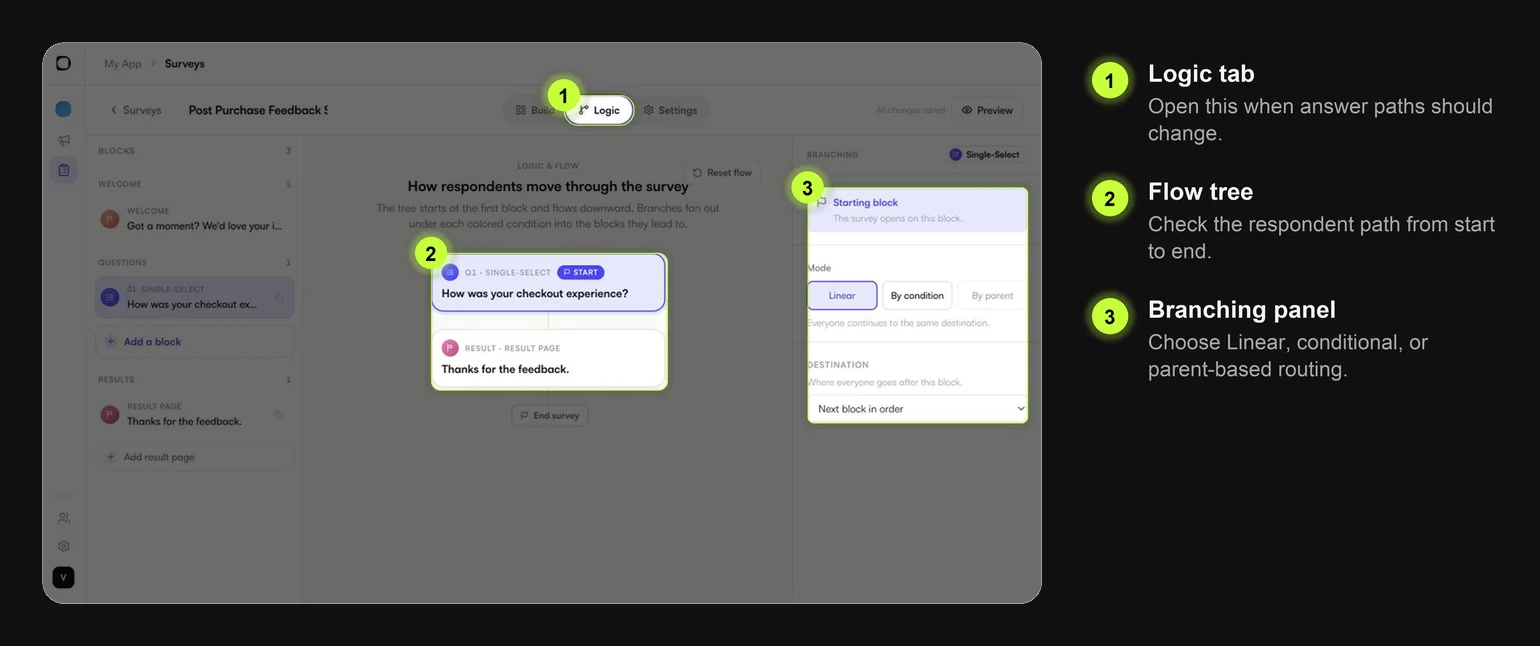
Logic Modes
| Mode | What it does | Use it when |
|---|---|---|
| Linear | Everyone goes to the same next destination | The Survey is simple and every respondent should see the same path |
| By condition | Route based on selected answers or values | Different answers need different follow-up questions or result pages |
| By parent | Follow routing inherited from the parent path | You are managing copied or nested paths and want routing to stay aligned |
Most Surveys should start as Linear. Add conditions only where they improve the respondent experience.
Destinations
Each block can lead to a destination.
| Destination | Use it for |
|---|---|
| Next block in order | Normal step-by-step flow |
| Go to a specific block | Skip ahead, show a follow-up, or route to a result page |
| Redirect to a URL | Send users outside the Survey after an answer |
| End the survey | Stop immediately after the selected block |
Use redirects carefully. They can interrupt feedback collection if users leave before submitting.
Common Branching Patterns
Low-score follow-up
| User answer | Next step |
|---|---|
| Low score | Ask What could we improve? |
| High score | Show thank-you result page |
Reason-based routing
| User answer | Next step |
|---|---|
Price | Ask about pricing expectations |
Delivery | Ask about delivery issue |
Product quality | Ask for product details |
Different result pages
| User answer | Result page |
|---|---|
| Promoter | Thanks for the love |
| Detractor | Thanks, we will review this |
Testing Branches
Before attaching the Survey to a campaign, test:
- the default path
- every important answer path
- every result page
- any path that ends the Survey early
- any path that redirects to a URL
Make a small path checklist while testing. Branching bugs are easiest to miss when the Survey looks correct on the first path.
Keep Branching Manageable
Use these guardrails:
- Branch only from the question that actually changes the next step.
- Avoid more than 2-3 major paths in a short mobile Survey.
- Use result pages to close paths cleanly.
- Do not ask for written feedback on every branch.
- Re-read the flow from the respondent's point of view before launch.