Choosing between FlutterFlow and Digia Studio isn’t just about choosing a tool, it’s about choosing how your team will build, ship, and evolve a mobile product over the next few years.
Both platforms promise speed.
Both promise flexibility.
Both try to save you from drowning in UI rewrites.
But here’s the truth mobile teams eventually discover:
FlutterFlow helps you get something out quickly.
Digia helps you keep that “something” evolving at the pace your users demand.
The early-stage team wants speed. They want something visual, intuitive, and quick enough to turn an idea into a working app without writing thousands of lines of code.
So they choose FlutterFlow. And honestly, it makes perfect sense.
But fast-forward a few months, once the product gains traction, once real users show up, once the UI needs to evolve weekly. The same team starts feeling the walls closing in.
App store release cycle slow them down.
Designers need more control.
Developers want cleaner architecture.
Product teams want experiments.
The generated code becomes a burden.
Every small change suddenly feels heavier than it should.
This is the moment when Digia Studio begins appearing in conversations, not as a competitor to FlutterFlow, but as a solution to a completely different problem.
This is the real story mobile teams repeat over and over again.
The Beginning: When All That Matters Is Building Fast
Most teams pick FlutterFlow for one simple reason:
They want to move quickly.
FlutterFlow delivers exactly that. It provides:
- drag-and-drop UI
- prebuilt templates
- fast prototyping
- Flutter code generation
- minimal engineering dependency
It’s fantastic for early-stage validation, demos, investor presentations, MVPs, and anything where speed outweighs structure.
From the outside, it looks like the perfect choice. And in the beginning, it is. But very few teams stay in “the beginning” for long.
What Is FlutterFlow?
FlutterFlow is a visual, low-code builder designed to help teams ship a working mobile app extremely fast. It’s built around drag-and-drop UI creation, 200+ ready components, strong built-in integrations (Firebase, Supabase, Stripe, Google Auth), and quick deployment options.
For founders, agencies, and early-stage teams, FlutterFlow cuts down the time and cost of getting Version 1 live, the stage where speed matters more than perfect architecture.
Why teams choose FlutterFlow (unbiased, business-backed):
- Speed to first user: Get a functional prototype or MVP live 3–10× faster than hand-coded Flutter. Great when you're validating an idea and need evidence fast.
- Lower early engineering cost: Non-technical teammates can build flows, connect APIs, and tweak UI without relying on a developer for every change.
- Rich prebuilt integrations: Payments, auth, notifications, storage, set up without writing boilerplate. Great for early monetization & onboarding.
- Fast learning curve: Ideal for teams that want “an app that works” quickly without deep Flutter knowledge.
The tradeoff: FlutterFlow is optimized for speed of starting, not speed of evolving indefinitely. As the product grows and changes become daily/weekly, generated code, custom logic, and app store release cycles start to introduce friction. But for the early phase, that tradeoff is both expected and acceptable.
What Is Digia Studio?
Digia Studio solves a different problem than FlutterFlow: it accelerates everything that happens after you already have users.
It uses server-driven UI (SDUI), where your UI lives on the server and the app renders whatever the backend sends. That means teams can update screens instantly, run experiments without waiting for app store approvals, and ship UI changes with web-like speed.
Digia isn’t meant to replace your app or generate code. Instead, it augments your existing Flutter codebase and gives your team a control panel to update any screen, component, or flow dynamically.
Why teams choose Digia (business-first explanation):
- Continuous UI updates without releases: Ship fixes, content updates, and UI changes instantly, critical for scaling teams with weekly iteration cycles.
- Fits existing engineering workflows: Your devs build foundational Flutter code; Digia makes parts of it server-driven. No lock-in, no custom DSL, no fighting generated code.
- Mock APIs for non-blocked design: Designers and PMs can create data mocks and test flows long before backend APIs are ready, reducing sprint delays.
- Enterprise comfort: Environments, permissions, real-device previews, SDUI consistency that is helpful for product teams managing large surfaces.
How Each Tool Approaches the Problem
FlutterFlow was created for teams who need to get an app out the door fast.
FlutterFlow’s Core Value: Build Something Quickly
It gives teams:
- a drag-and-drop interface
- prebuilt templates
- auto-generated Flutter code
- quick prototyping
- minimal engineering dependency
- fast learning curve
It’s the definition of “speed to first version.”
If a team’s biggest challenge is starting, FlutterFlow solves that beautifully.
Digia Studio’s Core Value: Update & Evolve Instantly
Digia Studio wasn’t built to compete with low-code builders.
It was built to solve the post-release pain FlutterFlow (and all low-code builders) cannot solve:
- slow app store reviews
- expensive build cycles
- heavy engineering dependency
- blocking designers & PMs
- UI changes that require new builds
- inability to experiment quickly
Digia uses Server-Driven UI (SDUI) so teams can:
- update UI instantly
- deploy new flows instantly
- fix mistakes instantly
- run experiments instantly
- iterate without releasing a new app version
Digia is not just another “builder.” It’s also a release accelerator.
Which One Fits You Right Now?
It’s not “FlutterFlow vs Digia.” It’s two products solving two different phases of a mobile product’s life cycle.
If you want to build an app from scratch: FlutterFlow is the right choice.
You need speed, low cost, fast learning, and quick proof. FlutterFlow gets you to a working app faster than anything else without writing a full Flutter codebase.
If you already have users & now need to move faster: Digia Studio is the right choice.
Your bottleneck isn’t “how do we build?”, it’s “how do we iterate, experiment, and ship changes without app store delays?” Digia gives you web-speed iteration inside a mobile app.
The real decision question is simple:
Are you trying to ship Version 1, or are you trying to ship Version 50 faster?
Quick Comparison: FlutterFlow vs Digia
| Category | FlutterFlow | Digia Studio |
|---|---|---|
| Goal | Build apps fast | Update apps fast |
| Best For | MVPs, early prototypes | Production apps, scaling teams |
| UI Updates | App-store submissions | Instant, server-driven |
| Builder | Drag-and-drop | Drag-and-drop SDUI |
| Customization | Limited at scale | Full flexibility |
| Mock APIs | ❌ No | ✅ Yes |
| Real Device Preview | Partial | Full via Preview App |
| Debugging | Errors | Real-time console + errors |
| AI Features | Excellent | Built-in AI components |
| Pricing | Per-seat | Flat |
Now let’s break down the most important features of both
1. Drag-and-Drop Builder
Both platforms offer visual builders, but they’re built with different end goals. One is optimized for quick assembly; the other is designed for long-term maintainability.
FlutterFlow
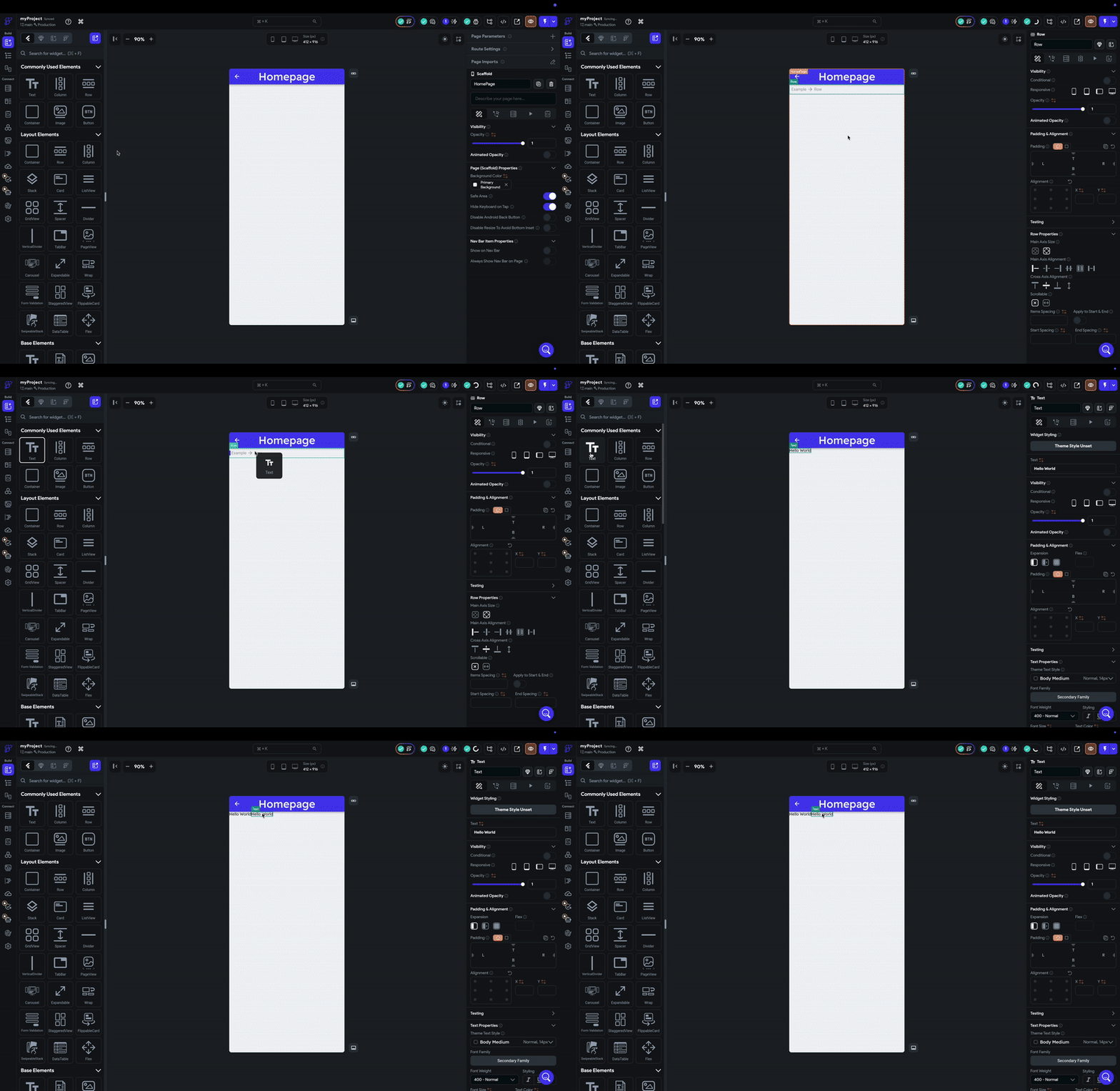
FlutterFlow’s builder feels familiar from the moment you start drag, drop, tweak, repeat.
Perfect for people who want to build something usable without touching the Flutter SDK directly.
Digia Studio
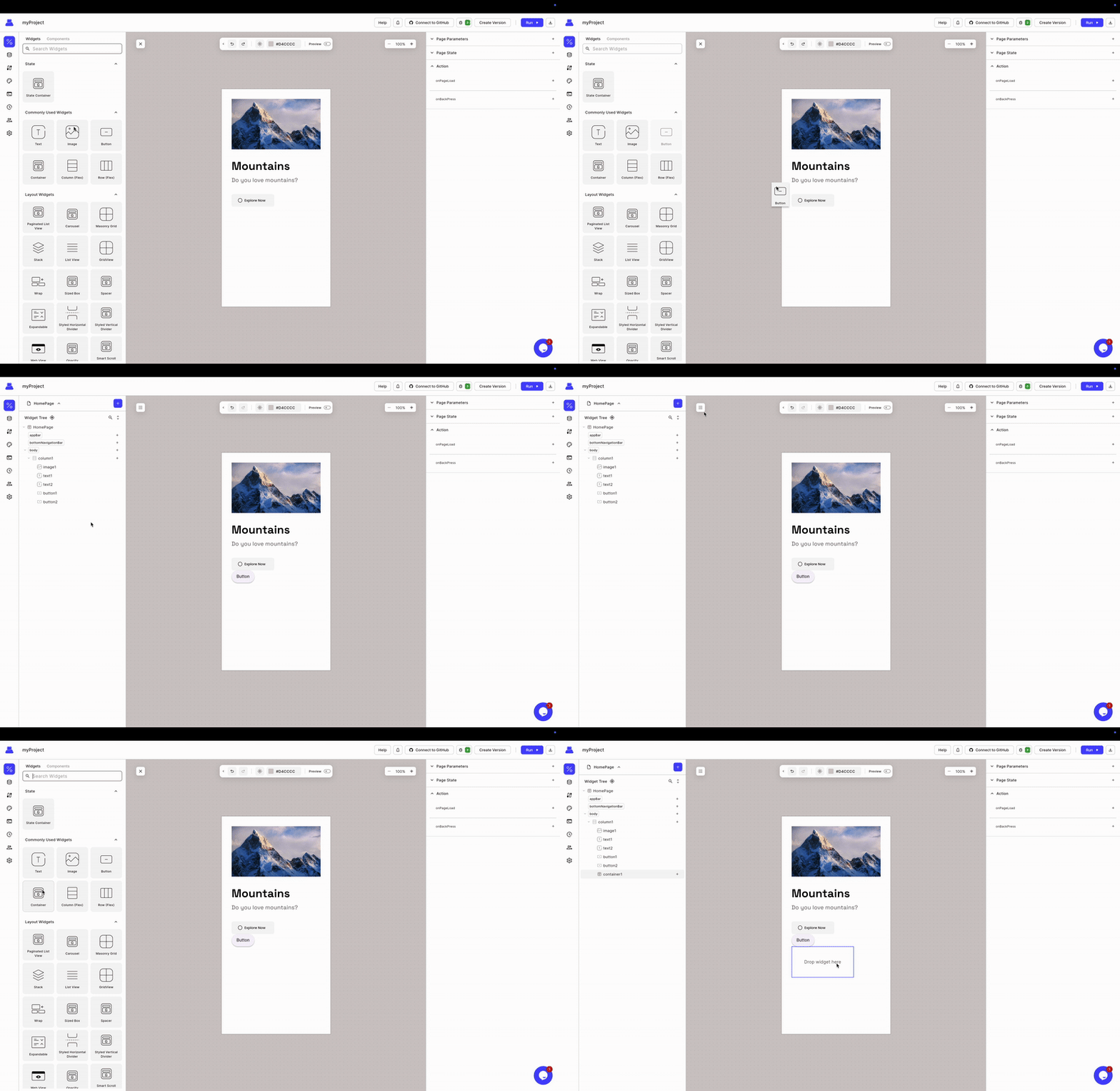
Digia’s builder feels similar on the surface but operates differently under the hood.
You’re not generating code, you’re defining server-driven UI structures that your app renders instantly.
| Feature | FlutterFlow | Digia Studio |
|---|---|---|
| Visual Builder | Yes | Yes |
| Ease of Use | Very beginner-friendly | Designed for production teams |
| Code Generation | Generates Flutter code | No code generation (SDUI-based) |
| Scalability | Breaks down as app grows | Scales cleanly with complexity |
| Target User | Makers, early-stage teams | Product teams, engineering-led teams |
2. Customization & Flexibility
Customizing UI is always easy in the early days. The real test starts when your app grows, designs evolve, and product demands start piling up. This is where FlutterFlow and Digia Studio reveal two very different philosophies.
FlutterFlow
FlutterFlow gives you a lot of freedom, and if you know Flutter, almost too much.
You can drop in custom Dart code, create fully custom widgets, override behaviors, and escape the visual builder whenever you hit its limits. This means you can technically build anything.
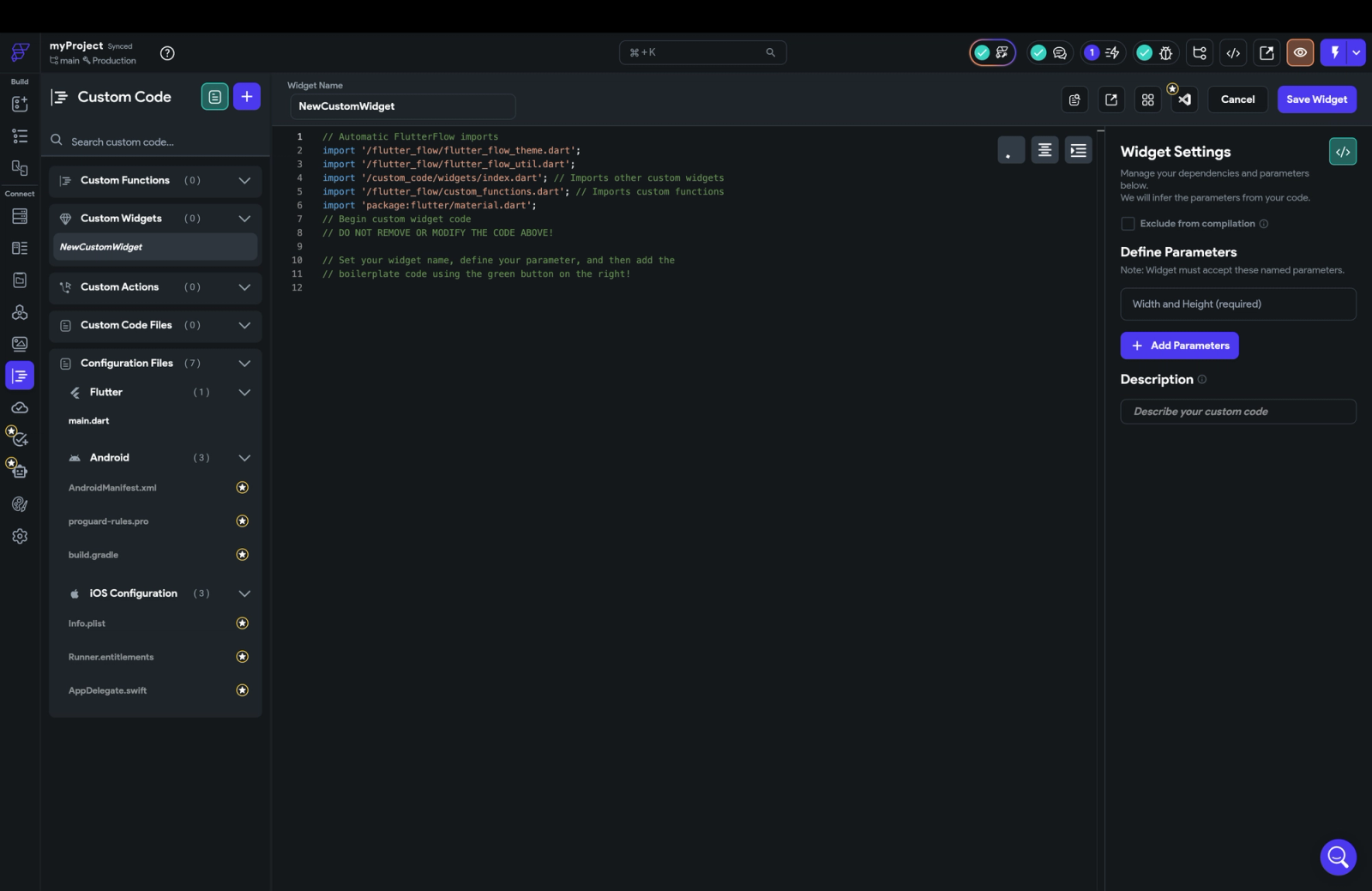
But here’s the tradeoff: the moment you rely heavily on custom code, you’re no longer fully inside the visual ecosystem. You’re managing generated code, dealing with merge conflicts after exports, and maintaining custom logic outside the builder. It works, but the more you customize, the more you slip away from the no-code/low-code promise.
Digia Studio
Digia approaches customization from the different direction.
It doesn’t generate code at all. Instead, you integrate Digia into your existing Flutter app and bring your own custom widgets. Anything your engineers build, any widget, animation, or complex UI, all can be made server-driven by simply exposing configurable parameters through Digia Studio.
No forking.
No fighting generated code.
No rebuilding custom UI inside a visual tool.
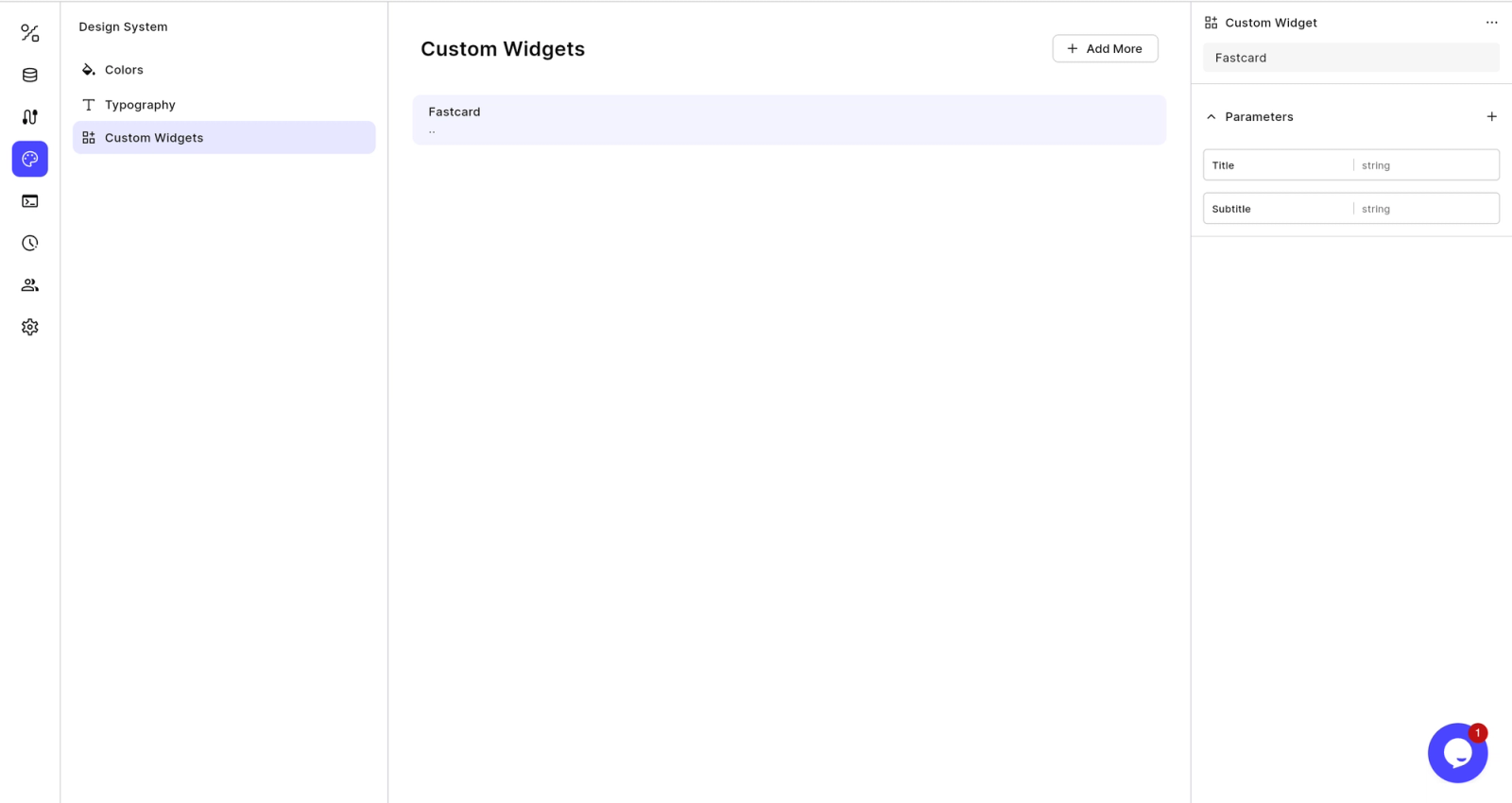
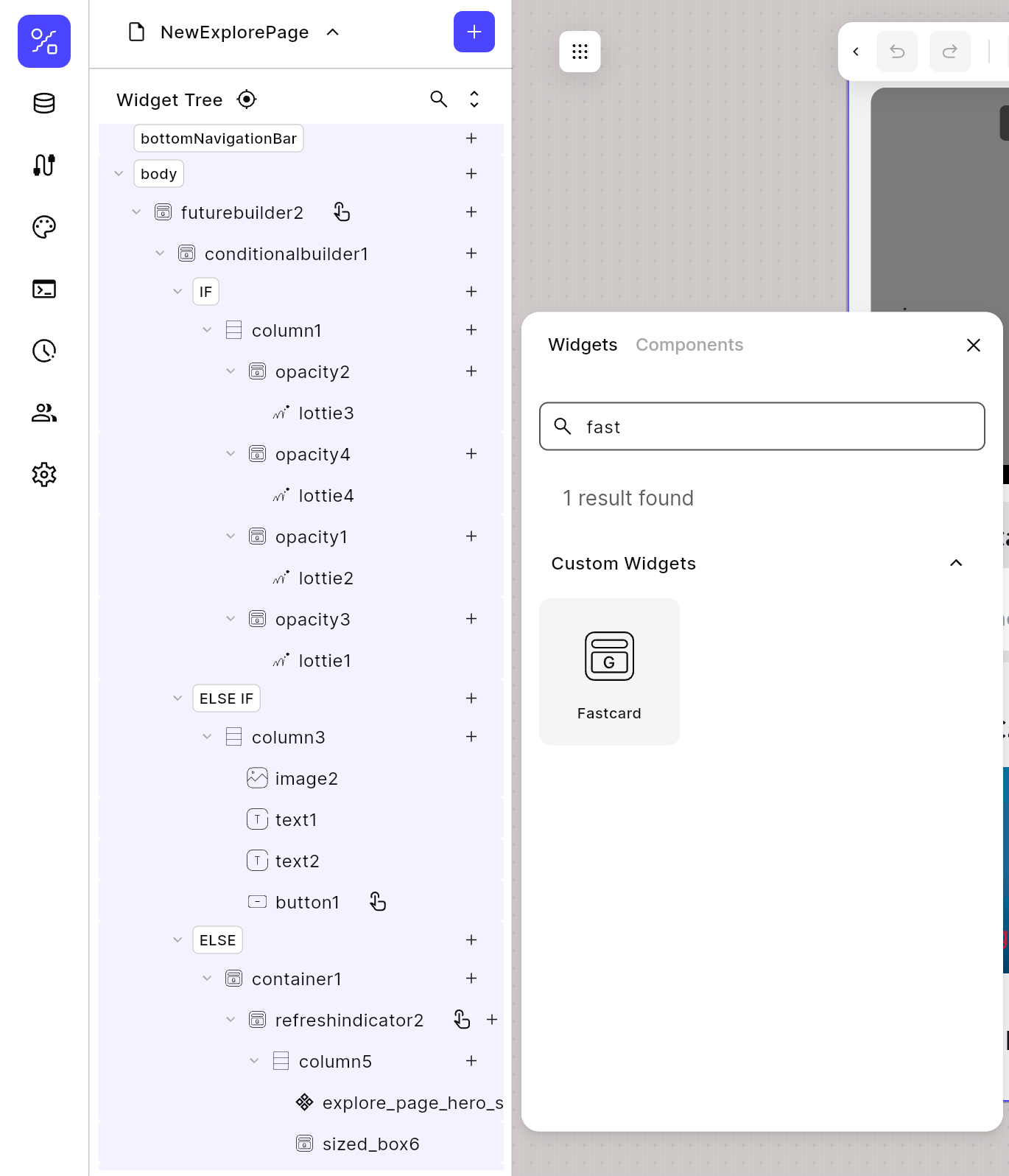
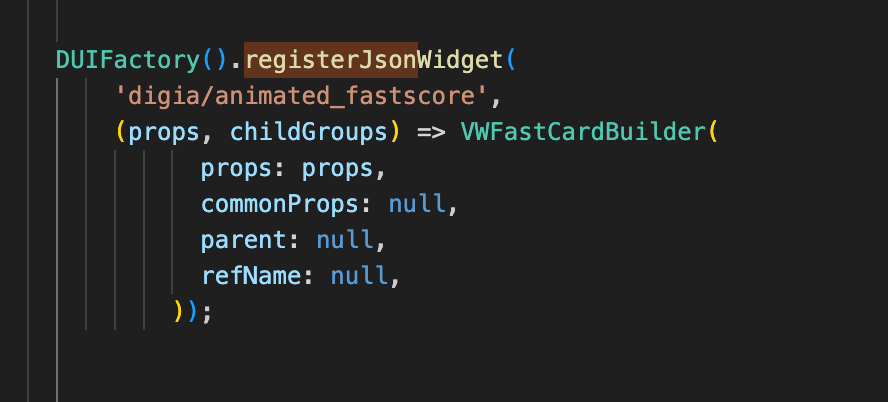
Digia becomes a control panel for your actual app, not a replacement for it. Customization stays clean, modular, and maintainable, without dragging your engineering team into refactor hell.
| Feature | FlutterFlow | Digia Studio |
|---|---|---|
| Custom Widgets | Fully possible via custom code | Fully supported by connecting your existing app widgets |
| Advanced Logic | Requires writing custom Flutter code | Server-driven logic + workflow engine |
| Animations | Possible via code in editor | Advanced, reusable, controlled via parameters |
| Reusable Components | Yes | Strong, component-driven SDUI |
| Long-Term Maintainability | Can get messy as custom code grows | High — SDUI keeps UI flexible without rewrites |
3. Third-Party Integrations
Every modern app depends on integrations like authentication, analytics, payments, notifications, backend APIs, and more. FlutterFlow and Digia Studio take two very different approaches: one ships integrations out-of-the-box, the other plugs into whatever your engineering team already uses.
FlutterFlow
One of FlutterFlow’s biggest strengths is how many integrations it supports natively. You get Firebase, Supabase, Google Sign-In, Stripe, RevenueCat, OneSignal, Algolia, authentication providers, storage services, and plenty of other plug-and-play options directly inside the builder.
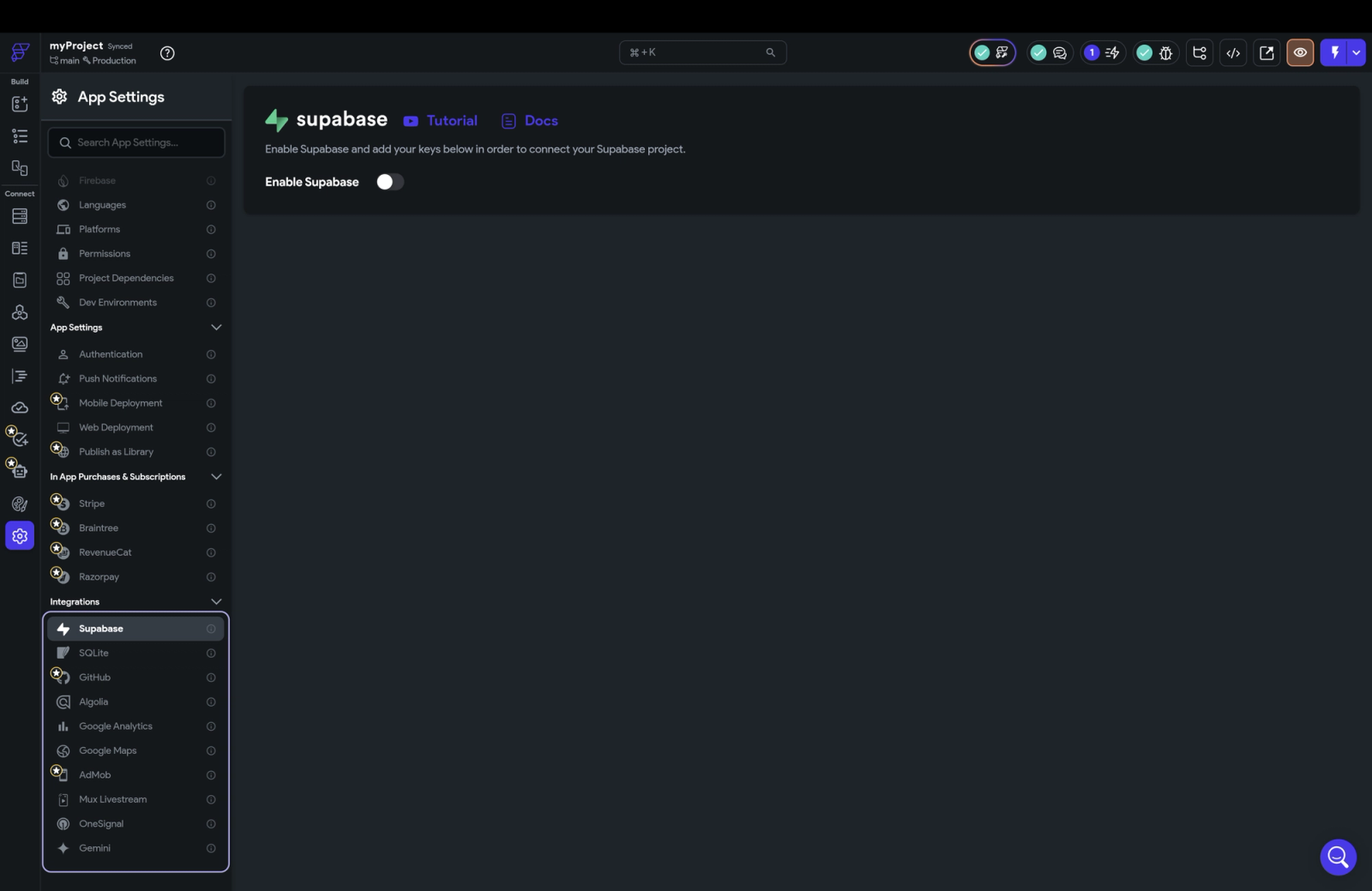
For early-stage teams or non-technical builders, this is incredibly convenient, you can connect powerful services with a few clicks and get something working fast.
FlutterFlow shines here because it abstracts away the complexity. You don’t have to write integration code; it’s already packaged for you. But this convenience also means you’re limited to the integrations FlutterFlow chooses to support, and more advanced or custom integrations often push you into custom code blocks.
Digia Studio
Digia takes a more flexible, engineering-friendly approach. Since Digia integrates with your existing Flutter app, you aren’t limited to a predefined list of supported services. Whatever your engineering team has already implemented analytics, payments, auth, storage, custom APIs, third-party SDKs, you can use instantly inside Digia.
How?
Through the “Call External Method” action.
Your app exposes methods for your integrations, and Digia can trigger them on demand. This means you’re not waiting on Digia to support a certain provider. You’re not boxed into a curated list. You simply reuse the integrations your team already trusts.
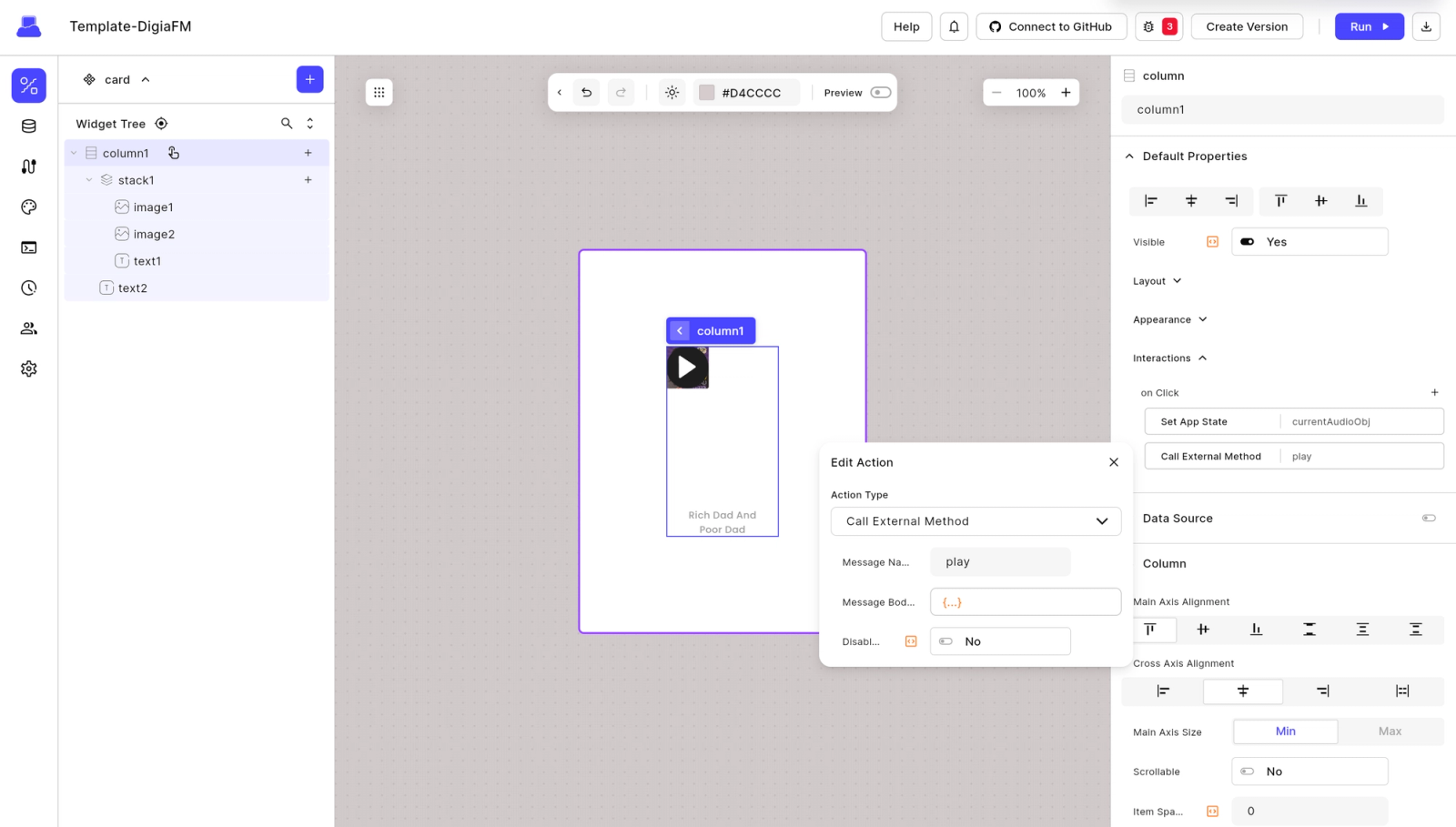
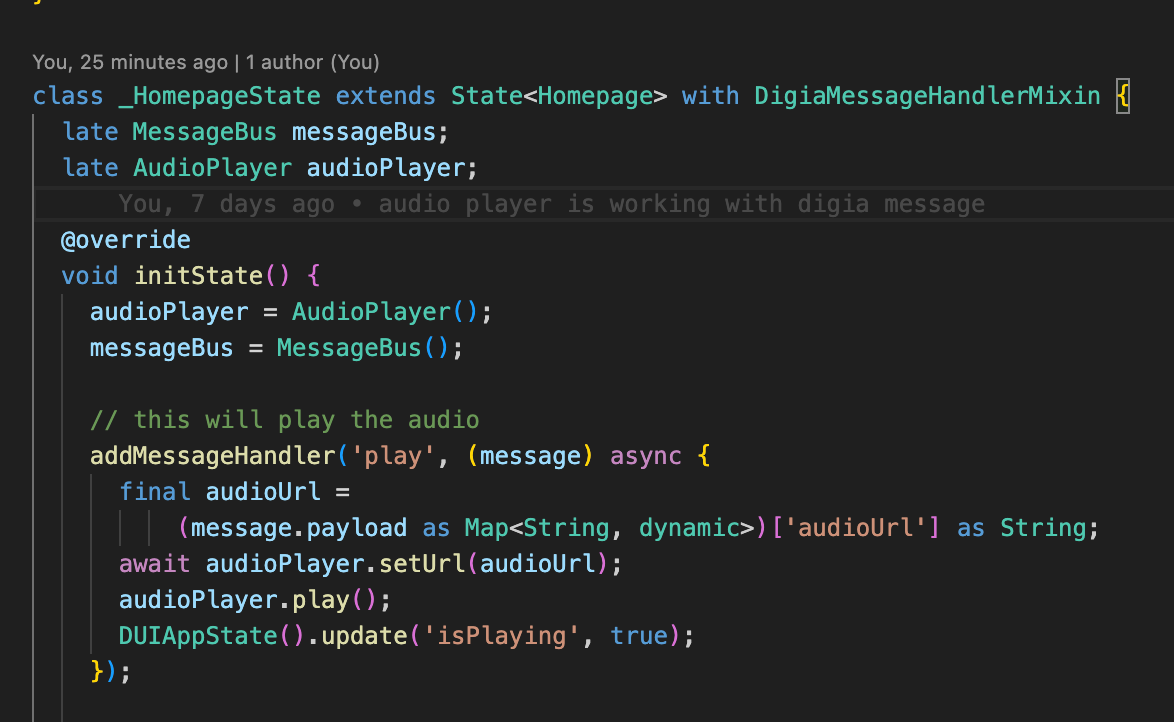
Your existing code stays intact.
Your integrations remain first-class citizens.
Digia just gives you a server-driven way to trigger them.
This approach scales infinitely better for mature apps, unique requirements, or teams with custom stacks.
| Feature | FlutterFlow | Digia Studio |
|---|---|---|
| Native Integrations | Many (Firebase, Stripe, OneSignal, etc.) | Uses whatever integrations your app already implements |
| Ease for Non-Technical Users | Very easy (click to configure) | Requires developer setup once, then no-code triggers |
| Custom Integrations | Requires custom code blocks | Unlimited via “Call External Method” |
| Vendor Lock-In | Medium (limited to supported integrations) | None — integrate anything |
| Scalability | Good early; complex later | Excellent — fully flexible |
4. Data Handling & Dynamic Binding
Modern apps don’t run on static data, they’re fed by constantly changing content, user-specific responses, dynamic lists, A/B variants, and backend-driven logic. The real question isn’t “Can a tool fetch data?” but “How does it behave when the data changes?”
This is where the difference between a visual builder and an SDUI platform becomes obvious.
FlutterFlow
FlutterFlow handles data binding very well. You can connect REST APIs, fetch lists, map responses, and wire data directly into UI components without touching code. For many early-stage apps, this is more than enough, simple CRUD flows just work.
Digia Studio
Digia’s SDUI model treats data as part of the UI itself.
When the backend response changes, the UI reacts instantly, new fields, new layouts, different behaviors, or dynamic variants all show up without rebuilding the app.
This makes Digia ideal for:
- real-time personalization
- on-device experiments
- dynamic screen variations
- A/B testing
- rapid iteration without app updates
Bottom line: Both tools handle dynamic data and binding well.
But here’s what takes this to another level:
Mock APIs (Digia-only advantage)
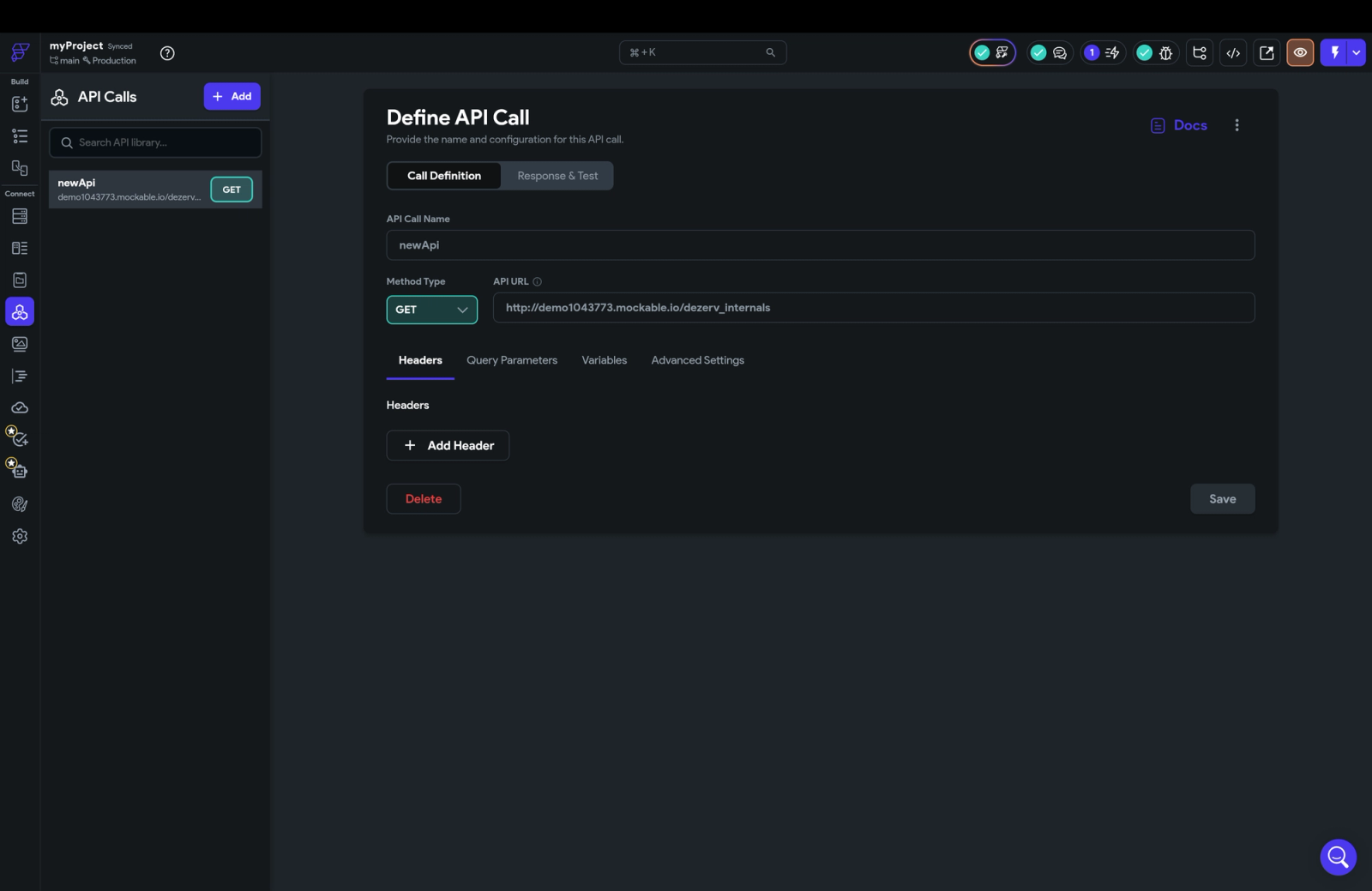
With Digia, you can create Mock APIs directly inside the platform.This lets designers, product managers, or even non-technical teammates simulate backend responses instantly, long before the actual backend is ready.
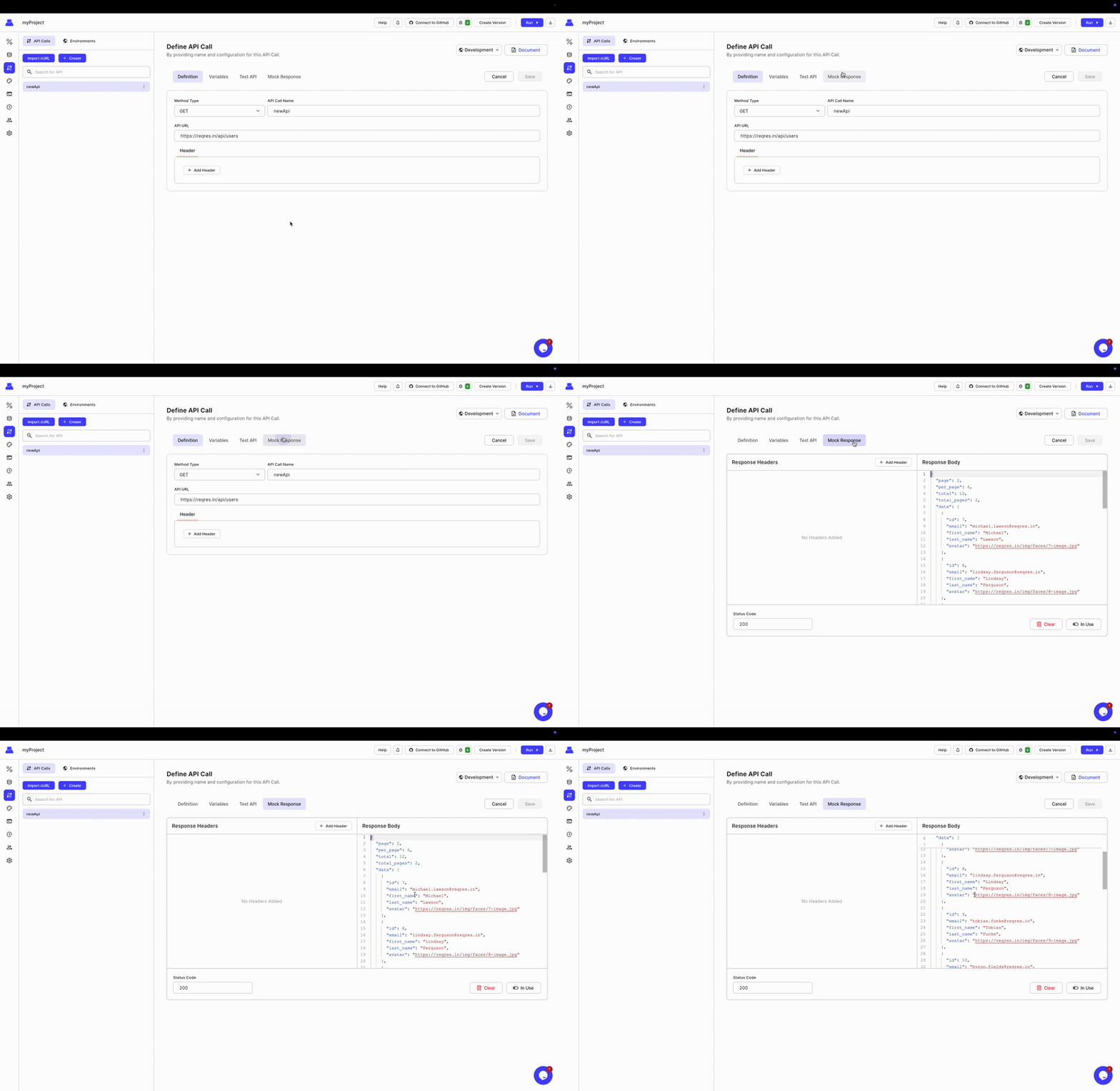
No blocking.
No waiting on API contracts.
No temporary JSON files.
No “we’ll test this when the backend is done.”
Mock APIs make dynamic UI development ridiculously fast and unblock your team from day one.
When the real API is ready, you just switch the endpoint — zero rework.
| Feature | FlutterFlow | Digia Studio |
|---|---|---|
| Basic Data Binding | Yes | Yes |
| Real-Time Dynamic UI | Yes | Full (SDUI-driven) |
| A/B Testing | Manual / custom-coded | Native via backend UI variants |
| Personalization | Needs coded logic | Native via SDUI parameters |
| Mock APIs | ❌ No | ✅ Yes — built-in |
| Environment Switching | Yes | Yes |
| Scalability With Complex Data | Medium | Very high |
5. AI Integration
AI is becoming a core requirement for modern apps, not just a gimmick.
FlutterFlow
FlutterFlow now includes AI-assisted features, like generating themes, sample screens, and boilerplate code using prompts plus the ability to call external AI APIs like OpenAI. It’s helpful for speeding up early development or brainstorming UI ideas.
But even with these additions, AI in FlutterFlow mostly stays outside the runtime. It doesn’t actively shape how the UI behaves or responds once the app is live. In other words, AI supports creation not dynamic, in-app intelligence.
Digia Studio
Digia Studio bakes AI directly into the SDUI engine, which changes what AI can do inside a mobile app. Instead of just generating code or designs upfront.
This means your screens can adapt dynamically to user behavior, API responses, or AI predictions without new app releases.
| Feature | FlutterFlow | Digia Studio |
|---|---|---|
| AI-Assisted Building | Yes | Yes |
| External AI API Calls | Yes | No |
| Built-In AI Components | Yes | Yes |
| AI-Driven UI Changes | Yes | No |
6. Security
Security tightens as user counts rise. This is where Digia’s enterprise DNA becomes obvious.
FlutterFlow
FlutterFlow gives you the basics, but most of the security burden sits on your backend and your own infrastructure choices. If your app relies on Firebase or Supabase, your security is only as strong as how well those rules are configured.
FlutterFlow itself doesn’t enforce deep enterprise-grade controls, it assumes developers will handle permissions, data isolation, and sensitive logic on their own.
Digia Studio
Digia Studio approaches security like a platform built for production and scale. It fits naturally into enterprise environments with ISO 27001-ready infrastructure, encrypted metadata, and role-based access baked directly into the system.
And because Digia uses server-driven UI, sensitive logic never lives inside the client app, it stays safely on the server. This alone eliminates a huge category of mobile security risks. For teams that can’t compromise on compliance or data protection, Digia’s architecture is a major advantage.
Digia treats security like a first-class product concern, not an optional layer.
| Feature | FlutterFlow | Digia Studio |
|---|---|---|
| Framework-Level Security | Yes | Yes |
| ISO 27001 Infrastructure | No mention | Yes |
| Metadata Encryption | Depends on backend | Yes |
| Role-Based Access | Basic | Advanced |
| Logic Location | On device | On server (safer) |
7. Deployment & Release Cycles
This is the biggest practical difference between the two platforms.
FlutterFlow
FlutterFlow definitely speeds up deploying the app, by integrating google play console, deployment is just a click away, but once the app is live, you would still have to face the same old mobile release cycle. Any UI change, even something as tiny as moving a button or fixing a typo, requires a rebuild, a new version, and another round of app store review.
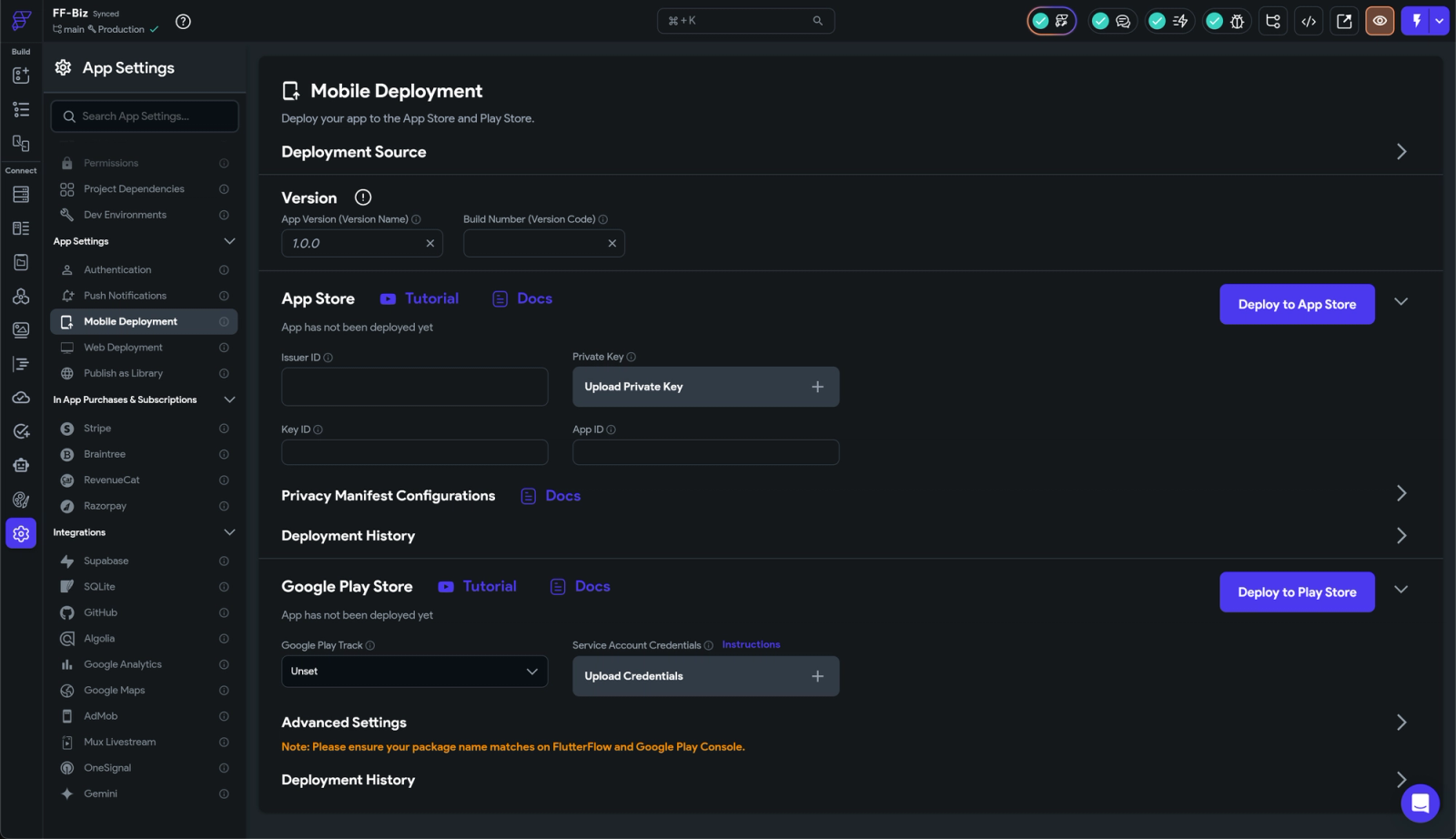
It’s fine in the beginning, but as your product starts evolving faster, this cycle becomes a slowdown you can’t ignore. Fast to start, slow to keep moving.
Digia Studio
Digia flips this process completely. Because the UI lives on the server, you can update screens, tweak flows, run experiments, and ship new experiences instantly, with zero app store submissions.
No rebuilds.
No review queues.
No “waiting for approval.”
It’s as close as mobile gets to the release speed of the web. For teams who iterate weekly (or daily), this difference is a game-changer.
FlutterFlow speeds up building. Digia speeds up shipping.
| Feature | FlutterFlow | Digia Studio |
|---|---|---|
| UI Changes | Requires rebuild | Instant |
| App Store Dependency | Yes | No |
| Rollbacks | Manual | Built-in |
| Release Frequency | Slow after launch | Continuous |
| Real-Time Shipping | No | Yes |
Want to know more about releasing from digia- read here
8. Git Integration
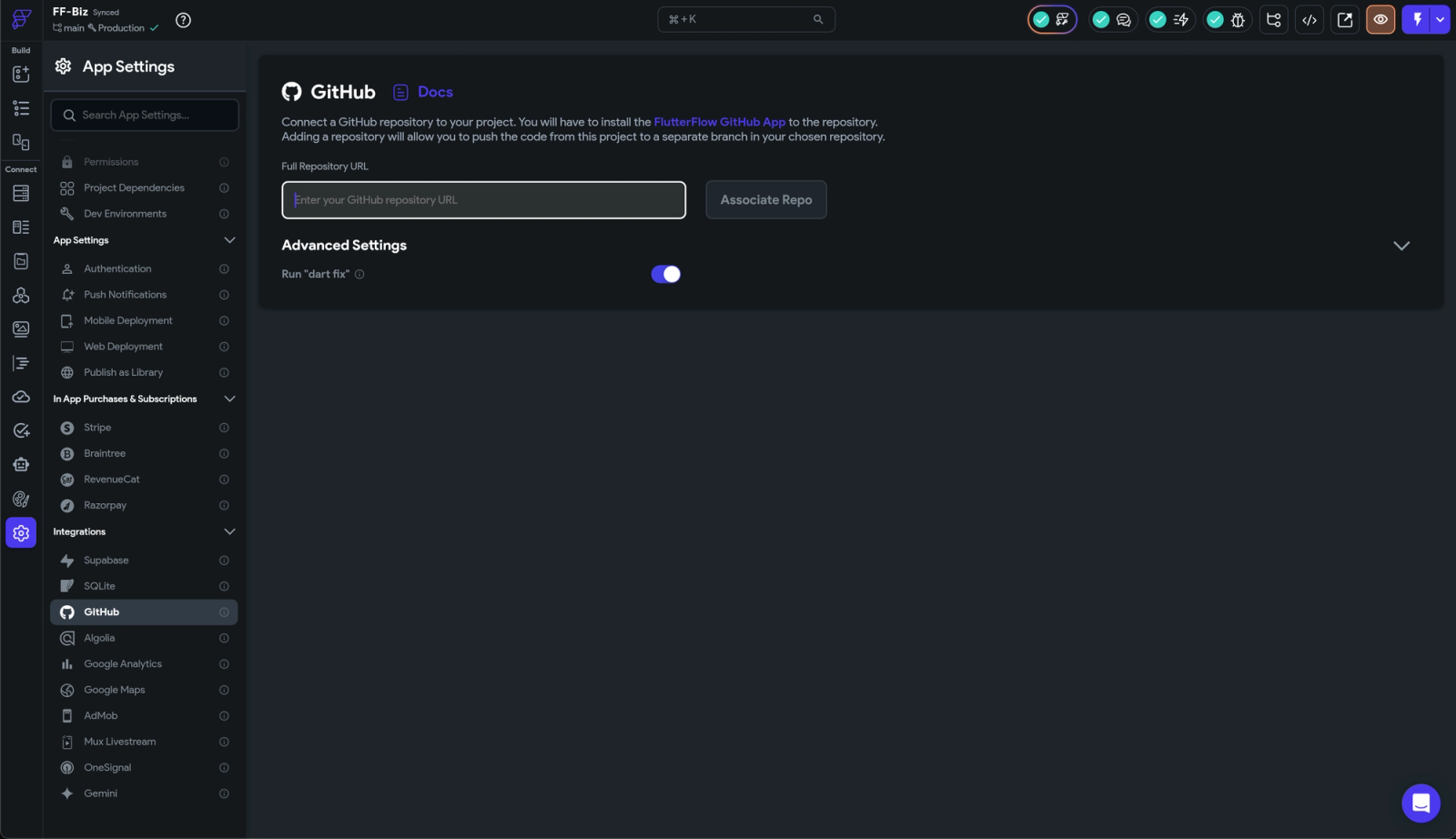
Both FlutterFlow and Digia offer Git support, and for most practical workflows, the capabilities are broadly similar. Neither platform replaces your engineering team’s full Git workflow, but both make it easy to move your project into version control and collaborate in a structured way.
FlutterFlow
For teams that want to blend no-code and traditional development, FlutterFlow’s Git workflow is straightforward and familiar. It works well for agencies, hybrid teams, or teams transitioning to custom Flutter code over time.
Digia Studio
Digia also supports Git-based workflows. Teams can:
- manage their project from a Git repository
- commit, review, and merge changes through their standard Git tooling
- keep changes aligned across environments
- collaborate using the same Git conventions engineers already rely on
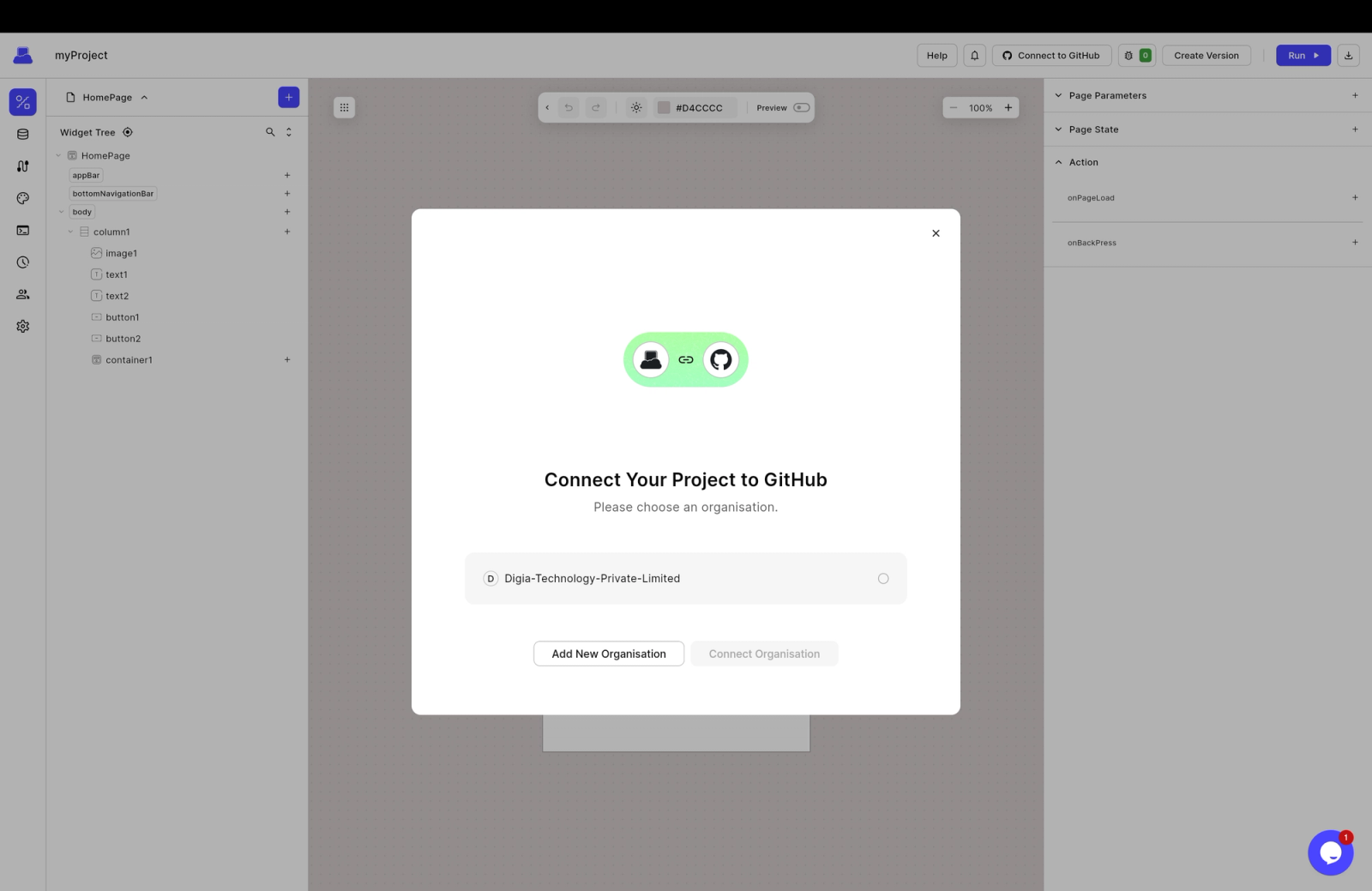
It’s structured, predictable, and built for team-based development. Engineers don’t have to adjust their habits here; Digia fits the way they already work.
| Feature | FlutterFlow | Digia Studio |
|---|---|---|
| Git Export | Yes | Yes |
| Full Branching | Yes | Yes |
| PR Reviews | Yes | Yes |
| Environment Sync | Yes | Yes |
9. User Roles & Permissions
As teams scale, not everyone should have access to everything.
FlutterFlow
FlutterFlow keeps permissions pretty simple. You get basic roles that work fine for small teams, but there isn’t much nuance beyond that. If you’re just a couple of people building an MVP, this simplicity is actually convenient.
But as soon as you have designers, PMs, developers, QA, and multiple environments, the lack of granularity becomes noticeable. You either give too much access or not enough, there’s no middle ground.
Digia Studio
Digia offers a more structured approach, even though the system is still expanding. You can separate admins from editors and control who gets access to what.
This gives teams a cleaner way to manage responsibilities without stepping on each other’s work. It’s not overcomplicated, but it’s thoughtful enough for real product teams that need more than one catch-all role.
| Feature | FlutterFlow | Digia Studio |
|---|---|---|
| Basic Roles | Yes | Yes |
| Granular Permissions | No | Coming soon |
| Environment Access | No | Coming soon |
| Component-Level Permissions | No | Coming soon |
| Team Scalability | Limited (Pricing:Seat problem) | Stronger |
10. Real-Time Collaboration
Both platforms support team collaboration, but they approach it differently and in this category, FlutterFlow clearly leads.
FlutterFlow
FlutterFlow offers one of the most polished real-time collaboration experiences in the no-code/low-code ecosystem. Multiple teammates can jump into a project, make edits, and see updates as they work and even view each other’s cursors, very similar to Figma but for actual development.
Digia Studio
Digia also supports team collaboration, but its co-editing features are still evolving. Teammates can work on the same project, but the experience is not as synchronous or cursor-based as FlutterFlow.
Where Digia helps is in shared testing, when someone updates a screen, everyone can instantly view it in the preview app. This makes review cycles quick, but it’s not the same as true real-time co-editing.
11. Real Device Preview (Digia’s Secret Weapon)
Testing on a real device changes everything, layout accuracy, performance, gestures, motion, all of it.
FlutterFlow
FlutterFlow’s preview experience works well when you’re in the early stages. You can test screens directly in the browser or spin up an emulator to see how things behave.
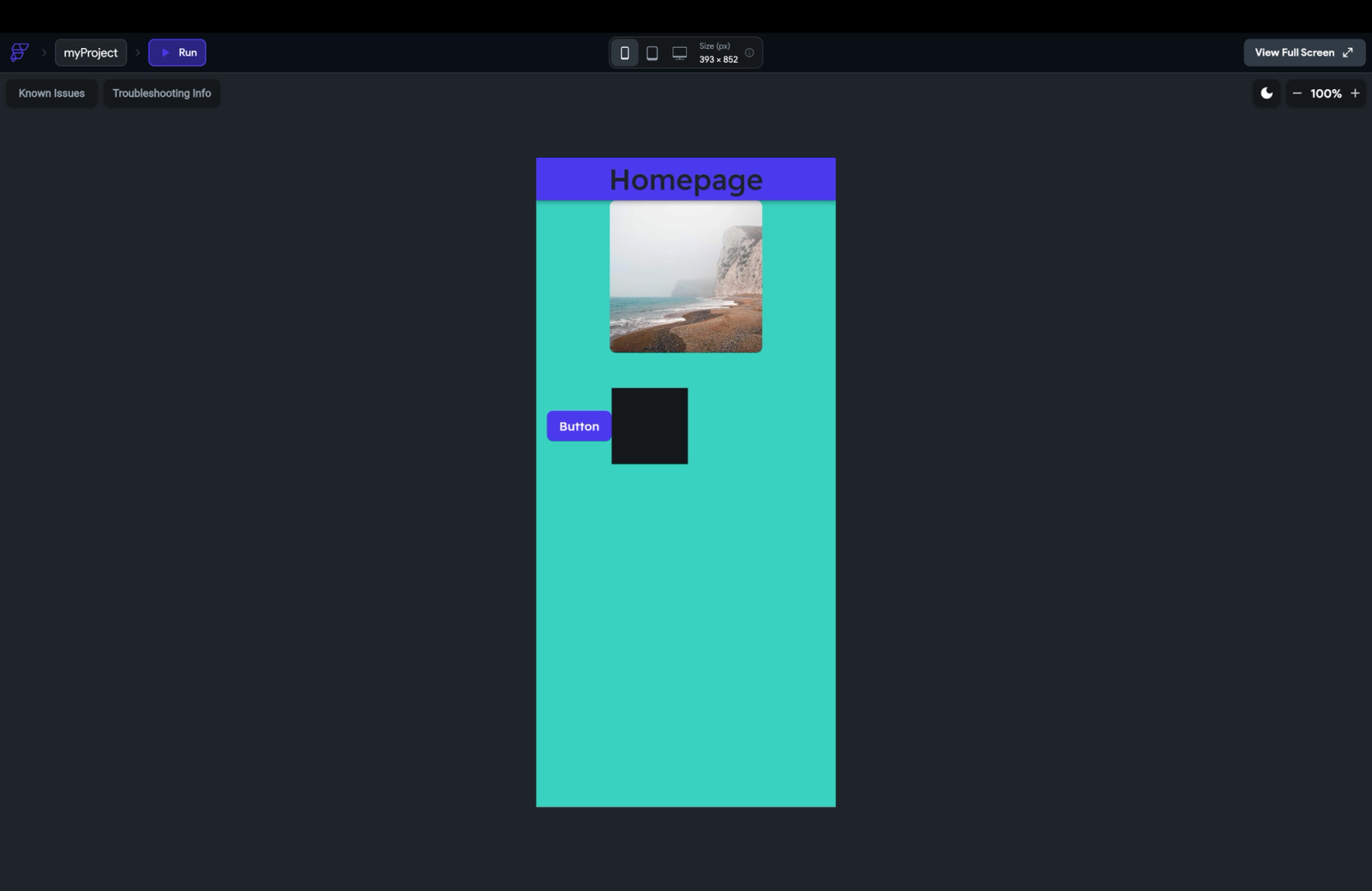
But when it comes to real devices, the place where layout quirks, gestures, animations, and performance truly show themselves, you’re back to exporting builds or generating APKs. It’s doable, but it slows down the feedback loop, especially for teams iterating multiple times a day.
Digia Studio
Digia removes all of that friction. With the Digia Preview App (Play store, App Store), you can load your UI instantly on a physical phone, no builds, no APK generation, no waiting. Just make a change in Digia Studio, open the preview app, and it appears instantly.
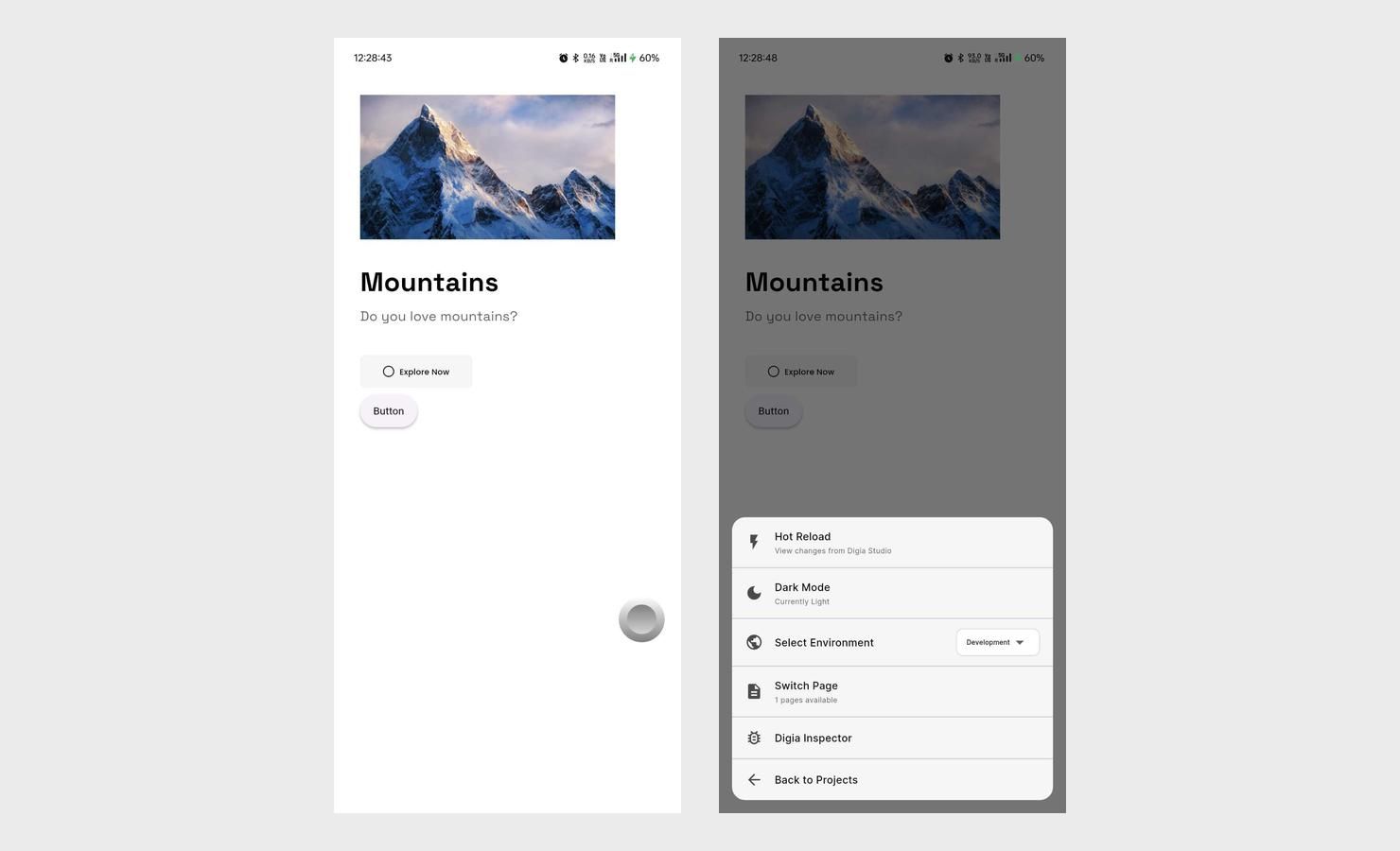
You can even share preview links with teammates or clients so everyone can see updates in real time. For fast-moving teams, this isn't just convenient, it easily saves hours every week and dramatically speeds up design-to-device feedback.
| Feature | FlutterFlow | Digia Studio |
|---|---|---|
| Browser Preview | Yes | Yes |
| Real Device Testing | Export required | Instant |
| Preview App | No | Yes (Android) |
| Shareable Previews | No | Yes |
| Speed | Slow | Extremely fast |
12. Debugging & Real-Time Error Detection
Stable, fast iteration depends on fast feedback. FlutterFlow pushes debugging into Flutter tooling; Digia brings debugging into the platform itself.
FlutterFlow
FlutterFlow gives you some visibility inside the editor, but real debugging usually starts only after you export the project into a proper Flutter environment. That means any time something breaks, an API doesn’t respond as expected, a workflow misfires, or a layout behaves unpredictably, you often need to jump out of the builder, fire up the dev tools, and debug it the traditional way.
Digia Studio
Digia brings debugging directly into the platform, which is a huge advantage when you’re iterating quickly. You get a real-time console that streams logs instantly, API request/response inspection, workflow-level debugging so broken configurations surface immediately.
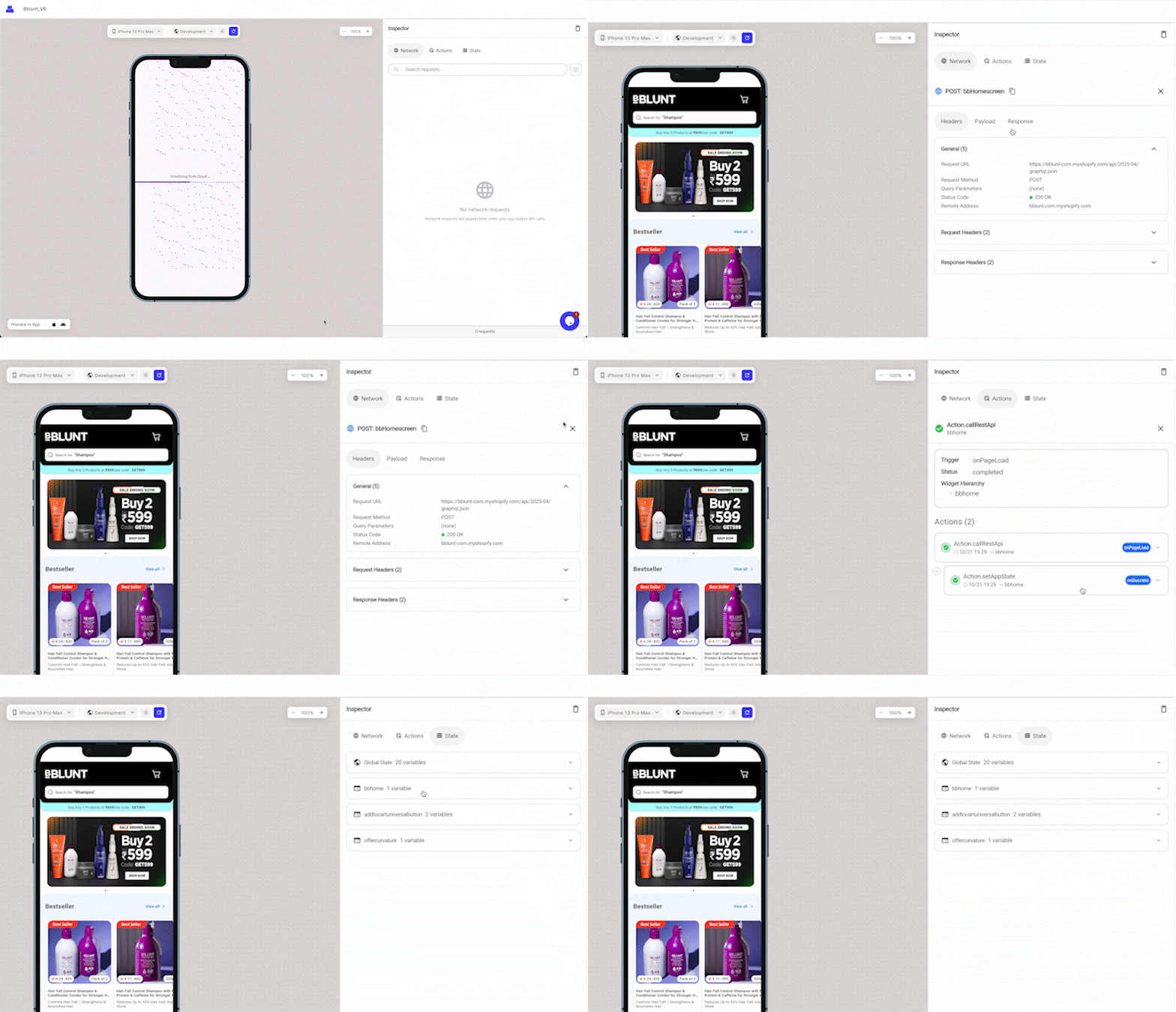
A huge advantage for teams making daily UI changes.
13. Pricing (The “Seat” Problem)
Both platforms present what looks like affordable options, the difference comes down to how scalability impacts cost. FlutterFlow uses a seat-based model; Digia uses install/usage-based tiers. Understanding the plan names, scopes and triggers matters when you’re choosing.
FlutterFlow
FlutterFlow offers a Free tier for prototyping, then paid tiers like Basic, Growth, Business, and an Enterprise plan. The core characteristic: per-seat pricing. Your monthly cost increases as you add more collaborators (designers, PMs, engineers).
Key points:
- Free: Good for single makers, limited collaboration/features.
- Paid tiers: Unlock source-code export, app store builds, team collaboration, Git integration.
- Growth/Business tiers: Often priced at a base seat + additional seats at discounted rates.
- Larger teams see cost escalation with each added seat.
In short: keep your team small and this is cost-efficient; as you scale collaborators, fees rise quickly.
Digia Studio
Digia lists four built-in tiers: Free, Basic, Pro, and Enterprise
Highlights from the plans:
- Free: ₹ 0/month, allows you to start building and deploy an app. Installs/usage are limited.
- Basic: For solo builders/freelancers. Elevated install limits (for example “50K installs/month” from their page).
- Pro: Designed for teams & agencies. Higher install band (e.g., “500K installs/month”) and additional features like Git workflows, team roles, permissions.
- Enterprise: Custom pricing, tailored for high-traffic apps, large install volumes, dedicated support, SLA etc. Usage/install bands trigger this.
Important pricing strategy points:
- Collaboration seat count does not drive cost (unlimited collaborators under a plan), cost is tied to install/usage limits.
- You can deliver and deploy even on the Free plan, meaning you can start building and release an app without immediate cost.
- As your app usage (installs/month, active users) grows past a threshold tied to a plan band, you’ll need to upgrade to the next tier or negotiate Enterprise.
Quick comparison & implications:
| Scenario | FlutterFlow | Digia Studio |
|---|---|---|
| Many collaborators (designers, PMs) but small user base | Cost balloons (per collaborator) | Collaborators free; cost tied to install/user base |
| App with <10,000 installs/month and small team | Very affordable | Very affordable |
| Large team + large user base | Cost multiplies (seats) | Cost increases with usage/install band, not seats |
| Experimentation, many internal users but moderate external users | Seat cost is dominant | Internal users don’t drive cost; external installs do |
Pricing Example: Realistic Growth Scenarios
Scenario 1 — Early-stage team (5 collaborators, <10K installs)
| Item | FlutterFlow | Digia Studio |
|---|---|---|
| Pricing Model | Per seat | Usage / Installs |
| Team Size | 5 people | Unlimited collaborators |
| Monthly Cost | Growth Plan: 1st seat ≈ $64 + 4 seats @ ≈ $44 → ≈ $240/mo | Free or Basic ≈ $0–$29/mo |
| Deployment | Paid tier required for exports | Allowed even on Free |
| Scaling Impact | Cost rises with each new teammate | No change with more collaborators |
Scenario 2 — Mid-stage team (20 collaborators, ~25K installs)
| Item | FlutterFlow | Digia Studio |
|---|---|---|
| Pricing Model | Per seat | Usage / Installs |
| Team Size | 20 people | Unlimited |
| Monthly Cost | 1st seat ≈ $64 + 19 seats @ ≈ $44 → ≈ $900/mo | Pro ≈ $0–$299/mo |
| Impact | Cost skyrockets with team size | Team size irrelevant; price tied to install band |
Scenario 3 — Scaling app (50K–500K installs/month)
| Item | FlutterFlow | Digia Studio |
|---|---|---|
| Pricing Trigger | Team growth | Install growth |
| Estimated Cost | Team-dependent (20+ seats = $1.5–3K/mo) | Moves into install tier (50K–500K installs) → Enterprise |
| Best For | Small teams, large internal control | High-growth apps, large marketing/user acquisition pushes |
Final words
FlutterFlow and Digia Studio are both powerful platforms for building modern mobile apps, but they serve different business needs and stages.
- FlutterFlow is best for individuals, startups, and small teams launching new apps who prioritize speed, visual simplicity, and code ownership. Its drag-and-drop builder, extensive templates, and no-code integrations make it easy to go from idea to app quickly. FlutterFlow’s full code export, vibrant ecosystem, and beginner-friendly tools help users validate concepts, impress stakeholders, and maintain control as the product grows, with enough technical expertise.
- Digia Studio is designed for companies with existing apps or those anticipating frequent, fast iteration after launch. Its server-driven UI model enables instant updates and experiments, bypassing slow app-store cycles. Digia excels when teams need enterprise-grade security, real-time collaboration, sophisticated workflows, and continuous delivery that keeps up with user demands and business innovation.
The choice comes down to where you are on your product journey:
- If you're bringing an idea to life and want to own your code and move fast with minimal complexity, FlutterFlow is the strategic pick.
- If you have users, want to scale at web speed, and need operational agility without sacrificing control, Digia Studio enables your vision.
Want to See Digia Studio in Action?
Digia gives your team:
- instant UI deployment
- server-driven updates
- real device preview
- mock APIs
- AI-driven UI
- real-time debugging
- enterprise security
- usage-based pricing