


TL;DR: A mobile A/B test can run cleanly, hit a number, and still teach you nothing. That happens when the test was never built to answer the question in the first place, which describes most of them. Mobile adds problems the web does not have: app store review that runs from days to weeks, users spread across many app versions at the same time, offline sessions, and events that arrive late or never. On top of that, the statistical traps that catch web teams hit harder on mobile, where traffic is lower and baseline conversion rates are small. Across large programs the success rate is sobering. At Google and Bing, only 10 to 20 percent of experiments produce a positive result, and at Microsoft as a whole, roughly one in three help, one in three do nothing, and one in three actively hurt the metric they were meant to move. This article covers why mobile experimentation is structurally harder, why most tests are underpowered before they start, the four mistakes that quietly invalidate results, what server-side and client-side tests can each actually measure, how to design a test that ends in a decision, and what to do when you cannot reach significance.
A test can run perfectly and still tell you nothing
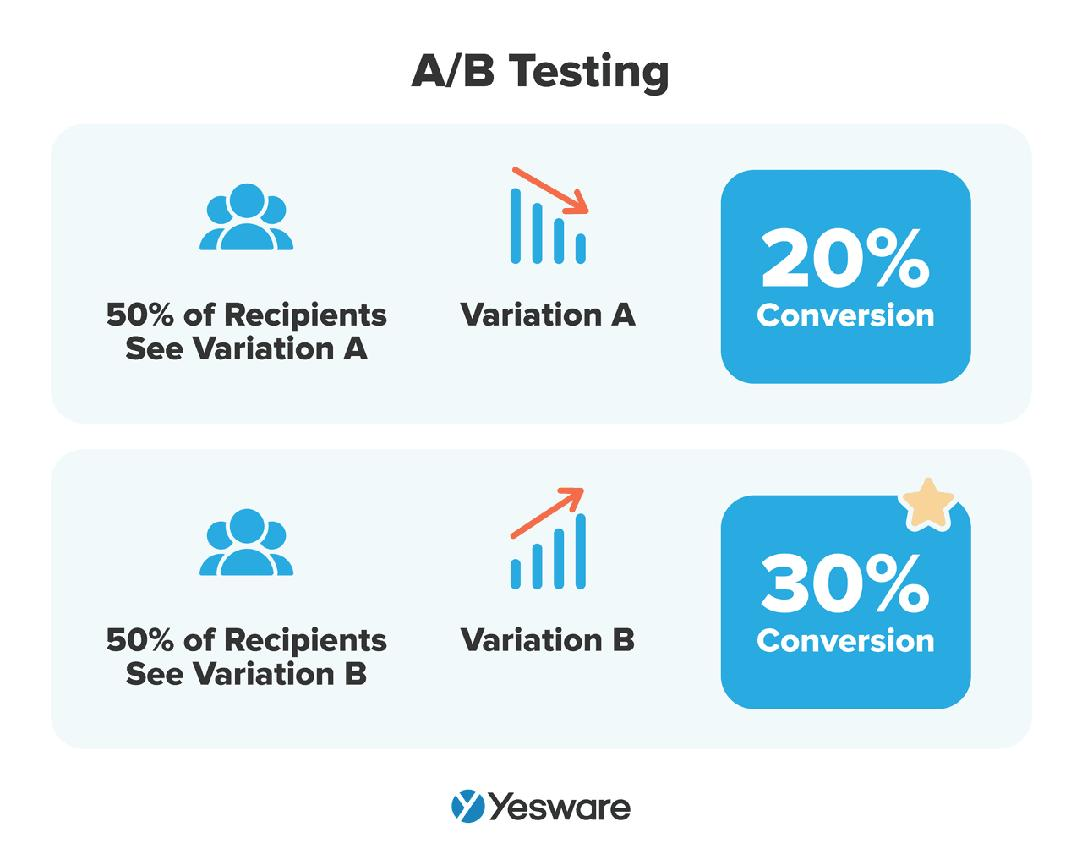
There are two separate activities that teams tend to treat as one. The first is running an experiment: shipping a variant, splitting traffic, collecting data, reading a result off a dashboard. The second is learning something you can act on with confidence. Mobile teams are good at the first. The gap between the two is where most experimentation programs quietly leak value, and on mobile that gap is wider than it is anywhere else.
Most experiments fail, and that is normal
Start with the part nobody enjoys hearing. Most experiments do not work, and that is normal even at the best programs in the world. When Ronny Kohavi's team at Airbnb ran around 250 controlled experiments on search, only about 20 of them moved the key metric, so more than 90 percent of the ideas failed to do anything. The 20 that worked were worth it, adding up to a 6 percent gain in booking conversion worth hundreds of millions of dollars, but the strike rate was brutal. A meta-analysis of roughly 20,000 experiments across more than a thousand Optimizely customers found that only about 10 percent produced a statistically significant lift on the primary metric. A review of experimentation methodology puts it plainly: more than half of ideas fail to generate meaningful improvement, and in some domains the failure rate climbs past 90 percent.
The real problem is a confident wrong answer
A high failure rate is not the problem. A high failure rate is the entire point of testing, because it means the test is catching weak ideas before they reach everyone. The actual problem is a test that produces a confident answer that happens to be wrong, or no real answer at all dressed up as one. That is what "doesn't produce an answer" means here. The dashboard turns green, the variant ships, and six months later nobody can say whether the change did a thing, because the experiment was never capable of telling them.
Why mobile makes the gap wider
This matters more on mobile for a simple reason. The false positive risk is already high even in mature web programs. Kohavi's own analysis shows the false positive risk reaching 26.4 percent at advanced organizations, which means more than one in four "significant" wins are not real wins. Mobile takes that already-shaky baseline and piles on a set of structural constraints that make underpowered tests, contaminated assignment, and noisy measurement the default rather than the exception. The rest of this article is about those constraints and what to do about each one.
Why mobile experiments are structurally harder than web
On the web, four things are easy that mobile makes hard. You deploy in minutes and roll back in seconds. You control rendering from the server. Your test runs against one current version of the site. Your analytics fire from a live, connected browser. Mobile breaks every one of those, and the breaks are not edge cases. They are the normal operating environment.
Release lag changes what you can test
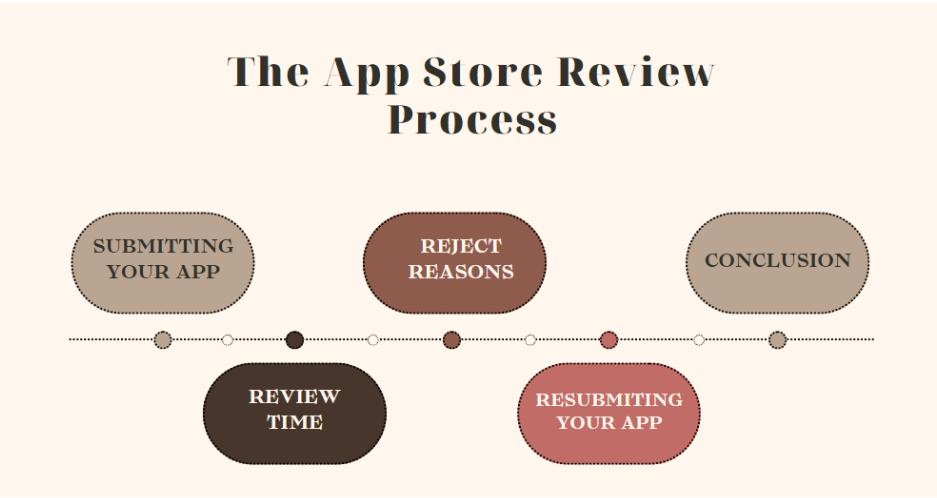
Apple and Google review every app update before it ships, which introduces delays of days to weeks between writing code and reaching users. Worse, users update on their own schedule, so at any given moment your experiment is running across many app versions at once. If your variant lives in shipped code that has to go through review, you cannot kill it the moment it tanks revenue, because killing it means another release and another review queue. This is why credible mobile experimentation runs through feature flags and remote configuration instead of deploys. You ship the variants hidden behind a flag, then control who sees what from a dashboard, which bypasses the store delay entirely and gives you an instant off switch. A team whose UI ships only on the release calendar is not running experiments at the speed the calendar allows. It is running them at the speed of app review.
Client-side state contaminates assignment
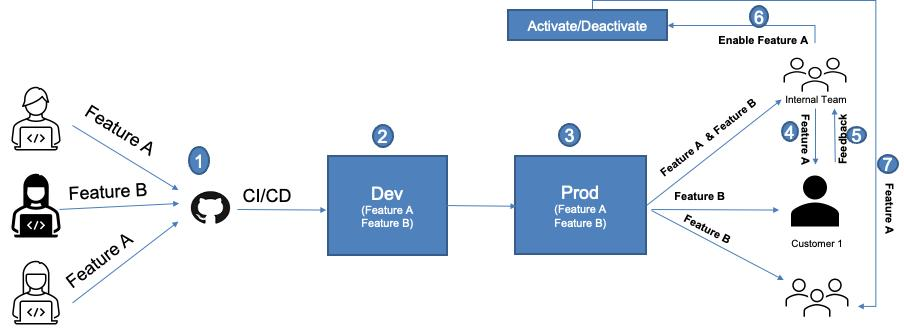
A mobile app caches data, holds session state on the device, and runs offline. Assignment has to stay sticky across launches, network gaps, and config updates, which requires a stable hashing function that maps a user and a flag to the same bucket every time. When that breaks and a user silently flips between control and variant, the result is not noisy data, it is invalid data, because an experiment that reassigns users between groups produces results that cannot support a causal conclusion. There is also the flicker problem. If the SDK fetches assignment on launch and the first screen paints before the flag resolves, the user sees control, then the variant snaps in. That visible flicker has been estimated to distort around 7 percent of results on its own, and it is worse on the slower networks mobile users actually have. A well-built mobile SDK initializes from a bundled fallback config so flags are never undefined, which prevents the worst of it.
Session timing stretches the measurement window
Mobile sessions are short, frequent, and constantly interrupted by backgrounding, notifications, and dead zones. Real conversion windows run across days, not minutes. A user meets your new onboarding flow on Monday and subscribes on Thursday. Set your analysis window to 24 hours and you measured noise, then declared the variant a failure because the conversion it caused had not happened yet.
Events arrive late, batched, or not at all
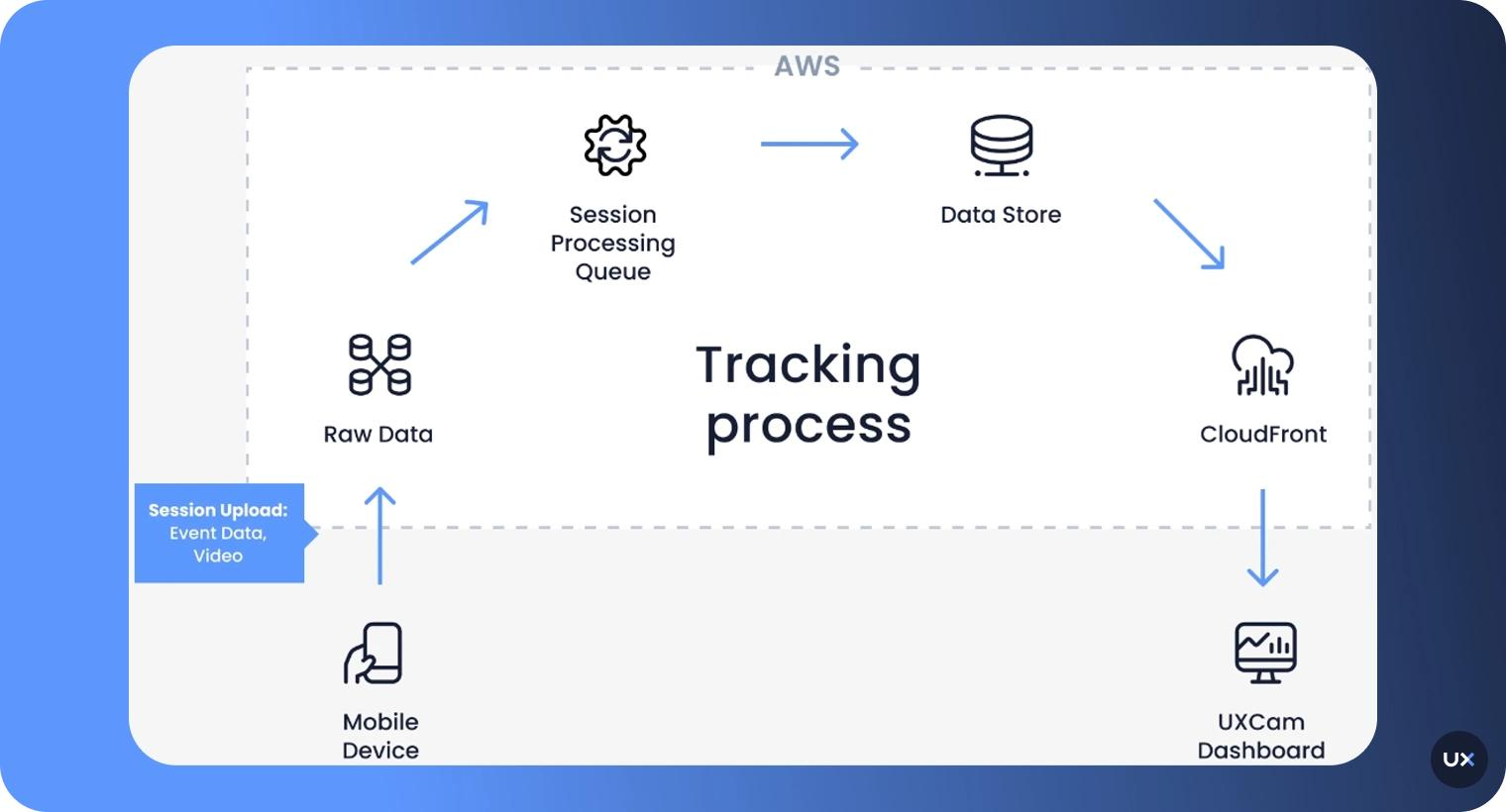
To save battery and handle offline use, mobile apps batch events and queue them until a connection is available. Some events get dropped. The cruel version of this: if the variant crashes, you lose the very events that would have told you it crashed, so the arm that drove users away reads as quiet rather than as damaging. You are not measuring user behavior directly. You are measuring whatever survived the delivery path, which on mobile is a lossy one.
Stack these on top of the fact that mobile apps usually have lower traffic than websites, so experiments take longer to reach significance, and you get the core difficulty. Mobile experimentation needs the experiment layer to live outside the binary, sticky across sessions, killable without a release, and measured over a window long enough to capture the behavior you care about. Platforms built for in-app experimentation, including Digia Engage, exist to close exactly this gap, letting a growth team run and stop in-app experiments without waiting on engineering or app review. The tooling matters, but the point underneath it matters more: if your test is coupled to the release cycle, the cycle, not the data, is setting your pace.
The sample size problem: most mobile experiments are underpowered
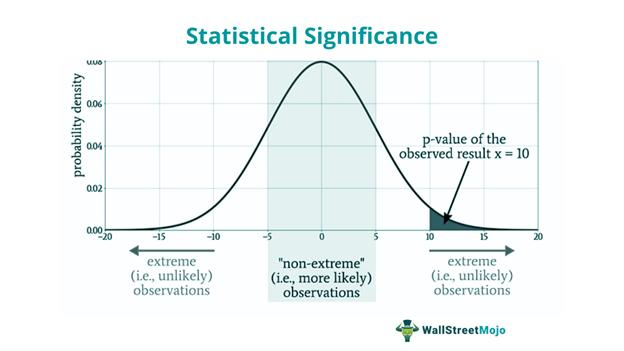
Here is the most common way a mobile experiment fails to produce an answer. The team picks a change, runs it for a week, collects a couple thousand users per arm, and reads the result as if it means something. It almost never does, because the test never had the statistical power to detect the effect it was looking for.
What power analysis actually checks
Power analysis is the calculation that tells you how many users you need before you run anything. It depends on two inputs you have to decide up front: your baseline conversion rate, and the minimum detectable effect, or MDE, which is the smallest change you actually care about catching. Skip this calculation and you are not running an experiment, you are running a coin flip with extra steps.
Why the math punishes small effects
The math is the part teams avoid, so name it directly. Required sample size scales with the inverse square of the effect you want to detect. Evan Miller's standard rule of thumb expresses it as n equals roughly 16 times the variance divided by the square of the minimum effect. The practical consequence is steep. Want to detect a 1 percent relative lift instead of a 2 percent one? You need about four times the users. Halve the effect again and you quadruple the requirement again. Detecting small effects is not a little harder, it is quadratically harder, and most teams do not budget for that curve.
Why low mobile baselines make it worse
Mobile makes this worse because baseline conversion rates tend to be low, and low baselines push the required sample up sharply. A worked example from a recent experimentation walkthrough: at a baseline conversion of 3.2 percent with an MDE of 0.5 percentage points, you need roughly 25,000 users per variant at 80 percent power and a 5 percent significance level. That is 50,000 users committed to a single test of a single change. Plenty of apps cannot gather that in a sensible window, so they run the test on a fraction of it and treat the result as real anyway.
An underpowered test fails in both directions
An underpowered test is dangerous in both directions, and both failures hide as success. When an underpowered test shows "no significant difference," it tells you close to nothing, because you could not have detected the effect even if it were sitting right there in the data. Reading that null as "the change doesn't work" is a mistake. When an underpowered test shows a win, the danger is sharper, because small samples produce large, noisy swings, and the apparent winners that clear the bar tend to be flukes. Statisticians call this the winner's curse: the lift you saw at the moment of significance is systematically inflated, so when you ship the variant and measure the real long-run effect, it shrinks, sometimes to zero.
This is how the inconclusive graveyard fills up, full of tests that hovered just below the significance threshold because they never had the traffic to clear it. The honest move is to run the power calculation first and find out whether your question is answerable at the precision you want, before you spend three weeks discovering it was not. If the required sample is larger than the traffic you can realistically collect, you have already learned the most useful thing the test could teach you: this experiment, as designed, cannot answer this question. That is a result, and acting on it early is cheaper than acting on it after the fact.
Four ways mobile experiments quietly produce the wrong answer
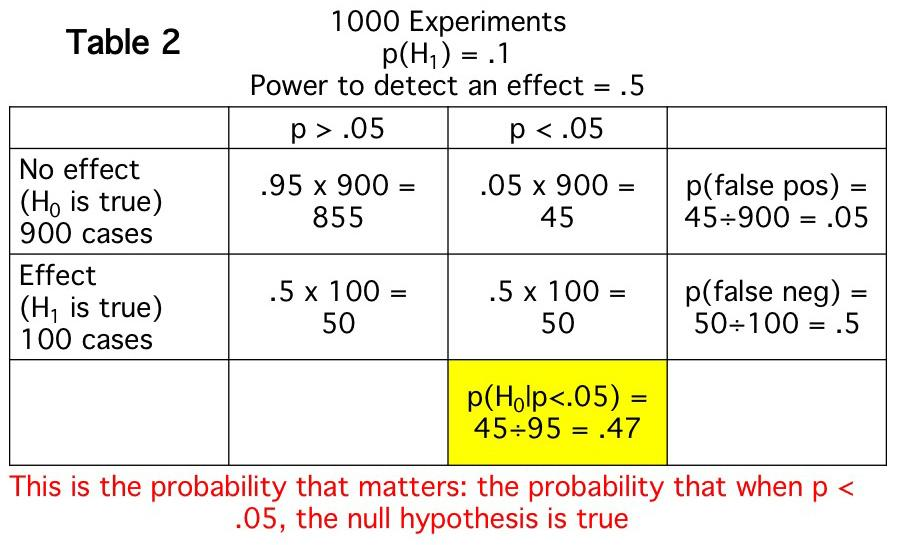
Even a well-powered test gets invalidated by procedure. These four mistakes are the most common, and each one produces a number that looks trustworthy and is not.
Peeking, then stopping when it looks good
This is the most pervasive and least understood threat to validity. A standard significance test is calibrated to be evaluated once, at a predetermined sample size. Every additional look is another roll of the dice, another chance for random noise to cross the threshold. Evan Miller quantified it in his widely cited How Not to Run an A/B Test: peek ten times during a test and what you think is 1 percent significance is really closer to 5 percent. Check after every batch and stop the moment you see p below 0.05, and your true false positive rate is not 5 percent, it is around 26.1 percent, so one in four "winners" is pure noise. Other simulations put continuous peeking and stopping at 40 percent or higher. Switching to a Bayesian framework does not save you either. A 2025 simulation found that using a 95 percent "probability to beat control" as a stopping rule, checked after every 100 observations, drove the false positive rate to 80 percent, and a separate analysis at Variance Explained found a fixed posterior threshold called 22.68 percent of pure-noise tests significant. The fix is to commit to a fixed sample size and look once at the end, or to use a sequential testing method built for continuous monitoring. What you cannot do is watch daily and stop on the first green number.
Reading too many metrics and shipping the winner
Track a dozen metrics, watch one come back significant, and ship on it, and you have run straight into the multiple comparisons problem. With many independent metrics each tested at a 5 percent threshold, you should expect at least one false positive by chance most of the time, which means the "win" you found may be the statistical equivalent of finding a face in a cloud. The discipline is to choose a single primary metric before launch and decide the win condition for it in advance. Everything else is either a guardrail that can block a ship, or a hypothesis for the next test. It is not the verdict for this one.
Sample ratio mismatch and assignment that drifts
If you designed a 50/50 split and the data comes back at 49.5/50.5, that is a sample ratio mismatch, and it is a red flag that something in assignment or data collection is broken. It is not a rounding quirk to wave away. DoorDash found that experiments with an SRM had twice as many statistically significant metrics as clean ones, which means ignoring the imbalance roughly doubles your rate of false findings. Microsoft's platform treats an SRM so seriously that it gates the actual results behind a check at p below 0.0005, refusing to show the experiment readout until the split passes. On mobile, SRM shows up easily because assignment depends on a flag that can resolve inconsistently across launches and app versions, which is the same root cause as the silent reassignment that invalidates results. Run an SRM check as a guardrail on every test, and if it fails, fix the assignment before you trust a single number.
Survivorship bias and the novelty effect
Most engagement metrics are measured among the users who stuck around, which means a variant that quietly pushed your worst-fit users to uninstall can look like a triumph, because the people it hurt are no longer in the dataset. Always read retention and churn next to whatever metric you are trying to move, so the dropouts count. The novelty effect is the time-based cousin of this. When you ship something new, engagement can spike out of curiosity and then fade, so a short test captures the spike and overstates the long-run effect. The reverse, the primacy effect, happens when users need time to adapt and the early numbers understate the change. One practical defense is to compare new users against returning users, or to run on new users only, since they are not influenced by what the app used to look like. The general lesson is that a mobile test run too short measures a reaction to novelty, not a durable behavior.
Server-side vs client-side: what each can and cannot test
These two approaches are not interchangeable, and choosing the wrong one wastes the whole experiment. They have different ceilings on what they can measure.
What server-side experiments can test
Server-side experiments assign users and branch the logic on the backend, so the app asks the server what to do and renders the answer it gets back. This is the stronger setup for anything the server already controls, which covers a lot: pricing, search ranking, recommendation models, and feed ordering all live on the server. The advantages are real. Assignment stays consistent, you can change or kill the test without an app release, the client cannot drift out of sync, page rendering is faster, and there is no flicker because the variant is decided before anything reaches the device. The limit is straightforward: if a behavior is rendered purely on the client with no server round-trip, the backend cannot test it directly unless the client cooperates.
What client-side experiments can test
Client-side experiments assign and branch inside the app itself, which is what you reach for when the thing you want to test only exists on the device. UI layout, onboarding screens, animations, and the placement of a button or a sheet are all client decisions. The cost is every structural problem from earlier in this piece. You either ship the variants inside the binary or fetch them through remote config, you carry SDK overhead and flicker risk, and you live with version fragmentation, because a client-side test running on a six-week-old app version is measuring a population you cannot fully refresh.
The native app constraint
There is also a hard constraint worth stating because teams forget it. A web-style client-side tool that depends on JavaScript and cookies cannot reach a native iOS or Android app at all. For native apps, your options are server-side evaluation or a native SDK that handles assignment and delivery on the device. There is no third path that lets a browser snippet test native UI.
The rule: push toward the server
The working rule that falls out of this is simple: push the experiment as far back toward the server as the change allows. Anything the server can decide, let the server decide, because you get consistency and an instant kill switch for free. Reserve client-side experiments for the things that genuinely only exist on the device, and run those through tooling that keeps assignment sticky across launches and lets you reconfigure without a release. The most capable mobile setups use server-driven UI, where the layout and content of in-app experiences are configured from a dashboard and delivered to the client, so a growth team can place, test, and move an experience without an engineering ticket or a store submission. That is the model behind Digia Engage's nudges and widgets, and it is the difference between iterating at the speed of a dashboard and iterating at the speed of a release train.
How to design an experiment that produces a decision
The single habit that separates a useful experiment from theater is writing down the decision before you run the test. Commit, in advance and in writing, to what you will do at every outcome. If you only define what you will do when the variant wins, you have built a machine for confirming things you already believe.
Define four things up front
A usable experiment design names four things up front, before any data exists:
- The one primary metric, and the direction that counts as a win. A single number you have agreed in advance is the thing this test is about. Picking it after you see the data is how the multiple comparisons problem sneaks back in.
- The minimum detectable effect, plus the sample size and duration that power requires to find it. Run the power calculation and write down the user count and the date the test ends. This is the step that prevents the underpowered coin flip.
- The stopping rule, fixed in advance. You look once at the predetermined end, or you use a sequential method designed for continuous looks. You do not freestyle a stop the first morning the line turns green.
- The guardrail metrics that block a ship even if the primary metric wins. Crash rate, churn, latency, and revenue are the usual four. A variant that lifts conversion while raising crashes is not a winner, and guardrails are how you catch that before it ships.
Run the power calculation before launch
Two checks make the design trustworthy in practice. Run the power calculation before launch, not after, because that is when it can still change your decision. If the required sample is larger than the traffic you can realistically gather in a reasonable window, you have a choice to make honestly: either make the change bolder so the effect is bigger and easier to detect, or accept that you are deciding on judgment rather than data, and say so out loud to whoever is asking. Both are defensible. Pretending an underpowered test settled the question is not.
Add an SRM check and an A/A test
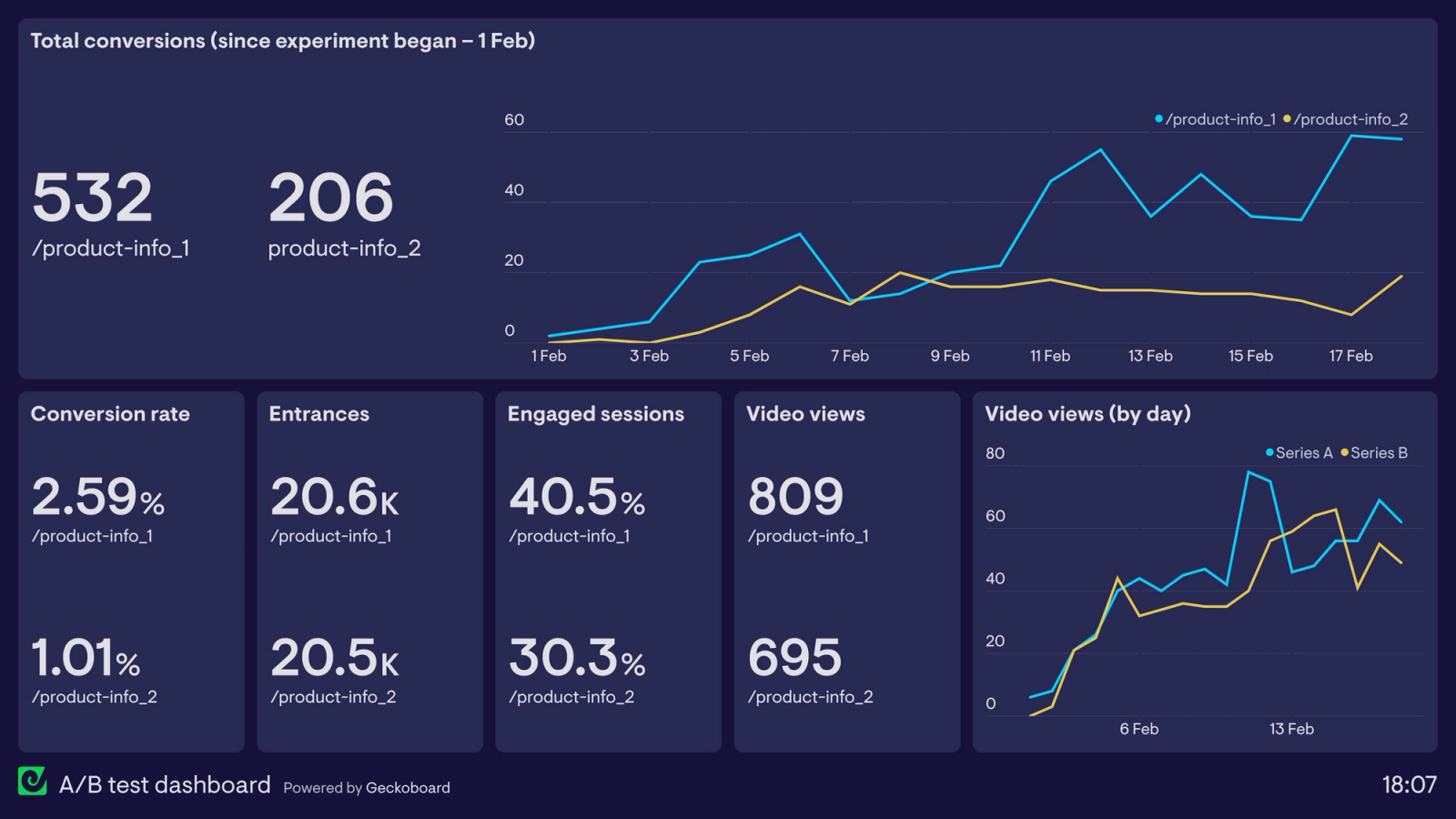
The second check is an SRM guardrail, and ideally an A/A test before you run anything real. An A/A test runs the same experience against itself, which should show no difference, so any "significant" result it produces is a sign your instrumentation is broken. Catching a broken pipeline on an A/A test costs you a few days. Catching it after you have shipped a fake winner costs you the decision and the trust that went with it.
Why disciplined testing compounds
A program that does this consistently compounds. Bing's experimentation program identified dozens of revenue-improving changes a month and grew revenue per search by 10 to 25 percent a year, which helped move its U.S. search share from 8 percent to 23 percent. None of that came from any single heroic test. It came from a high volume of trustworthy small ones, which is only possible when each test is designed to produce a real decision and the program can run many of them.
What to do when you can't reach statistical significance
Failing to reach significance is itself a result, so the first move is to figure out which kind of result it is before you react to it.
An inconclusive test is not a negative result
If the test was underpowered, the honest read is "inconclusive," and there is an important distinction hiding in that word. Failing to detect an effect with a sample too small to detect it proves nothing about whether the effect exists. Treating that null as proof the change does not work is one of the most common misreadings in experimentation, and it kills good ideas as casually as it ships bad ones.
When the number genuinely will not cross the line, you have a real set of options.
Run longer or pool more traffic
This works if your baseline and timeline make that feasible. Often they will not, which is precisely the constraint that started this problem, so this is the first option to consider and frequently the first to rule out.
Cut the variance instead of adding users
Variance reduction techniques like CUPED, introduced by Deng, Xu, Kohavi, and Walker at Microsoft in 2013 and now used at Netflix, Booking.com, and DoorDash, use pre-experiment data to strip out predictable noise. Eppo reports CUPED letting teams run experiments up to 65 percent faster, which is the same thing as needing far less traffic to reach the same confidence. The gains vary by metric and surface, with Microsoft seeing effective traffic multipliers range from barely anything to well over 1.2x depending on the product area, so it is not magic, but on a high-variance metric it can turn an unanswerable test into an answerable one. Stratifying by platform, country, or device tier helps for the same underlying reason.
Make a bigger bet
A timid change produces a tiny effect that needs an enormous sample to confirm. A bolder version of the same idea is easier to detect and, if it works, more worth shipping. When you cannot afford the sample for a small effect, the answer is sometimes to stop testing small effects.
Decide on a different metric for low-stakes changes
For a low-stakes, easily reversible change, "no measurable harm to the guardrails" can be enough to ship. Reserve the strict significance bar for decisions that are expensive to undo, and let cheap, reversible decisions move on lighter evidence. Spending three weeks of traffic to confirm a button color at p below 0.05 is its own kind of waste.
Sometimes the right call is to kill it
And sometimes the right call is to kill the test. If you cannot detect an effect at the sample you can realistically collect, the effect is small enough that it probably does not matter to the business. A change too small to measure is usually a change too small to care about, and accepting that frees the traffic for a test that can actually move something.
The bottleneck on mobile experimentation is rarely the tooling, and it is never the willingness to run tests. It is the willingness to check, before starting, whether you have the traffic and the discipline to learn anything at all, and the honesty to call an inconclusive test inconclusive. Programs that build that check into how they work get the compounding gains. Programs that skip it run experiments that were never capable of producing an answer, then trust the answer anyway, which is how A/B testing ends up looking like theater instead of a way to find out what is true.
Key takeaways
- Running an experiment and learning from one are different activities. A mobile test can run cleanly and still teach you nothing if it was never built to answer the question.
- A high failure rate is normal and healthy. Only 10 to 20 percent of experiments produce a positive result at top programs, and over 90 percent of ideas failed in Airbnb's search work. The problem is not failure, it is a confident answer that is wrong.
- Mobile is structurally harder than web for four reasons: app store review delays, client-side state that contaminates assignment, session timing that stretches the conversion window, and lossy event delivery. Experiments need to live outside the binary, stay sticky, and be killable without a release.
- Most mobile tests are underpowered. Required sample scales with the inverse square of the effect, so halving the detectable effect quadruples the users you need. Low mobile baselines push the requirement higher still. Run a power calculation before launch.
- Four procedural mistakes invalidate good tests: peeking and stopping early (which can push the false positive rate to 26 percent or beyond), reading too many metrics, sample ratio mismatch and drifting assignment, and survivorship plus novelty effects.
- Push experiments toward the server whenever the change allows it. Server-side gives consistent assignment, an instant kill switch, and no flicker. A browser-style client tool cannot reach a native app at all, so native UI needs server-side evaluation or a native SDK.
- Design the decision before the test. Name the primary metric and win condition, the MDE and sample size, the stopping rule, and the guardrails. Add an SRM check and an A/A test so a broken pipeline cannot ship a fake winner.
- When you cannot reach significance, the options are to run longer, cut variance with CUPED, make a bolder bet, decide on guardrails for low-stakes changes, or kill the test. An underpowered null means "inconclusive," never "no effect."
Further reading
From Digia
- Experimentation Analytics: How to Measure What Actually Changed
- Segmentation in Analytics: Why Averages Hide What Matters
- What is Server-Driven UI for Engagement (And Why It Matters)
- Contextual Nudges vs Global Campaigns: What Actually Works
- Mobile App Testing: Why Your QA Lab Is Lying to You
External sources, all claims attributed
- Microsoft one-third help / neutral / hurt, Google and Bing 10 to 20 percent positive, Bing revenue per search +10 to 25 percent/year and share 8 to 23 percent, Evan Miller peeking at 26.1 percent, sample size worked example - Towards Data Science (citing Kohavi, HBR, and Evan Miller)
- Airbnb ~250 experiments, ~20 positive (over 90 percent failed), 6 percent booking conversion gain - AB Tasty, 1,000 Experiments Club with Ronny Kohavi
- False positive risk reaching 26.4 percent at advanced organizations - Kameleoon (interview with Ron Kohavi)
- Optimizely meta-analysis of ~20,000 experiments: only ~10 percent significant on primary metric - Oliver Palmer (citing Thomke and Ghosh)
- More than 50 percent of ideas fail, 90 percent or higher in some domains - The American Statistician, A/B testing methodology review
- Peeking ten times turns 1 percent significance into 5 percent, sample size rule of thumb - Evan Miller, How Not to Run an A/B Test
- Continuous peeking and stopping can inflate the false positive rate to 40 percent or higher, sequential testing - Statsig
- Bayesian peeking every 100 observations drives false positives to 80 percent - Alex Molas
- Fixed Bayesian posterior threshold called 22.68 percent of null tests significant - Variance Explained (David Robinson)
- Peeking inflates the effect estimate, the winner's curse - Atticus Li
- Mobile constraints: app store review cycles, offline users, device fragmentation, battery and memory, lower traffic means longer to significance - Amplitude
- Apple and Google review delays of days to weeks, ship variations behind flags and control via remote config - Amplitude
- Feature flags decouple deployment from release and bypass app store approval, client-side JS and cookies cannot test native apps - AB Tasty
- Feature flags let teams roll back a bad variant by disabling the flag - AB Tasty
- Server-side rendering reduces flicker and load time on mobile - LaunchDarkly
- Flicker effect distorts around 7 percent of results, worse on slower mobile networks - Monday Systems
- Sticky assignment needs stable hashing, reassignment produces invalid results, SDK should initialize from a bundled fallback config - AppsOnAir
- Native apps cannot be reached by a JavaScript snippet, server-side is the only browserless option - Kirro
- Batching events when a connection is available, offline data collection complexity - Creative CX
- SRM: a 49.5/50.5 split can trigger it, experiments with SRM had twice as many significant metrics - DoorDash Engineering
- Microsoft gates experiment results behind an SRM check at p below 0.0005 - Microsoft Research
- Novelty and primacy effects: engagement that spikes then fades, or grows as users adapt - Novelty and Primacy: A Long-Term Estimator for Online Experiments (arXiv)
- CUPED introduced by Deng, Xu, Kohavi, and Walker (2013), used at Netflix, Booking.com, and others - Kameleoon
- CUPED can let teams run experiments up to 65 percent faster - Eppo
- CUPED effective traffic multipliers vary widely by product surface - Microsoft Research
- Many tests end in the inconclusive graveyard just below significance - Optimizely
Want to run in-app experiments without coupling them to your release cycle, with sticky assignment and an instant off switch from a dashboard? See how Digia Engage works or book a demo.