TL;DR
- No mobile coach mark tool is fully no-code.
- Every one needs an engineer to install an SDK and make screen elements targetable, because native apps have no CSS selectors.
- What "no-code" really buys you is everything after that setup: building tours and changing their copy, steps, and targeting from a dashboard without an app release.
- Judged on that, Appcues and Plotline are the most builder-friendly options for consumer apps.
- Digia Engage suits teams that already run CleverTap, MoEngage, or WebEngage.
- Whatfix and WalkMe fit enterprise and employee apps, and Amplitude Guides fits teams already on Amplitude analytics.
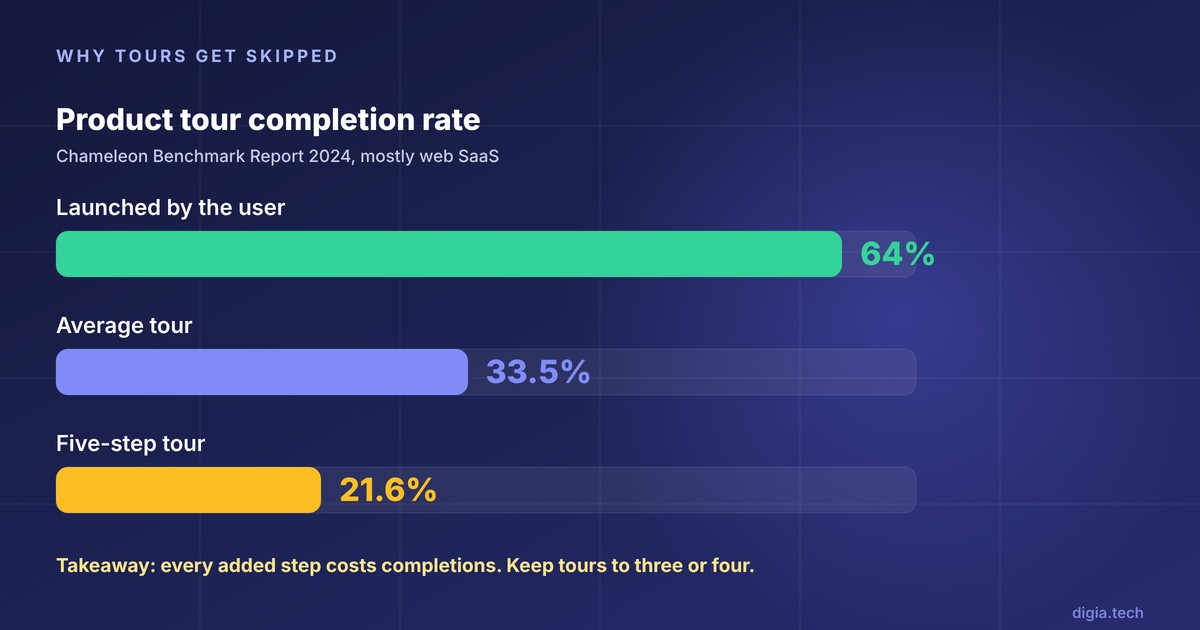
- Keep tours short, because Chameleon's 2024 benchmark found completion drops to 21.6% at five steps.
Editorial disclosure: Digia Engage is one of the tools reviewed here, and it integrates with CleverTap, MoEngage, and WebEngage. In November 2026 we reviewed each vendor's public documentation, SDK requirements, and pricing pages. We did not run paid trials of every tool, and where a vendor does not publish something, we say so. For tools that fire tooltips on specific user actions, see our companion review of behavior-triggered tooltip tools.
Coach marks, tooltips, and spotlights: what is the difference?
A coach mark is a temporary hint attached to a real control, usually one step in a short tour, while a tooltip can stand alone and appear any time. Adobe's Spectrum design system describes coach marks as temporary messages that educate users through new or unfamiliar product experiences, which can be chained into a sequence to form a tour.
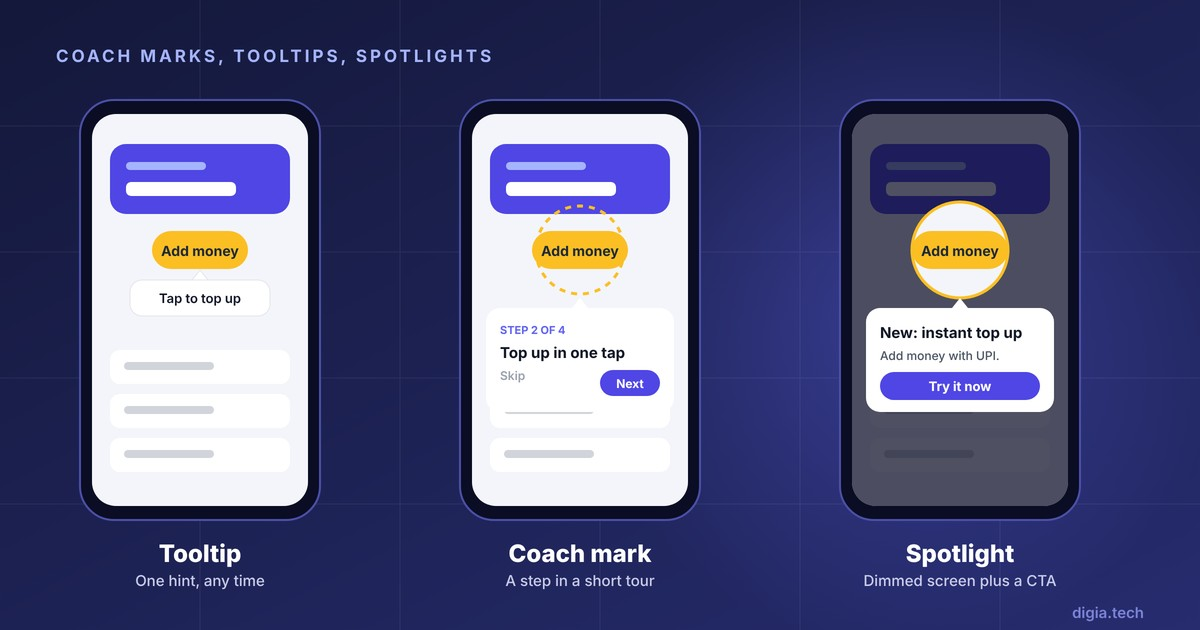
Vendors use the three terms loosely, so it helps to pin them down before comparing tools. Plotline, for example, defines a coachmark as a visual nudge that directs attention to a specific feature and dims the surrounding content, and a spotlight as a similar pattern with direct call-to-action buttons.
| Pattern | What it looks like | Typical use | Blocks the screen? |
|---|---|---|---|
| Tooltip | Small bubble beside an element | One contextual hint, any time | No |
| Coach mark | Bubble anchored to an element, often "Step 2 of 4" | Short onboarding or feature tour | Sometimes |
| Spotlight | Screen dimmed except the target, with a CTA button | Feature launch, one key action | Yes |
| Walkthrough | Several coach marks across screens | Complex first-run setup, employee training | Yes, step by step |
The practical difference for buyers: a tool that offers "tooltips" may not offer a dimmed spotlight overlay or a multi-screen walkthrough. Check each pattern separately in the demo.
What does "no-code" actually mean on mobile?
On mobile, "no-code" means a product manager can build and change coach marks after engineers have done a one-time setup. It never means zero engineering.
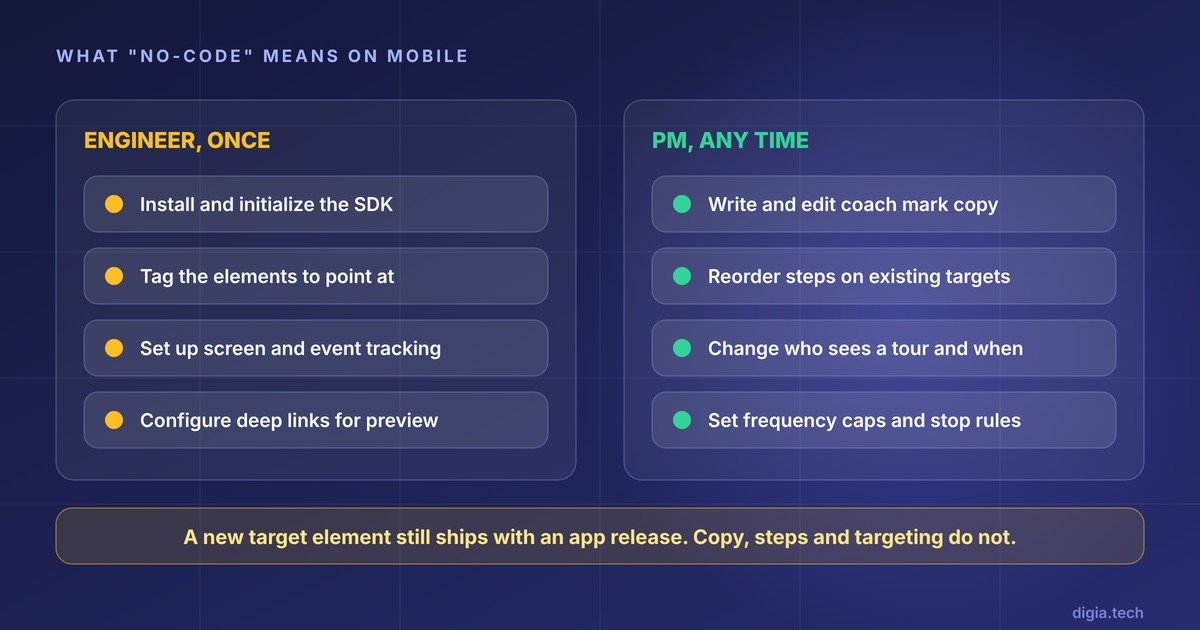
The reason is technical. On the web, a tool can find a button through a CSS selector. Native apps have no such thing. Amplitude's comparison of mobile guide tools explains that mobile targets are tagged in code, so a new tag ships with your next release, while copy, targeting, and timing can change without one. Appcues says the same in its own docs: if a screen capture shows no targetable elements, your developers need to set up the app so common elements are identifiable.
So split the work into two buckets before you buy:
| Needs an engineer (once, then per new target) | Product or growth team can do alone |
|---|---|
| Install and initialize the SDK | Write and edit coach mark copy |
| Tag or name the elements you want to point at | Reorder, add, or remove steps that use existing targets |
| Set up screen and event tracking | Change who sees a tour and when |
| Configure deep links for on-device capture or preview | Set frequency caps and stop rules |
A tool earns the "no-code" label by how much sits in the right-hand column, and by how painless the left-hand column is. Ask every vendor to show both.
Why do most coach mark tours get skipped?
Tours fail on timing and length far more often than on visual design.
The numbers are consistent. Chameleon's 2024 Benchmark Report put the average product tour completion rate at 33.5%, against 64% for tours users launched themselves, and found five-step tours fell to 21.6%. That data is mostly web SaaS, so treat it as an upper bound for mobile.
Nielsen Norman Group's guidance on mobile instructional overlays explains why. Users cannot read an overlay and use the app at the same time, so a chain of tips makes them memorize steps they forget within seconds.
A design team at Livefront saw this first-hand. Its first coach marks were skipped and overlooked by almost every user, partly because they appeared out of context on empty screens. After the team made the tour optional and tied the coach marks to the user's own data, 6 of 8 test participants read and interacted with them.
The lesson for tool selection: you want a tool that makes short, well-timed, skippable tours easy, and makes it easy to test and change them. A builder that makes ten-step tours effortless is not helping you.
How we evaluated the tools
In November 2026 we scored each tool on six criteria aimed at the no-code question.
- Targeting method. How a non-engineer points a coach mark at an element, and what engineers must do first.
- Spotlight and walkthrough support. Whether dimmed overlays and multi-screen tours are built in.
- On-device preview. Whether you can see a draft on a real phone before it goes live.
- Release independence. What changes ship from the dashboard without an app update.
- Framework coverage. Native iOS and Android, plus React Native and Flutter.
- Pricing transparency. Whether there is a public entry price.
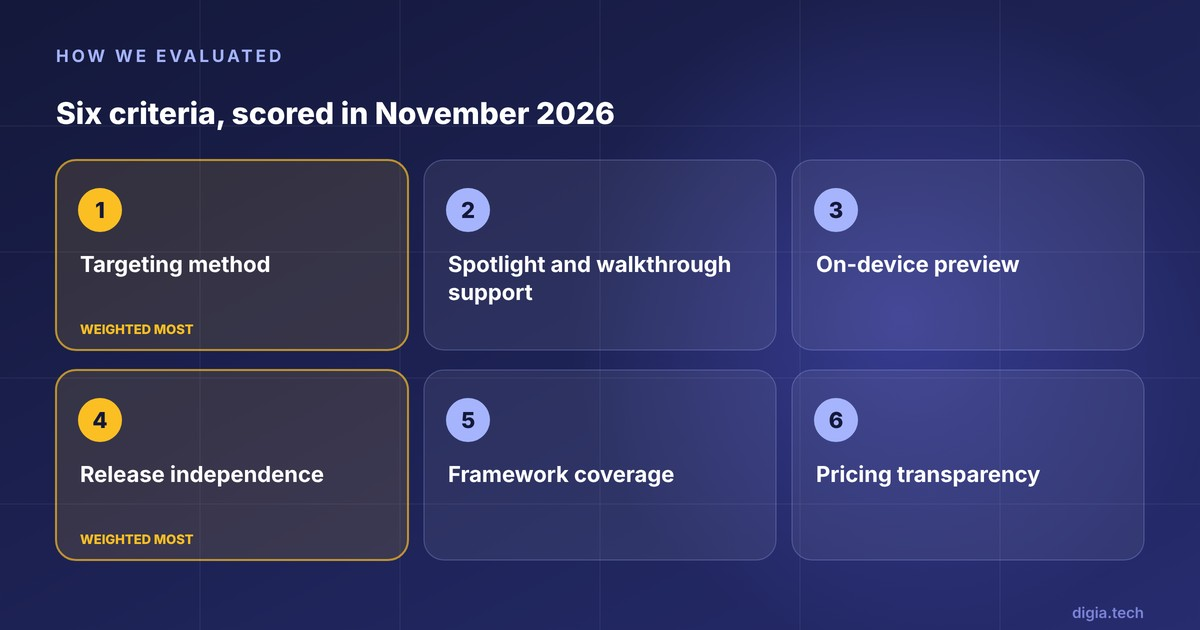
We weighted the first and fourth most heavily, because they decide how often a growth team has to queue behind an engineering sprint.
Comparison table
"Not published" means we found no public figure in the vendor's docs or pricing pages as of November 2026.
| Tool | How you target elements | Coach mark patterns | Mobile frameworks | Public entry price | Best fit |
|---|---|---|---|---|---|
| Appcues | Screen capture from a device, elements made identifiable by engineers | Anchored and floating tooltips, modals, slideouts | iOS, Android, React Native, Flutter, Ionic | Spark at $3,600/year | Product-led SaaS and consumer apps |
| Plotline | Visual builder over SDK-tagged elements | Tooltips, coachmarks, spotlights, stories | Native and cross-platform SDKs | From $999/month | Funded consumer apps |
| Digia Engage | Anchor keys registered in the app | Multi-step tooltip guides, spotlights | iOS, Android, React Native, Flutter | From $499/month | Teams on CleverTap, MoEngage, WebEngage |
| Amplitude Guides | Code identifiers such as testID | Pins, tooltips, carousels | iOS, Android, React Native, Flutter | Free tier with 1 live guide | Teams on Amplitude analytics |
| Pendo | Pendo tags in code | Tooltip guides | Wide, including Flutter and .NET MAUI | Free up to 500 MAU | B2B teams on Pendo for web |
| Whatfix Mobile | Captured screens in a no-code studio | Walkthroughs, nudges, checklists | iOS, Android, React Native, Flutter, Xamarin, MAUI, Cordova, Ionic | Not published | Enterprise and employee apps |
| WalkMe Mobile | Console wizard or in-app Power Mode | Smart Walk-Thrus, ShoutOuts | iOS, Android, React Native, Flutter, Cordova | Not published | Large, compliance-heavy enterprises |
| Userpilot | Event and screen autocapture | Carousels, slideouts, surveys | iOS, Android, React Native, Flutter | Mobile is a paid add-on | Userpilot web customers |
The 8 tools reviewed
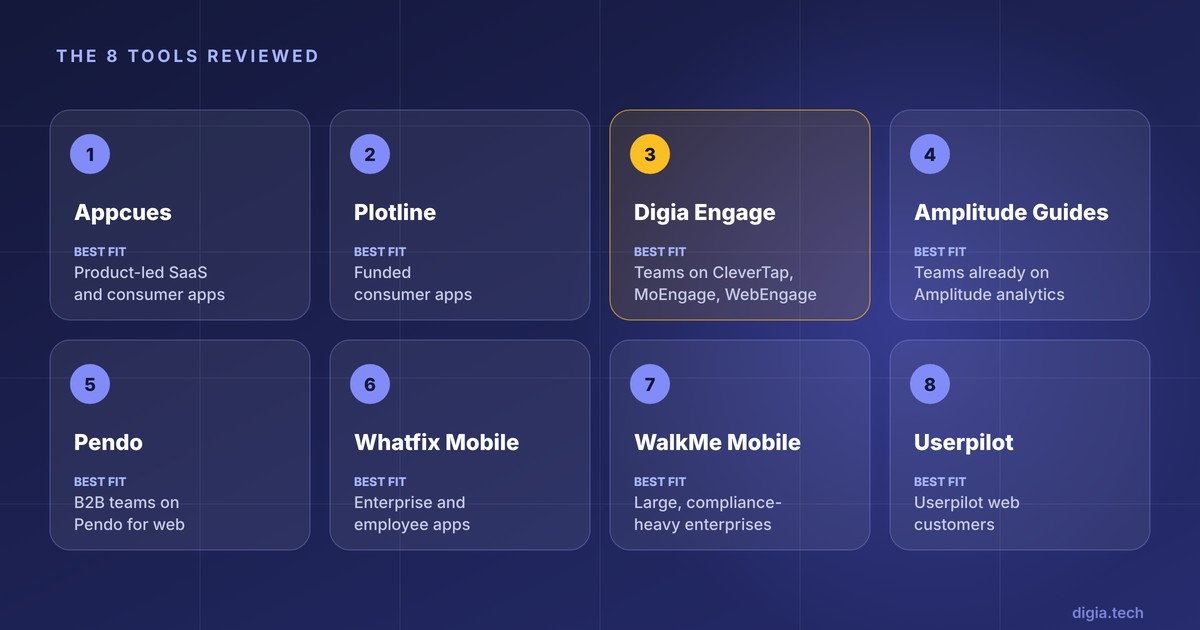
1. Appcues: the most approachable mobile builder
Appcues builds anchored tooltips from a screen capture. A teammate opens a link or QR code on a device with the app installed, navigates to a screen, and taps a capture button that sends the screenshot to the builder. The builder then lists the elements you can target.
Where it wins. Anchored tooltips work on native iOS and Android, React Native, and Flutter, and on Ionic through the Appcues Capacitor Plugin, and floating tooltips cover screens where anchoring is hard. Flows can trigger on app sessions, screen views, or in-app events, all set from the dashboard.
Where it falls short. The QR capture needs deep linking configured first, and webview targeting needs Mobile SDK 5.0.0 or later on the user's device. Triggering a flow the moment an event happens is an Enterprise feature or a paid add-on. The Spark plan costs $3,600 a year for 1,000 users, which gets expensive at consumer scale.
Best for: teams that want the gentlest builder for non-engineers, especially if they already use Appcues on web.
2. Plotline: spotlights built for consumer apps
Plotline offers tooltips, stories, spotlights, surveys, and videos without code, with a format library aimed at consumer apps.
Where it wins. Spotlights are a first-class format, which suits feature launches. Plotline's customer Jar reports that its GoldX feature saw almost 80% higher adoption among users who saw the Spotlight. That is a vendor-published testimonial without a published method, so treat it as a signal and not a benchmark.
Where it falls short. Pricing starts at $999 per month, which prices out many early-stage teams. Plotline's own blog post on coachmarks cites adoption gains without naming a source, so ask for customer data you can verify in the demo.
Best for: funded consumer apps that want a dedicated, mobile-first engagement tool with strong spotlight support.
3. Digia Engage: coach marks on top of the CEP you already run
In Digia Engage, a Guide is a tooltip or spotlight anchored to a UI element, used for onboarding tours and feature discovery. Engineers register anchor keys in the app once. After that, a PM builds each step in the Guide builder by entering the anchor key provided by the app team, then sends the draft to a connected debug device to check copy and step order before going live.
Where it wins. Teams on CleverTap, MoEngage, or WebEngage keep audience and trigger logic in their CEP and use Digia for the coach mark UI, linked through a single campaign key. Experiences render as native components with no WebViews across Flutter, Android, iOS, and React Native. Pricing starts at $499 per month on annual contracts.
Where it falls short. The model depends on anchor keys. The MoEngage guide is explicit that the key must match exactly and that the first anchor must be on screen when the campaign fires. A new target element still needs an engineer and a release. Teams without a CEP can use Digia's standalone mode, where each campaign carries its own trigger and priority.
Best for: mobile teams already running a CEP who want native coach marks without adding a second targeting system.
4. Amplitude Guides: coach marks tied to your analytics
Amplitude's mobile guides now run in iOS, Android, Flutter, and React Native apps, per documentation updated in October 2026. The SDK installs as a plugin to Amplitude Analytics, so guides share the same events and user identity as your charts.
Where it wins. Audiences come straight from funnels and cohorts you already built. Drafts can be opened on a device from a QR code, which catches clipping on small phones before launch.
Where it falls short. Targets need code identifiers, such as accessibilityIdentifier in UIKit or testID in React Native. Amplitude's docs also note that some new guide features reach end users only once the app ships an update with a compatible SDK version. The Free plan allows a single live guide.
Best for: teams already on Amplitude who want guides and analytics in one place.
5. Pendo: strong if Pendo already runs your web product
Pendo's mobile tooltip guides anchor to tagged features. For Jetpack Compose, the tag is a pendoTag set in code, and React Native support spans versions 0.60 to 0.83.
Where it wins. One segment model and one analytics view across web and mobile, with wide framework coverage.
Where it falls short. Support varies by setup. Pendo's docs state that tooltips are not available for React Native apps using custom routers. Paid pricing is not public.
Best for: B2B and SaaS companies standardizing on Pendo.
6. Whatfix Mobile: enterprise walkthroughs with a no-code studio
Whatfix describes Whatfix Mobile as a digital adoption platform for native mobile apps that lets enterprises onboard, train, and engage users with a no-code approach. Content is built in Mobile Studio, and Whatfix says changes publish instantly with no app update required.
Where it wins. Framework coverage is the widest in this list. Beyond native apps, Whatfix integrates with React Native, Xamarin, Cordova, and Ionic apps, plus MAUI, and it added Flutter support in 2025. Walkthroughs are built by capturing your app's screens and then identifying elements on them, so a training team can own the content.
Where it falls short. It is built for enterprise adoption and training more than consumer growth. Whatfix's own figures put the iOS SDK at about 6 to 8 MB, against about 529 KB on Android, which matters if app size is a KPI. We found no public pricing.
Best for: enterprises guiding employees or customers through complex workflows in internal or B2B apps.
7. WalkMe Mobile: authoring inside the app itself
WalkMe Mobile content is built in the Mobile Console's Campaign Wizard or directly in the mobile app using Power Mode. WalkMe states that content is delivered to the app without requiring an app store release.
Where it wins. Power Mode lets an author view and update captured screens and elements on a real device, which suits teams that think in terms of "show me on the phone". Power Mode supports iOS, Android, React Native, Flutter, and Cordova.
Where it falls short. On React Native for iOS it needs version 0.75 or higher, and Fabric is not supported on iOS. The product is aimed at large organizations, and we found no public pricing.
Best for: large enterprises already using WalkMe on web, especially in regulated industries.
8. Userpilot: mobile patterns, light on anchored coach marks
Userpilot's mobile product covers carousels, slideouts, push notifications, and in-app surveys for native apps, with screen and event autocapture.
Where it falls short for this use case. Amplitude's comparison lists no anchored tooltips or spotlights for Userpilot mobile and notes that mobile is a paid add-on below Enterprise. If coach marks are the job, confirm anchored support in a demo before shortlisting.
Best for: Userpilot web customers whose mobile needs are mainly carousels and slideouts.
Code-first alternatives and web-only tools
Open-source libraries
If tours rarely change, a library may be enough. On Android, TapTargetView highlights a view and offers a TapTargetSequence class for showing highlights one after another. On Flutter, tutorial_coach_mark is the common choice, with about 184,600 downloads in 30 days as of its listing.
The trade-off is that every copy or step change ships in a release. Libraries also leave you to build frequency caps and analytics yourself. Build in code when you have a handful of stable tours. Buy a tool when a growth team needs to change tours weekly.
Web tools that will not work in a native app
Many popular onboarding tools are web-only. Userpilot's comparison of product-experience tools, for example, lists UserGuiding as supporting web apps but not mobile. A web tool can still guide a mobile website, but it cannot place a coach mark on a native iOS or Android screen. Ask for the native SDK documentation before any demo.
Which tool fits which team?
| If your team | Start with | Why |
|---|---|---|
| Wants the friendliest builder for non-engineers | Appcues | Screen capture builder, broad framework support |
| Runs a consumer app and launches features often | Plotline | Spotlights are a core format |
| Already runs CleverTap, MoEngage, or WebEngage | Digia Engage | Reuses CEP triggers, renders native coach marks |
| Lives in Amplitude analytics | Amplitude Guides | Guides share your events and cohorts |
| Trains employees or B2B users on complex apps | Whatfix or WalkMe | Enterprise walkthroughs and wide framework support |
| Ships a few tours that rarely change | Open-source library | Lowest cost if nothing changes often |
Coach mark design rules that hold up
Whichever tool you pick, these rules decide whether the tour gets read.
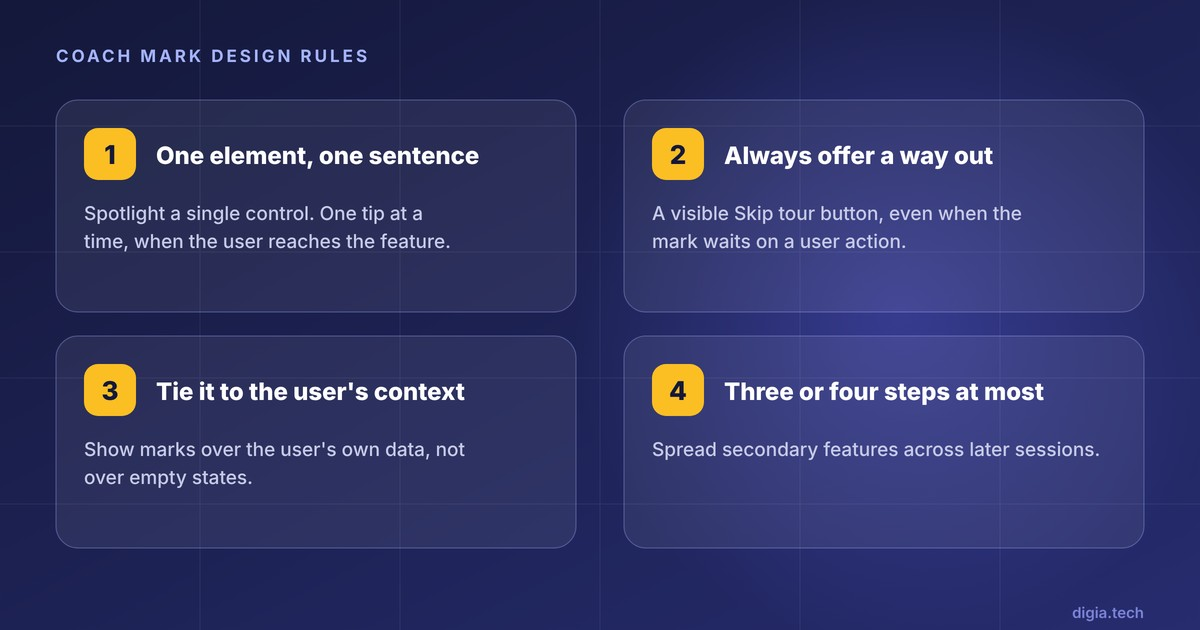
- One element, one sentence. Spotlight a single control and keep copy short. NN/g's overlay guidance favors one tip at a time, shown when the user reaches the relevant feature.
- Always offer a way out. Adobe's Spectrum guidelines cover a "Skip tour" button and say that when a coach mark waits on a user action, the user must still have a way to exit.
- Tie the tour to the user's context. Livefront's tour worked once coach marks appeared with the user's own data on screen, not over empty states.
- Cap it at three or four steps per session. Spread secondary features across later sessions rather than front-loading them.
For frequency and placement rules, see Digia's guide to designing non-annoying nudges. For when to hold a tour back entirely, see suppression logic.
Buyer checklist
Ask every vendor these eight questions, and test the first three on a real phone during the trial.
- Exactly what does an engineer have to do before a PM can build the first coach mark, and what do they have to do for each new target element?
- Can a PM build a dimmed spotlight and a multi-screen walkthrough, or only standalone tooltips?
- Can we preview a draft on a real device before publishing, and does it work on our smallest supported phone?
- Which changes ship from the dashboard, and which need a new SDK version or an app release?
- Which of our frameworks are supported, at which versions, and are there known gaps such as custom routers, bottom sheets, tab bars, or scroll views?
- Do coach marks render natively, or through a WebView or HTML template?
- How much does the SDK add to app size on iOS and Android?
- Which coach mark features in this demo are add-ons rather than part of the plan we are pricing?
Key Takeaways
- No mobile coach mark tool is fully no-code. Every one needs an SDK install and element tagging, because native apps have no CSS selectors. Judge tools on what a PM can do after that setup.
- Appcues has the most approachable builder, and Plotline leads on spotlights for consumer apps. Digia Engage fits teams that want coach marks driven by an existing CEP.
- Whatfix and WalkMe are enterprise walkthrough platforms with the widest framework coverage, priced on request.
- Keep tours to a few skippable steps tied to the user's context. Chameleon's 2024 data shows completion falling to 21.6% at five steps.
Further Reading
From Digia
- Best In-App Tooltip Tools Triggered by User Behavior (2027)
- How to Build an In-App Onboarding Flow That Gets Users to Their First Win
- In-App Nudges: What They Are, When to Use Them, and 12 Examples
- Designing Non-Annoying Nudges: Frequency, Placement, and Context
- When NOT to Show a Nudge: Building a Suppression Logic
- Best Mobile App Engagement Platforms in 2026: An Honest Comparison
External
External Sources: All Claims Attributed
- Coach mark - Adobe Spectrum design system
- Coachmarks and spotlight UI in mobile apps - Plotline blog
- 7 Best In-App Guide Tools for Mobile Apps in 2026 - Amplitude, accessed Nov 2026 (vendor-published comparison)
- Mobile Tooltips - Appcues docs, updated 15 Jul 2026
- Mobile Screen Capture - Appcues docs
- Target and Publish Mobile Flows - Appcues docs
- Pro Tip: Event Triggering vs Event Targeting - Appcues docs
- Chameleon Benchmark Report 2024 - Chameleon, 2024
- Mobile instructional overlays - Nielsen Norman Group, Aurora Harley, 16 Feb 2014
- Put me in coach (marks) - Livefront
- Plotline interactive demo and FAQ - Plotline
- Plotline nudges - Plotline
- Plotline pricing - Plotline
- Digia Engage core concepts - Digia docs
- Multi-Step Tooltip Guide with CleverTap - Digia docs
- Multi-Step Tooltip Guide with MoEngage - Digia docs
- Digia Engage developer guides - Digia docs
- Digia Engage pricing - Digia
- Mobile Guides and Surveys - Amplitude docs, updated 22 Oct 2026
- Add a tooltip guide to your mobile app - Pendo support
- React Native with custom navigation - Pendo support
- What is Whatfix Mobile - Whatfix docs
- Whatfix Mobile product page - Whatfix
- Whatfix Mobile glossary - Whatfix docs
- Whatfix release notes - Whatfix docs
- Operating systems, device compatibility, and performance impact - Whatfix docs
- Walkthroughs (flows) - Whatfix docs
- What is WalkMe Mobile and how is it used? - WalkMe Help Center
- Mobile in Console - WalkMe Help Center
- Mobile in Console: Power Mode - WalkMe Help Center
- Best tools for product tours - Userpilot blog
- SaaS product experience tools - Userpilot blog (vendor-published comparison)
- TapTargetView for Android Tutorial - Kodeco
- tutorial_coach_mark - Flutter Gems
Want coach marks and spotlight tours your growth team can change the same day, without an app release? Digia Engage builds multi-step tooltip guides and spotlights from a dashboard, renders them natively, and triggers them from the CleverTap, MoEngage, or WebEngage events you already track. Book a demo to see how it works.