TL;DR
- Remote Config changes values your app already reads, CEP in-app tools change messages built from templates your app already registered, and server-driven UI changes layouts built from components your app already ships.
- All three send data to code that went through store review, which is the line Apple's guideline 2.5.2 and Google Play's device and network abuse policy draw.
- All three also need one app release before the first change and another release every time you add a new kind of value, template or component.
- Nubank reports that app releases took about 4 to 5 weeks to reach 85% of users, against about 20 minutes with its server-driven framework.
- Thoughtworks places server-driven UI in Trial as of April 2026 and warns that building your own framework takes a large upfront investment.
- Pick by how new the change is: values and campaigns fit Remote Config and a CEP, and new layouts need a server-driven layer.
Editorial disclosure: Digia Engage sells a server-driven in-app layer and integrates with CleverTap, MoEngage, and WebEngage. It is not affiliated with Google, Firebase, Airbnb, or Nubank. In November 2026 we reviewed each vendor's public documentation, store policies, and published engineering write-ups. We did not run paid trials of every product, and where a source does not publish a figure, we say so. For tools that anchor tooltips and coach marks, see our companion reviews of behavior-triggered tooltip tools and no-code coach mark tools.
What does "without an app release" actually mean?
A team changes in-app UI without a release by sending data to an app that already contains the code to display it. Three mechanisms do this at three levels of freedom, and the level decides who on the team can use it.
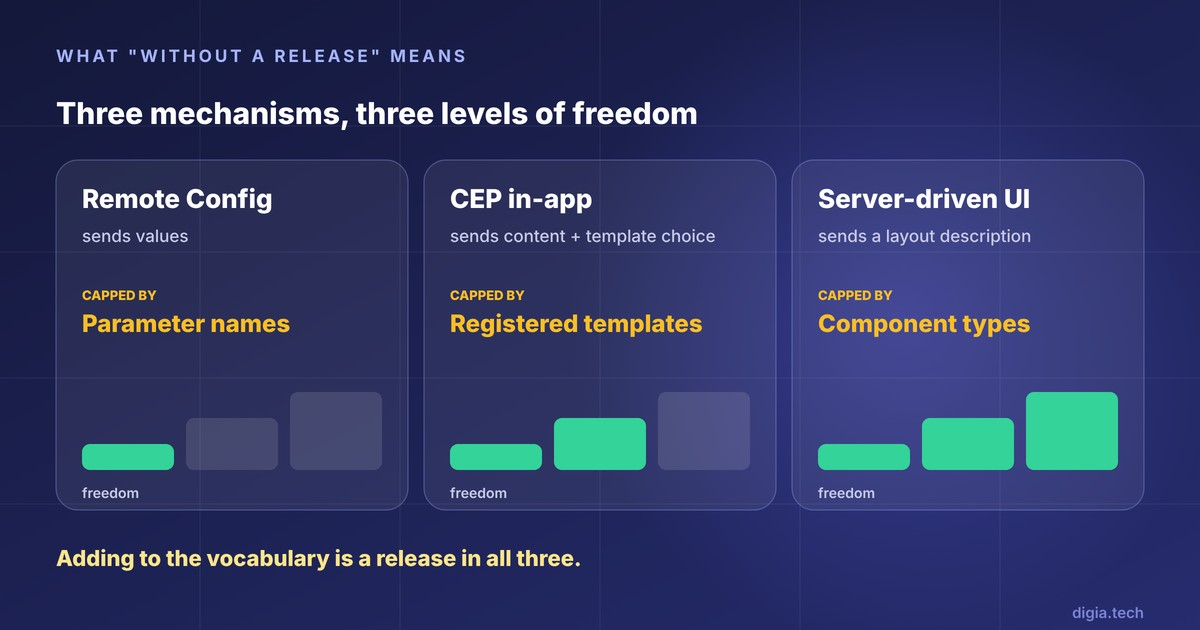
Remote Config sends values. A CEP in-app campaign sends content and a template choice. Server-driven UI sends a description of the layout itself. Each one can only express what the installed binary already knows how to draw, so the freedom is capped by a vocabulary: parameter names for Remote Config, registered templates for a CEP, component types for server-driven UI.
Adding a word to that vocabulary is a release in all three. Firebase's own guidance says to synchronize default parameter values with the backend whenever you update your app. CleverTap states that custom code templates must be registered before the SDK can process them. Nubank, with a mature server-driven framework, lists new device-level functions and new UI components as changes that still need a client release.
| Mechanism | What the server sends | What must already be in the app | What still needs a release |
|---|---|---|---|
| Remote Config | Parameter values and conditions | Code that reads each parameter, the UI it drives, and default values | A new parameter, or a new UI that reads it |
| CEP in-app | Campaign content, targeting, and a template choice | The CEP SDK and any custom code templates | A new custom template type |
| Server-driven UI | A UI description made of sections, screens, and actions | A renderer and every component the schema can name | A new component type or device function |
Ask every vendor, and your own platform team, how big the vocabulary is and who can extend it.
Why do store rules shape all three?
All three mechanisms ship data, because both stores restrict downloaded code. Apple's App Review Guideline 2.5.2 says apps may not download, install, or execute code that introduces or changes features or functionality of the app. Google Play's Device and Network Abuse policy says an app may not download executable code such as dex, JAR, or .so files from a source other than Google Play, and applies the same rule to third-party SDKs, with an exception for virtual machines and interpreters.
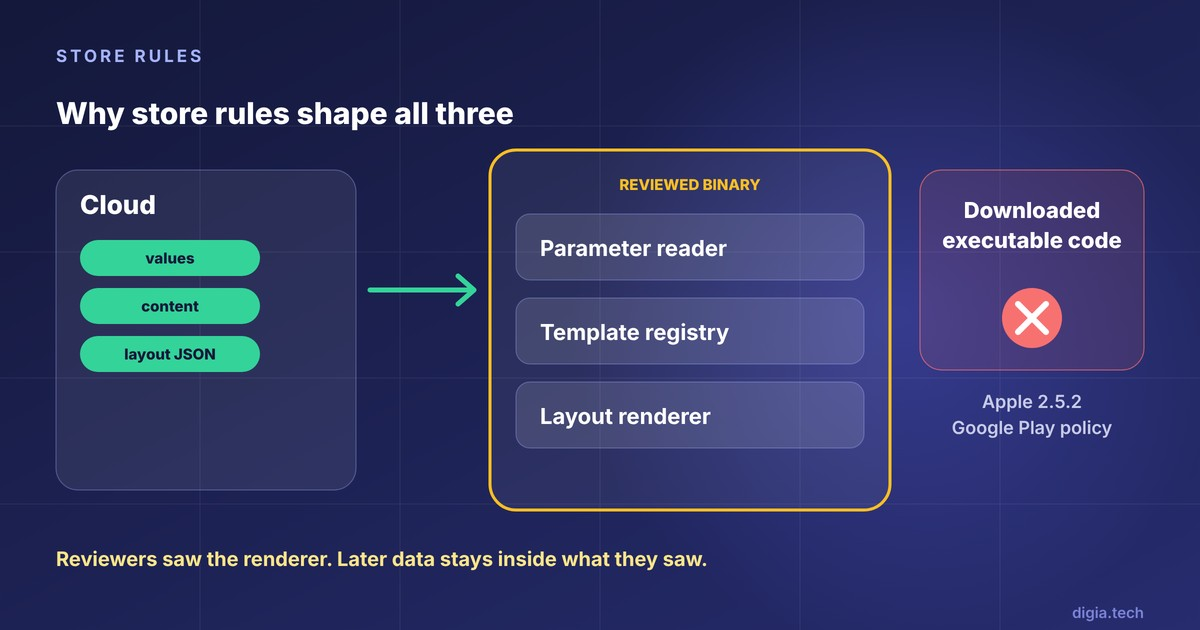
Firebase adds its own line for Remote Config: do not try to circumvent the requirements of your app's target platform.
The practical result is that reviewers see the full renderer, template registry, or parameter reader when the binary is submitted. Later data changes stay inside what they saw. A server-driven payload that makes a calculator app behave like a trading app would break the intent of the rule, even though no code is downloaded.
What about over-the-air JavaScript updates?
Tools that swap a JavaScript or web bundle after install are a fourth route, and they change code instead of data. Capgo's summary of Apple's license agreement says interpreted code may be downloaded when it does not change the app's primary purpose, does not bypass signing or sandbox protections, and does not create a store for other apps. We leave this route out of the comparison because it carries a different review risk and a different debugging model than the three data-driven options.
Remote Config: how far do parameters go?
What it does well
Firebase describes Remote Config as a cloud service that changes the behavior and appearance of your app without requiring users to download an update. Its documentation gives the standard example of a parameter used as a feature flag to change an app's layout or color theme for a seasonal promotion.
It also covers the plumbing a small team would otherwise build. Conditions target segments, A/B Testing and personalization sit on top, and real-time updates let active instances fetch new values as soon as they are published. Firebase describes it as a no cost tool within the Firebase platform.
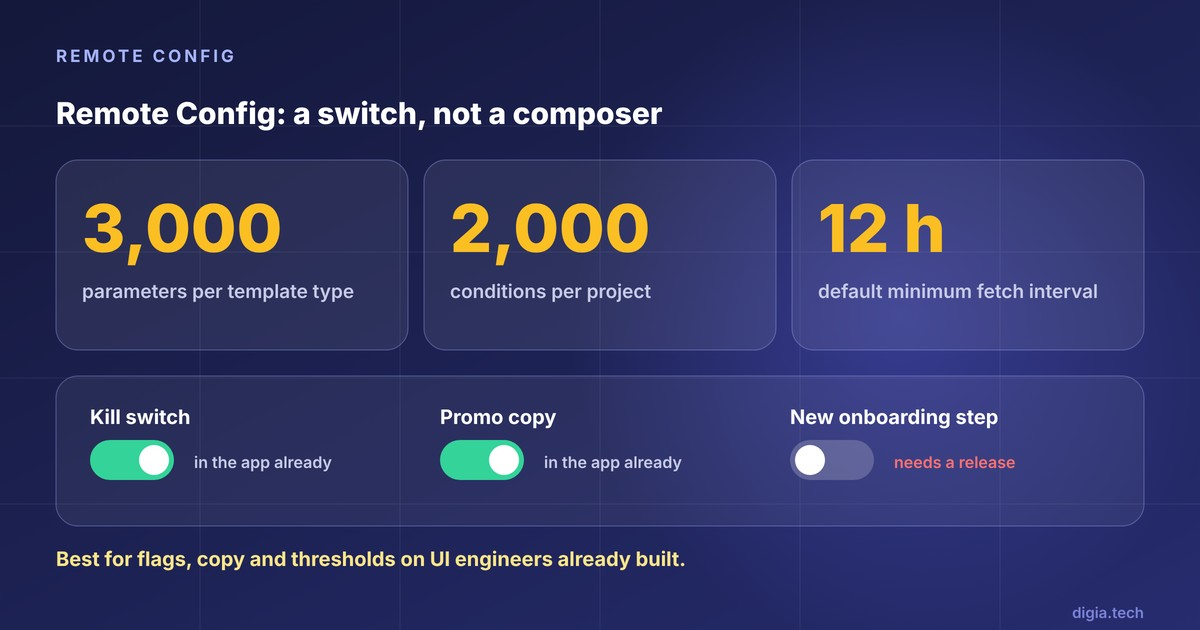
The documented limits are generous for most apps. A project can hold 3,000 parameters per template type and 2,000 conditions.
Where it stops
The UI has to exist in the binary before Remote Config can touch it. A parameter works like a switch, so a product manager can flip, tune, or relabel what engineers built, and cannot compose a new banner or a new onboarding step.
Timing depends on fetch settings. Firebase's own tutorial mentions a 12-hour default minimum fetch interval that teams can shorten, and real-time updates remove polling for apps that adopt them.
Values are also visible to users. Firebase warns that end users can access any default or fetched parameter available to their app instance, so confidential data does not belong there.
Remote Config models values and conditions. Campaign logic such as frequency caps, journeys, and send windows lives in your code or in another tool.
Best for: kill switches, feature flags, copy changes, thresholds, staged rollouts, and seasonal themes on UI your engineers already built.
CEP in-app messaging: how much can marketers build alone?
What it does well
CleverTap, MoEngage, and WebEngage all let marketers build in-app campaigns from a dashboard, and they bring something Remote Config does not have: audiences, triggers, and campaign orchestration tied to the same data as push and email.
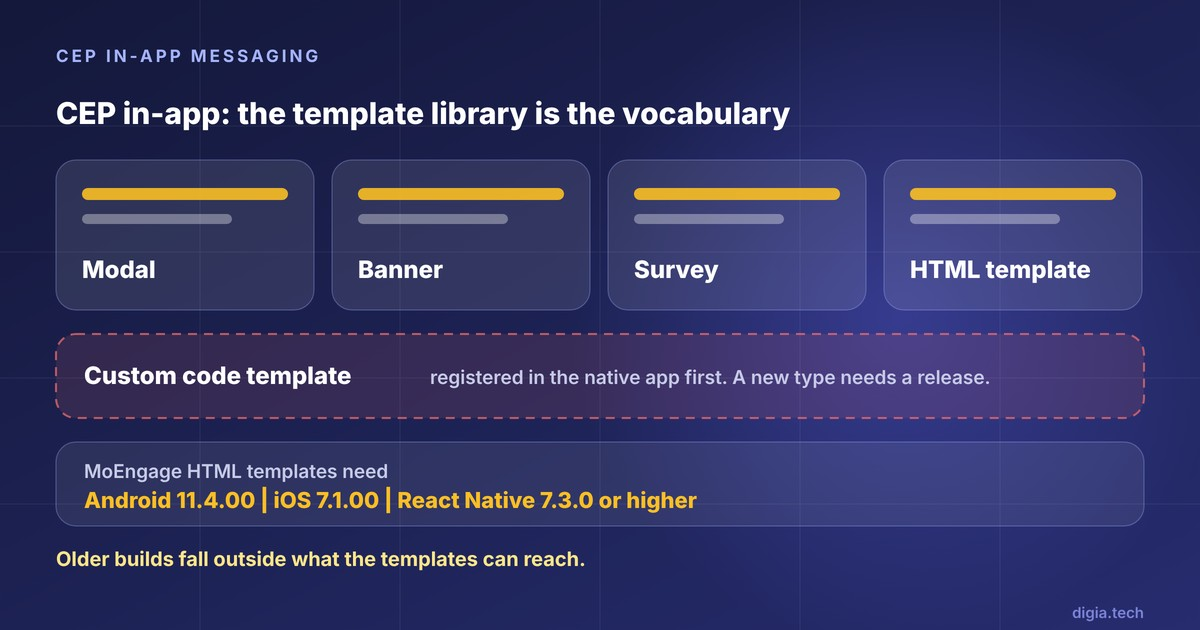
MoEngage's NATIV launch was pitched around customizable templates for size, color, shape, transparency, and position so campaigns appear natural to the app. Its HTML in-app templates let teams upload a ZIP or paste HTML while creating a campaign. CleverTap markets in-app messaging that can turn app UI elements into dynamic variables with no code changes or release cycles, which is a vendor claim worth testing against your own screens.
For a standard modal, banner, or survey, this is the lowest-effort route after Remote Config, and the audience logic comes included.
Where it stops
The template library is the vocabulary. MoEngage's HTML templates need Android SDK 11.4.00, iOS SDK 7.1.00, and React Native SDK 7.3.0 or higher, so users on older builds fall outside what those templates can reach.
CleverTap's custom code templates show where engineering re-enters. Templates must be registered in the native app, and syncing them to the dashboard can only be done in debug builds using a test user. Its Native Display feature delivers content units that your app code then handles and renders.
Layout depth varies by vendor. Plotline's comparison page claims that WebEngage in-app messaging supports only basic layouts and needs custom HTML or JavaScript beyond them. That comes from a competitor, so verify it in a demo, but ask each CEP what its templates cannot do before you commit a roadmap to them.
Best for: campaigns that reuse CEP segments and triggers, where the standard formats cover the design.
Server-driven UI: what does it take to change layouts?
What it does well
Server-driven UI sends the structure of a screen along with its data, and a generic renderer in the app draws it. Airbnb's engineers described three problems with client-driven UI: duplicated listing logic across clients, drift between web, iOS, and Android, and release lag. Their Ghost Platform answers with sections, screens, and actions defined by a single shared GraphQL schema for web, iOS, and Android.
Nubank gives the clearest numbers. Once a feature was built, reaching 85% of users through app releases took about 4 to 5 weeks, against about 20 minutes with its scripted framework. The same talk reports weekly app releases, more than 90% of screens built with the framework, and over 14,000 screens across geographies.
Where it stops
Airbnb's own write-up says the approach is complex, needs a carefully designed schema and client frameworks, and requires backward compatibility across components and actions. The article publishes no speed or adoption metrics.
Nubank lists its own limits: new components and device functions still need a client release, screens depend on connectivity (mitigated by caching), teams must learn a custom scripting language, and complex screens produce large payloads. Its third generation shows another failure: templates that fit almost but not exactly forced app releases for small variations.
Thoughtworks places the technique in Trial, and its April 2026 assessment cautions that a proprietary framework needs a large upfront investment and that careless designs turn into a hard-to-maintain "god-protocol". Its recommendation is to apply server-driven UI to the most dynamic areas of an app, and to skip it as a blanket replacement for native UI.
Build or buy
Airbnb and Nubank built their own, and both have large platform teams. A team with five mobile engineers faces a different calculation. A platform that ships a pre-built component library gives you a working vocabulary on day one, and you accept that its vocabulary becomes yours. Building gives you a vocabulary shaped to your product, and you pay for it in schema design, versioning, and a renderer on every platform you support.
Best for: products where screens change weekly, and teams that either have a platform group to build a framework or buy a layer that already has one.
Side-by-side comparison
| Dimension | Remote Config | CEP in-app | Server-driven UI |
|---|---|---|---|
| Unit of change | Parameter value | Campaign built from a template | Layout built from components |
| Who edits it | Engineers, or PMs with console access | Marketers and growth PMs | PMs and designers, if tooling exists |
| One-time engineering | Read parameters, set defaults | SDK install, plus custom templates if needed | Renderer, schema, component library |
| Adding something new | New parameter and UI need a release | New custom template needs a release | New component type needs a release |
| Targeting | Conditions and A/B Testing | CEP segments, events, and triggers | Whatever your backend or platform provides |
| How fast a change lands | Next fetch, or live with real-time updates | At the campaign trigger | Nubank reports about 20 minutes from deploy decision to screen |
| Documented limits | 3,000 parameters, 2,000 conditions | Template list and minimum SDK versions | Schema complexity, connectivity, payload size |
| Best fit | Flags, copy, thresholds | Standard campaigns on CEP data | Frequently changing layouts |
The old app version problem
Data changes reach every installed version, and old versions lack newer vocabulary. A payload that names a component the app has never heard of either breaks or falls back.
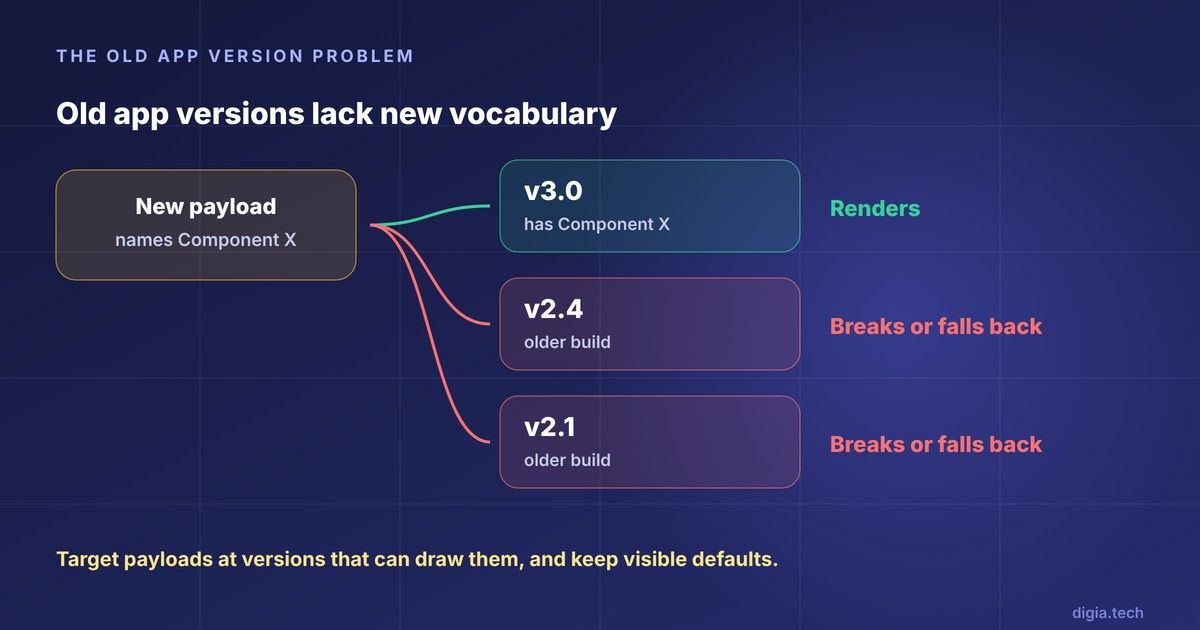
Each mechanism handles this differently. Remote Config relies on in-app defaults, and Firebase tells teams to keep them synchronized whenever the app updates. MoEngage ties HTML templates to minimum SDK versions, as shown above. Airbnb names backward compatibility across components and actions as a cost of the model.
Four habits help in all cases:
- Ship the renderer or template before you send content that needs it, then wait for adoption to climb.
- Target new payloads at app versions that can draw them.
- Keep a visible default for every remote value, so a failed fetch shows something sensible.
- Log which app version received each payload, so a broken screen can be traced to a version gap.
Where does Digia Engage fit?
Digia Engage sits in the server-driven category and works alongside a CEP. The CEP decides who gets a campaign and when. Digia renders the layout designed in Digia Studio, as native components with no WebView. Its docs describe the goal as no campaign UI code and no app release once the integration is in place.
Setup mirrors the pattern above. For CleverTap, a DigiaTemplate custom code template must be synced once per project from a test device, and the SDK has minimum versions per framework. The vocabulary is the component library Digia ships, which includes tooltips, bottom sheets, persistent banners, inline carousels, stories, surveys, and gamification mechanics. A component outside that list is a conversation with the vendor.
There is a gap to weigh. As of our November 2026 review, Digia's docs list the WebEngage plugin for iOS and React Native as coming soon, while Flutter and Android are available.
Which approach fits which team?
| If you need to | Start with | Why |
|---|---|---|
| Turn features on or off, tune thresholds, change copy | Remote Config | Cheapest path for values, and engineers keep control of UI |
| Run campaigns to CEP segments using standard formats | Your CEP's in-app channel | Audience and triggers already live there |
| Add tooltips, carousels, bottom sheets, or gamification beyond CEP templates | A server-driven layer alongside the CEP | Layout freedom without a custom framework |
| Rebuild core screens faster than the store allows | An in-house server-driven platform | Worth the cost only with a platform team |
| Add a device capability or change business logic | An app release | None of the three carry new native code |
Nothing stops a team from running all three. A common split is Remote Config for flags, the CEP for audiences and triggers, and a server-driven layer for the in-app surfaces. This is our recommendation and not a measured industry pattern.
What do engineers still own?
Even the best setup leaves engineering work that no dashboard removes:
- First integration. SDK install, identity wiring, and the one-time template or anchor setup.
- Vocabulary growth. Every new component, template, or parameter reader ships in a build.
- Fallbacks. Defaults for offline and failed fetches, plus a kill switch.
- Version policy. Deciding which payloads old builds receive and when to retire them.
The value of a good mechanism is that these tasks happen on the engineering team's schedule, and growth work runs between them.
Decision checklist
Ask these eight questions of any vendor, and of your own platform team if you are building.
- What can a product manager change without engineering after setup, and what needs a ticket?
- How large is the component or template vocabulary today, and who can extend it?
- How does the system treat users on old app versions?
- What does the user see if the fetch fails or the device is offline?
- How are changes previewed on a real device before they go live?
- Do experiences render natively, or through a WebView or HTML template?
- What are the minimum SDK versions for each framework we ship?
- How do we roll back a bad change, and how fast?
Key Takeaways
- Remote Config, CEP in-app tools, and server-driven UI all send data to code that store review already saw, and all three need a release to extend their vocabulary.
- Use Remote Config for values and flags, and a CEP for campaigns on existing segments. Reserve server-driven UI for layouts that change often.
- Nubank's reported 4 to 5 weeks versus 20 minutes shows the upside, and Thoughtworks' caution about upfront investment shows the cost of building your own.
- Plan for old app versions from day one, because data reaches them and new vocabulary does not.
Further Reading
From Digia
- Best In-App Tooltip Tools Triggered by User Behavior (2027)
- Best No-Code Tooltip and Coach Mark Tools for Mobile Apps (2027)
- In-App Engagement Trends for 2027
- In-App Nudges: What They Are, When to Use Them, and 12 Examples
- Best Mobile App Engagement Platforms in 2026: An Honest Comparison
External
- Airbnb Engineering: A Deep Dive into Airbnb's Server-Driven UI System
- InfoQ: Mobile Server-Driven UI at Scale (Nubank)
External Sources: All Claims Attributed
- Firebase Remote Config overview - Google Firebase docs
- Remote Config quotas and limits - Google Firebase docs
- Remote Config parameters and conditions - Google Firebase docs
- Introducing Remote Config real-time updates - Firebase Blog, June 2023
- Adding Firebase Remote Config to a Jetpack Compose app - Firebase Blog, November 2022
- App Review Guidelines - Apple, accessed November 2026
- Device and Network Abuse - Google Play policy
- Apple remote code execution and Capgo live updates - Capgo, secondary summary of Apple's license terms
- A Deep Dive into Airbnb's Server-Driven UI System - Ryan Brooks, Airbnb Engineering
- Mobile Server-Driven UI at Scale - Rafael Ring, Nubank, InfoQ
- Server-driven UI - Thoughtworks Technology Radar, April 2026 assessment
- MoEngage launches NATIV - VentureBeat
- HTML In-App Templates - MoEngage Help Center
- In-App Notifications - CleverTap (vendor claim)
- Flutter Custom Code In-App Templates - CleverTap developer docs
- iOS Custom Code In-App Templates - CleverTap developer docs
- iOS Native Display - CleverTap developer docs
- Best WebEngage alternatives - Plotline (competitor-published comparison)
- Digia Engage overview - Digia docs
- Digia CleverTap integration - Digia docs
Want to change in-app UI without an app release, using the CleverTap, MoEngage, or WebEngage segments you already run? Digia Engage renders tooltips, bottom sheets, carousels, stories, surveys, and gamification as native components from a dashboard and triggers them from the events you already track. Book a demo to see how it works.