




TL;DR: The most common reason personalization underperforms is not the algorithm, the platform, or the campaign strategy. It is that the data feeding the segments is wrong. Inconsistent event names, missing properties, unresolved user identities, and stale segments produce personalization that fires at the wrong users with the wrong context at the wrong time. This article covers what each category of dirty data breaks in personalization, how to design an event taxonomy that produces usable behavioral data, what the minimum viable data layer actually looks like, the freshness thresholds that matter for different use cases, how to govern data quality across a growth team, what CleverTap, MoEngage, and WebEngage specifically need from your event schema, and the audit checklist to assess readiness before investing further in platform capabilities. Sourcing note: All statistics are attributed throughout. Where claims are based on established data engineering principles rather than a single published study, that is noted.
Teams that struggle with personalization almost always frame the problem as a platform problem or a strategy problem. The platform is not powerful enough. The segmentation approach is not sophisticated enough. The campaigns are not targeted enough. So they upgrade platforms, redesign segmentation frameworks, and build more campaigns. The results improve marginally, if at all.
The actual problem, in most cases, is visible before any of this work begins. It is in the event schema. A product event called purchase in one part of the app and checkout_complete in another part. A user property called plan_type on iOS that does not exist on Android. An anonymous session that never resolves to the identified user profile when the user logs in. A segment built on behaviour from three months ago being used to deliver a real-time campaign today.
Messy, duplicated, and fragmented data is no longer a minor inconvenience. It has evolved into a full-blown crisis affecting organisations across industries. More than a quarter of organisations estimate annual losses exceeding USD 5 million due to poor data quality, according to Forrester. A 2025 IBM Institute for Business Value report found that 43% of chief operations officers cite data quality as their top data priority.
For mobile growth teams, the cost is not measured in financial losses reported in a board deck. It is measured in personalisation campaigns that fire on the wrong users, re-engagement nudges sent to users who are currently active, loyalty messages delivered with incorrect tier data, and onboarding flows shown to users who completed onboarding six months ago. Each of these is a data quality failure that disguises itself as a personalisation strategy failure.
This article is about identifying and fixing the actual failure before investing further in platform capabilities that will not solve a data problem.
The Dirty Data Problem: What Each Category Breaks
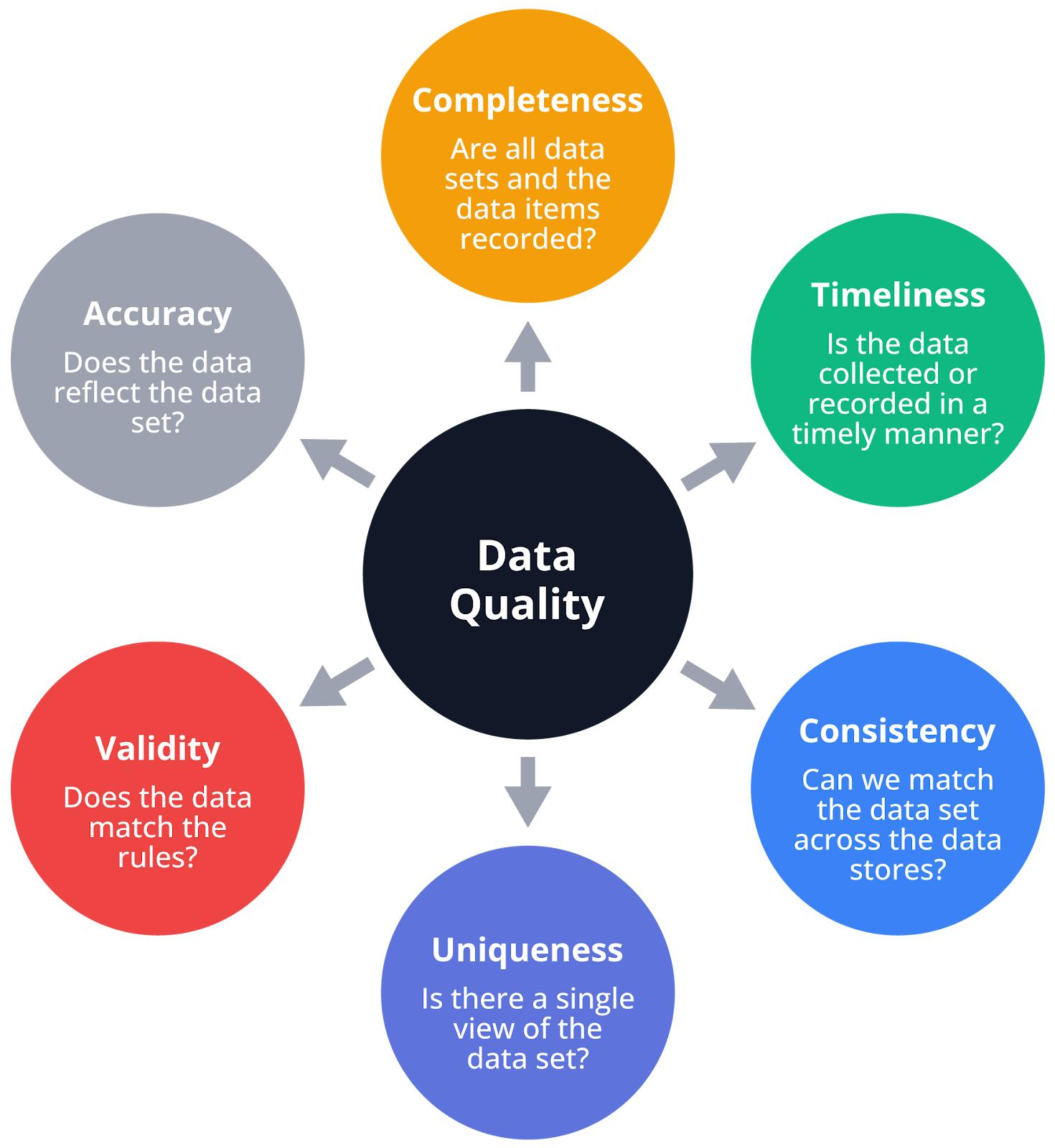
Dirty data in a mobile app context is not a single problem. It is four distinct categories of failure, each of which breaks personalization in a specific way. Understanding which category is causing the problem determines which fix is relevant.
Inconsistent event naming. When the same user action is tracked under different event names across different app versions, platforms, or teams, the segment that depends on that action produces fragmented counts. Messy taxonomies create duplicate events that split metrics across multiple lines. For instance, "sign-up", "sign_up", and "user_sign-up" might all track the same action, making conversion rates appear lower than they actually are. A segment built on checkout_completed misses all users whose purchase event was tracked as purchase_done or order_confirmed. The segment appears to have fewer qualified users than it does. Campaigns targeting that segment reach a fraction of the intended audience. The personalisation system does not throw an error. It quietly under-delivers.
Missing properties. Events that fire without the properties needed to qualify or contextualise them are events that cannot support the segmentation logic built on them. A product_viewed event without a category property cannot feed a segment for "users who viewed apparel this week." A transaction_completed event without an amount property cannot support an RFM model. User data with inconsistent schemas or missing consent tags cannot power real-time personalization without remediation overhead. The event is technically present in the schema. The segment that depends on it produces empty or unreliable cohorts.
Duplicate user identities. When the same user appears as multiple profiles in the platform, because their anonymous pre-login session was never merged with their authenticated session, or because they reinstalled the app and generated a new device ID, every segment that user qualifies for is split across their duplicate profiles. These variations create duplicate identities that fragment the customer profile. Without identity resolution, personalisation capabilities collapse. Instead of one unified customer profile, organisations end up with multiple fragmented profiles representing the same individual. Each system sees only a portion of the customer's behaviour, which leads to inconsistent messaging and inaccurate insights. The practical consequence: a user who has completed five transactions appears as two users who have completed two and three transactions respectively. Neither profile qualifies for the "high-value user" segment that requires four or more. The user receives no high-value treatment. They may receive new-user onboarding campaigns instead.
Unresolved attribution. When the data layer cannot reliably connect a user's acquisition source to their downstream behaviour, the segments built on acquisition channel produce unreliable cohorts. Users from paid campaigns are mixed with organic users in the same segment. A/B tests run on "paid acquisition users" include organic users. The attribution model tells one story. The actual composition of the segment tells another. Campaigns built on this segmentation are optimised against noise, not signal.
Dirty data can lead to poor decisions and planning due to outdated data and duplicate records, ineffective marketing campaigns and customer experience outcomes driven by incomplete customer data, and time-consuming data cleaning and reconciliation to correct errors.
The first step in any data foundation audit is identifying which of these four categories is present, in what volume, and in which parts of the event schema. Not all of them require the same fix, and attempting to fix all of them simultaneously without prioritising by impact is a common reason data quality projects stall.
Event Taxonomy Design: The Naming Conventions That Make Behavioral Data Usable
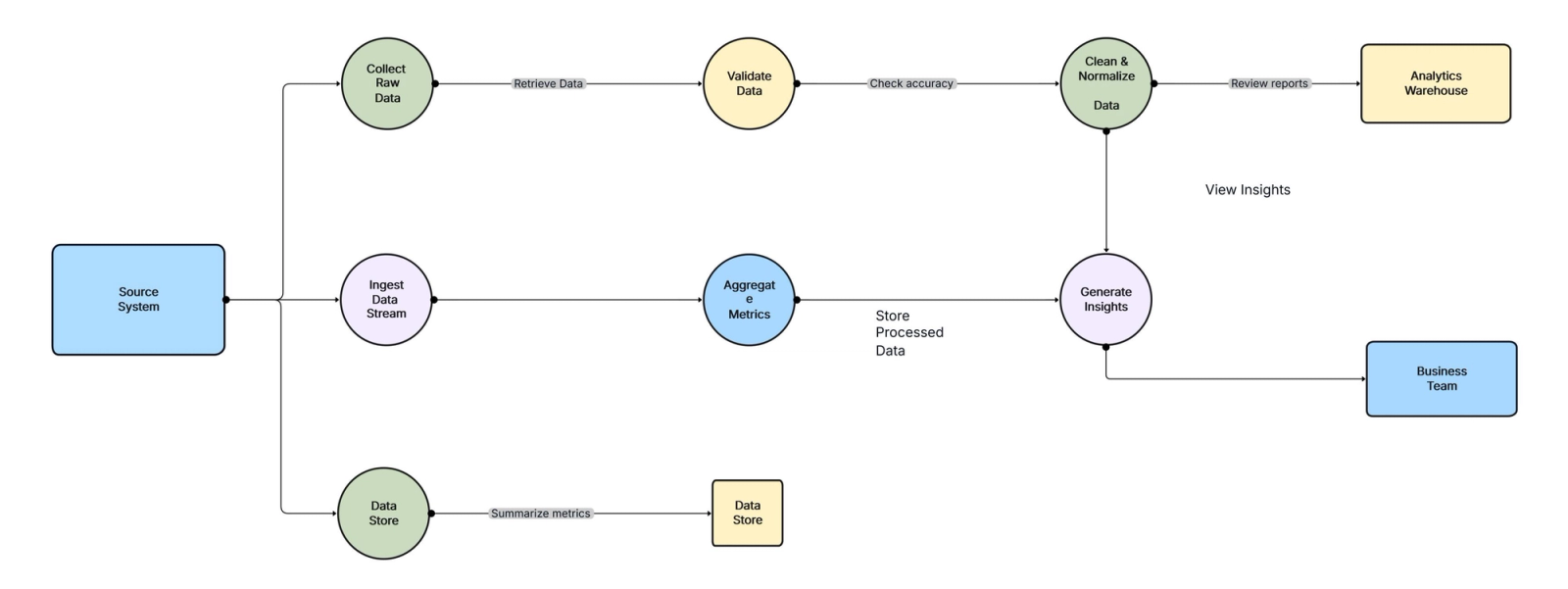
An event taxonomy is the structured framework that defines what gets tracked, what each event is called, what properties accompany it, and who is responsible for maintaining that structure over time. A durable event taxonomy typically includes both what to track and how to manage it, with an event naming convention covering consistent grammar, casing, and rules for plurals and synonyms.
The taxonomy is the foundation layer beneath every segment, campaign, funnel analysis, and A/B test in the personalisation stack. When the taxonomy is well-designed, behavioural data is immediately usable by any team member who understands the naming convention. When it is poorly designed or absent, data is only usable by the person who happened to instrument a specific event and who remembers what they named it.
The object-action naming pattern. Segment recommends Title Case for event names and snake_case for property names. Segment uses the Object + Action framework for event names: the object represents what was acted upon, the action represents what happened. Applied consistently: product_viewed, cart_updated, checkout_completed, subscription_started, feature_accessed. The pattern produces event names that read as self-explanatory statements of user behaviour. Anyone reading the schema understands what each event represents without needing documentation to decode it.
The alternative, UI-surface naming (homepage_button_clicked, settings_icon_tapped, modal_closed), describes the interface element rather than the user's intention. Ideally events should describe the actions users are taking independent of specific buttons. The "Product Added" event, for instance, should be the same whether the user updates their cart from the product detail page, a quick-add modal on the product list page, or a recommended products component. For information about the button itself, just pass the location of the button as a property in the event. Interface elements change when design updates. The underlying user action does not. An event taxonomy built on UI surfaces breaks every time the app is redesigned.
Property standards. Properties are the context that makes events segmentable. An event without properties is a count. An event with well-defined properties is a segmentation input. Establish consistent syntax using lowercase letters, underscores, and verb-noun patterns. Property names follow the same rules with stable data types: prices as numbers, currencies as standardised codes, timestamps in ISO format.
The minimum property set for each event category: user identity (who did this), timestamp (when they did it), session context (which session this belongs to), platform (iOS, Android, web), and the event-specific properties that make it segmentable. For a transaction_completed event, that minimum set includes transaction_id, amount, currency, payment_method, and product_category. For a feature_accessed event, it includes feature_name, access_method, and time_in_feature.
The tracking plan as a single source of truth. An event dictionary is the single source of truth for analytics. Without it, the implementation will have inconsistent implementations and unanswerable questions about what events mean. The event dictionary should be stored in a shared document accessible to all teams. The tracking plan is the document where every event, its properties, their data types, and their expected values are defined and maintained. It is not an engineering artifact. It is a cross-functional contract between product, engineering, analytics, and growth teams. Every team that consumes event data should be a contributor to the tracking plan, because the teams consuming the data are the ones who know what properties they need for their segmentation logic.
Versioning and schema migration. Event taxonomies change as products evolve. New features require new events. Deprecated features leave orphaned events in the schema. The safest approach to renaming events: add the new event alongside the old one, run both for a transition period, then remove the old event. Running both for a transition window allows historical data queries to continue working while new data flows into the correctly named event. Teams that rename events without a transition period break every historical analysis that depended on the old name, including the retention cohorts and funnel analyses that the personalisation strategy is built on.
User Identity Resolution: What Happens to Personalization When the Same User Has Multiple Profiles
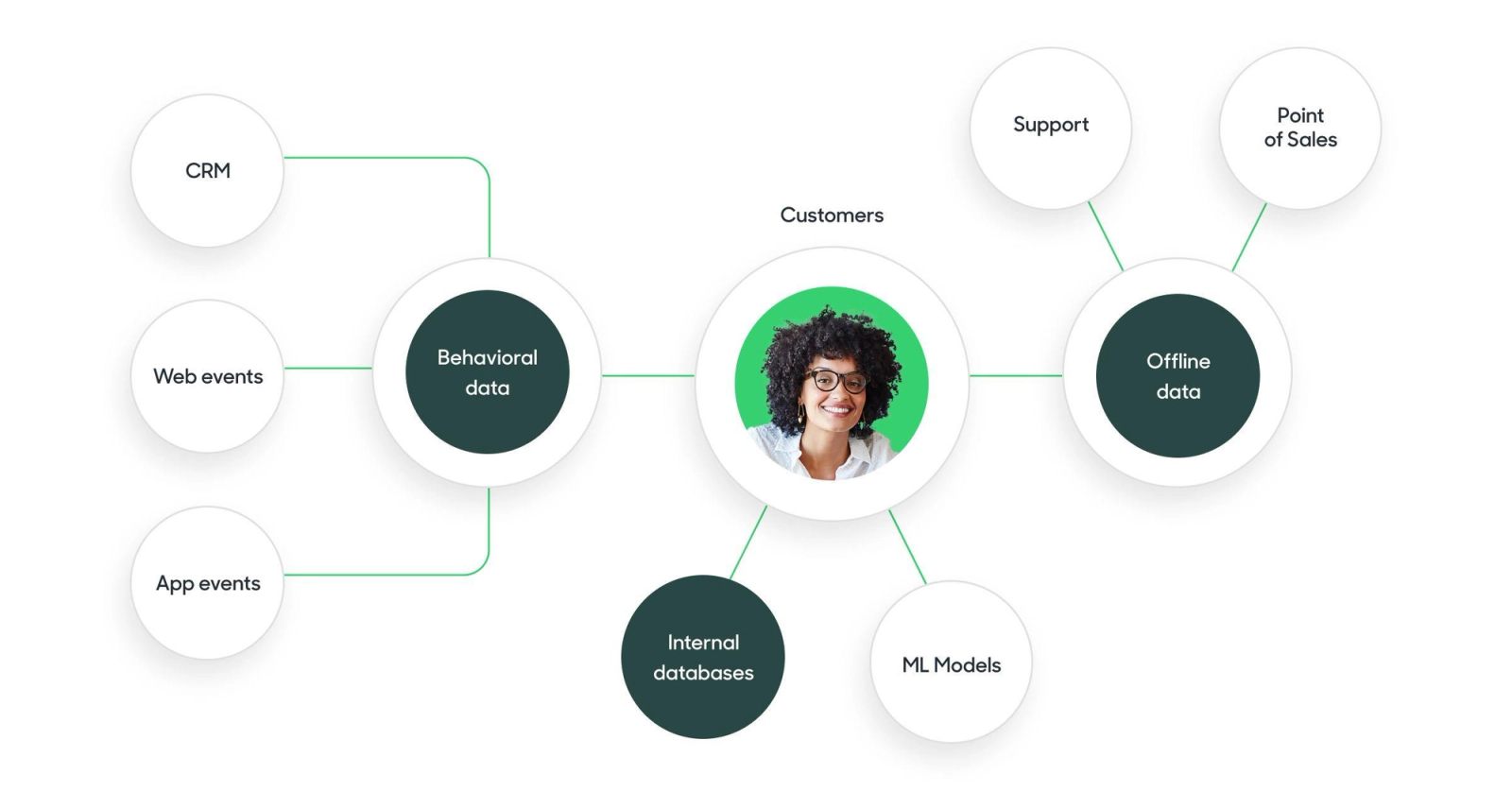
Identity resolution is the process of connecting all the signals generated by a single user across sessions, devices, and install cycles into one unified profile. As customers interact with brands across multiple channels and devices, and over longer periods of time, data becomes fragmented and difficult to unify. Identity resolution is the process that connects these signals into a unified customer profile, enabling more personalised marketing and customer experiences.
In a mobile app context, the specific identity resolution problems that break personalisation are:
Anonymous-to-identified transition. Every new app session begins with an anonymous user ID, typically a device or session identifier. When the user logs in or creates an account, the session should be merged with their known profile. When this merge does not happen correctly, the user's pre-login behaviour (product views, feature exploration, onboarding steps completed) is orphaned in the anonymous profile and never attributed to the identified user. The same individual may appear multiple times in a system due to small variations in identifying data. These variations create duplicate identities that fragment the customer profile. A user who spent 20 minutes exploring the app before logging in and then completed a transaction appears as two separate profiles: an anonymous profile with rich exploration behaviour and a logged-in profile with only the transaction. The logged-in profile does not receive personalisation based on the exploration behaviour because the system does not know it belongs to the same user.
Multi-device identity. A user who uses the app on both a phone and a tablet generates separate device IDs. Without identity stitching across devices, their behaviour on each device is tracked as a separate user. Fragmented data can lead to inaccurate measurement and reporting, which can impact business decisions and ROI. One of the biggest contributors to fragmented data is the rise of digital channels and devices. Consumers today interact with brands across multiple touchpoints. Each of these touchpoints generates data, but it is often siloed and disconnected from other sources. A segment for "users who have completed at least three sessions this week" may miss users who completed two sessions on each device, because neither device-level profile meets the threshold independently.
Re-install cycles. When a user uninstalls and reinstalls the app, the new install generates a new device ID. The new device ID begins its profile history from zero. The returning user, who may have a significant transaction history and behavioural profile from their prior install, is treated as a new user. They receive new-user onboarding nudges, first-time-user offers, and activation campaigns that they have already been through. The experience is at best confusing and at worst trust-damaging.
The technical fix for all three of these scenarios is a consistent identity graph: a persistent mapping of every identifier that belongs to the same user. The identity graph maps device IDs, session IDs, email addresses, phone numbers, and any other identifier used by the app to a single canonical user ID. When a new identifier is encountered, it is matched to the canonical ID through deterministic matching (same email or phone number) or probabilistic matching (same device fingerprint, overlapping behaviour patterns).
By linking these identifiers, identity graphs enable brands to understand who their customers are, no matter where or how they interact. This improves the precision of ads, marketing campaigns, and personalisation, ultimately leading to greater customer engagement.
For CleverTap, MoEngage, and WebEngage, the identity graph is built by passing a consistent user identity value at every login event. The identify call should fire at every authenticated session start, not just at account creation. The identity value should be the same canonical user ID across all platforms (iOS, Android, web). The anonymous-to-identified merge should be explicitly triggered at login and verified in the platform's user profile view before building segments that depend on pre-login behaviour.
The Minimum Viable Data Layer: What a Team Actually Needs Before Segmentation Produces Reliable Results
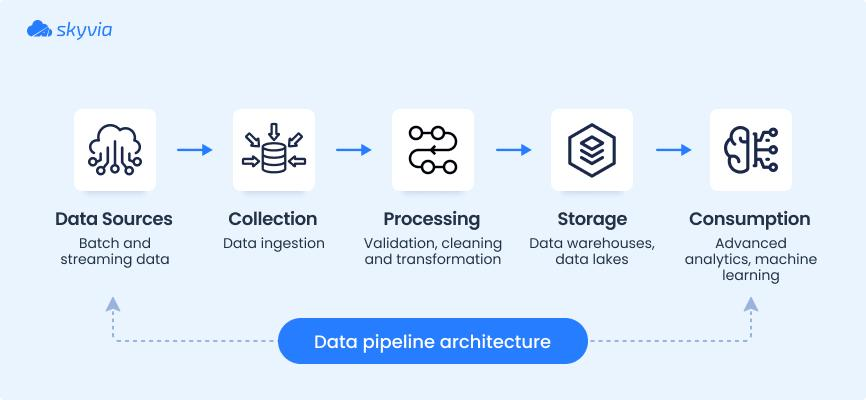
There is a minimum viable data layer below which behavioral segmentation does not produce reliable segments regardless of the sophistication of the platform or the strategy. Investing in personalisation platform capabilities before reaching this minimum is equivalent to building a house on a foundation that has not cured.
The minimum viable data layer for behavioral segmentation has five components:
A resolved user identity. Every event in the data layer is associated with a canonical user ID that is consistent across sessions, devices, and install cycles. The anonymous-to-identified merge is implemented and verified. Multi-device sessions resolve to the same profile.
A documented event taxonomy with at least 10 to 15 core events. Segment recommends starting with fewer events that are directly tied to business objectives. This focused effort helps avoid a situation where teams become overwhelmed by endless possible actions to track. The core events are those that represent the actions most directly tied to activation, retention, and monetisation. For a fintech app: app_opened, kyc_started, kyc_completed, transaction_initiated, transaction_completed, feature_accessed, investment_made, account_linked, support_contacted, app_backgrounded. For an e-commerce app: product_searched, product_viewed, cart_added, cart_removed, checkout_started, checkout_completed, order_cancelled, review_submitted, wishlist_added, return_initiated. Each of these events has a defined property set. None of them is instrumented inconsistently across platforms.
A user property set that covers lifecycle stage, account attributes, and key behaviour indicators. User properties are the persistent attributes of the user, updated as their state changes. The minimum set: lifecycle_stage (new, activated, retained, lapsed, churned), account_created_date, plan_type or subscription_tier, kyc_status (for fintech apps), last_active_date, total_transactions or total_orders, and primary_feature_used. These properties power the lifecycle-stage segmentation that is the first tier of any behavioural personalisation strategy.
A verified data ingestion pipeline. Events should be confirmed to be reaching the platform with their properties intact and with expected volume. A product event that fires correctly on 70% of eligible sessions but drops on 30% because of an instrumentation bug produces a segment that covers 70% of the intended audience. The 30% gap is invisible unless the team is actively monitoring event volume against expected baselines. Every core event should have a defined expected volume range, with monitoring that alerts when actual volume falls outside that range.
A clean attribution record for at least the last 90 days. Attribution data connects acquisition source to downstream behaviour. Without it, segments built on channel-specific criteria are unreliable. The attribution record should track which channel brought each user into the app, when they were acquired, and which campaign or creative was the entry point. This does not require a complex multi-touch attribution model. First-touch attribution with consistent UTM parameter handling is sufficient for most early-stage segmentation needs.
Below this minimum, personalisation campaigns will reach wrong users, fire on incomplete profiles, and produce performance data that cannot be diagnosed because the underlying data cannot be trusted.
Data Freshness: How Stale Data Creates Stale Segments
Data freshness is a dimension of data quality that is distinct from accuracy and completeness. A data record can be accurate and complete while still being stale: correct information about a past state of the user that no longer reflects their current context. What distinguishes data staleness from other quality dimensions is its relationship to time and timeliness. A dataset can be complete and internally consistent while still being stale.
In personalisation, staleness is particularly damaging because personalisation is a present-tense activity. The user is in the app now. The segment they belong to should reflect who they are now. A segment built on behaviour from 45 days ago and refreshed on a nightly batch cycle tells the system who the user was 45 days ago, not who they are today.
Marketing campaigns targeting customers based on segmentation that refreshes nightly operate on 24-hour-old profiles. Inventory decisions made from overnight warehouse refreshes miss intraday demand shifts. For real-time in-app personalisation, 24-hour-old profiles are an eternity. A user who completed their first transaction at 9 AM and then returned to the app at 11 AM should be in the "activated user" segment by 11 AM, not after the next nightly batch refresh.
The staleness thresholds that matter for different use cases in mobile personalisation:
Real-time event triggers: sub-second to 2 seconds. When a personalisation trigger fires based on a user completing a specific action in the current session (transaction completed, onboarding step finished, feature accessed for the first time), the segment evaluation must happen in real-time. A trigger that fires 30 minutes after the qualifying event is not a real-time trigger. It is an approximation that misses the contextual window when the personalisation would have been most effective.
Lifecycle stage segments: within 15 to 60 minutes. A user who completes KYC and moves from "registered" to "activated" should be in the activated segment within an hour, not at the next nightly refresh. Campaigns targeting the "registered but not activated" segment should stop reaching this user within the same hour.
Behavioural segments (recent activity): within 24 hours. Segments defined by activity in the past 7 or 30 days are recalculated when the rolling window moves forward. A 24-hour refresh cadence is adequate for these segments because the window is long enough that single-day variations do not materially change segment membership.
RFM and historical behaviour segments: 48 to 72 hours acceptable. Segments built on aggregated behaviour across months are inherently less time-sensitive. A user's RFM tier does not change meaningfully in a day. These segments can tolerate longer refresh cycles.
According to Gartner research on data quality, poor data quality including staleness costs organisations an average of $12.9 million annually. Freshness requirements vary by use case: real-time personalisation needs second-level updates, while analytics dashboards can work with daily refreshes.
The practical test for staleness in a mobile app data layer: instrument three core lifecycle transition events and measure the time between the event firing and the user's segment membership updating in the personalisation platform. If that time exceeds 60 minutes for lifecycle transitions, the data pipeline has a staleness problem that no amount of campaign strategy will fix.
Data Governance for Growth Teams: Who Owns What and How to Prevent Schema Drift
Schema drift is the gradual divergence of a data schema from its documented specification, caused by undocumented changes to event instrumentation, new events added without following the naming convention, and properties added or removed without updating the tracking plan. The biggest issues are inconsistent naming, missing required properties, tracking too much noise, and failing to implement governance. Any of these can break reporting even if events are technically firing.
Schema drift is a governance failure, not an engineering failure. The engineers who added the new events were building features. The problem was the absence of a process that required them to update the tracking plan and follow the naming convention before shipping the instrumentation.
The governance model that prevents schema drift has four components:
Defined ownership. One person or team owns the tracking plan and is responsible for its accuracy and completeness. Analytics or data teams govern standards, product teams define key behaviours, and engineering implements instrumentation. Clear approval and change management prevents taxonomy drift. The tracking plan owner approves all new events before they are instrumented. They review every sprint's data-related changes against the tracking plan. They conduct a quarterly audit of events in the platform against events in the tracking plan to identify any that were added without documentation.
A change management process for schema updates. Any new event or property must go through a lightweight approval process: the tracking plan owner reviews the proposed name and property set for compliance with the naming convention, approves or requests changes, and updates the tracking plan before the code is shipped. This process does not require a lengthy governance review. It requires a Notion or Confluence document that is the single source of truth, and a policy that no event ships without a corresponding tracking plan entry.
Automated schema validation. Store the tracking plan in an authoritative location (schema registry, dedicated repo, or a tracking-plan tool) and use automated validation against it. Segment Protocols and Amplitude Governance features surface violations and support approvals. Automated validation compares incoming events against the tracking plan specification and surfaces violations: events with unrecognised names, events missing required properties, properties with wrong data types. Without automated validation, schema drift is only discovered when someone tries to build a segment that depends on an event and finds the data is wrong.
A regular data quality audit. Once per quarter, the tracking plan owner pulls the full list of events and properties from the personalisation platform and compares them against the tracking plan. Events present in the platform but absent from the tracking plan are either undocumented additions (fix: document them or remove them) or events from a previous version that were deprecated without being removed from the schema (fix: discard and remove). Events present in the tracking plan but absent from the platform are either planned events that have not been instrumented (fix: schedule for instrumentation) or events that stopped firing because of a code change (fix: diagnose and restore the instrumentation).
The audit is not a complex data engineering exercise. It is a structured comparison between what is documented and what is present. The gap between those two is the schema drift accumulated since the last audit.
Tool-Specific Data Requirements: What CleverTap, MoEngage, and WebEngage Need
Each of the three dominant customer engagement platforms used by Indian mobile growth teams has specific data architecture requirements that determine what personalisation is possible within the platform. Understanding these requirements before designing the data layer prevents building an event schema that cannot support the segmentation logic the team needs.
CleverTap.
CleverTap is built on a real-time streaming architecture, ensuring that customer segmentation, evaluation, and event-triggered messaging are instantaneous. CleverTap ingests and processes up to 10,000 data points per user per month, with a 10-year lookback period. Every single data point is actionable, enabling precise segmentation, real-time engagement, and long-term retention strategies.
What CleverTap needs from the data layer to produce this: a consistent user identity passed at every identify call, event names that are stable (CleverTap's schema manager locks event names once they are published and does not allow renaming without discarding the event), and event properties with correct data types (CleverTap enforces type matching: a property expected as a number that arrives as a string is silently dropped). The event name cannot be changed after the event is published. If an event property comes in with the same name as a discarded property, it is considered undefined. This makes pre-instrumentation taxonomy design more critical for CleverTap than for platforms with more flexible schema management: decisions made at instrumentation time are difficult to reverse without losing historical data continuity.
CleverTap's Intent-Based Segments and RFM analysis both require sufficient event history per user. A user with fewer than 10 qualifying events in the lookback period produces unreliable predictions. Teams implementing CleverTap's AI segmentation features should ensure that core action events are firing consistently across the user base before enabling predictive segments.
MoEngage.
MoEngage's actionable lookback period is limited to 2 to 3 months. Events stored for more than 3 months become non-actionable for segmentation or engagement, making it challenging to deliver personalised data-driven experiences. Real-time engagement is guaranteed only for filter queries within the last 30 days and is restricted to six messaging channels.
This has a direct implication for data layer design for teams using MoEngage: the event schema must prioritise the events and properties that support segmentation within the 30 to 90 day window. Long-arc behavioural signals (user behaviour from 6 months ago, historical transaction patterns) cannot be used for active segmentation in MoEngage without additional infrastructure. For teams that need to personalise based on long-term user history, this limitation means either supplementing MoEngage with a data warehouse that can answer longer lookback queries, or migrating to a platform with longer actionable retention.
MoEngage's Sherpa AI engine for send-time optimisation and channel selection works best when event data is consistent and complete: the AI needs sufficient signal across multiple users to learn reliable patterns. Incomplete event schemas, where the same action is tracked inconsistently, produce noisy training data that degrades the AI's recommendations.
WebEngage.
WebEngage's strength is its visual journey builder and its accessibility for non-technical marketing teams. WebEngage is beloved by teams without heavy technical support because it makes complex multi-step journey logic visually intuitive. The platform excels at visual journey orchestration for non-technical teams.
The data layer requirement for WebEngage to deliver on this strength: the event schema must be sufficiently simple that non-technical users can build journey conditions without needing engineering support to interpret what the data means. An event schema with 150 events and inconsistent naming produces a journey builder experience where the non-technical user cannot determine which event represents the action they want to trigger on. The more accessible WebEngage's interface, the more important that the underlying data is named intuitively and documented consistently.
WebEngage's data ingestion error detection (available in higher-tier plans) surfaces events that arrive with schema violations, which provides a native data quality monitoring mechanism. Teams using WebEngage should enable this feature and review the error reports regularly as part of their data governance process.
For all three platforms, the common requirements are:
A canonical user ID that is the same value across iOS, Android, and web SDKs. An identify call that fires at every authenticated session start, not just at account creation. Core events that cover activation (first transaction, KYC completion, first feature use), retention (repeat session, repeat transaction), and monetisation (purchase, subscription start, upgrade). User properties that are updated as the user's state changes, not just set once at registration. And a data validation process that confirms events are reaching the platform with correct property types before the team builds campaigns that depend on them.
The Segment Evaluation Problem: What Bad Segments Actually Look Like in Campaign Data
Segment quality problems have a specific signature in campaign performance data that teams often misdiagnose as creative or strategy failures. Recognising the signature is the first step toward identifying that the problem is in the data layer.
A campaign with high delivery volume but unexplainably low conversion. When a campaign reaches a large number of users but converts at a rate far below what the target behaviour would predict, the segment likely includes users who do not actually exhibit the qualifying behaviour. The segment filter is mis-specified because the event it depends on is named inconsistently or fires with missing properties. The campaign is delivering broadly to users who partially match the filter, not to users who precisely match it.
A lifecycle campaign that reaches users who have already completed the target action. An activation campaign designed for users who have not yet made their first transaction that delivers to users with 10+ transactions is an identity resolution failure. The user's transaction history is on a different profile (a previous install's profile, or a merged profile that has not been resolved). The activation filter sees a user with no transactions. The actual user is far beyond the activation stage. Personalization only works when an organisation can accurately recognise the customer across interactions. When identity resolution fails, the result is fragmented experiences that confuse customers, undermine personalisation, and ultimately damage trust.
A segment that grows unexpectedly after a release. When a new app release introduces a differently named version of an existing event, the segment built on the old event name loses the users whose behaviour is now being tracked under the new name. The segment shrinks. A parallel segment built on the new event name grows. Both are counting the same behaviour, but they are split because the naming changed. This is the real-time consequence of schema drift.
A campaign that underperforms on Android relative to iOS. Platform-specific segment underperformance often indicates that an event or property is instrumented on iOS but missing on Android, or vice versa. The segment appears healthy in aggregate because iOS users inflate the overall event count. Android users who qualify for the segment based on their behaviour are absent from it because the data was never captured.
Each of these signatures is diagnosable by comparing the segment's expected membership against its actual membership using the tracking plan as a reference. The investigation follows the same structure: which event does this segment depend on, is that event firing correctly with its required properties, and is the user's identity resolved consistently enough to attribute the event to the right profile?
The Data Readiness Audit: How to Assess the Current Data Layer Before Investing in Platform Capabilities
The data readiness audit is a structured assessment of the current data layer's fitness for behavioral segmentation. It produces a clear picture of which components are in place, which are missing, and which are degraded. The output is a prioritised list of fixes, ordered by the impact each fix has on segmentation reliability.
The audit has seven sections:
Section 1: Identity resolution check. Pull 20 random user profiles from the personalisation platform. For each profile, check whether the anonymous-to-identified merge has occurred (the profile has both anonymous session history and identified session history connected under one canonical ID), whether the identify call fires at session start (not just at account creation), and whether users known to have used the app on multiple devices appear as a single profile or as multiple profiles. If fewer than 15 of the 20 profiles pass all three checks, identity resolution is the priority fix before any other data quality work.
Section 2: Core event coverage check. List the 10 to 15 core events that represent your app's activation, retention, and monetisation behaviour. For each event, check whether it is present in the platform's schema, whether it fires with the expected frequency (volume monitoring), whether it fires with all required properties (property completeness check), and whether its name is consistent across iOS, Android, and web. Score each event on these four dimensions. Any event that fails on two or more dimensions is an unreliable segmentation input.
Section 3: Property completeness check. For each core event, pull the property completion rate: what percentage of event instances include each required property. A transaction_completed event where amount is missing on 30% of instances is a broken segmentation input for any segment that filters by transaction value. Target a property completion rate above 95% for all properties defined as required in the tracking plan.
Section 4: Naming convention consistency check. Export the full event list from the platform. Look for events that appear to track the same behaviour under different names (purchase, buy_now, checkout_completed, order_placed). Look for case inconsistencies (AppOpened, app_opened, APP_OPENED). Count the total number of unique events. For most mobile apps with fewer than 50 features, a schema with more than 100 distinct events indicates event proliferation caused by undocumented additions rather than genuine behavioural diversity.
Section 5: Data freshness check. Trigger a core lifecycle transition event in a test user profile (complete a transaction, complete onboarding, or whatever the most important lifecycle transition in the app is). Measure the time between the event firing and the user's segment membership updating in the platform. If this time exceeds 60 minutes, the data pipeline has a staleness problem.
Section 6: Tracking plan coverage check. Compare the list of events in the platform against the tracking plan. Calculate: what percentage of events in the platform are documented in the tracking plan? What percentage of events in the tracking plan are present and firing in the platform? A documentation coverage rate below 80% indicates significant schema drift.
Section 7: Attribution data check. For 10 recent new users, verify that their acquisition source is correctly attributed in their profile. Check that UTM parameters are being captured and passed to the platform at install. Verify that paid and organic users can be reliably separated in segment filters. If attribution data is missing or unreliable for more than 2 of the 10 users, attribution-dependent segments are unreliable.
The audit outputs a readiness score across these seven dimensions. Teams with scores below 60% across the seven sections should prioritise data quality fixes before investing in new platform capabilities, segment designs, or campaign strategies. The platform cannot personalise reliably on data that fails these checks. No additional platform feature will compensate for a data layer that does not meet the minimum standard.
What the Data Foundation Enables Downstream: The Payoff
The reason to invest in data quality before personalisation capability is not just avoiding bad campaigns. It is enabling the campaigns and segmentation strategies that are simply impossible on dirty data.
Intent-based segments in CleverTap that predict purchase probability require clean event history across users. A model trained on fragmented, duplicate profiles learns patterns from noise. A model trained on clean, resolved profiles learns patterns from genuine behaviour. A stale identity graph does not produce a single misfire: it produces a repeating pattern of misfires that the system reinforces through continued decision-making.
Lifecycle orchestration across onboarding, activation, and retention requires that the platform knows, in real-time, which lifecycle stage each user is in. That requires accurate lifecycle-stage user properties, updated within the freshness thresholds that match each stage's time-sensitivity. A lifecycle campaign built on a data layer that meets the minimum viable standard can target users at the right stage with the right message. A lifecycle campaign built on a data layer that fails the audit fires the wrong messages at the wrong people, not because the campaign logic is wrong, but because the stage attribution is wrong.
RFM segmentation for Digia Engage's gamification campaigns (scratch cards, spin-the-wheel mechanics tied to transaction frequency) requires accurate transaction event data with correct amount and frequency properties. A user whose transaction events are split across two duplicate profiles does not qualify for the high-frequency segment that would make them a logical target for the daily spin mechanic. The clean data layer is what connects the personalisation strategy to the users it is designed for.
Digia Engage's event-based trigger architecture fires within 100ms of a qualifying event. That speed is only useful when the underlying event is correctly instrumented, consistently named, and includes the properties needed to evaluate the trigger condition. A sub-100ms trigger on a poorly instrumented event is a fast delivery of the wrong nudge to the wrong user. The infrastructure speed multiplies data quality, for better or worse.
Key Takeaways
The most common reason personalisation underperforms is not platform capability or campaign strategy. It is that the data feeding the segments is wrong. Dirty data produces four specific failure types: inconsistent event naming that splits segment counts, missing properties that break segment filters, duplicate user identities that fragment profiles, and unresolved attribution that contaminates channel-specific segments.
An event taxonomy built on the object-action naming pattern, with snake_case event names and a documented property set for each event, produces data that is immediately usable for segmentation. An event dictionary stored in a single accessible location and maintained by a named owner is the governance mechanism that keeps the taxonomy accurate over time.
User identity resolution connects all signals generated by a single user across sessions, devices, and install cycles into one canonical profile. Without it, lifecycle segments, RFM models, and multi-session behavioural triggers produce fragmented and unreliable results.
The minimum viable data layer for behavioural segmentation requires: a resolved user identity, 10 to 15 documented core events with complete property sets, lifecycle-stage user properties updated in real-time, a verified data ingestion pipeline with volume monitoring, and a clean attribution record for the last 90 days.
Data freshness thresholds vary by use case. Real-time event triggers require sub-second segment evaluation. Lifecycle transitions should update within 60 minutes. Rolling-window behavioural segments can tolerate 24-hour refresh cycles.
Schema drift is a governance failure. Preventing it requires a tracking plan owned by a named person, a change management process that requires plan updates before instrumentation ships, automated schema validation, and a quarterly audit of platform events against the plan.
CleverTap requires stable event names (they cannot be changed post-publication), correct property types, and a consistent canonical user ID at every identify call. MoEngage's 30 to 90 day actionable lookback window means the data layer must support segmentation on recent behaviour, not long-term history. WebEngage's non-technical user interface requires an event schema simple and intuitive enough that marketers can build journey conditions without engineering support.
The data readiness audit across seven dimensions (identity resolution, core event coverage, property completeness, naming convention consistency, data freshness, tracking plan coverage, and attribution data) produces a clear picture of which components are in place before investing further in platform capabilities.
Further Reading
From Digia Engage:
- Over-Personalization: When Too Much Adaptation Makes the App Feel Unreliable — the downstream consequence of personalisation built on wrong or over-engineered segments
- Behavioral Segmentation in Practice — how to build segmentation strategy on top of a clean data foundation
- Reducing Churn with Behavioral In-App Interventions — using clean behavioural data to identify churn signals before they reach headline retention metrics
- Digia Engage CleverTap Integration — how event data flows from the app through CleverTap into Digia Engage campaigns
- Digia Engage MoEngage Integration — connecting MoEngage's segmentation layer to Digia Engage's in-app personalisation
- Digia Engage WebEngage Integration — using WebEngage journey data to trigger contextual in-app nudges and widgets
- When NOT to Show a Nudge: Building a Suppression Logic — how clean session-state data enables suppression logic that prevents nudges from firing in the wrong context
External Sources:
- What Is Dirty Data? — IBM (43% of COOs cite data quality as their top priority; over USD 5 million annual loss from poor data quality per Forrester)
- How Dirty, Duplicate Data Prevents Businesses from Being Data-Driven — Dataversity (65% of organisations still rely on manual data cleaning; the full scope of the dirty data crisis in 2025)
- How Broken Identity Resolution Undermines Customer Trust — Stable Kernel (identity resolution as the foundational capability for personalisation; failure patterns and business consequences)
- Identity Resolution: From Fragmented Data to Rich Customer Profiles — Celebrus (companies excelling at personalisation generate 20% more revenue; 80% of consumers more likely to do business with personalised companies)
- Event Taxonomy: Design and Governance Playbook — Beefed.ai (end-to-end event taxonomy design, governance structure, and rollout timeline)
- Event Taxonomy: Complete Definition and Framework — Amplitude (the definitive reference on event taxonomy design, including property standards and testing methodology)
- Naming Conventions for Clean Data — Segment (the object-action framework for event naming; why consistent conventions matter for cross-team data usability)
- Data Collection Best Practices — Segment (tracking plan best practices, event naming structure, and the case for starting with fewer core events)
- Event Naming Best Practices: 7 Rules That Scale — Respectlytics (snake_case object_action structure; the event dictionary as single source of truth; safe schema migration patterns)
- Behavioral Data Collection Best Practices — RudderStack (why event names should describe user actions, not UI elements; using properties for context rather than creating new events)
- What Is Stale Data? — IBM (IBM IBV research: 45% of business leaders cite data accuracy and timeliness as a leading barrier to AI initiatives)
- What Is Data Freshness in Data Observability? — Sifflet (freshness as one of the 5 pillars of data observability; use-case-specific freshness requirements)
- Data Freshness: Definition, Examples and Use Cases — Saber (Gartner: poor data quality including staleness costs organisations an average of $12.9 million annually; freshness thresholds by use case)
- Stale Data: Causes, Detection, and How to Set Freshness SLAs — Tacnode (stale data looks valid but no longer reflects reality; detection methods and freshness SLA design by use case)
- Personalization Strategies for Media Companies — Databricks (consistent field naming and consent tagging as prerequisites for real-time personalisation; fragmented data ownership as the most common reason personalisation fails to launch)
- CleverTap vs MoEngage: Choosing the Right Customer Engagement Platform — CleverTap (MoEngage's 30 to 90 day actionable lookback limitation; CleverTap's TesseractDB 10-year retention and 10,000 data points per user per month)
- CleverTap vs MoEngage vs WebEngage: Indian CDPs Compared — Product Growth Intelligence (practical comparison of all three platforms for Indian mobile growth teams)
- Dirty Data, Broken AI: 2025 Data Privacy Study — Ketch (215 billion unpermissioned dirty data events generated monthly; 40% of trackers ignore consumer data-sharing preferences)
- First-Party Data for Agentic Personalization — Insider One (a stale identity graph produces repeating misfires that the system reinforces; identity resolution as the starting point before any AI personalisation layer)
The data foundation work described in this article is the prerequisite for every in-app personalisation campaign Digia Engage runs. When the data layer is clean, event-based triggers fire on accurate user state, lifecycle segments reflect real user behaviour, and suppression logic operates on correct session context. Book a demo to see how Digia Engage connects to your existing CleverTap, MoEngage, or WebEngage event data, or read the integration documentation to understand the specific data requirements for each integration.