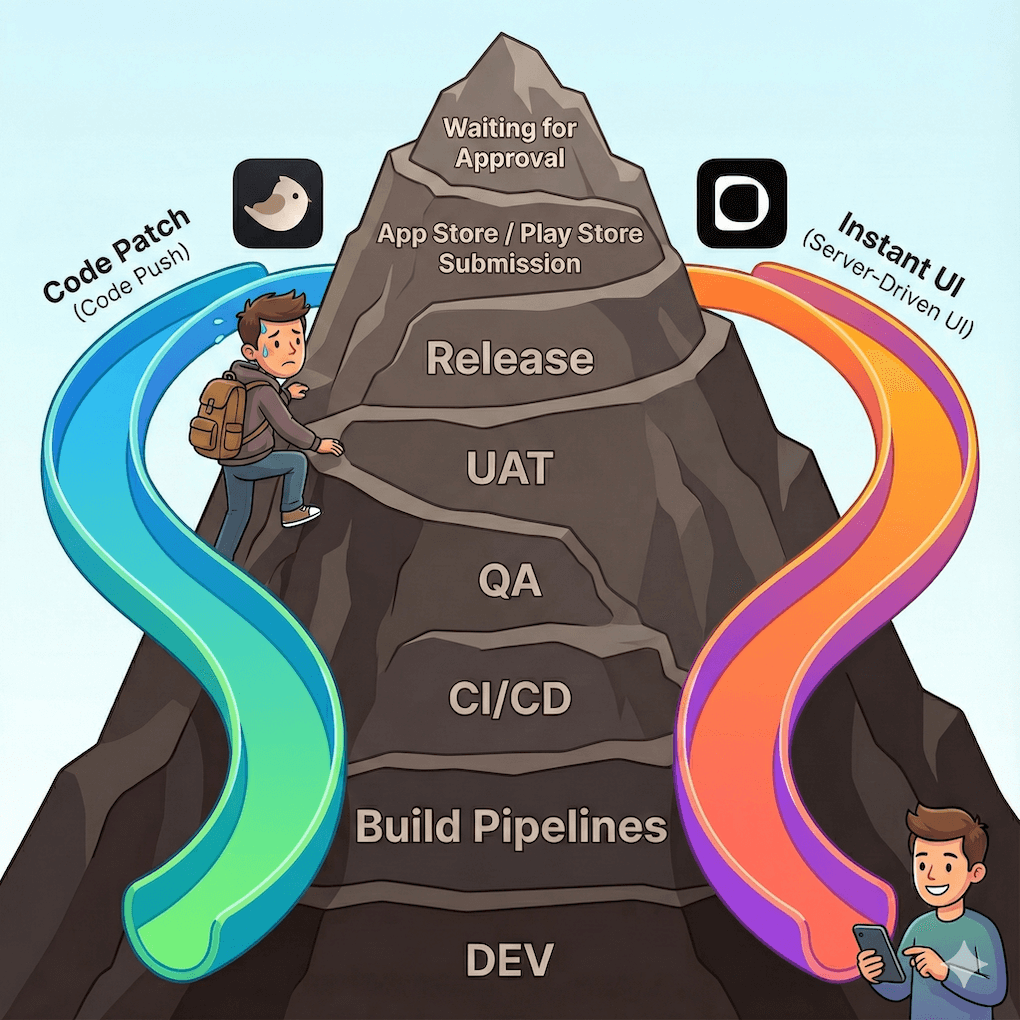
Shipping mobile updates is slow. Not because teams move slowly, but because app stores do.
A one-line copy fix, a padding tweak, or a small UI experiment still has to travel the same long path: Code → CI → QA → UAT → Release → App Store / Play Store → Review → Approval
Once something is compiled into a mobile binary, changing it almost always means shipping a new version and waiting - sometimes hours, often days. That pipeline exists to protect users, but it also creates unavoidable latency. What should be a five-minute fix often takes hours or days to reach production.
That delay creates a gap between “we fixed it” and “users can see it.” And that gap is exactly what modern mobile teams are trying to eliminate.
Why is this article worth reading?
Because most discussions about Code Push vs Server-Driven UI stay shallow, and the real trade-offs matter. If you build Mobile Apps at scale, you’ve probably asked at least one of these questions:
- How can we ship fixes without waiting for store approval?
- Can we update the UI without rebuilding the app every time?
- What’s the real difference between code push and server-driven UI?
- Which one is better? Safer? Faster? More future-proof?
This article gives you:
- A clear mental model of Code Push vs Server-Driven UI
- A concrete understanding of Digia vs Shorebird
- Real-world performance, binary size, and rollback implications
- A decision framework for choosing the right approach for your team
What is the core problem Digia and Shorebird are solving?
Mobile teams don’t struggle to build features. They struggle to deliver them quickly and safely. Even tiny UI adjustments or one-line text fixes must go through the same long path. The app binary is the bottleneck. Once UI or logic is compiled into it:
- Any change requires a new build
- Any build requires store submission
- Any submission requires waiting
So the real question isn’t “How do we code faster?” It’s:
How do we ship updates without going through the app stores every single time?
Digia and Shorebird both attack this problem, but at very different layers of the stack.
What are the two fundamental ways teams speed up mobile releases?
Teams speed up mobile delivery in two fundamentally different ways: by shipping code or by shipping configuration. These approaches look similar on the surface, but they change very different things under the hood.
What is Code Push?
Code Push lets you ship new application code to users without submitting a new app to the stores.
Code push systems like Shorebird work by updating compiled application logic after install.Instead of downloading a full APK or IPA:
- The app downloads a patch
- That patch contains only the changed Dart code
- The runtime validates and applies it safely
Examples: Shorebird, Expo (EAS Updates)
What is Server-Driven UI (SDUI)?
Server-Driven UI moves UI definitions out of the app binary and onto the server. Instead of compiling UI into the app:
- The server defines screens using a structured schema (DSL)
- The client interprets and renders those definitions at runtime
- The binary stays stable while the experience evolves
Both approaches dramatically reduce time-to-production. But they operate at very different layers of the stack:
1. Code Push removes code updates from the store.
2. Server-Driven UI removes UI updates from the binary.
Understanding that difference is the key to choosing correctly.
What is Shorebird?
Shorebird is a Flutter-specific code push platform that lets you ship Dart code updates after install. Its core idea is simple:
What if you could ship Dart code updates without shipping a new app binary?
Shorebird works by embedding a custom Flutter runtime into your production app. That runtime allows the app to safely download and apply Dart code patches after installation.
Instead of resubmitting to the app stores, you:
- Build and release a normal Flutter app once
- Generate small Dart-level patches for future changes
- Let users receive those patches automatically
From the user’s perspective, the app behaves as if a new version was installed - even though the store was never involved.
Shorebird is primarily designed for:
- Bug fixes
- Logic changes
- Emergency hotfixes
- Small functional updates
It keeps your UI architecture intact and stays very close to standard Flutter development workflows.
What is Digia?
Digia is a frontend orchestration platform for mobile apps. It enables teams to create, manage, and release UI and logic from a centralized dashboard, without needing to rebuild or redeploy the app through app stores.
Instead of shipping UI inside the app binary, Digia moves screen definitions, layout rules, styling, and interactions to the server.
Your Flutter app becomes a native renderer:
- It fetches structured UI configuration from Digia
- Parses that configuration at runtime
- Renders native Flutter widgets on the device
When the configuration changes, the UI updates instantly - no rebuild, no CI, no store submission. Digia is designed for:
- Frequently changing screens
- UI experiments and A/B tests
- Personalization and targeting
- Rapid product iteration driven by PMs or designers
Complex native logic still lives in code, but most UI and experience changes no longer require a release.
How do Digia and Shorebird compare at a glance?
They solve the same delivery problem, but at different layers of the stack.
| Dimension | Shorebird (Code Push) | Digia (Server-Driven UI) |
|---|---|---|
| What gets updated | Dart code | UI configuration |
| Requires app rebuild | ❌ | ❌ |
| Requires store submission | ❌ | ❌ |
| Primary use case | Logic fixes, hotfixes | UI, layout, copy, experiments |
| Who ships changes | Developers | Developers, PMs, designers |
| Runtime model | Patched Dart execution | Runtime UI rendering |
| Rollback | Automatic binary rollback | Instant config rollback |
| Best suited for | Stable apps needing safe fixes | Fast-moving product teams |
| Platforms supported | Dart/Flutter projects only | Flutter, React Native, Android (Jan 2026), iOS (Feb 2026) |
In this article, we’ll break down how each approach actually works, where each one shines, their constraints, and how they behave in a real-world scenario: in the Flutter world.
How is Shorebird solving slow App Release cycles?
Shorebird operationalizes code push in Flutter through two primitives: Releases and Patches.
Shorebird solves the slow-release problem by letting you ship code updates directly to users without going through the Play Store or App Store. Instead of waiting for a full binary release, you generate a small Dart code patch that the app downloads and applies on the next launch.
It starts with two concepts:
Release: A release is the binary you submit to the stores. It is built with the Shorebird runtime inside it. Shorebird needs this baseline binary so it can later generate patches against it.
Patch: A patch is the diff between your new Dart code and the code inside the shipped release. Users download this patch and the Shorebird updater merges it into the running app.
This gives you a workflow that looks like:
- Build and submit a release to the stores
- Make code changes locally
- Run shorebird patch which generates a Dart-level diff
- Shorebird hosts the patch
- User launches the app, updater checks for updates, downloads the patch and applies it on next restart
You are essentially shipping new code without shipping a new binary.This works because Shorebird provides its own fork of the Flutter engine that allows Dart code to be loaded in production through a safe interpreter or VM path (Reference). Native code cannot be patched, assets cannot be replaced, and store guidelines still require that major behavioral changes go through store review.
Shorebird fits cleanly into CI pipelines and supports any Dart/Flutter project. The added dependency footprint is small, patches typically weigh a few megabytes, and updates usually apply silently in the background.
How Digia is solving slow App Releases cycles?
Digia follows the zero release mobile architecture, and thus solves the slow-release problem in a different way. Instead of shipping new code to users, it ships configuration. Your app becomes a lightweight renderer that fetches UI layouts, rules and interactions from the server and builds the screen at runtime.
This is the Server Driven UI (SDUI) approach. The UI is no longer locked inside the binary. Layouts, copy, styles, experiments and even basic logic live on the server and can be updated instantly.
At a high level the workflow looks like this:
- Product and design teams build screens visually on Digia Studio
- Digia generates structured SDUI CONFIG that describes layout, styling, and logic
- Flutter app asks Digia for a flow config
- Digia SDK parses the CONFIG and renders native widgets
- Any update to the configuration is reflected immediately on user devices
There is no rebuild, no CI, no QA cycle for layout-only changes, and no store submission. You are shipping UI definitions, not code.
SDUI is most powerful when the UI needs to evolve quickly. It enables rapid experimentation, personalization, and cross-platform consistency, while allowing client code to focus on rich interactions and performance-critical experiences.
Digia fits the teams that want faster iteration loops, less dependency on store releases and a way for non-engineering roles to contribute to shipping product changes.
How do Digia and Shorebird solve app releases in practice?
By handling the same real-world change through two very different delivery mechanisms.
To understand how these systems behave outside of theory, let’s walk through a small but extremely common scenario, something every mobile team has shipped dozens of times.
What real-world change are we comparing?
Adding a small UI banner to an already-live Product Detail Page (PDP).Assume you have a simple PDP in production with: Product image, title, description, and an Add to Cart button. It is simple, stable, and already live in production. Now your PM asks for a small tweak.
“Can we add a Limited Time Offer banner at the top? Just a small text box. Should be quick.”
In a typical Flutter app, this means opening the widget tree, adding a new container, updating styles, testing it, rebuilding, and shipping a new release.
In this section, we look at what adding that one small banner looks like with Shorebird and with Digia. The same requirement, two very different workflows.
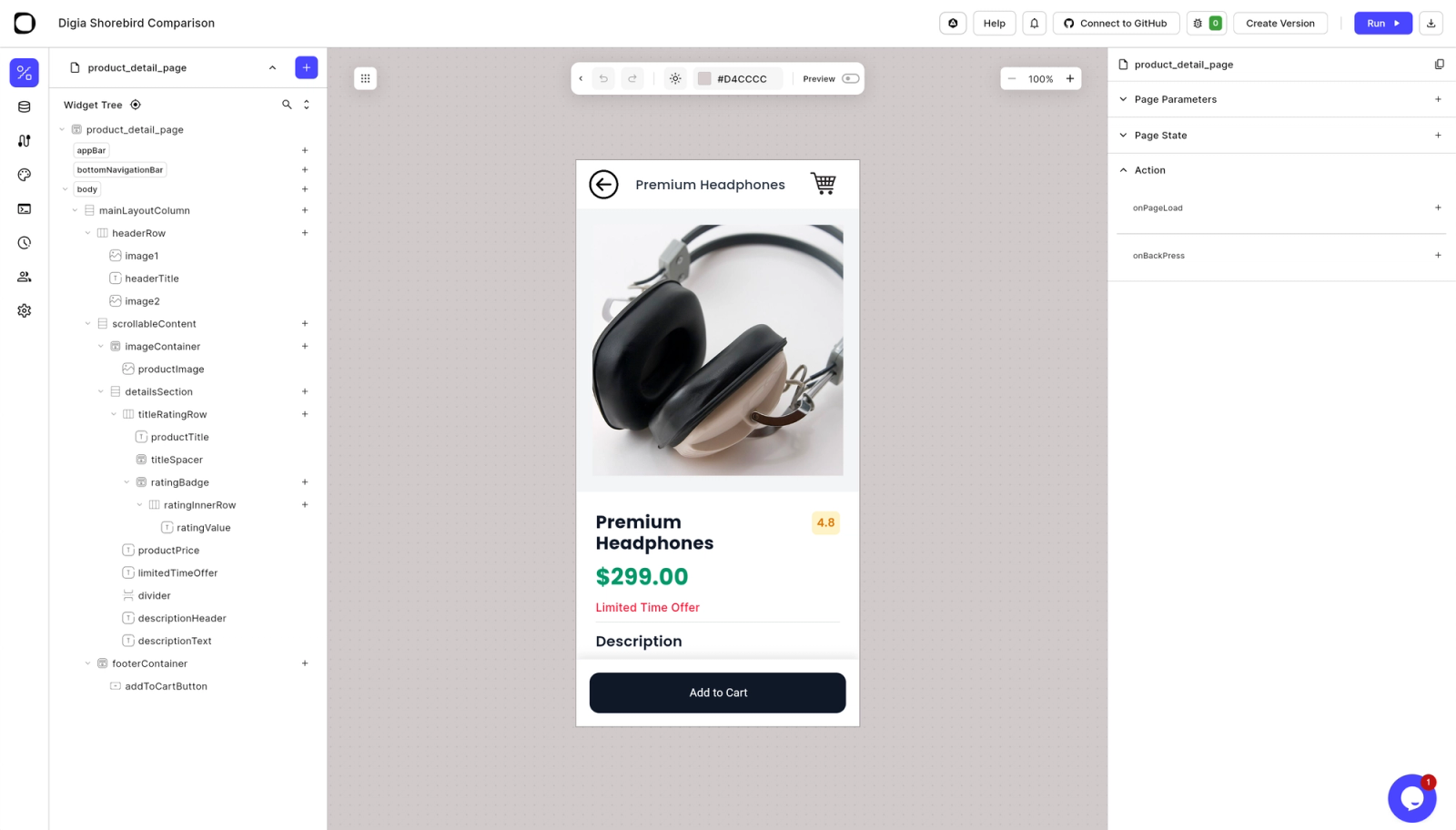
How does shipping this change work with Shorebird?
By modifying Flutter code and delivering the change as a Dart patch instead of a new store build. With Shorebird, you are still making a normal Flutter code change. The difference is how that change reaches users.
When you need to ship the “Limited Time Offer” banner from the PDP via Shorebird, you are doing a code change and shipping a Dart patch. Here are the concrete steps developers and CI will run.
What exactly changes when you add the banner via Shorebird?
You change the widget tree and ship the updated Dart code as a patch.
The banner is still implemented in Flutter:
- You add a new widget
- Update layout and styling
- Run tests as usual
Nothing about the app architecture changes. Only the delivery mechanism does.
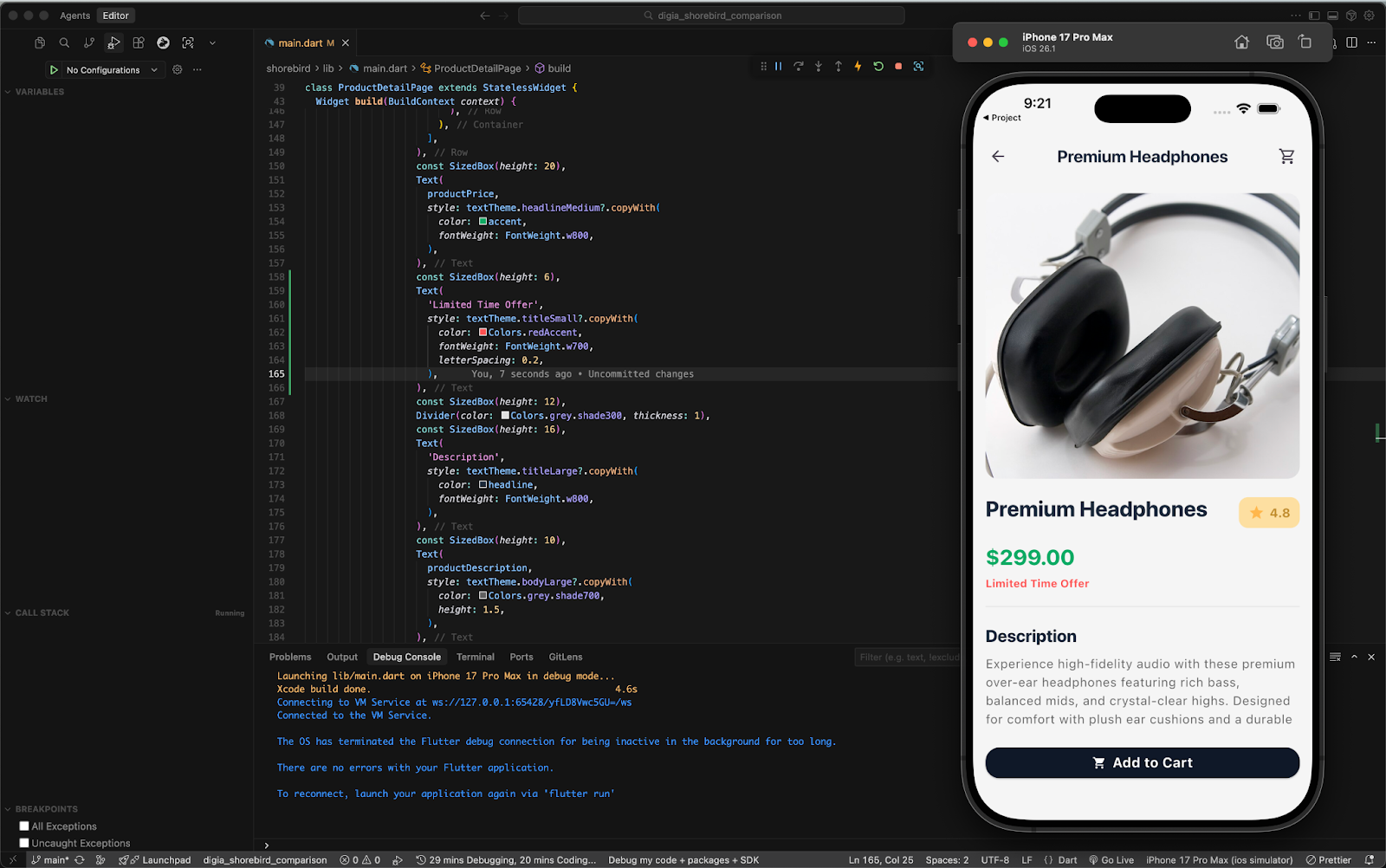
What are the concrete implementation steps with Shorebird?
The workflow closely mirrors a normal Flutter hotfix flow, with patching added at the end.
Developer & CI steps
- Make the change in the widget tree and test locally.
- Commit to trunk / feature branch, open a PR, run CI and merge.
- If you patch an existing release (hotfix flow), cherry-pick the commit into the release branch and tag a hotfix.
- Preview the patch locally or staging track before promoting.
How do you preview the change before production?
By previewing the patch on a staging track.
| # preview a patch on staging shorebird preview --track=staging |
|---|
This allows QA and stakeholders to validate the patched app before rollout.
How are releases and patches generated in Shorebird?
Using two CLI commands: shorebird release and shorebird patch.
Use shorebird release to prepare and sign a store binary (one-time for a release), and shorebird patch to generate and publish a patch.
| # prepare a release (run from CI/release job) shorebird release android -- --dart-define=ENV=prod shorebird release ios -- --dart-define=ENV=prod # create a patch (run in patch CI or locally) shorebird patch android --no-confirm shorebird patch ios --no-confirm # preview the generated patch on staging shorebird preview --track=staging |
|---|
How does the patch reach users?
Patches are downloaded automatically and applied on the next app restart.
After validation:
- You promote the patch to production (via Shorebird Console or CI)
- Users receive the update without visiting the app store
- The app behaves as if a new version was installed
Runtime and behavior notes
- Shorebird patches only Dart code; native code, plugin version changes, new assets require a store release.
- Patches are applied on the next app restart by default.
- Patch sizes depend on the diff; typical patches are a few MB. Shorebird caches up to two patches on-device.
- Continue shipping periodic store releases so new installs get the latest baseline binary.
How does shipping the same change work with Digia?
By updating UI configuration on the server, without touching Flutter code or rebuilding the app.
With Digia, the Flutter app is already wired as a renderer. Once that setup exists, future UI changes no longer live in the codebase.
What changes when you add the banner via Digia?
Nothing in the Flutter app changes at all.There is:
- No widget tree edit
- No commit
- No CI
- No rebuild
- No store submission
The entire change happens at the configuration layer.Assuming the Digia SDK is already set up and rendering pages inside your app, adding a new UI element like a “Limited Time Offer” banner requires no code changes and no new build. (SDK Integration)
What are the concrete implementation steps with Digia?
All changes are made visually in Digia Studio.
Product / Design workflow
- Open the product_details page in Digia Studio.
- Add a Limited Time Offer banner visually.
- Adjust layout and styling.
- Create a new version and release it.
That’s it.
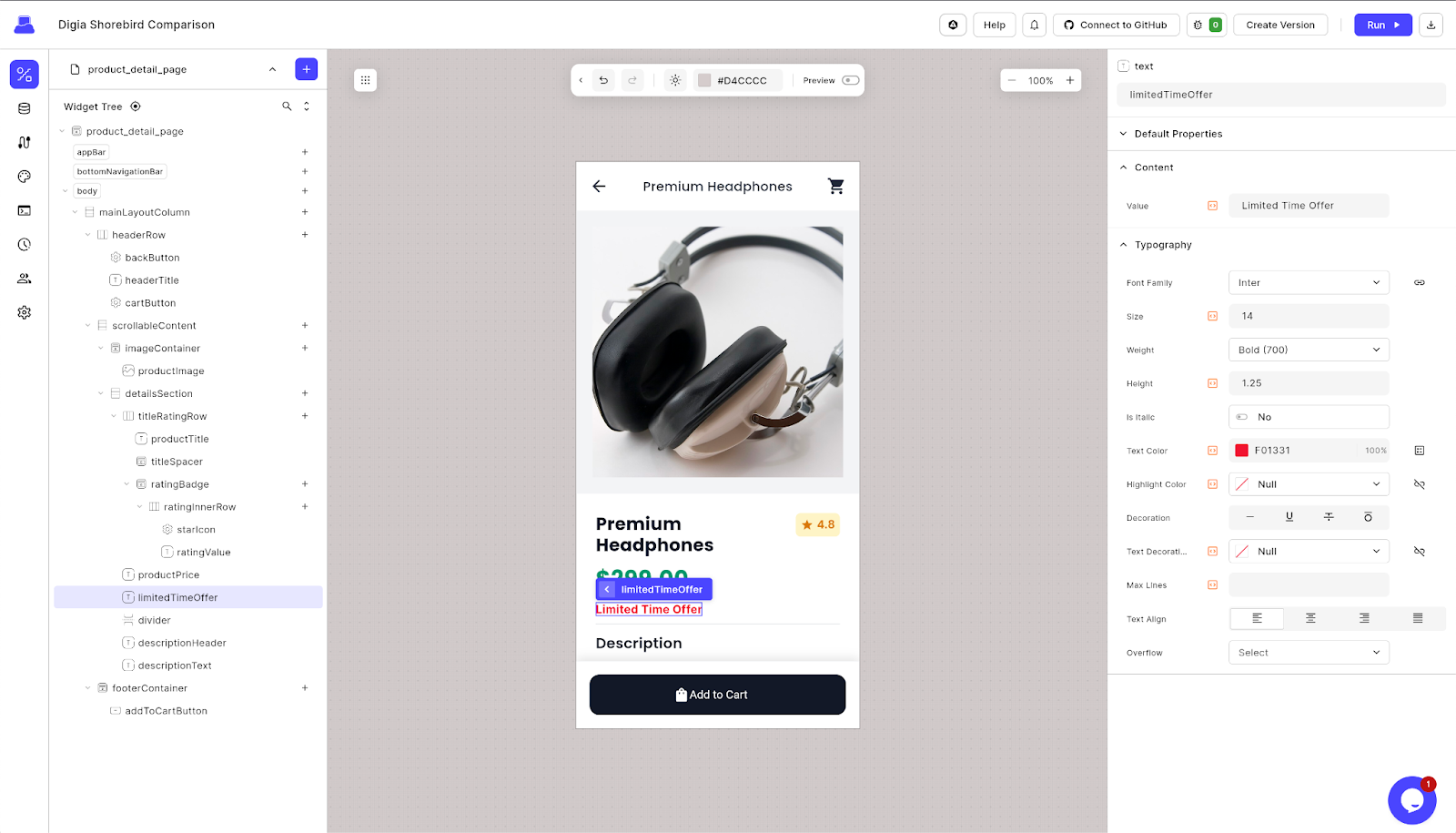
The change goes live immediately. No build. No CI. No release.
How do rollbacks work with Digia?
Rollbacks are instant and server-controlled.
If something looks wrong: Digia Studio supports three rollout strategies, depending on how aggressively you want UI updates to propagate:
- Network-first: fetch the latest layout on the next app start
- Cache-first: show cached UI immediately and pick up updates in the next session
- Local-first: use local assets, no network calls
Rollbacks are instant from Digia Studio.
What matters most when shipping updates outside the app stores?
Two things matter more than anything else: performance and failure handling.When updates bypass the App Store or Play Store, teams immediately worry about:
- Runtime performance – does the app stay fast and smooth?
- Failure & rollback – what happens if something breaks in production?
Both Shorebird and Digia address these concerns, but in very different ways.
Does code push or server-driven UI affect Flutter app performance?
In practice, neither approach meaningfully degrades user-perceived performance. To move beyond theory, we benchmarked:
- Vanilla Flutter
- Flutter + Shorebird
- Flutter + Digia
Using Flashlight, across two scenarios:
- A simple app (single-page, minimal logic)
- A production-style e-commerce app (realistic UI depth, lists, images, and interactions)
The goal was straightforward:
Do these update mechanisms introduce real runtime cost in real apps?
How do Shorebird and Digia perform in a simple Flutter app?
They perform almost identically, with only small and predictable differences.
Results (Simple App):
- FPS: ~59–60 across all three
- CPU usage: Similar, low single-digit %
- RAM usage:
- Vanilla / Shorebird: ~150–160 MB
- Digia: ~170–190 MB

What this means:
- Digia shows a ~10–20 MB RAM increase from loading and caching UI config
- The difference is not user-perceptible
- UX, scrolling, and animations remain indistinguishable
For simple screens, performance should not drive the decision.
How do Shorebird and Digia perform in a real-world, UI-heavy Flutter app?
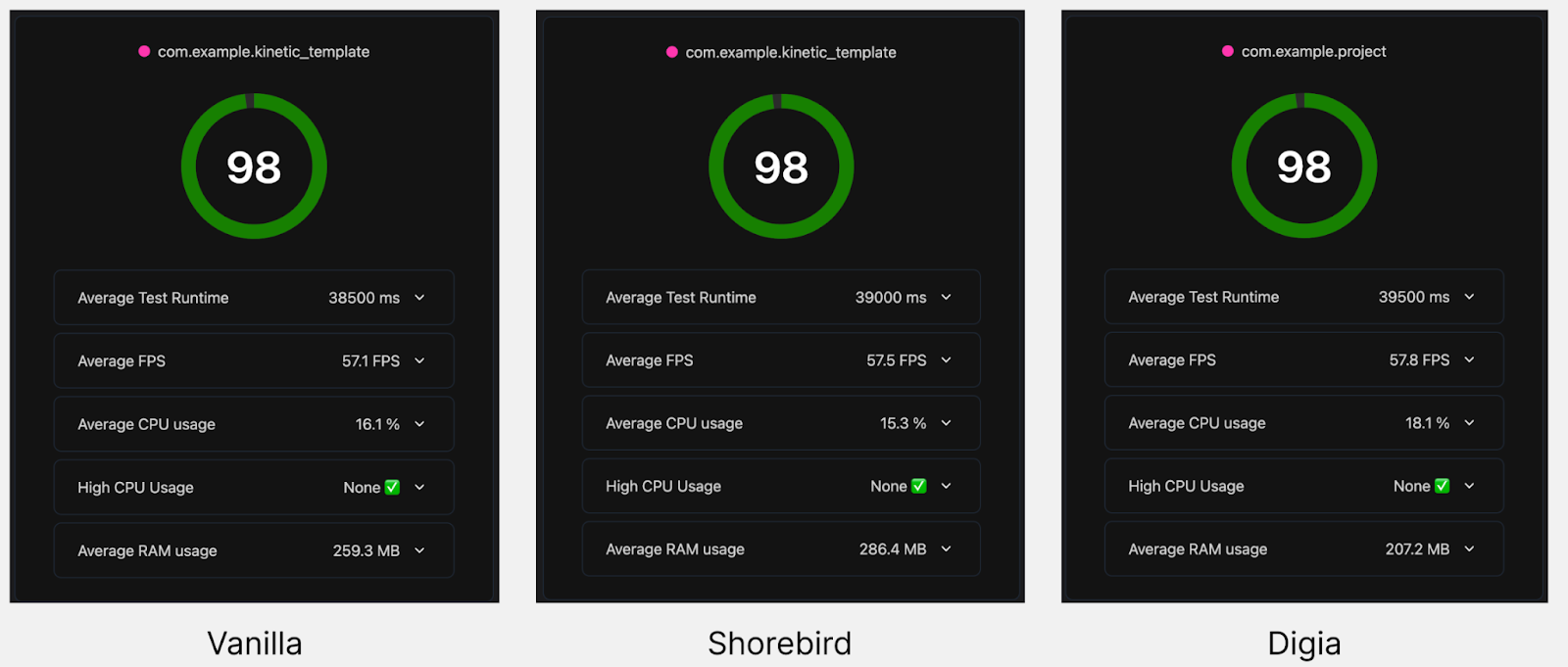
All three variants perform essentially the same from a user’s perspective.
Results (Production-style app):
- FPS: ~57–58 across all variants
- CPU usage:
- Vanilla / Shorebird: ~15–16%
- Digia: ~17–18%
- RAM usage:
- Vanilla: ~260 MB
- Shorebird: ~280 MB
- Digia: ~205–220 MB (varies by screen)
Key observations:
- All three variants perform essentially the same
- Digia adds ~1-2% CPU overhead, primarily from layout parsing and state reconciliation
- Memory usage stays within the same order of magnitude, with no runaway growth
- No high-CPU or dropped-frame events were detected
From the user’s perspective, there is no noticeable difference.
Why do Shorebird and Digia show different performance characteristics?
Because they update different layers of the system.
These results help contextualize how Shorebird and Digia approach updates, and why their performance characteristics look the way they do.
Shorebird (Native Dart patches)
Shorebird patches update compiled Dart code. The runtime behavior of a patched app is designed to be indistinguishable from a normal Flutter release. Shorebird’s updates apply as native Flutter code (a custom Flutter fork).
According to Shorebird’s documentation, release and patched builds “should function identically” to stock Flutter builds. In practice, Shorebird runs almost all Dart code natively at full speed; only the changed functions are interpreted on iOS (per Apple’s rules). Shorebird reports that “9 out of 10 patches” show no speed difference at all. The only slight slowdowns come from rare compiler quirks on iOS, which Shorebird’s tooling detects and warns about.
Practically, this means Shorebird patches impose almost zero runtime overhead. Each patch is just a differential update (only your changed Dart classes), typically only a few megabytes per CPU architecture. Patches are downloaded and applied on the next app restart (by default in the background). In short, Shorebird delivers native-speed updates – you fix a bug, ship a 2–5 MB patch, and the user’s app runs as fast as ever (the only caveat being Apple’s iOS interpreter requirement for the new code).
Digia (Unlimited UI Flexibility)
Digia updates UI and behavior via JSON/DSL configuration, not compiled Dart. This introduces a small, predictable cost at startup and first render, which shows up clearly in measurements but stabilizes quickly. Digia’s documentation show that a pure Flutter app cold-starts in ~20 ms, whereas a Flutter + Digia app with cached UI starts in ~60-70 ms (about a 40 ms Digia SDK init). If it must fetch new config over the network on first launch, startup can take ~190 ms.
In all cases, after the UI is loaded the app runs normally at ~58–60 FPS with minimal extra CPU cost. In fact, Digia’s benchmarks show an additional ~1–2% CPU usage overhead on complex screens (mainly from parsing layouts), and memory usage is only about 10–20 MB higher in some cases. For example, a static 1,000-item list consumes ~130–150 MB with Digia versus ~120–130 MB natively, and even an animation-heavy screen stays in the 56–60 FPS range. In practice, Digia’s SDUI feels “heavier” only on the very first load of a config or on extremely deep layouts; otherwise it delivers essentially native performance.
[Ref: Digia Docs, Comparison Repository]
How does code push vs SDUI affect APK size?
Shorebird keeps binaries small; Digia accepts a larger one-time cost.
Binary size is often the first concern teams raise when evaluating runtime systems like code-push or server-driven UI. To understand the real impact, it’s important to distinguish between simple examples and production-scale apps.
Why does Digia increase APK size more in small sample apps?
For a very small sample app containing a single page, the difference between Digia and Shorebird appears significant:
| Variant | APK Size |
|---|---|
| Vanilla Flutter | ~6.7MB |
| Flutter + Shorebird | ~8.5MB |
| Flutter + Digia | ~12MB |
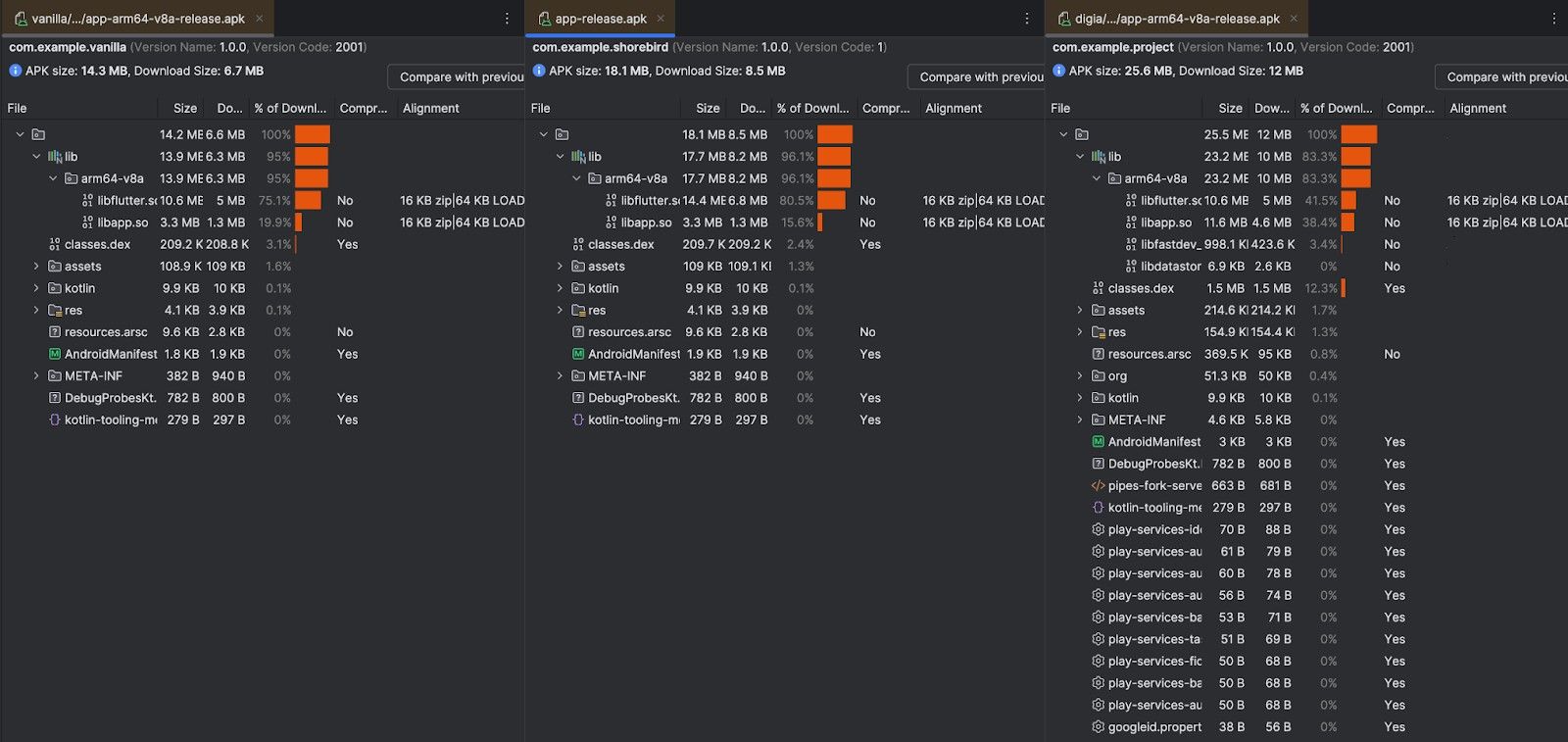
In this minimal setup:
- Shorebird adds a small runtime and metadata layer
- Digia adds a larger upfront cost because the SDUI runtime and its widget dependencies need to be bundled in the binary.
At this scale, the Digia binary looks meaningfully larger, because the app itself is unrealistically small, but this is not how real apps behave.
How does Digia affect binary size in real production Flutter apps?
Binary size comparisons look very different once the app resembles a real product.
To illustrate this, consider a real-world ecommerce-style Flutter template built without Digia: https://github.com/Digia-Technology-Private-Limited/kinetic_template
| Variant | APK Size |
|---|---|
| Vanilla Flutter | ~9.7MB |
| Flutter + Shorebird | ~11.6MB |
| Flutter + Digia | ~12.1MB |
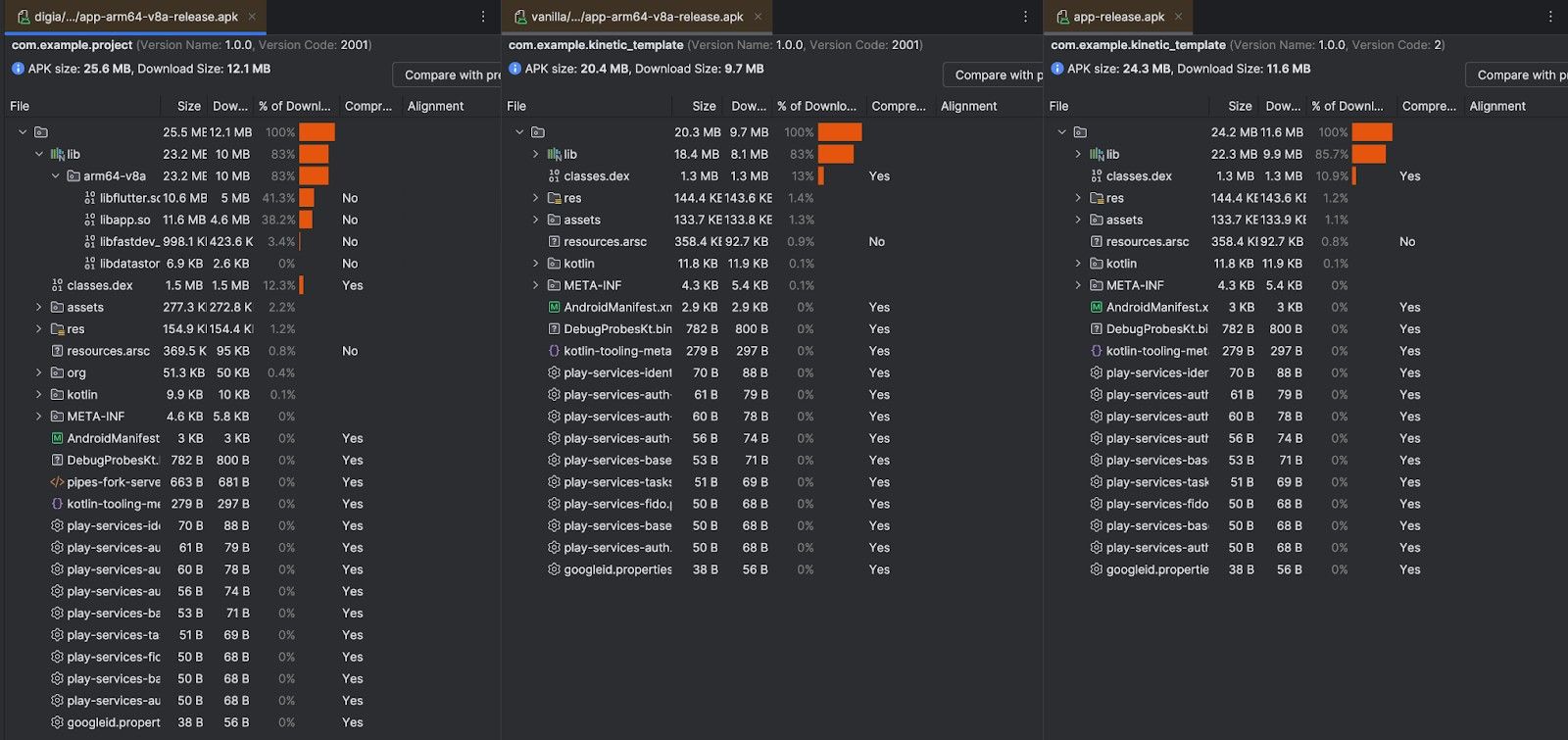
The resulting Android APK size is approximately ~9.7 MB, despite not using any server-driven UI framework.
At this scale, several factors dominate binary size:
- Product images, fonts, and bundled assets
- Navigation structure and shared UI components
- Business logic, networking, state management, and utilities
- Common production dependencies such as analytics, crash reporting, and payments
In other words, the apk size of real apps grows quickly even without SDUI. Digia no longer looks like an outlier, it sits within a few hundred kilobytes of Shorebird.
As applications move beyond simple examples, the relative impact of any single runtime - including a UI runtime - becomes smaller compared to the overall app footprint.
Is Digia’s binary size increase a real concern for production apps?
- Shorebird keeps the base binary almost identical to vanilla Flutter. Its value appears after install, when code patches are delivered incrementally.
- Digia accepts a higher one-time binary cost in exchange for removing UI and experience changes from future releases entirely.
That cost is paid once. Iteration speed compounds afterward.
How large are Shorebird patches for small changes?
To understand the real cost of change, we tested a simple text update on a production screen:
- "🎉 Free Shipping on Orders Over $50! Limited Time Offer!"+ "🎉 Free Shipping on Orders Over $50! Limited Time Offer | Hurry Now!"
Shorebird Patch
- Patch size (Android arm64): 2.34 KB
- Delivered as a signed binary diff
- Applied on next app restart
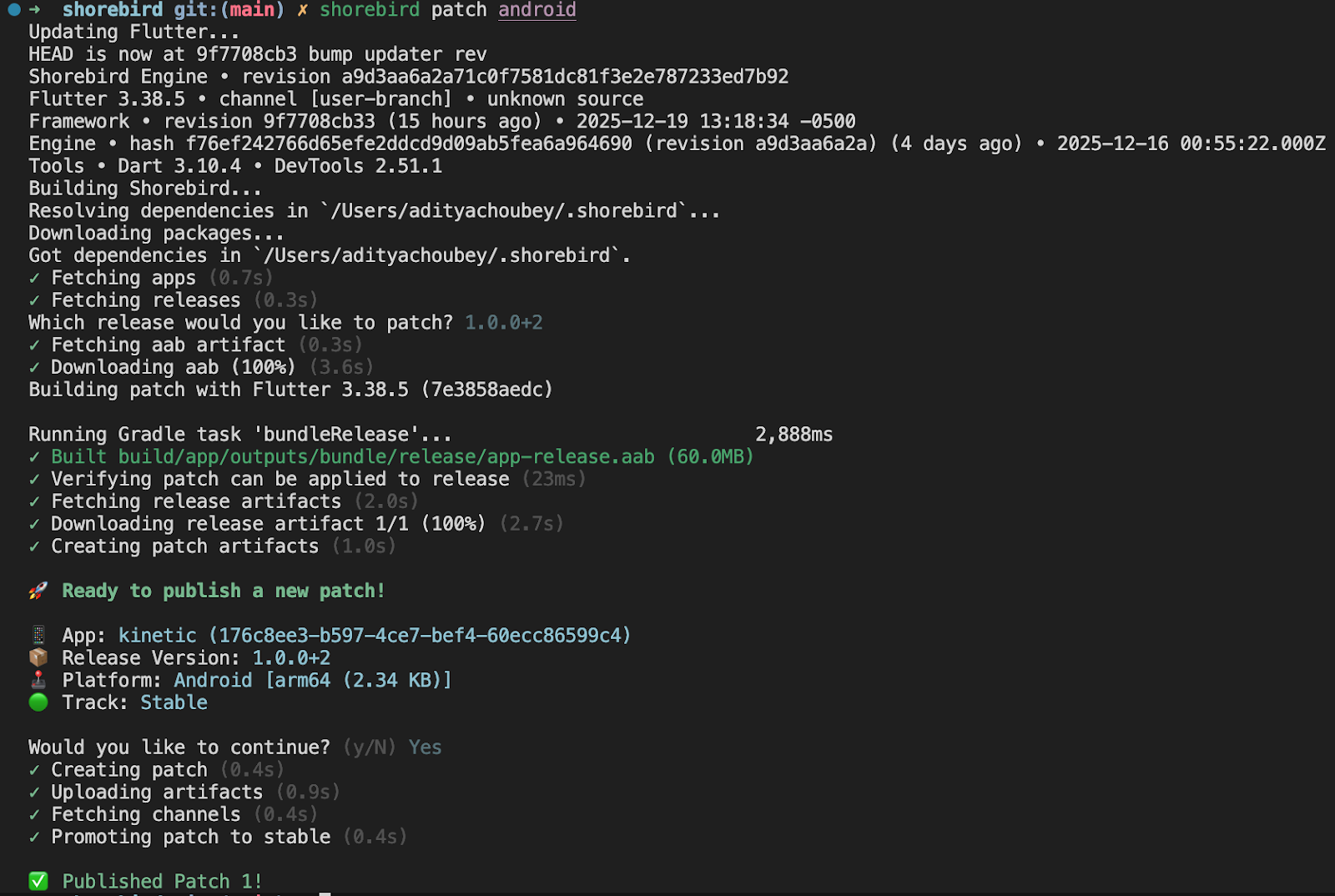
This demonstrates Shorebird’s core strength: code changes ship as tiny incremental updates instead of full binaries.
Digia Update
- No APK or patch shipped
- Change delivered as updated UI configuration
- APK size unchanged
From the client’s perspective, nothing new is installed, the renderer simply loads new configuration.
What happens when your changes break the app?
Both systems prioritize safety, but with different blast radii.
How does Shorebird ensure safe rollbacks?
By treating every patch like a signed, verifiable binary hotfix.
Shorebird treats each patch like a binary hotfix with strong safety guards. Before installing, it cryptographically validates the patch (architecture, base-app consistency, and a SHA hash). On-device, each patch’s signature/hash is checked whenever the app launches with it, and any mismatch or load failure triggers an automatic rollback. In other words, if a patched version crashes or fails to start, the Shorebird updater simply discards it and instantly reverts to the previous known-good build (no crash loops or user action needed).
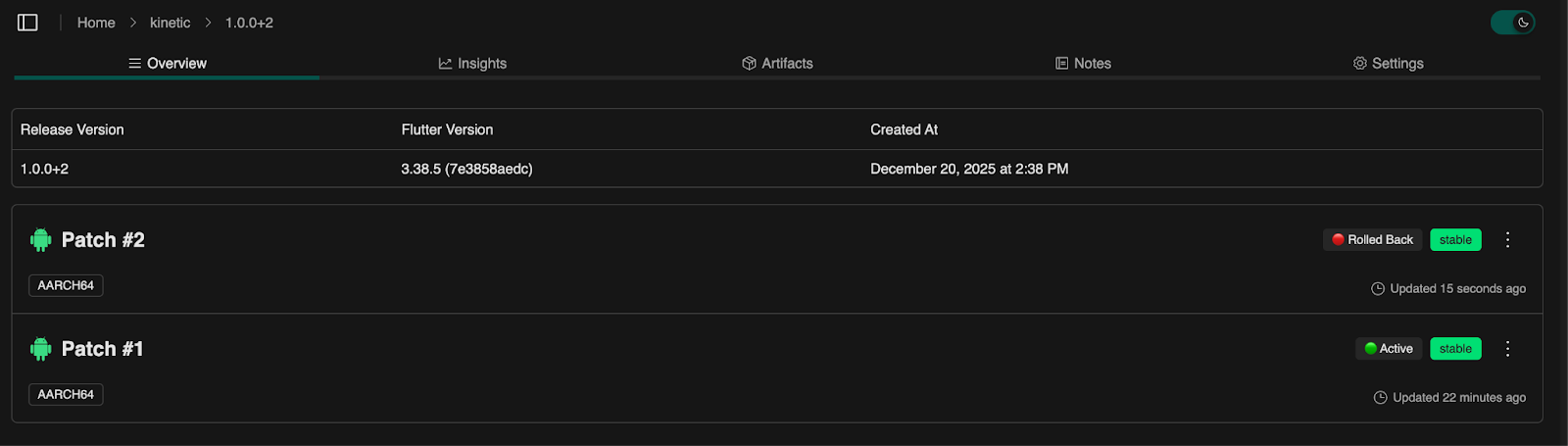
Shorebird also supports staged rollouts. You can deploy patches to test tracks or in percentage increments: for example, send a patch to 5% of users, then 20%, then 100% as confidence grows. The shorebird_code_push SDK even lets you target named tracks (staging, QA, beta) for A/B testing or phased releases. If a patch does need to be manually retracted, the console or CLI lets you roll it back with a single click: affected devices will drop that patch and load the last patch (or the original release) instead. In short: Shorebird’s updates are safe to experiment with – you can ship bad logic fixes, but the app won’t brick. Every patch is versioned and signed, and the system will always keep or fall back to a good build.
How does Digia ensure safe rollbacks?
By isolating all risk to the UI layer.
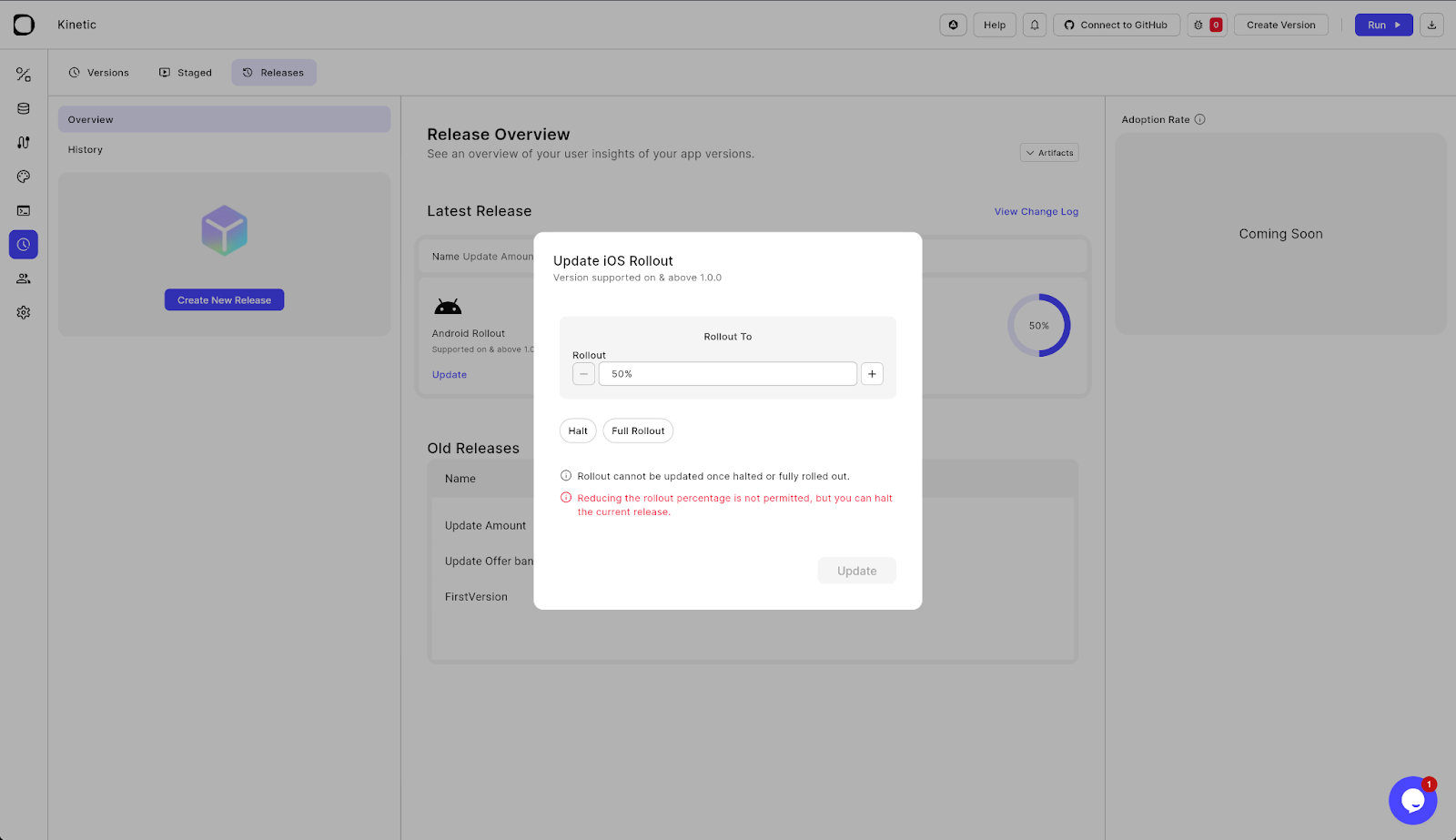
Digia updates only the UI layer, so failures cannot crash the app’s native code. Every new UI release in Digia is versioned and sandboxed in its dashboard. From there you can instantly roll back with one click: Digia’s Dashboard lets admins revert to the last working config (or push a new version) in real time.
It also supports gradual rollouts and targeting: for example, you can publish a version to a specific user cohort or platform, or do A/B tests, all via the Digia release workflow. Crucially, if something goes wrong, devices will simply continue using the cached UI. Digia’s SDK includes offline/caching strategies: for instance, in a “NetworkFirst” mode it tries to fetch the latest UI but falls back to the locally cached config (or even bundled assets) if the network fails. In other words, the worst outcome of a bad update is a stale or slightly broken layout – it won’t crash or freeze the app.
Shorebird: fastest at runtime, built for safe logic hotfixes.Digia: fastest at iteration, built for safe UI changes.
Both stay fast. Both stay safe. They just optimize for different kinds of change.
What are the core trade-offs between Shorebird and Digia?
While Shorebird and Digia both reduce dependence on app-store releases, they make different trade-offs by design. One optimizes for runtime fidelity and logic safety; the other optimizes for iteration speed and UI flexibility.
The table below summarizes those trade-offs at a glance.
Shorebird vs Digia: Trade-off Comparison
| Dimension | Shorebird (Code Push) | Digia (Server-Driven UI) |
|---|---|---|
| Primary abstraction | Compiled Dart code | UI configuration |
| What changes most easily | Logic, bug fixes | UI, layout, copy, flows |
| Runtime performance | Near-native (identical in most cases) | Near-native after first render |
| Startup impact | None | Small, predictable init cost based on initialization strategy |
| Binary size impact | Minimal | Higher one-time cost |
| Patch / update size | Very small (KB–MB) | No client update |
| Store dependency | Required for baseline releases | Required only for SDK updates |
| Rollback model | Automatic binary rollback | Instant config rollback |
| Failure blast radius | Code-level (guarded) | UI-only (cannot crash app) |
| Who can ship changes | Developers | Developers, PMs, designers |
| Experimentation & A/B tests | Limited | First-class |
| Best suited for | Hotfixes, logic updates | Fast UI iteration, personalization |
What does this table actually mean in practice?
- Shorebird trades flexibility for safety and fidelityYou keep writing Flutter code, get native performance, and gain the ability to hotfix production safely.
- Digia trades upfront binary size for long-term speedYou pay a one-time cost to remove most UI changes from your release pipeline entirely.
How do Digia and Shorebird pricing models reflect these differences?
Their pricing mirrors what they optimize for.
| Category | Digia (Server-Driven UI) | Shorebird (Code Push) |
|---|---|---|
| Pricing Model | Annual subscription per team, based on install tier and collaboration features | Annual subscription per patch installs (usage-based) |
| Free Tier | ₹0 / month | $0 / year |
| Up to 1,000 installs / month | Up to 5,000 patch installs | |
| Entry Tier | Basic — ₹799 / month (billed ₹9,588/yr) | Pro — $240 / year |
| Up to 50,000 installs / month | Up to 600,000 patch installs | |
| Mid/Team Tier | Teams — ₹7,999 / month (billed ₹95,988/yr) | Business — $4,800 / year |
| Up to 500,000 installs / month | Up to 12,000,000 patch installs | |
| Enterprise Tier | Custom pricing | Custom pricing |
| Large scale installs & SAML, support, custom needs | Custom installs, enterprise support + SLAs | |
| Primary Billing Basis | Monthly installs & team features | Patch installs (successful installs of a given patch) |
| Who It’s Built For | Teams shipping frequent UI/experience changes | Teams shipping safe code hotfixes |
| Focus | UI experimentation, A/B, product iteration | Scalable logic delivery, hotfix reliability |
| Includes (Core Features) | • Digia Studio (visual UI editor)• Unlimited apps (varies by plan)• Role-based access• Rollouts & A/B | • Patch hosting & delivery• Signed patches & rollback• Staging & tracking• CI integrations |
| Support Level | Community & plan-based (higher tiers add priority) | Community & plan-based (higher tiers add private support) |
| Entry Cost Focus | Affordable for UI team experimentation | Affordable for early code push usage |
How pricing reflects their focus
- Digia’s pricing is structured around monthly install volumes and team collaboration, because server-driven UI is about frequent, UI-heavy iteration and enabling product/design teams to ship changes often.
- Shorebird’s pricing is based on patch installs, because code push is about delivering small logic updates safely at scale — so costs scale with how many endpoints receive patches.
Conclusion: Which One Should You Choose?
Shorebird and Digia solve the same frustration: waiting days to ship something you finished in minutes.
But they solve different layers of the same problem.Shorebird updates code. Digia updates UI and experience, and it does so as a native, language-agnostic UI framework.
Neither replaces the other. They sit in different parts of the stack, and the best choice depends on what slows your team down most today.
Shorebird works for Dart/Flutter projects, while
Digia has support for Dart/Flutter and React Native.
Also, Digia is expanding to Android in January 2026, and iOS in February 2026. If your projects are on Android/iOS, you can still use Digia’s SDUI engine for instant App store or Play store releases, this is a major thing to keep in mind when you are in the state where you have to choose a solution for your project’s growth velocity.
Choose Shorebird when:
You should strongly prefer Shorebird if:
- Your app is mostly stable, but bugs still slip into production
- You need to hotfix Dart logic without waiting for store review
- Your team is comfortable staying entirely inside Flutter code
- Most changes are functional, not visual
- You want the safest possible production patching model
- Runtime performance must stay indistinguishable from native Flutter
In this setup, Shorebird behaves like a safety net: small patches, minimal risk, almost zero runtime overhead, and no change to how your app is architected.
Choose Digia when:
You should strongly prefer Digia if:
- Your UI and UX change frequently
- Your team is comfortable in Flutter, React Native, Android, or iOS or expanding to these technologies
- Product, design, or growth teams need to ship without waiting for engineers
- You run experiments, A/B tests, or personalized flows
- Time-to-production matters more than binary size or cold-start milliseconds
- Most changes are layout, copy, structure, or flow-related
- You want to decouple product iteration from release cycles
In this setup, Digia behaves like a control panel: screens update instantly, rollbacks are one click, and the app keeps evolving without rebuilding.
The Real Pattern Most Teams Follow
Once you understand both tools, the path becomes obvious:
- Shorebird → solve the “we need a hotfix today” problem
- Digia → solve the “we need to ship features and updates every week” problem
Shorebird protects production stability. Digia accelerates product velocity. Many teams will use both. One handles emergency patches; the other accelerates product iteration.
Resources
Shorebird Documentation: https://docs.shorebird.dev/
Digia Studio Documentation: https://docs.digia.tech/
GitHub Comparison Repos: http://github.com/Digia-Technology-Private-Limited/digia_shorebird_comparison