




TL;DR: In-app nudges are contextual UI prompts delivered inside a mobile app to guide users toward a specific action, without interrupting what they came to do. The taxonomy covers six distinct formats: tooltips, spotlights, modals, bottom sheets, persistent banners, and inline widgets. Each format has a specific trigger logic, a right context to use it, and a wrong one. This guide defines every type, shows how triggering actually works, and gives you a clear picture of when each format earns its place in a mobile experience.
What Is an In-App Nudge?
An in-app nudge is a contextual prompt that appears inside a mobile app to guide a user toward a specific action. It fires based on what the user is doing at that moment, not on a fixed schedule. It does not require a new app release to deploy. And it is meant to work with the user's current intent, not against it.
The word "nudge" comes from behavioral economics. Richard Thaler and Cass Sunstein defined it in their 2008 book Nudge as any aspect of a choice architecture that alters behavior in a predictable way without restricting options or changing economic incentives. In mobile products, that translates to a UI element that makes one path more visible, more obvious, or easier to take, without forcing the user's hand.
The practical definition for growth teams: an in-app nudge is a non-blocking, contextual UI overlay or embedded element that fires on a behavioral or event trigger and asks, teaches, or directs the user to do something specific. Tooltips, spotlights, bottom sheets, modals, floating action buttons, persistent banners: these are all nudge formats. Each has a different interruption level, a different use case, and a different risk of annoying the person on the other end.
The distinction that most content on this topic misses: nudges are not the same as in-app messages, and they are not a category within push notifications. They are their own channel, one that operates entirely inside the live session, triggered by real-time behavior, with no dependency on notification permissions. That distinction has significant implications for both technical implementation and engagement outcomes, and this guide covers both.
Why In-App Nudges Exist: The Channel Problem
Push notifications and email are the default channels for most mobile engagement teams. They are also increasingly unreliable as primary engagement tools.
Android push opt-in rates dropped from 85% to 67% in a single year following Android 13's consent policy changes, and iOS opt-in rates sit at around 56%. That means roughly four out of every ten users you acquire will never receive your push notifications at all. Email open rates in most consumer categories are under 25%. Both channels compete with every other brand that has the same idea.
Push notifications can boost engagement by 88% when done well, but they also drive uninstalls when they do not land right. The risk of over-relying on external channels is that you have no control over context. You send a push at 2pm on Tuesday. You do not know whether the user is in a meeting, commuting, or actively using a competing app. The message lands without any understanding of the user's current state.
In-app nudges solve this with a different mechanism. They fire only when the user is already in the app, on a specific screen, having just completed or not completed a specific action. The context is known. The moment is intentional. The ability to target users at exactly the right moment within 100ms of an event being triggered is what makes in-app nudges more precise than any external channel.
The other constraint in-app nudges address is the engineering bottleneck. For most mobile apps, any UI change requires a pull request, a review cycle, a QA pass, and an App Store or Play Store release cycle. Growth teams that want to experiment with messaging, test a new onboarding step, or announce a feature update are blocked behind that cycle. A no-code nudge platform breaks that dependency, so growth ships campaigns independently, with no engineering ticket.
The Six Nudge Formats Explained
The taxonomy here matters. Using a modal when a tooltip would do is a conversion killer. Using a tooltip when a spotlight is needed means your message gets missed. Each format has a specific job.
1. Tooltips
A tooltip is a small overlay anchored to a specific UI element: a button, an icon, a menu item. It appears when a user reaches a relevant screen and points directly at the element you want them to notice. The message is short: typically one line of instruction or explanation.
When to use them: Feature discovery for elements that are not intuitively obvious. Step-by-step guided tours where each step fires only when the previous action is complete. Progressive disclosure of complexity, showing a user what a filter does only when they open the filter panel.
When not to use them: When the instruction needed is more than two sentences. When the user has already interacted with that element before. When the information is important enough to require acknowledgment.
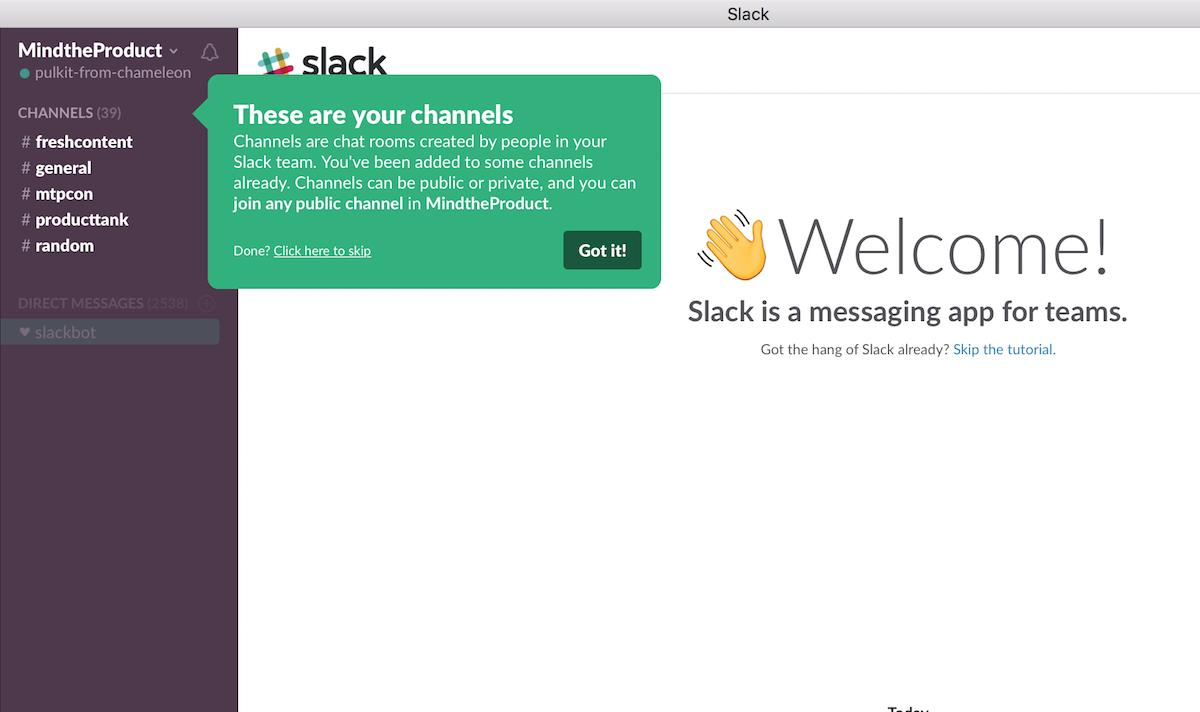
Interruption level: Very low. The user can ignore the tooltip entirely and continue their task.
2. Spotlights
A spotlight darkens the rest of the screen and highlights a specific element or area. It is more forceful than a tooltip, since the contrast forces attention, but less interruptive than a full modal because the user can still see the app interface behind the overlay.
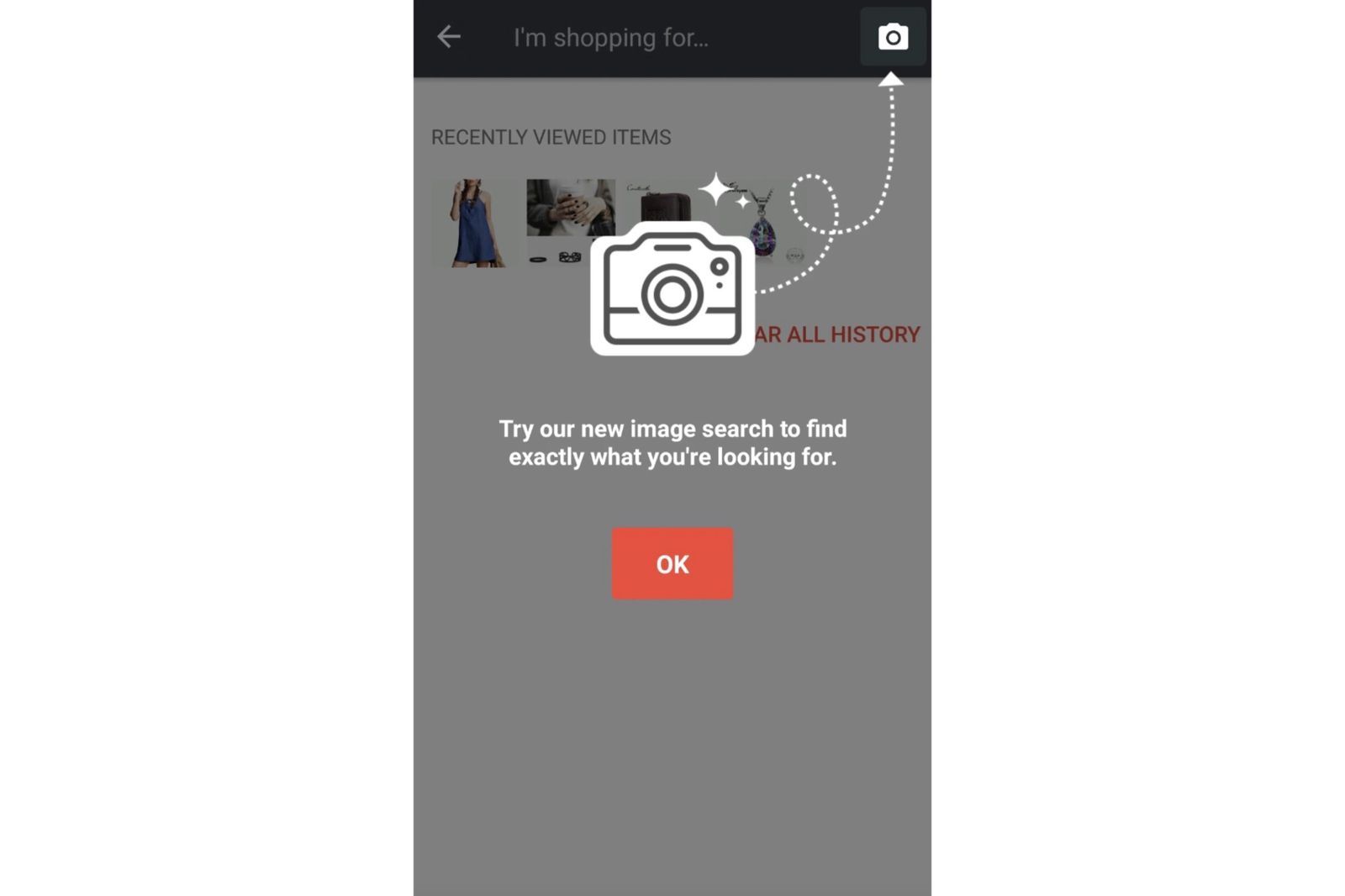
When to use them: New feature launches where you want every relevant user to notice the feature. High-stakes CTAs that need visibility: a new investment category in a fintech app, a new checkout method in an e-commerce flow. Post-onboarding moments where a core feature needs to be shown before the user develops habits that exclude it.
When not to use them: More than once per session. For anything the user did not specifically need to know about at that exact moment.
Interruption level: Medium. The user's current task is paused until they engage with or dismiss the spotlight.
3. Modals
A modal is a full-screen or near-full-screen overlay that requires the user to take action before continuing. It is the most interruptive nudge format. It blocks everything else until dismissed.
When to use them: Permission requests that need context before the system prompt (location, notifications, camera). Critical account security updates. Onboarding steps that have no safe path forward without completing them. Conversion moments where the offer justifies the interruption.
When not to use them: As a default format for anything that does not require immediate action. For feature announcements that can wait. For any nudge you are running more than once a week to the same user.
Interruption level: High. The session stops until the modal is addressed.
4. Bottom Sheets
A bottom sheet slides up from the bottom of the screen and partially covers the current view. It is native to mobile. Android material design uses it extensively, and iOS has adopted it widely. It feels less aggressive than a full modal because the underlying content is still partially visible.
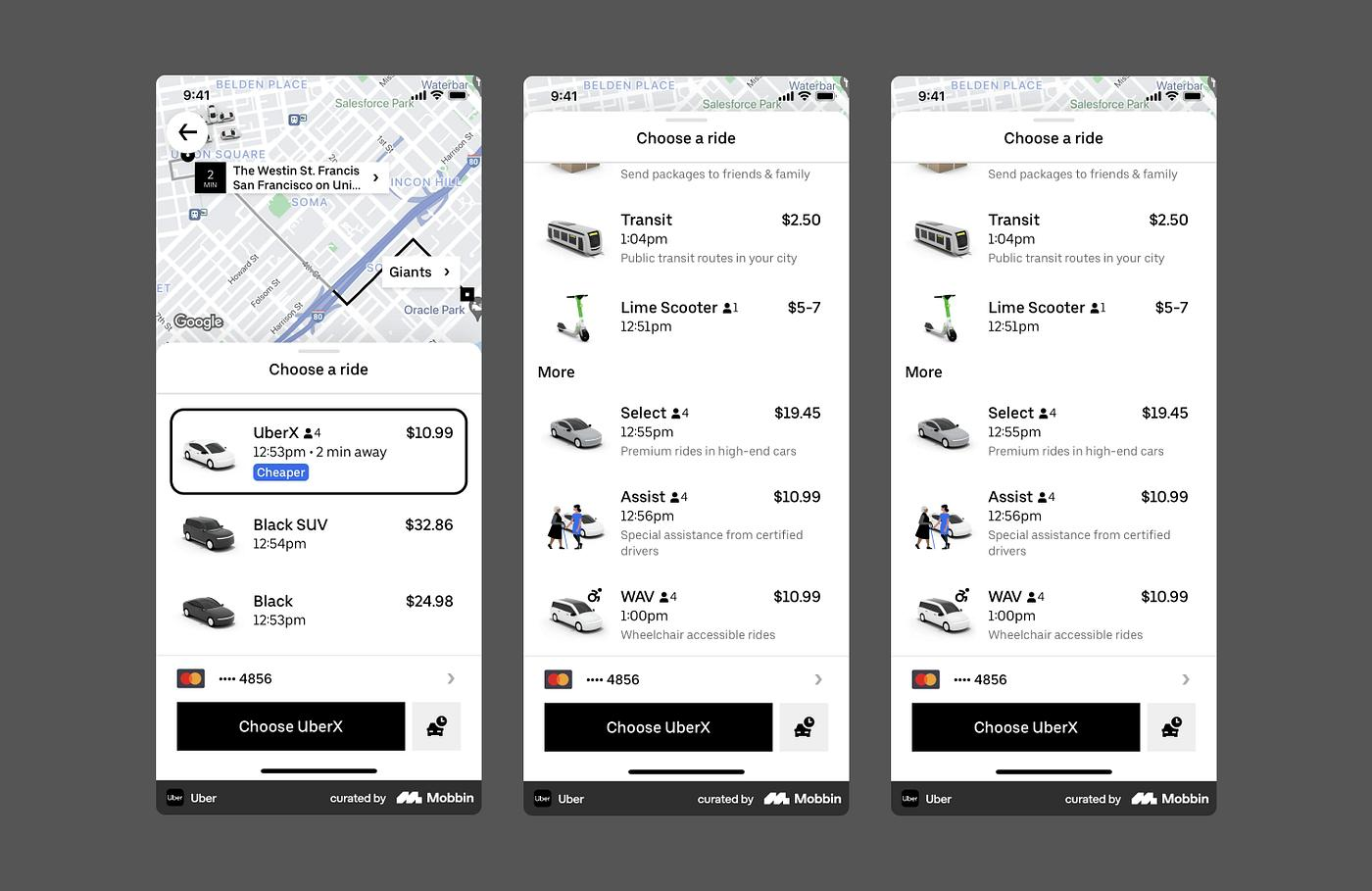
When to use them: Upsell moments during a purchase flow. Onboarding configuration steps (choose your preferences, set your first goal). Contextual product recommendations triggered mid-session. Any scenario where you need more real estate than a tooltip but do not want to fully block the session.
Interruption level: Medium-high, but contextually appropriate on mobile because users associate bottom sheets with native UI patterns rather than "ad interruption."
5. Persistent Banners
A persistent banner is a strip along the top or bottom of the screen that remains visible as the user navigates. It does not interrupt. It sits in the UI until the user acts on it or dismisses it.
When to use them: Time-sensitive offers where you want the CTA to stay visible across multiple screens. Feature announcements that do not need immediate action but should remain discoverable. Account alerts: incomplete KYC in a fintech app, unverified email, subscription expiring soon.
When not to use them: For any message that loses its value if ignored for 20 minutes. For content that requires reading more than one sentence.
Interruption level: Very low. The user can continue navigating normally.
6. Floating Action Buttons (Floaters)
A floating button is a persistent CTA that remains on screen as users scroll or navigate between screens. It is not a notification. It is part of the session's UI layer, controlled from the growth dashboard rather than hardcoded in the app.
When to use them: Tournament sign-up CTAs in gaming apps. Flash sale countdowns in e-commerce. Primary onboarding actions that should stay visible across the first few sessions. Any conversion CTA that is likely to get buried as users browse.
Interruption level: Low. The button is visible but does not block content or require interaction.
What Is an Inline Widget?
Inline widgets sit in a separate category from overlay nudges. They are not overlays. They are embedded content blocks that live inside the app's normal UI flow, like any other screen element.
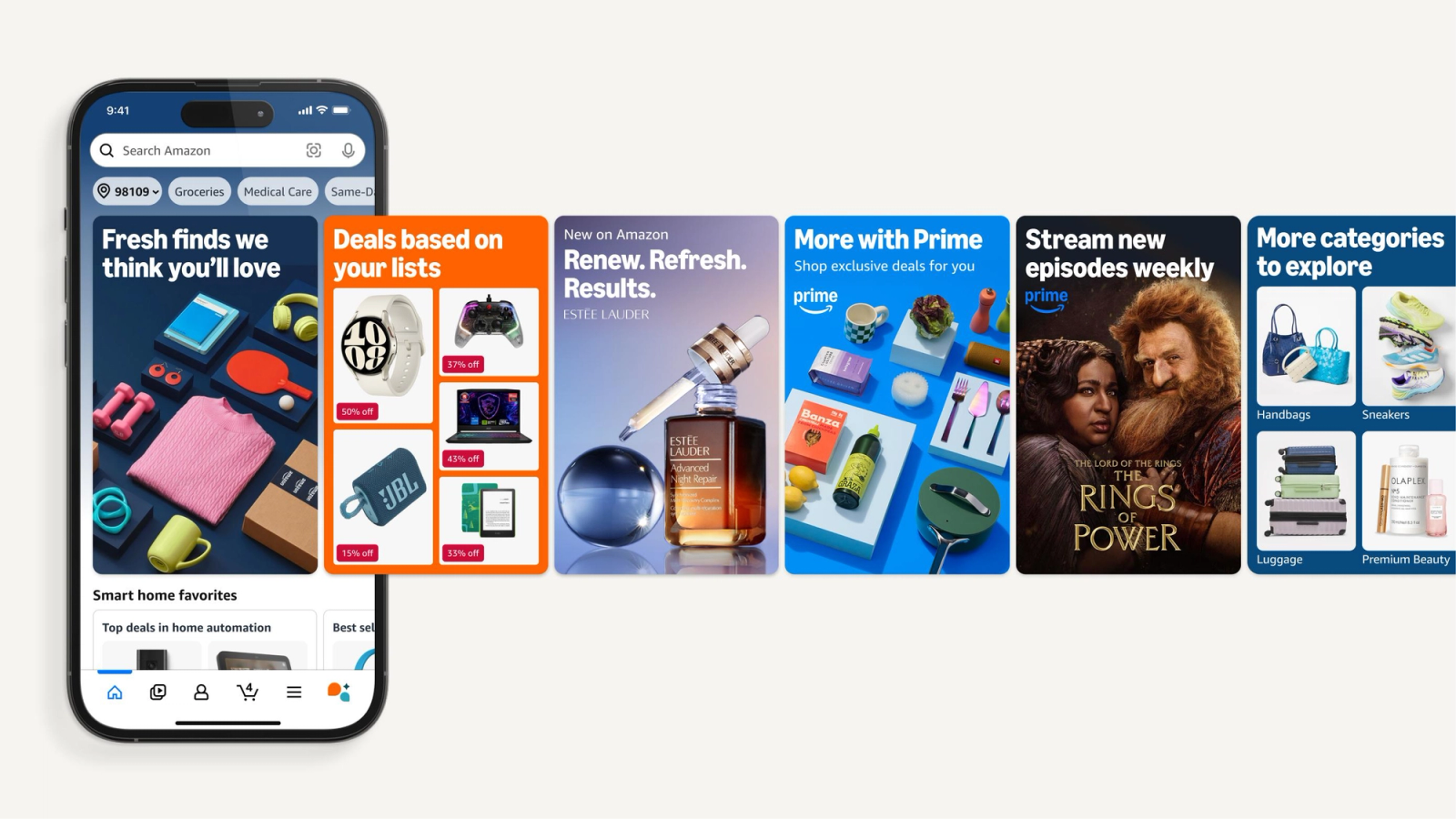
A carousel of personalized offers at the top of a home screen, a stories strip showing new features, a product recommendation grid inside a category page: these are all inline widgets. The user does not perceive them as messages or nudges. They look like part of the product.
The practical advantage: inline widgets can be updated from a dashboard without a new app release. A growth team can change the content of a home screen carousel, replace a promo banner with a new offer, or add a seasonal feature strip without opening a single engineering ticket. That makes them one of the most underused tools in the mobile growth stack.
The key distinction between inline widgets and nudges:
| Dimension | Overlay Nudge | Inline Widget |
|---|---|---|
| Position | On top of UI (overlay) | Within UI (embedded) |
| Interruption level | Low to high depending on format | Zero |
| User perception | "This app is telling me something" | "This is part of the app" |
| Best for | Guiding action at a specific moment | Personalizing content across sessions |
| Update without release | Yes | Yes |
Both types can be triggered by behavioral data and user segments. The choice between them comes down to whether you want to interrupt with intention or personalize without friction.
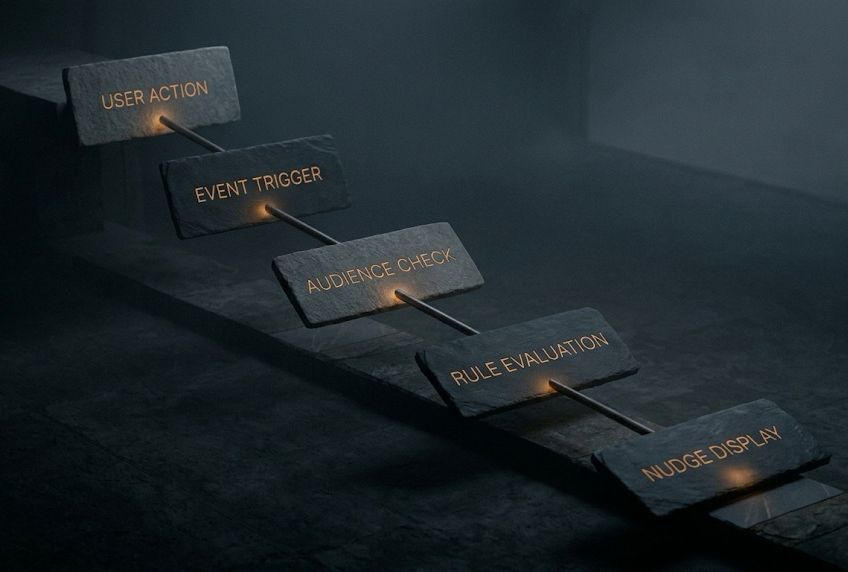
How Nudge Triggering Actually Works
A nudge sitting in a dashboard is inert. What makes it active is the trigger, the condition that causes it to fire. Understanding the triggering architecture is where most teams gain real leverage, because the same nudge content can be highly effective or completely irrelevant depending on when it fires.
Event-Based Triggers
The most precise triggering mechanism. A specific in-app event fires the nudge. The event can be a screen view, a button tap, a completed transaction, a failed action attempt, or any custom event you have instrumented.
Example: A user views the "Investments" screen for the second time in three sessions but has never tapped "Start SIP." That event combination fires a tooltip pointing at the SIP button with a one-line message about auto-invest.
Platforms built specifically for in-app engagement fire nudges within 100ms of an event being triggered, which means the nudge appears while the user is still in the exact context that triggered it.
User Attribute Triggers
Fires based on who the user is, not what they just did. User attributes can include lifecycle stage, segment membership, days since install, cumulative transaction value, device type, or any property synced from your CRM or analytics platform.
Example: All users who completed onboarding more than 7 days ago but have not used Feature X receive a spotlight the next time they open the app.
Behavioral Combination Triggers
Combines event history with current session behavior. These are the highest-precision triggers but require more setup.
Example: Users who have opened the app at least 5 times (frequency signal), whose last transaction was more than 14 days ago (recency signal), and who are currently on the home screen trigger a bottom sheet with a re-engagement offer.
Time-Based Triggers
Fires based on time relative to an event: X days after install, Y hours after the last session, Z minutes after completing a specific action. Useful for drip-style onboarding sequences.
Screen + Session Triggers
Fires when a user reaches a specific screen during a live session. The simplest trigger to configure. The risk is low precision: it will fire for every user who hits that screen regardless of whether the nudge content is relevant to them. Combining it with a user segment condition improves precision.
Nudge Use Cases by Stage of the User Journey
The same nudge format can be used across multiple journey stages, but the content, trigger, and objective change at each stage.
Activation (Day 0 to First Value Moment)
The goal here is getting the user to complete the action that delivers first value, not giving them a product tour. Most apps confuse the two.
Relevant formats: multi-step tooltips for critical path guidance, spotlights for the single most important action, bottom sheets for preference configuration that contextualizes the experience.
Trigger logic: fires on first app open, or when the user reaches a screen without completing the prerequisite action.
Example: A new user in a quick-commerce app reaches the home screen without setting a delivery address. A bottom sheet fires asking them to set their location, with "Deliver to current location" as the primary CTA.
Feature Adoption (Post-Activation)
The activation was successful. The user has experienced the core value. Now the goal is expanding their use of the product to include secondary features that increase stickiness.
Relevant formats: tooltips anchored to the specific feature element, spotlights for major new feature launches, persistent banners for time-sensitive feature access periods.
Trigger logic: fires when the user is on a screen adjacent to the underused feature and has opened the app at least N times (confirming they are past the new-user phase).
Example: Jar's GoldX feature was introduced to users via a Spotlight nudge. The nudge fired for users who were actively using the savings feature but had not yet explored the new GoldX investment option, using contextually appropriate timing based on what the user was already doing.
Monetization and Upsell
Conversion nudges have to survive the scrutiny of a user who already knows your app's value and is deciding whether it is worth paying more for. The trigger timing matters here more than anywhere else.
Relevant formats: bottom sheets for upsell offers during or immediately after a purchase action, modals for subscription conversion when the user has hit a usage limit, floating buttons for time-sensitive upgrade CTAs during premium feature discovery.
Trigger logic: fires when the user interacts with a premium-gated feature, or when a usage milestone (N free uses exhausted) is reached.
Re-engagement
Users who have been inactive for 7 to 30 days represent a specific recovery challenge. Their push notification opt-in may be on but the notification is not getting them back. When they do return to the app organically or through a re-engagement campaign, the in-app experience during that session determines whether they stay.
Relevant formats: bottom sheets with a re-engagement summary ("Here's what changed while you were away"), spotlights for new features they have never seen, inline widgets personalizing the home screen to their historical preferences.
Trigger logic: fires on the first session after a defined inactivity period.
Real Examples from Indian Consumer Apps
Indian consumer apps are the best-in-class case study for in-app nudges, for two reasons. First, the competitive density in categories like fintech, quick commerce, and content forces teams to drive engagement without relying on external channels. Second, the DAU expectations in these categories, CRED, Zepto, PhonePe, require daily habit formation, not just transactional utility.
CRED
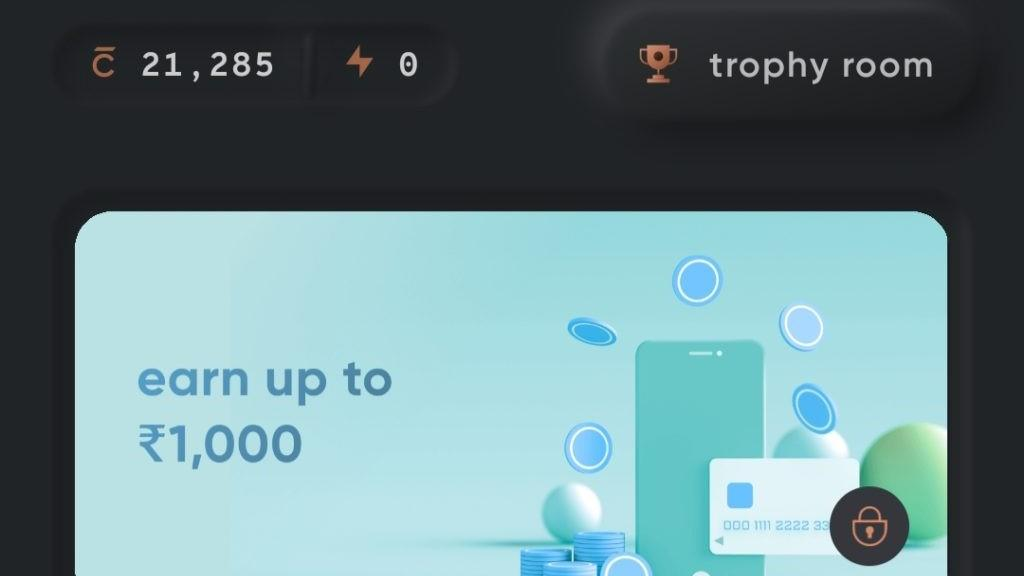
CRED's nudge strategy is notable for its restraint. The app uses rewards-based engagement mechanics with daily touchpoints: quizzes, scratch cards, spin-the-wheel. But the nudges that surface these features are deliberately light. CRED's nudge patterns earn user trust through restraint: the nudges appear at high-signal moments (post bill-payment, post credit score check) rather than on every session entry.
The key behavior CRED drives: getting users to open the app on days when they do not have a bill to pay. Nudges tied to reward availability, streak continuity, and limited-time offers serve this goal without becoming intrusive. The daily spin-the-wheel mechanic on CRED drove 40% daily active engagement from rewards-eligible users, a number that push notifications alone cannot sustain.
Zepto
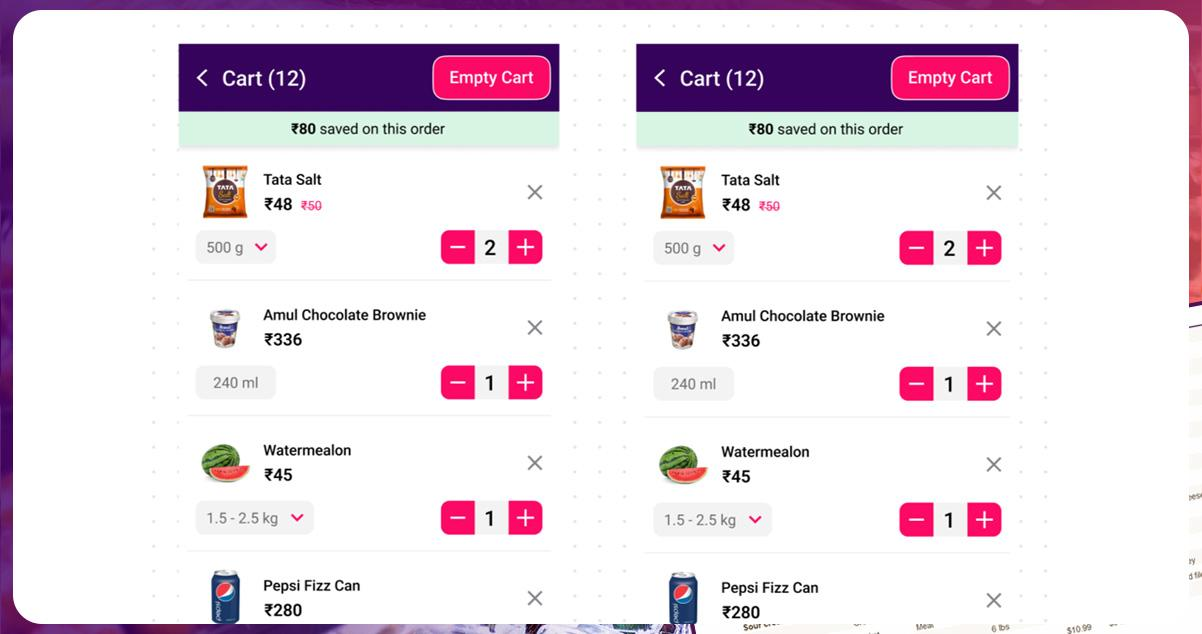
Zepto uses event-triggered nudges tied to cart behavior and browsing patterns. When a user browses a category but does not add items, a floating banner with a contextual offer fires. Cart abandonment recovery happens through a bottom sheet with a time-limited discount, not a push notification.
The distinction matters: the nudge fires while the user is in the app, in the session, at the moment of decision. Zepto also ran a cricket-themed quiz during match days, using event timing to drive record session lengths and repeat daily opens.
PhonePe
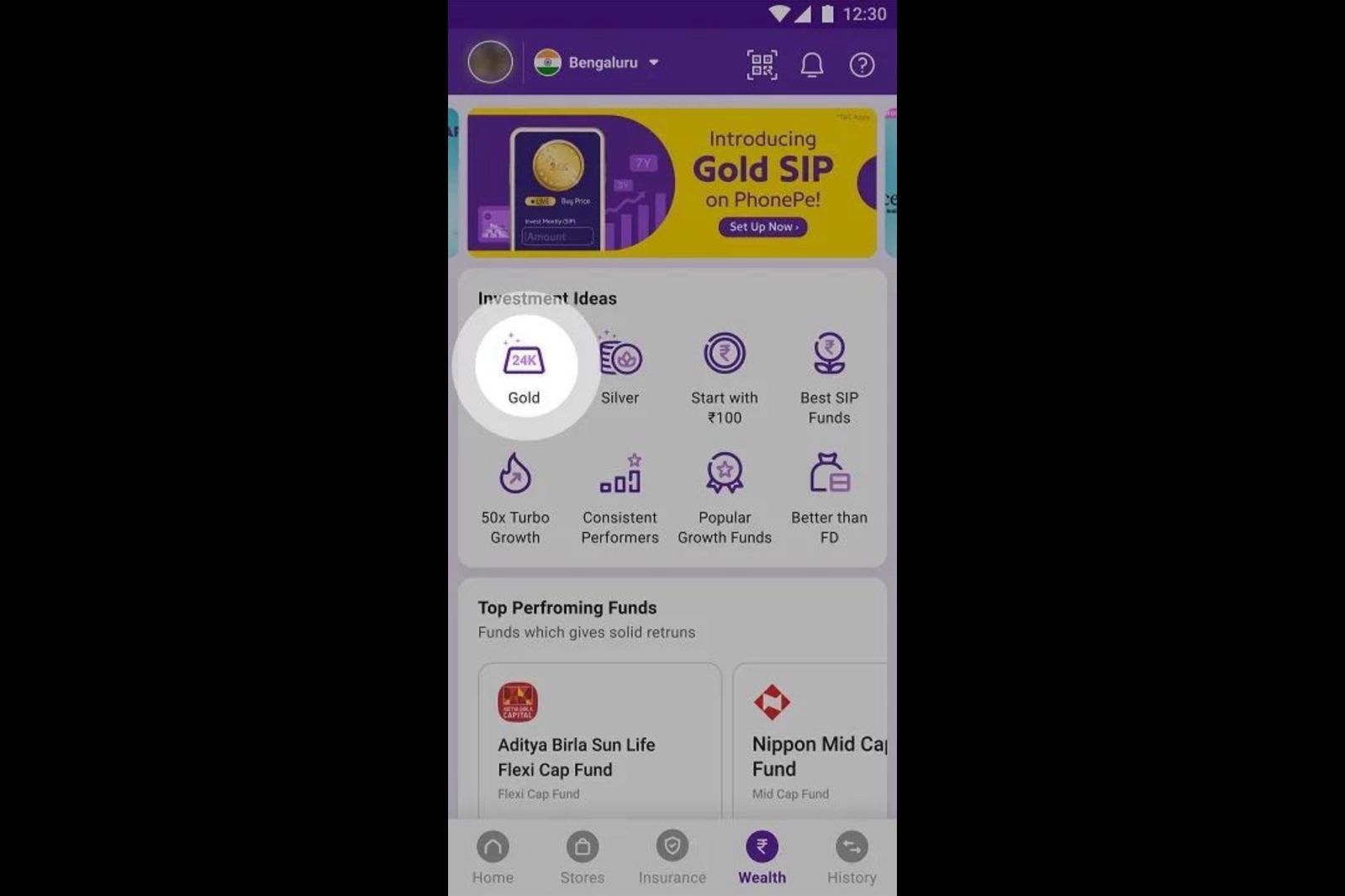
PhonePe's in-app nudge usage skews toward feature adoption and cross-sell. The app uses spotlights and tooltip walkthroughs to introduce financial products, including insurance, mutual funds, and gold investment, to users who primarily use the app for UPI payments.
The trigger logic is behavioral: users who have completed more than 10 UPI transactions but have never visited the investments section receive a spotlight nudge pointing at the investment tab. The timing is based on demonstrated trust (10+ transactions) rather than days since install.
What Makes a Nudge Fail
Most failed nudge campaigns fail for one of four reasons, and none of them are about the nudge format itself.
Wrong timing. The nudge fires before the user has enough context to act on it. A tooltip explaining the SIP feature firing on session one, before the user has even understood the app's primary value, lands as noise. The same tooltip on session four, after the user has completed two transactions, has a real chance of converting.
Wrong audience. A nudge sent to all users is not targeted: it is spam with better UI. The most common mistake is using screen-based triggers without any user-level qualification. Everyone who opens the investments screen does not need the same nudge. A user who has already invested does not need the "try SIP" spotlight.
Ignoring nudge frequency. There is no industry-standard number for how many nudges per session is too many. But the behavioral signal is clear: when users start dismissing nudges without reading them, the frequency is too high. Overwhelming users with too many nudges is the primary failure mode for in-app engagement campaigns. A good starting point is one active nudge per session, with a frequency cap that prevents the same user from seeing the same nudge more than twice in 7 days.
No action path. A nudge that explains something without giving the user a direct path to act on the explanation is incomplete. Every nudge needs a CTA, even if the CTA is just "Got it" for a tooltip. If the nudge is asking the user to try a feature, the tap on the nudge should take them directly to that feature, not to the home screen.
Nudges vs Push Notifications vs In-App Messages: Clearing the Confusion
These three terms are often used interchangeably. They describe different mechanisms.
Push notifications are messages sent to the device's notification tray, delivered by Apple's APNs or Google's FCM infrastructure. They require opt-in. They fire outside the app. They reach users who are not currently using the product.
In-app messages is a broad category used by platforms like CleverTap, MoEngage, and Braze to describe any message delivered inside the app. The category includes full-screen interstitials, banners, and simple text modals, often less contextually precise than purpose-built nudges because they are typically configured in campaign tools built primarily for outbound channels.
In-app nudges, in the specific sense used by Digia Engage and purpose-built engagement platforms, are behavior-triggered UI experiences designed to fire at a precise moment in a live session, anchored to what the user is doing. They are built with mobile-first rendering, sub-100ms delivery, and no app release dependency.
The practical difference: a CleverTap in-app message is typically configured against a batch segment and fires on next session open. A purpose-built nudge fires within 100ms of the specific event that makes it relevant. That gap in precision is the gap between a message that lands and one that gets dismissed.
How to Measure Nudge Performance
A nudge that fires and gets dismissed immediately is not a successful nudge. The metrics that tell you whether your nudges are working:
Impression rate: The percentage of targeted users who actually saw the nudge. If your targeting logic is correct but your impression rate is low, there is a technical issue with trigger conditions or delivery.
Engagement rate: The percentage of users who interacted with the nudge (tapped the CTA, completed the action, did not immediately dismiss). This is your primary quality signal.
Goal completion rate: The percentage of nudge recipients who completed the desired downstream action, not just tapped the CTA, but actually did the thing the nudge was pointing toward. For a "try SIP" nudge, this is the percentage who started an SIP within the session or within 48 hours.
Dismissal rate: High dismissal rate indicates one of four problems: wrong timing, wrong audience, uninteresting content, or frequency fatigue. Segment your dismissal data by user lifecycle stage to find out which.
Nudge-influenced retention: The percentage of users who received and engaged with a nudge and were still active 7, 14, or 30 days later, compared to a matched control group who did not receive the nudge. This is the metric that tells you whether nudges are driving actual retention or just session-level interactions.
A/B testing is essential here. Digia Engage's Smart Switch shifts traffic toward the winning nudge variant automatically based on the conversion metric you define, removing the manual analysis overhead from iteration cycles.
Nudge Fatigue: The Problem Nobody Talks About Enough
Nudge fatigue is the state in which a user has been shown so many nudges that they dismiss all of them reflexively, without reading. It is the in-app equivalent of banner blindness, and it develops faster than most growth teams expect.
The causes are predictable. Multiple teams within the same company deploying nudges independently, with no central frequency governance. Nudges triggered on too-broad audience conditions. Onboarding sequences that run longer than the user's patience.
The signals are also predictable: dismissal rates trending upward over time, engagement rates dropping despite consistent targeting, users who were previously engaged with nudges showing sudden drops in goal completion.
Avoiding nudge fatigue requires treating nudge frequency as a product decision, not a campaign decision. A daily cap on nudges per user, a cooldown period after dismissal, and a clear priority hierarchy when multiple nudges qualify simultaneously are the three controls that prevent fatigue before it develops.
The teams that get this right run fewer nudges, not more. Restraint in nudge volume is what maintains the signal value of each individual nudge.
Key Takeaways
In-app nudges are behavior-triggered UI prompts that fire inside an active session to guide users toward specific actions. The six formats, tooltips, spotlights, modals, bottom sheets, persistent banners, and floating buttons, each have different interruption levels and appropriate use cases.
Inline widgets are the embedded counterpart to overlay nudges. They live inside the UI rather than on top of it, and they personalize content without any interruption signal.
Triggering is the whole game. Event-based triggers produce the highest precision. Screen-only triggers produce the lowest. The combination of event history, user attributes, and current session behavior produces targeting that no external channel can replicate.
Nudges fail when they fire at the wrong moment, target the wrong users, appear too frequently, or lack a direct action path. Frequency governance and a centralized nudge strategy across teams are the infrastructure requirements that prevent failure at scale.
The channel advantage is real. In-app nudges reach users who have opted out of push, fire with session context that push cannot access, and can be deployed without a new app release. That combination makes them the growth team's most direct lever inside the product.
Further Reading
From Digia Engage:
- In-App Onboarding Flows: How to Get Users to Their First Win Faster, the activation use case in practice
- User Activation: What It Means and How to Move the Metric, defining activation correctly before building nudge sequences
- Digia Engage Nudge Builder, tooltips, spotlights, modals, bottom sheets, and floaters without an app release
- Segmentation Models for Mobile Apps, getting the audience targeting right before the nudge goes live
- Inspiration Gallery: Real Nudge Examples from Consumer Apps, see how Zepto, CRED, and others build nudge campaigns
Sources
- Nudge, by Richard H. Thaler and Cass R. Sunstein, Penguin Books, foundational text on behavioral nudging
- The Ultimate Guide to In-App Nudges 2026, Plotline, January 2026
- In-App Notifications: Types, Best Practices, and Examples, Appcues, May 2026
- In-App Banners vs Modals vs Tooltips: Which UX Pattern Works Best?, AnnounceKit, July 2025
- Different Types of In-App Nudges, NudgeNow, March 2024
- What Are In-App Nudges: Strategies and Examples, NudgeNow, January 2025
- In-App Nudges: 12 Examples and 6 Design Patterns, Nvecta, May 2026
- What Are Digital Nudges: A Complete Guide, Apxor
- In-App Nudges: How to Build Non-Intrusive Mobile Experiences, MoEngage, August 2024
- Mobile In-App Definition, SAP Engagement Cloud (Emarsys), February 2026
- Mobile App Engagement Metrics to Track in 2026, Adapty, January 2026
- The Great Push Notifications Benchmark 2025, Batch
- CRED's In-App Nudge Strategy: How Restraint Drives Engagement, Digia Dispatch, May 2026
- Strategies to Increase Mobile App Engagement in 2026, Plotline
- Digia Engage Inspiration Gallery, Digia Engage, 2026
Your growth team can build and ship every nudge format covered in this guide without an app release. Digia Engage's Nudge Builder handles tooltips, spotlights, bottom sheets, modals, floating buttons, and multi-step walkthroughs from one dashboard, with triggers that fire in under 100ms. Book a demo to see how it works inside your own app.
