





TL;DR:
- MoEngage's event pipeline, attribute filtering with AND logic, and default frequency capping all held up under direct testing on a live app. Personalization works too, once you know the syntax is @-triggered Jinja, not curly braces.
- A campaign's target audience filter can be updated on the dashboard and not reflect on device for a while. Frequency changes showed the same lag, taking 15 to 20 minutes to apply.
- In-app campaigns render inside a WebView. That's a real architectural choice, not a rumor, and it's the reason MoEngage in-app content can feel like a browser tab pasted over your UI instead of a native screen. The Spin the Wheel gamification template, built specifically to showcase that in-app surface, showed visible layout and positioning issues during testing.
- Every native and HTML in-app template MoEngage ships is an overlay: modal, banner, full-screen, or popup. There's no built-in way to place a campaign inline within your app's own scrollable content the way a widget or content card sits inside a page.
- MoEngage Personalize and Outbound Segment Sync, the feature that pushes live segment membership changes to other systems, are both sold as separate paid add-ons, not bundled into the base plan. MoEngage doesn't offer a free tier at all.
- None of this rules the channel out. It means you should know where the ceiling is before you build a roadmap around it.
MoEngage will tell you a campaign was delivered. Your dashboard will show it as sent. And the app, if nothing is wired up to catch it, will do nothing at all. No error in the console, no flag in the analytics view, just a campaign that technically fired and a user who never saw it.
We found that by building real campaigns, not by reading the docs. We integrated MoEngage's SDK into a live Flutter app, wired up event tracking on the cart flow, and ran a series of in-app campaigns end to end, checking both the app-side logs and MoEngage's own dashboard at every step. This piece is what came out of that, section by section, the parts that worked exactly as documented and the parts where a growth or product team would get stuck.
What We Tested
MoEngage's in-app channel renders contextual messages, banners, and modals inside a mobile app, triggered by events, screen views, or user attributes. The setup: a Flutter app, MoEngage's SDK, and a test surface built around cart and screen events. We ran this round of testing over the second week of July 2026.
We started at the SDK layer. Initialization completed correctly, and background sync (Core_ReportsManager, Core_DataSyncWorker) ran without issue. From there we confirmed the event pipeline end to end, from the app's analytics layer through its adapter into the CEP SDK and into MoEngage. Two events carried the bulk of testing: screen_viewed with a screen_name attribute, and cart_viewed with item_count and total_value attributes. Both showed up correctly in raw MoEngage SDK logs and in the app's own console output.
With the pipeline confirmed, we moved into campaign behavior: event and attribute-based triggering, combined AND conditions, frequency capping, personalization tokens, A/B variation testing, and segmentation through the Filter by User Property layer. Each is covered below, with what worked next to what didn't.
What MoEngage In-App Does Well
Event and attribute-based triggering work, including combined conditions
We built a campaign on cart_viewed with two AND conditions stacked together, total_value > 500 and item_count > 2. At item_count = 2, the campaign correctly stayed silent since the condition requires strictly greater than two. At item_count = 3 and total_value = 3547, both conditions passed and the message fired. That's the behavior you want from a targeting layer, and it's worth confirming before you build campaign logic on top of it, since a platform that silently treats AND as OR would inflate your audience without telling you.
Frequency capping does what it says, with a real escape hatch for testing
Default capping set to once per day correctly suppressed a repeat trigger from the same user on a second attempt. MoEngage's own documentation notes that capping decisions get made at the user and platform level, and separately ships an explicit Ignore frequency capping toggle per campaign, built specifically so teams aren't stuck waiting out a cap during test iteration. That toggle is a small detail, but it's the difference between a QA cycle that takes minutes and one that takes a day.
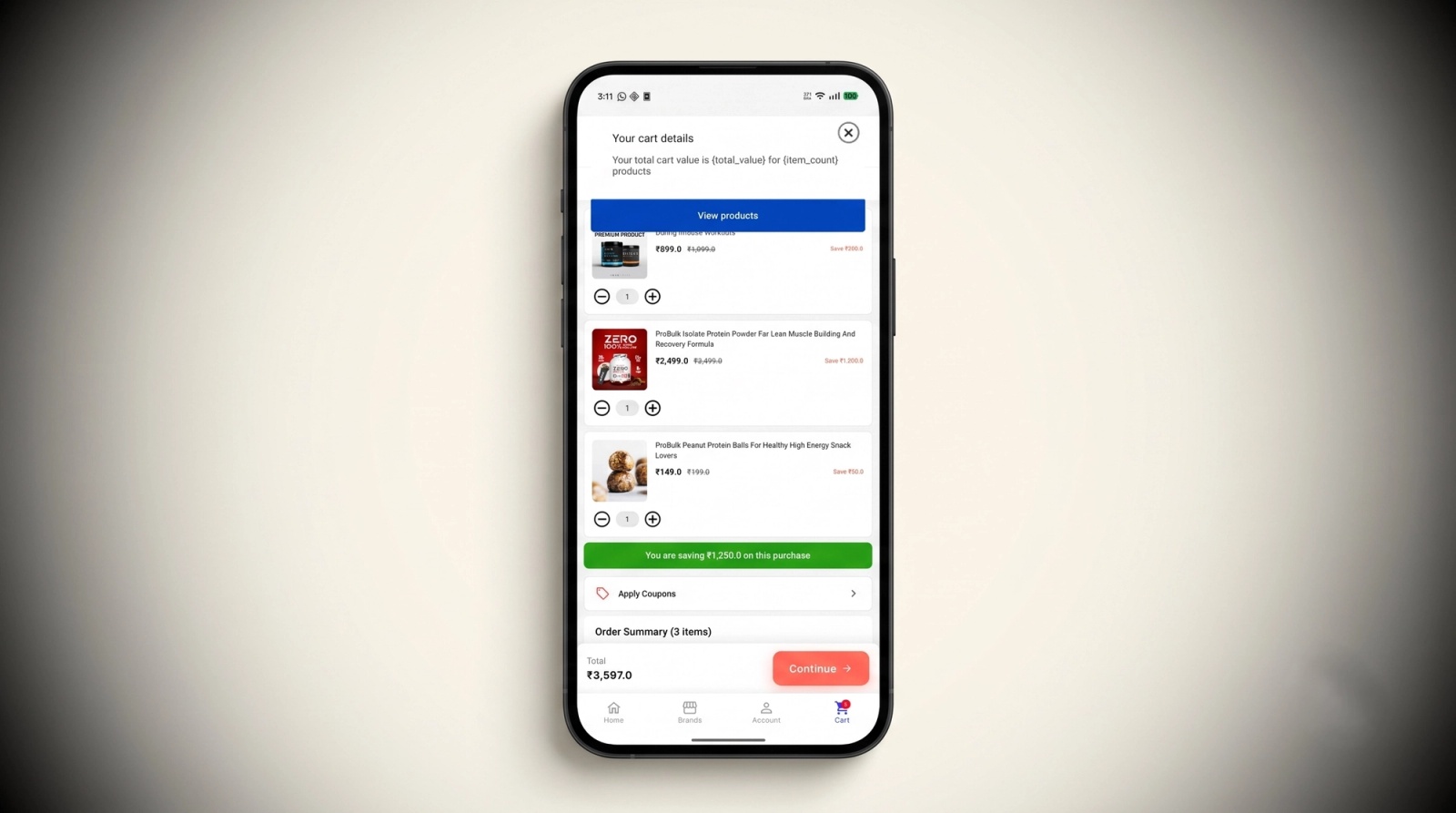
Personalization works, but only through the correct syntax
Our first attempt used {total_value} and {item_count} style tokens, which rendered as literal text on the message instead of pulling live data. MoEngage's Jinja templating documentation confirmed the actual mechanism: personalization is triggered by typing @ inside a content field, which opens a picker for user attributes, event attributes, and content blocks, and inserts Jinja syntax rather than curly-brace placeholders. Once we used the @ picker, personalization rendered correctly on every subsequent test. The gap here isn't a hidden setup step buried in a different settings page. It's a syntax mismatch with zero inline warning when you type something the editor doesn't recognize, and it's the kind of thing that costs a first-time campaign builder a debugging session before anyone tells them what to type instead.
A/B variation testing is sticky per user and offers a genuine choice in how traffic splits
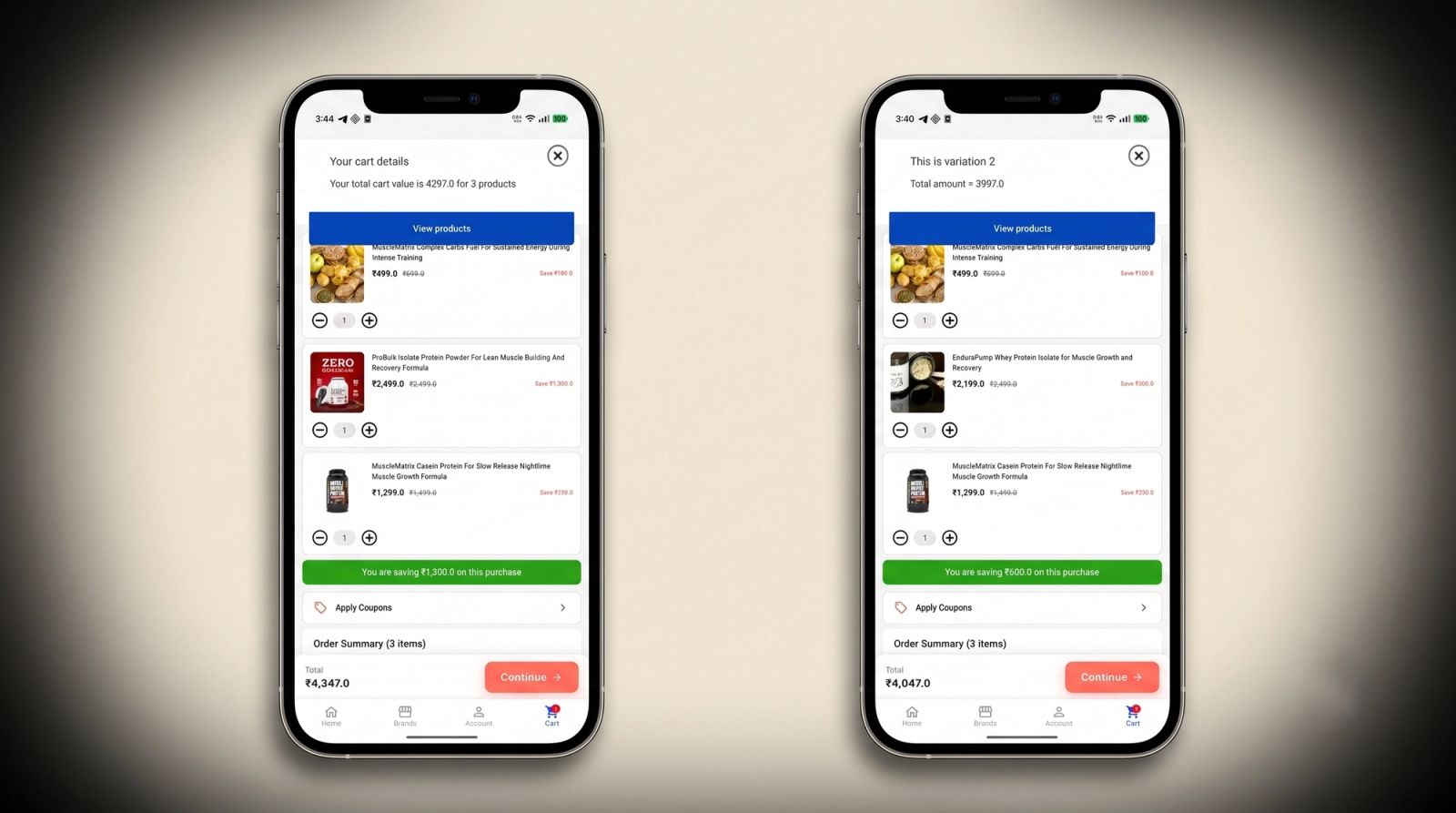
We built multiple variations for the same in-app campaign and confirmed variation assignment stuck to the individual user rather than reshuffling on every impression, the correct behavior for a clean test where you need to attribute a user's actions to one variation consistently. Beyond that, campaign creation offered two distribution methods: a manual split where you set the traffic percentage per variation yourself, and a dynamic option powered by Merlin AI, MoEngage's AI engine, which shifts traffic toward the better-performing variation as the campaign runs instead of waiting for a marketer to check results and reallocate manually. For teams running frequent experiments, that second option removes a manual step that otherwise eats into a campaign's early momentum while a variation with a poor open rate keeps getting equal traffic.
Segmentation through attribute filters is a distinct, working layer
Beyond trigger criteria, we applied a Filter by User Property on top of the event trigger and confirmed it behaves as MoEngage's actual audience segmentation layer, separate from the event condition itself. That separation matters for anyone building layered targeting: the event decides when a message can fire, and the property filter decides who's eligible, and treating them as one setting will produce campaigns that either under- or over-target without an obvious cause.
Where Growth Teams Get Stuck
Frequency and audience updates don't apply in real time
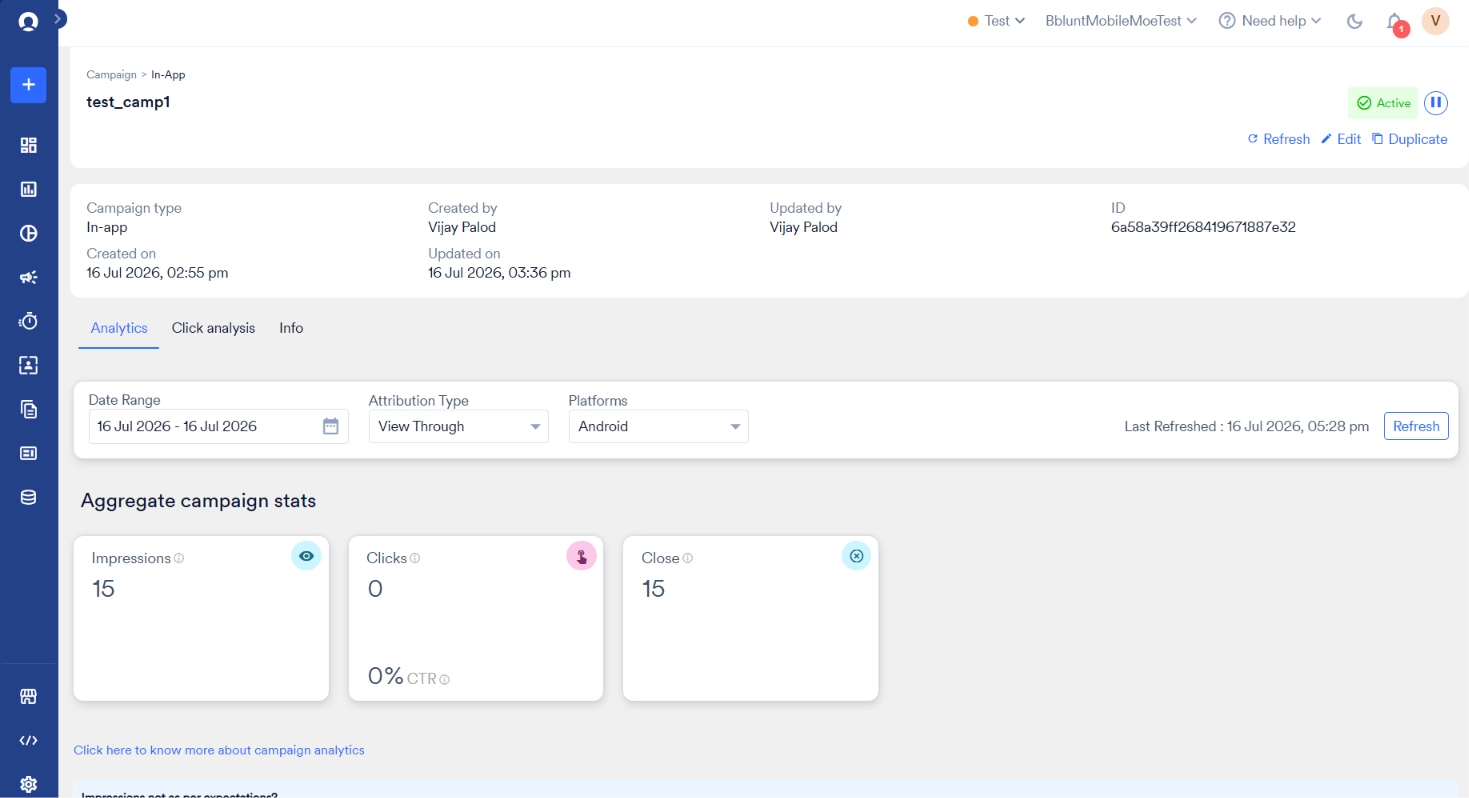
Updating a campaign's send frequency showed a consistent lag of 15 to 20 minutes before the new setting took effect on device. Updating the target audience filter on an already-configured campaign showed the same kind of delay during testing, the change saved on the dashboard without immediately reflecting in what the app was eligible to receive.
MoEngage's own SDK release notes give a plausible mechanism for part of this. iOS SDK updates introduced trigger-time segment re-evaluation specifically to ensure in-app messages are shown only to users eligible at the moment of the trigger, rather than at the last sync. That's a meaningful admission: without it, campaign eligibility is decided against data as of the last sync, not the live state of the campaign or the user. If your team is iterating on audience filters mid-campaign, expect a gap between what you configured and what's actually being evaluated on device until the next sync cycle runs.
Building a custom campaign from scratch is a real project, not a five-minute task
The drag-and-drop editor covers layout, content blocks, and interaction actions, and MoEngage documents it as a way to customize a campaign without touching code. In practice, assembling a campaign that doesn't look like a stretched version of a template took real trial and error with spacing, block behavior across portrait and rotated screen views, and how content properties interact with each other. It's not gated behind an HTML editor the way some competitors' advanced customization is. It's still a tool that rewards familiarity, and a marketer building their first campaign from a blank canvas should budget more than a quick session for it.
In-app campaigns render inside a WebView, and it shows
This isn't speculation. MoEngage's own developer documentation states plainly that the SDK uses WebView to load and display HTML in-apps, downloading images, CSS, and other assets and loading them from local storage into that WebView. During testing, campaigns built this way didn't carry the same feel as the rest of the app. Transitions, font rendering, and touch response all sit a step behind what a fully native screen delivers, and users notice that gap even when they can't articulate why something feels slightly off. For teams building onboarding flows or gamified moments meant to feel like a core part of the product, this is the architectural reason MoEngage in-app content tends to read as a layer bolted onto the app rather than a piece of it.
The Spin the Wheel gamification template looked broken in testing
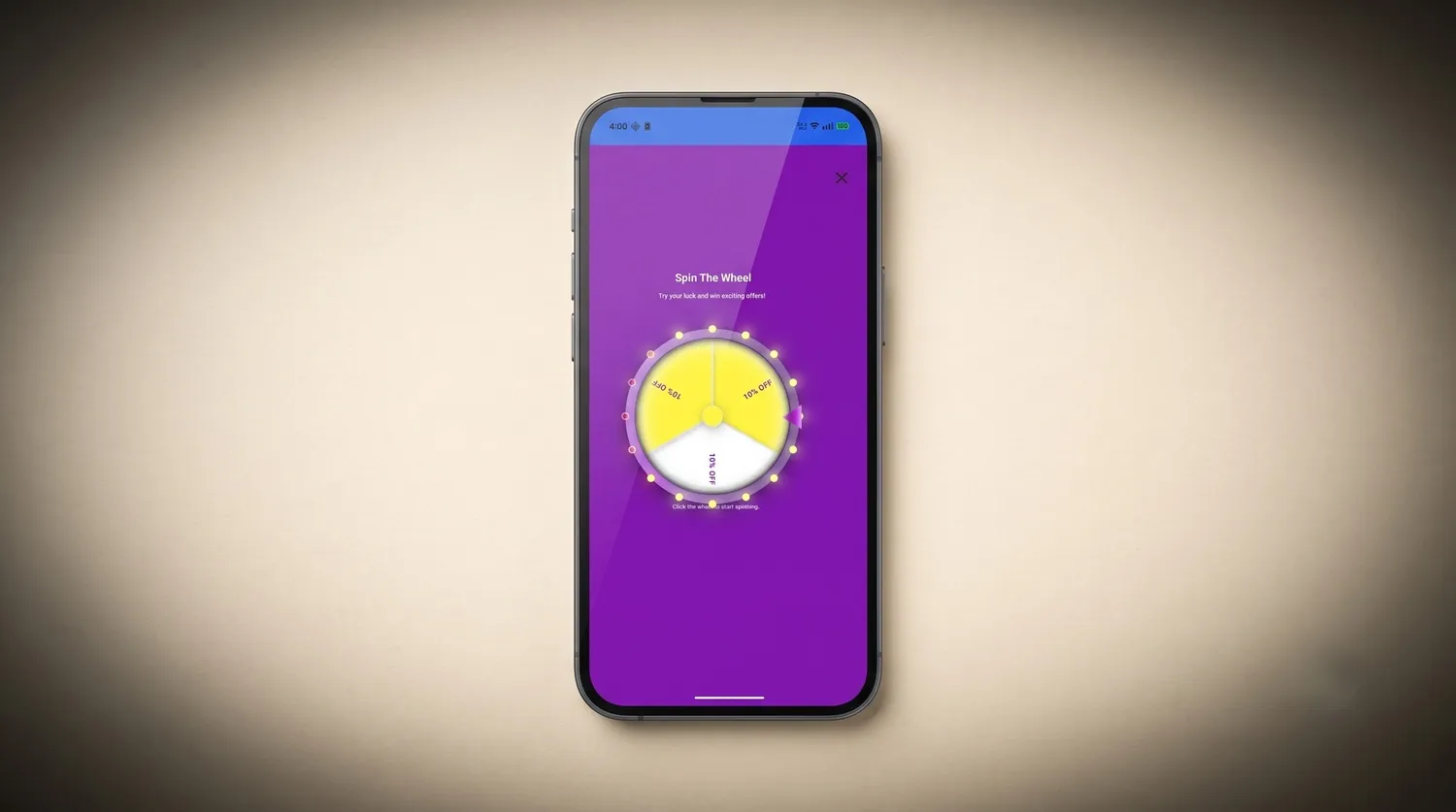
MoEngage ships Spin the Wheel and Scratch Card as no-code gamification templates, built specifically to run without an SDK update and without touching HTML. On paper, that's a genuine differentiator, gamified templates most platforms either lock behind a paid add-on or make you build from scratch. In our test build, the wheel didn't render the way the editor previewed it. Elements sat off-position, and the overall layout read as visibly unfinished rather than the polished spin animation the template is meant to deliver. We have a screenshot of the exact state it rendered in. Since MoEngage's own HTML in-app documentation confirms these templates run inside a full-screen WebView, the same rendering path responsible for the native-feel gap above is a reasonable explanation for why a visually complex template like this one is more prone to breaking than a simple text banner.
There's no way to place a campaign inline within your app's own content
Every in-app template MoEngage documents, native or HTML, is an overlay: modal, banner, full-screen, or popup. MoEngage's own HTML template documentation goes further and confirms that even a template that doesn't visually occupy the full screen still renders inside a transparent, full-screen WebView that blocks interaction with the rest of the app behind it. There's no native template type built to sit inline in a scrollable feed or embedded inside existing page content the way a widget or card would. The closest option is building self-handled Cards yourself, which puts the entire rendering and layout burden back on your engineering team instead of the platform. If your use case is a widget that lives inside your existing UI rather than a message that interrupts it, MoEngage's in-app templates aren't built for that job today.
Other Known Issues Worth Knowing About
Independent reviews echo the dashboard consistency problem directly. On Gartner Peer Insights, one reviewer described inconsistency between numbers shown on different dashboard views, and another cited delayed engineering ticket responses alongside a 60-day data retention window on analytics, a real constraint if your team wants to look back at campaign performance from earlier in the quarter.
On G2, reviewers repeatedly flag the platform as feature-rich but overwhelming for new users, particularly when setting up advanced flows or managing complex segments without strict naming discipline. That combination, a lot of surface area plus loose guardrails, means the platform rewards teams that already have an established process and can be a genuine ramp for teams that don't.
Pricing follows a tiered, usage-based model scaled to Monthly Tracked Users, and G2's pricing page confirms it isn't public. That structure means exploratory testing, the kind this piece is built on, requires a sales conversation before you can see what a real account looks like. SaaSWorthy's listing confirms MoEngage doesn't offer a free plan at all, so there's no self-serve way to test the platform before committing to a quote.
Two features worth flagging specifically for teams evaluating personalization and cross-platform segmentation: MoEngage Personalize, the on-site and web personalization engine, is listed as its own separate pricing plan rather than a feature bundled into the core in-app messaging tier. And Outbound Segment Sync, the capability that pushes live segment membership changes out to downstream tools, shows up on independent pricing breakdowns as a paid add-on priced separately from Growth and Enterprise plans. Budget for both as line items, not assumptions, before you scope a project around them.
Why These Gaps Keep Showing Up
Every gap above traces back to one decision. MoEngage was built as an insights-led customer engagement platform first, with segmentation, analytics, and cross-channel orchestration as the core investment. In-app messaging sits on top of that as one delivery surface, using WebView rendering and the same sync infrastructure that also has to serve push, email, and SMS.
That's a defensible choice for a platform trying to cover every channel from one dashboard. Deciding who should see a message and when is a different discipline from rendering rich, native UI on a mobile device and keeping that UI in sync with live campaign changes. One needs a data pipeline and a segmentation engine. The other needs a native rendering layer, a component system, and delivery logic that updates the moment you change it, not fifteen minutes later.
None of the targeting mechanics we tested were the problem. Event triggers fired correctly, AND logic behaved correctly, frequency capping suppressed correctly. The gap sits specifically in what happens after the trigger decision gets made: what renders on screen, how native it feels, and how quickly a dashboard change actually reaches the device.
MoEngage vs Digia Engage at a Glance
MoEngage In-App vs Digia Engage
| Capability | MoEngage In-App | Digia Engage |
|---|---|---|
| Rendering | HTML in-app content loaded and displayed inside a WebView | Fully native components rendered on device, no WebView |
| Campaign update propagation | Frequency and audience filter changes showed a 15 to 20 minute lag to device in testing | Changes reflect on the next interaction, not on a separate sync cycle |
| Campaign building for non-coders | Drag-and-drop editor works but has a real learning curve for a first custom campaign | Visual dashboard built specifically for growth and marketing teams, no engineering handoff |
| Personalization | Works correctly once you use @-triggered Jinja syntax, with no inline warning for the wrong format | Personalization tokens map directly from connected event and user data |
| Inline placement | Every template is an overlay, modal, banner, full-screen, or popup. No native way to embed a campaign inside existing scrollable content | Widgets render natively inside your app's own layout, not as an overlay on top of it |
| Gamification rendering | Spin the Wheel and Scratch Card ship no-code, but render inside a WebView and showed visible layout issues in testing | Gamified components render natively, matching the rest of the app's motion and layout system |
| Personalization and segment sync pricing | MoEngage Personalize and Outbound Segment Sync are separate paid add-ons on top of the base plan, with no free tier | Personalization and segmentation come from the same connected MoEngage data at no added platform cost |
How MoEngage and Digia Engage Fit Together
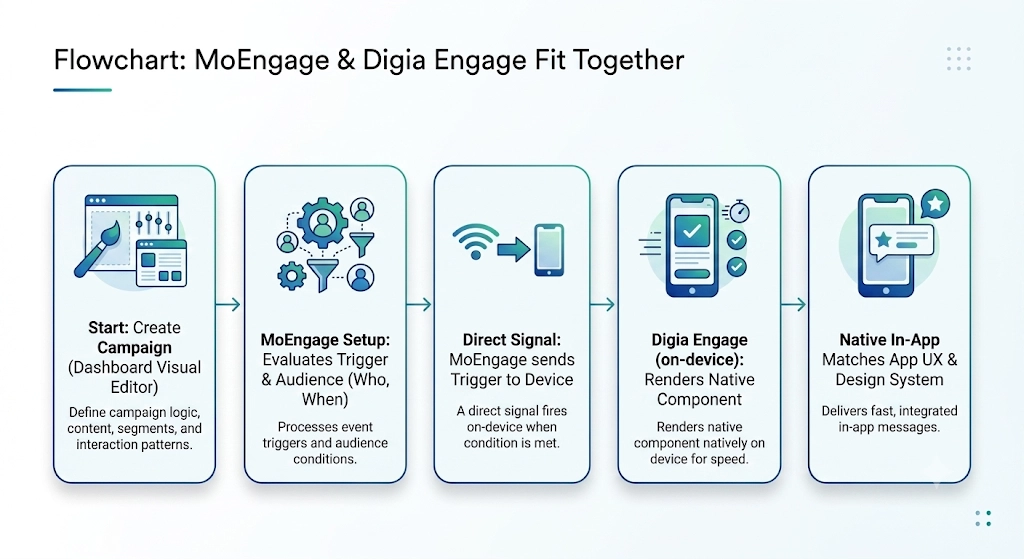
The split, in one line. MoEngage keeps deciding who qualifies for a message and when the trigger fires. Digia Engage runs as a direct integration on top of MoEngage, taking over what actually renders on screen and how fast that rendering reflects a change.
How the handoff works. A trigger fires from MoEngage based on the same event and segment logic tested above. Digia Engage receives that signal on device and renders the configured component natively, no WebView, no waiting on the next sync cycle to reflect a frequency or audience change made in the dashboard.
What changes for how a campaign actually looks. Because Digia Engage renders natively instead of inside a WebView, the same event and segment logic that decided a message should fire now produces a component that matches the rest of the app's motion, fonts, and touch response, instead of a browser surface pasted on top of it.
Growth teams build and edit that component from a visual editor, adjusting layout, spacing, and interaction patterns to match the app's existing design system, instead of assembling a drag-and-drop campaign that still needs manual tuning to avoid looking like a stretched template. The dashboard is built for marketers and product managers, not developers.
Where the Combination Earns Its Keep
Some in-app use cases are fine on MoEngage's native templates alone. A simple promotional banner triggered off a cart event doesn't need a dedicated rendering layer. The cases below are where that layer starts to matter.
Onboarding Flows That Actually Match Your App
Onboarding is where a WebView seam shows up fastest, since it's the first extended interaction a new user has with the product. With Digia Engage, teams control exactly what a guide, tooltip, or checklist looks like directly from the dashboard, spacing, color, animation, all rendered natively. MoEngage's trigger logic still decides which users see which onboarding step and in what order. Digia Engage decides what that step actually looks like on screen.
Widgets That Live Inside Your App Instead of On Top of It
Since MoEngage has no native template built to render inline within existing content, teams that want a recommendation carousel, a progress tracker, or a promotional widget sitting inside a screen rather than interrupting it end up building that entirely in-house on self-handled Cards. Digia Engage's widgets are built for exactly this placement, triggered by the same MoEngage events and segments tested above, rendered as a native part of the layout rather than an overlay competing for the same screen space.
Gamified Moments That Need to Feel Polished
The Spin the Wheel finding above matters most in exactly the moments a team is trying hardest to delight a user, a reward reveal, a loyalty milestone, a checkout incentive. A gamified template that renders with visible layout issues undercuts the entire point of using gamification in the first place. Digia Engage's gamification components render natively rather than inside a WebView, so the polish a team designs for shows up the same way on every device.
Analytics That Update When They Happen
This connects directly to the propagation delay found in testing. Digia Engage's dashboard reflects interaction events as they're captured on device, so the number a team is watching during a live test and the number in the full report are the same number, not two views separated by a sync window.
How the Split Pays for Itself
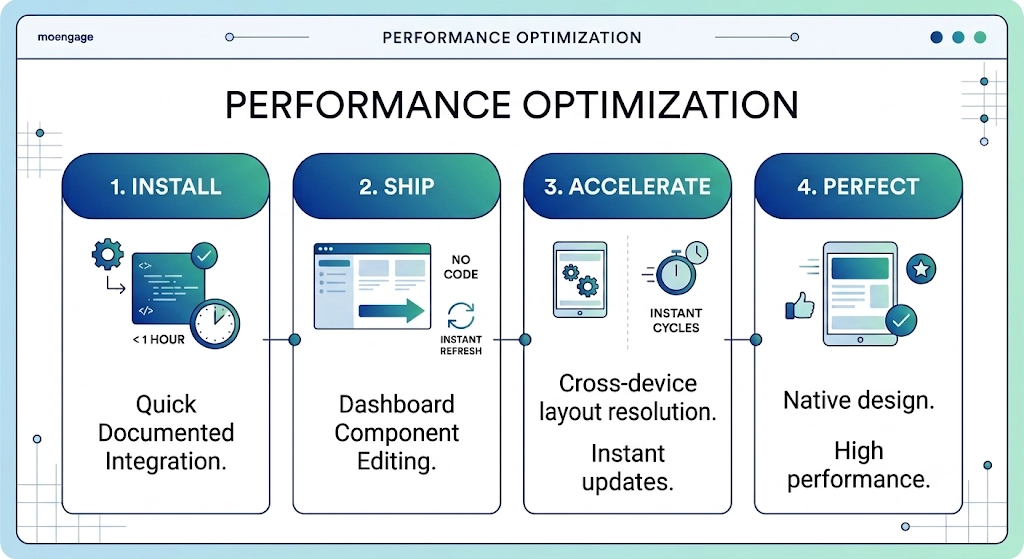
The case against adding a second layer is usually complexity. Another SDK, another dashboard. Worth answering directly: the MoEngage integration runs on top of the core Digia Engage SDK and typically adds well under an hour of engineering time, per Digia's own MoEngage integration documentation. After that, in-app visual changes ship from the dashboard without a new engineering ticket per update.
Compare that to a team debugging why a gamified campaign renders with visible layout issues on some devices, or waiting fifteen minutes to confirm whether a frequency change actually applied before running the next test. Those cycles add up fast, and they're exactly the kind of overhead a dedicated rendering layer removes.
A Simple Framework for Deciding If This Matters to You
If your team's need is a straightforward triggered message based on an event or a segment, without custom visual polish or inline placement, MoEngage's native in-app templates handle that well on their own.
If your need extends further, a few things start to matter. A native look and feel that doesn't read as a WebView. A gamified moment that renders exactly as designed on every device. Campaign changes that reflect immediately instead of on the next sync. One dashboard for onboarding, gamification, and surveys instead of stitching several tools together.
That's the point where pairing MoEngage's targeting with a dedicated rendering layer closes the gap this review surfaced.
Key Takeaways
- MoEngage's event pipeline, AND-based attribute filtering, default frequency capping, and property-based segmentation all held up correctly under direct testing on a live app.
- A/B variation testing stuck correctly per user, and campaign creation offered both manual traffic distribution and a dynamic option powered by Merlin AI that shifts traffic toward the better-performing variation automatically.
- Personalization tokens work, but only through @-triggered Jinja syntax, not curly braces, with no inline warning when the wrong format is used.
- Frequency and audience filter updates showed a 15 to 20 minute lag before reflecting on device during testing, consistent with MoEngage's own SDK notes on trigger-time segment re-evaluation.
- In-app content renders inside a WebView by MoEngage's own documentation, a real architectural reason campaigns can feel less native than the rest of the app. The Spin the Wheel gamification template showed visible layout issues in testing that trace back to this same rendering path.
- Every in-app template MoEngage ships, native or HTML, is an overlay. There's no built-in way to place a campaign inline inside existing scrollable content without building the rendering yourself on self-handled Cards.
- MoEngage Personalize and Outbound Segment Sync are both sold as separate paid add-ons on top of the base plan, and MoEngage has no free tier for teams that want to test before committing.
- The drag-and-drop editor is workable but has a real learning curve for a marketer building a custom campaign from a blank canvas for the first time.
- Pairing MoEngage's trigger logic with a dedicated native rendering layer like Digia Engage addresses the WebView feel, the lack of inline placement, and the update lag directly, without touching the targeting and segmentation work MoEngage already does well.
External Sources
- Frequency Capping, MoEngage User Guide: MoEngage's own documentation on how capping decisions get made and the per-campaign "Ignore frequency capping" toggle
- Jinja Templating Language, MoEngage: official documentation confirming @-triggered Jinja syntax for personalization
- Perform User Distribution Dynamically using Merlin AI, MoEngage User Guide: official documentation on manual versus Merlin AI-driven variation distribution
- Troubleshooting and FAQs, MoEngage Developer Guide: confirms the SDK renders HTML in-apps inside a WebView
- Drag and Drop Editor, MoEngage User Guide: official documentation on building custom in-app campaigns without code
- iOS SDK Release Notes, MoEngage: documents trigger-time segment re-evaluation as an SDK-level feature addition
- MoEngage Reviews, Gartner Peer Insights: user-reported dashboard inconsistencies and analytics data retention limits
- MoEngage Reviews, G2: aggregated user feedback on learning curve and segment complexity
- MoEngage Pricing, G2: confirms tiered, usage-based pricing without public rates
- No-code Gamification Templates, MoEngage User Guide: official documentation on the Spin the Wheel and Scratch Card templates
- In-App Templates, MoEngage User Guide: confirms every native in-app template type is an overlay format
- HTML In-App Templates, MoEngage User Guide: confirms HTML templates render inside a full-screen WebView regardless of visual size
- MoEngage Pricing, SaaSWorthy: confirms MoEngage does not offer a free plan
- MoEngage Pricing and Plans, Software Finder: lists MoEngage Personalize as a separately priced plan
- What Is MoEngage, CDP.com: independent breakdown confirming Outbound Segment Sync and other capabilities are priced as separate add-ons
Digia Engage is the native in-app rendering layer for growth teams running MoEngage, WebEngage, or CleverTap. It covers nudges, widgets, inline surveys, gamification, onboarding, and in-app video from a single, no-code dashboard, with analytics that reflect interactions as they happen instead of on MoEngage's sync cycle. Book a demo to see how it sits alongside your existing MoEngage setup.