TL;DR
- In November 2026 we compared eight in-app survey tools for iOS and Android:
- Amplitude Guides and Surveys, PostHog Surveys, Sprig, Survicate, Refiner, Plotline, Blitzllama and Digia Engage.
- The survey widget is the easy part.
- The decision that matters is which direction data flows.
- Check four things per tool: can it import your analytics cohorts for targeting, can it trigger on your existing events, does it write responses back as events, and does it write them back as user properties.
- Amplitude and PostHog keep surveys inside the analytics product, so the loop is closed by default.
- Sprig, Survicate, Refiner, Plotline and Blitzllama document integrations with Amplitude, Mixpanel, Segment or CleverTap, with differences in direction and plan.
- Digia Engage is built for teams that already run CleverTap or MoEngage and want native survey components triggered from there.
Editorial disclosure: Digia Engage is one of the eight tools reviewed here, and Digia sells it. Digia Engage integrates with CleverTap, MoEngage and WebEngage and is not affiliated with any other vendor named in this article. Several comparison pages cited below, including Amplitude's and PostHog's, are published by vendors that rank themselves. We use them for feature facts and treat their rankings as marketing. Where a vendor makes no public statement, the table says "Not stated", which means we found nothing public as of November 2026.
What "Feeds Your Analytics" Actually Means
Most listicles on this topic compare question types and templates. Those are table stakes. A survey that lives in its own dashboard produces a score and a pile of comments. A survey wired into your analytics produces a segment you can chart, a cohort you can retarget and a retention curve split by sentiment.
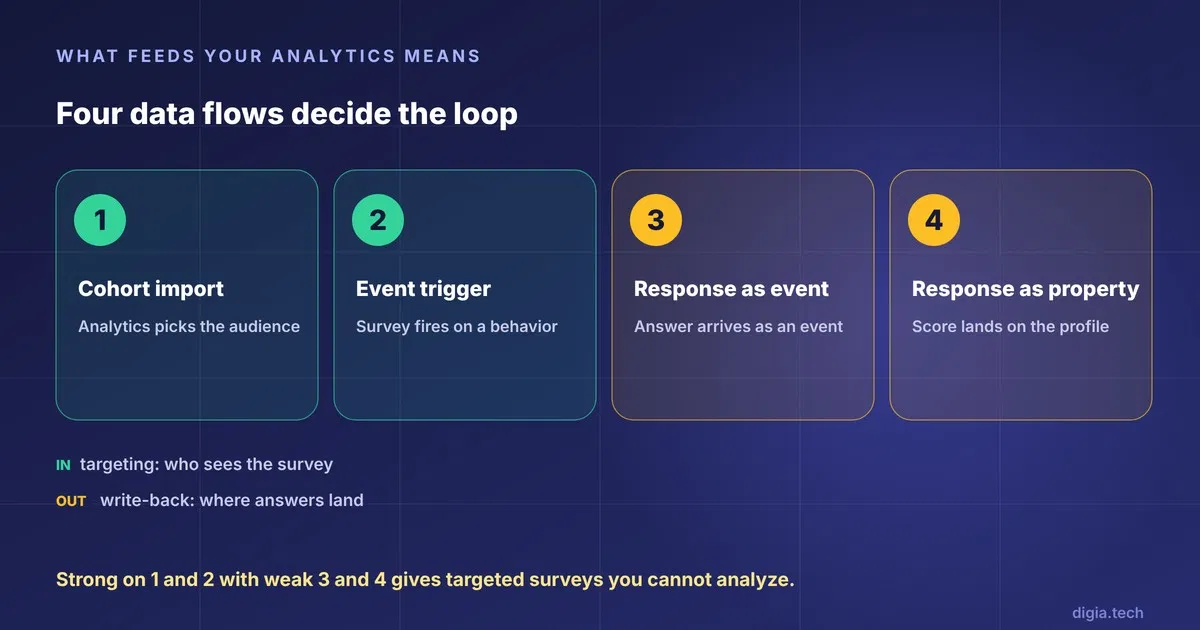
Four flows decide whether that wiring exists:
- Cohort import. Your analytics tool defines who should see the survey, and the survey tool pulls that cohort. Blitzllama, for example, lists cohort import from Amplitude and Mixpanel as a core integration.
- Event triggers. The survey fires after a behavioral event such as a completed purchase. Blitzllama's changelog says its Amplitude, Mixpanel and Segment integration lets teams launch surveys from existing analytics events, and that it is limited to the Scale plan.
- Responses as events. Each answer arrives in your analytics as an event you can chart. Braze documents this pattern with its Survey Response event exported through Currents.
- Responses as properties. The score or answer is written onto the user profile so it can drive segmentation. Survicate's Braze integration syncs responses as attributes and events.
A tool can be strong on flows one and two and weak on three and four. That combination gives you well-targeted surveys whose answers you cannot analyze next to behavior. Ask for all four in every demo.
How We Evaluated
We scored each tool on six points, ordered by weight:
- Response write-back (30%). Do answers reach your analytics as events, properties or both, and on which plan.
- Targeting inputs (20%). Cohort import and event triggers from the analytics tool you already run.
- Mobile SDK coverage (20%). Native iOS and Android, plus Flutter and React Native, based on the vendor's own documentation.
- Native rendering (10%). Whether the survey is a native component or a web view inside the app.
- Pricing transparency (10%). Whether a buyer can estimate cost before a sales call.
- Setup effort (10%). Whether a product manager can launch without an app release.
All facts come from public vendor documentation and pages read in November 2026. We did not run each SDK in a test app, so this is a documentation review. Where two sources disagree, we say so.
Comparison Table
| Tool | Mobile SDKs (per vendor docs) | Analytics in | Responses out | Pricing visibility |
|---|---|---|---|---|
| Amplitude Guides and Surveys | [iOS SDK documented](https://amplitude.com/docs/sdks/guides-and-surveys/guides-and-surveys-ios-sdk), mobile launched [March 2026](https://amplitude.com/blog/mobile-guides-surveys) | Native, same platform | Native, same platform | Not stated |
| PostHog Surveys | [Flutter guide](https://posthog.com/docs/surveys/installation/flutter), [SDK feature matrix](https://posthog.com/docs/surveys/sdk-feature-support) | Native, same platform | Native, same platform | [Free tier per PostHog's comparison](https://posthog.com/blog/best-inapp-survey-tools) |
| Sprig | [Mobile SDKs](https://sprig.com/features/mobile), Flutter disputed | [Amplitude integration](https://docs.sprig.com/docs/amplitude), [Segment on Android](https://docs.sprig.com/docs/installation/introduction-mobile/segment-android.md) | Via integrations | Usage-based, rates not public |
| Survicate | [Mobile surveys](https://survicate.com/mobile-surveys/) | [Segment](https://help.survicate.com/en/articles/3942525-segment-integration), [Amplitude](https://help.survicate.com/en/articles/5707918-amplitude-integration) | Attributes and events in Braze | Not stated |
| Refiner | [Mobile app surveys](https://refiner.io/features/mobile-app-surveys/) | [Amplitude](https://refiner.io/docs/kb/integrations/amplitude-integration/), [Mixpanel](https://refiner.io/docs/?p=25192), [Segment](https://refiner.io/docs/?p=19942) | Via integrations | Not stated |
| Plotline | Not stated | [Amplitude destination](https://amplitude.com/docs/data/destination-catalog/plotline), [Mixpanel partner](https://mixpanel.com/partners/integrations/plotline) | Via integrations | Not stated |
| Blitzllama | Android, iOS, React Native, Flutter per [its own comparison](https://blitzllama.com/blog/sprig-vs-blitzllama) | Cohorts from [Amplitude, Mixpanel, CleverTap](https://blitzllama.com/integration), event triggers on Scale plan | Feedback export plus [Export API](https://www.blitzllama.com/integration/export-api) | [Not public per G2](https://www.g2.com/products/blitzllama/pricing) |
| Digia Engage | Native components, no WebView, per [core concepts](https://docs.digia.tech/digia-engage/start-here/core-concepts) | Triggered from [CleverTap](https://docs.digia.tech/digia-engage/user-guides/clevertap/survey) or [MoEngage](https://docs.digia.tech/digia-engage/user-guides/moengage/survey) | Not stated publicly | Not stated |
The Eight Tools
1. Amplitude Guides and Surveys
Amplitude is the shortest path if Amplitude already holds your event data. The survey product sits in the same platform, so targeting uses the cohorts you already built. Amplitude announced mobile support on March 11, 2026, and the iOS SDK guide and a mobile SDK changelog are public.
Where it wins: No integration to build. Behavior and sentiment live in one place.
Where it falls short: It is young on mobile. Read the changelog for Flutter and React Native status before committing, because platform coverage shifts quickly. It also assumes you are an Amplitude customer. Amplitude also publishes its own survey tool comparison, so treat that page as vendor material.
Best for: Teams already on Amplitude who want surveys without a new vendor.
2. PostHog Surveys
PostHog bundles surveys with analytics, session replay and feature flags. Its docs include a Flutter installation guide and an SDK feature support page that shows which survey features each SDK supports. That matrix is the document to read, because mobile feature parity varies by SDK.
Where it wins: Responses and behavior share one data model, and PostHog's own comparison says it offers a free tier.
Where it falls short: Older PostHog material said mobile surveys were absent, and newer docs show support. Trust the current feature matrix over any blog post, including ours. It is also the wrong pick if your analytics home is Mixpanel or CleverTap.
Best for: Product-led teams that want one open platform for analytics and feedback.
3. Sprig
Sprig runs a dedicated mobile survey product and documents an Amplitude integration. Its Android install guide covers a Segment path, and RudderStack's release notes describe device-mode SDKs for Kotlin, Swift and React Native.
Where it wins: Strong CDP connectivity. If Segment or RudderStack sits between your app and your tools, Sprig plugs in cleanly.
Where it falls short: Flutter support is disputed. Sprig's page lists it. PostHog's comparison says Sprig does not support Flutter. PostHog is a competitor, so weigh that, then test it in a build before signing. The same PostHog page puts Sprig's free tier at 25 responses a month and says rates are not public.
Best for: Teams with a CDP and a dedicated research function.
4. Survicate
Survicate offers mobile surveys with documented Segment and Amplitude integrations. Its Braze work is the clearest write-back story in this group. The Braze guide says responses can flow into Braze as custom attributes, and Braze's own partner page describes syncing responses as attributes or events. Survicate's Amplitude page in Amplitude's catalog shows the integration is listed on both sides.
Where it wins: Both write-back flows, properties and events, are documented for Braze.
Where it falls short: Pricing is not stated in what we read, and its mobile positioning is one channel among email, web and in-product.
Best for: Teams on Braze that need responses to drive segments.
5. Refiner
Refiner pitches mobile app surveys around integrations with the tools you already own, and documents Amplitude, Mixpanel and Segment paths. Braze's partner directory also lists Refiner as an in-app survey platform for NPS, CSAT and CES.
Where it wins: The widest analytics coverage among the dedicated survey vendors, including Mixpanel.
Where it falls short: Mobile SDK specifics are thinner in public docs than for Sprig or Blitzllama. Ask for the exact SDK list.
Best for: SaaS and mobile teams on Mixpanel.
6. Plotline
Plotline bundles surveys with in-app guides. Its LoadShare NPS case study shows the survey use case in production. On the analytics side it appears as an Amplitude destination and on Mixpanel's partner page, and its FAQ is the place to check SDK and plan details.
Where it wins: A published NPS case study in production, and listings in both Amplitude's and Mixpanel's integration catalogs.
Where it falls short: We could not confirm response write-back mechanics or pricing from public pages.
Best for: Early-stage consumer apps that want guides and surveys from one vendor.
7. Blitzllama
Blitzllama is the most explicit about two-way sync. It lists Android, iOS, React Native and Flutter and imports cohorts from Amplitude, Mixpanel and CleverTap. Amplitude's own catalog lists a Blitzllama raw events source, so feedback can stream in as events.
Where it wins: Cohort import, feedback export and an export API are all published. Event triggers from analytics exist, with a plan restriction.
Where it falls short: Event-based targeting is limited to the Scale plan, and G2 says pricing is not provided. Blitzllama's own comparison pages are marketing.
Best for: Teams that want survey-specific tooling and two-way sync with Amplitude or Mixpanel.
8. Digia Engage
Digia Engage is a no-code, server-driven engagement platform that renders native components rather than a WebView, per its core concepts doc. Surveys and NPS prompts are one of its components, and the setup flow is built around your existing CEP. In the CleverTap guide, you build a reusable NPS survey in Digia, create a survey campaign that points to it, and trigger it from a CleverTap in-app campaign. A MoEngage guide covers the same pattern.
Where it wins: Native rendering that matches your app's UI, audiences and triggers you already manage in CleverTap or MoEngage, and no app release to change a survey.
Where it falls short: It is not a survey research suite. It has no public Amplitude or Mixpanel integration page that we could find, and the public guides cover campaign setup and triggers, so check the response-event schema in a demo. We rate this row "Not stated" for that reason. Digia also sells this product, so read the verdict with that in mind.
Best for: Growth teams on CleverTap or MoEngage, mostly fintech, ecommerce, gaming and media apps, who want a native survey without adding a research tool.
Surveys You May Already Own: Braze, CleverTap, Pendo and Formbricks
Before buying, check what your current stack ships.
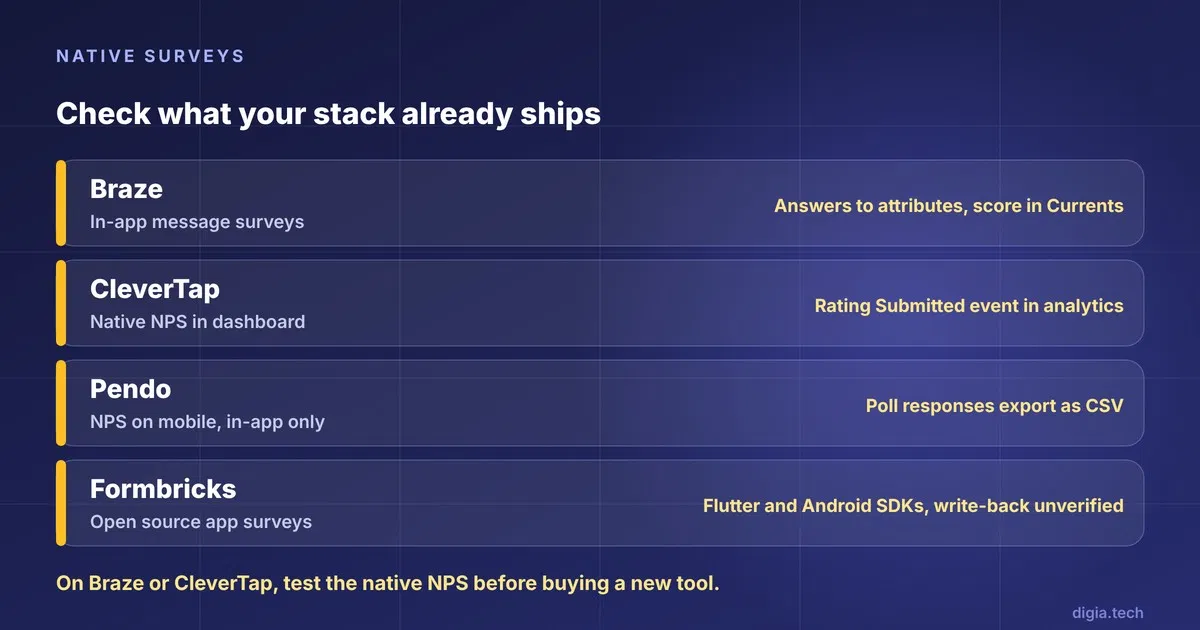
Braze has in-app message surveys whose answers can be logged to custom attributes, except long-text answers. It groups NPS responses into promoters, passives and detractors in its analytics, and Currents exports the numeric score on the Survey Response event. Promoter and detractor labels are not separate Currents fields, so compute them downstream.
CleverTap lets you run and track NPS surveys from the dashboard, and ratings appear as a Rating Submitted event in analytics. It also offers NPS AI Insights that combines scores with sentiment and theme clustering.
Pendo supports NPS surveys on mobile, with in-app as the only delivery method, and poll responses export as CSV. A CSV is a manual step if you wanted a live feed into another analytics tool.
Formbricks is the open-source option. Its framework guides cover app surveys, and there is a Flutter package on pub.dev and an Android SDK repository. We did not verify analytics write-back for it.
If you run Braze or CleverTap, the native survey is often enough for NPS. A dedicated tool earns its cost when you need multi-question research, deeper logic or a second analytics destination.
Which Tool Fits Which Team
| Your situation | Best-fit tool | Why |
|---|---|---|
| Already on Amplitude | Amplitude Guides and Surveys | No integration, one data model |
| Want one open platform for analytics and feedback | PostHog Surveys | Surveys sit beside events and replay |
| CDP-first stack (Segment, RudderStack) | Sprig | Documented CDP paths |
| Braze is your CEP | Survicate | Documented attribute and event sync |
| Mixpanel is your analytics home | Refiner or Blitzllama | Documented Mixpanel integrations |
| CleverTap or MoEngage is your CEP and you want native UI | Digia Engage | Triggered from your CEP, no WebView |
| NPS only, already on Braze or CleverTap | Native survey | Nothing new to buy |
Buyer Checklist
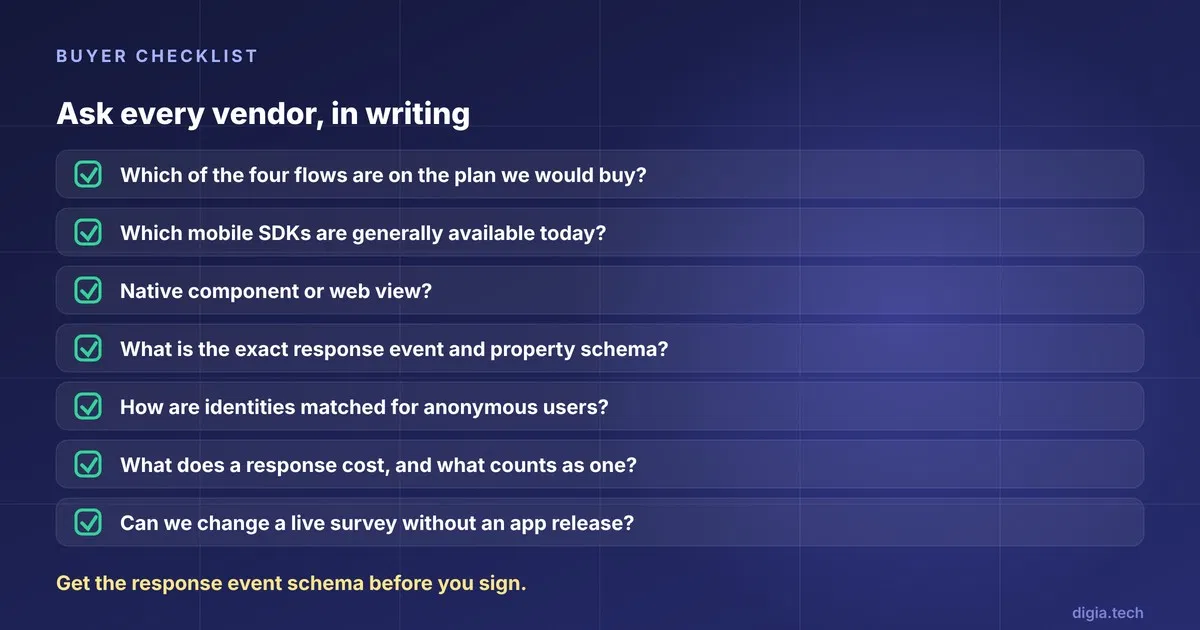
Ask each vendor these questions, in writing:
- Which of the four data flows (cohort in, event trigger, response as event, response as property) are on the plan we would buy?
- Which mobile SDKs are generally available today, including Flutter and React Native, and what is missing from each?
- Is the survey a native component or a web view?
- What is the exact event name and property schema for a response?
- How are identities matched, and what happens to anonymous users?
- How do you cap survey frequency per user, and can the cap be shared with our push and in-app campaigns?
- What does a response cost, and what counts as one?
- Can we change a live survey without an app release?
Key Takeaways
- Judge a survey tool by the direction its data flows. Template libraries are similar everywhere.
- Amplitude and PostHog close the loop by default because the survey lives inside the analytics product.
- Dedicated tools differ on write-back. Ask for the response event schema before you sign.
- Plan limits matter. Blitzllama restricts analytics-event triggers to its Scale plan.
- Flutter support is the most contested claim in this category. Test it in your own build.
- If you already run Braze or CleverTap, test the native NPS first.
Further Reading
From Digia
- Best No-Code Tooltip and Coach Mark Tools for Mobile Apps (2027)
- How Mobile Teams Change In-App UI Without an App Release in 2027
- Best Mobile App Engagement Platforms: An Honest Comparison
- Designing Non-Annoying Nudges: Frequency, Placement and Context
- When Not to Show a Nudge: Building Suppression Logic
External
- Amplitude: best in-app survey tools for mobile apps (vendor-published)
- PostHog: best in-app survey tools, compared (vendor-published)
- Braze: surveys documentation
External Sources: All Claims Attributed
All pages read in November 2026.
- Amplitude. Best in-app survey tools for mobile apps (vendor-published)
- Amplitude. Mobile Guides and Surveys announcement, March 11, 2026
- Amplitude. Guides and Surveys iOS SDK
- Amplitude. Guides and Surveys mobile SDK changelog
- Amplitude. Survicate source catalog
- Amplitude. Plotline destination catalog
- Amplitude. Blitzllama integration
- PostHog. Best in-app survey tools, compared (vendor-published)
- PostHog. Surveys SDK feature support
- PostHog. Surveys Flutter installation
- Sprig. Mobile surveys
- Sprig. Amplitude integration
- Sprig. Segment on Android
- RudderStack. Sprig device mode for Kotlin, Swift and React Native
- Survicate. Mobile surveys
- Survicate. Segment integration
- Survicate. Amplitude integration
- Survicate. Braze integration
- Braze. Survicate partner page
- Braze. Refiner partner page
- Braze. Surveys
- Braze. In-app message surveys
- Refiner. Mobile app surveys
- Refiner. Amplitude integration
- Refiner. Mixpanel integration
- Refiner. Segment integration
- Plotline. LoadShare NPS case study
- Plotline. FAQ
- Mixpanel. Plotline partner integration
- Blitzllama. Integrations
- Blitzllama. Amplitude integration
- Blitzllama. Mixpanel integration
- Blitzllama. CleverTap integration
- Blitzllama. Export API
- Blitzllama. Changelog
- Blitzllama. Sprig vs Blitzllama (vendor-published)
- Blitzllama. Android integration
- G2. Blitzllama pricing
- CleverTap. Execute and track NPS surveys from the dashboard
- CleverTap. Analysing user ratings
- CleverTap. NPS AI Insights
- Pendo. Set up an NPS survey for mobile
- Pendo. Poll responses
- Formbricks. Framework guides
- Formbricks. Flutter package
- Formbricks. Android SDK
- Digia. Core concepts
- Digia. In-app survey with CleverTap
- Digia. In-app survey with MoEngage
Want to run native surveys inside your app, without an app release? Digia Engage renders surveys and NPS prompts as native components, triggered from the CleverTap or MoEngage campaigns you already run. Book a demo to see how it works.