TL;DR
- Both stores let you change what an installed app displays, as long as the change is data for code that review already saw.
- They restrict four things: downloaded code that adds features (Apple guideline 2.5.2, Google Play's Device and Network Abuse policy), features hidden from review (Apple's new guideline 2.5.19, dated October 16, 2026), payment prompts that bypass store billing, and data collection that your disclosures do not describe.
- Copy, imagery, ordering, timing, targeting, and test variants of features reviewers saw sit on the safe side of that line in our reading.
- A feature switched on after review, a new payment path, new data collection, and any new executable logic need a store update or a disclosure first.
- We found no Apple or Google ruling that names remote config or server-driven UI, so treat every call in this guide as an informed reading of the published text.
Editorial disclosure: Digia Engage sells a server-driven in-app layer and integrates with CleverTap, MoEngage, and WebEngage. It is not affiliated with Apple, Google, or Firebase. In November 2026 we read the published Apple and Google policy text, Apple's October 2026 changelog, and secondary analysis of both. We did not submit test apps to either store, and we are not a law firm. Where a source is a third-party interpretation, the text says so. For the delivery mechanisms these rules apply to, see our comparison of Remote Config, CEP in-app tools, and server-driven UI.
What do Apple and Google actually forbid?
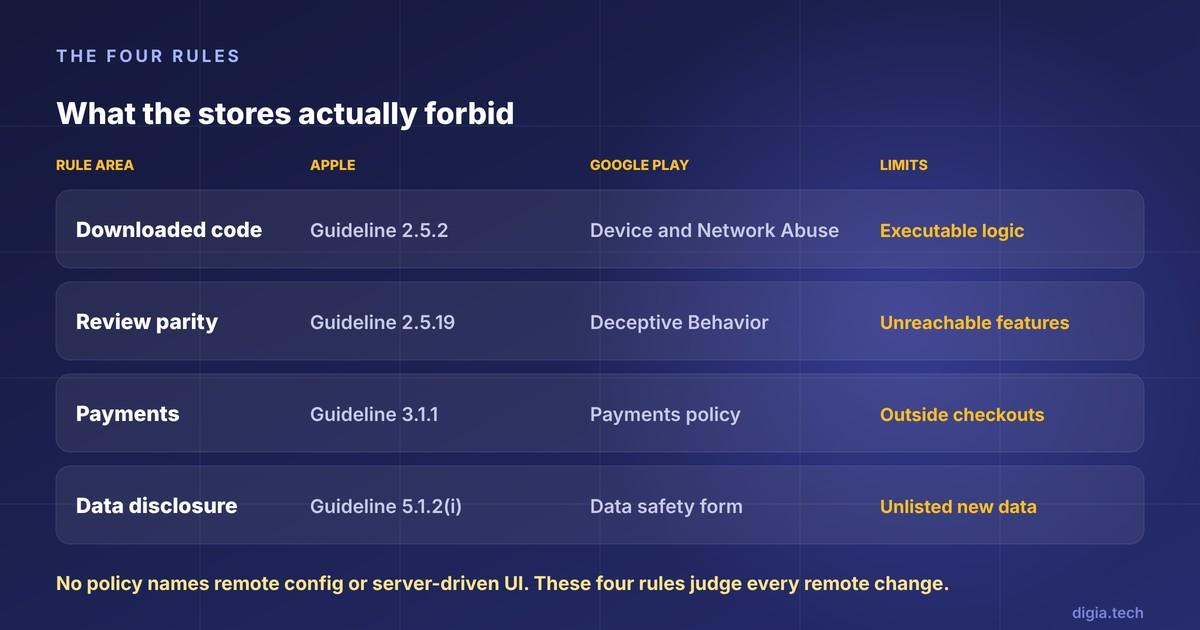
Neither store publishes an exemption or a ban for remote changes by name. Vendors say "no app update needed" as if a policy blessed the claim. No policy does. The stores publish rules about four behaviors, and every remote change gets judged against them.
| Rule area | Apple | Google Play | What it limits in a remote change |
|---|---|---|---|
| Downloaded code | [Guideline 2.5.2](https://developer.apple.com/app-store/review/guidelines/) and the Developer Program License Agreement | [Device and Network Abuse policy](https://support.google.com/googleplay/android-developer/answer/16559646?hl=en) | Payloads that carry executable logic |
| Review parity | [Guideline 2.5.19](https://developer.apple.com/news?id=92th7e5i) and 2.3.1(a) | [Deceptive Behavior policy](https://support.google.com/googleplay/android-developer/answer/16680223?hl=en) | Features that reviewers could not reach |
| Payments | Guideline 3.1.1 and 3.1.1(a) | [Payments policy](https://play.google.com/about/monetization-ads/payments) | Campaign calls to action that send users to other checkouts |
| Data disclosure | Guideline 5.1.2(i) and App Privacy labels | [Data safety form](https://g.co/play/datasafety) | New data collection that labels do not describe |
The last three rows catch teams that have already cleared the code rule, because they apply to content and behavior, and a remote campaign is content.
Where is the line between code and data?
Apple and Google both restrict downloaded code, and a payload of values or layout descriptions is data. Apple's 2.5.2 says apps should be self-contained in their bundles and may not download, install, or execute code that introduces or changes features or functionality of the app. Google Play's policy says an app, and any third-party SDK inside it, may not download executable code such as dex, JAR, or .so files from a source other than Google Play.
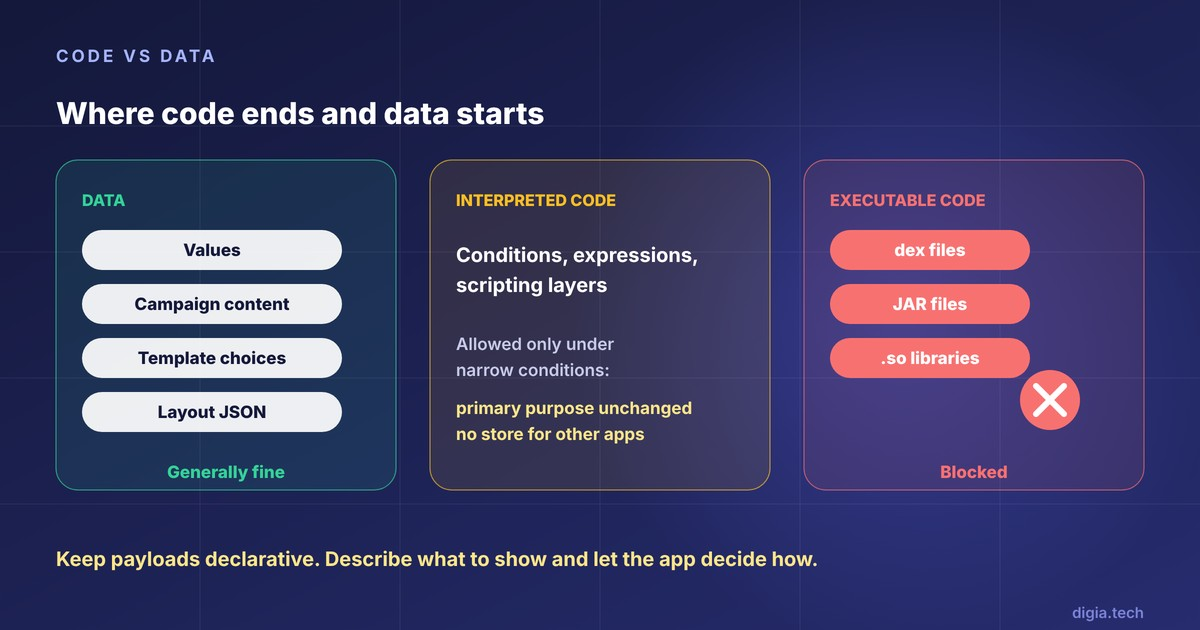
Remote Config values, CEP campaign content, template choices, and a JSON layout for a renderer already in the app do not match either description. They carry no instructions for the device to execute. The reviewer sees the renderer, the template registry, or the parameter reader in the submitted binary, and later payloads stay inside that vocabulary.
Why are the interpreted-code exceptions narrower than they look?
Both stores carve out interpreted code, and both carve-outs come with conditions. Apple's license agreement allows downloaded interpreted code only under conditions that include keeping the app's primary purpose unchanged and not creating a store for other apps. We could not read section 3.3.1(B) of the agreement directly, so that summary comes from Capgo, and The Register's 2017 report describes the same conditions. Google's older policy text exempts code that runs in a virtual machine or interpreter with indirect access to Android APIs, such as JavaScript in a WebView.
A server-driven schema starts as data and can drift toward a language. Nubank's framework uses a scripting layer, and its engineers list learning a custom scripting language as a cost. Once a payload carries conditions or expressions that change what the app does, the payload looks more like interpreted code than like configuration. That puts it under the interpreted-code conditions, and the primary-purpose condition becomes the one that matters.
The practical rule: keep payloads declarative. Describe what to show and let the app decide how.
Can you switch features on after review?
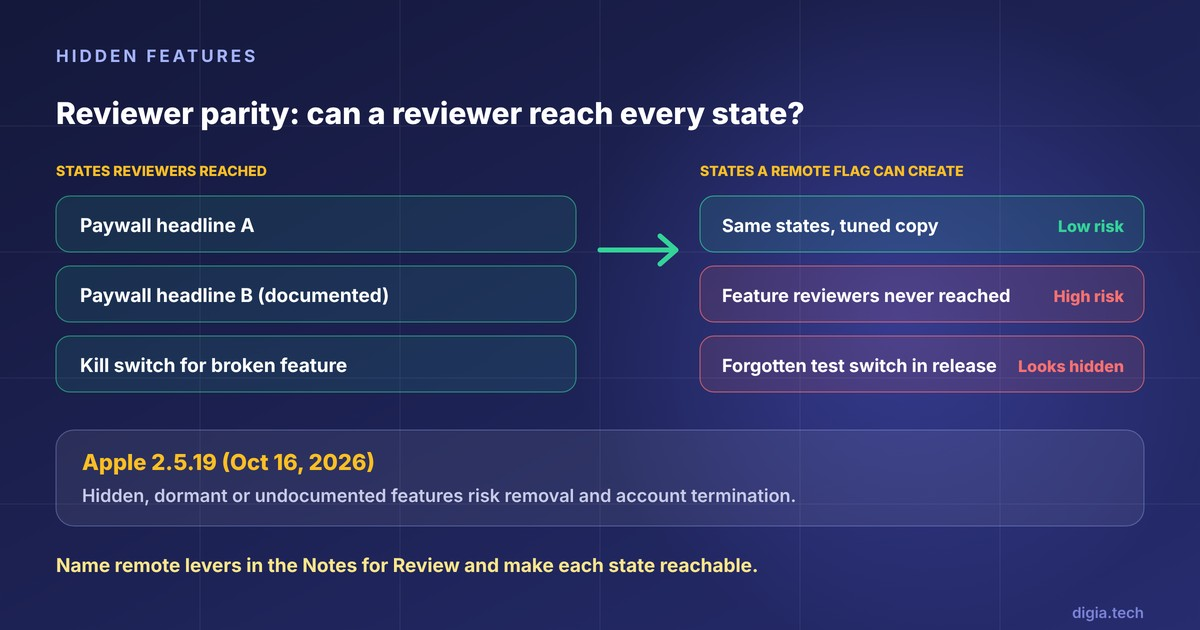
Apple's guideline 2.5.19, published October 16, 2026, is the rule that matters most for 2027 planning. Apple's changelog calls it a new guideline that clarifies long-standing policy on hidden, dormant, or undocumented features, formerly covered in 2.3.1. PPC Land's reading of the text reports that attempts to hide features in the binary, such as through code obfuscation, are grounds for removal of the app and termination of the developer account. Apple's separate post describes the target as bait-and-switch behavior, a phrase that does not appear in the guideline itself.
Two older rules sit beside it. Guideline 2.3.1(a) requires new features and product changes to be described with specificity in the Notes for Review, and generic descriptions get rejected, per a third-party summary of the current text. Guideline 2.3.12 requires significant changes to be described in the What's New text, with generic wording reserved for bug fixes and performance work.
Google reaches the same place through different words. Its Deceptive Behavior policy lists apps that change significantly between versions without alerting users and updating the store listing among its examples, and also lists apps that attempt to modify or obfuscate behavior during review.
Is a feature flag a hidden feature?
Apple has not said. We found no Apple statement on remote config or feature flags in the current guidelines or changelog. The Apple Developer Forums have a long-running thread asking exactly this, and every answer there comes from community members. One reading in that thread holds that flags work when App Review is told about the hidden feature and given a way to test it.
BuildMVPFast's analysis proposes a reviewer-parity test: if a reviewer can reach every state a user can reach, nothing is hidden. It rates kill switches and copy tests as low risk, and remote flags that turn on new features after approval as high risk. That is one analyst's heuristic and carries no Apple endorsement, but it matches the text of the guideline.
Our reading follows the same lines:
- Flags that disable a broken feature are low risk.
- Variants of a feature reviewers saw, such as a different paywall headline, are low risk when documented.
- A flag that exposes a feature reviewers never reached is the pattern 2.5.19 describes.
- A forgotten test switch in a release build looks the same as a hidden feature to a reviewer.
What can remote campaigns say about payments?
A remote campaign is in-app content, so the payment rules apply to its calls to action. Apple's guideline 3.1.1 requires in-app purchase for paid features and content, and says apps and their metadata may not include buttons or external links that direct customers to other purchasing mechanisms. Apple has carved out entitlements. Changes announced May 1, 2025 affect Guidelines 3.1.1 and 3.1.1(a) for apps in the United States, and the October 2026 update again revised 3.1.1(a) to say links may go to a permitted destination. Whether an in-app campaign may link out depends on the entitlement.
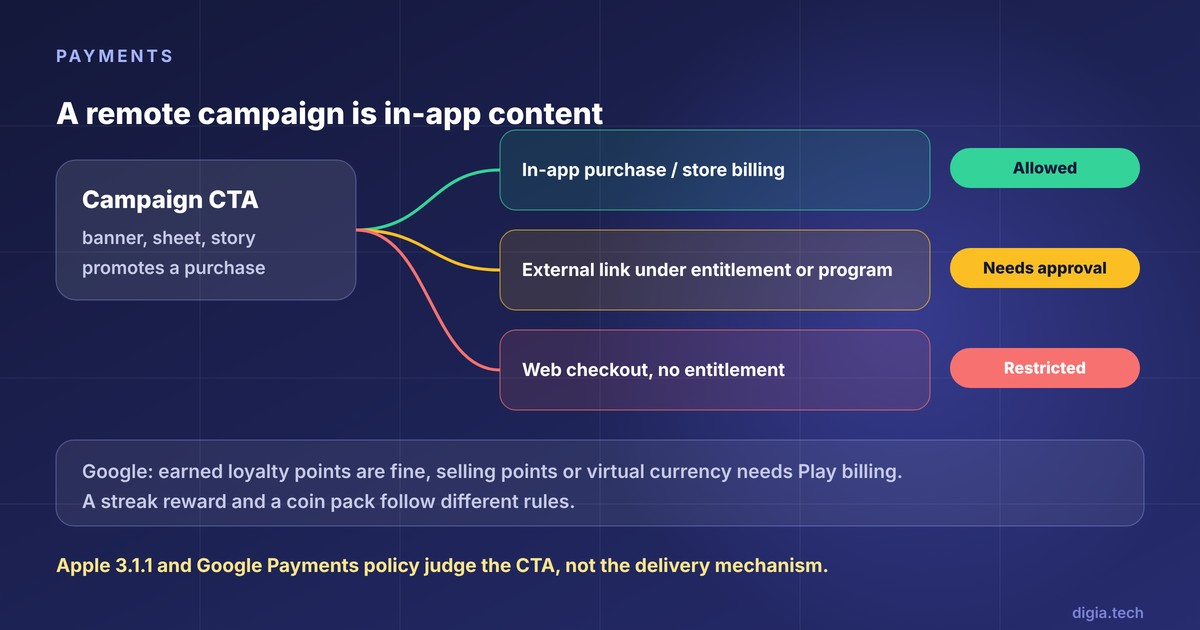
Google's Payments policy lists in-app promotions related to purchasable content among the ways an app may not lead users to other payment methods, unless a program permits it. Programs now exist, and they need enrollment. For the EEA, Google says developers must complete enrollment in the external offers program before promoting external offers, and a US External Content Links program carries its own enrollment requirement.
One more distinction affects gamified campaigns. Google's FAQ says earned or awarded loyalty points can be issued in-app and exchanged for digital goods without Google Play billing, but selling points or virtual currency in-app requires Play billing. A streak reward is a different thing from a coin pack, and the rules treat them differently.
What about data collection in remote experiences?
Remote content can change what an app collects, and the disclosures stay your responsibility. A new survey or a new tracking event can add data types that your store labels never mentioned. Google's policy makes the developer responsible for the accuracy of the Data safety label and for keeping it up to date, and Singular's guidance notes that the form can be updated in Play Console without submitting a new app version. That makes a stale label cheap to fix and easy to ignore.
On Apple's side, the November 13, 2025 guideline update tightened data sharing. Apps must disclose where personal data will be shared with third parties, including third-party AI, and obtain explicit permission. A remote campaign that sends response data to an AI vendor falls under that rule the day it goes live, regardless of when the binary shipped.
A working matrix of remote changes
The table below applies the rules above to common remote changes. It is our reading and no store has published an equivalent list.
| Remote change | Risk | Rule that applies |
|---|---|---|
| Copy and images on a component already in the app | Generally fine | Data, not code (2.5.2, Device and Network Abuse) |
| Order and timing of components the reviewed build contains | Generally fine | Data, not code |
| Audiences and frequency caps | Generally fine | Data, not code |
| Test variants of a feature reviewers saw | Generally fine, name them in review notes | 2.3.1(a), 2.5.19 |
| Switching on a feature reviewers could not reach | High risk | 2.5.19, Deceptive Behavior |
| A new component type or native capability | Needs an app update | 2.5.2, Device and Network Abuse |
| A call to action that sends users to a web checkout for digital goods | Restricted, needs an entitlement or program | 3.1.1, Payments policy |
| A new survey or tracking event that collects new data types | Disclose first | 5.1.2(i), Data safety form |
The "generally fine" rows still describe changes inside the experience that review approved. A payload that makes a utility app behave like a trading app falls outside them, because the primary-purpose condition in Apple's license terms still applies.
How do Remote Config, CEPs, and server-driven UI map to the rules?
All three mechanisms deliver data, and the code rule treats them alike. Payment and data rules depend on what each one carries.
Remote Config carries values, which makes it easy to defend on the code rule. A boolean is also the cheapest way to switch a feature on after review, so it carries the most hidden-feature risk. Firebase's own documentation tells developers not to try to circumvent the requirements of the app's target platform.
CEP in-app campaigns are where payment and data rules bite, because campaigns promote offers and collect responses. The template library handles the code rule, and the campaign copy decides the payment rule.
Server-driven UI has the widest design freedom and the biggest drift risk. The vocabulary of components lives in the binary, and a schema that grows scripting moves toward the interpreted-code conditions described earlier. Our comparison of the three delivery mechanisms covers what each can change and where each stops.
Where does Digia Engage fit?
Digia Engage is a server-driven in-app layer that works alongside a CEP. Its component library, which includes tooltips, bottom sheets, banners, carousels, stories, surveys, and gamification mechanics, ships inside the app binary that goes through review. Campaigns configured in the dashboard are data for that library, and the docs describe the goal as campaign UI with no UI code and no app release once the integration is in place.
That architecture addresses the code rule. It does nothing about the other three. A bottom sheet that links to a web checkout meets the payments rules by the same standard as any other in-app promotion, and a survey that collects new data types still belongs in your store disclosures. A new component type, as in every mechanism above, ships in an app build.
A review-safe workflow for remote UI changes
Four steps cover most of what the stores ask for.
- Inventory the vocabulary. List every remote parameter, flag, template, and component, and label each as tuning something reviewers saw or enabling something new.
- Name the levers in the Notes for Review. Describe each remote control and how a reviewer reaches each state, and add demo accounts for login-gated screens.
- Make every state reachable. Either enable the state in the reviewed build or hold it for a later update, and strip debug and test switches from release builds.
- Re-check after each policy update. Apple revised its guidelines on November 13, 2025 and again on October 16, 2026. A flag that was fine last quarter deserves a second look when the rules change.
Decision checklist
Ask these eight questions before shipping any remote experience.
- Does the payload carry values and layout, or does it carry logic that changes behavior?
- Could a reviewer reach every state this payload can produce?
- Are the remote levers named in our current Notes for Review?
- Does this change need a What's New entry on iOS or a store listing update on Android?
- Does any call to action send users to a purchase outside store billing, and if so, which entitlement or program covers it?
- Does the campaign collect a data type our Data safety form and App Privacy answers do not list?
- Does the experience send user data to a third party, including an AI vendor, with consent?
- What happens on app versions that predate the component this payload names?
Key Takeaways
- Both stores permit remote changes to data that reviewed code renders, and restrict downloaded code, hidden features, payment bypass, and undisclosed data collection.
- Apple's guideline 2.5.19 of October 16, 2026 puts hidden, dormant, or undocumented features at the center of account-level enforcement, so reviewer parity is the habit to build.
- Payments and data rules apply to campaign content, so growth teams own compliance for what a campaign says and collects.
- Keep schemas declarative, document remote levers in review notes, and ship new capabilities in an app update.
Further Reading
From Digia
- Change In-App UI Without an App Release: Remote Config vs CEP vs SDUI
- Best In-App Tooltip Tools Triggered by User Behavior (2027)
- In-App Engagement Trends for 2027
- In-App Nudges: What They Are, When to Use Them, and 12 Examples
- Best Mobile App Engagement Platforms in 2026: An Honest Comparison
External
External Sources: All Claims Attributed
- App Review Guidelines - Apple, last updated October 16, 2026
- Updated App Review Guidelines are now available - Apple Developer News, October 16, 2026
- Apple's rule 2.3.14 and the October 2026 guideline changes - PPC Land, October 18, 2026
- Apple App Store Guideline 2.5.19 and hidden features - BuildMVPFast, third-party analysis
- Section 2.3.1 of the App Store Review Guidelines and Feature Flags - Apple Developer Forums, community thread, February 2017
- Apple Developer Program License Agreement - Apple
- Apple remote code execution and Capgo live updates - Capgo, secondary summary of Apple's license terms
- Apple relaxes developer rules - The Register, June 2017
- Guideline changes after WWDC 2018 - Curated summary of the 2018 guideline update, includes 2.3.12
- Apple updates App Store rules to allow external purchase links in the US - iClarified
- Apple's new App Review Guidelines clamp down on apps sharing personal data with third-party AI - TechCrunch, November 13, 2025
- Device and Network Abuse - Google Play policy
- Device and Network Abuse, earlier policy text - Google Play policy
- Deceptive Behavior - Google Play policy
- Payments - Google Play policy
- Payments policy FAQ - Google Play Help
- Changes to the external offers program for users in the EEA - Google Play Help
- Google Play's new US billing and linking policies - Neonpay, December 2025
- Provide information for Google Play's Data safety section - Google Play Help
- User Data policy excerpt on the Data safety section - Google Play policy
- Submitting the Google Play Data Safety Section Form - Singular
- Remote Config quotas and limits - Google Firebase docs
- Mobile Server-Driven UI at Scale - Rafael Ring, Nubank, InfoQ
- Digia Engage overview - Digia docs
Want to run in-app campaigns inside the store rules, without waiting for an app release each time? Digia Engage renders tooltips, bottom sheets, carousels, stories, surveys, and gamification as native components from a dashboard, and triggers them from the CleverTap, MoEngage, or WebEngage segments you already run. Book a demo to see how it works.