TL;DR: CleverTap is excellent at segmentation, behavioral cohorts, journey orchestration, and cross-channel delivery. Its in-app rendering layer is a different story. Template rigidity, WebView overhead, and fixed interaction patterns cap what growth teams can actually ship inside the app. This article covers why that gap exists, what extending CleverTap with a dedicated UI rendering layer looks like in practice, and the specific use cases where that combination produces results neither system achieves alone.
What CleverTap Was Built to Do
CleverTap was founded in 2013 and built its core product around a specific set of problems: consolidating user behavioral data, creating segmented audiences, and orchestrating messaging across multiple channels from a single platform.
Three capabilities define what it does well.
Behavioral segmentation with depth. CleverTap's TesseractDB stores up to 10 years of historical event data, which means growth teams can build segments based on behavioral patterns that go back further than most platforms allow. Segments can combine event-based rules, user properties, inaction conditions, and nested boolean logic up to 10 levels deep. The RFM analysis tool automatically categorizes users into groups ranging from Champions to Hibernating users, and those segments update in real time as user behavior changes. This is a genuine competitive strength. Building this kind of segmentation depth in-house takes years and significant data infrastructure investment.
Journey orchestration. CleverTap's Journeys product lets growth and CRM teams design multi-step lifecycle flows with conditional branching, time delays, and channel switching. A user who opens a push notification but doesn't complete onboarding can be automatically routed into a different message sequence than one who ignores it entirely. Teams can design and manage these flows visually without SQL or engineering support for each variation.
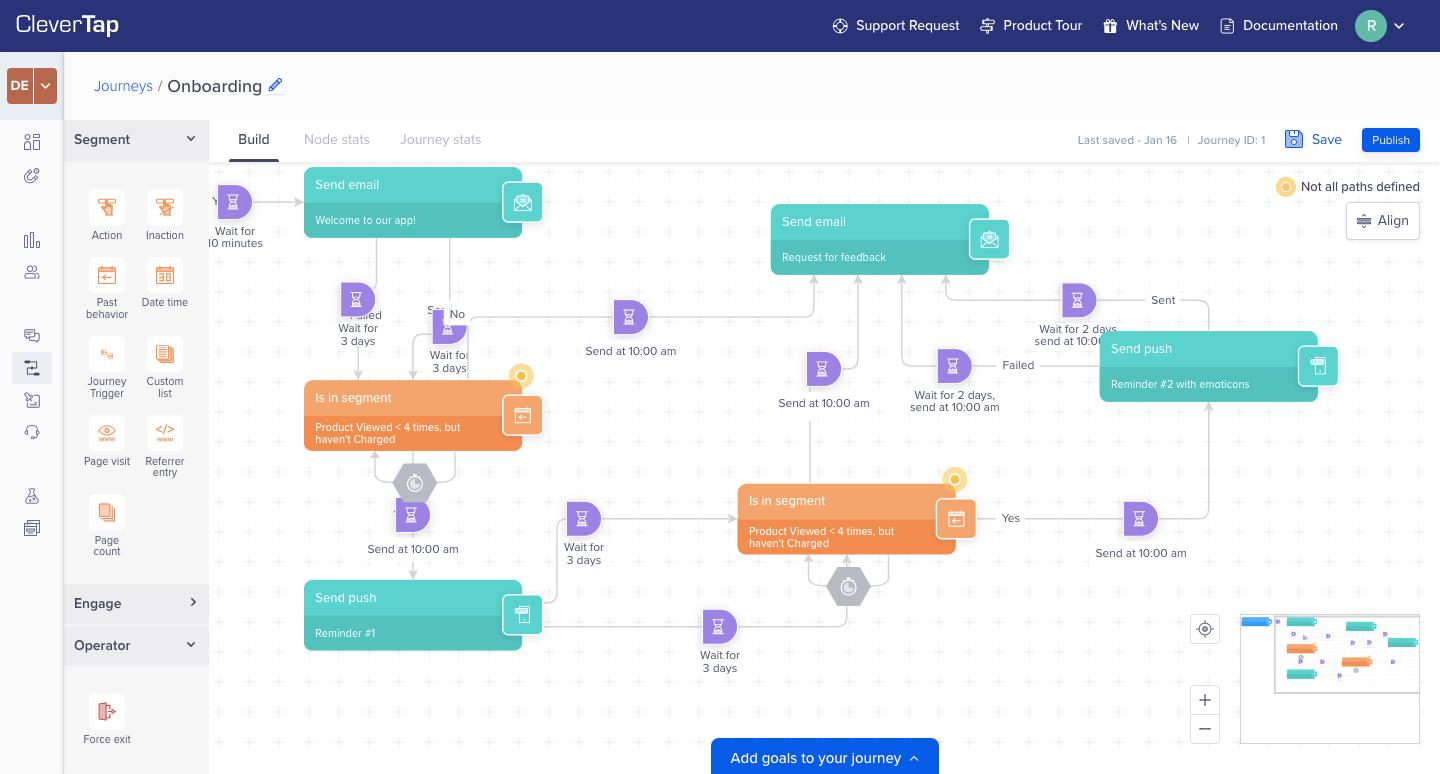
Omnichannel delivery. Push notifications, email, SMS, WhatsApp, in-app messages, app inbox, RCS, and web messaging all route through the same platform. When a segment qualifies for a campaign, CleverTap's IntelliNODE feature (on the Cutting Edge plan) can also determine which channel and send time produces the best outcome per user, based on historical engagement patterns.
These three things compound on each other. A team that has run CleverTap for 12 to 24 months has built behavioral cohorts, tested journey variations, and accumulated engagement data that directly improves targeting accuracy over time. That accumulated data infrastructure is not something to replace.
The problem is not with any of these capabilities. The problem starts when the same platform is asked to also handle in-app UI rendering.
Where CleverTap's In-App Layer Runs Out of Road
CleverTap added in-app messaging as a natural extension of its push notification stack. The reasoning made sense: if you're already delivering messages to a user's device, delivering one inside the app is an incremental step. The architectural consequence of that decision is that in-app rendering in CleverTap sits on top of a platform whose investment is in data pipelines and channel orchestration, not native UI rendering.
Here is where that creates real friction.
Template Rigidity
CleverTap's built-in in-app editor offers a set of pre-defined formats: full-screen interstitials, banners, half-interstitials, header and footer banners, and image-only formats. For standard informational messages, these work. For anything that needs to match a product's actual design system, include custom interaction patterns, or carry visual complexity beyond a static image with a CTA, the templates are a ceiling.
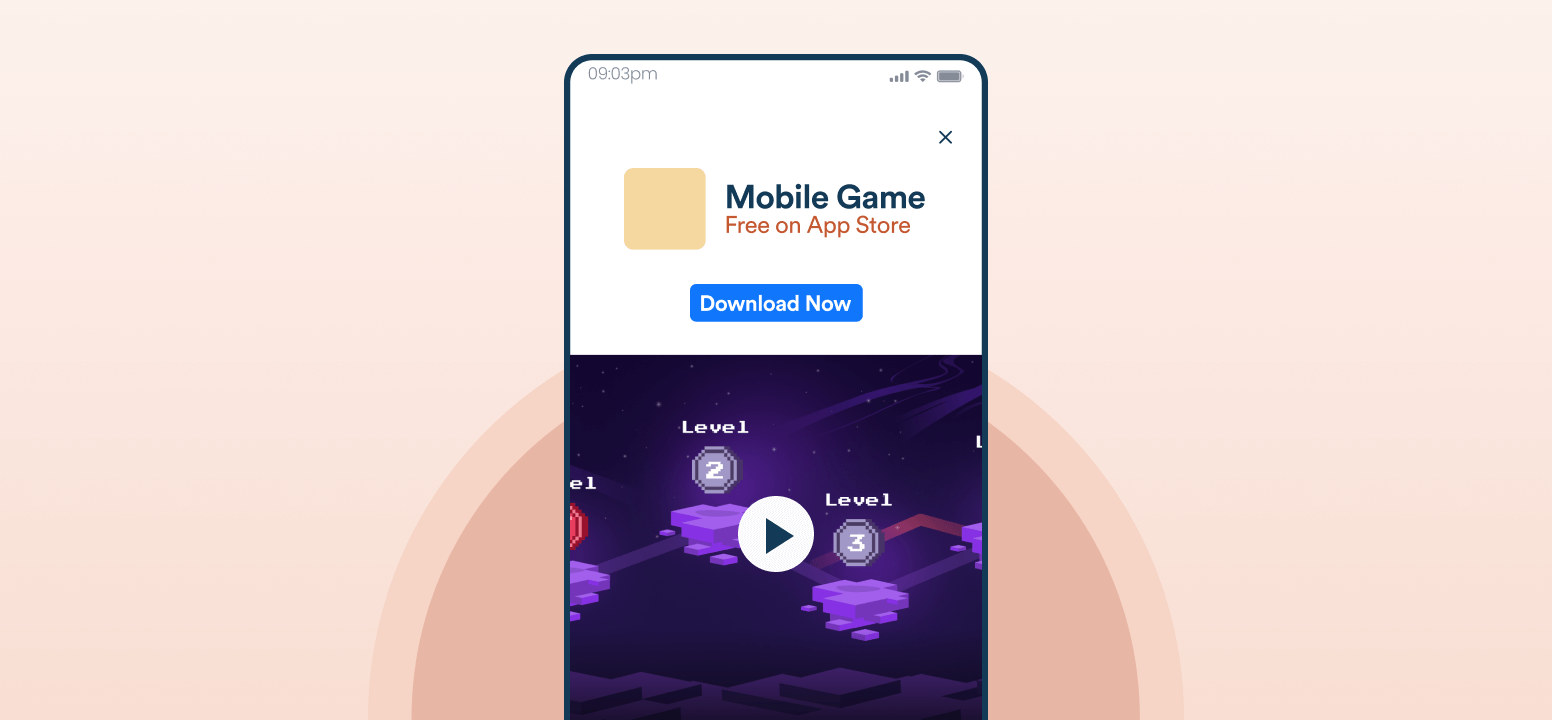
CleverTap itself acknowledges that creation of custom in-app messages "has been a cumbersome process, involving multiple steps from design to HTML coding" and that teams faced "limited customization options, with the ability to add only one call-to-action (CTA) on the image, necessitating significant development effort." That acknowledgment comes from CleverTap's own documentation.
Teams that want to escape these defaults have two options: work inside the custom HTML editor (which reintroduces engineering dependency every time a visual change is needed) or adopt Custom Code In-App Templates (which require developer implementation per template before marketers can use them from the dashboard).
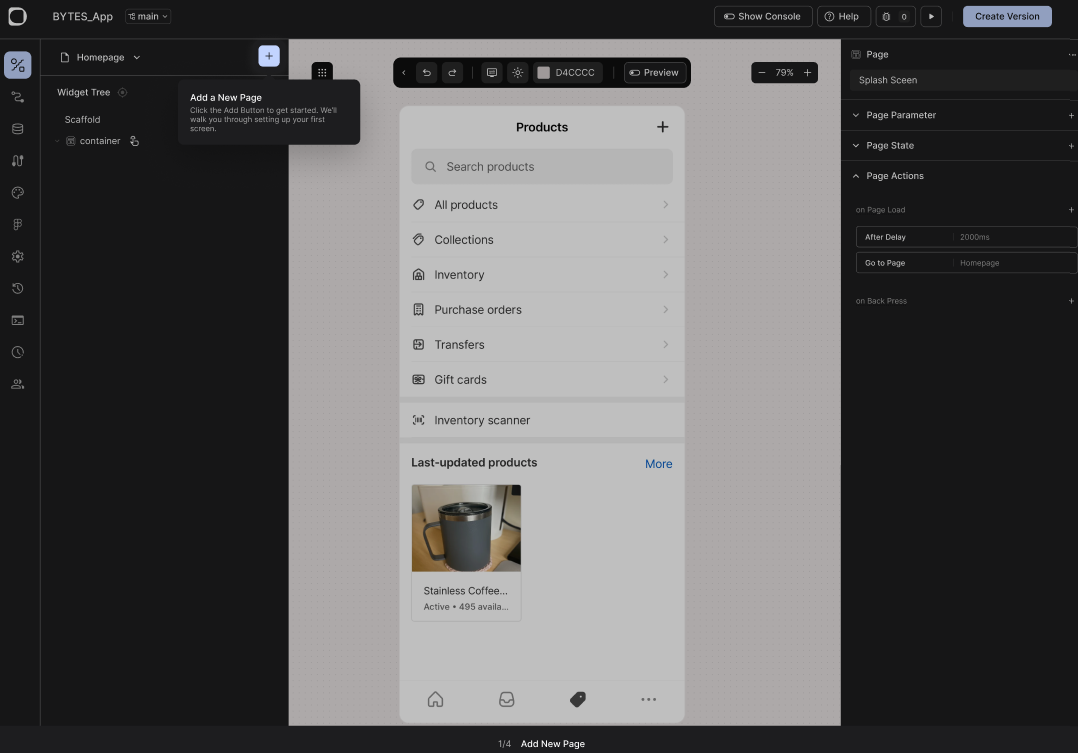
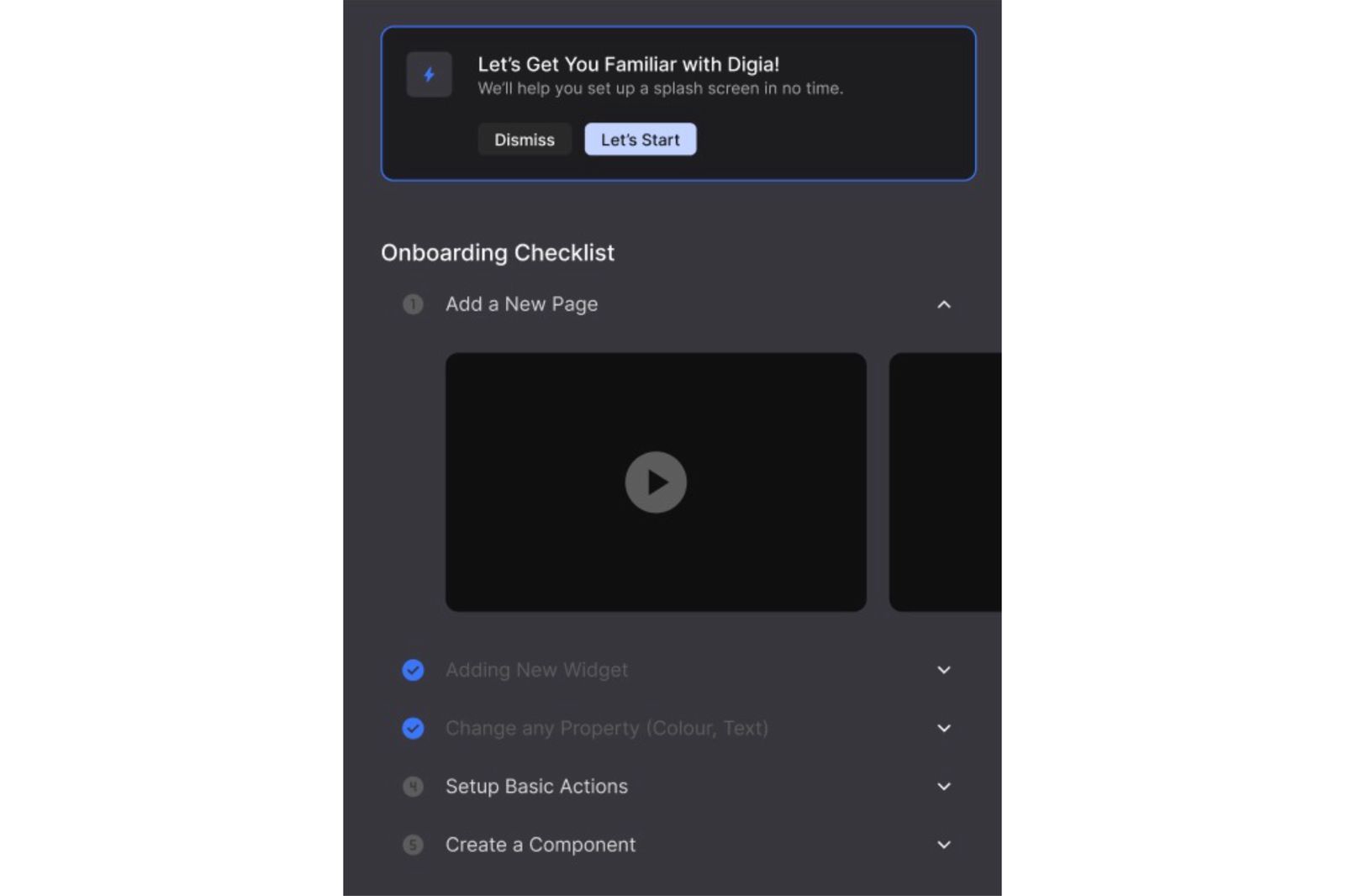
Native UI components such as tooltips and dynamic onboarding checklists help guide users contextually, creating experiences that go beyond traditional template-based in-app messages.
Custom Code Templates Require Pre-Registered Engineering Work
CleverTap's Custom Code In-App Templates feature, available from Android SDK 7.0.0, iOS SDK 7.0.0, React Native SDK 3.1.0, Flutter Plugin 3.0.0, and Unity Plugin 5.0.0 onwards, does give developers a way to register fully custom UI components that marketers can then trigger from the dashboard. The architecture is sound: templates are defined in JSON, registered at app launch, and presented when CleverTap fires the relevant campaign.
The constraint is that every custom template still has to be built and registered by an engineer before the growth team can use it. If a marketer wants a new interaction pattern, say, an animated scratch card or a multi-step onboarding carousel, someone has to code that template, push a release, and ensure it reaches a sufficient percentage of the user base before the campaign can go live.
This is not a small friction. Mobile app release cycles typically run weekly to bi-weekly for teams with healthy engineering velocity, and much slower for teams with app store review dependencies or cautious QA processes. A growth team that wants to experiment with five different visual treatments in a quarter is gated by how many new templates engineering can build and ship in that same window.
WebView Rendering Overhead
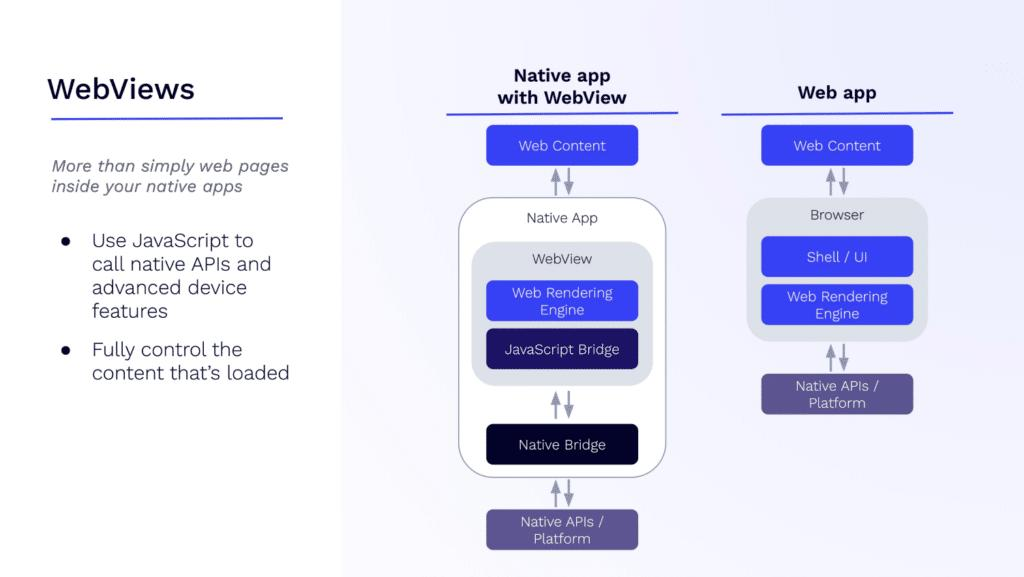
When CleverTap in-app messages are rendered via the custom HTML path, they run inside a WebView. WebView rendering lags behind native component rendering, and the JavaScript bridge creates overhead for every native call that crosses between the WebView layer and the native app layer. For simple text modals, this delta is imperceptible. For animated, media-rich, or interactive experiences, the lag is visible, and users who experience it may interpret it as an app performance problem rather than a campaign delay.
File Download Delays for Image-Heavy Messages
CleverTap's SDK downloads images before displaying an in-app message. If a message contains an image that hasn't been pre-fetched, the message displays only after the download completes. On slow or mobile connections, that delay can push the display time well past the moment of context. A user who just completed a transaction and should see a cross-sell offer immediately may see nothing for two to five seconds, or may have already navigated away by the time the message appears.
A purpose-built rendering system resolves this by keeping component assets available in memory and rendering natively without a download-then-display cycle.
No Native Gamification or Complex Interaction Patterns
CleverTap's template library does not include gamification mechanics. Scratch cards, streak trackers, spin-to-win wheels, and multi-step onboarding checklists are not available as built-in components. Teams that want these experiences inside a CleverTap campaign need to either build Custom Code Templates for each mechanic (which brings the engineering dependency problem back) or use a separate tool that can render these components.
What "Custom In-App UI" Actually Means
"Custom in-app UI" gets used loosely, so it is worth being precise about what it means in this architecture.
In CleverTap's native context, custom in-app UI means either HTML-based templates rendered via WebView or Custom Code Templates that developers pre-register in the SDK. Both require engineering input before growth teams can act independently.
In the extended architecture described here, custom in-app UI means a dedicated rendering SDK, specifically Digia Engage, that maintains a library of pre-built native components: tooltips, bottom sheets, persistent banners, inline widgets, carousels, stories, surveys, gamification mechanics, and in-app video. These components are available in memory, render natively on iOS and Android without WebView overhead, and are configurable from a dashboard without engineering input per campaign.
The components can match a product's design system because they are not locked to CleverTap's template format. They render in under 100ms after a qualifying trigger fires. And because they are managed from a separate dashboard, the growth team controls the visual layer independently of the engineering release cycle.
This is the distinction that matters: CleverTap owns the decision of who sees what and when. Digia Engage owns what actually appears on screen and how it behaves.
The Real Workflow: CleverTap Trigger, Digia Rendering
The implementation is additive. It does not replace CleverTap's data infrastructure, segmentation, or journey logic. Here is what the workflow looks like step by step.
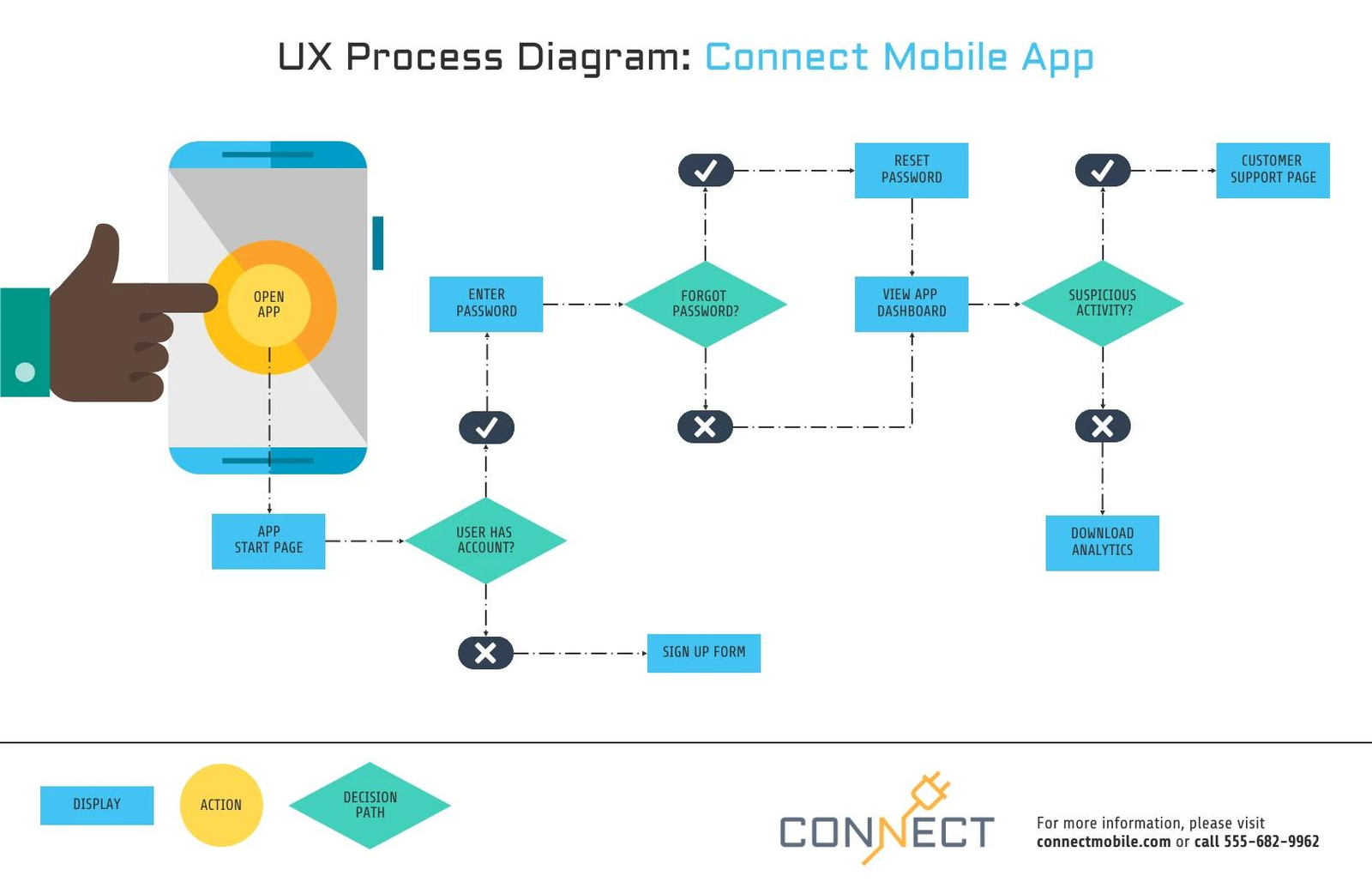
Step 1: Connect identity and events. The Digia Engage CleverTap plugin sits alongside the core Digia Engage SDK. It connects CleverTap user identity so that the same user profile that CleverTap uses for targeting is also recognized by Digia Engage. Event data and user attributes from CleverTap flow into Digia Engage's audience targeting without a duplicate data layer.
Step 2: Map segments. Growth teams can reuse CleverTap cohorts directly as audience filters in Digia Engage, or mirror the same behavioral rules inside Digia Engage for in-app delivery. If CleverTap has a cohort for "users who completed KYC but haven't made their first transaction in 7 days," that same logic targets the in-app experience.
Step 3: Configure the trigger. CleverTap fires an event-based trigger when user behavior matches campaign conditions. That trigger is received by the Digia Engage SDK on-device. The SDK checks the active campaign configuration, selects the correct component, and renders it natively, without a network round-trip for the UI itself.
Step 4: Render natively. Digia Engage renders the configured component: a bottom sheet upsell, a personalized banner, an onboarding checklist step, a gamification reward, or a contextual survey. The component fires in under 100ms, matching the user's in-session context rather than arriving after they've moved on.
Step 5: Track interactions and report. User interactions with the rendered component, taps, dismissals, form completions, and CTA clicks, are captured by Digia Engage and fed back into the analytics infrastructure. Growth teams see conversion data in their existing review cadence.
The engineering setup for this integration is approximately 20 minutes on top of the core SDK integration, according to Digia's documentation. After that, the growth team ships campaigns from the dashboard without opening engineering tickets for each visual update.
Use Cases That Need This Architecture
Several use cases work well with CleverTap's native in-app templates. Product announcements, simple push-to-purchase prompts, and basic NPS surveys all function adequately within standard formats.
The cases below are where native templates are insufficient and the CleverTap plus custom UI architecture produces meaningfully better results.
Personalized Onboarding Banners
Standard onboarding flows in CleverTap can be triggered by events and sent as step-by-step in-app messages. The limitation is that the messages look like what they are: third-party overlays. They don't match the app's typography, spacing, or component library. For onboarding in particular, where users are forming their first impressions of the product's quality, a visually foreign message works against the trust that good design builds.
With Digia Engage, the onboarding components use the product's own design tokens. A tooltip that spotlights a key feature looks like it was built by the product team, not sent by a marketing platform. A bottom sheet that explains a transactional step uses the same type scale as the screen beneath it. This design coherence is not cosmetic. It affects whether users treat the guidance as part of the product or as an intrusion.
The trigger still comes from CleverTap's journey logic. The event sequence, the behavioral conditions for showing step 2 after step 1 is completed, and the timing rules all stay in CleverTap. What changes is what the user sees when those conditions fire.
Dynamic Onboarding Checklists
Onboarding checklists, where users can see which steps they've completed and what remains, require a component that reads from real-time user state. CleverTap's templates don't support components that dynamically reflect completed versus incomplete actions from user event data at render time.
With a dedicated rendering SDK, a checklist component can query the user's event history, mark completed steps, and visually update without a new campaign trigger for each state change. The same component serves a user who has completed two of five onboarding steps differently than one who has completed four, without requiring separate campaigns for each state.
Contextual Upsells at High-Intent Moments
CleverTap's event-based triggers are accurate at identifying high-intent moments: a user who has viewed a premium feature page three times in a session, a user who completed a transaction and is on the confirmation screen, or a user who just hit a free tier limit. These moments are exactly when an upsell is most likely to convert.
The problem is that a generic full-screen interstitial at these moments often undermines the conversion it's trying to drive. It interrupts a positive experience rather than extending it. A contextual upsell that appears as a native bottom sheet, visually connected to the action the user just completed and timed to appear after the confirmation state renders, converts at a higher rate than an interstitial that fires mid-flow.
CleverTap identifies who is in the moment. Digia Engage controls what they see when they get there.
Gamified Retention Mechanics
Scratch cards, spin-to-win mechanics, daily streak trackers, and milestone reward reveals all require custom interaction components. None of these exist in CleverTap's template library. Building them as Custom Code Templates requires engineering time per mechanic, plus a release cycle before they reach users.
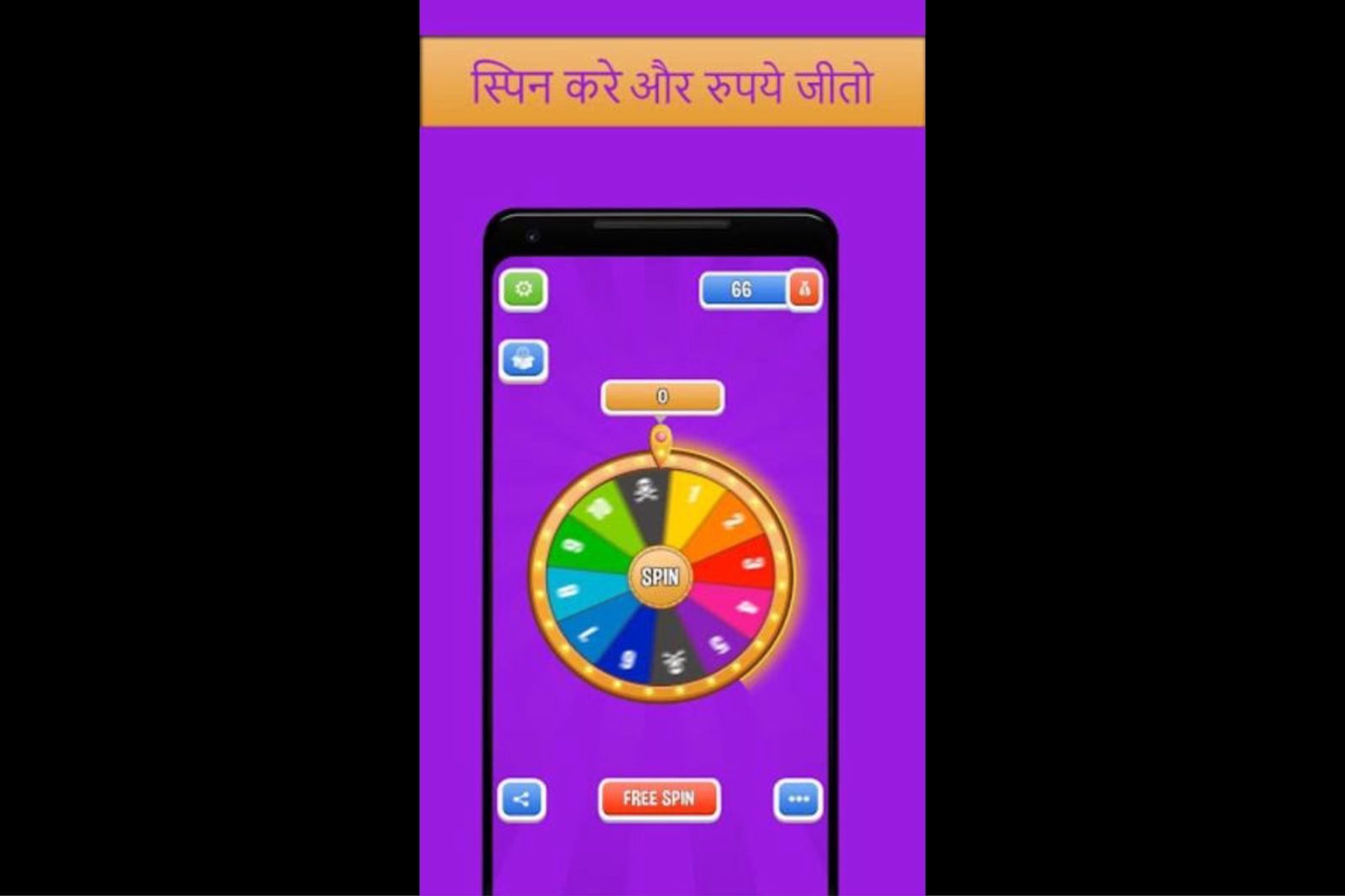
With Digia Engage's gamification components, these mechanics are available without a new engineering build. CleverTap's journey logic determines which users qualify and when. Digia Engage renders the mechanic with native animations and interaction patterns. Teams at apps like Lokal have used this combination to drive daily active engagement that push notifications alone did not produce.
In-App Surveys at Behavioral Moments
CleverTap can trigger an in-app message when a user completes a specific action. Digia Engage can render an NPS survey, an emoji feedback prompt, or a quiz at that exact moment with response collection and analytics built into the component. In-app NPS surveys on Digia Engage see a 30% or higher response rate, compared to a 3% baseline for email-based NPS. The behavioral trigger that CleverTap provides is what makes the survey timing precise. The survey itself needs a rendering layer that can collect and report responses as first-class data, which the native CleverTap template builder does not fully support for custom question formats.
Interaction Tracking: Closing the Loop
One of the practical concerns with a decoupled rendering architecture is data fragmentation. If CleverTap owns targeting analytics and Digia Engage owns in-app interaction data, growth teams end up with two sources of truth for related events.
The integration addresses this directly. Digia Engage captures in-app interaction events, including taps, dismissals, CTA clicks, survey completions, and gamification redemptions, and routes them back into the analytics infrastructure. Teams can attribute in-app conversion events in the same review cadence they use for push and email performance. A user who converted after seeing a Digia Engage bottom sheet that was triggered by CleverTap's journey logic shows a clean attribution chain.
CleverTap cohorts that were used to target the experience also receive the feedback. If a user who was in the "completed KYC, not transacted" cohort converts after seeing the contextual upsell, CleverTap's funnel analytics can capture that state change. The two systems do not create an analytics dead zone between trigger and outcome.
What This Changes for Growth Teams Without New Engineering Overhead
The common objection to this architecture is that it introduces another tool, another SDK, another integration, and another dashboard. Those are real costs. Here is what the cost-benefit looks like when examined directly.
Engineering time to implement. The Digia Engage core SDK integration takes approximately 20 minutes. The CleverTap plugin adds another 20 minutes on top of that. Total engineering commitment at setup: roughly 40 minutes plus testing time. After that, the growth team operates from the Digia Engage dashboard for in-app campaign changes, with no additional engineering tickets per visual update.
The alternative cost. A growth team running entirely within CleverTap's native in-app templates files engineering tickets for every visual treatment that exceeds template defaults. If a product team is doing two to three in-app experiments per month, that is two to three engineering-adjacent coordination cycles per month, each involving a ticket, a development window, a QA pass, and a release. The cumulative cost of that process over a quarter exceeds the integration cost of a dedicated rendering layer.
Campaign velocity. Teams that separate the rendering layer from the CEP consistently report higher experiment velocity. Lyft reduced experiment delivery from two weeks to two days after adopting server-driven UI architecture. The same principle applies at the consumer app scale: when growth teams can change a component's copy, visual treatment, or interaction pattern from a dashboard, they run more experiments per quarter without adding engineering headcount.
No disruption to existing CleverTap workflows. Push, email, SMS, WhatsApp, and journey orchestration all stay exactly as they are. The in-app channel is the only layer that changes, and it changes only by adding a purpose-built rendering system alongside the existing trigger logic. Growth teams that have invested in building CleverTap cohorts and journey flows keep all of that work intact.
The Hidden Costs of Staying in Template-Only Mode
Teams that stay within CleverTap's native in-app templates often undercount the full cost of that choice. The visible cost is template rigidity. The less visible costs accumulate over time.
Design system erosion. Every in-app message that doesn't match the product's visual system slightly weakens the coherence of the user experience. Users don't consciously register that the banner font is different from the app's standard font, but the aggregate effect of visually inconsistent overlays is a product that feels slightly less polished than it should. Over time, this affects trust signals in ways that don't show up directly in campaign analytics.
Vendor dependency on the rendering layer. When in-app visual logic lives inside CleverTap's template system, switching to a different CEP means rebuilding every in-app campaign from scratch. Audience logic and journey flows can be exported or re-created. The visual templates, conditional display rules, and interaction patterns cannot. Teams that have migrated between CEPs know that this hidden rebuild cost often doubles the expected migration timeline.
Experimentation surface that's too narrow. CleverTap's native A/B testing supports copy variation and audience split testing. It does not support testing visual treatments, interaction patterns, or component structures that fall outside the template format. A growth team that wants to test whether a bottom sheet converts better than a full-screen interstitial for a specific upsell moment cannot run that test inside CleverTap's native tools. That experimentation surface is bounded by what the template editor supports.
The in-app channel underperforms its potential. Push notification open rates sit at 1 to 5% for most consumer apps. In-app engagement rates are significantly higher because users are already active in the product. A channel that has a structural engagement advantage is being underinvested when the only in-app experiences growth teams can ship without engineering help are generic templates. The ceiling on in-app performance is the rendering layer, not the targeting layer.
A/B Testing in a Decoupled Architecture
One question growth teams ask before adopting a separate rendering layer is how A/B testing works when triggering and rendering are in different systems.
The answer is that testing surface expands, not shrinks.
CleverTap's native A/B testing handles audience splits: which users see variant A versus variant B. That functionality stays in CleverTap. The Digia Engage layer adds the ability to test the visual treatment itself: layout A versus layout B, interaction pattern A versus pattern B, component structure A versus component B. These are tests that CleverTap's template editor cannot run because it cannot render the visual variants being compared.
In practice, this means a growth team can test:
- The same copy in a bottom sheet versus a tooltip
- A multi-step onboarding flow versus a single-screen checklist
- An animated scratch card versus a static reward banner
- A persistent nudge versus a one-time interstitial for the same upsell moment
All of these tests run without engineering tickets for each variant. The variants are configured in the Digia Engage dashboard. CleverTap's segment logic determines which users enter each test arm. Interaction data comes back through Digia Engage's analytics. The growth team reads results in their existing review cycle.
Key Takeaways
CleverTap's core investment is in behavioral segmentation, journey orchestration, and omnichannel delivery. Those capabilities are genuine and they compound over time with usage. In-app rendering is a different discipline, and CleverTap added it as an extension of its existing stack rather than building it as a primary capability.
The gap shows up concretely: template rigidity that caps design quality, WebView overhead that affects performance, file download delays for image-heavy messages, no native gamification or complex interaction components, and an engineering dependency on every visual change that falls outside template defaults.
Extending CleverTap with a dedicated rendering layer resolves each of these points without replacing the CEP investment. CleverTap continues to own the decision of who sees an in-app experience and when. Digia Engage owns what appears on screen and how it behaves. The growth team configures both sides from a single operational workflow without additional engineering tickets per campaign.
The use cases that need this architecture, personalized onboarding, dynamic checklists, contextual upsells, gamification mechanics, and behavioral surveys, are among the highest-converting in-app engagement patterns available to consumer apps. They're also the ones that CleverTap's native template library cannot support without significant engineering pre-work.
The integration is 40 minutes of engineering time. The compounding return is a growth team that can experiment at a higher velocity across a wider visual surface without extending the engineering backlog.
Further Reading
From Digia Engage:
- Why Engagement Tools Shouldn't Own UI Rendering - the architectural argument for separating triggering from rendering in the engagement stack
- CleverTap Integration - how the plugin connects CleverTap identity and events to Digia Engage's rendering layer
- Digia Engage Nudges - the in-app nudge component library and trigger configuration
- Digia Engage Gamification - scratch cards, streaks, spin-to-win, and milestone mechanics
- RFM Segmentation for Mobile Apps - how to build on CleverTap's RFM segments to drive in-app engagement with specific user types
External Sources:
- CleverTap Custom Code In-App Templates (Android) - CleverTap's developer documentation for building custom template components
- CleverTap Custom Code In-App Templates (iOS) - iOS-specific implementation guide for custom code templates
- CleverTap React Native Custom Code Templates - React Native implementation for custom in-app UI
- CleverTap Flutter Custom Code Templates - Flutter implementation for custom in-app templates
- A Deep Dive into Airbnb's Server-Driven UI System - Airbnb Engineering on how server-driven rendering scales across platforms and enables high-velocity experimentation
- Server-Driven UI: What Airbnb, Netflix, and Lyft Learned - how rendering architecture decisions affect experiment velocity at scale
- CleverTap In-App Messaging Documentation - CleverTap's official in-app campaign documentation
- CleverTap Unlock Operational Efficiency in In-App Experiences - CleverTap's own acknowledgment of in-app customization challenges
Digia Engage is the in-app rendering layer for growth teams that run CleverTap. It integrates in under 40 minutes, supports iOS, Android, React Native, and Flutter, and lets growth teams ship campaigns from a dashboard without engineering tickets. Book a demo to see how it fits alongside your existing CleverTap setup.