





TL;DR: In-app messaging and push notifications are not interchangeable channels. Push notifications fire outside the app, require opt-in, and are built for re-engagement. In-app messages fire inside an active session, require no permission, and are built for converting users who are already present. In-app messaging produces higher CTR for active users. Push is the stronger tool for bringing lapsed users back. The channel that does less harm is the one used at the right moment, not both at every moment.
What Is In-App Messaging?
In-app messaging is any message delivered to a user while they are actively inside your mobile application. The message appears within the app's interface, not in the device's notification tray. It does not require the user to have granted notification permissions. It fires based on what the user is doing at that exact moment, whether that is reaching a specific screen, completing an action, or hitting a defined behavioral trigger.
The formats range from full-screen interstitials and bottom sheets to inline banners, tooltips, and carousels. Each format has a different interruption level and a different appropriate use case. A bottom sheet offering an upsell during a checkout flow is an in-app message. So is a tooltip pointing at an underused feature during the user's third session.
The defining characteristic: the user has to be in the app for the message to reach them. That constraint is also what makes in-app messaging precise. The context is known. The user is engaged. The signal-to-noise ratio is far higher than any external channel.
For a complete breakdown of in-app message formats and trigger logic, read What Are In-App Nudges and How Do They Work?
What Are Push Notifications?
Push notifications are messages sent to a user's device even when the app is closed or running in the background. They appear in the device's notification tray, on the lock screen, or as banners at the top of the display. On iOS, they are delivered through Apple Push Notification service (APNs). On Android, they go through Firebase Cloud Messaging (FCM).
Push notifications require explicit user opt-in. On iOS, an explicit prompt appears and the user must actively accept. On Android, notifications were opt-out by default until Android 13 changed the model to mirror iOS, requiring consent at install.
The core use case for push: reaching users who are not currently in your app. A user who went dormant three weeks ago will not see your in-app message. A push notification is the only channel you control that can reach that user on their device, provided they have not opted out.
Delivery Mechanism: How Each Channel Actually Works
Understanding the technical delivery path explains why each channel behaves so differently at scale.
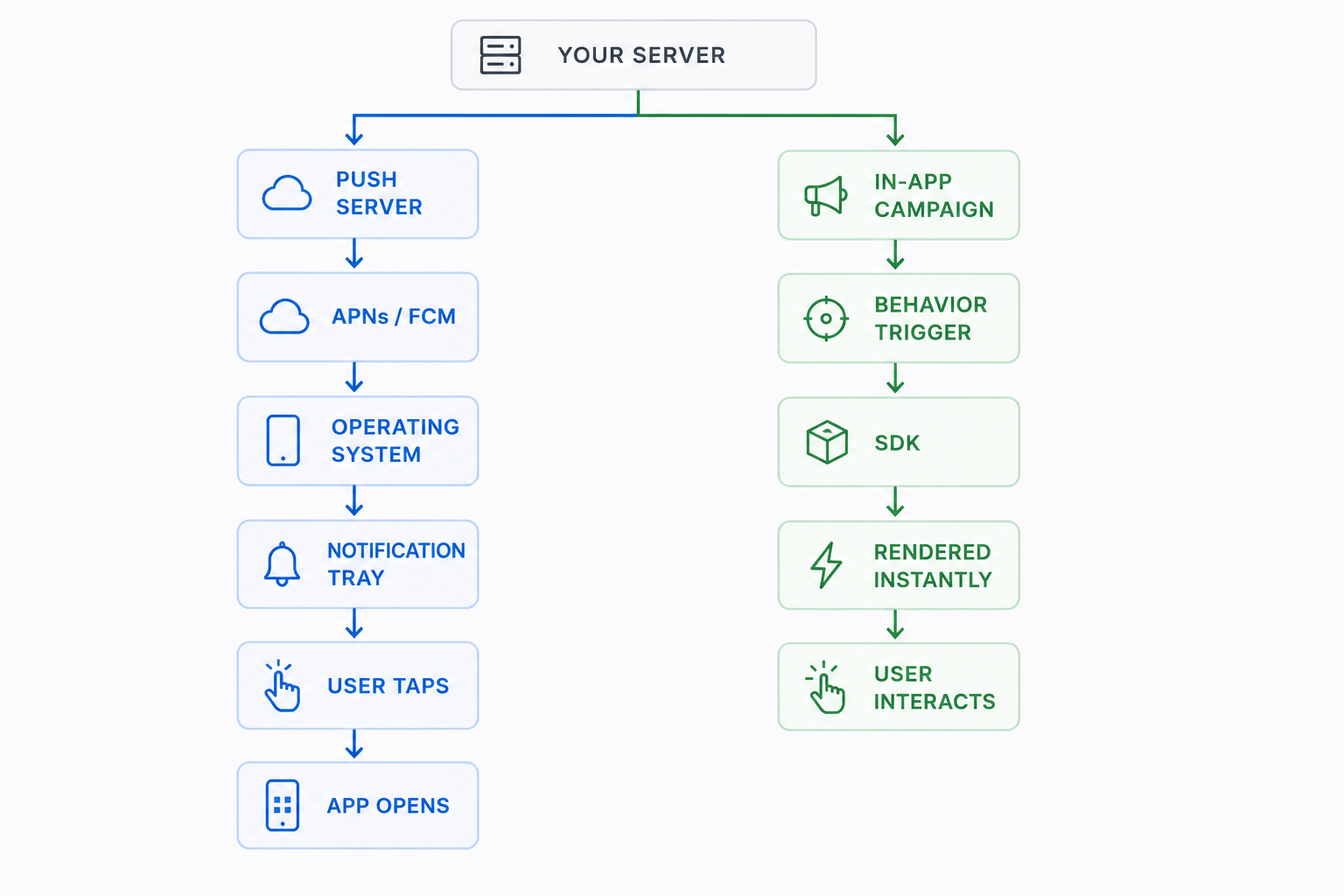
Push notification delivery path: Your server sends a message payload to APNs or FCM. Apple or Google delivers it to the device. The operating system determines whether and how to display it, based on the user's permission settings, Do Not Disturb status, and notification grouping rules. The message lives in the tray until the user taps it, dismisses it, or clears their notifications.
In-app messaging delivery path: Your campaign configuration sits in the messaging platform. When the user opens the app and meets the trigger conditions (a specific screen view, an event, an attribute match), the message is fetched and rendered within the app's own UI layer. Platforms built specifically for in-app engagement, like Digia Engage's in-app messaging system, deliver and render these messages in under 100ms from the trigger event.
The practical difference in that architecture: push notifications pass through a third-party infrastructure that your team does not control. In-app messages render inside your own product. Push can be throttled, batched, or delayed by the OS. In-app triggers fire the moment the condition is met.
Permission Requirements
This is the most consequential structural difference between the two channels, and it has grown more significant every year.
Android push opt-in rates dropped from 85% to 67% in a single year following Android 13's consent policy changes. iOS opt-in rates sit at approximately 56%. That means roughly 39% of Android users and 44% of iOS users who download your app will never receive a push notification. You acquired them. You cannot reach them with push.
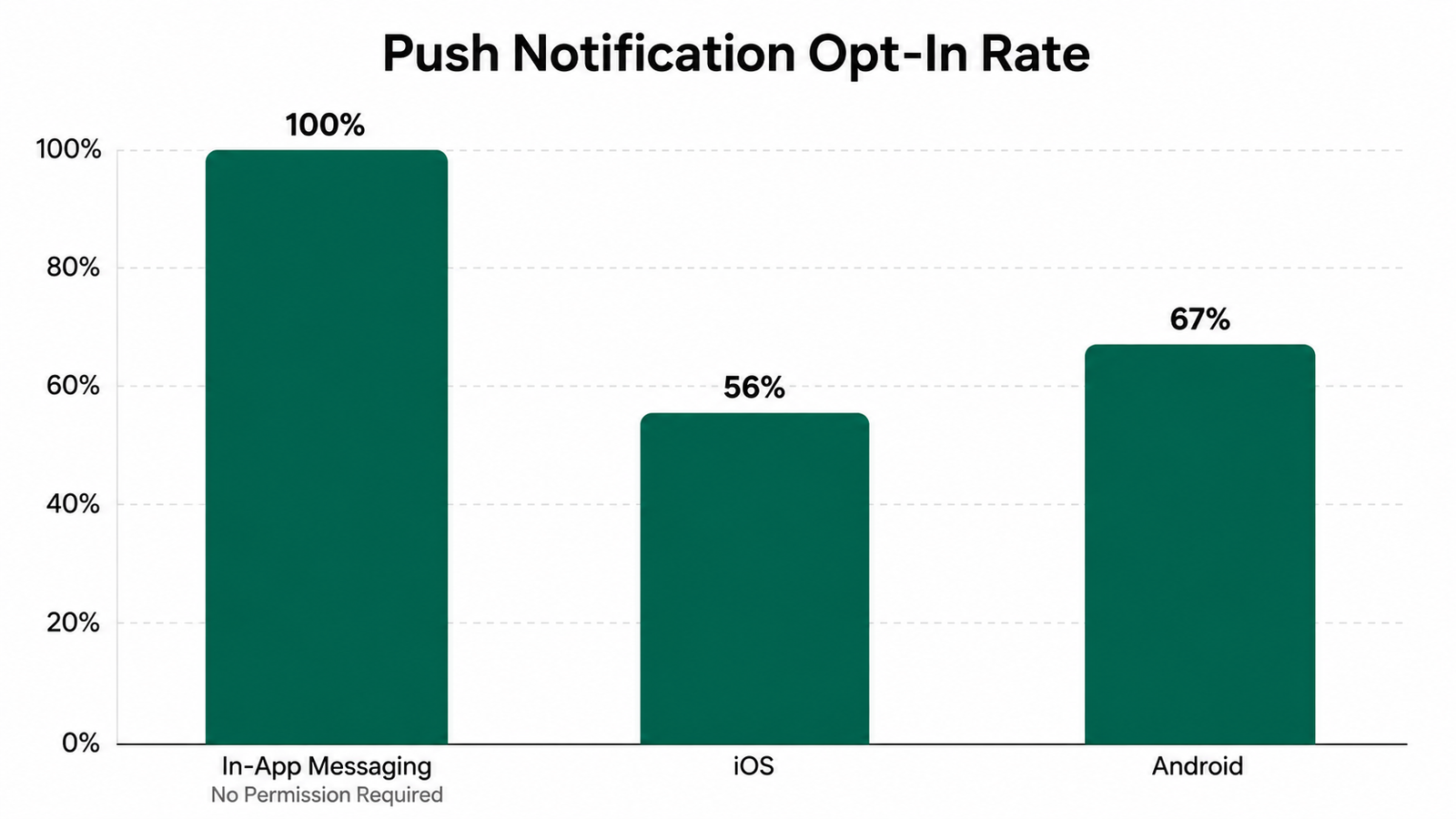
In-app messaging has no permission dependency. Every active user sees in-app messages, regardless of their notification settings. That 100% delivery to active sessions is what makes in-app messaging the more reliable channel for users who are already engaged with your product.
Timing and Trigger Logic
Push notifications operate on campaign time. Your team defines a schedule, a segment, and a send time. The message goes out to that cohort at the defined moment. The user receives it whenever they next look at their phone, whether that is two minutes or six hours after the send time.
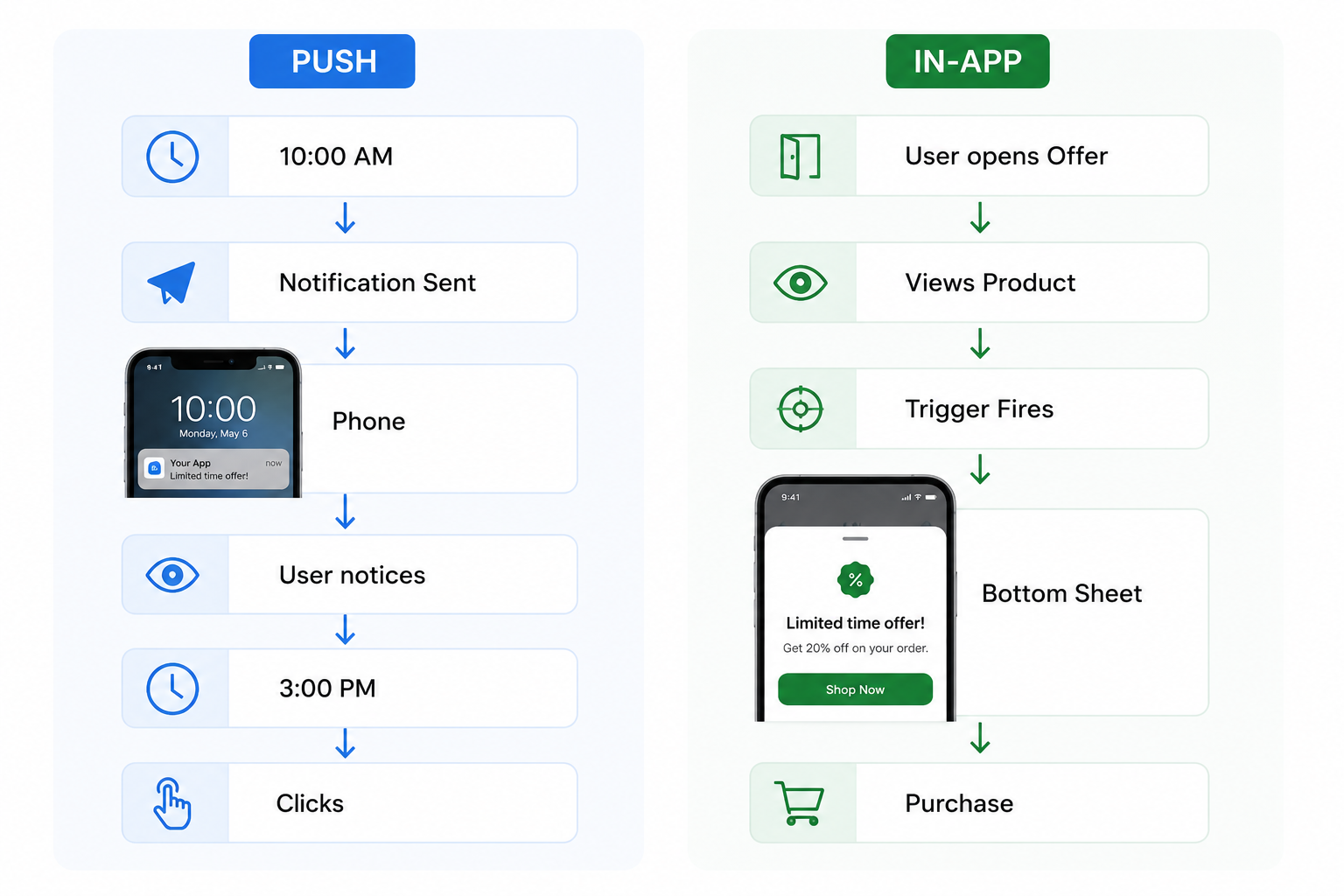
In-app messages operate on session time. The trigger fires when the user hits the precise condition inside a live session. The user is already in the app, doing something specific. The message appears in that context, not against a fixed clock.
That timing gap matters more than it sounds. A push notification promoting a limited-time offer sent at 10am reaches a user who sees it at 3pm, after the urgency is gone. An in-app message triggered when the user opens the offer detail page fires at the exact moment of decision.
Building the right no-code campaign flow to manage in-app timing triggers without engineering dependency is where most growth teams find their biggest efficiency gain, because they can iterate trigger conditions without a release cycle.
Engagement Data: What the Numbers Say
The engagement gap between the two channels is real and consistently documented across research.
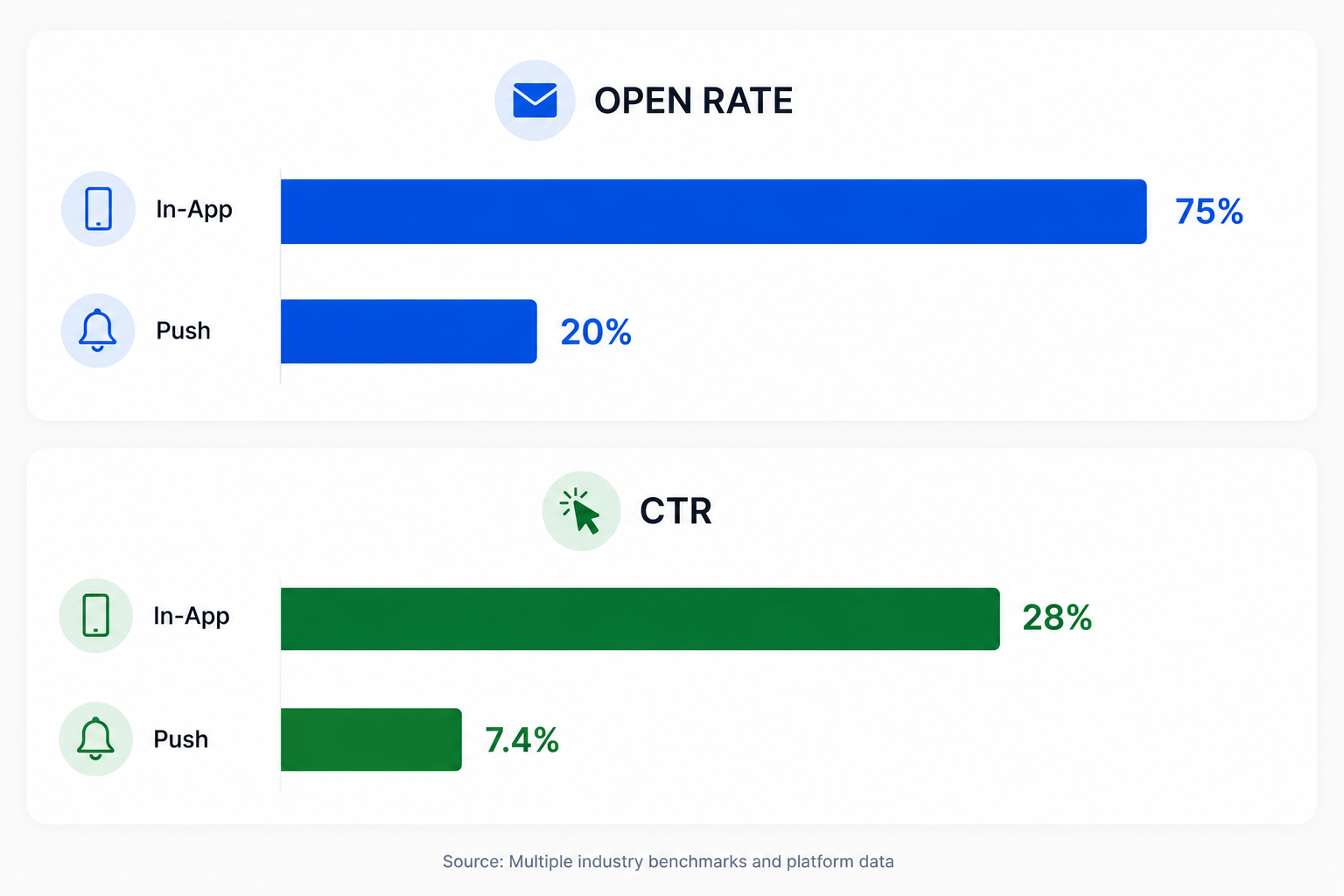
For push, the average reaction rate across all industries is 7.8%, with iOS at 4.9% and Android at 10.7%. Rich push notifications with images or video can improve those figures by up to 56%.
The key interpretation: in-app messaging wins on active-session engagement. Push wins on reach to users who are not currently present. Comparing CTRs in isolation misses this distinction entirely.
Use Cases by Channel
In-app messaging is the right channel for:
- Feature adoption: showing a first-time user where a key feature lives the moment they are on the relevant screen
- Upsell during high-intent moments: a bottom sheet offering a premium plan when a user hits a usage cap inside the product
- Onboarding sequence delivery: step-by-step guidance that fires at each completed action
- Feedback collection: NPS or emoji surveys triggered after a key action while the experience is fresh
- Cart or checkout recovery: a message that fires when session behavior signals drop-off risk
Push notifications are the right channel for:
- Re-engaging dormant users: reaching users who have not opened the app in 7 to 30 days
- Time-sensitive alerts: price drops, flash sales, delivery updates, and live event start times where the value depends on immediacy
- Transactional confirmations: order received, payment processed, appointment confirmed
- Reactivation campaigns: reminding users to complete onboarding steps they started but never finished
- Breaking news or real-time updates for media apps
Decision Framework Table
| Dimension | In-App Messaging | Push Notifications |
|---|---|---|
| Where it fires | Inside an active app session | On the device, outside the app |
| Requires opt-in | No | Yes |
| Who it reaches | Active users only | All opted-in users, including dormant |
| Trigger logic | Behavioral event, session state, screen | Campaign schedule, segment batch |
| Delivery speed | Under 100ms from trigger event | Minutes to hours after send time |
| Average open rate | 75% | 20% |
| Average CTR | 28% | 7.4% |
| Context at delivery | Known (user is in the app, doing something) | Unknown (user may be in a meeting, asleep, or driving) |
| Best for | Converting active users | Re-engaging lapsed users |
| Permission dependency | None | High (39% to 44% of users will not have opted in) |
| Deployment dependency | No app release needed (with the right platform) | No app release needed |
| Frequency risk | Nudge fatigue if overused in-session | Opt-out and uninstall risk with over-messaging |
When to Use In-App Messaging
Use in-app messaging when the user being in the app is precisely what makes the message valuable.
A user who just completed onboarding and is on the home screen for the first time is the right audience for a spotlight pointing at the next critical action. That message has no value if sent as a push notification two hours later. The context is gone.
A user who has browsed the investments section twice without converting is a candidate for an in-app bottom sheet on the third visit. The trigger fires at the moment of highest intent. A push notification with the same copy sent that evening misses the intent window.
The consistent pattern: in-app messaging works when the trigger condition and the message content are tied to a specific moment in the user's session. Separating those two things produces a generic broadcast, which is what push does by default.
When to Use Push Notifications
Use push notifications when the user being away from the app is the entire point.
A daily habit app that wants to build a streak needs to reach users who forgot to open the product. An in-app message cannot do that. Push is the only option.
A food delivery app with a flash sale that expires in two hours needs to reach users who are not currently on the home screen. Push handles that. An in-app message is invisible to anyone not currently in a session.
Push also handles transactional communication well: order confirmed, payment received, your ride is arriving in 3 minutes. These messages have to arrive even when the app is closed. The category does not shift to in-app messaging.
The risk with push is frequency. Sending 2 to 5 notifications per week causes 46% of users to opt out. Even a single notification per week leads 10% of users to disable push entirely. The investment in acquiring an opted-in push subscriber means over-messaging is genuinely costly to undo.
The Case for Running Both Channels Together
The two channels address different problems in a user's lifecycle. Running only push leaves active users under-engaged during their sessions. Running only in-app messaging abandons the segment that is not currently in the app.
The practical architecture for a mobile growth team:
Push handles re-engagement: dormant users, time-sensitive alerts, transactional notifications, and win-back campaigns. In-app messaging handles the active session: onboarding steps, feature discovery, upsell timing, and in-session feedback. The two channels should not carry the same message at the same time to the same user. That overlap is what produces notification fatigue.
Digia Engage plugs directly into existing CEPs like CleverTap, MoEngage, and WebEngage, which means teams can trigger in-app messages from the same segment events that fire their push campaigns, without building a parallel data layer. The result is a coordinated channel strategy rather than two separate teams sending the same message twice.
Key Takeaways
In-app messaging and push notifications solve different problems in a user's lifecycle. In-app messaging reaches active users inside the session with precise, behavior-triggered messages. Push reaches users who are not in the app, with no guarantee of delivery context.
The engagement data consistently favors in-app messaging for active users: 75% open rates and 28% CTR against push's 20% open rate and 7.4% CTR. Push retains its advantage where in-app messaging has no reach, which is any scenario requiring contact with a dormant or inactive user.
The decision is not about which channel is better in aggregate. It is about which channel is appropriate for the specific goal: active-session conversion or out-of-app re-engagement. Applying push logic to active-session goals, or in-app logic to re-engagement goals, is where most mobile teams waste budget.
Further Reading
From Digia Engage:
- What Are In-App Nudges and How Do They Work?: the full taxonomy of in-app messaging formats with trigger logic, use cases, and real examples from Indian consumer apps
- No-Code In-App Campaigns: How Growth Teams Ship Without Developers: how to build and launch in-app campaigns on behavioral triggers without an engineering ticket
- Digia Engage In-App Messaging: the product page covering nudges, bottom sheets, tooltips, spotlights, and modals that fire in under 100ms
Sources
- The Great Push Notifications Benchmark 2025, Batch, July 2024 to July 2025: opt-in rate trends, in-app message CTR by format
- Push Notifications Statistics 2026, Business of Apps: reaction rate benchmarks by platform, segmentation impact on CTR
- Push Notifications vs. In-App Alerts: Key Differences, ZeePalm: 75% in-app open rate vs 20% push open rate, 28% in-app CTR vs 7.4% push CTR
- Mobile In-App Inboxes Have 17% Higher Click Rates Than Push Notifications, SuprSend, based on Acoustic research: 22%+ in-app open rate vs 5% push open rate
- 11 Push Notification Statistics to Know in 2025, TrueList: 75% in-app open rate, Android vs iOS opt-in rate comparison
- 50+ Push Notification Statistics for 2025, MoLoud: frequency and opt-out rate data, 46% opt-out on 2 to 5 weekly notifications
- Push Notification Metrics and KPIs to Track in 2026, MoEngage: industry CTR benchmarks, 7.8% average reaction rate
- Push Notification Benchmarks 2025, Pushwoosh: Q4 2024 to Q2 2025 industry-level CTR data
- Customer Engagement Benchmarks for 2026 and Beyond, MoEngage: in-app CTR personalization uplift by industry
Digia Engage builds in-app messaging, nudges, and behavioral campaigns that fire in under 100ms, no app release required. Book a demo to see how it works inside your own app.