TL;DR: Push notifications are the default recovery tool for most growth teams, and that is exactly why abandonment rates stay high. iOS opt-in rates now sit at 56% and declining, meaning nearly half your users can't be reached by push at all. In-app prompts, triggered by what the user was actually doing before they stopped, recover users at the moment of highest intent before they close the app, not hours later when context has evaporated. This article covers the three categories of in-app abandonment (cart, onboarding mid-flow, and feature drop-off), how to detect pre-exit signals before the user fully leaves, how contextual recovery copy outperforms generic reminders, and which UX patterns reliably pull users back into the flow they dropped from.
What Is In-App Abandonment Recovery?
In-app abandonment recovery is the practice of identifying users who are about to leave a critical journey, such as checkout, onboarding, or feature adoption, and helping them continue through contextual interventions delivered inside the app.
Unlike traditional re-engagement campaigns, which attempt to bring users back after they leave, abandonment recovery operates while intent is still present. The goal is not to reacquire attention. It is to preserve momentum before the user fully disengages.
Effective recovery systems combine behavioral signals, real-time triggers, contextual messaging, and low-friction UX patterns to help users resume the exact action they were trying to complete.
The Wrong Recovery Assumption Most Teams Make
A growth team notices checkout drop-off climbing on their mobile app. The assigned solution: set up a push notification sequence. A cart reminder fires 30 minutes after abandonment. Open rate comes in at 12%. Click-through rate is 3%. Conversion from those clicks is just under 8%. The team declares the campaign "working" because push was sent and someone clicked.
Nobody questions the 88% who never opened it, or the 97% who opened but did not click, or the fraction of the user base who never received a single notification because they denied push permissions during onboarding. The recovery campaign is live. The abandonment problem is not solved.
This is where most in-app recovery programs fail, not in execution, but in the choice of channel and timing. Push notifications are a re-engagement tool. They work well for users who have left the app and need a reason to return. They are a poor tool for users who are still inside the app, still in a session, and still in a moment where recovery is possible without ever breaking their experience. For those users, the right intervention happens inside the product, at the moment abandonment is about to occur, with copy that connects directly to what they were just doing.
That is what contextual in-app recovery is. The rest of this article covers how to build it correctly.
The Three Types of In-App Abandonment (and Why They Require Different Approaches)
Abandonment is not a single behavior. The recovery strategy that works for a user who dropped off a KYC form is different from the one that works for a user who added three items to a cart and then went idle. Treating all abandonment as the same problem produces interventions that fit none of it well.
1. Cart Abandonment
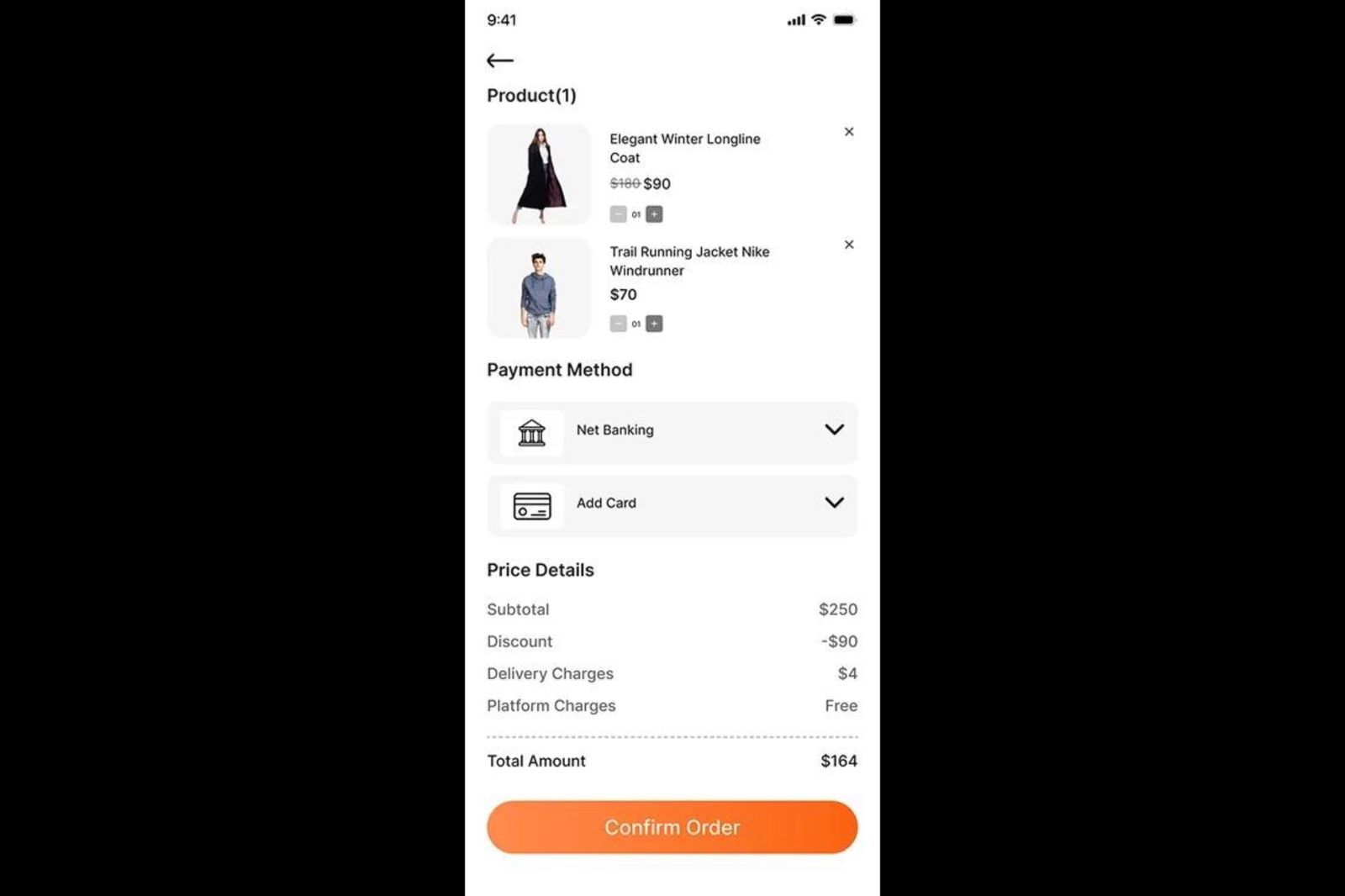
The numbers here are not new, but they are still alarming. Mobile cart abandonment currently sits at around 80%, compared to 66% on desktop, according to Baymard Institute's aggregation of 49 independent studies. Mobile's gap over desktop has been widening, not closing, as mobile browsing behavior has become more exploratory and less committed than desktop shopping behavior.
The reasons users abandon carts fall into two categories: friction-driven and intent-driven.
Friction-driven abandonment happens when something in the checkout flow creates enough resistance that the user stops. Unexpected shipping costs, too many form fields, forced account creation, slow load times on payment screens. These are fixable UX problems, and addressing them reduces abandonment at the source. Baymard Institute estimates that $260 billion in lost orders are recoverable in the US and EU alone through better checkout flow and design, which puts the scope of the friction problem in sharp relief.
Intent-driven abandonment is different. The user was browsing, not buying. They added items to a cart as a bookmarking behavior, or they got distracted mid-session by something outside the app. These users are recoverable, but not by addressing friction. They need a prompt that reconnects them to the specific items they were considering, at a moment when their attention returns to the app.
In-app recovery addresses both types better than push because the user is still in context. A bottom sheet that appears when a user returns to the home screen after spending two minutes on the checkout page, showing the exact items they left in the cart, lands differently than a push notification 30 minutes later that competes with everything else on their lock screen.
2. Onboarding Mid-Flow Drop-Off
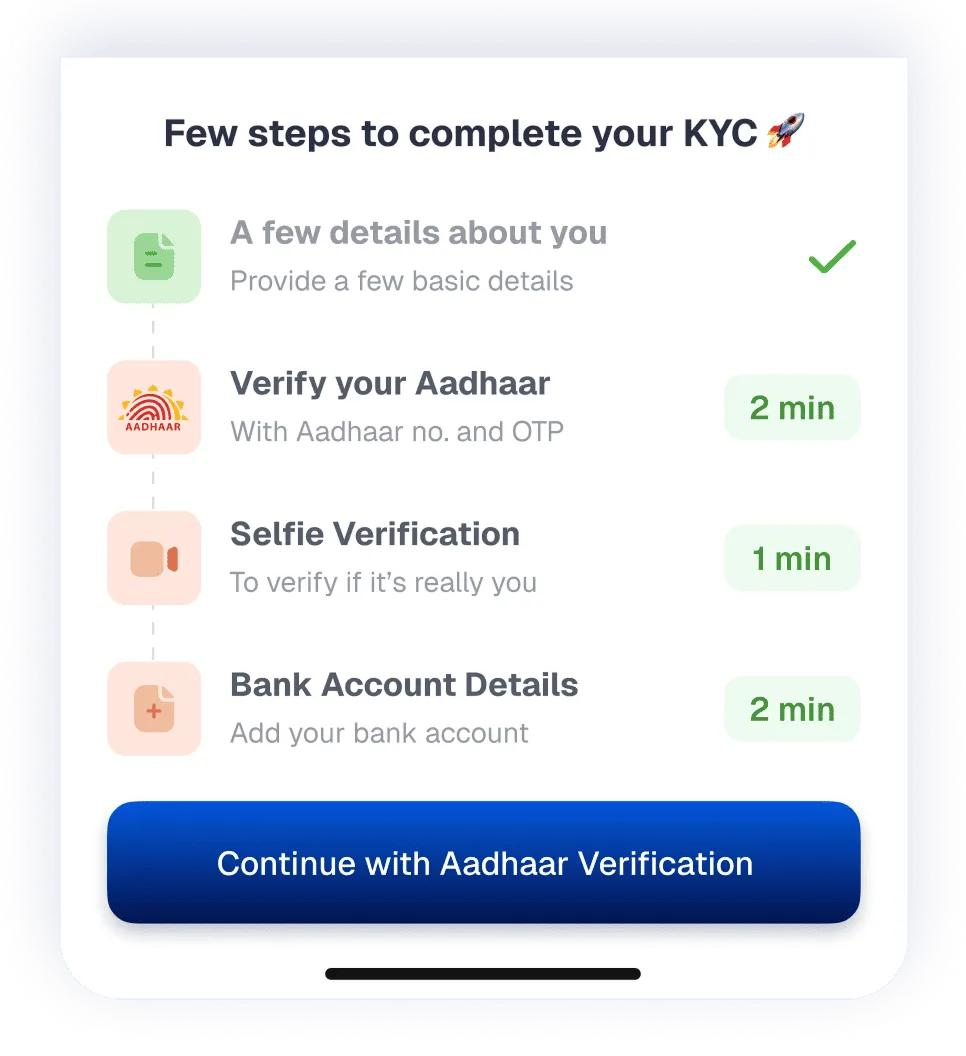
Onboarding abandonment is the most damaging type because it happens before the user has experienced any value. The average onboarding abandonment rate across sectors sits between 60% and 80%, depending on the complexity of the flow and the number of verification steps required. For financial services apps, 68% of consumers have abandoned digital banking applications mid-onboarding because the process felt too long or too complex.
The specific drop-off point matters enormously here. A user who exits at step two of a twelve-step KYC flow is in a different recovery situation than a user who made it to step ten and then stopped at document upload. Recovery copy for each of these users should be completely different.
The problem most apps have with onboarding recovery is that they wait until the user is gone to attempt it. A push notification the following morning that says "Complete your profile to get started" is not contextual. It does not acknowledge what the user completed, what they were blocked on, or how close they are to finishing. It is a generic reminder that lands as a generic reminder.
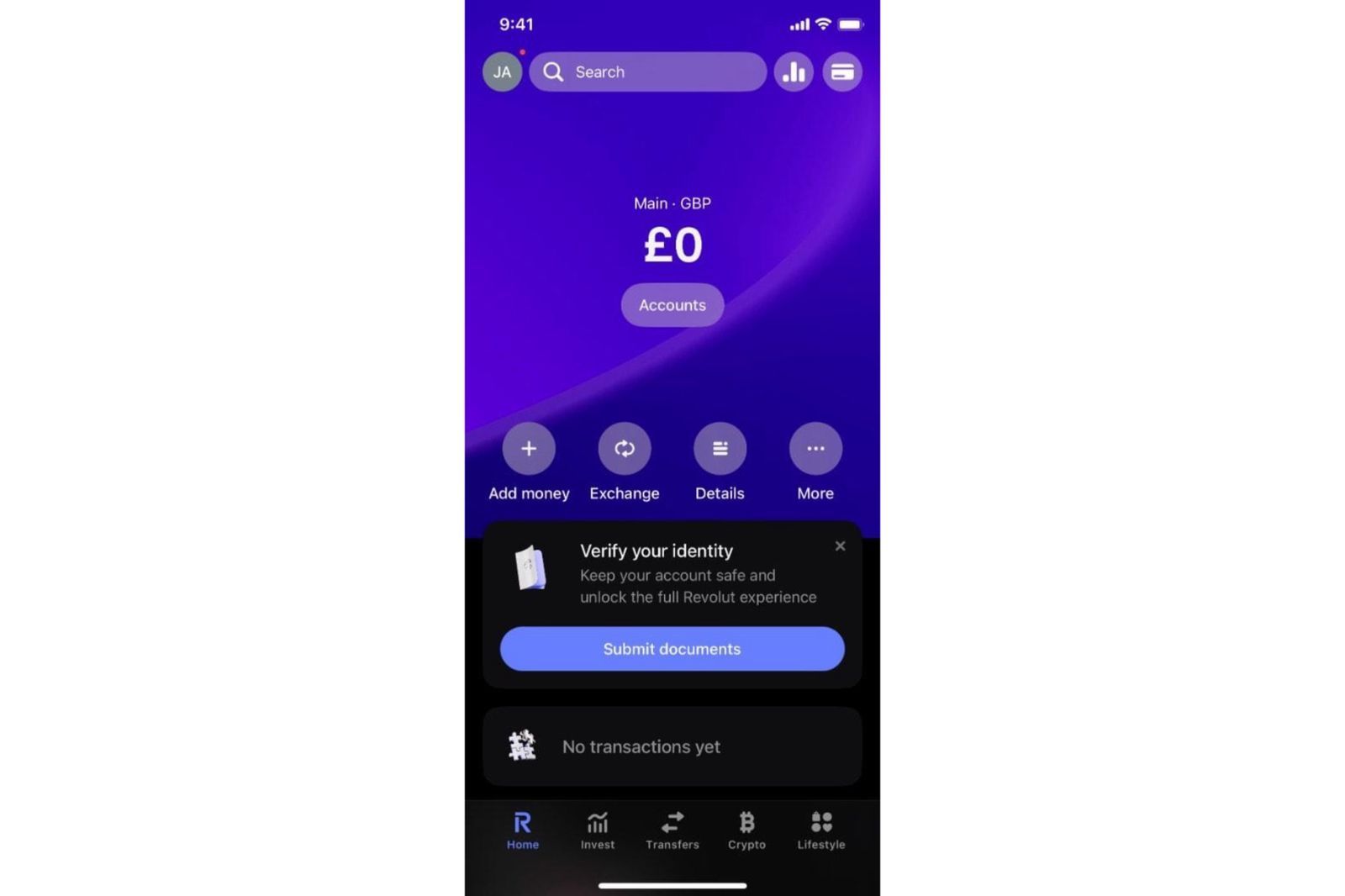
An in-app prompt, triggered when a returning user lands back on the app after an incomplete onboarding, can do what push cannot. It can show the user exactly where they left off, how many steps remain, and frame the remaining work as minimal and specific. Products with a "quick win" in onboarding retain 80% more users, and the resume-from-here prompt is a designed quick win: the user does not have to restart, they just have to take one more step.
3. Feature Drop-Off
Feature drop-off is subtler than cart or onboarding abandonment, and it is more common than most product teams measure. A user reaches a feature, engages with it partially, and then stops using it entirely. The feature is not broken. The user is not gone from the app. They just stopped going to that part of it.
Feature drop-off compounds over time. A fintech user who set up a portfolio tracker but never returned to it after the first session represents a revenue risk that does not show up in standard churn metrics until it is too late. The user is technically "retained" in DAU counts, but they have already stopped extracting value from the feature that was supposed to drive long-term engagement.
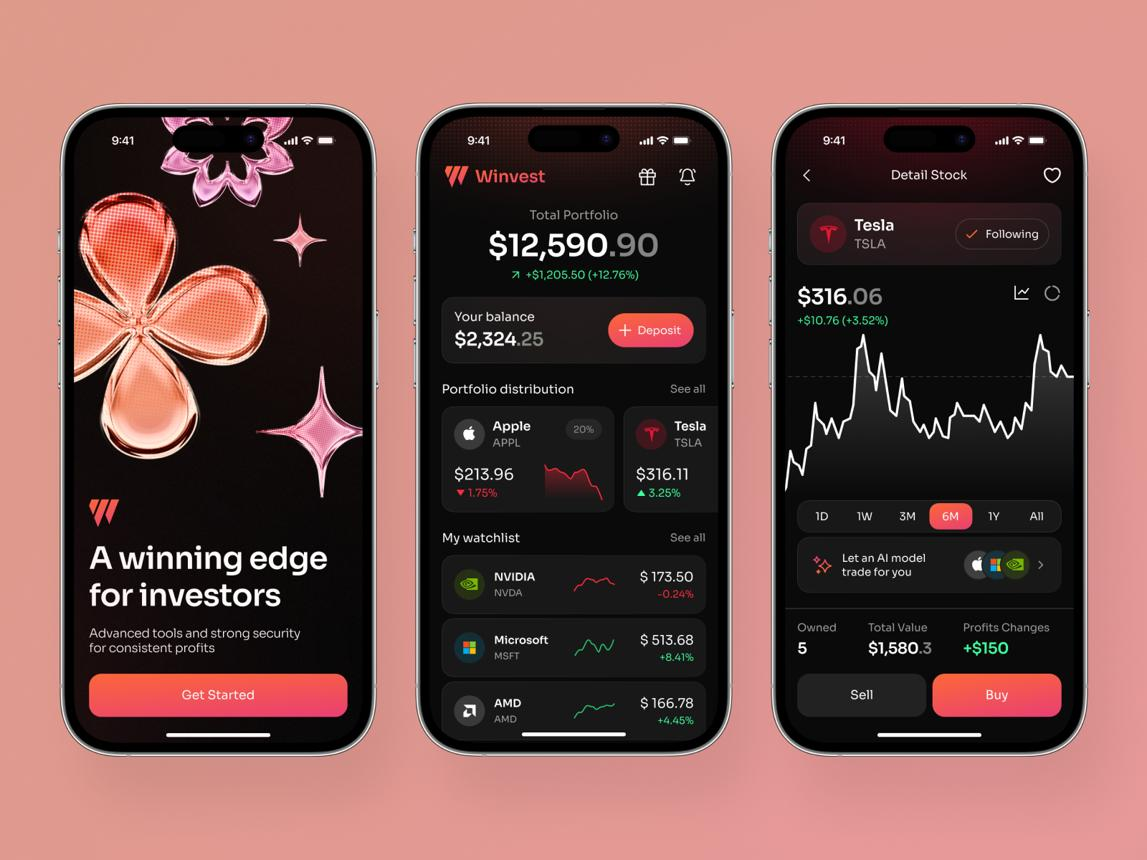
Feature drop-off occurs when users stop engaging with a specific feature, even while remaining active in the app. Recovery works best when prompts reconnect users to that feature at a relevant moment.
The recovery signal for feature drop-off is behavioral, not time-based. Triggering a recovery prompt on a fixed schedule, "You haven't used the savings goal feature in 7 days," gets timing wrong. The correct trigger fires when the user is in a session where a feature they previously engaged with would be naturally relevant, showing them a prompt to pick up where they stopped, grounded in what they were doing before they dropped off.
Why Push Notifications Are the Wrong Recovery Channel
This is worth examining directly, because the default assumption in most mobile growth teams is that push is how you recover abandoning users. The data says otherwise.
The Opt-In Problem Has Gotten Worse
iOS push notification opt-in rates now sit at 56%, and Android's rates dropped from 85% to 67% in a single year following Android 13's consent policy change. The overall average is now 61%. That means four out of ten of your users cannot receive a push notification from you at all.
For recovery campaigns, this creates a structural gap. The users you cannot reach by push are not a random sample of your user base. Users who deny push permissions tend to be higher-privacy-conscious users, often on iOS, often in markets where notification fatigue has set in. Designing your recovery strategy around a channel that excludes nearly half your addressable audience is a constraint the "push-first" teams rarely acknowledge.
In-app messages require no opt-in. They display to every active user in the session, regardless of notification settings. For recovery use cases, this coverage advantage alone justifies the channel choice. You cannot recover a user through a channel they have blocked.
Timing Is Structurally Wrong for Push-Based Recovery
Push notifications recover users who have already left the app. The recovery attempt therefore has to first re-engage the user's attention, pull them back into the app, reconnect them to the context of what they were doing, and then convert. That is four steps to accomplish what an in-app prompt does in one: it catches the user while the context is still live.
Airship's analysis of 50 billion notifications found average reaction rates of 10.7% on Android and 4.9% on iOS across all industries. Even for cart abandonment, where push is at its most targeted and commercially motivated, push notifications achieve around 30-40% open rates and 16% click-through, with an overall conversion rate of 8-12%. Those are not bad numbers for an outbound channel, but they arrive hours after the abandonment event, competing with unread messages, news, and social content on a lock screen.
The user who abandons checkout at 7 PM is not in the same mental state at 7:30 PM. The in-app prompt shown before they close the app is shown to the same user with the same intent intact. That window is where the highest-probability recovery lives.
Notification Fatigue Is a Real Churn Driver
The average US smartphone user receives 46 push notifications per day. Recovery campaigns add to that number. Receiving 6 to 10 notifications per week causes 30% of users to discontinue using an app, and 28% stop after receiving just 2 to 5. Using push for recovery risks cannibalizing the opt-in rate that makes all your other push campaigns viable.
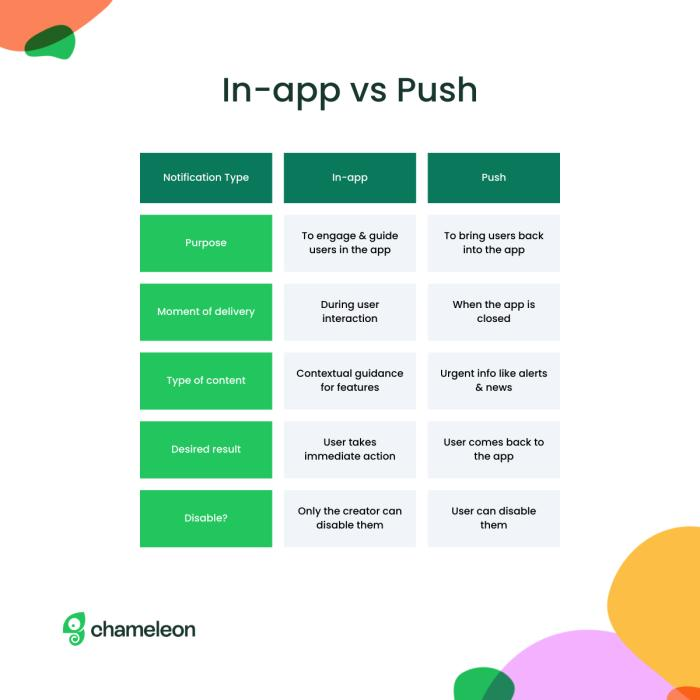
In-app messages, by contrast, are session-bound. A user who sees an in-app recovery prompt is already in the app, already engaged. The prompt does not compete with lock screen clutter. It does not train the user to associate your app with interruptions. And because it is triggered by the user's own behavior in that session, it arrives with contextual relevance that a scheduled push cannot match. In-app notifications have a three times higher open rate than push notifications, and in-app messaging drives a 3.5x higher user retention rate when compared to push-only engagement strategies.
How to Detect Abandonment Signals Before the User Fully Leaves
The most valuable recovery window is the one you catch before it closes. That means identifying the behavioral signals that indicate a user is about to drop off, not the ones that confirm they already did.
Several behavioral patterns consistently precede abandonment within a session. Each is detectable through event-level analytics and can serve as a trigger condition for an in-app recovery prompt.
Back button tap on a high-friction screen. A user who reaches the document upload step of KYC and immediately hits the back button is not navigating. They are retreating. That event, combined with the knowledge that document upload is a historically high drop-off point in the specific flow, is a pre-exit signal. An in-app prompt fired on that back button event, offering an alternative path, an explanation, or a reassurance, catches the user at the moment of hesitation rather than hours after they have closed the app.
Session idle time on a conversion screen. A user who opens the payment screen and then stops interacting for 30 to 90 seconds is displaying an abandonment precursor behavior. They may be comparing prices elsewhere, reconsidering the purchase, or looking for coupon codes. A prompt that appears at the 60-second idle mark, offering a small incentive, addressing a common concern about the purchase, or simply acknowledging that they can save the cart and return, lands at the most recoverable moment in that session.
Rage taps on a disabled or hard-to-find element. A user who taps the same element multiple times in rapid succession is experiencing friction they cannot verbalize. Session replay and behavioral analytics platforms can identify rage tap patterns that correlate with session abandonment. Triggering a contextual help prompt or a live support entry point at that moment converts what would have been a frustrated departure into a supported continuation.
Repeated loop behavior before drop-off. A user who cycles through the same two or three screens without progressing is stuck. They are not browsing, they are searching for something they cannot find. This loop pattern, detectable through screen visit sequences in event analytics, precedes abandonment with enough consistency to justify a nudge that offers navigation help or a shortcut to the specific action they appear to be looking for.
The technical requirement for any of these triggers is an event-based trigger architecture that can evaluate session context in real time. Scheduled campaigns cannot respond to back button taps or idle behavior on a specific screen. Behavioral event-based triggers can, and they are the only mechanism that turns abandonment detection into abandonment prevention.
| Behavioral Signal | Detectable in Real Time | Typical Implementation |
|---|---|---|
| Back button on high-friction screen | ✅ Yes | Custom event triggers an in-app recovery prompt immediately |
| Idle time on payment or conversion screen | ⚠️ Requires custom tracking | Fire an inactivity event after a defined period (e.g., 60 seconds) |
| Rage taps | ⚠️ Requires behavioral analytics | Detect repeated taps and send a custom frustration event |
| Repeated screen loops | ⚠️ Possible with event sequencing | Analyze screen-view patterns and trigger navigation assistance |
| Funnel drop-off | ✅ Strong support | Identify users who entered a step but did not progress |
| Real-time intervention | ✅ Strong support | Trigger nudges, journeys, or in-app messages instantly after qualifying events |
Contextual Recovery Copy: Using What the User Was Doing to Write What They Need to Hear
The most common failure mode in in-app recovery prompts is generic copy. "Still thinking it over?" is not contextual. "Your cart is waiting" is not contextual. "Come back and finish what you started" is not contextual. These phrases could apply to any user who did anything at any point in any session. They do not demonstrate that the product noticed what the user specifically did before they stopped.
Contextual copy uses what the user was doing, what they had selected, how far they had progressed, or what they were searching for, to make the prompt feel responsive rather than automated. The difference in conversion rate between generic and contextual recovery copy is measurable.
For cart abandonment, contextual copy names the items or the category. A user who added a specific jacket and a pair of boots to their cart should see those items in the recovery prompt, not a generic reminder about their cart. If the cart total is above a shipping threshold, the copy should mention free shipping. If the items are low in stock, that information is relevant and honest. The copy mirrors the user's specific situation, not the average situation.
For onboarding mid-flow drop-off, contextual copy acknowledges the progress made and frames the remaining work as minimal. A user who completed 8 of 12 onboarding steps before dropping off should see a prompt that says something like: "You finished 8 steps. The remaining 4 take about 3 minutes." That framing does two things. It validates the effort already invested (triggering the Zeigarnik effect, where people feel compelled to complete interrupted tasks), and it makes the remaining work feel achievable rather than overwhelming. Generic "Complete your profile" copy does neither.
For feature drop-off, contextual copy references the specific feature and the user's last interaction with it. A user who set up two savings goals but never returned to add transactions should see a prompt tied to those goals, not a generic "Have you explored our savings tools?" The personalization signal tells the user that the product tracks their activity and is responding to it, which itself is a retention signal.
The three elements of effective contextual recovery copy are specificity (what exactly did this user do), proximity (how close were they to completing the flow), and a low-friction forward action (one step to resume, not a re-entry into a complex flow from the beginning).
UX Patterns That Work for In-App Recovery
The copy alone does not determine recovery success. The presentation pattern, when the prompt appears, how it appears, and what it asks the user to do, shapes the outcome as much as the message itself.
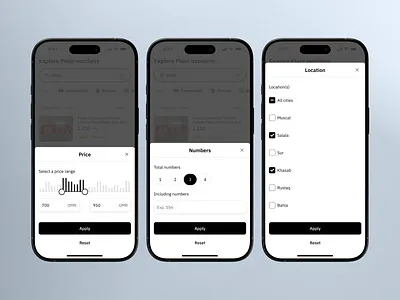
Resume prompts preserve user context and reduce the effort required to complete an interrupted flow.
These are the four patterns with the strongest conversion evidence for in-app abandonment recovery.
Resume-From-Here Prompts
The resume-from-here prompt is displayed when a user returns to the app after a session in which they did not complete a critical flow. It appears on the home screen or the first screen the user lands on after reopening, and it offers a single-tap path back to the exact point they left, not the beginning of the flow.
The design principle here is state preservation. The user's progress, their cart contents, their partially filled form fields, the specific step they reached in onboarding, all of that context is retained and surfaced in the prompt. The prompt asks for the smallest possible commitment to resume: one tap, not a re-read of instructions, not a restart from step one.
Netflix's "Continue Watching" placement is the most-studied implementation of this pattern at scale. The mechanic works because it reduces the decision cost of re-entry to near zero. The user does not have to remember where they were. The product remembers for them and surfaces the answer as the path of least resistance.

For mobile apps, the same mechanic applies to checkout flows, onboarding sequences, and multi-step forms. The implementation requires that the app preserves state across sessions and that the in-app messaging system can read the user's last incomplete action to populate the prompt dynamically.
Progress and Proximity Nudges
Proximity nudges make the gap between where the user stopped and where they would complete the flow explicitly small. They rely on the Zeigarnik effect, the cognitive tendency to remember and feel drawn to complete interrupted tasks, to create forward momentum.
A progress nudge during a session shows a user how far they have come: "You're 75% through setup." A proximity nudge after a return frames the remaining distance: "One more step to finish." Both framings work because they recast the incomplete task as almost done rather than still-in-progress.
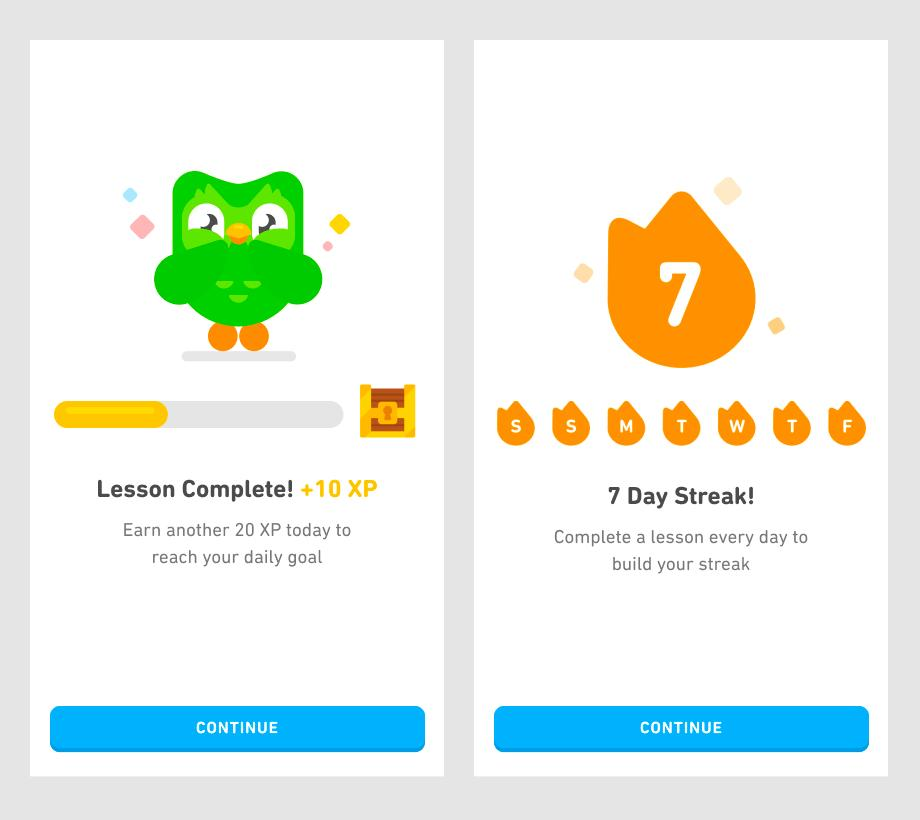
Progress indicators make unfinished tasks feel achievable by showing users how close they are to completion.
The specific framing matters. Percentage-based progress ("85% complete") works well for flows where the user has invested significant time. Step-based framing ("Step 4 of 5") works well for structured sequences where each step is discrete and meaningful. Estimated time ("About 2 more minutes") works well for flows where perceived time investment is the primary barrier to continuation.
The wrong application of this pattern is artificially inflating progress indicators to manipulate the user. This is a dark pattern with measurable backlash effects on trust scores. The correct application accurately communicates genuine proximity. Users who feel deceived by false progress bars abandon at higher rates than users who were shown accurate progress from the start.
Offer-Based Recovery
Offer-based recovery introduces a discount, free shipping unlock, bonus credit, or other incentive as part of the recovery prompt. It is the right tool for a narrow set of situations, and the wrong tool for most.
Offers work for cart abandonment when the abandonment was price-driven. If a user spent significant time on the payment screen and then left, and the cart value is above a threshold that suggests genuine purchase consideration, a small offer can tip the conversion. In-app cart recovery prompts that include offers typically convert at 5-8%, which outperforms generic reminder prompts.
The problem with offer-based recovery is conditioning. A user who learns that abandoning a cart reliably produces a discount offer will start abandoning carts intentionally to capture the offer. Teams that deploy offers for all cart recovery, regardless of abandonment reason, train their highest-intent users to hold out for deals. This erodes margin and makes the recovery data look better than the underlying behavior warrants.
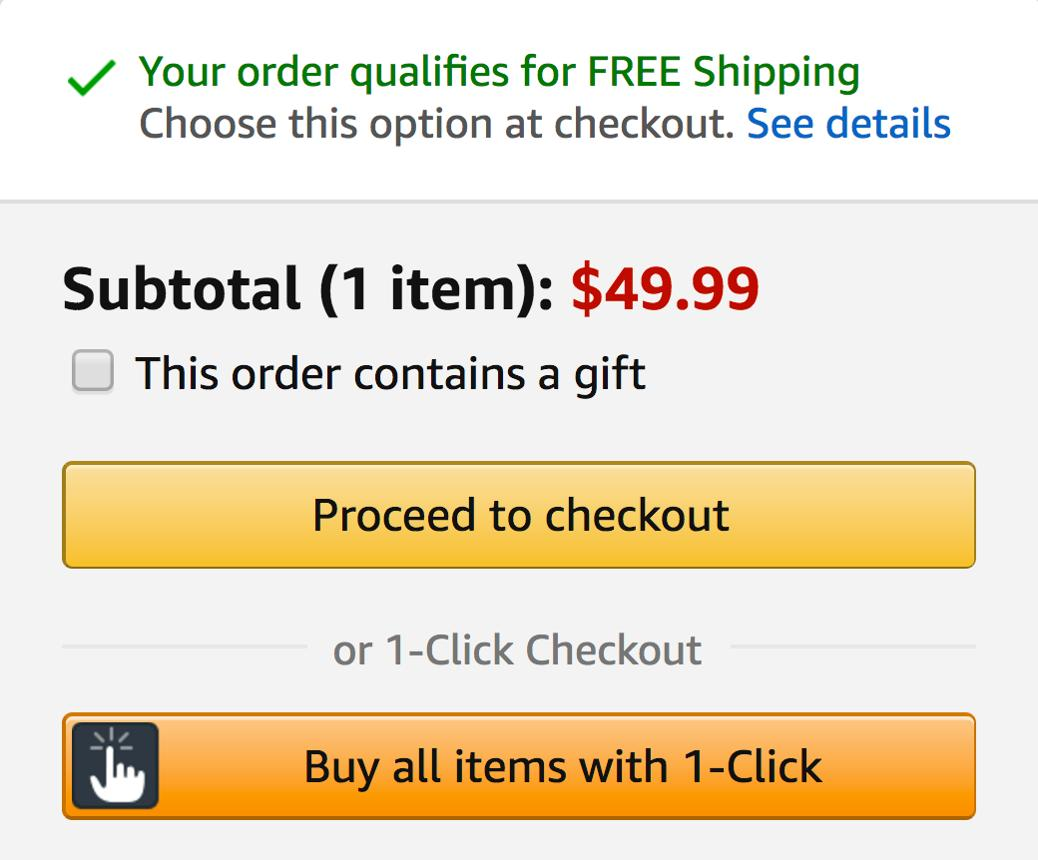
The targeting rule for offer-based recovery: use it for users whose behavioral signal (extended time on the payment screen, multiple returns to the product detail page, high-value cart total) suggests genuine price sensitivity. Suppress it for users whose abandonment appears distraction-driven, where a resume prompt without an offer is the more appropriate and less costly intervention.
Conversational Recovery Prompts
Conversational prompts ask a question rather than issuing a reminder. "Is there anything holding you back?" or "Did you have a question about this step?" signals that the app is responsive to the user's specific situation, not just executing a scheduled workflow.
This pattern works best for high-commitment flows where the user has demonstrated enough intent to justify asking them why they stopped. Onboarding abandonment at a late-stage verification step, checkout hesitation after extended browsing, or feature setup abandonment for a premium feature are all contexts where the user's hesitation is likely specific enough that a question will surface useful signal.
Conversational prompts can connect directly to an in-app chat or help surface if the user responds affirmatively. The exit intent then becomes a support entry point, and recovery happens through resolution rather than reminder. In-app surveys triggered at high-signal moments see 30% or higher response rates, compared to 3% for email-based feedback, which makes the in-app conversational prompt a genuinely viable recovery mechanism in flows where friction is the primary abandonment driver.
Setting Up In-App Recovery Without a Release Cycle
Growth teams running recovery experiments against a release-gated architecture cannot move fast enough to learn what works. If changing a recovery prompt's trigger condition, its copy, or its timing requires a sprint, an App Store submission, and a review cycle, the team will run four experiments per quarter at best. That is not enough iteration velocity to improve recovery rates meaningfully.
The architecture that enables rapid recovery experimentation is server-side trigger configuration. When the trigger logic, the copy, the timing, and the targeting rules are all stored outside the app binary, changing any of them is a dashboard operation. The SDK running on the user's device reads the updated configuration at session start and executes accordingly. No new code deployment. No App Store submission. No sprint cycle.
This is the same architectural principle that makes timing experiments possible without a release, as covered in Timing Experiments: When to Trigger In-App Engagement. The same framework that lets you vary when a prompt fires also lets you vary what it says, who sees it, and what action it offers, all independently and all without engineering involvement on each iteration.
Digia Engage is built on this architecture. Abandonment triggers, the specific events that fire a recovery prompt, are configured in the dashboard using behavioral events from the user's session. Recovery copy, including dynamic fields that pull in cart item names, step counts, and progress percentages, is managed without touching the app binary. Growth teams can run a copy experiment on a cart recovery prompt and a trigger-timing experiment on an onboarding resumption prompt in the same sprint, without opening a single engineering ticket.
This is the operational gap that separates teams with high-iteration recovery programs from teams that run the same push sequence for six months and call it a retention strategy. The tooling determines the iteration velocity, and the iteration velocity determines how quickly the team learns what actually recovers their specific users.
Key Takeaways
- Push notifications exclude nearly 40% of users who have denied opt-in, and Android's opt-in rate dropped 18 percentage points in a single year. Designing recovery strategy around push means accepting that structural reach ceiling from the start.
- The three categories of in-app abandonment, cart, onboarding mid-flow, and feature drop-off, require different recovery triggers, different prompt timing, and different copy. A single recovery approach applied uniformly to all three will underperform on all three.
- Pre-exit signal detection, back button taps on high-friction screens, idle time on payment pages, rage tap patterns, and navigation loops, is the most underused abandonment recovery tool available. The user is still in the app when these signals fire.
- Contextual copy outperforms generic copy by connecting the prompt to the specific action, item, or step the user was engaged with before they stopped. Generic reminders perform like generic reminders.
- The four UX patterns worth implementing for in-app recovery are resume-from-here prompts, progress and proximity nudges, offer-based recovery (used selectively), and conversational prompts. Each serves a different abandonment scenario and a different user mental state.
- Offer-based recovery trains users to repeat the abandonment-to-discount cycle when applied indiscriminately. Target it at users whose behavioral signals indicate price sensitivity, not at every abandonment event.
- Server-side trigger configuration is the operational requirement for high-velocity recovery experimentation. Teams without it run too few experiments per quarter to learn fast enough to improve recovery rates at a meaningful scale.
Further Reading
From Digia Engage
Timing Experiments: When to Trigger In-App Engagement covers the four timing variables that determine whether an in-app prompt converts or gets dismissed, with specific guidance on session position, action recency, and user tenure.
No-Code In-App Campaigns: How Growth Teams Ship Without Developers explains the campaign architecture that separates trigger logic from app releases, enabling teams to iterate on recovery prompts without engineering involvement.
Digia Engage Nudges covers the trigger framework used to fire contextual recovery prompts based on behavioral events, without modifying the app binary.
Book a product demo to see in-app abandonment recovery configured live, from trigger setup to contextual copy to A/B experiment assignment.
External Sources
Baymard Institute: Mobile Cart Abandonment Research is the primary source for cart abandonment benchmarks, covering abandonment rates by device, industry, and checkout flow complexity across 49 independent studies.
Batch Push Notification Benchmark 2025 provides the opt-in rate decline data for both Android and iOS, with industry-level breakdowns and in-app message comparison metrics covering July 2024 to July 2025.
Jumio: How to Reduce Customer Onboarding Abandonment covers abandonment rates across onboarding flows, including KYC-heavy financial services flows and the specific friction points that drive mid-flow drop-off.
Userpilot: Feature Drop-Offs, Causes and 4 Ways to Reduce Them covers how feature engagement analytics identify drop-off points and what recovery interventions work for users who have stopped engaging with a specific feature.
Digia Engage is a no-code in-app campaign platform for mobile growth teams. It integrates with CleverTap, MoEngage, and WebEngage, supports iOS, Android, React Native, and Flutter, and takes under 20 minutes to integrate. See how in-app abandonment recovery works inside the platform.