TL;DR: A 1% rollout catches the same bugs as a 100% rollout. The difference is how many users absorb the impact. Staged rollouts are the mechanism that separates release confidence from release recklessness. This article covers what staged rollouts are and how they work differently on Android and iOS, how canary releases build the layer before percentages, which metrics tell you to proceed or stop, how automated gates work and when to trust them, what a real rollback strategy requires before you ever ship, and why a staged rollout without active monitoring is just a slower version of a full release.
What a staged rollout actually is
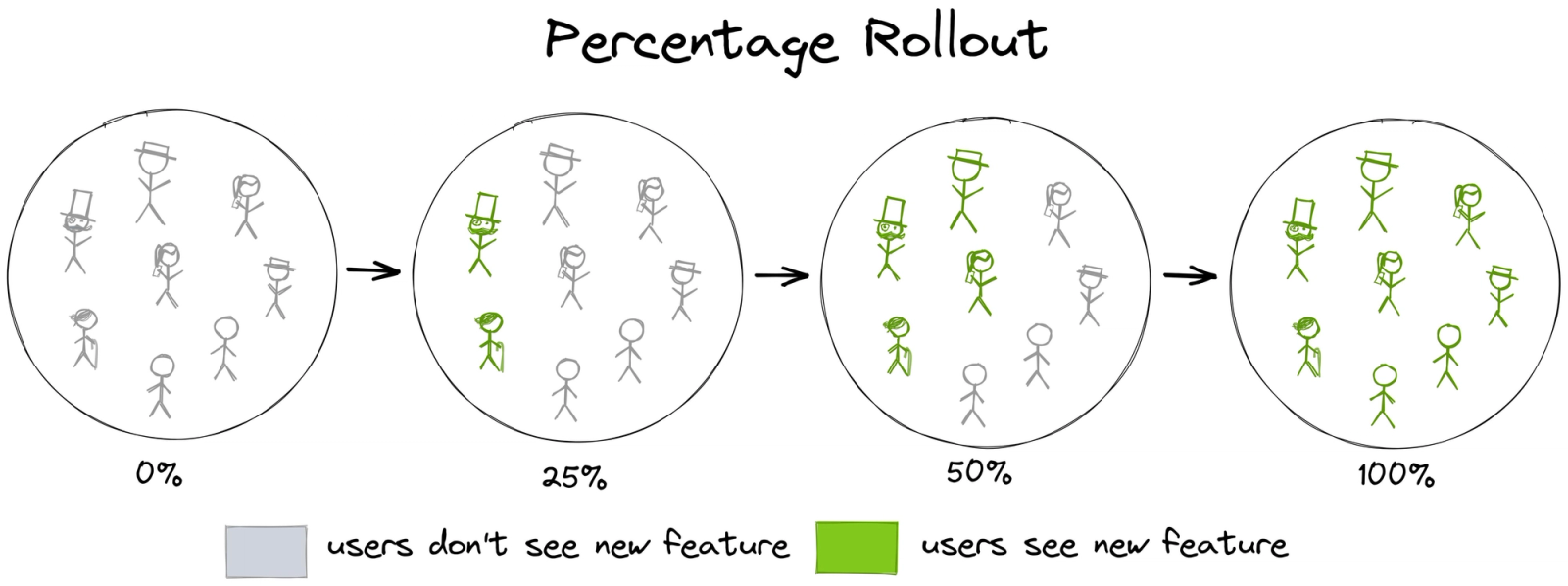
A staged rollout is a release strategy that exposes a new app version to a controlled percentage of users before pushing it to everyone. You start with a fraction of your audience, watch the metrics, and expand the rollout incrementally when things hold stable.
The logic is straightforward. A production environment contains things no test environment can fully replicate: the full distribution of real devices, operating system versions, network conditions, user data configurations, and third-party integrations running at scale. Internal testing and beta programs reduce the surface area of unknowns, but they do not eliminate it. The only way to verify a build's behavior in production is to expose it to production, and a staged rollout lets you do that with a defined blast radius.
This is the core argument for the strategy. Everything else in this article is implementation detail.
How staged rollouts work on Android
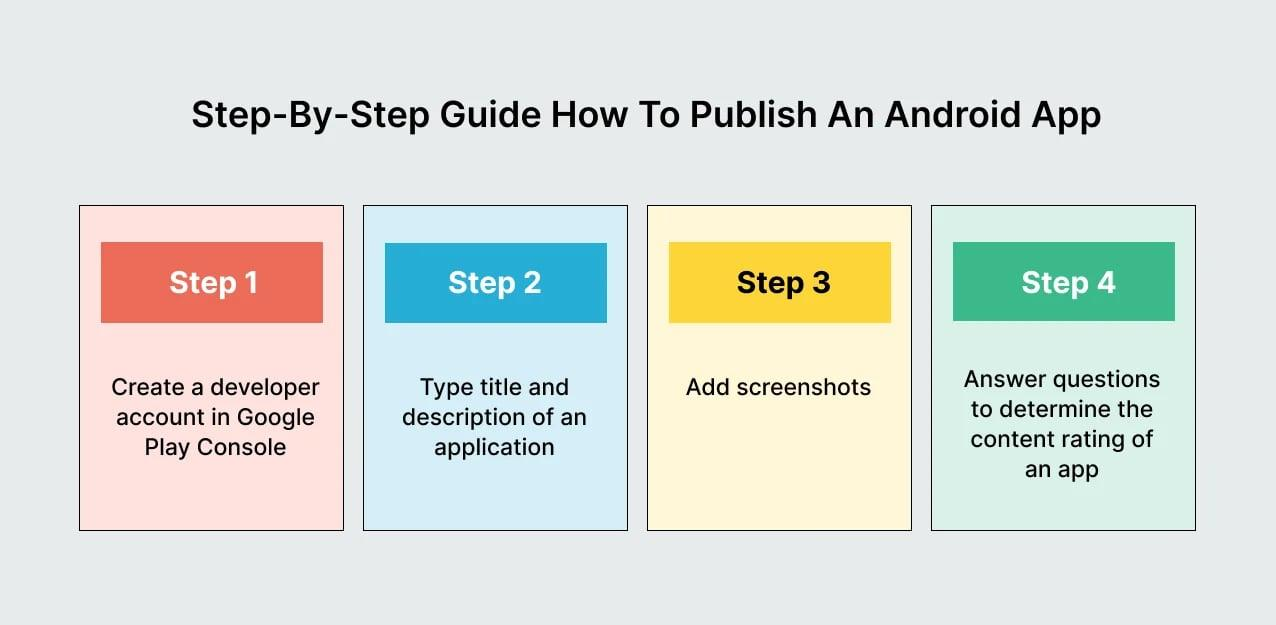
On Android, staged rollouts are managed through the Google Play Console. When you submit an update to the production track, you can set a rollout percentage before publishing. Google then distributes the update to that percentage of your eligible user base, selected at random.
The mechanics have a few specifics worth knowing.
User selection. Both new and existing users are randomly selected to receive the update. This differs from iOS, where random selection only applies to users who have automatic updates enabled. On Android, new installs always receive the latest version regardless of staged rollout percentage.
Percentage control. You set the starting percentage manually and increase it yourself at each stage. There is no automated daily progression. Google Play does not have an automated daily increase of percentage, unlike the App Store. The developer has to manually bump the percentage. Common starting points are 1%, 5%, or 10%, with expansion to 20%, 50%, and then 100% at intervals the team decides based on metric review.
Halt and resume behavior. If you halt a rollout and then resume it, the same cohort of users who were initially selected continues to receive the update. The selection does not reset to a new random group. If you start a staged rollout for a new version while a previous version's rollout is still in progress, the new version targets the same user group as the previous staged rollout.
The 24-hour rule. It is recommended to wait at least 24 hours before increasing the rollout percentage. This gives you time to monitor performance and address any issues before expanding the update further. This is a practical minimum, not a ceiling. Teams with complex releases or limited monitoring bandwidth should wait longer.
Android vitals and store visibility. Google Play tracks core quality metrics including crash rate and ANR rate under Android vitals. These metrics affect your app's discoverability on the store. The overall bad behavior threshold for user-perceived crash rate is at least 1.09% of daily active users experiencing a crash. For ANRs, the overall bad behavior threshold is at least 0.47% of daily active users experiencing a user-perceived ANR. Exceeding these thresholds during a staged rollout means your app is already at risk of reduced store visibility, which makes the monitoring window during rollout directly consequential for your distribution reach.
How phased releases work on iOS
Apple's version of a staged rollout is called a Phased Release, and it works on a fixed schedule with less flexibility than Android.
The 7-day schedule. When you turn on phased release, your application is fully rolled out over 7 days to all your users at increments of 1%, 2%, 5%, 10%, 20%, 50%, and 100%. Each stage advances automatically every 24 hours. You cannot change the percentage at each stage or skip to a custom number.
Who gets the update. Users are randomly selected from those who have enabled automatic updates on their devices, selected at random by their Apple ID. Critically, users who choose to manually update their app will always receive the new version regardless of the staged rollout stage. New downloads also always receive the latest version. This means your actual exposure during early stages is higher than the percentage suggests if you have a large segment of manual updaters or if you run any paid acquisition that drives new installs during the rollout window.
Pausing. You can pause the phased release for a total of 30 days, with no limit on the number of individual pauses. Once you hit 30 cumulative days paused, the implication from Apple's documentation is that the release proceeds to 100%. You can also manually push to 100% at any point during the rollout if your metrics warrant it.
Enabling phased release. You can enable phased release before the App Store review stage, or during the release stage after approval as long as the rollout has not yet started. The setting is in App Store Connect under the version's release settings.
No rollback at the binary level. Phased releases cannot be rolled back. The only way to stop a version going to 100% is to release a version that supersedes it. This is the most important operational constraint on iOS. If you find a critical bug at day three of a phased release, you cannot retract the version from users who already have it. You can pause to stop further expansion, but users on the broken version stay on it until you publish a fix with a higher build number that clears App Store review.
The critical differences between Android and iOS rollouts
The two platforms share the same intent but differ enough mechanically that teams who treat them as equivalent will run into problems.
Percentage control. Android gives you full, manual control over the rollout percentage at every step. iOS runs on a predetermined 7-day schedule that you can interrupt but cannot reconfigure. A team that wants to stay at 5% for three days while they watch metrics cannot do that on iOS without holding the rollout at day one's 1% by pausing immediately after it starts, then manually advancing when ready.
User selection scope. Android's random selection applies across all eligible users. iOS's selection only applies to automatic updaters. Manual updaters and new installs bypass the staged rollout entirely on both platforms, but the proportion of your audience affected by this varies significantly depending on how your user base behaves.
Rollback mechanics. On Android, halting a rollout stops new users from receiving it. On iOS, pausing stops expansion. In both cases, users already on the new version stay there. The practical difference is that Android's rollback requires submitting a new build with a higher version code, while iOS requires submitting a new build and clearing App Store review, which typically takes several hours at minimum and can take longer.
Timeline pressure. iOS's 30-day total pause cap creates a hard deadline on how long you can hold a troubled rollout. Android has no equivalent time pressure. A team that finds a complex bug they cannot fix in 30 days will need to release a new build on iOS regardless of whether the fix is ready.
Canary releases: the layer before percentages
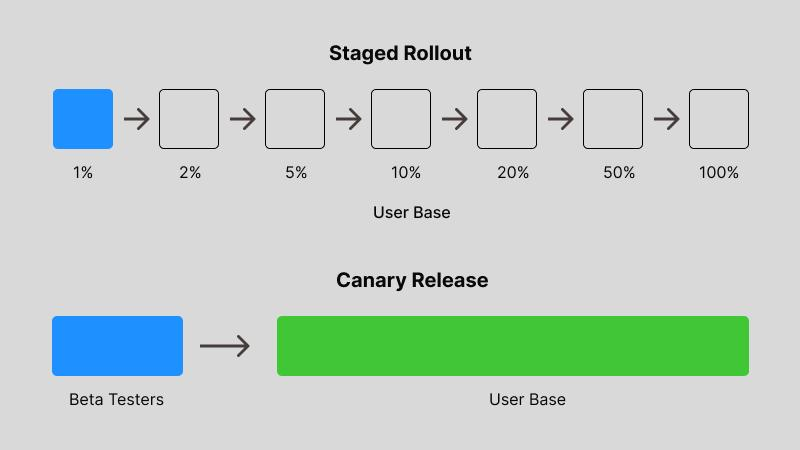
A staged rollout to a percentage of production users is not the first checkpoint in a mature release process. It is the final one. Before any build touches production percentages, it should have passed through two earlier layers.
Internal testing (dogfooding). Your own team runs the build. This catches the obvious failures: crashes on devices you own, broken authentication flows, missing assets, layout regressions on the screen sizes in the office. It costs nothing beyond team time and filters out the embarrassing bugs before anyone outside the company sees them.
On Android, this is the internal testing track in Play Console. Builds here do not require full review and are available to designated team members within minutes of upload. On iOS, TestFlight handles internal testing for up to 100 members of your development team.
Beta groups. Opt-in testers who know they are receiving pre-release builds. These are real users with real devices, real usage patterns, and real data, but they have accepted the instability risk. Beta groups surface problems that internal testing cannot: the device model you do not have in the office, the carrier configuration that breaks your network requests, the user data shape that triggers an edge case in your new parsing logic.
On Android, Play Console's closed and open testing tracks handle this. On iOS, TestFlight supports up to 10,000 external testers with a lighter review process than full App Store submission.
Canary releases target a smaller, more specific group for initial exposure, while staged rollouts do so in a more gradual, phased manner across a broader user base. The distinction matters because canary groups are typically selected for specific characteristics: power users, beta testers, internal employees, users on specific device configurations. A production staged rollout uses random selection. Both serve different diagnostic purposes and together they give you layered validation.
The production percentage rollout. After internal and beta pass, you open to a slice of your production audience. This is where you find the problems that only appear at scale: edge cases in aggregate user data, third-party API failures under production load, device-specific crashes on hardware combinations that did not exist in your beta pool.
Each layer filters noise. By the time you hit 10% of production, the build has already been validated by two real-world cohorts. The percentage rollout confirms or contradicts what those earlier stages suggested.
What to monitor during a rollout
A staged rollout without monitoring is theater. The percentage means nothing if no one is watching the metrics that would tell you to stop.
The metrics worth tracking during a rollout fall into four categories: stability, performance, engagement, and ratings velocity.
Crash-free session rate. This is your primary stop-the-rollout metric. You are measuring the percentage of sessions that completed without a crash. Top apps reach 99.99% crash-free sessions, while below 99.8% is a red flag. Compare this number against your baseline from the previous stable version. Any meaningful drop in crash-free rate on the rollout cohort relative to the baseline is the signal that something is wrong.
Monitor crash-free rates with Crashlytics or Sentry. Set alerts for when the rate drops below 99.5%. The specific threshold depends on your historical baseline. If your app normally runs at 98.5% crash-free, setting an alert at 99.5% will fire on every release. Calibrate against your actual recent history, not against an aspirational target.
ANR rate (Android only). Application Not Responding errors occur when your app blocks the main thread long enough that the system shows the "App isn't responding" dialog. The median ANR rate is 2.62 per 10,000 sessions. Google Play may penalize apps with an ANR rate over 0.47% of daily active users. ANR spikes during a staged rollout indicate something in the new version is performing synchronous work on the main thread that was not there before.
API error rates. Watch your backend error logs alongside the mobile release. A new app version hitting a backend endpoint that returns 500 errors at an elevated rate is a production incident whether or not it shows up in mobile crash reporting. Your server dashboards should show a baseline error rate for each endpoint. Any spike correlated with the timing of the staged rollout is a rollout-related issue.
Conversion on critical flows. Crash rate tells you the app is broken at a technical level. Conversion rate tells you whether users are completing the actions that matter: onboarding, first purchase, subscription, investment. If crash-free sessions look normal but your primary conversion event drops 15% for the rollout cohort versus the control cohort, something is broken in the user experience layer even if it is not crashing the app.
Ratings velocity. App store ratings are a lagging indicator, but a sudden spike in 1-star reviews correlated with a rollout window is a clear signal. Monitor the rate of new reviews during rollout stages, not just the aggregate score. A rating that moves from 4.2 to 4.1 over a month is routine. Twenty new 1-star reviews in the first 48 hours of a staged rollout is a specific signal.
The metrics that actually trigger a pause
Watching metrics and knowing which numbers trigger a pause are different things. Teams that do not define pause thresholds before a release will spend their time during the rollout arguing about whether the current numbers are bad enough to stop, which is exactly the wrong time to have that conversation.
Define these four thresholds before the release goes out.
Crash-free session floor. The percentage below which you immediately halt the rollout. This should be set relative to your app's actual historical baseline. A common starting point for teams without established baselines: any drop greater than 0.5 percentage points from the previous version's crash-free rate triggers a halt.
ANR rate ceiling (Android). Android vitals' overall bad behavior threshold for ANR rate is 0.47% of daily active users. Use this as an absolute ceiling. Your internal threshold should be lower, set at a point that gives you time to react before you hit the store visibility impact zone.
API error rate delta. Define the percentage increase in backend error rate, relative to baseline, that triggers a rollout pause. This depends on your typical error rate variance. If your p99 latency for a critical endpoint normally sits at 200ms and you see it spike to 800ms for the rollout cohort, that is a pause trigger regardless of whether it shows up in crash reporting.
Conversion drop threshold. Define the percentage decline in your primary conversion metric for the rollout cohort versus the control group that triggers a pause. For most consumer apps, a 10% relative decline in a critical conversion event warrants investigation. A 20% decline warrants a halt.
Write these numbers down in a document that the on-call engineer has access to during the rollout. The pause decision should be a lookup, not a judgment call made under pressure.
Automated vs manual rollout gates
A rollout gate is a decision point: proceed to the next percentage, hold, or halt. Gates can be operated manually by a human reviewing a dashboard, or they can be automated with pre-configured thresholds that act without human intervention.
Manual gates mean an engineer reviews metrics after each expansion stage and makes the call to proceed or stop. This is the right default for most teams and a practical necessity for teams that do not yet have the monitoring infrastructure to support automation.
The weakness of manual gates is human availability. A staged rollout that begins on a Thursday afternoon can hit its 24-hour review window on a Friday morning or a Saturday if the team is small. Manual gates require someone to be watching at the right moment, and rollouts that occur across time zones or over weekends often do not get reviewed at the timing they require.
Automated gates use pre-set metric thresholds to pause or halt a rollout without waiting for human review. CI/CD pipelines including Bitrise, GitHub Actions, and Fastlane can integrate with crash reporting and analytics tools to trigger rollout pauses automatically. The configuration looks like: "If crash-free sessions on the rollout cohort drop below 99.2% within any 4-hour window, pause the release and fire a PagerDuty alert."
The limitation of automated gates is that they require accurate baselines. If you set an automated pause threshold at 99.5% crash-free sessions and your app historically runs at 98.8%, every release will trigger an automatic pause. Automate rollbacks and promotions carefully: if a monitored metric exceeds a threshold, your system should automatically roll back to the previous stable version. Conversely, if the canary performs well, it should be automatically promoted.
The practical path forward: start with manual gates while building four to six releases worth of baseline data. Once you have accurate histograms of your normal metric variance, automate the thresholds that would catch genuine regressions without false-positive firing on normal variation.
When to trust data over instinct. Automated gates are valuable specifically because they remove the human tendency to explain away concerning numbers. A team that has invested months in a release feature will naturally look for reasons the crash rate spike is coincidental. A system that fires a pause alert at a pre-defined threshold does not rationalize. Designing the thresholds is a judgment call. Applying them during a live rollout should be mechanical.
Rollback strategy: what it requires before you ship
The term "rollback" is misleading in the context of mobile app releases. On the web, a rollback is a server-side action that can restore a previous state for all users in minutes. Mobile rollback does not work that way. Users who have already received a new version stay on it. The mechanisms that exist for "rolling back" a mobile release are all about containing further spread and issuing a corrective build as fast as possible.
Understanding this distinction shapes what a real rollback strategy looks like.
Halt the rollout immediately. On Android, halting the staged rollout in Play Console stops any additional users from receiving the update. Users already on the new version are unaffected. On iOS, pausing the phased release stops the automatic advancement to the next percentage stage. In both cases, this is the fastest action available and should be the immediate first step when a halt threshold is crossed.
Issue a hotfix build. The practical "rollback" for a mobile release is a new build that either fixes the bug or reverts the problematic code, submitted with a higher version number. On Android, submitting a hotfix to the production track with a higher version code will reach users on the broken version as a normal update. On iOS, a hotfix build needs to clear App Store review before it can reach users.
What enables a fast hotfix. The speed of your rollback response depends almost entirely on preparation before the release. Specifically:
The previous production build should be archived and ready to resubmit without any code changes. If you have to locate the correct source commit, rebuild, and re-sign before you can submit a hotfix, you have added hours to the response time. Archive every production build as a standard part of your release process.
Your deployment pipeline should be able to create a signed, store-ready build from a specific commit without manual steps. A hotfix that requires four engineers to manually coordinate a build submission is not an effective rollback mechanism. The rollback process should be as automated as possible: fast, only execute deployment, with full control over rollback process.
The on-call engineer should have clear authorization to halt a rollout without needing approvals. If pausing a rollout requires a manager's sign-off, and the issue surfaces at 11pm, the response time will reflect that dependency.
The archived build discipline. A rollback to a previous version requires a build that is ready to submit. To rollback a staged rollout on Amazon Appstore (and similarly on Google Play), you halt the rollout, replace the APK with your original APK but with a higher versionCode, and submit the new version to all users. You cannot submit the identical binary with the same version number. Version numbering for rollback purposes means archiving builds in a state where they can be repackaged and resubmitted with an incremented version code on short notice.
Feature flags as your fastest rollback mechanism
For features that depend on backend configuration or remote toggles, feature flags are a faster rollback mechanism than a new binary submission to any app store.
A feature flag is a remote switch that controls whether a specific code path is active. When a new feature is behind a flag, you can disable it on the server side without touching the app binary, without submitting a new build, and without waiting for store review.
The architecture: the app ships with the new feature's code present but gated behind a flag check that reads a remote configuration value. If the feature behaves poorly in production, the server-side flag is toggled off. The app checks the flag on its next session start or on a configurable refresh interval, and the problematic code path becomes inactive without any user-facing prompt or app update.
Tools commonly used for feature flag management in mobile applications include LaunchDarkly, Firebase Remote Config, ConfigCat, and Flagsmith. Each provides a dashboard for toggling flags, targeting specific user segments, and logging flag evaluation events.
The constraint: feature flags only protect features that were designed to sit behind a flag. A crash caused by a regression in a core, unflagged code path cannot be resolved server-side. Flags and staged rollouts are complementary mechanisms, not substitutes for each other. Flags give you fast, targeted control over specific features. Staged rollouts give you population-level containment of the entire release.
The dark pattern: rollouts without monitoring
This is the failure mode that teams do not talk about because it looks like responsible practice from the outside.
The pattern: a team enables a staged rollout, feels good about having done so, assigns no one to watch the metrics dashboard, and lets the rollout advance automatically (iOS) or manually bumps it without any metric review (Android). Issues surface in app store reviews two weeks later. The team traces it back to the version that launched in the staged rollout, at which point the majority of users are already on the broken version.
A staged rollout without monitoring does not reduce risk. It changes the rate at which you expose the risk while creating the organizational impression that risk management is in place.
The safeguard is the monitoring and the defined response process, not the rollout percentage itself. A 1% rollout that no one is watching provides no meaningful protection over a 100% release. The only thing that makes the 1% valuable is the decision that can be made when something goes wrong at 1%.
Three questions every staged rollout needs answered before it begins:
Who is watching this rollout right now? A named person, not a team. Teams diffuse responsibility. One person should be designated as accountable for reviewing the metrics dashboard at defined intervals during each stage of the rollout.
What number triggers a pause? Written down, before launch, not negotiated in real time when you are staring at a graph that might be a problem.
How does that person halt the rollout? The pause process should be documented and accessible. If the on-call engineer has to find the right screen in Play Console at 2am while the crash rate is rising, every minute of confusion is a minute of additional user impact.
A practical rollout sequence for teams starting out
If your team has not run staged rollouts before, the following is a workable starting sequence. It is not prescriptive for every app, but it gives a concrete starting point that most teams can calibrate from.
Stage 1: Internal track (Day 0). Submit the build to your internal testing track. Cover the main user flows on the device models your team owns. Fix anything obviously broken before proceeding. This stage should not take more than one working day for most releases.
Stage 2: Beta track (Days 1 to 3). Open to your beta group. Watch crash reports and any beta tester feedback. The minimum watch window is 24 hours of active usage data. For major feature releases, 48 to 72 hours of beta data is more defensible.
Stage 3: 5% production rollout (Days 4 to 5). Release to 5% of your production audience. At this stage you are primarily watching crash-free rate and ANR rate. Compare against the previous version's baseline. Wait 24 hours minimum before expanding.
Stage 4: 10% to 20% rollout (Days 6 to 7). If metrics hold, expand to 10% then 20%. At this stage you have enough data volume to start looking at conversion metrics alongside stability metrics. A 20% cohort is large enough to surface most meaningful behavioral differences between versions.
Stage 5: 50% then 100% (Days 8 to 10). If the 20% stage holds for at least 24 hours, push to 50%, hold for another 24-hour observation window, then complete to 100%.
This timeline is conservative and appropriate for teams with limited rollout history. As you build a track record of clean releases and establish accurate metric baselines, you can accelerate the stages with confidence. Teams with strong automated monitoring pipelines can complete the same sequence in 3 to 4 days.
Document the crash rate, ANR rate, and primary conversion metric for every release. After four to six releases, you will have a baseline accurate enough to calibrate automated gate thresholds against.
The goal of the entire sequence is not a complicated process. It is that a bad release gets caught at 5% instead of 100%, and that catching it at 5% is the result of a defined process, not luck.
Key takeaways
Staged rollouts contain the blast radius of a bad release. A 1% rollout that catches a critical bug before it reaches 100% of users is the strategy working exactly as intended.
Android staged rollouts give full manual control over the rollout percentage and timeline. iOS phased releases use a fixed 7-day automatic schedule with pause capability but no percentage customization. The two platforms require different planning assumptions.
Canary releases through internal testing and beta groups should precede production staged rollouts. Each layer filters a different class of bug, and by the time you hit a production percentage rollout, the build has already cleared two real-world validation checkpoints.
The four metrics worth watching during a rollout are crash-free session rate, ANR rate (Android), API error rates, and conversion on critical flows. Define pause thresholds for each before the release begins, not during it.
Manual rollout gates are the right default for teams without monitoring infrastructure. Automated gates require accurate baselines and prevent the human tendency to rationalize concerning metrics during an active release.
Rollback in mobile means halting expansion and issuing a hotfix build. Feature flags are the fastest rollback mechanism for specific features, but they only work for code that was designed to sit behind a flag.
A staged rollout without monitoring is just a slow full release. The safeguard is the defined metric threshold and the named person watching it, not the percentage itself.
Further reading
From Digia Engage
- When NOT to Show a Nudge: Avoiding Engagement Fatigue
- UI Patterns for Reducing Drop-Offs During Onboarding
- Contextual Nudges vs Global Campaigns: What Actually Works
- Nudges: Triggered In-App Experiences
Want to ship in-app experiences, experiments, and feature rollouts without waiting on an app release cycle? See how Digia Engage works or book a demo.
Sources
- Staged rollouts serve as a blast radius limiter. If a bug surfaces at 5% rollout, only a fraction of users are affected - Educative, Mobile App Update and Release Strategy
- Play Store doesn't have an automated daily increase of the percentage. The developer has to manually bump the percentage - ProAndroidDev, Ready, Aim, Release: Android App Rollout Tips (April 2024)
- It is recommended to wait at least 24 hours before increasing the rollout percentage - Capgo, Google Play Staged Rollouts: How It Works (May 2026)
- Overall bad behavior threshold for user-perceived crash rate: at least 1.09% of daily active users - Android Developers, Crashes, Android vitals (March 2026)
- Overall bad behavior threshold for user-perceived ANR rate: at least 0.47% of daily active users - Android Developers, ANRs, Android vitals (March 2026)
- When you turn on phased release your application will be fully rolled out over 7 days at increments of 1%, 2%, 5%, 10%, 20%, 50%, and 100% - James Montemagno, Staged Rollouts and Phased Releases (September 2022)
- Users are randomly selected from those who have enabled automatic updates on their devices, selected at random by their Apple ID - Bitrise, Releasing Your App on the App Store
- Phased releases cannot be rolled back. The only way to stop a version going to 100% is to release a version that supersedes it - Krasamo, iOS App Phased Release Overview (September 2025)
- Canary releases target a smaller, more specific group for initial exposure, while staged rollouts do so in a more gradual, phased manner - ConfigCat, Using ConfigCat for Staged Rollouts and Canary Releases (January 2024)
- Google engineering teams have reported that over 95% of their releases use staged rollouts - GoReplay, A Modern Canary Deployment Strategy (October 2025)
- Top apps reach 99.99% crash-free sessions. Below 99.8% is a red flag. The median ANR rate is 2.62 per 10,000 sessions - Alphabin, Mobile App Testing Crash Rates: 2025 Stats and Trends (September 2025)
- Monitor crash-free rates with Crashlytics or Sentry. Set alerts for when the rate drops below 99.5% - Drizz.dev, Mobile CI/CD: How to Build a Pipeline that Actually Works (May 2026)
- Track error rates, response times, CPU and memory usage, and metrics specific to what you changed - Aqua Cloud, What is Canary Testing: Ultimate Guide to Safer Software Releases (January 2026)
- Automated rollback triggers fire if post-release crash rate spikes - DevelopersVoice, Mobile CI/CD in a Day (October 2025)
- Automate rollbacks and promotions: if a monitored metric exceeds a threshold, roll back automatically - Gocodeo, What is a Canary Deployment? (June 2025)
- For critical bugs, Apple provides an expedited review option - Foresight Mobile, iOS Distribution Guide 2026 (May 2026)
- Feature flags allow for the quick and precise toggling of specific features, enabling teams to selectively roll back only the affected components - Harness, How You Can Use Feature Flags to Simplify Your Rollback Plan (April 2026)
- Feature flags offer several advantages: gradual rollout, easy rollbacks without redeploying, and efficient A/B testing - Medium/Kasata, Deploying with Feature Flags: A Comprehensive Strategy (June 2024)
- Progressive delivery adds gradual rollouts with real-time monitoring to continuous delivery principles - Flagsmith, 8 Types of Deployment Strategies (2024)
- Start with a small user subset and scale gradually. Use predefined rollback criteria to make quick and informed decisions - FeatBit, What is a Canary Release Strategy and Why It Matters in 2025 (January 2025)
- To rollback a staged rollout, halt it and replace the APK with your original APK with a higher versionCode - Amazon Developer, A Developer's Guide to Staged Rollouts for the Amazon Appstore (September 2023)
Want to run in-app experiments without coupling them to your release cycle, with sticky assignment and an instant off switch from a dashboard? See how Digia Engage works or book a demo.