TL;DR: MoEngage is a capable customer engagement platform. Its segmentation engine, predictive analytics, and cross-channel journey orchestration are genuine strengths that compound over time. But the in-app rendering layer is a different story. Pre-built templates that lock growth teams to fixed layouts, HTML In-App messages that run inside a full-screen WebView, image downloads that delay rendering before the user sees anything, and zero native gamification support these are real ceilings. This article covers where each problem actually shows up in practice, and why the architectural fix is to separate MoEngage's trigger logic from your app's UI rendering entirely.
What MoEngage Was Built to Do
MoEngage was founded in 2014 and positioned itself as an "insights-led" customer engagement platform, meaning its architecture prioritizes behavioral data and predictive analytics as the foundation, with campaign delivery built on top of that data layer.
Three things define what it does well.
Segmentation and predictive analytics. MoEngage's Merlin AI suite includes predictive churn scoring, optimal send-time computation, next-best-action recommendations, and content optimization included in the core platform rather than priced as add-ons. The segmentation engine supports behavioral filters, event sequences, user attributes, and RFM categorization. Teams running MoEngage for 12 to 18 months accumulate behavioral data that directly improves targeting accuracy over time. That data infrastructure is not something to discard lightly.
Journey orchestration across channels. MoEngage Flows lets CRM and lifecycle teams design multi-step cross-channel journeys with conditional branching, time delays, and channel-switching logic. A user who opens a push notification but doesn't complete a KYC step can be automatically routed into a different sequence from one who ignores the push entirely. These flows are visual, marketer-configurable, and do not require SQL or engineering intervention for each variation.
Omnichannel delivery. Push notifications, email, SMS, WhatsApp, in-app messages, app inbox, web push, and on-site messaging all route through the same platform. MoEngage's Push Amplification feature attempts delivery across multiple routes when the primary push channel fails, and smart triggers fire on real-time behavioral events rather than batch-delayed schedules. According to G2 reviews from verified users in 2025 and 2026, teams consistently praise the automation workflows and segmentation capabilities.
These three capabilities are the reason teams choose MoEngage and stay on it. The problem starts when the same platform is asked to also handle in-app UI rendering which it was not architected to do as a primary capability.
Where MoEngage's In-App Layer Falls Short
MoEngage added in-app messaging as an extension of its channel delivery stack. The architectural consequence is that in-app rendering in MoEngage sits on top of a platform whose core investment is in data pipelines, analytics, and cross-channel orchestration. In-app UI is an add-on, not a foundation.
Here is where that creates concrete friction.
Template Rigidity in NATIV Campaigns
MoEngage's pre-built in-app offering is called NATIV (Native In-App Templates and Interactions for Visual campaigns). Per MoEngage's own documentation, these templates "help you create campaigns quickly and efficiently" with pre-designed formats.
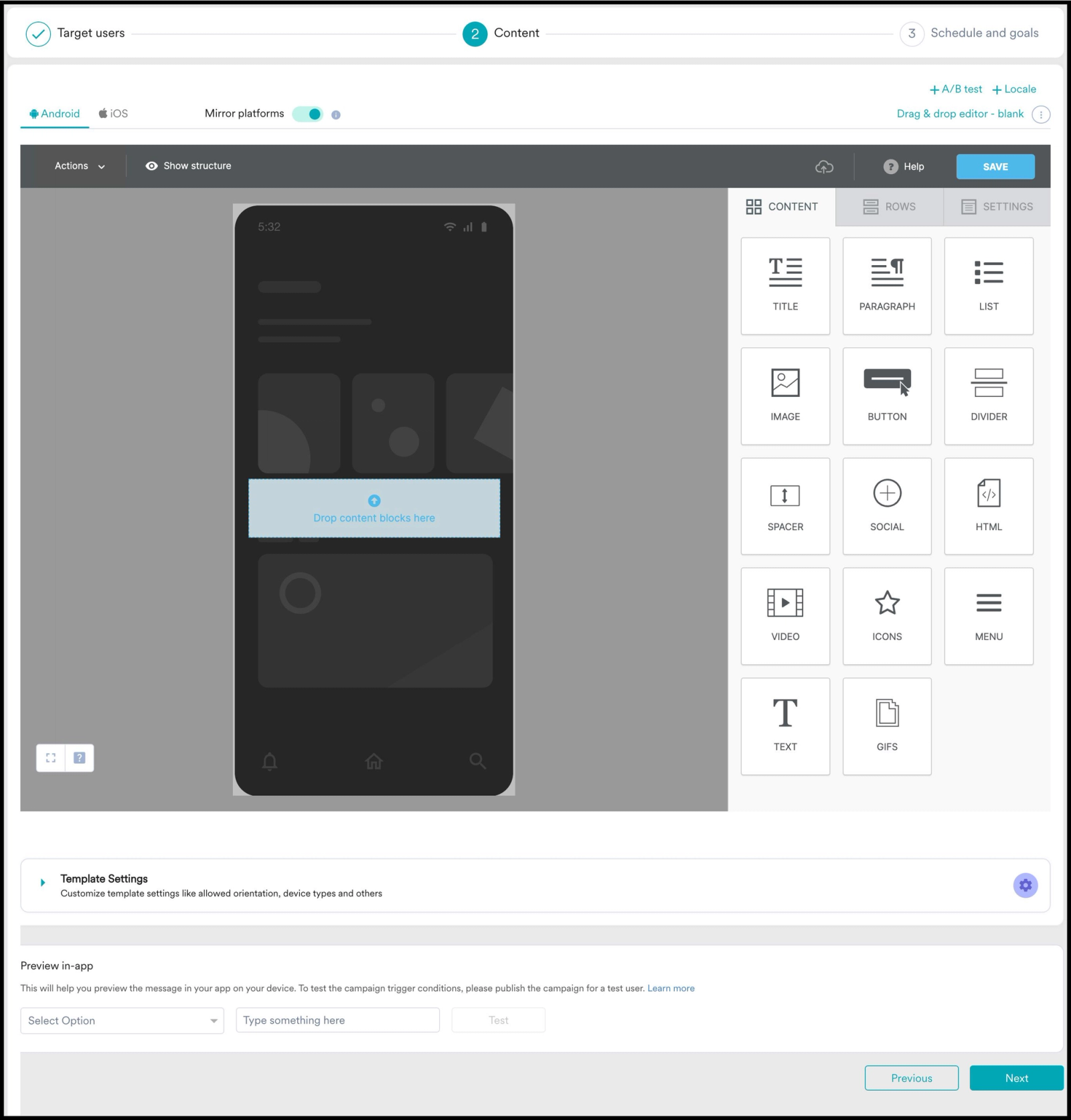
The formats themselves are standard: full-screen interstitials, bottom sheets, banners, and image-based overlays. For simple informational messages or standard promotional prompts, they work fine. For anything that needs to match a product's actual design system, carry visual complexity, or include multi-step interaction patterns, the templates are a hard ceiling.
Teams can't change the underlying component structure from the dashboard. Copy, images, and CTA text are configurable. The layout, spacing, component hierarchy, and interaction patterns are not. A financial app that needs an in-app nudge that matches its card-based UI and uses its own typography gets a generic overlay instead. That visual mismatch is not just an aesthetic problem. Users who receive in-app messages that look like they came from a different product are implicitly being told that the experience is not part of the product they trusted.
Equally important: MoEngage's own documentation confirms that pre-built in-app messages are not supported on tablets. Only HTML In-App messages work on tablet devices. For apps with significant tablet user bases, this pushes teams into the HTML path by default, which brings its own set of constraints.
HTML In-App Messages Run in a Full-Screen WebView
When teams outgrow the NATIV templates, the next step is HTML In-App messages. MoEngage's developer documentation is explicit about how this works: "MoEngage SDK uses WebView to load and display HTML InApps."
The HTML templates always occupy the entire screen, regardless of the content they display. MoEngage's documentation states this directly: "The HTML Templates always occupy the entire screen on your mobile app. Even if the HTML of the template does not occupy the entire screen, there will be a transparent web view there which will restrict the user from interacting with your app."
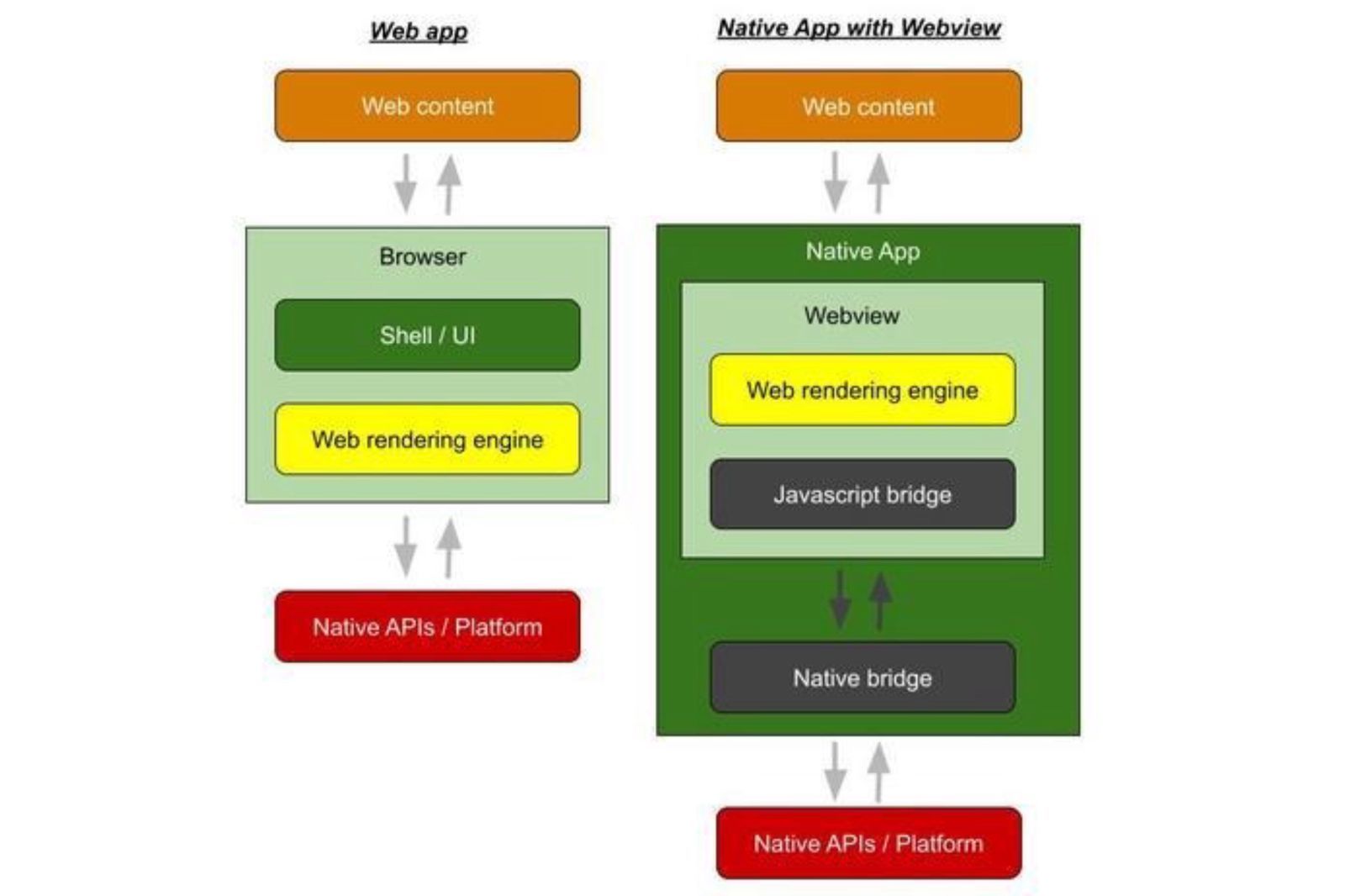
The practical consequence is that WebView rendering sits between your app's native layer and whatever the user is supposed to see. Every interaction that crosses from the HTML template into the native app layer has to go through MoEngage's JavaScript Bridge. That bridge is documented separately and requires explicit API calls for every data interaction like tracking events, firing custom actions, capturing user attributes. Each one of those bridge calls adds latency.
For simple text modals, that latency is invisible. For animated, media-rich, or multi-step interactive experiences, the WebView overhead is perceptible, and users who notice it will read it as an app performance problem rather than a campaign rendering delay. That distinction does not help conversion rates.
Image Downloads Happen Before the User Sees Anything
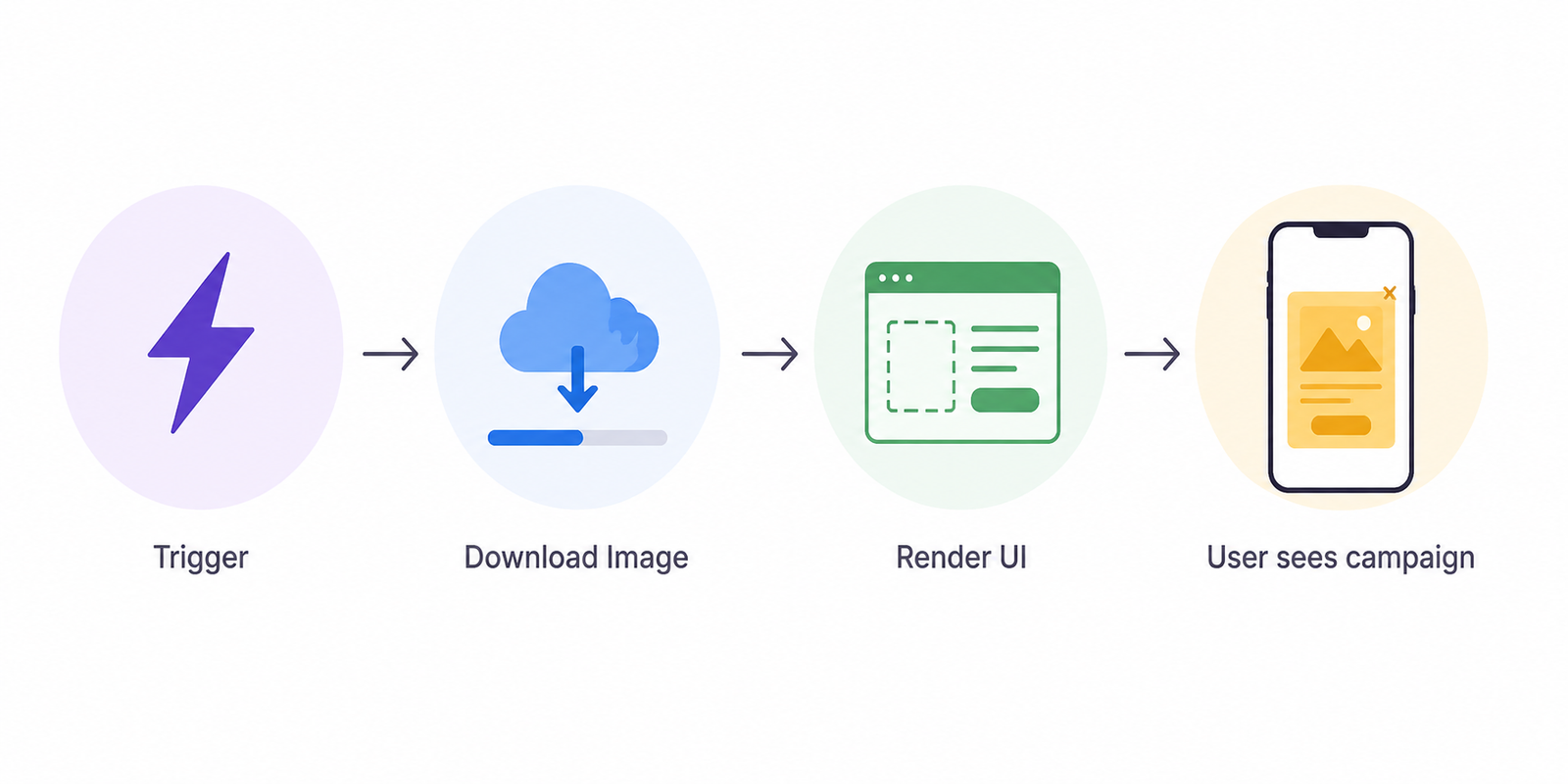
MoEngage's template documentation describes the image pre-fetch behavior this way: "Before an In-App message is shown on the device, the image within the message is downloaded from a CDN before being shown to the user. Larger images can cause delays in displaying the message, especially for users with slower internet connections."
The practical result is a gap between when the trigger fires and when the user actually sees the in-app message. On strong connections with small images, that gap is imperceptible. On slow or mobile data connections with images approaching the 2MB limit that MoEngage recommends as a ceiling, the gap can be two to five seconds. That is enough time for a user who just completed a transaction to navigate to the next screen, at which point the in-app upsell or confirmation prompt fires on the wrong context.
There is also a documented exception for HTML templates: MoEngage explicitly states that "for background images provided inside the HTML template as described in the image, MoEngage will not pre-fetch the URLs as these URLs are inside the template styles." This means HTML background images download at render time, not in advance, creating an additional delay layer for certain template designs.
No Native Gamification or Complex Interaction Components
MoEngage's in-app template library does not include gamification mechanics. Scratch cards, spin-to-win wheels, streak trackers, milestone reward reveals, and multi-step onboarding checklists are not available as built-in components. Teams that want these experiences inside a MoEngage campaign have two choices.
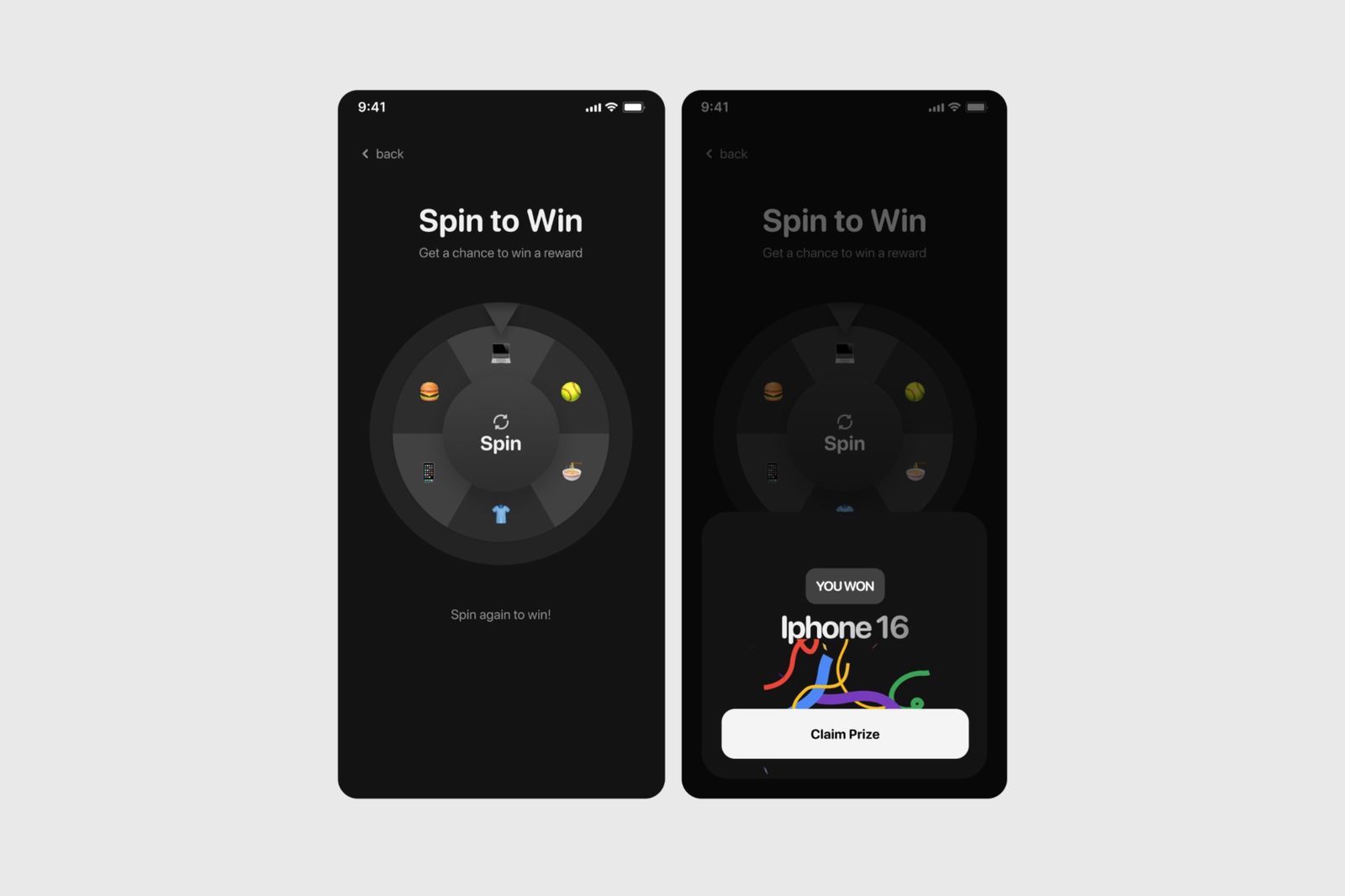
The first is to build them as custom HTML templates and ship them via the HTML In-App path, which reintroduces WebView overhead, requires engineering time for every mechanic, and needs a release cycle before reaching users. The second is to use a separate tool that can render these components natively.
User reviews across G2 and Joinsecret flag "limited templates and static content elements" as a recurring limitation. That constraint is structural, not a missing feature that an update can add without rethinking the rendering architecture.
Engineering Dependency That Blocks Growth Teams
Growth and product teams who want custom in-app UI that goes beyond NATIV template defaults have no path that does not require engineering input first. HTML templates need to be built by someone who knows HTML, CSS, and the JavaScript Bridge API. Any new interaction pattern, visual treatment, or component that doesn't exist in the template library needs a developer to write it, test it, and push it through a release.
Mobile app release cycles are typically weekly to bi-weekly for teams with healthy engineering velocity. For teams with conservative QA processes or App Store review dependencies, the cycle is longer. A growth team that wants to test three different in-app visual treatments in a month is gated on how many new template builds engineering can complete in that same window.
This is not a minor operational friction. It is the reason growth teams consistently underinvest in the in-app channel relative to what it can actually deliver.
What Growth Teams Actually Run Into
The limitations above are not abstract. Here is what they translate to in day-to-day workflows across growth and product teams.
The design system gap. A product team spends months building a design system with specific typography, spacing, component styles, and interaction patterns. Then the in-app messages they launch from MoEngage use a different font stack, default button styles, and fixed spacing ratios. Users don't consciously register that the overlay font is different from the app's standard font. The aggregate effect of visually inconsistent overlays is a product that feels fractionally less polished than it should. Over time, that affects trust in ways that don't surface directly in campaign analytics.
The template-then-ticket cycle. A lifecycle marketer identifies that users who complete onboarding step 3 but don't reach step 4 within 48 hours need a contextual nudge at the point of drop. They write the brief. Then they wait. An engineer needs to build the HTML template, the designer needs to spec the layout, QA needs to validate the rendering across device sizes, and a release needs to ship it to the user base. By the time the campaign goes live, the window for the experiment has shifted and three other priorities have taken its place.
The WebView performance complaint. On devices with 4G connections in markets where MoEngage is widely deployed, India in particular, WebView-based in-app messages with animation or rich media load noticeably slower than native content. Capterra reviews from real users flag platform loading time as a consistent pain point, particularly for campaigns that duplicate or re-render templates on slow connections. Users notice. Conversion suffers.
The gamification workaround. A retention team wants to run a daily scratch-card reveal to drive return visits. MoEngage doesn't have the component. They either ask engineering to build a custom HTML scratch card template which means weeks of work, a release, and fragile JavaScript or they skip the mechanic entirely and run a simpler notification-based reward campaign that converts at a lower rate.
The Architecture Fix: Separate Triggering from Rendering
The underlying issue across all of these problems is that MoEngage owns both the trigger logic and the rendering layer. When those two things are coupled in the same system, the ceiling on what growth teams can ship inside the app is determined by the rendering layer's capabilities, not the trigger layer's sophistication.
The fix is to decouple them.
MoEngage continues to own what it does well: behavioral segmentation, journey orchestration, and cross-channel delivery. Push, email, SMS, WhatsApp, and lifecycle flows all stay in MoEngage. But in-app rendering moves to a dedicated layer, specifically Digia Engage, that was built specifically for in-app components. It maintains a pre-built library of native components, renders them on iOS and Android without WebView overhead, and lets growth teams configure and ship campaigns from a dashboard without engineering tickets per visual update.
This is the critical distinction: MoEngage decides who sees an in-app experience and when. Digia Engage decides what appears on screen and how it behaves.
The architecture is additive. Nothing in MoEngage's data infrastructure, segmentation, or outbound channel stack changes. The only thing that changes is what gets rendered when an in-app trigger fires.
How MoEngage and Digia Engage Work Together
The integration does not require replacing MoEngage or rebuilding targeting logic. Here is what the workflow looks like step by step.
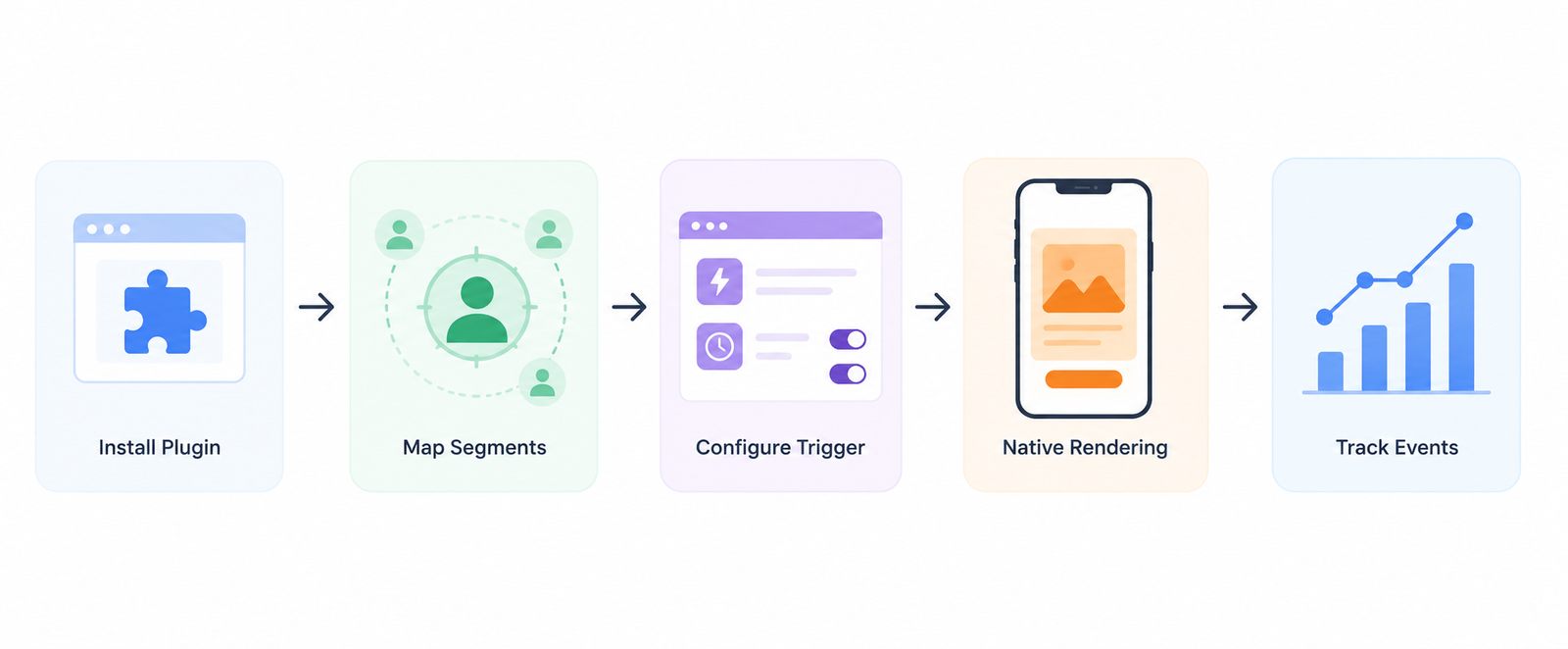
Step 1: Install the plugin. The Digia Engage MoEngage plugin sits alongside the core Digia Engage SDK. It connects MoEngage user identity to Digia Engage so the same user profile that MoEngage uses for segmentation is also recognized by the rendering layer. The plugin is available for Flutter (digia_moengage_plugin), Android (engage-moengage), React Native (@digia-engage/moengage), and iOS (digia_moengage_iOS), and adds approximately 20 minutes of engineering time on top of the core SDK setup.
Step 2: Map segments. Lifecycle teams can reuse MoEngage cohorts directly as audience filters in Digia Engage, or mirror the same behavioral rules inside Digia Engage for in-app delivery. If MoEngage has a segment for "users who completed KYC but haven't made a first transaction in seven days," that same logic targets the in-app experience without a duplicate data layer.
Step 3: Configure the trigger. MoEngage fires a behavioral trigger when user conditions match a campaign. The Digia Engage SDK receives that trigger on-device, checks the active campaign configuration, and renders the correct component natively without a network round-trip for the UI itself. Components fire in under 100ms.
Step 4: Render natively. Digia Engage renders the configured component: a bottom sheet upsell, a personalized banner, an onboarding checklist, a gamification mechanic, or a contextual NPS survey. The component matches the product's design system and loads immediately, regardless of connection speed.
Step 5: Track interactions and close the loop. In-app interaction events like taps, dismissals, CTA clicks, survey completions, gamification outcomes are captured by Digia Engage and flow back into the analytics infrastructure. MoEngage user profiles receive the behavioral feedback. Growth teams read conversion data in their existing review cadence without managing two parallel data views.
Use Cases That Need This Architecture
Several in-app use cases work fine within MoEngage's native template library. Simple product announcements, basic promotional banners, and single-CTA interstitials all function adequately with NATIV templates. The cases below are where the template layer is a constraint and the decoupled architecture produces meaningfully better results.
Design-Consistent Onboarding Flows
Onboarding is where users form their first impression of a product's quality. An onboarding tooltip or guided spotlight that uses MoEngage's default template styling sends a signal unconsciously, but consistently that the guidance is not part of the product. It looks foreign because it was rendered by a third-party overlay, not by the app itself.
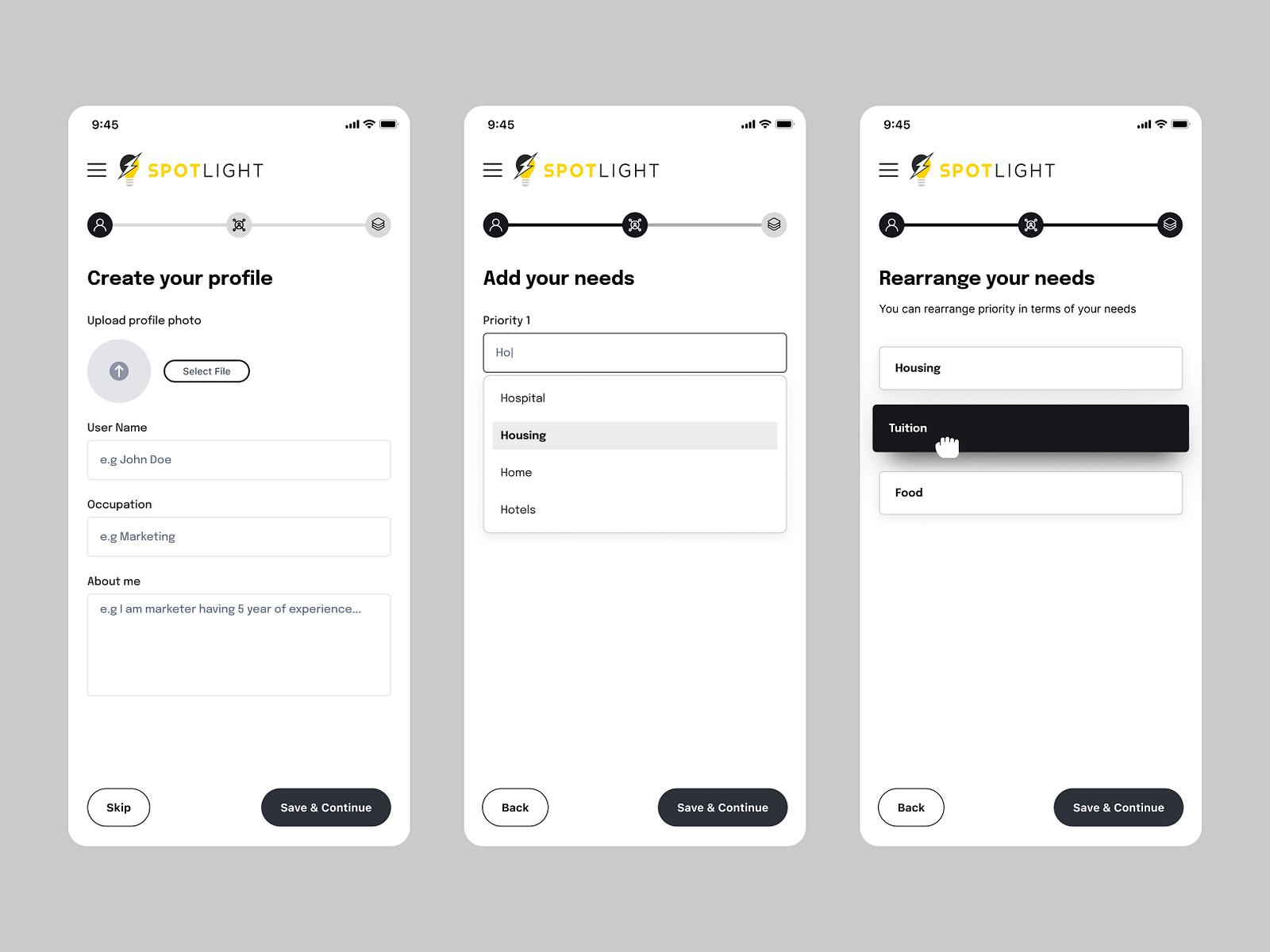
With Digia Engage, onboarding components use the product's own design tokens. A spotlight that highlights a key feature uses the same corner radius, font weight, and color palette as the screen it sits on. A bottom sheet that explains a transaction step uses the same type scale as the surrounding UI. That coherence is not cosmetic. Users who perceive onboarding guidance as part of the product complete more steps than users who perceive it as a system notification.
MoEngage continues to own the trigger logic: which users see which onboarding step, in what order, based on their behavioral state. Digia Engage owns what those users actually see when the condition fires.
Dynamic Checklists That Reflect Real-Time User State
Onboarding checklists with a completed/incomplete state for each step require a component that reads from real-time user event data at render time. MoEngage's standard templates do not support components that dynamically reflect the user's behavioral state without a new campaign trigger for each state change.
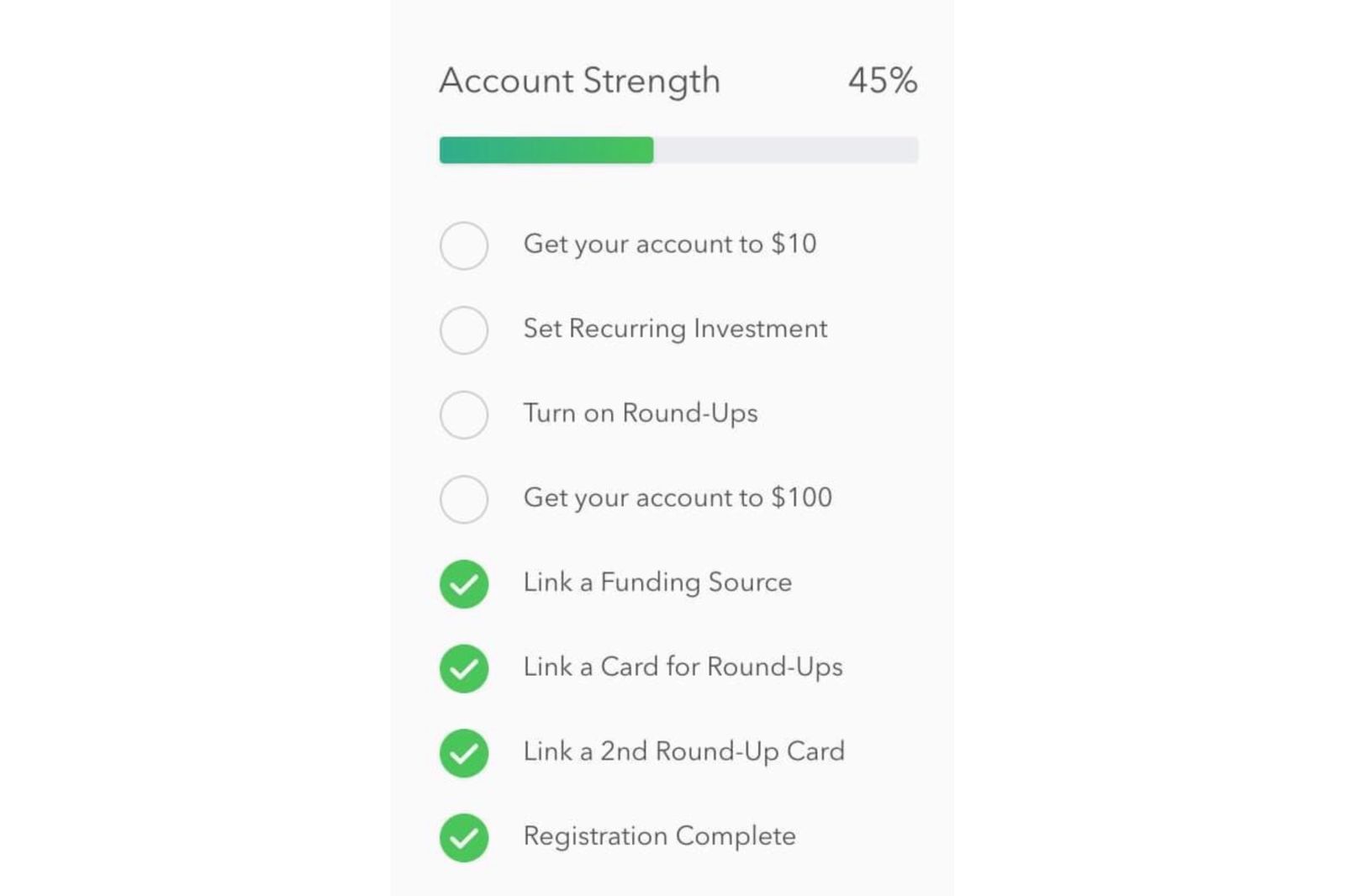
A dedicated rendering SDK can query the user's event history, mark completed steps, and render the correct visual state without firing a new campaign. The same checklist component serves a user who has completed two of five steps differently from one who has completed four, without requiring separate campaigns for each condition.
Contextual Upsells at High-Intent Moments
MoEngage's event-based triggers are accurate at identifying high-intent moments: a user who has viewed a premium feature page three times in a session, a user on the transaction confirmation screen, or a user who just hit their free tier limit. These are exactly the moments when an upsell converts.
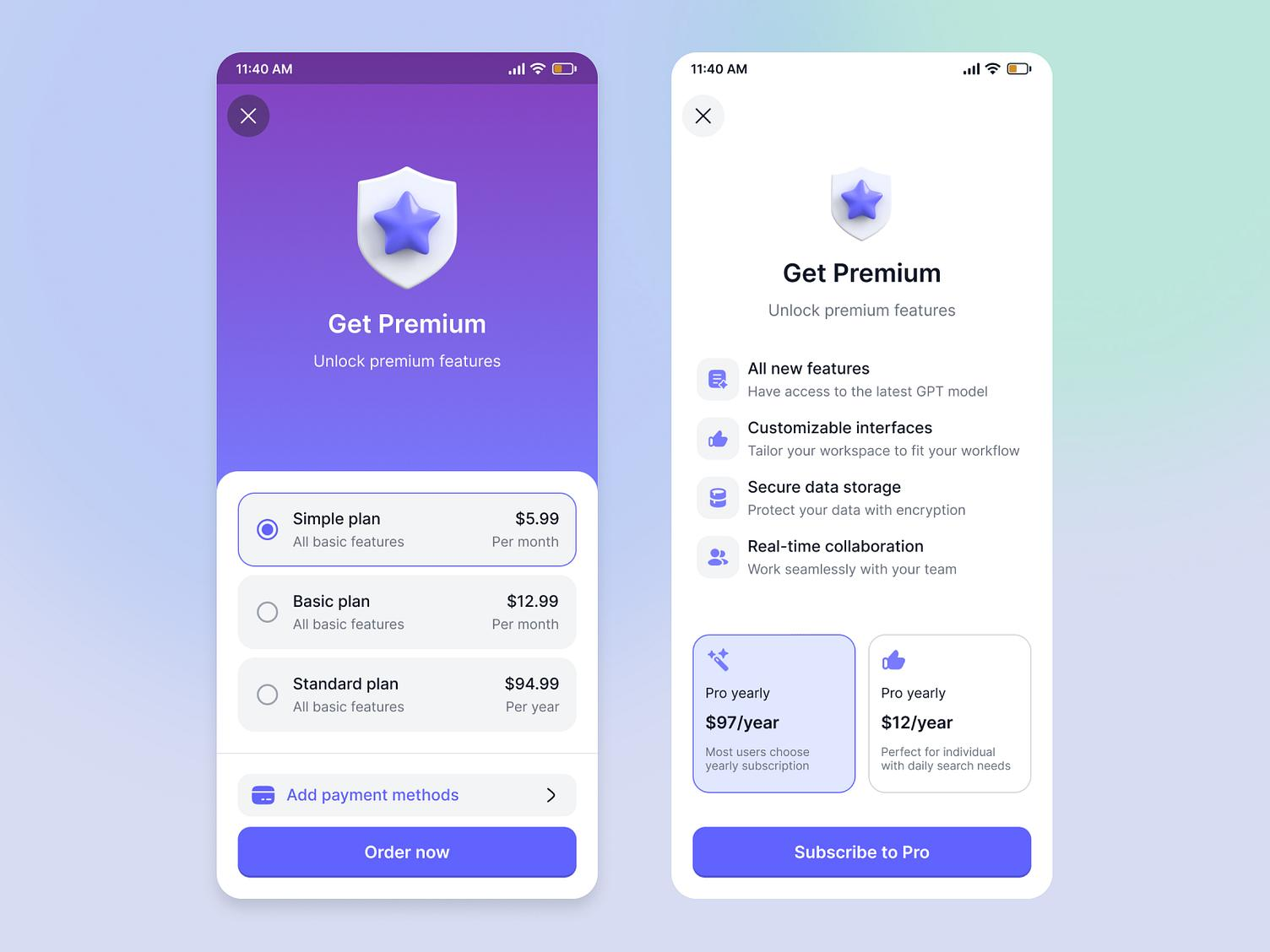
A full-screen interstitial at these moments often undermines conversion by interrupting a positive experience. A contextual upsell that appears as a native bottom sheet, visually connected to the action the user just completed, converts better because it extends the experience rather than stopping it.
MoEngage identifies who is in the moment. Digia Engage controls what they see when they get there.
Gamification Mechanics That Drive Return Visits
Scratch cards, spin-to-win mechanics, daily streak trackers, and milestone reward reveals require custom interaction components that MoEngage's template library does not include. Building them as custom HTML templates requires engineering time per mechanic plus a release cycle.
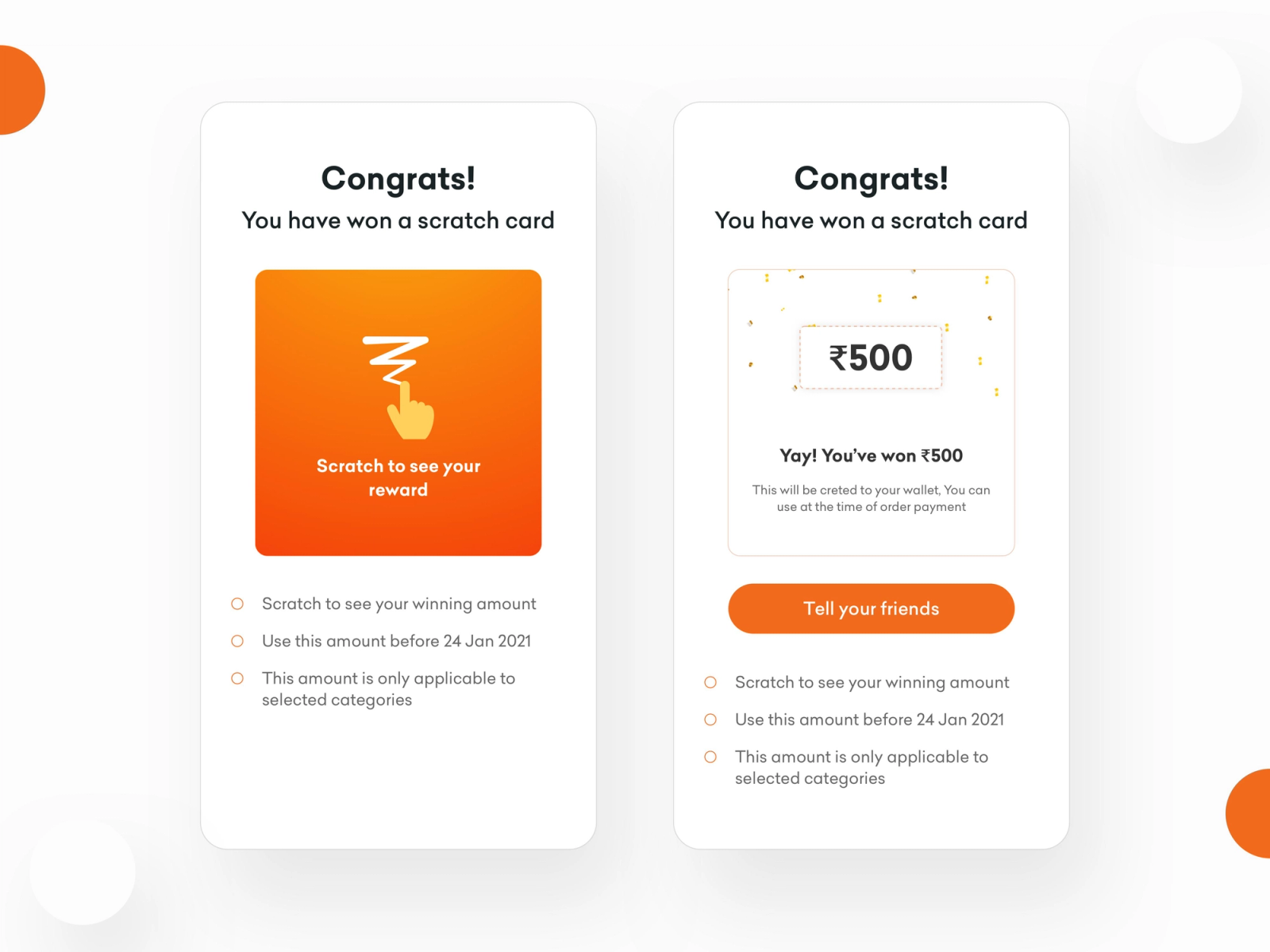
With Digia Engage's gamification component library, these mechanics are available without a new engineering build. MoEngage's journey logic determines which users qualify and when. Digia Engage renders the mechanic with native animations and interaction patterns, without WebView overhead.
The combination matters: MoEngage's behavioral precision tells you exactly which users are at the right engagement moment for a gamified reward. Digia Engage delivers the mechanic in a way that feels like part of the product, not a bolted-on overlay.
In-App NPS and Behavioral Surveys
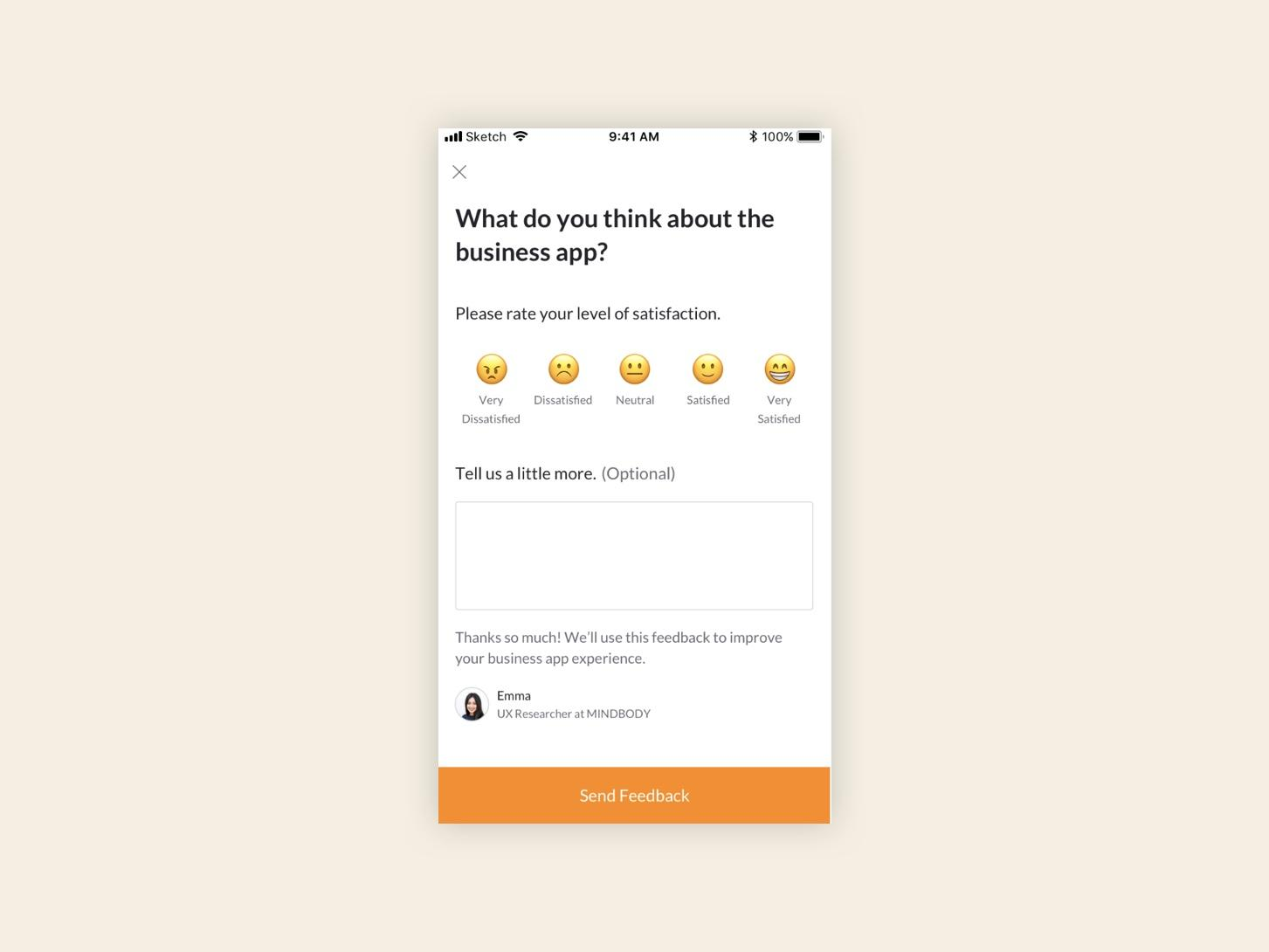
MoEngage can trigger an in-app message when a user completes a specific action. Digia Engage can render an NPS survey, emoji feedback prompt, or quiz at that exact moment, with response collection built into the component. In-app NPS surveys on Digia Engage see a 30% or higher response rate, compared to a 3% baseline for email-based NPS. The behavioral trigger that MoEngage provides is what makes the timing precise. The rendering layer is what makes the survey feel native and frictionless enough to actually complete.
How the Split-Responsibility Model Scales
The argument against a decoupled architecture is usually that it adds complexity: another SDK, another dashboard, another integration to maintain. That is a fair concern. Here is what the cost-benefit looks like when examined directly.
Setup cost. The Digia Engage MoEngage plugin adds approximately 20 minutes of engineering time on top of the core SDK integration. Total engineering commitment at setup: roughly 40 minutes plus testing. After that, growth teams operate from the Digia Engage dashboard for all in-app visual changes, with no additional engineering tickets per campaign update.
The alternative cost. A growth team running entirely within MoEngage's NATIV templates files engineering tickets for every visual treatment that exceeds template defaults. If that team runs two to three in-app experiments per month, that is two to three coordination cycles per month, each involving a brief, a development window, a QA pass, and a release. The cumulative cost of that process over a quarter consistently exceeds the setup cost of a dedicated rendering layer.
Experiment velocity at scale. When rendering separates from triggering, growth teams run more experiments per quarter without adding engineering headcount. Lyft, for instance, reduced experiment delivery time from two weeks to two days after adopting server-driven UI architecture, as documented in analysis of how Airbnb, Netflix, and Lyft approached dynamic mobile rendering. The same principle applies at consumer app scale: every visual change that comes off the engineering backlog compounds over time as shipped experiments.
Vendor dependency on the rendering layer. When in-app visual logic lives inside MoEngage's template system, switching to a different CEP means rebuilding every in-app campaign from scratch. Audience logic and journey flows can be migrated. The visual templates, conditional display rules, and interaction patterns cannot. Teams that have gone through CEP migrations know that the hidden rebuild cost for in-app templates often doubles the expected migration timeline. Owning the rendering layer independently means that the in-app visual logic survives any CEP decision.
The in-app channel has a structural engagement advantage that's being wasted. Push notification open rates sit at 1 to 5% for most consumer apps. In-app engagement rates are significantly higher because the user is already active in the product. Underinvesting in the in-app channel because the rendering layer caps what growth teams can ship means leaving the highest-engagement channel in the stack at a fraction of its potential.
A/B Testing in a Decoupled Architecture
A practical concern before adopting a separate rendering layer is how A/B testing works when triggering and rendering live in different systems. The answer is that the testable surface expands, not shrinks.
MoEngage's native A/B testing handles audience splits: which users see variant A versus variant B. That stays in MoEngage. Digia Engage adds the ability to test the visual treatment itself: layout A versus layout B, component A versus component B, interaction pattern A versus pattern B. These are tests that MoEngage's template editor cannot run because it cannot render the visual variants being compared.
In practice, a growth team can test the same copy in a bottom sheet versus a tooltip, a multi-step onboarding flow versus a single-screen checklist, an animated scratch card versus a static reward banner, or a persistent nudge versus a one-time interstitial for the same upsell moment. All of these run without engineering tickets for each variant. The variants are configured in the Digia Engage dashboard. MoEngage's segment logic determines which users enter each test arm. Interaction data flows back through Digia Engage's analytics. Growth teams read results in the same review cadence they already use.
Key Takeaways
MoEngage's core investment is in behavioral segmentation, predictive analytics, journey orchestration, and omnichannel delivery. Those capabilities are real and they compound over time with usage. In-app rendering is a different discipline, and MoEngage built it as an extension of its existing channel stack rather than as a primary capability.
The gap shows up concretely: NATIV templates that lock growth teams to fixed layouts, HTML In-App messages rendered inside a full-screen WebView with JavaScript Bridge overhead, image downloads that delay rendering at the moment of context, no native gamification or complex interaction components, no tablet support for pre-built templates, and an engineering dependency on every visual change that falls outside the NATIV defaults.
Separating MoEngage's trigger logic from in-app rendering resolves each of these problems without replacing the CEP investment. MoEngage continues to own who sees an in-app experience and when. Digia Engage owns what appears on screen and how it behaves. Growth teams configure both sides from a single operational workflow without extending the engineering backlog.
The use cases that benefit most from this architecture design-consistent onboarding, dynamic checklists, contextual upsells, gamification mechanics, and behavioral surveys are among the highest-converting in-app engagement patterns available to consumer apps. They are also the ones that MoEngage's native template library cannot support without significant engineering pre-work.
The integration is about 40 minutes of engineering time. The return is a growth team that ships in-app campaigns at higher velocity across a wider visual surface, without the MoEngage rendering layer being the constraint.
Further Reading
From Digia Engage:
- MoEngage Integration - how the plugin connects MoEngage identity and events to Digia Engage's rendering layer
- Why Engagement Tools Shouldn't Own UI Rendering - the architectural argument for separating triggering from rendering
- Extending CleverTap with Custom In-App UI - the same decoupled architecture applied to CleverTap
- Digia Engage Gamification - scratch cards, streaks, spin-to-win, and milestone mechanics
- Digia Engage Nudges - the in-app nudge component library and trigger configuration
- Personalization Experiments Using Dynamic UI Rendering - how teams run visual experiments independently of the CEP release cycle
External Sources:
- MoEngage HTML In-App Templates Documentation - MoEngage's developer guide for HTML In-App campaign creation
- MoEngage JavaScript Bridge for HTML In-Apps - how interactions in HTML templates communicate with the native SDK layer
- MoEngage In-App Templates Documentation - MoEngage's official NATIV in-app template guide, including tablet support limitations
- MoEngage Troubleshooting and FAQs (Developer Guide) - including the WebView confirmation for HTML in-app rendering
- MoEngage SDK Developer Introduction - MoEngage's overview of SDK capabilities across platforms
- Server-Driven UI: What Airbnb, Netflix, and Lyft Learned - how rendering architecture decisions affect experiment velocity at scale
- MoEngage Reviews on G2 - verified user feedback including UI and template limitations
- MoEngage Reviews on Gartner Peer Insights - enterprise-scale perspective on MoEngage's capabilities and constraints
Digia Engage is the in-app rendering layer for growth teams that run MoEngage. It connects in about 40 minutes of engineering time, supports iOS, Android, React Native, and Flutter, and lets growth teams ship native in-app campaigns from a dashboard without engineering tickets. Book a demo to see how it fits alongside your existing MoEngage setup.