


TL;DR:
- Mobile app releases are bottlenecked by App Store review cycles, code-signing complexity, and release freeze windows. In-app campaigns do not need to be.
- Server-driven UI architecture separates campaign delivery from app binary deployment. Changes to nudges, surveys, gamification flows, and onboarding tours deploy without touching the app store submission queue.
- A git repository stores campaign configuration as JSON or YAML files. Every change has version history, a pull request review process, automated validation before merge, and a git revert rollback path.
- The pipeline runs schema validation, conflict detection, and suppression rule audits on every pull request. Invalid configurations cannot merge. Validated configurations deploy to staging before production.
- Feature flags extend the architecture to support progressive rollout. A campaign can go live at 10% of the qualifying audience and expand without a new deployment.
- Testing for campaign configuration covers schema validation, rendering tests against known user states, conflict tests against the active campaign library, and integration tests against the staging environment.
- Rollback has two paths. A dashboard pause for immediate production incidents. A git revert for the documented post-incident remediation. Both are available without waiting for an app store review.
- The article covers the full pipeline architecture with YAML and JSON examples, environment gating, feature flag integration, the test framework, and where teams hit friction building this themselves versus adopting a platform that already does it.
Mobile app development has a deployment problem that web development mostly solved a decade ago. A web team can push a change to production in minutes. The same change in a mobile app goes through a build, code signing, store submission, Apple or Google review (which takes anywhere from a few hours to a week), and then a user update cycle where a meaningful percentage of the user base will not receive the update for days or weeks after release. According to Google's 2024 DORA Report, elite engineering teams deploy code 973 times more frequently than low-performing teams. Mobile teams are catching up with CI/CD automation, but the store review constraint is architectural, not a process problem. You cannot automate your way past Apple's review queue.
The solution for in-app engagement, specifically, is not to push faster through the store review queue. It is to remove in-app campaign changes from the queue entirely.
Server-driven UI is the architectural pattern that makes this possible. When the content, layout, and trigger logic for in-app experiences are defined in configuration data served from a remote endpoint rather than compiled into the app binary, those experiences can be updated without touching the app binary at all. A campaign change pushed to a configuration repository deploys through a CD pipeline and is live in the app within minutes of merge. No App Store submission. No review cycle. No binary update.
This article covers how to build that pipeline, what it requires from the SDK, and where teams hit the practical friction points.
What Server-Driven UI Actually Means for Campaign Deployment
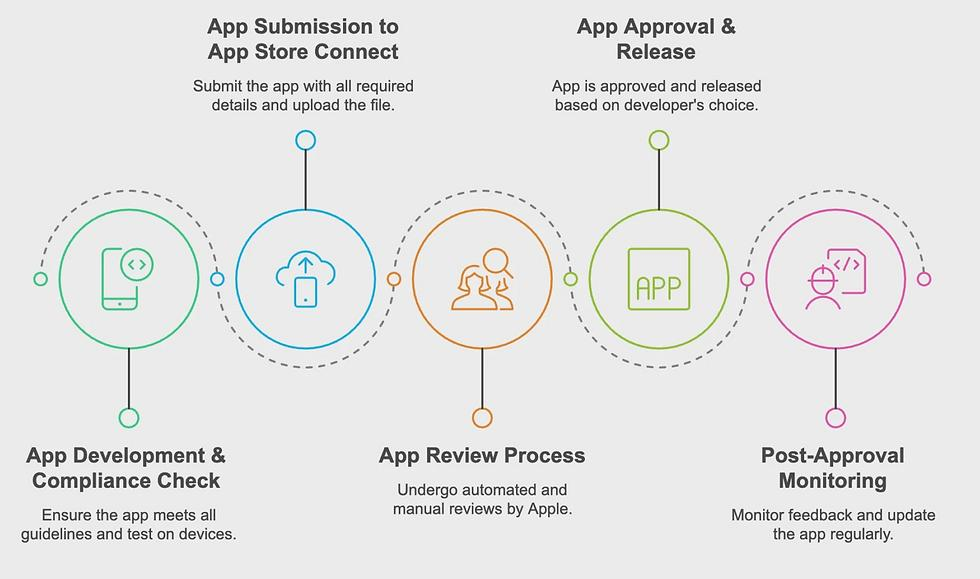
In a conventional mobile app, the visual components, logic, and content of in-app experiences are compiled into the binary at build time. If you want to change the copy on an onboarding tooltip, you change the string resource, rebuild, resubmit, and wait for review and user update propagation. The same applies to changing a nudge's trigger condition, updating a gamification reward's prize pool, or modifying the timing of a survey.
Server-driven UI inverts this. The app binary contains a rendering engine: the code that knows how to display a tooltip, render a bottom sheet, present a gamification widget, or play an in-app video. The content, configuration, and trigger logic for each of those components arrive from a remote server at runtime rather than from compiled assets. The binary does not need to change when the experience changes. Only the configuration needs to change.
Digia Engage's rendering architecture works exactly this way: the SDK renders nudges, widgets, surveys, gamification components, and in-app video natively using the app's own rendering pipeline, while the configuration for each component is served from Digia's edge infrastructure and evaluates in under 100ms of a qualifying event. The engineering team integrates the SDK once. After that, every campaign change goes through the dashboard or, for teams that want git-based deployment, through a configuration pipeline that writes to the same backend.
The practical consequence for deployment is significant. Campaign releases bypass the app store queue entirely, which means teams can ship a new onboarding flow, update a gamification prize pool, or fix a broken nudge copy on the same day they identify the issue, rather than waiting for the next release cycle.
The Git-Based Campaign Deployment Architecture
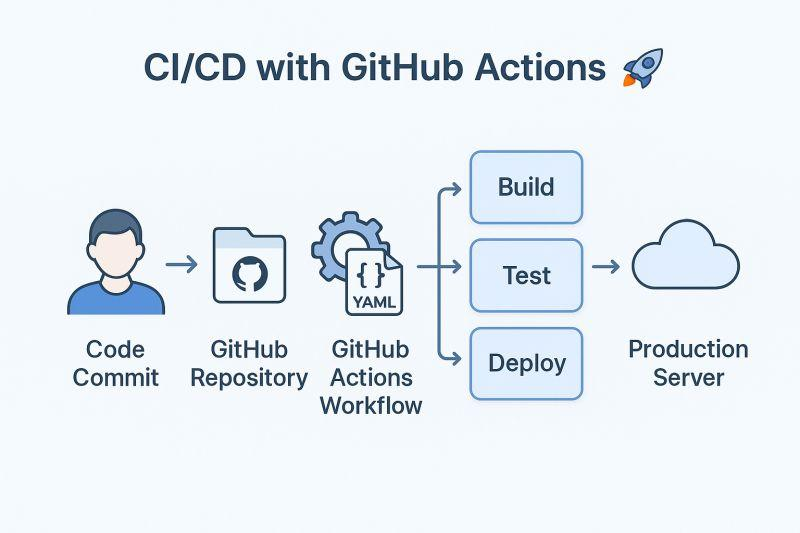
The goal is a pipeline where a pull request merged to main automatically deploys campaign configuration to a production campaign delivery system. The architecture has four components: the configuration repository, the validation layer, the deployment pipeline, and the campaign delivery API.
The configuration repository. Campaign configuration is stored as version-controlled files, typically JSON or YAML, in a git repository. Each campaign, nudge, survey, or gamification widget has a corresponding configuration file defining its content, trigger conditions, audience filter, display format, frequency caps, and suppression rules.
A nudge configuration file for a fintech app might look like this:
{
  "campaign_id": "sip-first-investment-nudge",
  "trigger": {
    "event": "investment_tab_opened",
    "conditions": {
      "user.kyc_status": "completed",
      "user.total_investments": 0,
      "session.count": { "gte": 3 }
    }
  },
  "suppression": {
    "states": ["transaction_in_progress", "error_state"],
    "frequency": {
      "per_session": 1,
      "cooldown_days": 7
    }
  },
  "display": {
    "format": "bottom_sheet",
    "content": {
      "headline": "Start your first SIP in under 2 minutes",
      "body": "Choose a fund, set an amount, and your investment starts today.",
      "cta": "Set up SIP"
    },
    "deep_link": "app://investments/sip-setup"
  },
  "audience": {
    "segment": "kyc_complete_no_investment",
    "platform": ["ios", "android"]
  }
}
Storing this configuration in git gives the team version history, review process, rollback capability, and the ability to trace exactly who changed what and when. A campaign that was working last week and is broken today can be diagnosed by looking at the diff rather than by guessing at a configuration that exists only in a dashboard UI.
The validation layer. Before any configuration change reaches production, it runs through automated validation. The validation stage checks schema compliance (required fields are present, field types match the expected schema), business rule compliance (frequency caps are within policy limits, suppression states include the mandatory blacklist entries like transaction_in_progress), and conflict detection (the new campaign does not create a targeting overlap with active campaigns that share the same segment and trigger event without a priority rule defined).
Schema validation in a GitHub Actions workflow:
on:
  pull_request:
    paths:
      - 'campaigns/**/*.json'

jobs:
  validate:
    runs-on: ubuntu-latest
    steps:
      - uses: actions/checkout@v4
      - name: Set up Node.js
        uses: actions/setup-node@v4
        with:
          node-version: '20'
      - name: Install dependencies
        run: npm ci
      - name: Run schema validation
        run: npm run validate:campaigns
      - name: Run conflict detection
        run: npm run check:campaign-conflicts
      - name: Run suppression rule audit
        run: npm run audit:suppression-rules
The validation step runs on every pull request that touches a file in the campaigns/ directory. A PR that fails validation cannot be merged. This is the gate that prevents invalid configurations from reaching production, which matters more for campaigns than for typical software because a misconfigured campaign can fire on the wrong users at the wrong moments, producing visible UX failures in a live production app.
The deployment pipeline. On merge to main, the CD pipeline deploys the changed configuration files to the campaign delivery API. The deployment is a configuration push rather than a binary build, which means it is fast (typically under 2 minutes) and does not require the platform-specific signing and distribution stages that characterise a mobile binary deployment.
on:
  push:
    branches: [main]
    paths:
      - 'campaigns/**/*.json'

jobs:
  deploy:
    runs-on: ubuntu-latest
    environment: production
    steps:
      - uses: actions/checkout@v4
      - name: Identify changed campaigns
        id: changed
        run: |
          CHANGED=$(git diff --name-only HEAD~1 HEAD -- 'campaigns/*.json')
          echo "files=$CHANGED" >> $GITHUB_OUTPUT
      - name: Deploy to staging
        run: |
          for file in ${{ steps.changed.outputs.files }}; do
            curl -X PUT \
              -H "Authorization: Bearer ${{ secrets.DIGIA_API_KEY }}" \
              -H "Content-Type: application/json" \
              -d @"$file" \
              "${{ secrets.DIGIA_API_BASE }}/campaigns/$(basename $file .json)"
          done
        env:
          ENVIRONMENT: staging
      - name: Run smoke tests
        run: npm run test:campaigns:staging
      - name: Deploy to production
        if: success()
        run: |
          for file in ${{ steps.changed.outputs.files }}; do
            curl -X PUT \
              -H "Authorization: Bearer ${{ secrets.DIGIA_PROD_API_KEY }}" \
              -H "Content-Type: application/json" \
              -d @"$file" \
              "${{ secrets.DIGIA_PROD_API_BASE }}/campaigns/$(basename $file .json)"
          done
The pipeline only deploys configurations that changed in the merged commit, not the full campaign library on every deployment. This keeps deployment scope minimal and rollback straightforward.
The campaign delivery API. The deployment pipeline writes to an API that the in-app SDK polls or receives push updates from. When a user's device evaluates trigger conditions, the SDK checks the latest configuration from this API. The configuration that was deployed 10 minutes ago via the pipeline is the configuration the SDK uses for the current session.
Environment Gating: Staging Before Production
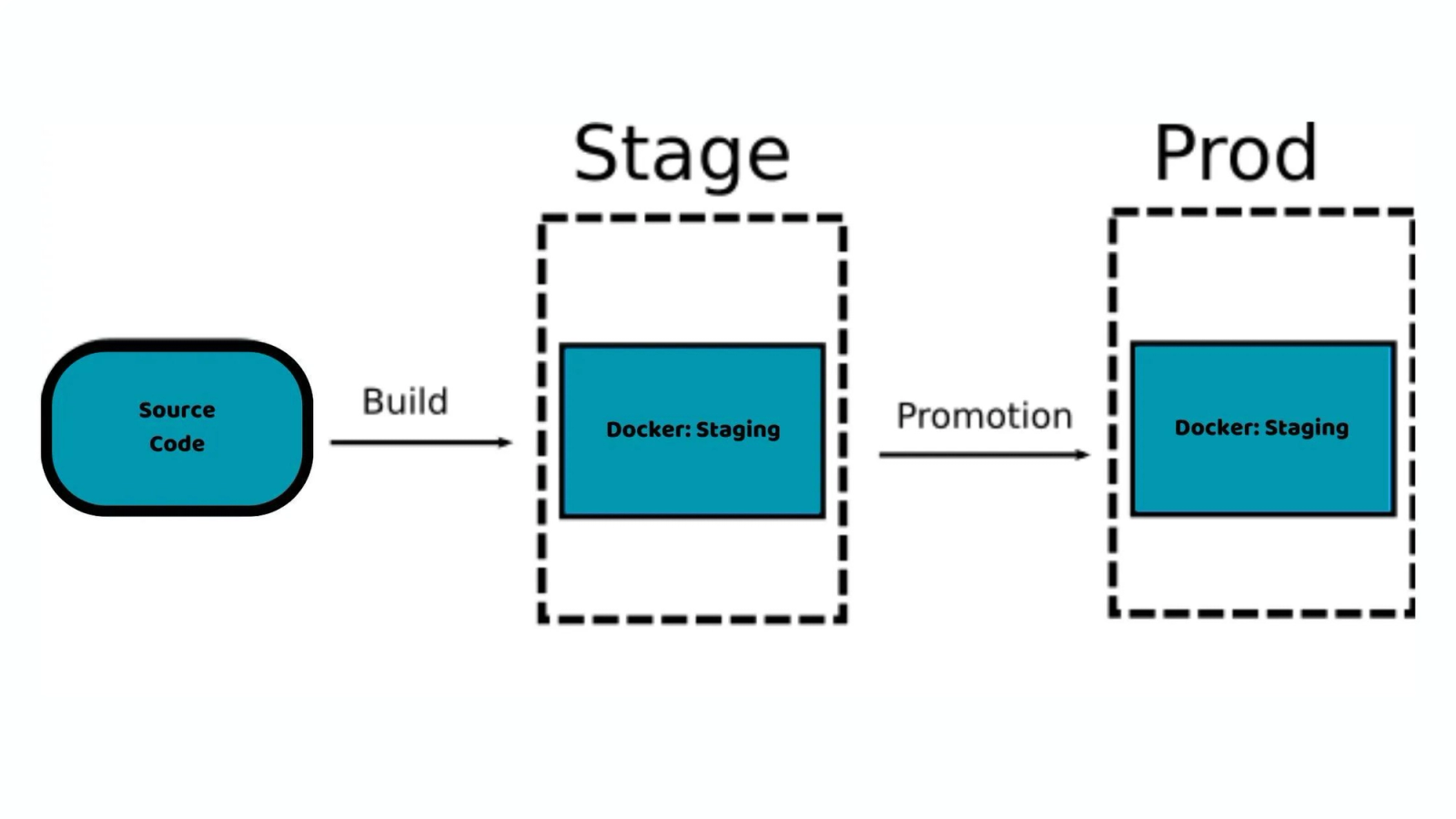
The deployment pipeline above deploys to staging before production and requires the staging smoke tests to pass before the production deployment runs. This is a standard environment gate, and it applies to campaign configuration deployment the same way it applies to any other software deployment.
The staging environment is a copy of the production campaign delivery infrastructure that points to a test app build rather than the production app. Before any configuration change reaches production users, it is deployed to staging and validated against an automated test suite that checks that the configuration renders correctly in the expected format, that trigger conditions evaluate as expected against test user states, and that suppression rules fire at the correct session states.
The GitHub Actions environment: production directive in the pipeline above requires a manual approval before the production deployment step runs if the repository is configured with a required reviewer for the production environment. For teams that want automated production deployment without manual approval, removing the environment directive and relying on the automated smoke test gate is acceptable for low-risk campaign changes (copy updates, CTA changes). Configuration changes that affect trigger logic, audience filters, or suppression rules warrant a manual review before production deployment because their failure mode is more consequential.
Feature Flags for Campaign Configuration
Feature flags extend the campaign deployment architecture to support progressive rollout, which is the mobile equivalent of staged rollout in app store deployment. Instead of deploying a campaign to 100% of the qualifying audience immediately on merge, a feature flag controls the rollout percentage.
A feature flag layer in the campaign configuration adds a rollout key:
{
"campaign_id": "new-gamification-spin-wheel",
"rollout": {
"enabled": true,
"percentage": 10,
"flag_key": "spin_wheel_v2_rollout"
}
}
The SDK evaluates the flag before deciding whether to show the campaign to a specific user. At 10% rollout, 9 out of every 10 qualifying users see their previous experience. The 10% see the new campaign. If performance data from the 10% group is positive (higher engagement, no unexpected dismiss spikes, no error-state interactions), the rollout percentage is incremented without a new deployment. The flag value is updated in the feature flag service, and the SDK picks up the new percentage on next evaluation.
Firebase Remote Config is a widely-used tool for this exact pattern in mobile apps, allowing teams to update configuration values that the SDK reads at runtime without requiring a binary update. For teams using Digia Engage, the equivalent is the campaign's audience and rollout configuration in the dashboard, which can be updated independently of the campaign configuration file in git.
The combination of git-based deployment for configuration control and feature flags for rollout control gives the team the ability to deploy a campaign with full version history and review process, then progressively expand its reach without touching the deployment pipeline again.
What Testing Looks Like for Campaign Configuration
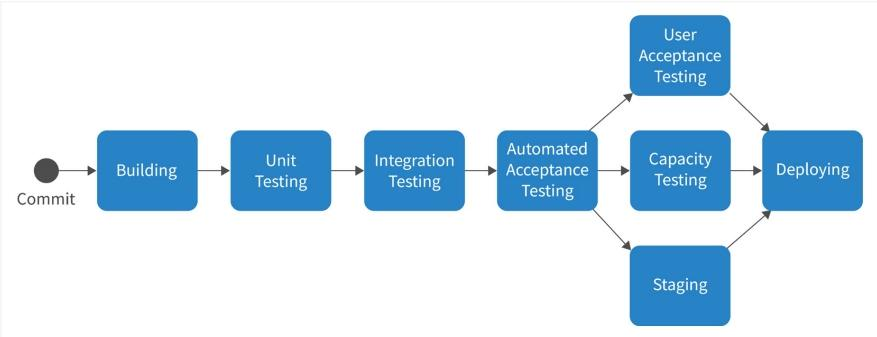
Testing a campaign configuration file is not the same as testing compiled application code. There is no binary to run. The test surface is the configuration itself: does it conform to the schema, does it produce the correct rendering output for known input states, and does it interact with other active campaigns in expected ways?
Schema tests. JSON schema validation confirms that every required field is present, every field value matches its expected type and enumeration, and no deprecated field names are used. This catches the obvious errors: a campaign with no trigger event defined, a display format that does not exist in the SDK's renderer, or an audience filter referencing a user property that the data layer does not produce.
Rendering tests. For each campaign configuration, a rendering test evaluates the configuration against a set of known user states and confirms that the correct rendering output is produced. A nudge configured to fire after investment_tab_opened with user.total_investments == 0 should produce a rendered bottom sheet in the test harness when those state conditions are met, and should produce no output when user.total_investments > 0. These tests are run in a Node.js or Python test harness against the configuration files before deployment.
Conflict tests. Multiple campaigns targeting the same user in the same session require a priority rule that determines which campaign delivers. A conflict test scans the active campaign library for campaigns that share a trigger event and an overlapping audience filter, and fails the PR if any such pair lacks a priority relationship.
Suppression rule audit. A suppression rule audit runs against every campaign configuration and confirms that the mandatory suppression states are present. The suppression framework requires that certain session states (transaction in progress, error state, onboarding completion steps, permission request flows) are always present in every campaign's suppression list. A campaign missing these states is a compliance failure against the suppression policy, not just a configuration error.
Integration tests against staging. After deployment to staging, an integration test suite fires simulated events against the staging campaign delivery API and confirms that the correct campaign configurations are returned for known user states. This is the last gate before production deployment.
Rollback Strategy for Campaign Deployments
Because campaign configuration is version-controlled in git, rollback is a git revert rather than a rollback build process. The revert creates a new commit that undoes the change, the pipeline runs on the new commit, and the previous configuration is deployed to production.
For teams that need faster rollback than a git revert and pipeline run (which typically takes under 3 minutes from merge to production for configuration changes), a campaign can be paused through the dashboard directly without going through git. The dashboard pause is immediate. The git revert documents the decision for the audit trail.
The two-path rollback model, fast pause through the dashboard, documented revert through git, is the right architecture for production incidents. A campaign that is firing incorrectly at 2 AM needs to be stopped immediately. The post-incident review and formal configuration fix happens through the git process after the immediate incident is resolved.
The Digia Engage SDK Integration Point
The pipeline described above writes campaign configurations to the Digia Engage campaign delivery backend. The SDK installed in the app reads configuration from that backend at session start and evaluates trigger conditions against real-time user state as events fire.
The SDK integration is a one-time engineering investment, typically around 20 minutes for the initial setup, after which the campaign delivery layer is decoupled from the app binary. All subsequent campaign changes, new campaigns, configuration updates, audience filter changes, and suppression rule modifications, go through the dashboard or through the git-based CD pipeline described in this article, without returning to the engineering team for each change.
The CleverTap integration and MoEngage integration pass segmentation data from the CEP to the Digia Engage audience filter layer. A campaign configured to fire only for users in a specific MoEngage segment receives the segment membership data from MoEngage through the integration, which means the git-based campaign configuration can reference segments defined in the CEP without duplicating the segmentation logic.
Where Teams Hit Friction
Teams that try to build this architecture from scratch rather than adopting a platform that already has it encounter several friction points that are worth anticipating.
Schema drift. Without a formal schema registry and validation enforcement, campaign configuration files accumulate inconsistencies over time. A field that was called trigger_event in Q1 becomes event in Q3 when a different engineer adds a new campaign without referencing the existing convention. The rendering engine eventually needs to handle both field names, which creates technical debt in the SDK. A schema registry with automated validation on every PR is not optional. It is what prevents the configuration layer from becoming as hard to maintain as the binary it was supposed to decouple changes from.
Suppression rule inconsistency. Without an automated suppression rule audit in the pipeline, individual campaign authors make their own decisions about which suppression states to include. The mandatory suppression states (transaction in progress, error state, high-stakes flows) get omitted from campaigns built by engineers who are not familiar with the suppression policy. The audit runs on every PR and fails any campaign that is missing mandatory suppression states, which enforces consistency without requiring every engineer to memorise the full suppression rule list.
Testing environment parity. The staging environment needs to behave identically to production for the staging smoke tests to be meaningful. If the staging campaign delivery API is running a different version of the evaluation logic than production, a test that passes in staging can fail in production for reasons that are not detectable before deployment. Version-pinning the campaign delivery service in both environments and running the same evaluation engine version in both is the infrastructure requirement that keeps staging meaningful.
CEP segment latency. When campaign audience filters reference segments from CleverTap or MoEngage, the segment membership data available to the campaign evaluation engine is only as fresh as the CEP's segment refresh cycle. A campaign that should fire for users who just completed KYC will not fire immediately if the "KYC completed" segment in the CEP has not yet included this user in its most recent refresh. For campaigns where real-time trigger accuracy is critical, the trigger should be based on the event itself (the kyc_completed event firing) rather than on segment membership, because event-based triggers evaluate in real time while segment membership evaluates at the last refresh interval.
The Business Case for Git-Based Campaign Deployment
The engineering argument for this architecture is version control, auditability, and automated validation. The business argument is speed.
A growth team that needs to update a nudge copy because a product feature was renamed cannot wait for the next binary release cycle. A team running a Diwali campaign that needs to update the prize pool at 6 PM on Diwali evening cannot wait for an App Store review. A team that deployed a campaign with an incorrect trigger condition that is firing on the wrong users cannot afford a 48-hour rollback window.
App store review times have historically ranged from a few hours to multiple days, with no guaranteed timeline. The server-driven campaign deployment architecture makes the review timeline irrelevant for in-app engagement changes, because those changes never enter the review queue.
According to the 2024 DORA State of DevOps Report, high-performing engineering teams deploy code 127 times more frequently than low-performing teams. The teams deploying that frequently are not doing so through manual app store submissions. They are doing so through feature flags, server-driven configuration, and automated CD pipelines. Campaign configuration deployment is the in-app engagement equivalent of that model.
Topics Not in the Brief That Teams Should Know
Secrets management for the CD pipeline. The deployment pipeline authenticates against the campaign delivery API using an API key stored as a GitHub Actions secret. API keys should be scoped to the minimum permissions needed (write access to campaign configuration, not read access to user data), rotated on a schedule, and audited for access. A compromised API key that allows an attacker to write arbitrary campaign configuration to a production app is a security incident, not a configuration error. Treat campaign API keys with the same security discipline as database credentials.
Audit log requirements for regulated industries. For fintech and insurance apps in India, any change to an in-app communication that could be construed as a financial communication is potentially subject to audit. The git commit history provides a natural audit trail: who changed the configuration, what was changed, and when. Teams that need to demonstrate to regulators that their in-app communications comply with guidelines benefit from the git-based deployment model precisely because every change is documented with author, timestamp, and a diff showing the before and after state.
Multi-region and multi-language campaign deployment. A campaign serving users across India's regional language markets may need configuration variants for different language versions of copy, different prize pools for different markets, or different timing rules for different time zones. Storing these variants in the configuration repository with a consistent naming convention (campaigns/en-in/sip-nudge.json, campaigns/hi-in/sip-nudge.json) allows the deployment pipeline to handle multi-variant campaigns with the same infrastructure as single-variant ones.
Configuration drift between dashboard and git. If the dashboard allows direct configuration edits that bypass the git repository, the repository and the deployed configuration will eventually diverge. Teams using both the dashboard and git-based deployment need a policy: the dashboard is the source of truth and git is read-only (pull the current state from the API and commit it), or git is the source of truth and the dashboard is read-only (display the current state but require all changes to go through git). Mixed-authority models produce divergence that is painful to reconcile.
Key Takeaways
Server-driven UI separates campaign configuration from the app binary. In-app experience changes deploy through a CD pipeline rather than through the app store submission queue.
The campaign configuration repository stores JSON or YAML files defining content, trigger conditions, audience filters, frequency caps, and suppression rules. Version control gives the team change history, rollback capability, and a review process for every campaign modification.
The GitHub Actions pipeline runs schema validation, business rule compliance, and conflict detection on every pull request that touches a campaign file. Invalid configurations cannot be merged. Validated configurations deploy to staging before production.
Feature flags extend the deployment architecture to support progressive rollout. A campaign can be deployed to 10% of the qualifying audience and expanded without a new deployment.
Testing for campaign configuration covers schema validation, rendering tests against known user states, conflict tests against the active campaign library, suppression rule audits, and integration tests against the staging environment.
Rollback is a git revert for the documented path and a dashboard pause for immediate incident response. The two-path model handles both the speed requirement of a live incident and the audit requirement of a post-incident review.
The main friction points teams hit when building this from scratch are schema drift without a registry, suppression rule inconsistency without an automated audit, staging environment parity issues, and CEP segment latency for real-time trigger use cases.
Further Reading
From Digia Engage:
- Server-Driven UI for In-App Engagement — the rendering architecture that makes git-based campaign deployment possible without a binary update
- Release Cycles Are Breaking Your App Engagement — the business cost of coupling in-app experience changes to app store release cycles
- When NOT to Show a Nudge: Building a Suppression Logic — the suppression rules that the CD pipeline's audit step enforces automatically
- The Data Foundation: What You Need to Clean Up Before Personalization Can Work — the event schema and user property layer that campaign trigger conditions depend on
- Digia Engage SDK Documentation — integration guide, event instrumentation, and configuration API reference
- CleverTap Integration — passing CEP segment membership to Digia Engage campaign audience filters
- MoEngage Integration — connecting MoEngage cohorts to Digia Engage campaign targeting
External Sources:
- Mobile CI/CD Pipeline Guide 2026 — GitNexa (GitHub Actions for mobile pipelines; DORA 973x deployment frequency for elite teams; pipeline under 15 minutes target)
- What Is Mobile CI/CD and Why It Matters — Bitrise (seven-stage mobile pipeline; how mobile CD differs from web CD; code signing as a mobile-specific pipeline stage)
- Mobile App DevOps Pipeline Guide 2026 — GitNexa (DORA 127x deployment frequency gap; DPDP and GDPR compliance scanning in pipelines; device fragmentation testing strategy)
- Mobile CI/CD in a Day: GitHub Actions and Fastlane — Developers Voice (GitHub Actions reference YAML for mobile; environment gating with required approvals; secrets management for mobile pipelines)
- Mobile App Deployment Strategies Guide — GitNexa (feature flag integration with Firebase Remote Config; staged rollout patterns; top-performing apps release every 2 to 4 weeks)
- Mobile DevOps 2025: CI/CD Pipelines for App Excellence — Madrigan (Fastlane Match for certificate management in git; parallel test execution for pipeline speed; observability requirements for production monitoring)
- Continuous Deployment Through GitHub Actions Statistics — Electroiq (GitHub Actions deployment frequency up 50%; GitHub Actions cut deployment times by average 30%; Docker in CI workflows up 25%)
The Digia Engage SDK integration decouples in-app campaign changes from app store release cycles. After the initial SDK integration, which takes approximately 20 minutes, campaign configuration, nudges, surveys, gamification components, and in-app video, deploys from the dashboard or through a git-based CD pipeline without returning to the app store queue. Read the SDK documentation to see the integration steps, or book a demo to see how the campaign delivery API works with an existing CI/CD setup.