


TL;DR
- A buyer's guide is only useful if it would still be useful to someone who ends up choosing a competitor.
- This one is structured as a decision process rather than a ranking, because the right answer genuinely differs by app category, existing stack, team shape, and market.
- This guide covers what defines this category and what sits adjacent to it.
- It covers the architecture decision that determines your shortlist before any vendor is considered.
- It covers the full landscape across dedicated in-app layers, CEPs with in-app modules, product adoption platforms, and build-it-yourself.
- It covers the evaluation criteria that actually differentiate vendors, and a master comparison table with its methodology and limitations stated plainly.
- It covers decision paths for five common buyer situations.
- It covers how to run the evaluation itself, from proof of concept through security review to contract negotiation, and closes with a full reading list mapping every article in this series to the stage of the decision it supports.
- Sourcing note: Every vendor claim in this guide traces to a specific source, either a vendor's own published material or an independently sourced comparison, with the origin stated at each point rather than presented as uniformly verified fact.
Most buyer's guides in this category are written by a vendor with a predetermined conclusion, structured to make that conclusion look inevitable by the time a reader reaches the comparison table. That approach fails a specific and important test: would this guide still help someone who reads it in full and correctly decides a competitor is the better fit for their situation. This guide is built to pass that test. It starts with the questions that determine which category of tool you should even be evaluating, works through the full landscape honestly, and only at the end explains where Digia specifically fits, because that is the order in which the decision should actually be made.
Defining the Category
An in-app experience platform is software that renders and targets content inside a native mobile app's own interface, at run time, without requiring a new app build for each change. That definition sounds simple. In practice, several adjacent categories claim overlapping territory, and separating them requires a specific, three-part test.
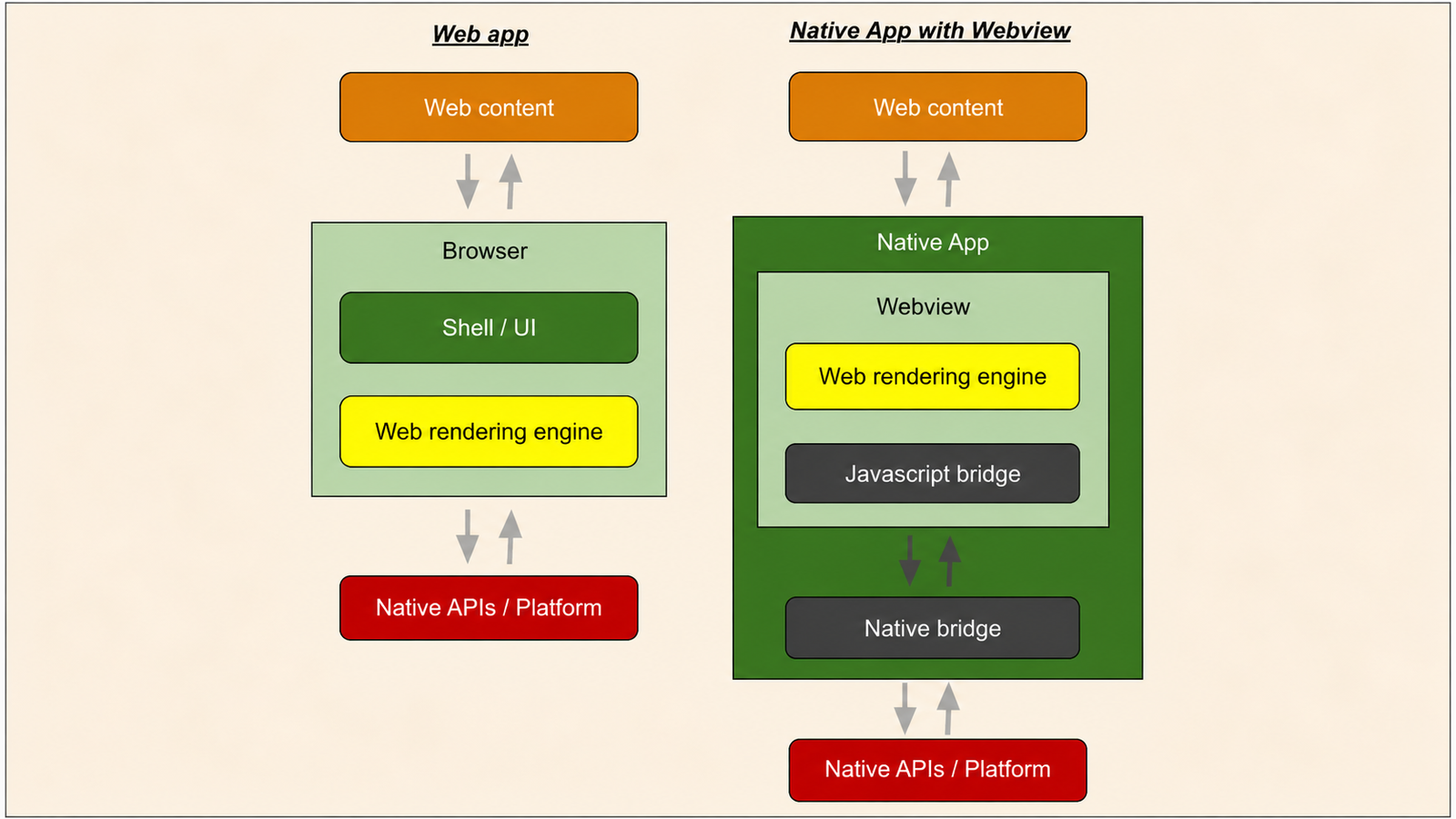
Test one: does it render natively, or does it require a WebView. Native rendering uses the app's own platform-level UI components, while WebView rendering displays a webpage inside a native app screen, carrying the visual seams and interaction characteristics of a browser rather than the app's own design system. A tool that answers this test with "it depends on the format" is telling you its native rendering is partial, which matters directly for visual fidelity and performance on lower-end devices.
Test two: does changing what's shown require a new app release. Server-driven architecture, where content and targeting logic are controlled from a backend rather than compiled into the app binary, is what separates a tool teams can iterate on weekly from one that is functionally frozen the moment it ships. A tool that requires an SDK update and app store review for every new campaign type has not actually solved the problem this category exists to solve, regardless of how it is marketed.
Test three: is targeting logic native to the tool, or does it read from an existing system. This is the architectural fork covered in the next section in full, and it is the single most consequential three-part test result for determining your shortlist, since a tool's answer here determines whether it is a replacement for your existing customer engagement platform or an addition to it.
What sits adjacent but fails at least one test: app engagement platforms broadly, which power push notifications, in-app messaging, email, and lifecycle campaigns as the retention engine turning installs into habits, describe the wider category this guide's subject sits inside, but not every tool in that wider category passes all three tests above. Digital adoption platforms, built for guided onboarding and feature discovery rather than general-purpose engagement, frequently pass tests one and two but are scoped narrowly enough that test three is moot, since their targeting logic is rarely built to serve a broader engagement programme. Digital experience platforms, a much broader category spanning content management, personalization engines, and journey orchestration across web and mobile, are increasingly judged on orchestration across an entire technology stack rather than the specific in-app rendering problem this guide addresses, which makes them a different and larger purchase than most teams evaluating this specific category actually need.
The Architecture Decision First
Before any vendor's name enters the conversation, one question determines your shortlist entirely: do you already have a working customer engagement platform whose segmentation and orchestration you want to keep, or are you building an engagement capability from zero.
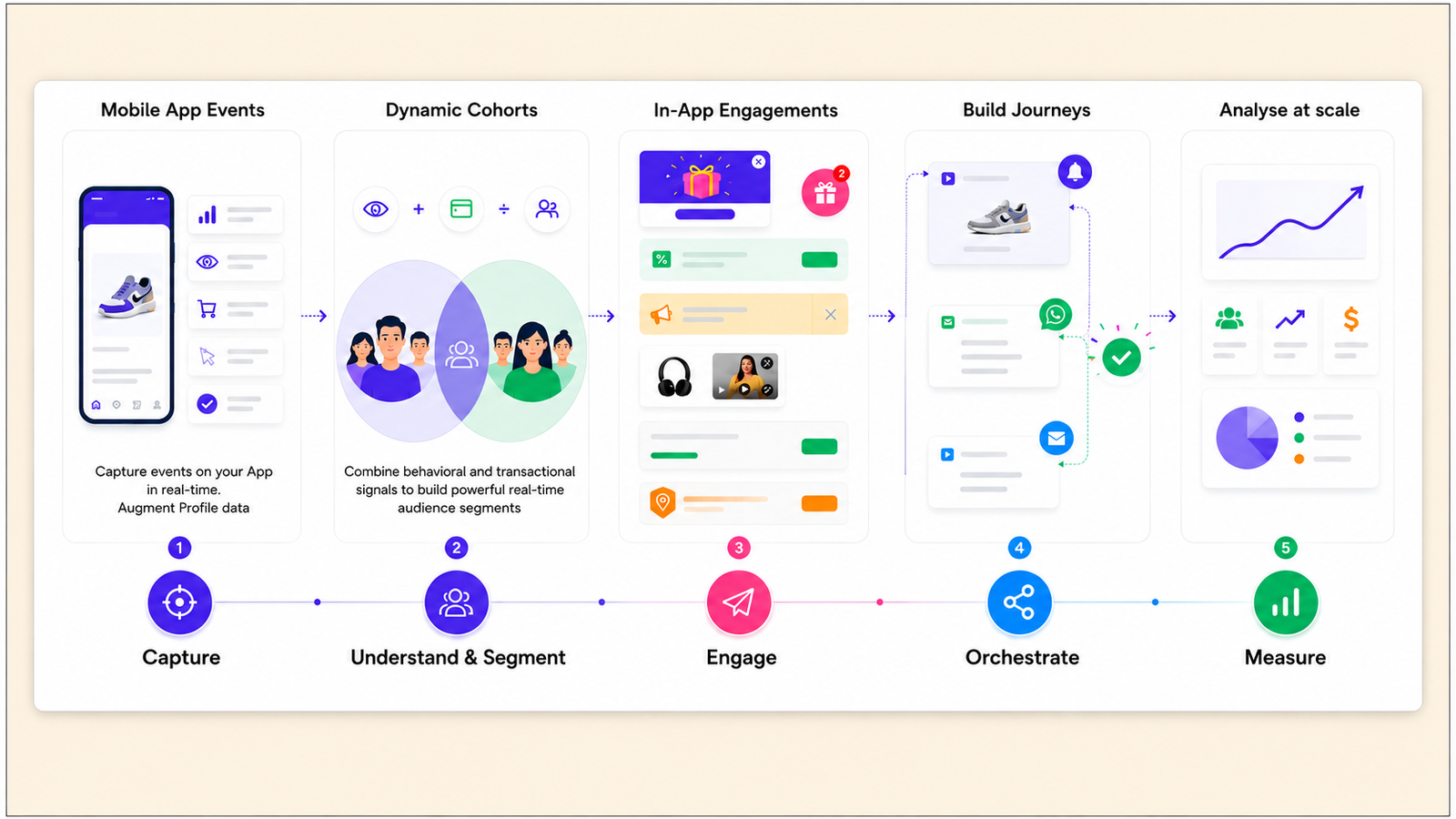
If the answer is that you have a working CEP, CleverTap, MoEngage, WebEngage, or a comparable platform, and your dissatisfaction is specifically about in-app rendering, template rigidity, WebView seams, the inability to place content inline within a screen rather than as an overlay, your shortlist is dedicated in-app layers built to plug into that existing platform. Evaluating a full CEP replacement for a rendering-specific complaint is evaluating the wrong category of solution, because every major CEP in this category ships its in-app channel as one delivery surface among several within a broader outbound-first architecture, which means a lateral move between CEPs changes the segmentation engine and pricing but rarely resolves the underlying rendering ceiling.
If the answer is that you have no meaningful existing CEP investment, or your dissatisfaction extends beyond rendering into the CEP's core segmentation depth or pricing, a broader evaluation across full CEPs and standalone in-app platforms is the correct scope. This is a genuinely different, larger decision than the layering question above, and conflating the two is the single most common and most expensive mistake in this category's procurement process.
The Full Landscape
Dedicated in-app layers. Digia and comparable platforms are built to render inside an existing CEP, leaving segmentation, journeys, and analytics exactly where they are, with the split of responsibility explicit: the CEP decides who sees an experience and when, the in-app layer decides only what gets shown. Plotline occupies a comparable architectural position but is built as a genuinely standalone system with its own segmentation and campaign analytics, typically deployed alongside a CEP for outbound channels rather than built specifically to render on top of one. This category fits a team whose in-app rendering needs extend beyond what a bundled CEP module supports, particularly around gamification depth, inline placement, and iteration speed.
CEPs with in-app modules. CleverTap, MoEngage, WebEngage, Braze, and Netcore each bundle an in-app messaging channel alongside push, email, and SMS within a single platform. CleverTap's native templates render as native UI, a genuine advantage over WebView-based rendering, but the template set remains limited to overlay shapes. MoEngage's HTML in-app content renders through a WebView according to the vendor's own documentation. This category fits a team whose in-app needs are genuinely limited to standard promotional overlays already served adequately by their existing platform's bundled segmentation.
Product adoption platforms. Appcues and Pendo were built to solve guided onboarding and feature adoption for SaaS products, with a format library, tours, tooltips, checklists, modals, well suited to that specific job, and Pendo's account-level analytics architecture and MAU-metered pricing reflect assumptions built for a small number of high-value B2B accounts rather than tens of millions of low-ARPU consumer users. This category fits a team whose core problem is genuinely guided product education, not campaign-style engagement, gamification, or monetisation surfaces.
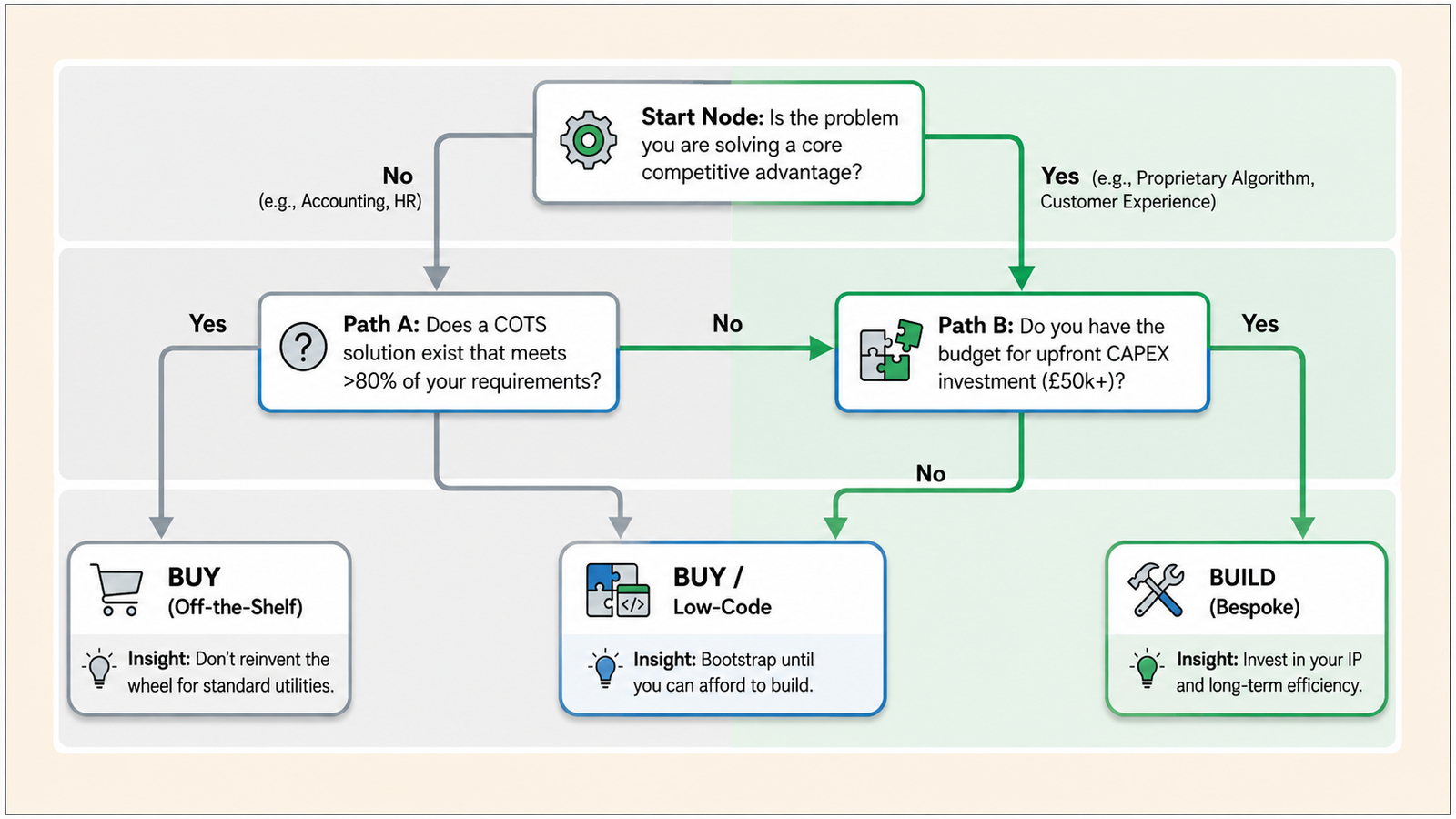
Build-it-yourself. Software make-or-buy decisions in 2026 are typically settled by weighing strategic differentiation, internal engineering capability, integration density, and a genuine five-year total cost of ownership, not a single upfront cost comparison. A poorly executed custom build can consume 10 to 15% of an engineering budget annually without delivering proportional value, and the specific risk for an in-app rendering layer is that it looks deceptively buildable in an early prototype but accumulates real, ongoing maintenance cost as the format library, targeting logic, and cross-platform rendering fidelity grow to match what a purpose-built vendor already maintains. This category is genuinely the right choice only when a team's in-app needs are narrow, stable, and unlikely to expand, and the team has spare, not fully allocated, engineering capacity to maintain it indefinitely.
The Evaluation Criteria That Matter
Rendering fidelity. Native rendering without a WebView, confirmed directly rather than inferred from marketing copy, since this single architectural fact determines visual polish, animation smoothness, and performance on lower-end devices more than any other factor in this list.
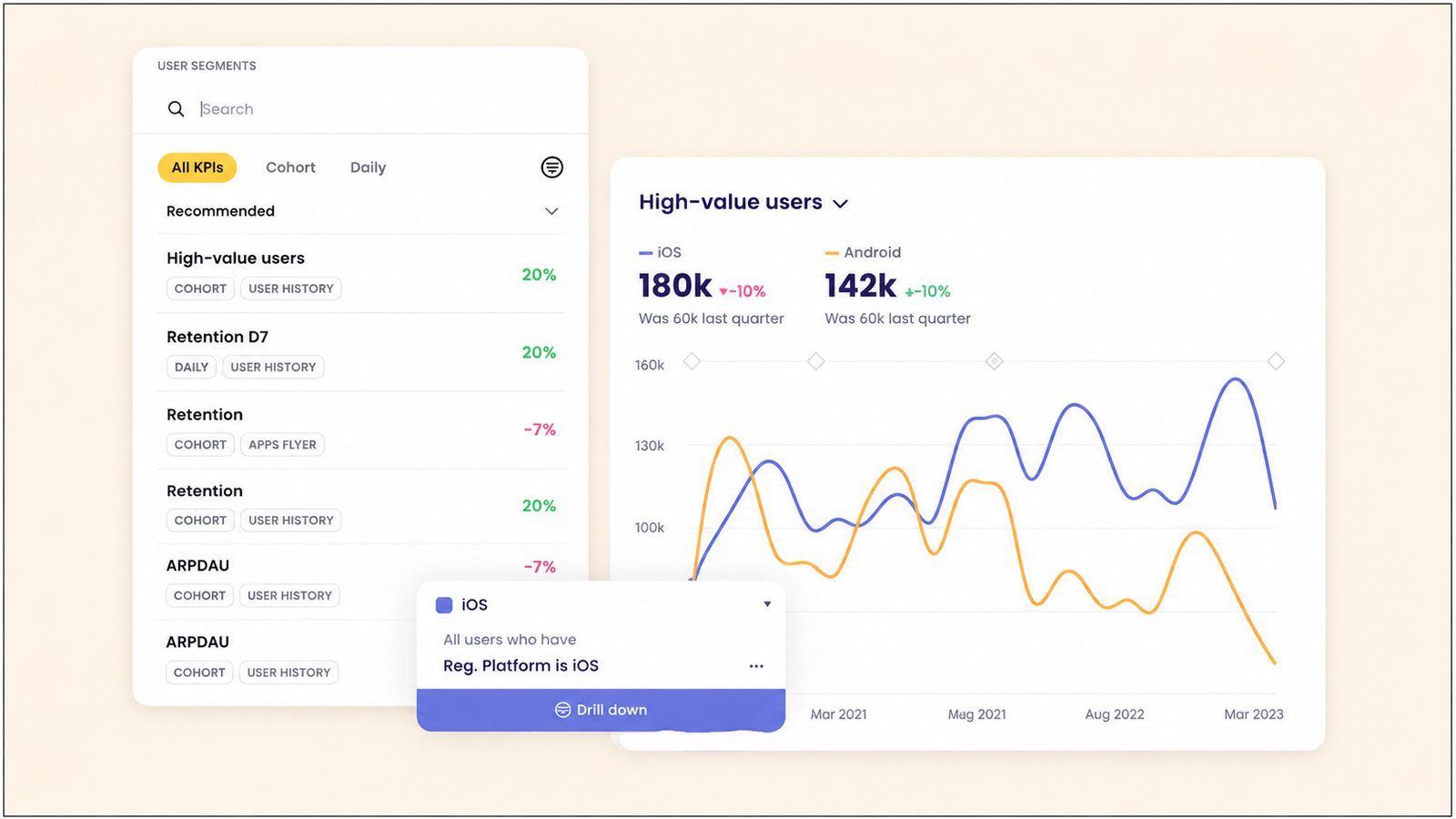
Component breadth. How many distinct format types the tool renders, and how deep each one goes, a scratch card with a single fixed template versus one with configurable prize tiers and reveal thresholds, since gamification depth varies significantly across this category, from a small set of overlay templates with code-adjacent reward configuration to a broad, fully dashboard-configured library.
Targeting depth. Whether the tool's targeting reads from an existing CEP's already-computed segments, or requires building and maintaining a second, independent segmentation logic. The default path that produces duplicate, potentially divergent segmentation is wiring a new tool's SDK to the same raw event sources a CEP already reads from, producing two systems computing overlapping state from separately ingested copies of the same signal, which is a specific, testable architectural risk worth confirming directly during evaluation.
No-code ceiling. Where the no-code workflow actually stops, and what specifically requires a developer once you hit that ceiling, since every tool in this category claims no-code and the honest question is what the exception list looks like in practice.
SDK footprint. Binary size and memory overhead, tested against a genuinely representative device, not a flagship test unit, given that only 22% of India-sold Android devices receive security patches beyond 18 months and most budget devices run on 3 to 4GB of RAM, a device profile a tool built primarily against a US or European market may never have been tested against seriously.
Integration model. The single most consequential fork, covered in full above: whether the tool is built to layer on an existing CEP or to stand alone, which determines almost everything else about implementation cost and timeline.
Pricing structure. Five distinct pricing models exist in this category, MAU-based, event-volume-based, seat-based, impression-based, and flat platform fee, each shifting cost risk between vendor and buyer in a different direction, and the model that is cheapest at a team's current scale is frequently not the model that stays cheapest at 10x that scale.
The Master Comparison Table
Methodology and limitations, stated plainly. Every claim below traces to a specific source, either a vendor's own published documentation or an independently sourced hands-on comparison conducted earlier in this research series. Where two sources disagreed, such as a genuine discrepancy found between Pendo's own claimed mobile SDK support and a competitor's claim that Pendo lacks native mobile support, this guide flagged the disagreement directly rather than silently picking a side. Pricing figures reflect published rates or independently gathered market data at the time of research and should be reconfirmed directly with any vendor before a final decision, since SaaS pricing in this category changes frequently.
| Platform | Category | Native Rendering | Gamification Depth | Integration Model | Pricing Model | India Support |
|---|---|---|---|---|---|---|
| CleverTap | Full CEP | Native templates, overlay shapes only | Spin wheel and scratch card, code-adjacent config | Full CEP, in-app is one channel | MAU-based, published entry from $75/mo | Strong local presence |
| MoEngage | Full CEP | WebView-rendered per own docs | Spin wheel, scratch card, countdown timer; reward config via code variable | Full CEP, in-app is one channel | MAU-based | Strong local presence |
| WebEngage | Full CEP | Overlay-based, comparable constraint pattern | Not independently confirmed as a core native format | Full CEP, in-app is one channel | Custom quote, no free tier | Strong local presence |
| Braze | Full CEP, enterprise tier | Overlay-based, no WYSIWYG web editor | Requires more technical configuration | Full CEP, in-app is one channel | 2-3x MoEngage pricing | Limited India-specific transparency |
| Pendo | Product adoption | Native SDK confirmed (iOS, Android, RN, Flutter) | Not a core native format | Standalone product adoption tool | MAU-metered, median $48,500/yr | USD billing, no India-specific tier |
| Digia Engage | Dedicated in-app layer | Fully native, no WebView | Scratch cards, spin-to-win, streaks, milestones, quizzes, dashboard-configured | Built specifically to layer on CleverTap, MoEngage, or WebEngage | Quoted per deployment | India-based support, ~20 min plugin setup |
Decision Paths by Situation
Existing CEP with weak UI. Evaluate a dedicated in-app layer built specifically to plug into your current platform, confirming it reads existing segments rather than requiring raw event duplication. This is the lowest-cost, lowest-risk path, and it should be the default recommendation for this specific, extremely common situation.
No engagement stack at all. Evaluate full CEPs and standalone in-app platforms together, since you are building both the targeting and rendering layers from zero and the two decisions are genuinely linked at this stage. Weight segmentation depth and channel breadth more heavily than you would in a layering decision, since you have no existing investment to preserve.
Web-first product extending into mobile. A tool's web-first heritage shows up concretely in DOM-based targeting assumptions and a session model built around browser behaviour, neither of which has a native mobile equivalent, which means confirming a genuinely separate, actively maintained native mobile SDK, not a web tool's mobile extension, is the specific evaluation priority for this situation.
Consumer app at scale. A pricing model metered on Monthly Active Users produces a bill that climbs directly with the growth a consumer app's business model depends on, which is a structural mismatch for high-volume, low-ARPU products regardless of how strong the underlying product is. Prioritise a deployment-scoped or negotiated pricing model over a published MAU-tier rate card, and model cost explicitly at 10x current scale before signing anything.
Indian market team. Confirm DPDP-specific compliance documentation, not a GDPR statement with a note that DPDP is broadly similar, test SDK footprint against a genuinely representative low-RAM device, and confirm actual India-hours support coverage rather than a generic 24/7 claim. Every one of these factors changes project timelines and compliance risk more than a feature comparison alone would suggest.
Running the Evaluation
POC design. Scope the test to one specific surface and one clear success metric, defined before testing begins, rather than an open-ended evaluation across the full feature set. Test the specific rendering gap or targeting question that motivated the evaluation, not a generic feature tour.
Reference calls. Speak directly with at least two or three customers similar in product category and scale to your own, not just references the vendor selects, and ask specifically about implementation timeline, support responsiveness, and any gap between what was sold and what was delivered.
Security review preparation. Have a current sub-processor list, documented data residency and retention policy, confirmed AES-256 and TLS 1.3 encryption, and a DPA that correctly classifies your app as controller and the vendor as processor ready before the review starts, since producing these reactively is what stalls a review for weeks rather than days.
Contract terms worth negotiating. Volume commitment moves the negotiation needle more than contract length alone, and the specific terms worth fixing explicitly are a capped overage rate, a defined annual price escalator, and a non-punitive exit clause, which compound in cost over a multi-year contract more than the initial headline rate.
Topics Not in the Brief That Teams Should Know
A genuine, well-run POC should test the losing scenario, not just the winning one. Most evaluations only confirm that a shortlisted tool can do what it claims under favourable conditions. A more rigorous test deliberately probes the specific failure mode each category is prone to, a rendering seam under a complex campaign, a targeting mismatch under a segment edge case, since this is where the real difference between vendors, not the marketing difference, actually shows up.
Vendor consolidation pressure is a distinct, legitimate reason to choose differently than pure feature fit would suggest. An organisation under a mandate to reduce total vendor count may correctly choose a full CEP replacement even when a layered approach would be technically cheaper and faster, because the consolidation value is realised at the vendor-count level, a genuine business consideration this guide's architecture-first framing does not automatically capture.
The switching cost from a standalone in-app platform back to a layered architecture is asymmetric and worth planning for at signing, not just at exit. A team starting with a standalone tool that later wants to add or switch to a CEP-layered approach is undertaking a comparable migration project to switching CEPs entirely, since the standalone tool's own segmentation logic has to be reconciled with whatever CEP is introduced. This asymmetry is worth factoring into the initial architecture decision, not discovered only when a switch becomes necessary.
Key Takeaways
- The three-test definition, native rendering versus WebView, server-driven versus release-dependent, and native targeting versus CEP-fed, separates this category from digital adoption platforms and broader digital experience platforms that claim overlapping territory.
- The architecture decision, layering onto an existing CEP versus building an engagement stack from zero, determines your shortlist before any vendor's specific features matter, and conflating the two produces the most expensive procurement mistake in this category.
- The full landscape spans dedicated in-app layers, CEPs with bundled in-app modules, product adoption platforms, and build-it-yourself, and each fits a genuinely different team profile rather than representing tiers of the same underlying offering.
- Rendering fidelity, component breadth, targeting depth, no-code ceiling, SDK footprint, integration model, and pricing structure are the seven criteria that actually differentiate vendors in a way a generic feature checklist does not surface.
- The master comparison table's methodology, and its stated limitations, matter as much as the data itself, since pricing and capability claims in this category shift frequently enough that direct reconfirmation with any shortlisted vendor is a required step, not an optional one.
- Five specific buyer situations, an existing CEP with weak UI, no engagement stack, a web-first product extending to mobile, a consumer app at scale, and an Indian market team, each point toward a different starting shortlist, which is why a single ranked list cannot serve every reader of this guide equally well.
- A disciplined evaluation scopes the proof of concept to one surface and one metric, includes independently sourced reference calls, prepares the full security review artefact set before the review starts, and treats volume commitment and capped overage terms as more consequential negotiation levers than the headline rate.
Further Reading
The full series, mapped to the stage of the decision it supports:
Understanding the architecture question:
- Integrating an In-App Layer Without Duplicate Data Pipelines or PII Movement - the segment-forwarding architecture that resolves the security review objection most evaluations stall on
- Inline Banners vs Overlays: Conversion Impact and UX Friction - the format principle underlying rendering fidelity as an evaluation criterion
- Personalised Inline Widgets: Making the Home Screen Adapt Per Segment - server-driven layout as an architectural precondition, referenced in this guide's category definition
Evaluating specific vendors:
- CleverTap Alternatives: 7 Tools for Teams Who Want Better In-App UI
- MoEngage Alternatives for In-App Messaging on Consumer Apps
- WebEngage Alternatives: Rich In-App UI Without Rebuilding Pipelines
- Appcues Alternatives for Native Mobile Apps
- Pendo Alternatives for Consumer Mobile Apps
- Plotline Alternatives for Indian Consumer Apps
Pricing and negotiation:
- In-App Platform Pricing: What You Actually Pay For - the full pricing model breakdown and negotiation lever detail this guide's evaluation section summarises
India-specific context:
- Why Indian Product Teams Need Different In-App Tooling Than US SaaS - the device, network, and DPDP detail behind this guide's India decision path
Business case and ROI:
- The ROI of In-App Engagement: Business Case for Leadership - the value chain framework for justifying whichever platform this guide leads you toward
External Sources:
- App Industry Landscape 2026 - Business of Apps (the app engagement platform category definition this guide's category section builds on)
- Digital Experience Platforms: Your 2026 Comprehensive Guide -CMSWire (the broader DXP category boundary distinguishing it from this guide's specific subject)
- Digital Adoption Platforms in 2026: Avoid the Wrong Pick - Userpilot (the DAP category split between SaaS product adoption and employee training tools)
- Build vs Buy Software: Pros and Cons, Costs, and How to Decide (2026) - Zylo (the seven-criteria decision framework and five-year TCO structure)
- IDP Build vs. Buy: 2026 TCO Analysis - Amplify IT (the 10-15% annual engineering budget consumption risk for a poorly executed custom build)
This guide is the entry point to Digia's full comparison series. Every claim about a specific competitor traces back to its own dedicated article, linked above, where the full detail and sourcing live. Book a demo to see where Digia specifically fits against your own architecture decision, or start with the pricing guide if cost modelling is your next step.