


TL;DR:
- Digia and Plotline both build native in-app experiences without an app release, but they start from different assumptions about your stack.
- Plotline is an end-to-end in-app engagement platform, built to run standalone for teams with no existing customer engagement platform (CEP) in place.
- Digia is an experience layer that plugs into a CEP you already run, CleverTap, MoEngage, or WebEngage, and leaves your segmentation, journeys, and analytics exactly where they are.
- Pick Plotline if you're building an engagement stack from zero. Pick Digia if you've already invested in a CEP and want richer native experiences without migrating off it.
In-app experiences stopped being a nice-to-have, once push notifications hit their ceiling. Open rates decay fast once a user is inside the app, and engagement that only happens outside the session misses the moment where activation and retention actually get decided, while the user is looking at the screen. Onboarding flows that only run once at signup, feature announcements buried in a changelog nobody reads, upsell moments that depend on the user opening an email first, all of it loses to a nudge that shows up inside the product at the exact moment it's relevant. That shift is why in-app nudges moved from a marketing afterthought to something product and growth teams treat as core infrastructure.
That's also why so many teams are now evaluating a dedicated in-app experience platform instead of stitching the capability together in-house or leaving it to whatever their existing tools happen to support. But the evaluation runs into a harder question than most teams expect going in. It isn't which platform ships more component types, stories, tooltips, and coach marks are close to table stakes at this point, every serious vendor has them. What actually decides fit is architecture: does the platform expect to become your engagement system, or does it expect to sit inside the one you've already built. That distinction is what the rest of this piece works through, before either specific product enters the picture.
What Is an In-App Experience Platform?
What it is
An in-app experience platform lets product, growth, CRM, and marketing teams build and change what a user sees inside a mobile app, without shipping a new app release for every change. Nudges, tooltips, banners, and full-screen moments render natively inside the app and update from a dashboard, not from a code deploy.
The core shift is where the experience lives. In a traditional setup, anything a user sees inside the app, a new onboarding step, a promotional banner, a survey prompt, has to be built into the app's codebase and shipped through the app store like any other feature. An in-app experience platform separates that layer out. A lightweight SDK sits inside the app once, and everything rendered through it, layout, copy, targeting, timing, gets configured from a dashboard instead of a code change. The app itself stops being the thing that has to be rebuilt every time a team wants to test a new message or change how a moment looks.
That separation is what makes the category useful day to day. A growth PM can change the wording on an upsell prompt without a pull request. A product manager can add a step to an onboarding flow and see it live within minutes, not the next release cycle. The platform doesn't replace the app, it sits inside it as a layer that non-engineering teams can operate on their own.
What problems it solves
The problem is a permission problem as much as an engineering one. Opt-in rates for push notifications have been falling since Android 13's permission changes took effect, which means a growing share of users can't be reached outside the app at all. Email and SMS sit even further from the moment a decision actually gets made.
There's a timing problem underneath that too. Growth teams spend heavily on performance marketing just to get a user to open the app. Once they do, that user has already decided to be there, and for that session, the app has their full attention. What happens during that window is what decides whether the acquisition spend was worth it. That's why the real work shifts to activation, engagement, and retention the moment the app opens, reaching a user again from outside the app once they've left is the harder path, not the easier one.
That plays out differently by business. A gaming app uses a tooltip to walk a new player through their first match instead of losing them to a confusing first session. A D2C brand times a gamified offer to the moment a user is placing an order, aimed at lifetime value rather than just closing that one purchase.
An in-app platform puts the message where the user already is, inside that live session, instead of trying to pull them back into one later. It also removes engineering as the bottleneck for every UI experiment, since the team running the campaign can publish directly. That matters most at the exact point most companies hit this problem in practice: past Seed or Series A, once a dedicated VP or Head of Growth comes in to push velocity, or during a major app revamp, when engineering is focused on keeping core flows stable while product wants to run a high volume of experiments on top of it.
Typical users
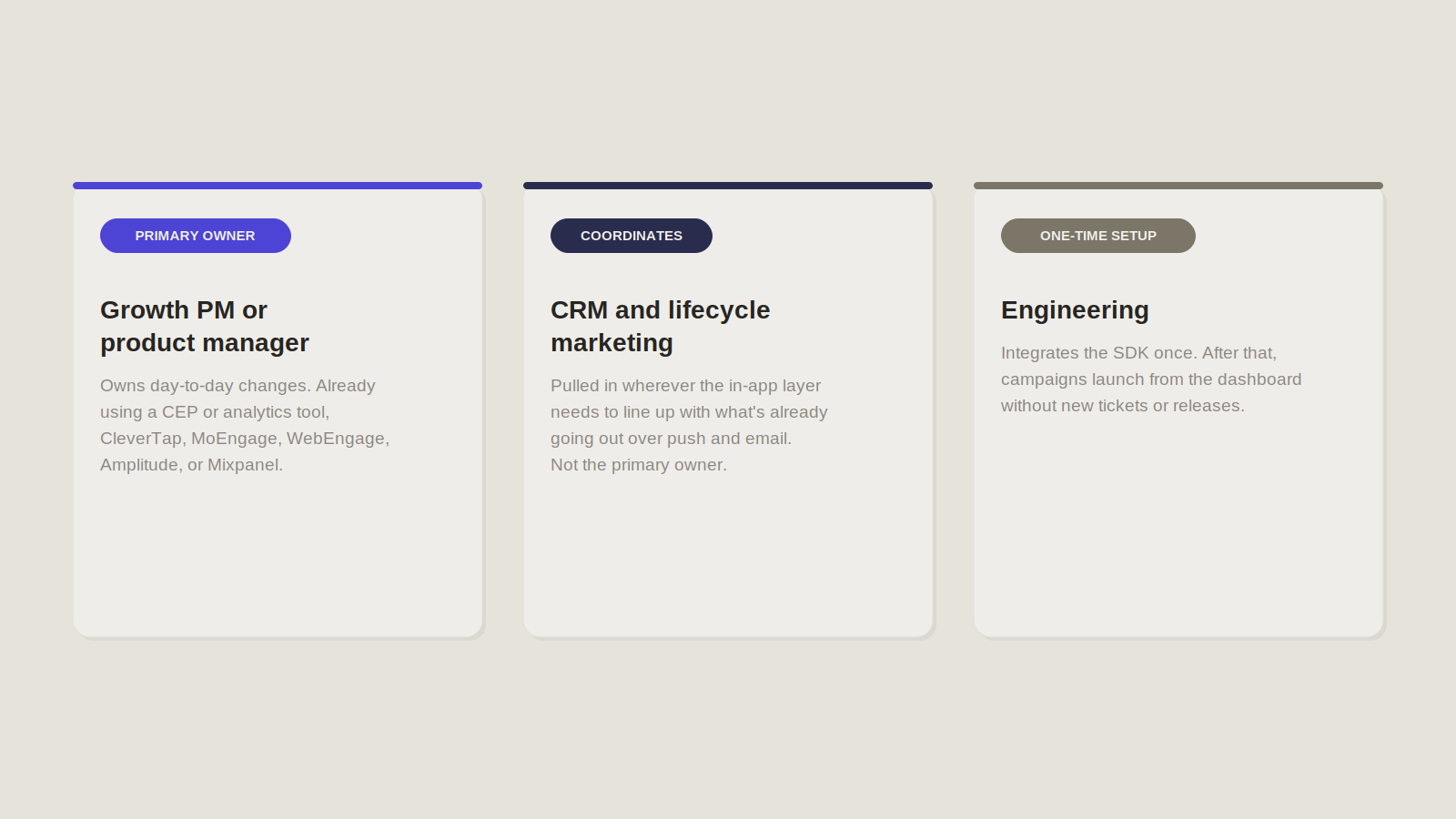
The buyer varies by org, but the day-to-day owner is usually a growth PM or a product manager who is tired of waiting on an engineering sprint to test a new onboarding flow, people who are already using CEP or analytics tools such as CleverTap, MoEngage, WebEngage, Amplitude, and Mixpanel. CRM and lifecycle marketing teams get pulled in wherever the in-app layer needs to coordinate with what's already going out over push and email.
Common use cases
The category covers a fairly consistent set of jobs across vendors. The components differ in polish and depth, but the jobs themselves are close to standard:
- Onboarding. First-run walkthroughs and progressive tours that get a new user to their first meaningful action, not just past a welcome screen.
- Feature adoption. Targeted nudges that surface a feature to users who haven't tried it, timed to when it's actually relevant to what they're doing.
- Cross-sell. Pointing an engaged user toward an adjacent product or category they haven't used yet, based on what they've already done in the app.
- Upsell. Surfacing a paid tier or add-on at the moment a user hits a limit of the free experience, rather than through a generic pricing page.
- Surveys. Short, in-context questions that don't require leaving the app or opening a separate form.
- NPS. Relationship-health scoring collected inside the product, close to the moment of use rather than in a detached follow-up email.
- Gamification. Scratch cards, streak trackers, and spin-to-win mechanics that reward specific in-app behavior.
- Wallet nudges. Prompts tied to payment methods, balances, or transactions, common in fintech and ecommerce apps.
- Stories and carousels. Short-form, swipeable visual content used for announcements, promotions, or feature tours.
None of this is unique to any one platform. What differs, and what the rest of this article is actually about, is the architecture each vendor chose to deliver it.
When Do You Need One?
Not every team needs a dedicated in-app experience platform on day one. Basic banners and a simple modal library cover a surprising amount of ground early on but the signal to move past that point isn't a single event, it's usually a pattern of the same friction showing up across a few consecutive quarters. These are the six signs that pattern has arrived.
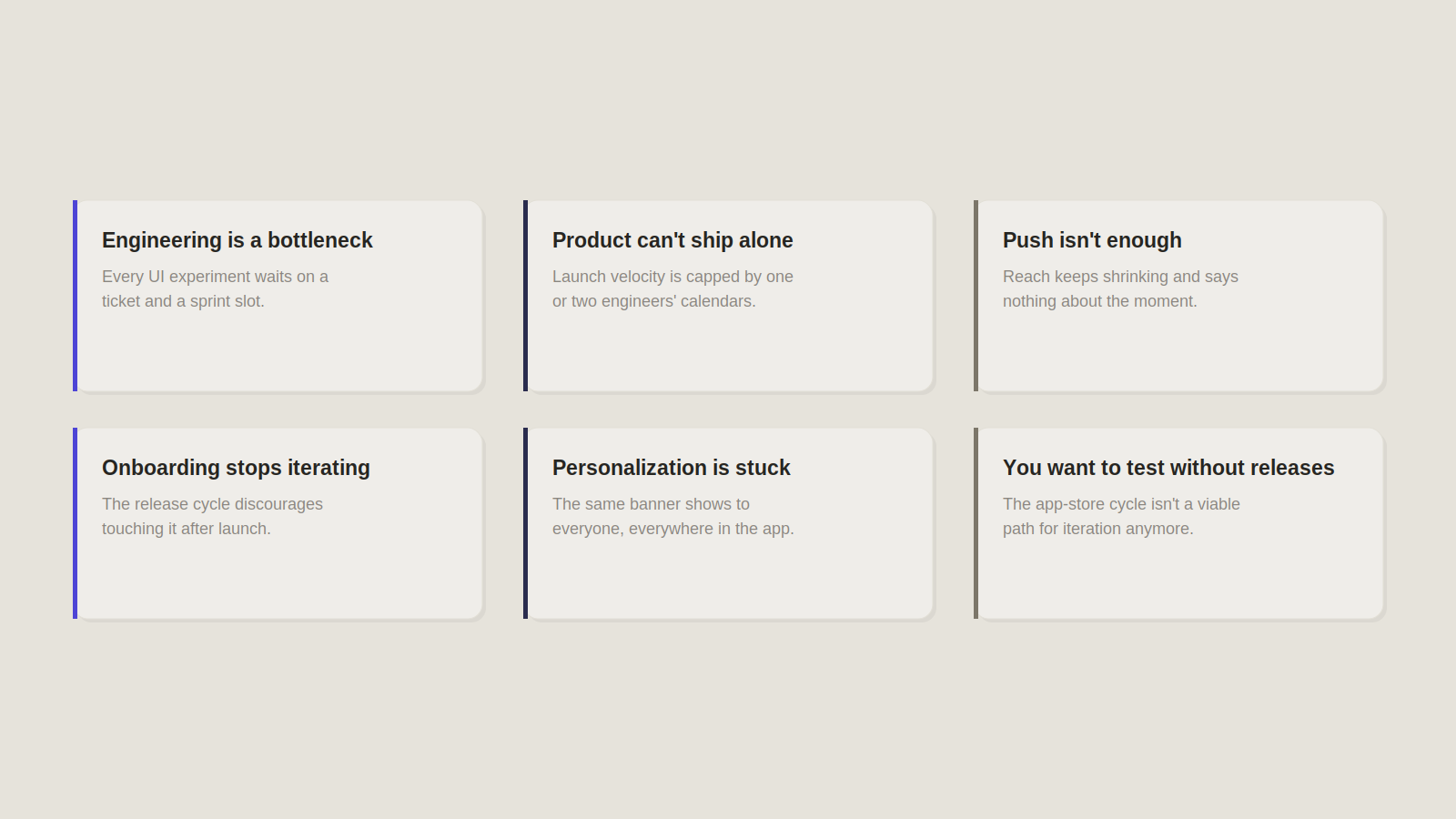
Engineering is a bottleneck for every UI experiment. If testing a new onboarding tooltip or a pricing nudge means opening a ticket and waiting for a sprint slot, the team runs fewer experiments than it should, not because the ideas are bad but because the cost of testing them is too high. A dedicated platform moves that cost from engineering time to a dashboard, which changes how many ideas actually get tried.
Product and marketing can't launch experiences independently. When every campaign, no matter how small, routes through the same one or two engineers who own the in-app UI code, launch velocity is capped by their calendar, not by the size of the idea. Independent publishing removes that single point of failure.
Push notifications aren't enough. Push reaches a shrinking share of users and only when they're outside the app entirely. It says nothing about what a user is doing in the moment, so campaigns end up generic by necessity. A team that keeps trying to compensate for this with more push volume, rather than a message inside the session itself, has usually already hit this wall.
Onboarding is difficult to iterate. If changing the first-run flow requires the same release cycle as any other feature, most teams simply stop iterating on it after launch. Onboarding then quietly rots while the rest of the app keeps shipping, even though it's one of the highest-leverage screens in the product.
Personalization is limited. Static in-app messaging that shows the same banner to every user regardless of behavior, plan, or lifecycle stage is a sign the current toolset can't segment inside the app the way the team already segments outside it.
You want to experiment inside the app without app releases. This is the underlying need the other five roll up into. Once a team wants to A/B test, target, and iterate on in-app UI at the same speed it iterates on a landing page, the app-store release cycle stops being a viable path, and that's the point a dedicated platform earns its cost.
The Two Ways to Build In-App Experiences
Once a team decides it needs a dedicated platform, the next decision matters more than which vendor's demo looked best. There are two fundamentally different philosophies for where an in-app experience platform sits relative to the rest of the stack, and most vendors commit hard to one or the other. Understanding the philosophy first makes the vendor comparison in the rest of this article much easier to reason about.
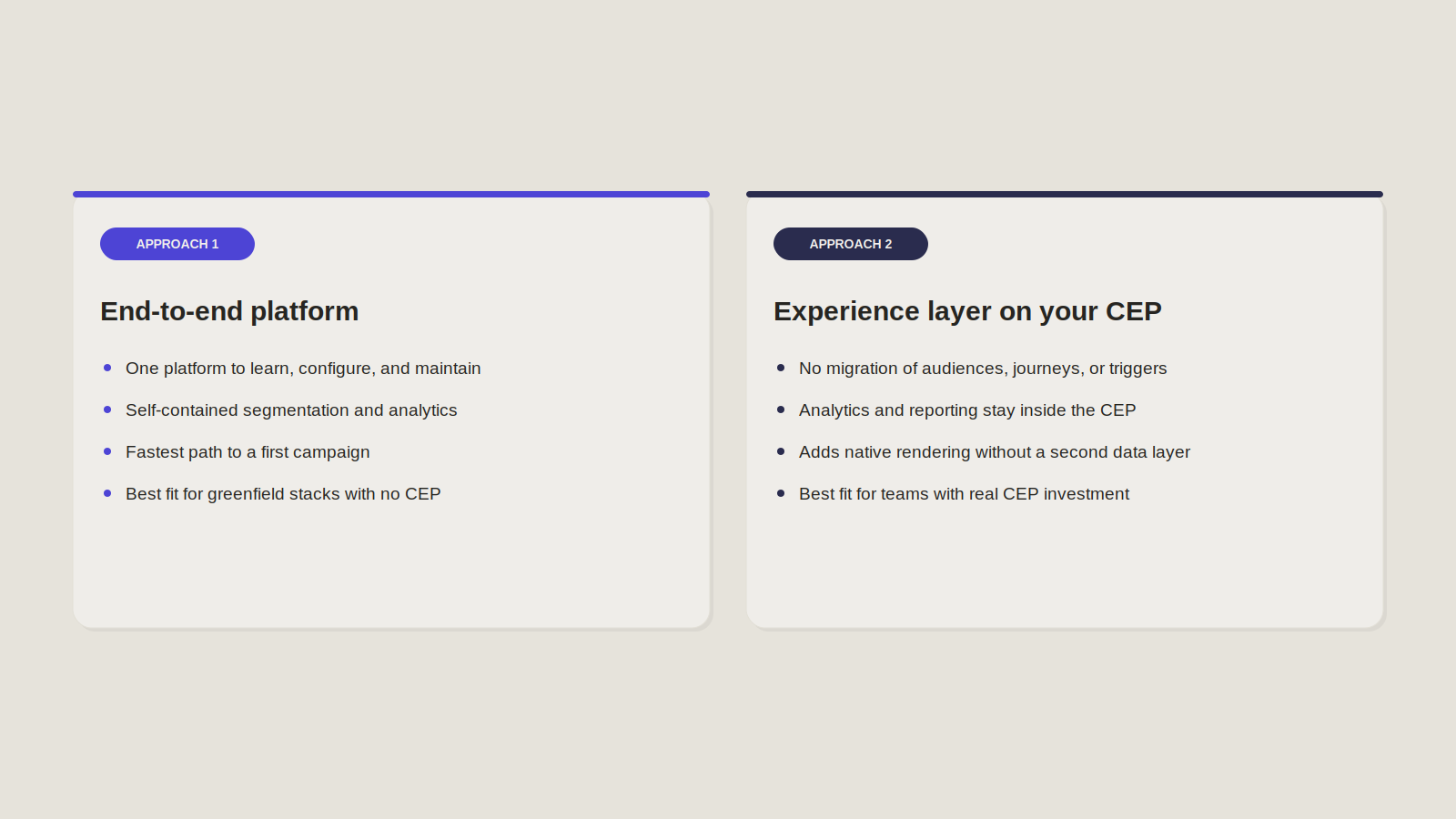
Approach 1: End-to-End In-App Experience Platform
This model treats in-app experience as its own standalone engagement system. It owns its own targeting logic, its own segmentation, its own analytics, and its own campaign builder, independent of whatever else the team runs for push, email, or lifecycle marketing. For a team with no existing customer engagement platform (CEP), or one that wants a single tool to own the entire in-app layer end to end, this is a clean, self-contained way to get started. Everything the team needs to launch, target, and measure an in-app campaign lives in one place.
- One platform to learn, configure, and maintain
- Self-contained segmentation and analytics, no dependency on another tool being set up correctly
- Fastest path to a first campaign for a team starting from zero
- Best fit for greenfield engagement stacks with no CEP already in place
Approach 2: Experience Layer on Top of Your Existing CEP
This model assumes the team already has a customer engagement platform running push, email, journeys, and segmentation, and treats in-app rendering as the one piece that CEP does poorly, not as a reason to replace it. Instead of duplicating audiences and campaign logic in a second system, the experience layer plugs into the CEP that's already the source of truth and handles what native, real-time in-app rendering needs that the CEP's own in-app module typically can't deliver.
- No migration of existing audiences, journeys, or triggers
- Analytics and reporting stay inside the CEP the team already trusts
- Adds native in-app rendering depth without adding a second customer data layer
- Best fit for teams with real investment already sunk into a CEP
Both philosophies solve the same underlying problem from opposite directions: one assumes you're starting clean, the other assumes you're not. Which one fits depends entirely on what's already running in your stack, which is exactly the question the next two sections get concrete about.
Plotline's Architecture
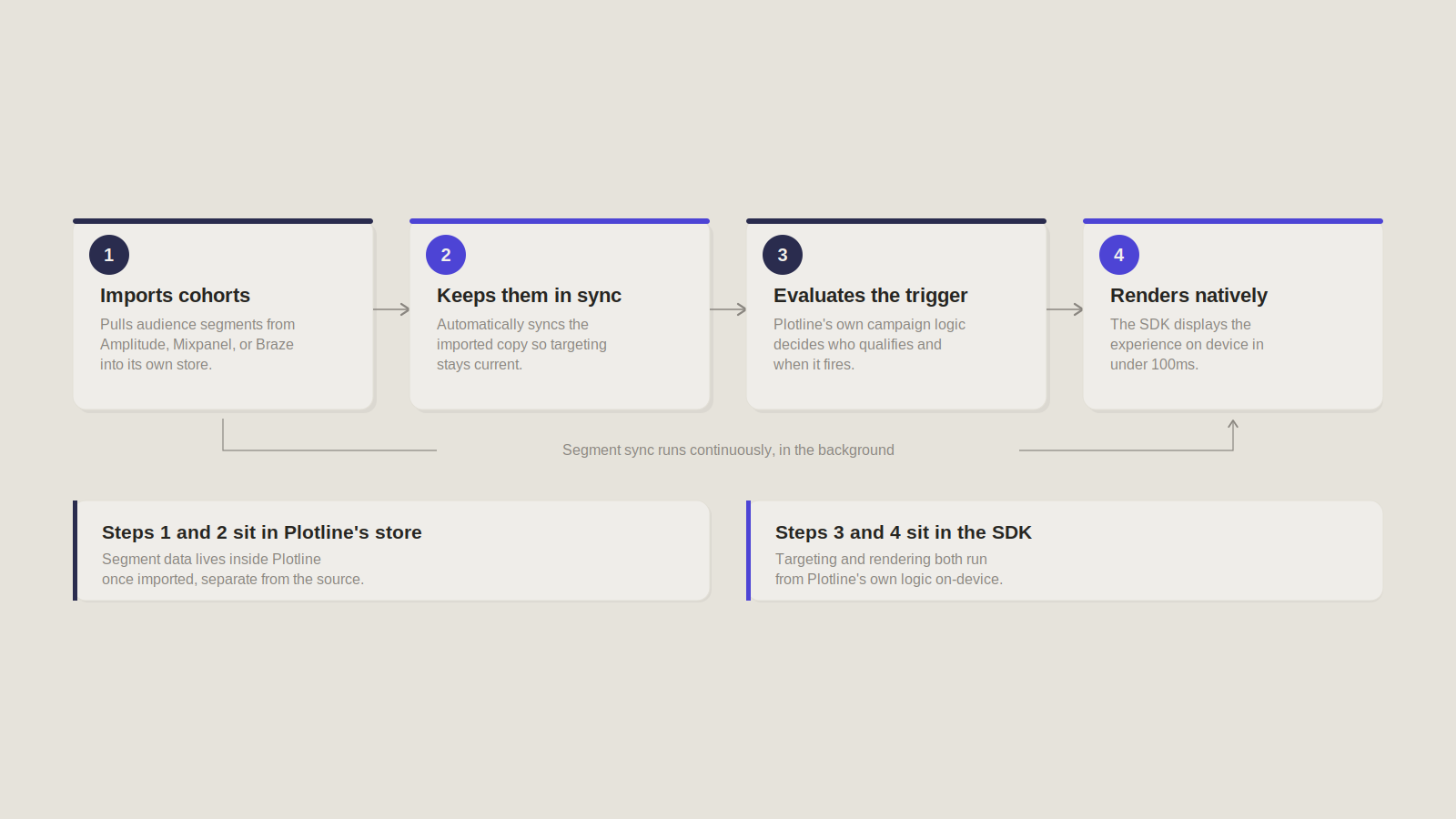
Plotline runs on an SDK integrated directly into the app, with support for iOS, Android, React Native, Flutter, and Ionic. Setup is designed to be fast and mostly hands-off for engineering after the initial step. According to Plotline's interactive product demo, after the initial 20-minute SDK integration, product managers, growth teams, and marketers can create and launch campaigns independently, no code required, no app releases needed. Once integrated, experiences render and trigger in real time, with Plotline's own FAQ citing latency under 100ms from event to display.
Plotline also connects into a team's existing data stack rather than operating as a closed system. Per its integrations page, it integrates with analytics, CRM, and marketing platforms, importing cohorts, triggering campaigns from events, and syncing performance data back to those tools. Specifically, it pulls audience segments from tools like Amplitude, Mixpanel, and Braze and keeps them automatically in sync. That's a meaningful architectural detail: Plotline is importing and holding its own copy of segment data, not reading it live from the source system on each request.
Where it fits
- Fills the real-time gap most CEPs leave open. Per Plotline's free trial page, tools built for outside-app engagement like push, SMS, and email tend to offer only banners and popups inside the app, without the ability to trigger experiences in real time. Plotline is built specifically for that gap.
- Doesn't require displacing what's already running. It sits alongside a team's existing push, SMS, and email tools rather than asking them to be replaced.
- Draws data from tools already in place. Per the integrations page, it pulls in cohorts and event triggers from analytics and CRM platforms already in use, and syncs performance data back out for reporting.
Strengths
- Broad, visual-first component library. Per Plotline's FAQ: spotlights, Instagram-style Stories, tooltips and coachmarks, surveys, embedded or full-screen video, grids and carousels, banners and cards, 150-plus skill-based games, and streak and milestone mechanics, all available without code.
- Deep template customization. Fonts, colors, corner radius, spacing, button styles, and animations are all editable to match an app's existing design system.
- Built-in experimentation. Multivariate testing on any campaign element, with automatic statistical significance tracking, so testing doesn't require a separate tool.
- Performance-conscious SDK. SDK size stays under 2MB, and campaigns are cached to reduce network usage, per the same FAQ.
Best-fit organizations
Per Plotline's interactive demo page, the platform targets product and growth teams at consumer mobile apps, particularly in EdTech, FinTech, HealthTech, Gaming, and Commerce. Named customers on Plotline's own LinkedIn company page include Dream11, Upstox, BharatPe, and AngelOne, all high-transaction-volume consumer apps in fintech and gaming.
Digia's Architecture
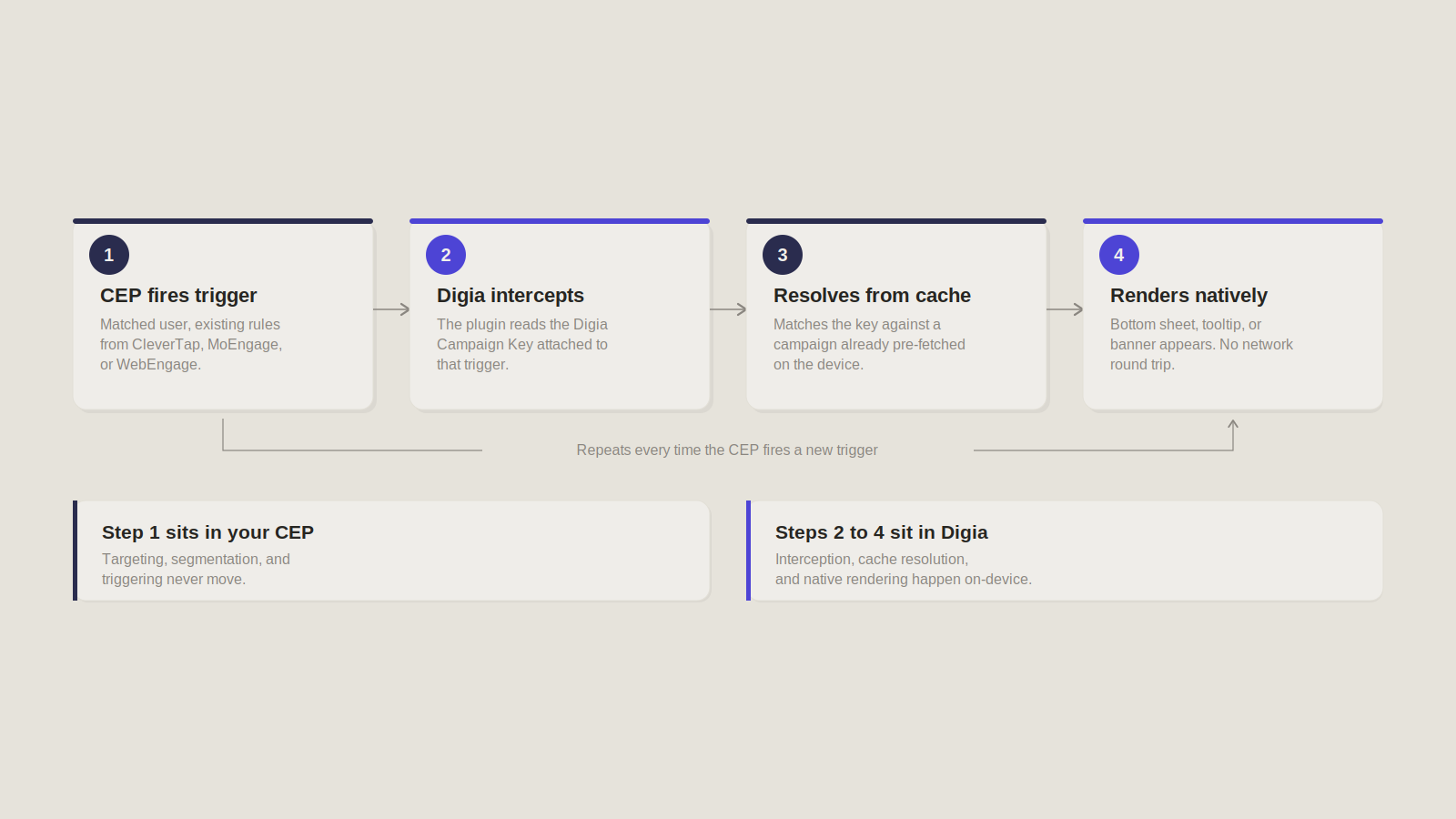
Digia Engage is a native UI rendering layer for a Customer Engagement Platform, not a replacement for one. It plugs into the CEP a team already runs, CleverTap, MoEngage, or WebEngage, and renders in-app experiences from layouts designed in the Digia Engage Dashboard.
The split of responsibility is explicit, not just directional. The CEP decides who sees an experience and when: audience segmentation, user properties, event triggers, and journey rules stay entirely inside the CEP. Digia decides only what gets shown, the layout designed in its dashboard. When a CEP campaign fires, the matching Digia plugin intercepts that trigger and reads a Digia Campaign Key attached to it, which maps to a layout already cached on the device. The SDK pre-fetches and caches every Digia campaign at app start, so when a trigger comes in, rendering resolves against that local cache with no per-trigger network round trip. That's what makes the experience appear close to instantly once the CEP fires.
Concretely, this means:
- Existing journeys stay untouched. Trigger logic and journey rules live entirely in the CEP. Digia never overrides or duplicates when a campaign fires.
- Existing segmentation stays untouched. Audience segmentation and user properties are owned by the CEP alone. Digia has no targeting logic of its own to keep in sync.
- Existing analytics stay untouched. Because Digia doesn't hold its own audience or targeting layer, there's no second data trail generating numbers that could drift from what the CEP already reports.
What Digia specializes in
- Near-instant render, not a network round trip per trigger. Every Digia campaign is pre-fetched and cached on the device at app start. When the CEP fires a trigger, the SDK resolves it against that local cache instead of calling out to a server, which is the actual source of the speed, nothing is being fetched or built at the moment the user sees it. The payoff is native rendering, real bottom sheets, dialogs, banners, tooltips, and spotlights instead of a WebView, but the speed itself comes from the cache, not from "native" as a label.
- Rich experiences. Three experience types cover most of what a growth team needs: a Nudge (an overlay like a bottom sheet or dialog, for promotions, announcements, upgrade prompts, or in-app surveys), a Guide (a tooltip or spotlight anchored to a specific UI element, for onboarding tours and feature discovery), and Inline content (banners, cards, or promotional strips injected directly into a feed). Surveys run on top of these, NPS, CSAT, and drop-off forms with 50-plus templates, per Digia's insights page.
- Experience management. Once the SDK is integrated, product and marketing teams design and launch these experiences from the Digia Engage Dashboard, with no further code changes and no app-store release, while the CEP keeps firing the same campaigns it always has.
The practical result: a team adopting Digia isn't building a second engagement system. The CEP keeps deciding who and when. Digia only changes what shows up on screen when it does, and does it natively instead of through a WebView.
What Both Platforms Do Well
Areas of overlap.
Component overlap between Plotline and Digia, July 2026
| Capability | Plotline | Digia |
|---|---|---|
| Stories | Instagram-style Stories, per Plotline's In-App Videos page | Story carousels with embedded CTAs. Users can check out directly from the story, per Digia's In-App Videos page |
| Tooltips | Tooltips paired with coachmarks, per Plotline's Nudges page | Tooltips rendered via the Guide component, anchored to a specific UI element, per Digia's Nudges page |
| Spotlight | Spotlights, per Plotline's Nudges page | Spotlights for step-by-step tours and feature discovery, per Digia's Nudges page |
| Surveys | Included in the core component library, per Plotline's Insights and Feedback page | NPS, CSAT, emoji, star-rating, multiple-choice, and drop-off surveys with 50-plus templates, per Digia's Insights and In-App Feedback page |
| Gamification | 150-plus skill-based games plus streak and milestone mechanics, per Plotline's Gamification page | Scratch cards, spin the wheel, slot machines, treasure chests, mystery boxes, quizzes, streaks, and milestone rewards, per Digia's Gamification page |
| Native SDKs | iOS, Android, React Native, Flutter, Ionic | Flutter, Android, React Native, iOS (Swift) |
| No-code publishing | Dashboard-driven, no app release required | Dashboard-driven, no app release required |
| Campaigns | Own campaign builder and publishing flow | Digia campaigns resolved against a CEP-fired trigger |
This overlap is table stakes for the category at this point. It's real, and it's worth acknowledging plainly rather than pretending one platform invented tooltips. What actually separates the two isn't any row on this table, it's the architecture underneath all of them, which is where the rest of this article goes next.
Architectural Trade-Offs
End-to-End Platform
Pros
- Unified engagement platform. One system owns targeting, rendering, and campaign logic, nothing to reconcile between two vendors.
- Centralized workflows. Product, growth, and CRM all work inside the same dashboard, with one place to learn and one place to check for what's live.
- Suitable for greenfield deployments. A team with no CEP in place gets a working engagement stack fast, without evaluating and standing up a second system first.
Considerations
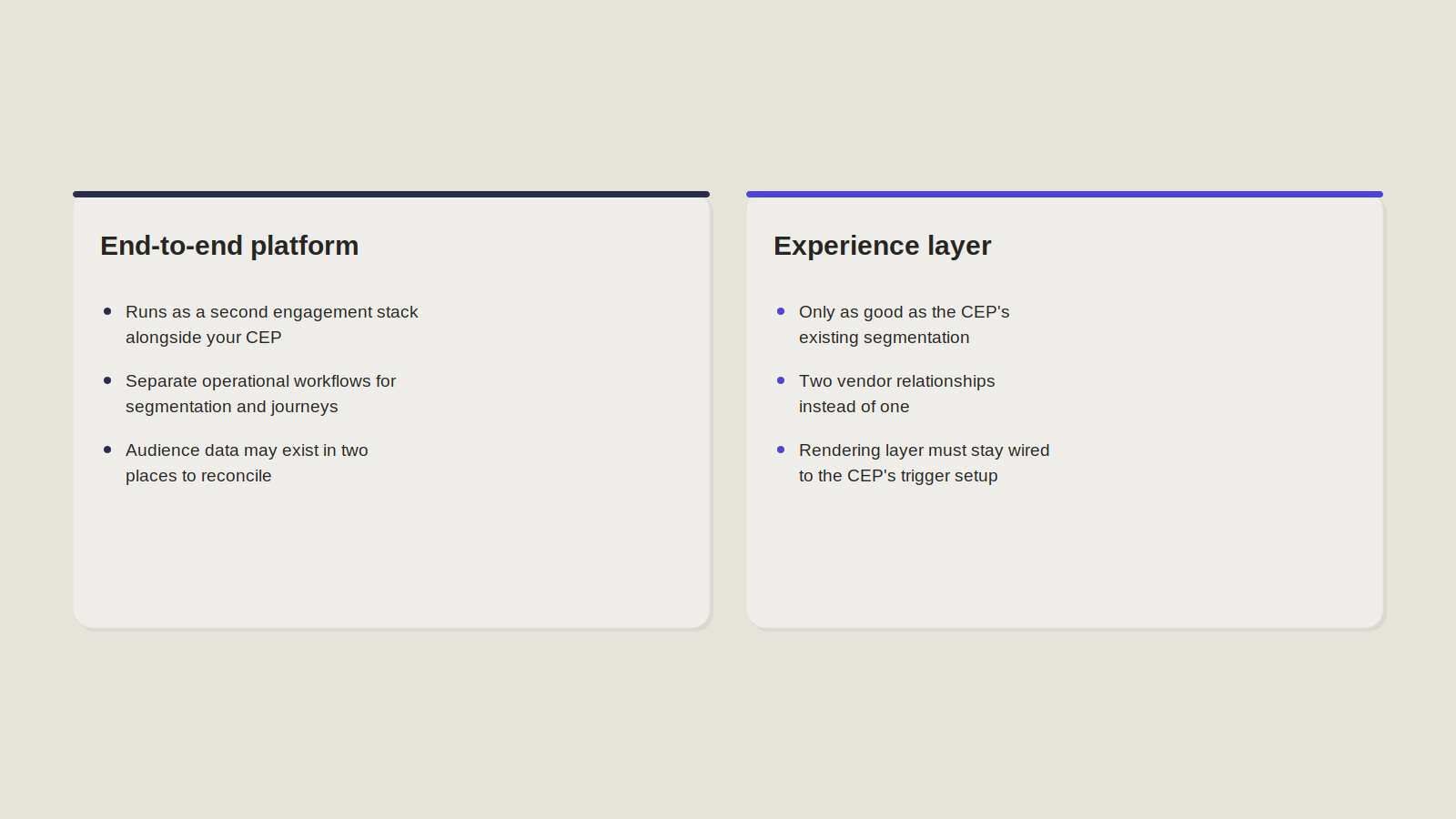
- Additional engagement stack. For a team that already runs a CEP, this model means running two systems that both do targeting and campaign logic, not one system plus a rendering layer.
- Separate operational workflows. Segmentation, journeys, and in-app campaigns live in different tools than whatever's already handling push and email, which means two places to check, two places that can disagree.
- Additional customer data management. Depending on how deep the integration runs, audience data may exist in two places rather than one, which is an operational cost even when both copies stay accurate.
Experience Layer
Pros
- Preserve existing lifecycle investments. No migration of audiences, journeys, triggers, or campaign logic. Whatever a team already built in its CEP keeps running exactly as it did before.
- Single source of truth. Analytics stay inside the existing CEP. Existing dashboards keep working. There's no second reporting system to reconcile against the first.
- No duplicate customer data layer. No second customer database gets created. The CEP's identity data stays the only copy that matters.
- No additional PII replication. Personally identifiable information stays inside the platform that already governs it, which is less surface area for a security or compliance review to cover.
- Better data quality. No audience synchronization step means no sync lag, no drift, and no need to recalibrate conversion numbers against a second source.
- Lower total cost of ownership. Fewer integrations to maintain, lower migration effort, and no second vendor's worth of targeting infrastructure to keep running in parallel.
Considerations
- Depends on the CEP's own segmentation being good. An experience layer only renders against whatever targeting the CEP hands it. If the CEP's segmentation is thin, the in-app experience inherits that limitation, this model doesn't fix upstream targeting problems.
- Two vendors instead of one. A team is now managing a CEP relationship and an experience-layer relationship, two contracts, two support channels, two things that can have an outage, even though only one of them owns targeting.
- Added integration surface. The rendering layer has to stay correctly wired to the CEP's trigger and campaign-key setup. It's a one-time integration, not an ongoing sync, but it's still a dependency that has to be configured correctly and maintained as the CEP's own setup evolves.
Side-by-Side Comparison
Plotline and Digia compared across architecture, data ownership, and best-fit buyer
| Dimension | Plotline | Digia |
|---|---|---|
| Philosophy | Standalone in-app engagement system with its own targeting and campaign logic and native rendering, per Plotline's integrations page | Native rendering layer for a CEP a team already runs, per Digia's CleverTap integration page |
| Architecture | Imports and holds its own copy of audience segments, keeping them automatically in sync with the source tool | Holds no audience or targeting layer of its own. The CEP decides who and when, Digia renders what |
| Existing CEP compatibility | Integrates with tools already in place, pulling cohorts and event triggers from platforms like Amplitude, Mixpanel, and Braze, and syncing performance data back out | Plugs directly into CleverTap, MoEngage, or WebEngage. Existing user IDs, cohorts, and attributes map directly to Digia's audience filters, no separate targeting setup |
| Segmentation | Owns its own segment logic once cohorts are imported | Entirely CEP-owned. Digia has no segmentation logic of its own to configure or maintain |
| Triggering | Fires based on imported events and its own campaign logic | Fires only when the CEP's own trigger fires. Digia intercepts that trigger and resolves the matching layout |
| Analytics and reporting | Runs a full analytics suite: event trends, conversion funnels with drop-off points, click heatmaps, and masked session recordings, per Plotline's A/B testing page. Performance data also syncs back to connected CRM and analytics tools, per its integrations page. | Tracks impression, click, and conversion rates per campaign in its own dashboard, plus survey results and response rates. Digia also syncs campaign performance back to the connected CRM and analytics tools. |
| Data ownership | Holds an imported, synced copy of segment data alongside the source system | No second copy. Identity and segment data stay owned entirely by the CEP |
| Experience rendering | Native rendering via SDK, with a broad component library: spotlights, Stories, tooltips and coachmarks, video, grids, banners, games, streak mechanics | Native rendering via SDK, resolved against a pre-fetched, cached layout. Components: Nudge (overlay), Guide (anchored tooltip or spotlight), Inline (embedded content) |
| Best-fit customer | Consumer mobile apps in EdTech, FinTech, HealthTech, Gaming, and Commerce, particularly teams with no CEP or limited CEP investment already in place | Consumer mobile apps with an existing CleverTap, MoEngage, or WebEngage deployment who want native in-app rendering without duplicating targeting infrastructure |
Which Architecture Is Right for You?
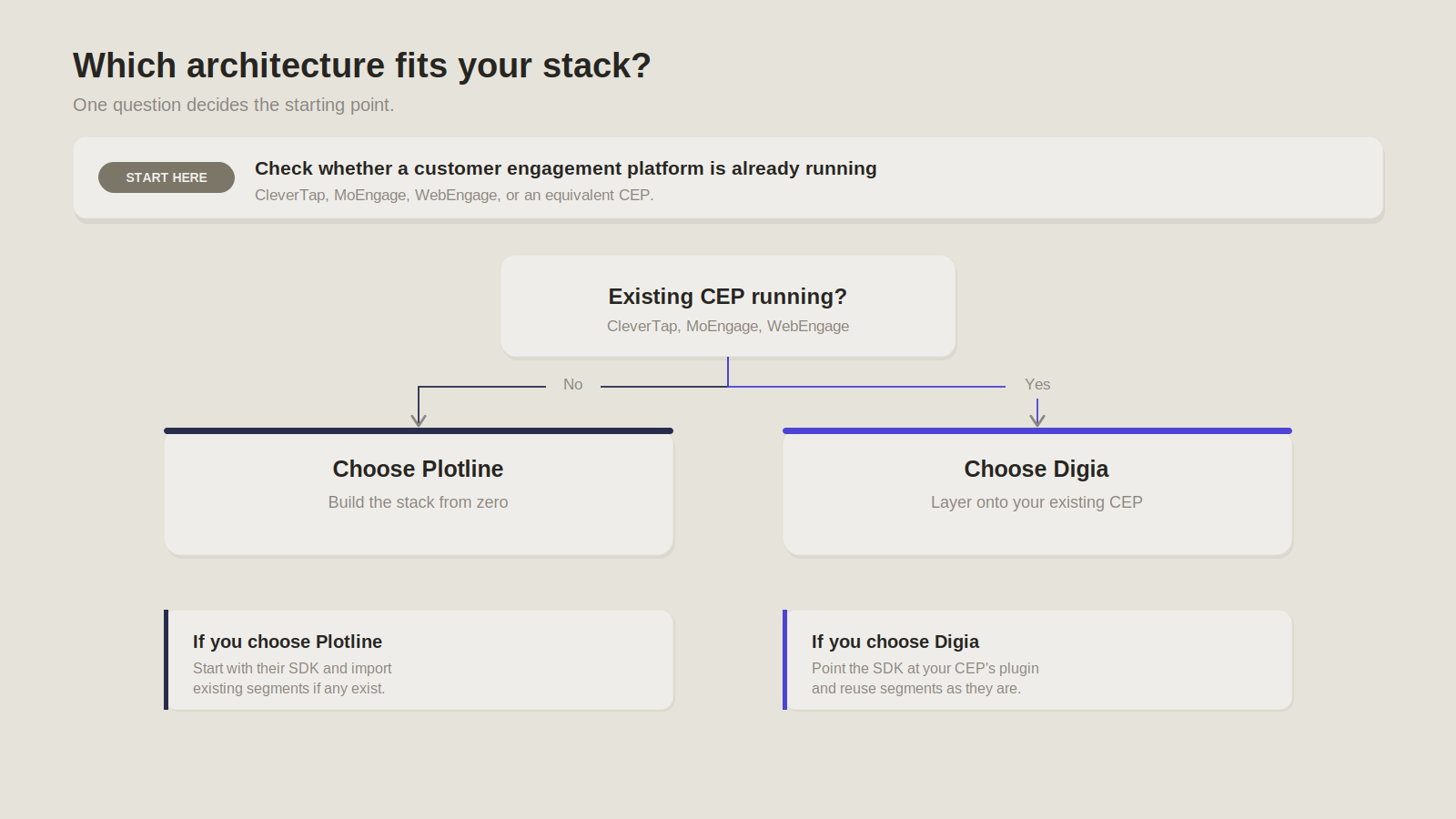
Choose Plotline if...
- You're building your engagement stack from scratch, with no CEP already in place. Per Plotline's own positioning, the platform is built for product and growth teams at consumer mobile apps who need targeting, triggering, and native in-app rendering in one system.
- You want one platform to own targeting, campaign logic, and in-app rendering end to end. Plotline's integrations page confirms it imports cohorts, triggers off events, and syncs performance data back to whatever analytics or CRM tools are already in place. That's a genuine convenience if the alternative is standing up a full CEP first just to get in-app experiences running. One dashboard, one login, one place campaigns live and get measured.
- You have minimal investment in an existing CEP, so importing and managing your own segment data isn't added overhead, it's the only option. The tradeoff of a second copy of audience data that can drift out of sync only bites a team that already has a first copy somewhere else to drift from. A team starting clean doesn't pay that cost, because there's no CEP-side copy to reconcile against.
Choose Digia if...
- You already use CleverTap, MoEngage, or WebEngage and don't want to duplicate the targeting work already done there. Digia's CleverTap, MoEngage, and WebEngage integration pages each confirm the same architecture: cohorts and user attributes map directly to Digia's audience filters, with the CEP staying the one place targeting logic actually lives. If a team has already spent months building out segmentation and journey rules, this is what avoids rebuilding that work a second time.
- You want richer, native in-app rendering without rebuilding or migrating your lifecycle infrastructure. Digia's component set, Nudges, Guides, and Inline content, renders natively and resolves against a locally cached layout rather than a live network call. A team gets that rendering quality on top of what it already runs, not instead of it.
- You want your existing segmentation, triggering, and analytics to stay exactly where they are, with no second data layer to keep in sync. The CEP keeps deciding who and when, Digia only decides what gets shown. Campaign-level engagement analytics, impressions, clicks, conversions, and survey results, live in Digia's own dashboard (see feature adoption and insights and feedback), but audience-level segmentation reporting never leaves the CEP.
Key Takeaways
- Digia and Plotline solve the same underlying problem, native in-app experiences without an app release, through two different architectures. Plotline is a standalone engagement system. Digia is a rendering layer that plugs into a CEP you already run.
- Plotline owns its own targeting and holds an imported, synced copy of segment data. Digia owns no targeting layer at all, it only renders what the CEP has already decided to trigger.
- The overlap in components, Stories, tooltips, spotlights, surveys, gamification, is real. What separates the two platforms isn't any single component, it's the architecture underneath all of them.
- Plotline's analytics run as a full standalone suite: funnels, heatmaps, session recordings. Digia's analytics live in its own dashboard for campaign-level metrics, while audience-level segmentation reporting stays entirely inside the CEP.
- An experience layer only renders against whatever targeting the CEP already has. If the CEP's segmentation is thin, Digia inherits that limitation rather than fixing it.
- Choose Plotline if there's no CEP in place yet, or minimal investment sunk into one, and you want one platform to own targeting, campaign logic, and rendering end to end.
- Choose Digia if CleverTap, MoEngage, or WebEngage already own your segmentation and journeys, and you want richer native rendering without migrating off what's already working.
- Neither architecture is more sophisticated than the other. The right one depends entirely on what's already running in your stack before you evaluate either platform.
Further Reading
From Digia
- Why In-App Campaigns Convert 8x Better Than Email
- Digia vs Appcues: Product Adoption Comparison
- Digia vs Braze: Customer Engagement Comparison
- Digia Engage Homepage, Digia Engage, April 2026
- CleverTap Integration, Digia Engage, April 2026
- MoEngage Integration, Digia Engage
- WebEngage Integration, Digia Engage
- Insights and In-App Feedback, Digia Engage, April 2026
- Feature Adoption, Digia Engage
- Gamification: Engagement Mechanics, Digia Engage, April 2026
- Nudges, Digia Engage
- In-App Videos: Rich Media Experiences, Digia Engage, April 2026
External Sources: All Claims Attributed
- Plotline Frequently Asked Questions, Plotline
- Plotline Interactive Demo, Plotline
- Plotline Integrations, Plotline
- Plotline Free Trial, Plotline
- A/B Testing, Feature Flags and Experimentation, Plotline
- Plotline Nudges, Plotline
- Plotline Insights and Feedback, Plotline
- Plotline Styling and UI Variations, Plotline
- Plotline LinkedIn Company Page, LinkedIn
- Push Notification Statistics, shno.co