


TL;DR:
- We tested CleverTap's in-app channel on a live Flutter app in July 2026, on a Nothing Phone (4a) running Android 16. Event-property triggering, message-level frequency capping, Liquid personalization, and deep-link CTAs all worked as documented, and the native templates render as native UI rather than inside a WebView.
- Render latency was the clearest user-facing weakness. Roughly two seconds passed between a bottom-nav tap and the overlay appearing, consistently. Testers had already started scrolling by then, and we repeatedly mistook the delay for a campaign that never delivered.
- The hardest problem was working out why a campaign underdelivered. CleverTap's Stats tab prints "Campaign limits applied" under the Viewed count without saying how many deliveries were dropped or which mechanism dropped them. Control group holdout, the message-level cap, and the account-wide Global Campaign Limit all produce the same three words, and CleverTap separately documents that two in-app campaigns cannot run on the same event, where the second reports zero views with no warning.
- Native in-app campaigns default to Send every time the user qualifies, so there is no spam protection until someone sets a cap. Our uncapped interstitial reached 41 impressions and 29 clicks. When we set a per-user cap of three, it held at exactly three on device.
- Once a campaign is live, only content is editable. Audience, segment, trigger, occurrence limits, and delivery preferences are all locked, so any change beyond copy means stopping the campaign and rebuilding it, which also resets its stats.
- CleverTap owns targeting, segmentation, capping, and measurement, and it does that work well. The friction sits downstream of the trigger decision, in what renders and how fast a team can change it. Pairing CleverTap's targeting with a dedicated native rendering layer closes the second half without touching the first.
Quick verdict
CleverTap decides who qualifies and when to fire better than almost anything else in its price band. The time it costs a growth team gets spent afterwards, working out what actually happened.
In July 2026 we built and shipped in-app campaigns against a live Flutter app on a Nothing Phone (4a) running Android 16, watching both the device logs and the CleverTap dashboard at every step. Trigger conditions evaluated precisely. Frequency capping did what it promised. Getting from the tap to the pixels took about two seconds every time, which is long enough that a tester scrolls past the moment the message was written for. Personalization worked on the first try once we used the right syntax. Then we built a campaign that combined an occurrence limit, a 20% control group, and a global-limit exclusion, confirmed on device that both the trigger and the campaign limits matched, and watched deliveries get dropped anyway. The dashboard's entire explanation was three words, and those three words cover three different mechanisms.
That single gap is the through-line of this review. CleverTap gives you a lot of delivery controls and very little visibility into which one just fired.
CleverTap in-app scorecard
Scores reflect what we could verify on a Nothing Phone (4a) running Android 16 in July 2026, not a full multi-platform audit. Each row names the evidence.
CleverTap in-app scorecard, July 2026
| Category | Score | What drove the score |
|---|---|---|
| Trigger accuracy | 9/10 | Custom event plus property filter fired reliably across 41 recorded impressions with no false positives. Does not work on API-raised events. |
| Segmentation | 8/10 | Event-property matching is exact and dependable. Matching is case and whitespace sensitive with no warning when a value never matches. |
| Personalization | 8/10 | Liquid-style tokens with fallbacks and inline editor hints. What rendered on device did not match the editor preview. |
| Delivery control | 7/10 | Message-level cap set to three held at exactly three. No default cap at all, and the account-wide cap throttles without naming itself. |
| Render latency | 5/10 | Roughly two seconds from tap to visible overlay, consistently. Long enough that the user has moved on, and long enough to be mistaken for non-delivery. |
| Native feel | 8/10 | Native templates render as native UI, a genuine advantage. Custom HTML templates run in a web surface. |
| Gamification | 4/10 | Spin the Wheel and Scratch Card work once configured, but configuration means editing raw HTML in an editor that would not scroll. |
| Ease of building | 6/10 | The Advanced In-App Builder is a real WYSIWYG canvas. Campaigns become structurally immutable the moment they go live. |
| Reporting | 4/10 | Clean numbers on a delivering campaign. The A/B report declared a winner at 0% conversion on nine impressions, and the CTR cutover date differed between two campaigns in one account. |
| Delivery debugging | 5/10 | A throttled campaign reports one generic reason that maps to three unrelated mechanisms, with no count of what was dropped. |
| Overall | 6.4/10 | Strong targeting engine, thin feedback loop once something goes wrong. |
Who CleverTap in-app messaging is for
Buy it if this describes you
You are running a consumer mobile app with meaningful volume and you want push, email, WhatsApp, in-app, and journey orchestration decided from one segmentation engine. You have a growth team that will invest a few weeks learning the platform's vocabulary. Your in-app use cases are triggered overlays: a promo interstitial, an offer banner, a feedback prompt after a specific action. You want to start small without a procurement cycle, which the $75 per month Essentials plan and its 30-day trial make possible.
For that profile, CleverTap is a strong buy. The targeting layer we tested is precise, the analytics depth is real, and G2 reviewers rate the platform 4.6 out of 5 across 654 reviews, with analytics and customer support as the two most frequently praised attributes.
Look elsewhere if this describes you
Your in-app roadmap is built around experiences rather than messages. Onboarding walkthroughs that match your design system. A recommendation carousel that sits inside a scrollable screen rather than on top of it. Gamified reward moments that need to feel like part of the product. A survey embedded in a settings page.
CleverTap's in-app templates are all overlays: cover, interstitial, half-interstitial, header, footer, and banner. The one channel built for placement inside your own layout is Native Display, and CleverTap's setup documentation is direct about the tradeoff. Native Display delivers the content and expects you to use the app's inherent design elements to render it, after completing integration steps for Android and iOS. The rendering work lands on your engineering team.
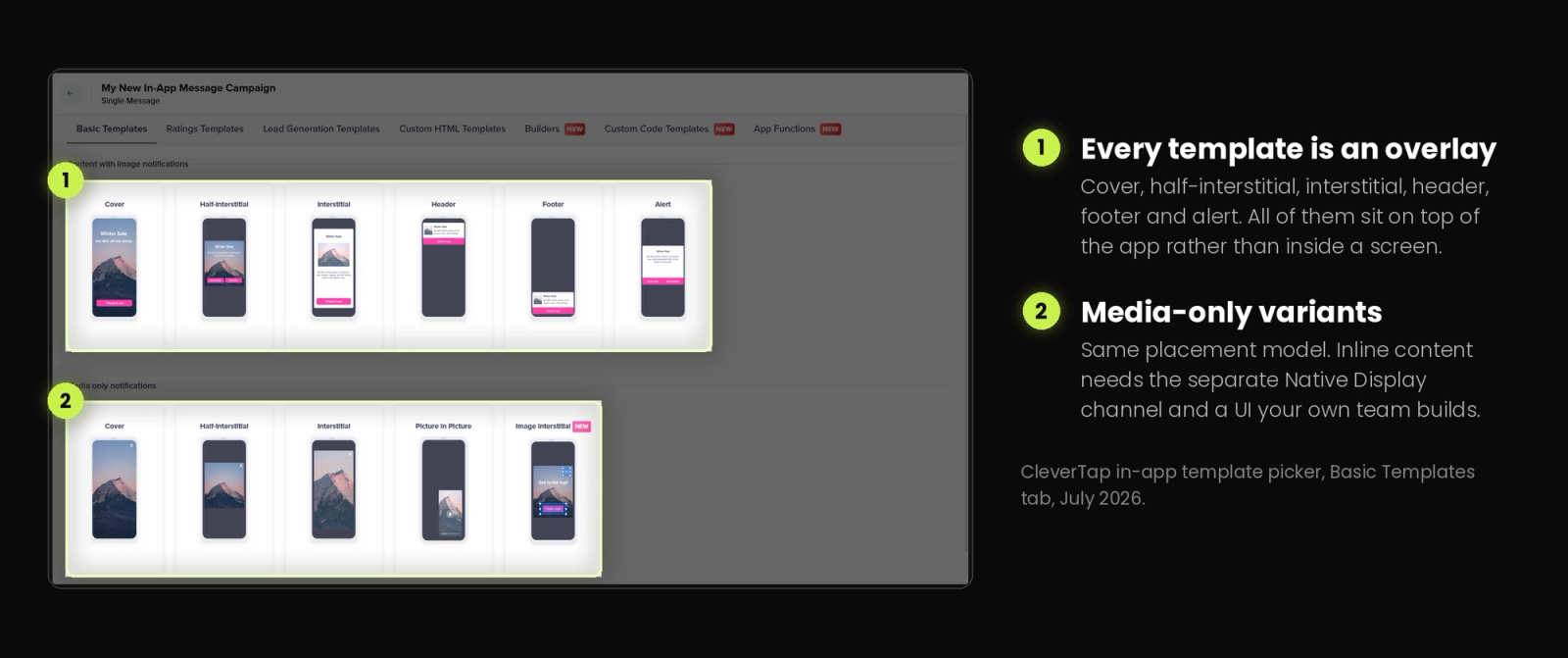
The second disqualifier is iteration speed. If your growth team expects to change targeting on a live campaign the way they change copy, CleverTap's post-launch model will frustrate them within a week.
How we tested
Editorial disclosure: Digia Engage integrates with CleverTap and is not affiliated with CleverTap. All CleverTap figures and behaviors below are drawn from CleverTap's own published documentation or from our own device logs as of July 2026.
The setup was a Flutter app running the CleverTap SDK in a sandbox project, on a Nothing Phone (4a) running Android 16, with the test device registered as a Test Profile in the dashboard. We built campaigns from the dashboard the way a growth PM would, then verified each one against the device logs rather than trusting the dashboard's own reporting.
What we exercised: interstitial campaigns on a custom event with a property filter, the Spin the Wheel and Scratch Card gamified templates, Liquid personalization with fallback values, deep-link CTAs into a specific in-app screen, message-level occurrence limits, account-level Global Campaign Limits, control-group behavior, and the delivery latency for both new campaigns and edits to existing ones.
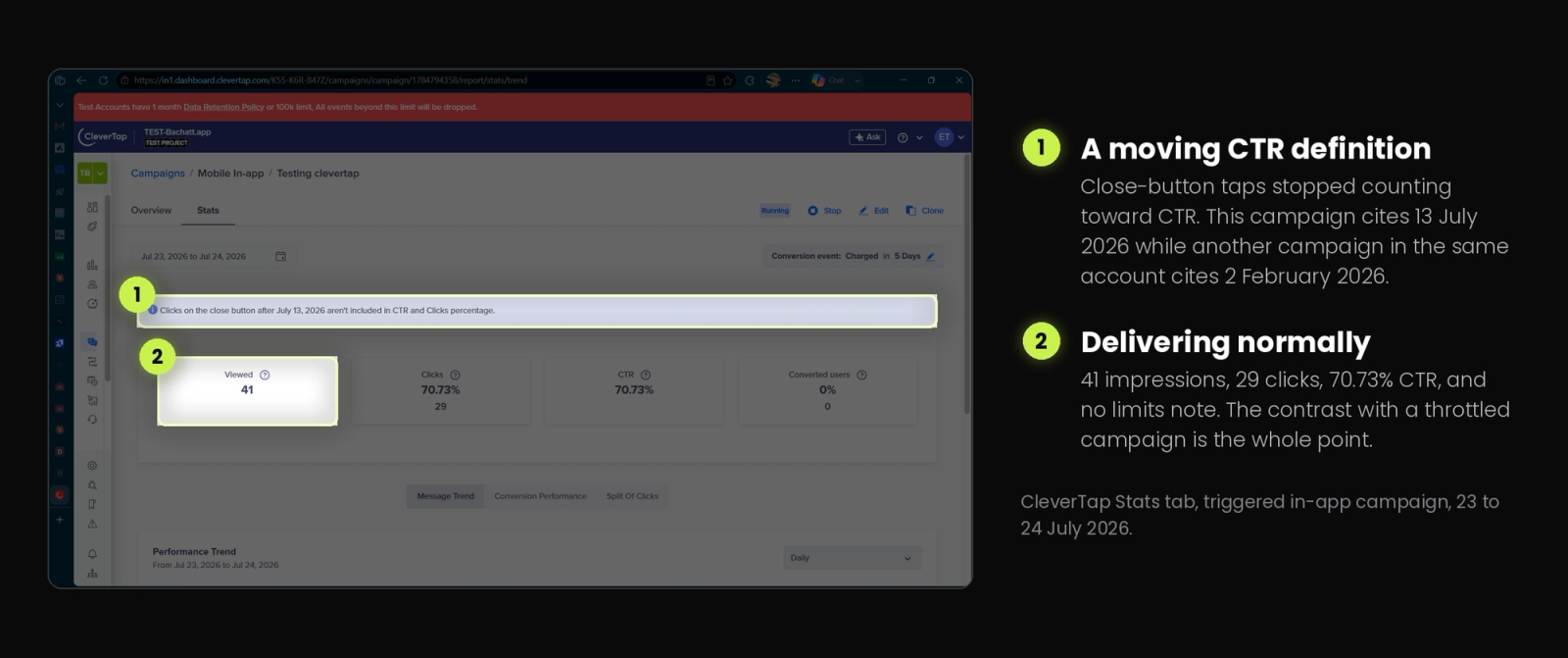
Across the round the uncapped interstitial reached 41 impressions and 29 clicks at a 70.73% CTR, while a separate capped A/B campaign recorded 9 impressions carrying CleverTap's own "Campaign limits applied" note. Both figures come from CleverTap's Stats tab on 24 July 2026 and both are discussed below.
One number needs explaining before it confuses anyone. We set a per-user occurrence cap of three on the cart-screen campaign and it held at three on the device, with no fourth impression. The dashboard's Viewed count is a total across every user and session in the test window, so 9 impressions and a 3-impression cap describe two different things.
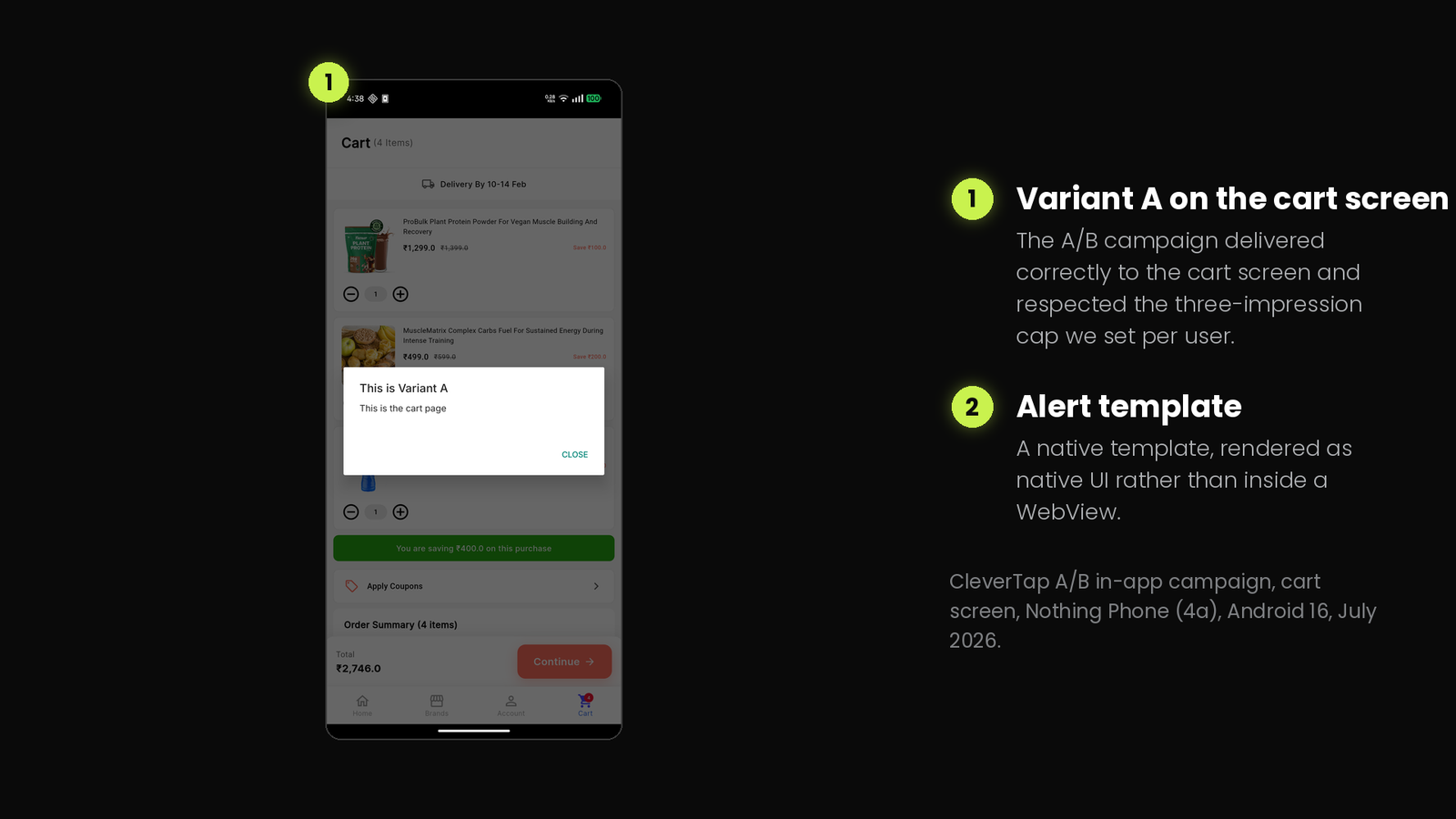
Three limits on the scope, stated up front. This was Android only, so nothing here speaks to iOS rendering parity. Four campaign types went untested: banner, half-interstitial, native display, and custom HTML. And this is one app on one device, not a fleet. Where a finding is a single observation rather than a repeated one, the text says so.
What CleverTap in-app does well
Event-property targeting is exact and reliable
We built a campaign triggered on a custom event with a property filter attached, matching a single tab name. It fired every time the condition matched and stayed silent when it did not, with no false positives across the run. The decision logic is dependable. How long it takes for that decision to reach the screen is covered under weaknesses.
The one thing to internalize before you build campaign logic on top of this: the property match is exact. A trailing space or a case difference means the campaign never fires, and nothing in the dashboard tells you that the value you typed will never match anything your app emits. Confirm the exact string in your event stream before you save the campaign, not after you wonder why nothing showed.
One documented constraint that will surprise teams migrating from an outbound-first platform: in-app campaigns only work on events raised by the mobile SDK. An event pushed in through CleverTap's API will not trigger an in-app message. That is a design decision about real-time delivery rather than a bug, but it quietly rules out a whole category of server-driven use cases.
Message-level frequency capping does what it says
This is the finding we most wanted to verify, because a capping system that leaks is worse than no capping at all. We set an occurrence limit of three on a cart-screen campaign and ran the trigger repeatedly. The campaign displayed three times and then stopped. No fourth impression, no drift.
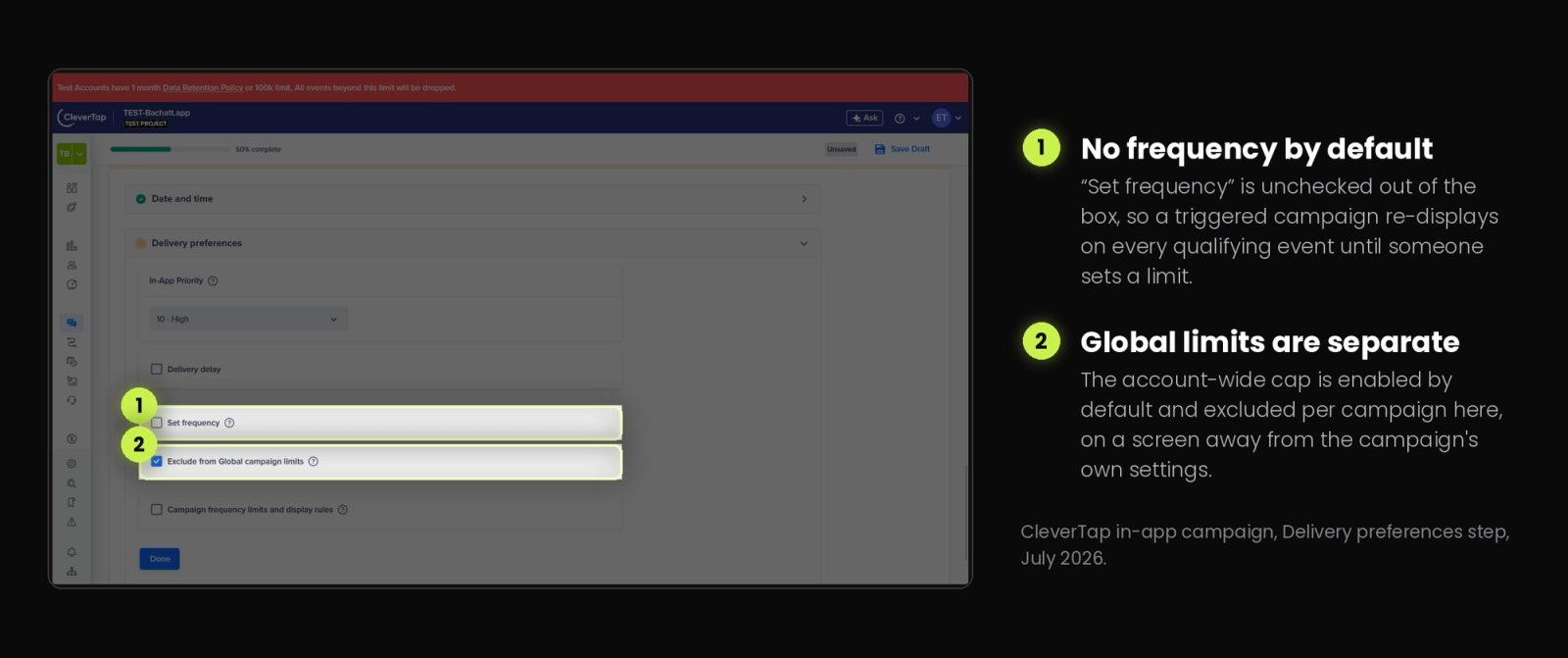
Worth knowing what the default is, though. CleverTap's own documentation lists Send every time the user qualifies as the default control option for message-level caps. A triggered in-app campaign shipped without an explicit limit will re-display on every single qualifying event, indefinitely. Our first interstitial did exactly that. For a campaign fired on a high-frequency event like a tab tap, that is a spam incident waiting for a launch date.
Personalization works, with autocomplete that actually helps
CleverTap uses Liquid tags for message personalization. In our tests, event-property tokens with a fallback value resolved correctly on device on the first attempt. The editor surfaces inline hints for inserting variables, which removes the guesswork that costs a first-time campaign builder a debugging session on platforms that expect you to already know the syntax.
One constraint to design around. Native template fields carry hard character limits, and the personalization token counts against them. Our message field capped at 75 characters, and a single Liquid token with a fallback value consumed 71 of those 75 before any real copy went in. Title fields were tighter still, at 20 to 25 characters depending on the template, and button text capped at 15. Write the copy against the limit rather than trimming it afterwards.
The remaining gap is visual rather than functional, and it is covered under weaknesses below.
Deep-link CTAs route cleanly
CTA buttons routed correctly to the intended in-app screen every time. When no URL was set, the message dismissed cleanly with nothing left behind. That sounds like a low bar. It is the kind of thing that breaks often enough on other platforms to be worth confirming.
The Advanced In-App Builder is a genuine visual editor
CleverTap's Advanced In-App Builder is a WYSIWYG canvas with drag-and-drop element placement, stacking with bring-forward and send-backward controls, per-element styling, container position and size presets, entrance animations, and custom font loading from an uploaded or hosted CSS file. Banners are built from the same container element by setting a top or bottom position.
For a marketer building a standard overlay, this is a real no-code path and it is better than what several direct competitors ship. The caveats attach to gamified templates and to editing after launch, both covered next.
Native templates render natively
CleverTap's native in-app templates render as native UI rather than as HTML inside a WebView. Anyone who has watched a WebView-rendered campaign land on top of a native app knows the difference: fonts sit slightly wrong, transitions lag by a frame, touch response feels a half-step behind. We did not see that with CleverTap's native templates. This is a meaningful architectural advantage over platforms that route every in-app template through a browser surface, and it deserves saying plainly in a review that spends most of its length on problems. Custom HTML templates are the exception, since by definition they render web content.
Where growth teams hit a wall
A suppressed campaign will not tell you why
This is the finding that matters most, and it is the one we would want to know before signing.
Our final test campaign combined three delivery controls at once: an explicit occurrence limit, a 20% control group, and the "Exclude from Global limits" toggle, on a numeric-condition trigger. The device-side log confirmed that both the trigger condition and the per-campaign limits passed, and delivery was still being suppressed.
What CleverTap's Stats tab told us was a single line of grey text under the Viewed count: "Campaign limits applied." That campaign recorded 9 impressions. The label does not say how many deliveries were dropped, and it does not say which of three unrelated mechanisms dropped them:
- The user landed in the 20% control group holdout and was correctly excluded.
- The message-level occurrence limit was evaluated server-side and rejected the impression.
- The account-wide Global Campaign Limit fired despite the exclusion toggle.
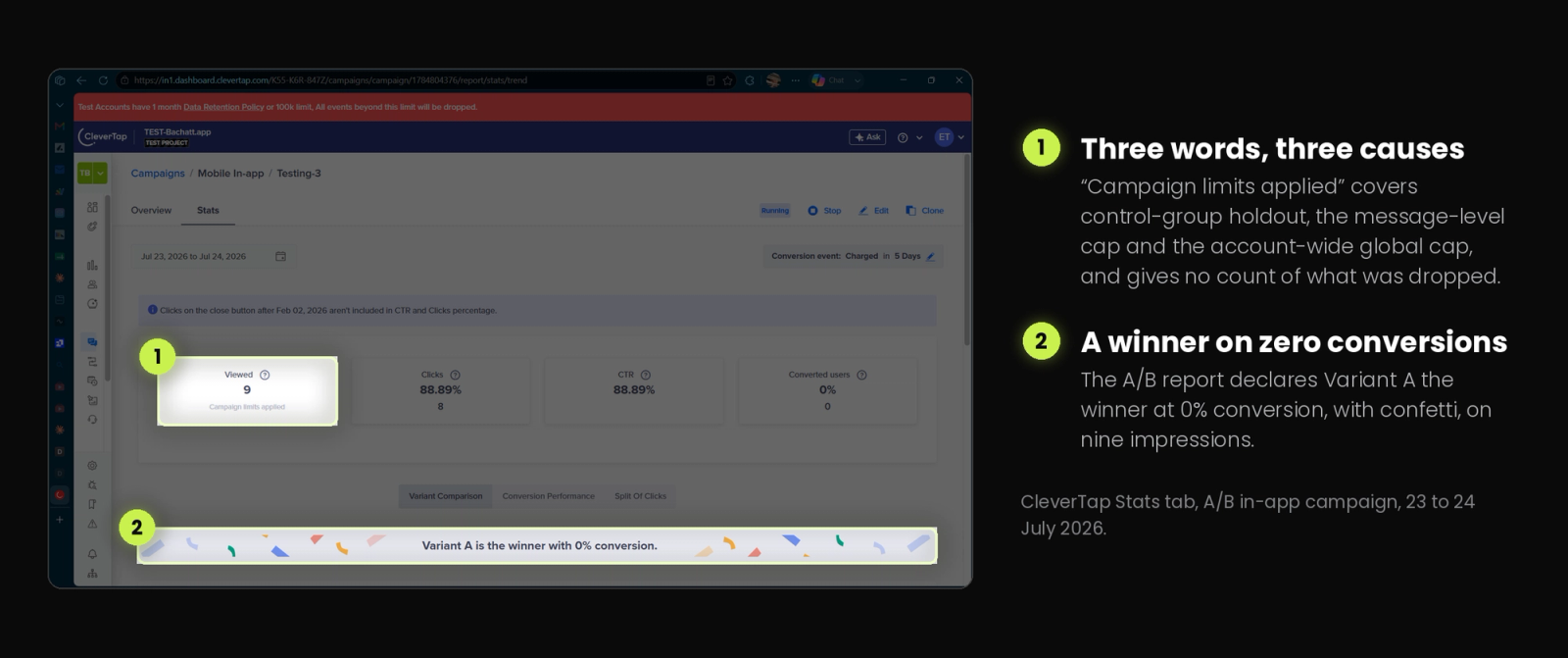
Compare that against the triggered interstitial from the same round, which reported 41 viewed, 29 clicks, and a 70.73% CTR with no limits note attached. The contrast is the whole point. When CleverTap is delivering, the numbers are clear. When it stops delivering, you get three words that fit three explanations.
That third possibility is not exotic. CleverTap's documentation states that the Global Campaign Limit is enabled by default and has to be explicitly cleared under the campaign's Who section. A campaign can pass every check visible on its own page and still be throttled by an account-level setting configured months earlier by someone else, on a different screen.
Earlier in testing we hit the same wall in simpler form. A campaign with a matching audience and a matching trigger silently never rendered, with no console line and no dashboard warning. CleverTap's frequency documentation says dropped messages are accounted for in the campaign report error table, and the error table does register them. What it does not do is name the mechanism.
For a growth team, the practical cost is measured in days. Underdelivery on a live campaign becomes a process of elimination run by changing one setting at a time and waiting for propagation, rather than reading an answer off a screen.
Two seconds is long enough for the moment to pass
Every triggered campaign in our testing took roughly two seconds to appear, measured from the tap to the visible overlay, and the figure was consistent across every retrigger.
Two seconds sounds small written down. Watch a real user in that window. We triggered on a bottom-nav tap into a brands screen, which is a deliberate navigation action, and by the time the interstitial rendered the screen had already loaded and a tester had started scrolling. The message arrives on top of an interaction the user has already committed to, so it reads as an interruption instead of an answer to what they just did. For a promo overlay that is mildly annoying. For an onboarding tooltip pointing at an element the user has already scrolled past, it is broken.
The compounding effect is on debugging. More than once during testing we recorded a campaign as undelivered and started checking triggers and limits, when the message was simply still on its way. Two seconds is right at the boundary where a human stops waiting and starts diagnosing. Set against the suppression opacity described above, this is the second reason a team ends up investigating delivery problems that were never problems.
This is a characteristic of the render path, and the condition itself evaluated correctly every time. What we measured is the distance between the decision and the pixels.
Live campaigns are structurally immutable
Once a campaign goes live, only the template and its content remain editable. The target audience and segment, the trigger event and its conditions, occurrence limits, and every delivery preference including the global-limit exclusion are locked. Changing any of them means stopping the campaign and effectively rebuilding or cloning it.
This is a product decision rather than a defect, and there is a defensible argument for it: a campaign whose targeting mutates mid-flight produces analytics nobody can trust. It still imposes a real cost on the iterate-and-measure loop that growth teams run on. Copy changes ship in minutes. Everything else restarts the campaign and its stats.
It also compounds the previous problem. Debugging a silently suppressed campaign requires changing delivery settings, which requires stopping and rebuilding the campaign, which resets what you were measuring.
Edits propagate far slower than new campaigns
A newly created campaign reached our test device within seconds. Edits to an existing campaign took roughly five minutes to reach the same device.
CleverTap's troubleshooting documentation gives the mechanism, and it is worth quoting the number: the warm-up time for a campaign is three to five minutes. Our observation sits at the top of that documented range. The asymmetry is what catches people out. If your first campaign synced in seconds, a five-minute wait on an edit reads as "my change didn't work," and the natural response is to change something else and make the debugging harder.
The same troubleshooting page also answers the most-searched failure mode on this channel: an in-app showing zero views after users have qualified. Along with warm-up time, CleverTap names a constraint that is easy to trip over at scale. Two in-app campaigns cannot run on the same event. The campaign created first displays. The others report zero views, with no conflict warning at build time. On a mature app where app_launched or screen_viewed is the natural trigger for half a dozen campaigns, that is a collision waiting to happen and a strong argument for trigger-naming discipline from day one.
Gamified templates are code, not no-code
CleverTap ships Spin the Wheel and Scratch Card templates. Both rendered and functioned correctly in our testing, and the underlying quality is good.
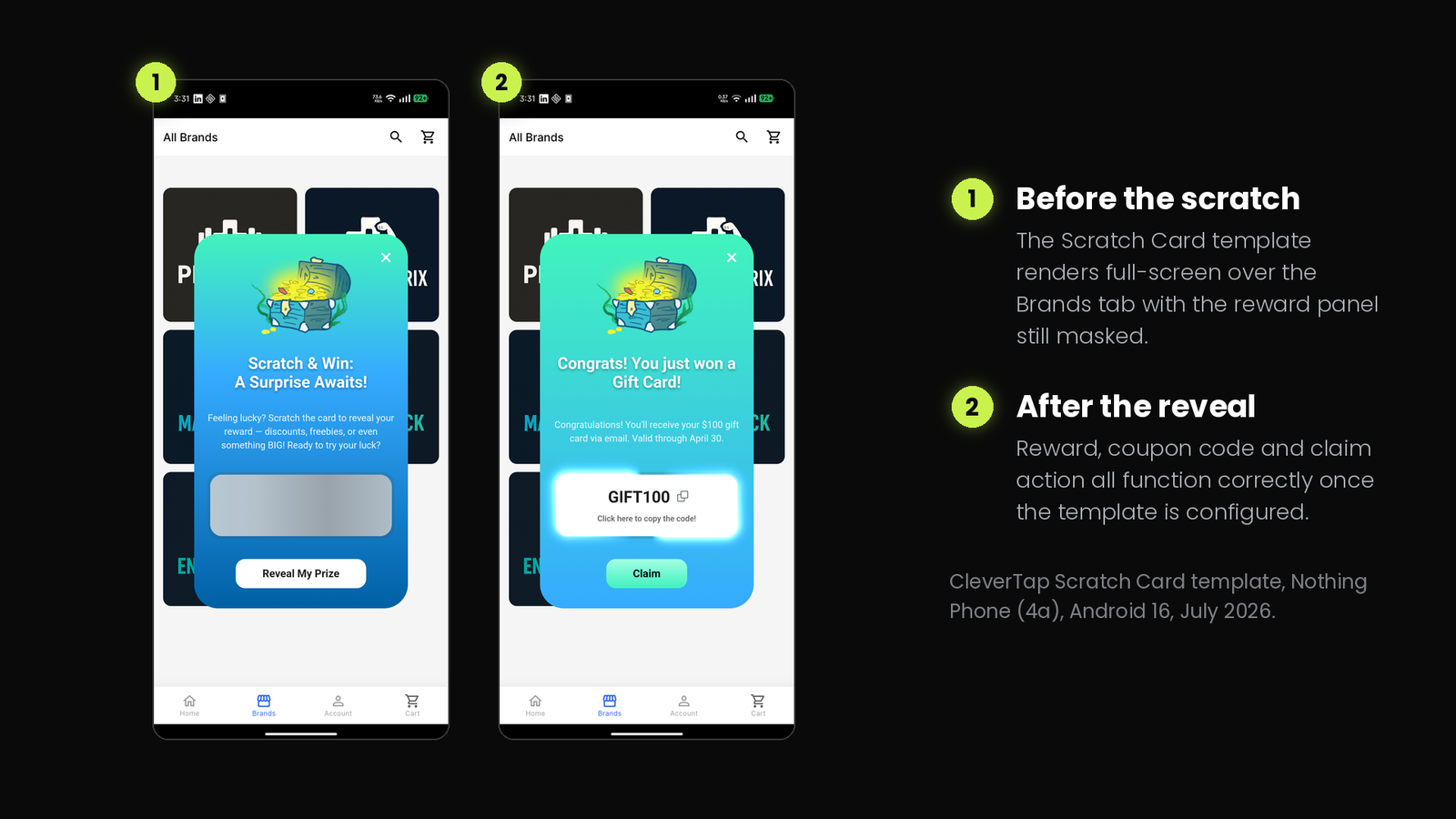
Getting there is the problem. They arrive as raw HTML, CSS, and JavaScript with a CONFIG object at the top of a script block. The config object genuinely lowers the bar, since changing rewards, colors, copy, and destination URLs does not require touching the canvas or animation logic. Customization still means opening a code editor and editing code directly. A growth PM who was promised a no-code gamification template will find a script tag.
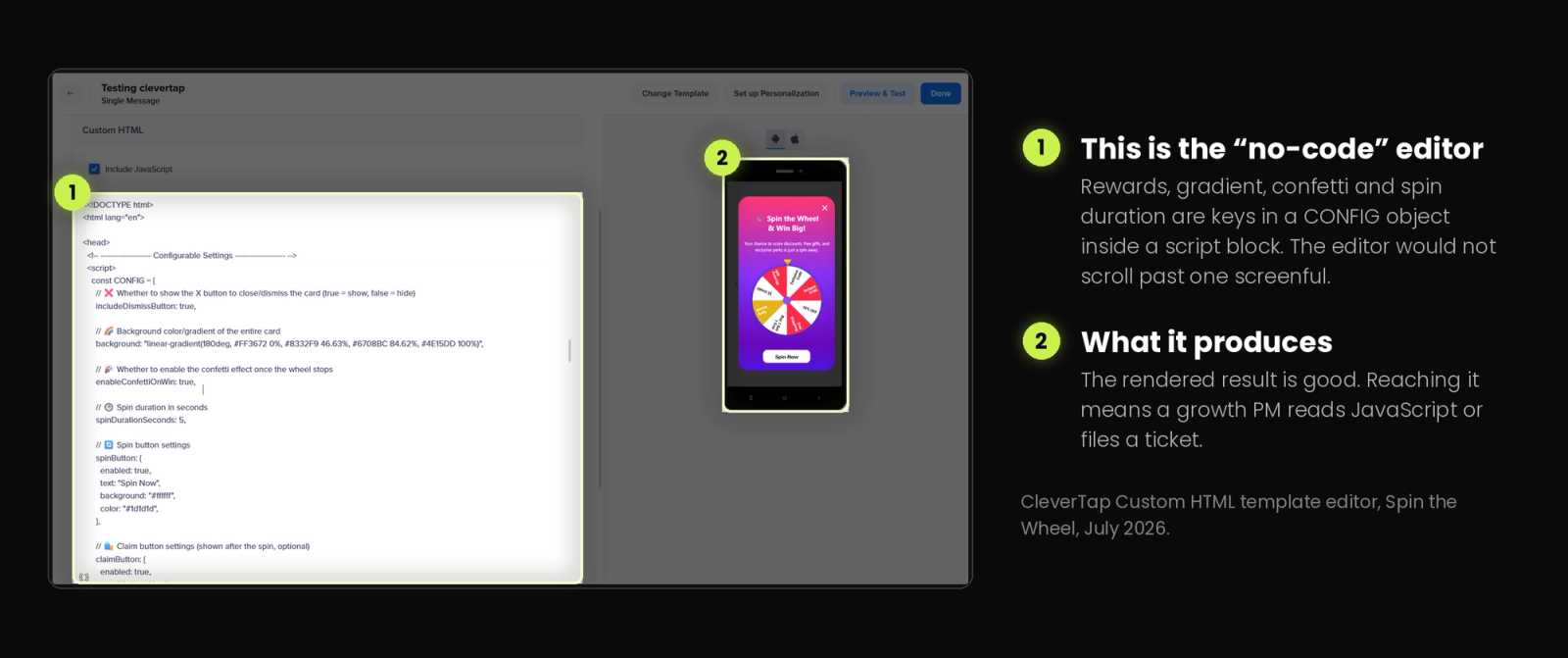
The in-dashboard code editor made this materially worse. In July 2026, on both Firefox and Microsoft Edge, the editor did not scroll once content exceeded the visible viewport. Everything below the fold was inaccessible. Cursor placement was also unreliable, landing in line gaps rather than snapping to the nearest character. Two browsers with identical behavior rules out a rendering quirk on our end. Editing any gamified template longer than one screenful was, in practice, very difficult.
We are dating this finding deliberately. A broken editor component is the kind of thing that gets patched, and if CleverTap has fixed it since July 2026, this paragraph is out of date rather than wrong.
One related note we want to correct rather than repeat as a complaint. Both gamified templates ship with a non-functional wzrk:// placeholder as the default claim and close button URL, and a first-time tester who does not replace it will get a CTA that appears broken. That placeholder is not an oversight. CleverTap's own troubleshooting guide documents a dummy wzrk:// link as the supported way to close an in-app notification from a button, since the link resolves to nothing and the message dismisses. The default is the documented dismiss idiom. The real gap is discoverability, because nothing in the template says so.
The editor preview and the device render do not match
Personalization worked functionally. Fallback syntax resolved, tokens populated, nothing errored. What rendered on the device looked visually different from what the editor previewed.
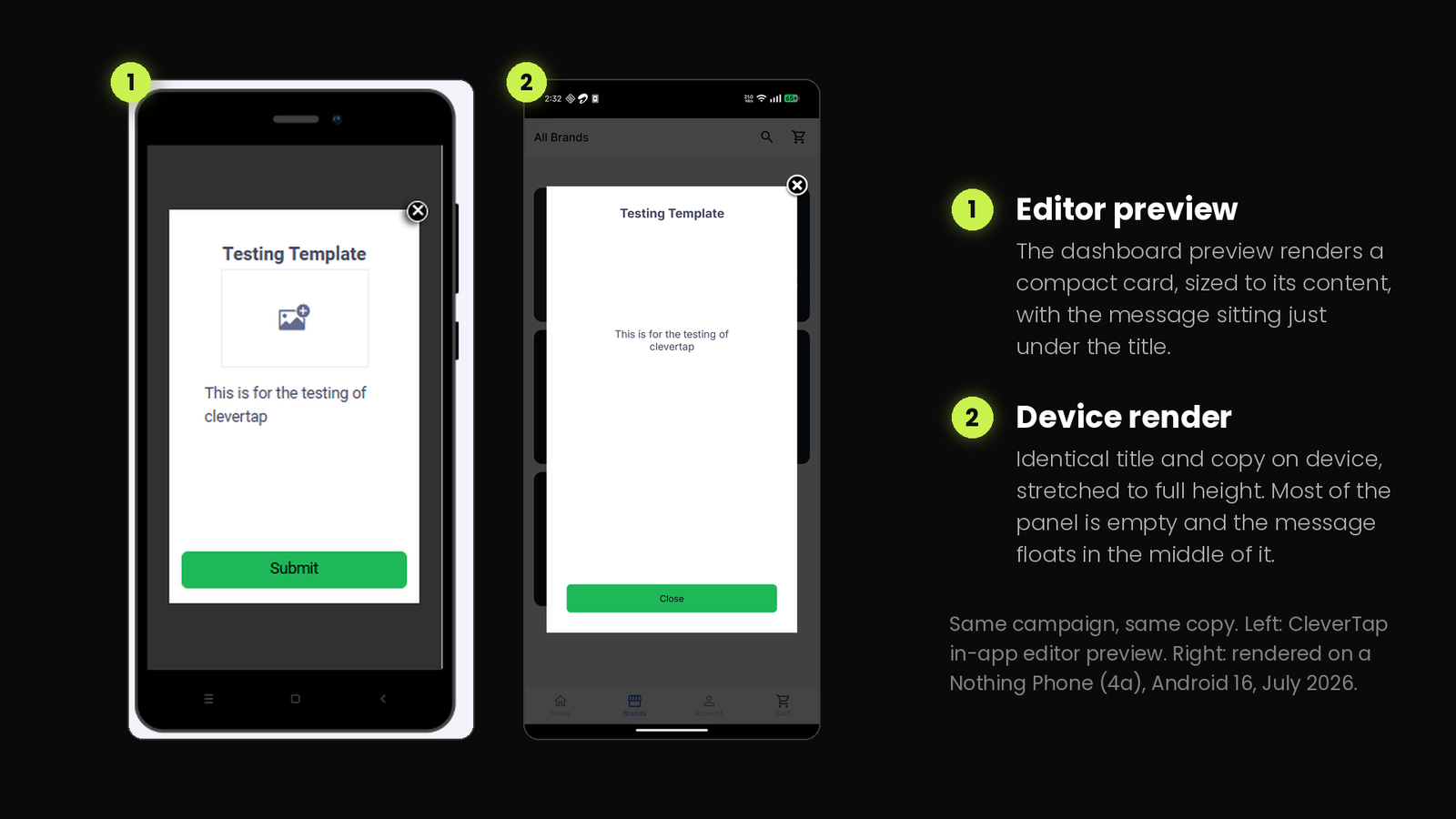
The campaign carried one title and one short line of body copy. In the dashboard preview the card sizes itself to that content, so the message sits directly under the title and the card ends shortly after. On the device the same campaign stretched to nearly the full screen height, leaving the message stranded in the middle of a mostly empty white panel.
The likely cause is the container size setting, which offers preset heights rather than fitting to content. That is a configuration choice rather than a defect, and knowing to check it is the point. The preview does not reflect the setting, so a campaign gets approved on one shape and ships in another.
We recorded this on one template configuration, so treat it as a flag rather than a measured defect across the whole template set. It is still the kind of gap that costs a design review cycle.
The A/B report declared a winner on zero conversions
Our A/B campaign ran two variants against a Charged conversion event over a five-day window. Neither variant converted anybody. Converted users read 0%, and the count underneath read 0.
CleverTap's Stats tab announced that Variant A was the winner with 0% conversion, framed in a banner with confetti graphics.
Nothing here is factually false. Variant A did receive more clicks, on nine total impressions. Presenting that as a settled result is a different matter, because a growth team skimming a report is being handed a conclusion that the underlying sample cannot support. Anyone using CleverTap's A/B reporting should check the impression count and the conversion count before acting on a declared winner, particularly on in-app campaigns where volumes build slowly.
The CTR definition changed under teams' feet
Sitting above the stats on our A/B campaign was a notice from CleverTap: clicks on the close button after February 2, 2026 are no longer counted in the CTR and Clicks percentages.
A second campaign in the same account, viewed on the same day, carried the same notice with a different date: July 13, 2026. Two campaigns, one account, one afternoon, two stated cutover dates for the same metric change. We have not established which date governs which campaign, and CleverTap's documentation does not explain the per-campaign variation. Anyone reconciling in-app CTR across a reporting period should check the notice on each campaign rather than assuming one account-wide cutover.
That is the correct change to make. A dismissal is not engagement, and counting it as one inflates every in-app CTR a team has ever reported. The problem is what it does to a time series. Any in-app CTR figure spanning that date is two different metrics stitched together, and a campaign that looks like it declined in early 2026 may simply have stopped being credited for people closing it.
It also puts a ceiling on how much weight a headline percentage deserves. Our A/B campaign reported an 88.89% CTR off 8 clicks on 9 impressions. At that sample the figure carries almost no information, and the dashboard presents it at the same visual weight as the 70.73% drawn from 41 impressions on the campaign beside it. Anyone building a reporting deck off in-app campaign stats should pull the raw counts rather than the percentages, and should check whether their historical baselines straddle the cutover notice on that specific campaign.
Small friction that adds up
Two more items from the log, both minor on their own.
A paused test campaign could not be resumed. Once stopped, the path forward was a rebuild. And the dashboard logged us out at unpredictable intervals across more than one browser during a working session, which is a small tax that becomes a real one when a five-minute propagation wait sits on the other side of every re-login.
There is also a documentation mismatch on image size worth flagging for anyone building an asset pipeline. CleverTap's In-App Editor guidelines state images should be under 1 MB. In our testing the uploader enforced a hard cap at 500 KB. Design to the lower number.
Why these gaps exist
Every problem above sits on one side of a line, and it is the same line.
CleverTap was built as an analytics-led engagement platform. Behavioral analytics, segmentation, and cross-channel orchestration are the core investment, and it shows in exactly the places our testing found strength. Event-property matching is exact. Frequency caps are enforced correctly at both the message and account level. Control groups, A/B splits, journeys, and predictions all operate on the same event pipeline.
In-app messaging sits on top of that as one delivery surface among many. Push, email, SMS, WhatsApp, and in-app all inherit the same campaign lifecycle model, the same warm-up cycle, and the same delivery-preference stack. For push and email, an immutable live campaign and a three-to-five-minute warm-up are completely reasonable. For a channel that renders UI inside an app your team iterates on weekly, they are friction.
The suppression opacity comes from the same place. When one delivery-control stack serves six channels, "Campaign limits applied" is a label that has to be true for all of them. It is accurate, and it is useless to someone debugging a single in-app campaign on a single screen.
Deciding who should see a message is a data problem, and CleverTap solved it well. Rendering rich in-app UI and letting a team iterate on it weekly is a different discipline, one the platform treats as a delivery destination rather than a surface of its own. Nothing our testing found contradicts the targeting layer. The friction is entirely downstream of the trigger decision.
Pricing and what sits behind a plan gate
CleverTap prices on Monthly Active Users, and unlike several direct competitors it publishes a real entry point. The Essentials plan starts at $75 per month for an MAU tier of up to 5,000, scaling to 100,000 MAU, with a 30-day trial and no annual commitment. G2 lists the same $75 entry price with a free trial available. For a team that wants to build a real campaign before talking to a salesperson, that matters, and it is a genuine advantage over vendors who gate all evaluation behind a quote.
Two things to budget for beyond the base plan.
First, billing is not purely MAU-based. CleverTap bills on Monthly Billable Users, derived from MAU and processed data points, whichever is higher, with 10,000 data points allocated per MAU. A verified reviewer on TrustRadius flags the practical consequence, noting that cost rises when event volume scales because pricing keys off events rather than users alone. Event-heavy apps should model this before committing.
Second, in-app features are tiered. CleverTap's own editor documentation states that the Image Interstitial template is available only on the Advanced and Cutting Edge plans. Confirm which in-app templates your tier includes before scoping a campaign roadmap around one.
On the qualitative side, the most consistent independent criticism is ramp time. G2's own review-attribute breakdown lists learning curve as a recurring theme across 654 reviews, alongside notes on complexity and initial setup. That maps closely to our own experience. The platform is not hard to use once you know where things live. Knowing where things live takes weeks.
Where each layer wins
Everything above sorts into two columns, and the line between them is consistent. Deciding who qualifies for an in-app message and when it should fire is a data problem, and CleverTap is genuinely good at it. Designing what appears on screen and changing it the following week is a product-surface problem that needs a different kind of tool.
Which layer owns which job
| The job | Winner | Why, from this testing |
|---|---|---|
| Deciding who qualifies | CleverTap | Exact event-property matching, user-property segments, and RFM and predictive models feeding the same segment engine |
| Deciding when to fire | CleverTap | Custom event plus property conditions evaluated reliably, with no false positives across the run |
| Enforcing how often | CleverTap | A message-level cap held exactly where we set it, with account-wide caps layered on top |
| Measuring and orchestrating | CleverTap | Funnels, cohorts, journeys, and cross-channel delivery across push, email, SMS, and WhatsApp |
| Rendering it before the moment passes | Digia Engage | We measured roughly two seconds from tap to overlay on CleverTap. Digia Engage states a sub-100ms server-side render |
| Designing what appears | Digia Engage | Native components configured from a dashboard instead of overlay templates plus HTML |
| Placing content inside a screen | Digia Engage | CleverTap in-app templates are all overlays, and inline content means building Native Display UI yourself |
| Shipping gamified moments | Digia Engage | CleverTap's Spin the Wheel and Scratch Card are configured by editing a script block |
| Changing a live experience | Digia Engage | CleverTap locks audience, segment, trigger, and delivery rules the moment a campaign publishes |
Nothing in the left column is a knock on CleverTap. A platform that scores 9 on triggering and 8 on segmentation has earned the top half of that table, and no rendering layer replaces any of it. The bottom half is where a growth team's week actually goes, and it is the half this review kept running into.
CleverTap in-app vs Digia Engage
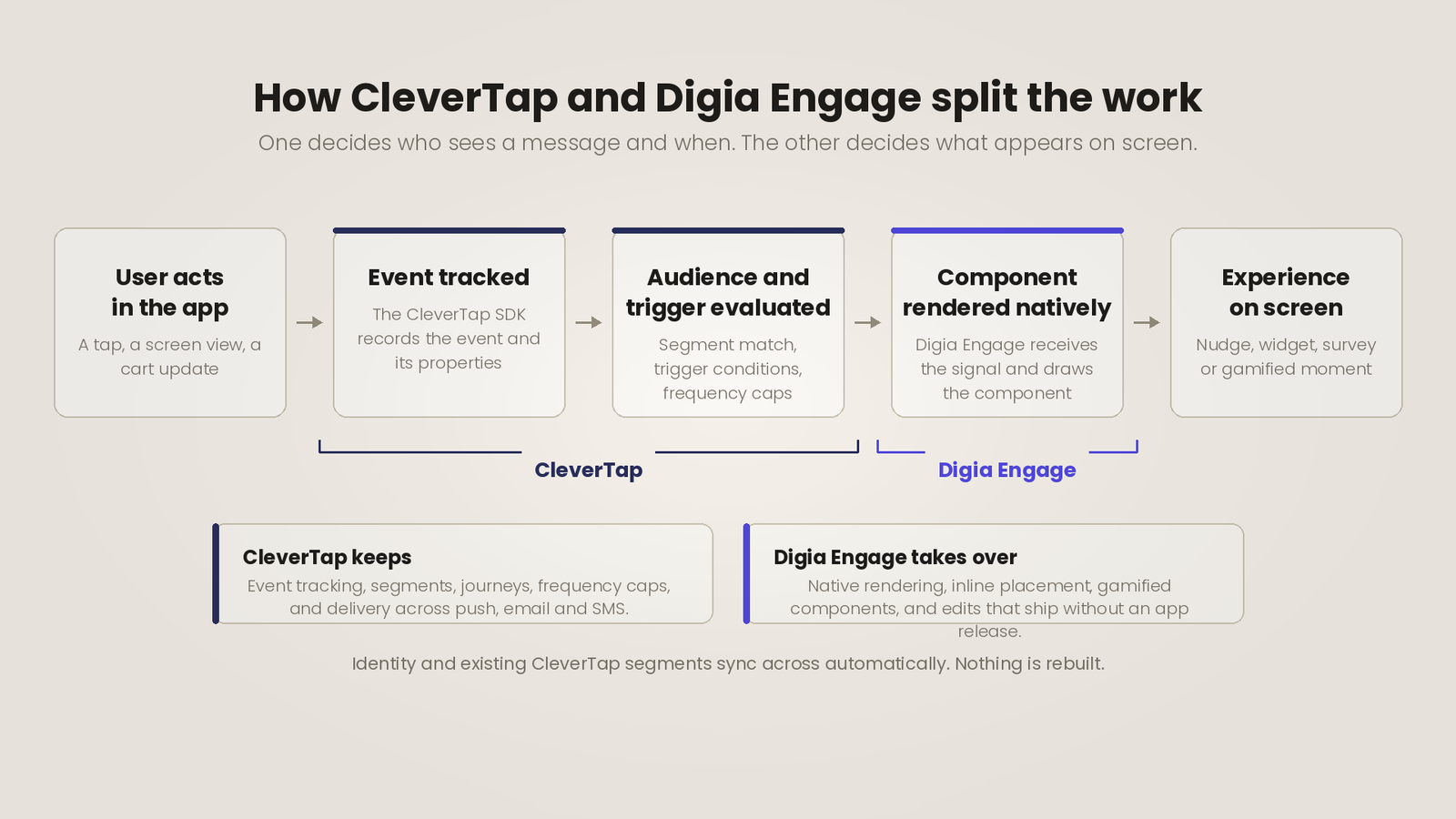
The split, in one line. CleverTap keeps deciding who qualifies for a message and when the trigger fires. Digia Engage runs as a direct integration on top of it, taking over what actually renders on screen and how quickly that rendering reflects a change.
These two are not substitutes, and framing them as competitors gets the architecture wrong. Identity and existing segments sync across automatically, so the segmentation work already done in CleverTap carries over rather than being rebuilt.
CleverTap In-App vs Digia Engage
| Capability | CleverTap In-App | Digia Engage |
|---|---|---|
| Rendering | Native templates render natively. Custom HTML runs as web content. | Native components rendered on device, no WebView path |
| Render latency | Roughly two seconds from trigger to visible overlay in our testing | Stated sub-100ms server-side render, not independently measured here |
| Placement | Overlay templates: cover, interstitial, half-interstitial, header, footer, banner. Inline content requires Native Display plus your own UI build | Widgets render inline inside your app's existing layout |
| Editing a live campaign | Content only. Targeting, triggers, and limits are locked once live | Component and delivery rules editable without stopping and rebuilding |
| Edit propagation | Documented three-to-five minute warm-up. We measured roughly five minutes | Changes apply server-side without a rebuild or a release |
| Gamification | Spin the Wheel and Scratch Card ship as editable HTML with a config object | Scratch cards, streak trackers, and spin-to-win as configured native components |
| Suppression visibility | "Campaign limits applied" covers control group, message cap, and global cap alike | Per-component delivery rules with the applied rule visible |
| Entry pricing | Published: $75 per month Essentials, 30-day trial | Quoted per deployment |
| Segmentation and orchestration | The core strength. Analytics, journeys, and cross-channel delivery | None. Reuses CleverTap's segments and events directly |
How the split works in practice
CleverTap keeps owning event tracking, segmentation, journey orchestration, and delivery across push, email, and SMS. A trigger fires from the same event and segment logic tested above. Digia Engage receives that signal on device and renders the configured component natively, from a dashboard built for growth PMs rather than engineers.
If your in-app roadmap is triggered promotional overlays, CleverTap handles that on its own and adding a rendering layer is unnecessary complexity. The cases below are the ones where our testing found a wall that a rendering layer removes.
Where the combination earns its keep
Gamified moments that do not require a code editor
This is the sharpest gap the testing found. CleverTap's Spin the Wheel and Scratch Card templates render correctly, and the destination is good. The path there runs through a config object inside a script block, in a dashboard editor that would not scroll past one screenful on either browser we tried in July 2026. A growth PM who wants to change a reward tier is either learning to read JavaScript or filing a ticket.
Digia's gamification components cover scratch cards, streak trackers, and spin-to-win as configured native components. Reward values, copy, colors, and destinations are fields in a dashboard. The trigger and the audience still come from CleverTap.
Experiences that land while the moment is still live
The two-second gap we measured is the difference between a message that answers what a user just did and a message that interrupts what they moved on to. Digia Engage states a sub-100ms server-side render for its native components, roughly an order of magnitude tighter than what we recorded, though that figure is Digia's own and was not measured in this testing round.
Where that matters is anything anchored to a specific element or a specific instant. A tooltip pointing at a button the user is looking at now. A reward animation on the tap that earned it. A survey at the moment an action completes. Those use cases either work immediately or stop working at all, and CleverTap keeps deciding who sees them.
Widgets that sit inside a screen rather than on top of it
Every CleverTap in-app template is an overlay. Native Display is the documented route to inline content, and CleverTap's own setup page is clear that it hands you the data and expects your team to render it using the app's design elements, after completing SDK integration on both platforms. That is an engineering project with a maintenance cost, and a growth team cannot ship it on a Tuesday.
Digia's widgets are built for that placement specifically. A recommendation carousel inside a category page, a progress tracker in a profile screen, or a promotional strip inside a feed, rendered as part of the layout and triggered by the CleverTap events you already emit.
Iterating on a live experience without rebuilding it
CleverTap locks targeting, triggers, occurrence limits, and delivery preferences the moment a campaign goes live. Copy is editable. Everything else means stopping the campaign, rebuilding it, and restarting its stats. Layer the three-to-five minute warm-up on top and a single targeting experiment costs most of an afternoon.
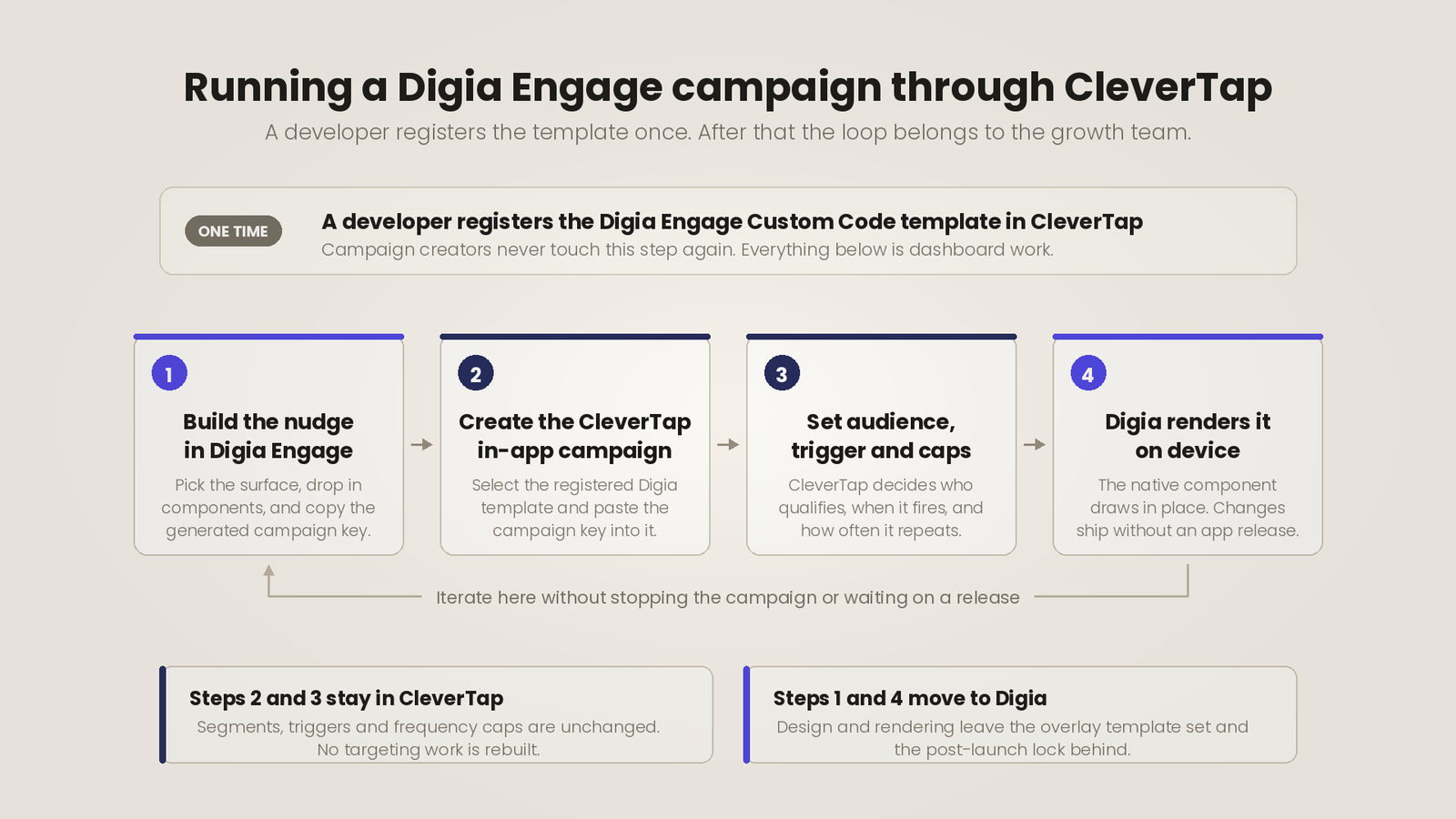
Digia Engage changes component configuration and delivery rules server-side, so an iteration cycle is a save rather than a rebuild, and none of it waits on an app release. For teams running weekly experiments on onboarding or activation surfaces, that difference compounds fast.
Knowing why something did not show
The finding at the centre of this review is that "Campaign limits applied" covers control-group holdout, message-level caps, and the account-wide global cap without distinguishing them. Digia Engage carries its own per-component delivery rules and surfaces which rule applied, which turns an afternoon of elimination testing into reading a line off a screen.
Onboarding flows that match your design system
Onboarding is the longest uninterrupted stretch a new user spends with your product, and it is where a bolted-on surface reads as bolted on fastest. CleverTap's native templates render natively, so this is less acute here than on WebView-based platforms. The constraint is the template set. Cover, interstitial, and banner are message shapes, not walkthrough shapes. Digia's nudges cover tooltips, bottom sheets, and multi-step guides as native components configured from a dashboard, with CleverTap still deciding who enters the flow.
What adding a second layer actually costs
The reasonable objection is complexity. Another SDK, another dashboard, another thing to debug.
Two things make that a smaller cost than it looks. The CleverTap integration runs on top of the core Digia Engage SDK, and identity and existing segments sync automatically rather than being rebuilt. And the layer removes work rather than adding a parallel workflow, because CleverTap keeps owning targeting and journeys while Digia owns what renders.
Set that against the cycles this review documented. Five-minute waits to confirm whether an edit applied. Rebuilding a live campaign to change one targeting condition. Elimination-testing a suppressed campaign because the dashboard names three causes at once. Editing gamified template HTML in an editor that will not scroll. Those hours are already being spent, and they are spent by the people you hired to run growth experiments.
A checklist before you commit
Questions worth asking in an evaluation, all of which came directly out of this testing round:
- Which event will trigger this campaign, and is any other in-app campaign already using it? Only the first one created will display.
- What is the occurrence limit? The default is unlimited, so leaving it unset ships a campaign that fires on every qualifying event forever.
- Is the account-wide Global Campaign Limit set, who set it, and does this campaign need to be excluded? It is enabled by default and it suppresses silently.
- What in the campaign might change after launch? Audience, segment, trigger, and delivery rules are all locked once live, so anything other than copy means stopping and rebuilding.
- Which in-app templates does your plan tier actually include?
- Has anyone confirmed the exact string values in your event properties? Matching is exact, and a mismatch fails silently.
- Does your roadmap need anything placed inline inside your own screens? If so, price the engineering work for Native Display or a rendering layer now rather than after the campaign is scoped.
- Who on your team owns debugging a campaign that reports zero views? Budget real hours for it.
Key Takeaways
- Event-property triggering, message-level frequency capping, Liquid personalization, and deep-link CTAs all held up under direct testing on a live Flutter app in July 2026, on a Nothing Phone (4a) running Android 16. An uncapped interstitial reached 41 impressions and 29 clicks at a 70.73% CTR, and a per-user cap of three held at exactly three on device.
- Render latency was consistently around two seconds from trigger to visible overlay. That is long enough for a user to scroll past the moment the message targeted, and long enough that our own testers repeatedly logged delayed messages as undelivered.
- A throttled campaign reports "Campaign limits applied" under its Viewed count, one label covering control group holdout, message-level cap, and the account-wide Global Campaign Limit, with no count of how many deliveries were dropped. The Global Campaign Limit is enabled by default and configured on a different screen.
- Live campaigns are structurally immutable and carry a documented three-to-five minute warm-up on edits, so any targeting or delivery change means stopping, rebuilding, and resetting the stats you were measuring. Pairing CleverTap's targeting with a dedicated native rendering layer addresses inline placement, gamification polish, and live iteration without touching the segmentation work CleverTap already does well.
Further Reading
From Digia
- MoEngage In-App Messaging: What It Can Do and Where Teams Hit a Wall
- WebEngage In-App: What It Does Well and Where Growth Teams Get Stuck
- Digia Engage and CleverTap integration
External Sources: All Claims Attributed
- In-App, CleverTap User Docs: overview of the in-app channel, templates, and SDK version requirements
- In-App: Troubleshooting and FAQs, CleverTap User Docs: documents the three-to-five minute campaign warm-up, the SDK-events-only constraint, the one-campaign-per-event rule, and the dummy wzrk:// link used to close an in-app
- Messaging Frequency Caps, CleverTap User Docs: confirms "Send every time the user qualifies" as the default message-level control and that the Global Campaign Limit is enabled by default
- Advanced In-App Builder, CleverTap User Docs: WYSIWYG canvas, element stacking, animations, banners, and custom font loading
- In-App Editor, CleverTap User Docs: template list, the under-1-MB image guideline, and Image Interstitial plan gating
- Liquid Tags, CleverTap User Docs: personalization syntax used in in-app message content
- Control Groups, CleverTap User Docs: holdout behavior relevant to suppressed-delivery attribution
- Native Display, CleverTap User Docs: the channel for content rendered inline within an app
- Native Display Setup, CleverTap User Docs: confirms Android and iOS integration prerequisites and app-owned UI
- Plans and Programs, CleverTap User Docs: $75 per month Essentials plan, MAU tiers, and trial terms
- CleverTap Essentials Billing, CleverTap User Docs: Monthly Billable Users calculation and the 10,000 data points per MAU allocation
- CleverTap Reviews, G2: 654 reviews, 4.6 out of 5, $75 entry pricing, and review-attribute breakdown including learning curve
- CleverTap Pricing, TrustRadius: verified reviewer note on cost scaling with event volume
Want to ship in-app experiences that match your product instead of sitting on top of it, without an app release? Digia Engage plugs directly into CleverTap, reusing the segments and events you already manage to render native nudges, inline widgets, surveys, and gamified moments in under 100ms. Book a demo to see how it sits alongside your existing CleverTap setup.