TL;DR: "It works on my device" isn't a reliability statement; it's a sampling error. Real mobile reliability is a whole different game: your app has to behave consistently across thousands of device configurations, sketchy network connections, and backend states you never even dreamed of testing. So what can you do? This article covers the four axes of mobile reliability chaos, how to define what "reliable" actually means with SLAs and error budgets, and what high-reliability teams do structurally distinct from everyone else.
Every mobile team has said it. "We tested this. It works."
And they're not wrong. On that specific device, with that exact OS version, connected to that Wi-Fi network at that precise time of day with that particular backend latency, it works.
But here's the problem. Your users aren't on your device. They're on a four-year-old Redmi with 2GB of RAM, stuck on a 3G connection in a metro station, with a backend that just started timing out for a specific user segment in Karnataka. And that app of yours, the one that runs flawlessly on a MacBook-connected Pixel Pro, is silently failing for 8% of your real user base.
That's the reliability gap. It's not a testing problem at all; it's a fundamental gap in systems thinking.
App crashes are the visible face of a reliability failure. But crashes are only what happens when the failure is loud; most reliability failures are totally quiet. The app doesn't explode, it just silently stops working, a screen hangs, a request times out with no feedback, and data loads from a cache that's 24 hours out of date. The user concludes the app is broken, opens a competitor, and you'll never even get a bug report.
Reliability engineering for mobile is the whole discipline of making consistency deliberate. Not "it usually works." It's about engineering for consistency, even in the middle of total chaos.
What "It Works on My Device" Actually Means (and Why It's Dangerous)
"It works on my device."
It's a classic line from developers and QA engineers everywhere, a claim that's, somehow, both technically true and operationally meaningless.
So, what's really hiding inside that statement?
- Tested on 1–3 specific devices
- Tested on a specific OS version (usually the latest)
- Tested on a stable Wi-Fi connection
- Tested when the backend was healthy
- Tested in a clean app state, not after 3 days of background sessions and low memory
So, what does your real user base look like? The following data isn't a guess; it's pulled directly from the official Android distribution dashboard inside Android Studio:
| OS Version | Approximate Active Share |
|---|---|
| Android 14 | ~30% |
| Android 13 | ~26% |
| Android 12 | ~16% |
| Android 11 | ~12% |
| Android 10 and below | ~16% |
That last row? It's the one teams routinely ignore. And it's the exact spot where your reliability completely collapses.
Add device fragmentation on top of all that.Android runs on thousands of distinct hardware configurations, we're talking different screen densities, GPU power, memory limits, weird manufacturer-level UI overlays (like Samsung One UI, MIUI, or OxygenOS). And Custom system behaviors that will interact with your app in ways no emulator or small device lab could ever possibly capture.
"It works on my device." That isn't confidence. It's just a sample size of one pulled from a wild population of thousands.
The Four Axes of Mobile Reliability Chaos
Reliability in mobile is not one problem. It is four simultaneous problems that interact.
1. Device Fragmentation
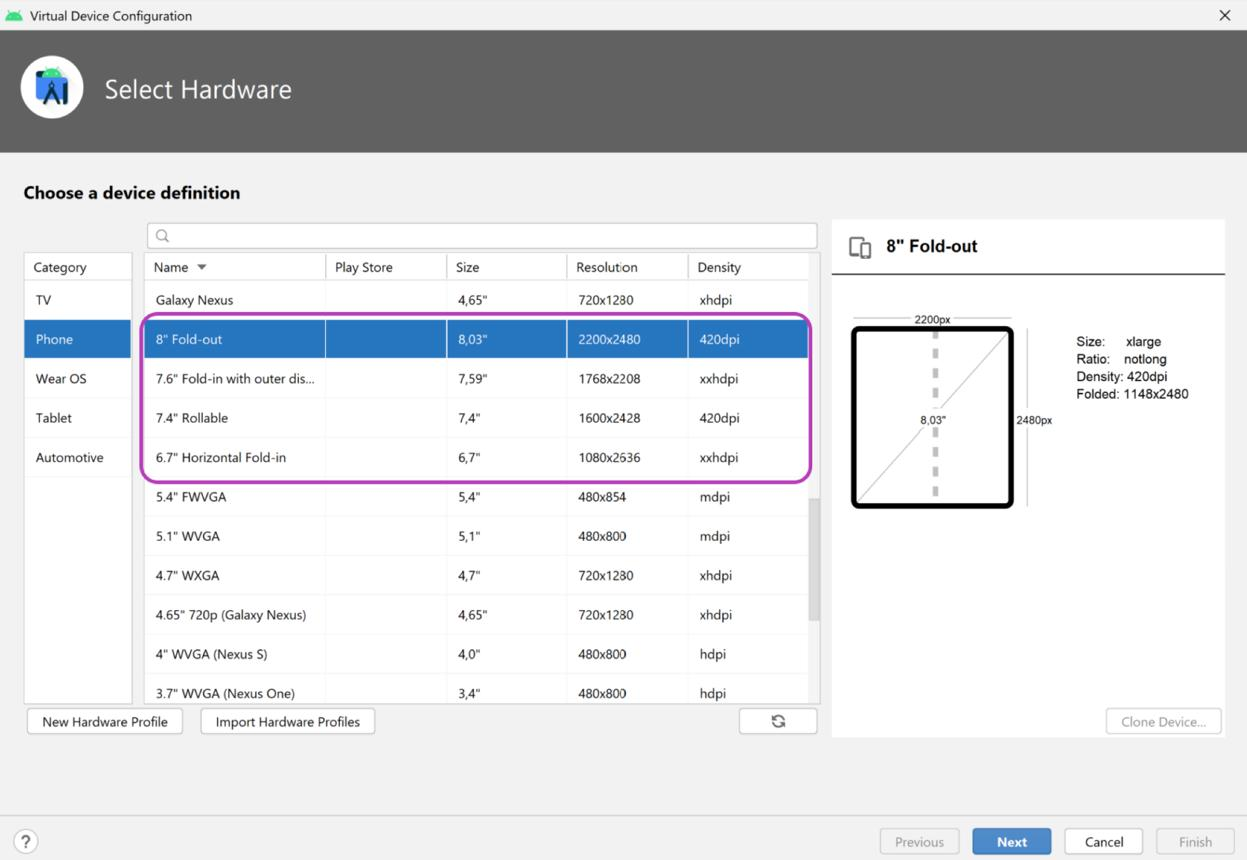
Android runs on about 3 billion active devices. That's a staggering number spread across countless manufacturers, screen sizes, RAM configurations, and chipsets. And while iOS is more controlled, it's not immune either, rendering, memory management, and even system-level API behavior can differ meaningfully between an iPhone 12 and an iPhone 16.
So what breaks because of all this device fragmentation?
You get weird rendering bugs on specific screen densities (like xxhdpi vs xxxhdpi). Code that runs perfectly fine on a phone with 8GB of RAM causes memory crashes on devices with only 2–3GB. There are also maddening differences in camera and media APIs across manufacturer implementations. Even permission dialogs act differently depending on whether you're using MIUI, One UI, or stock Android. The worst culprit might be background process killing, some Android skins (looking at you, Xiaomi and Huawei) are so aggressive that they completely break background sync and notification delivery.
It's wishful thinking. Teams that test on three devices and declare it "covered" aren't doing reliability engineering.
So what should you do? Define a device coverage matrix based on who your actual users are. You can use services like Firebase Test Lab and AWS Device Farm to run automated tests across a massive fleet of real devices. Your matrix doesn't need to cover every device under the sun, it just needs to cover 80% of your installs and every major device class (low-RAM, mid-range, and flagship) that exhibits different behavior.
2. Network Variability
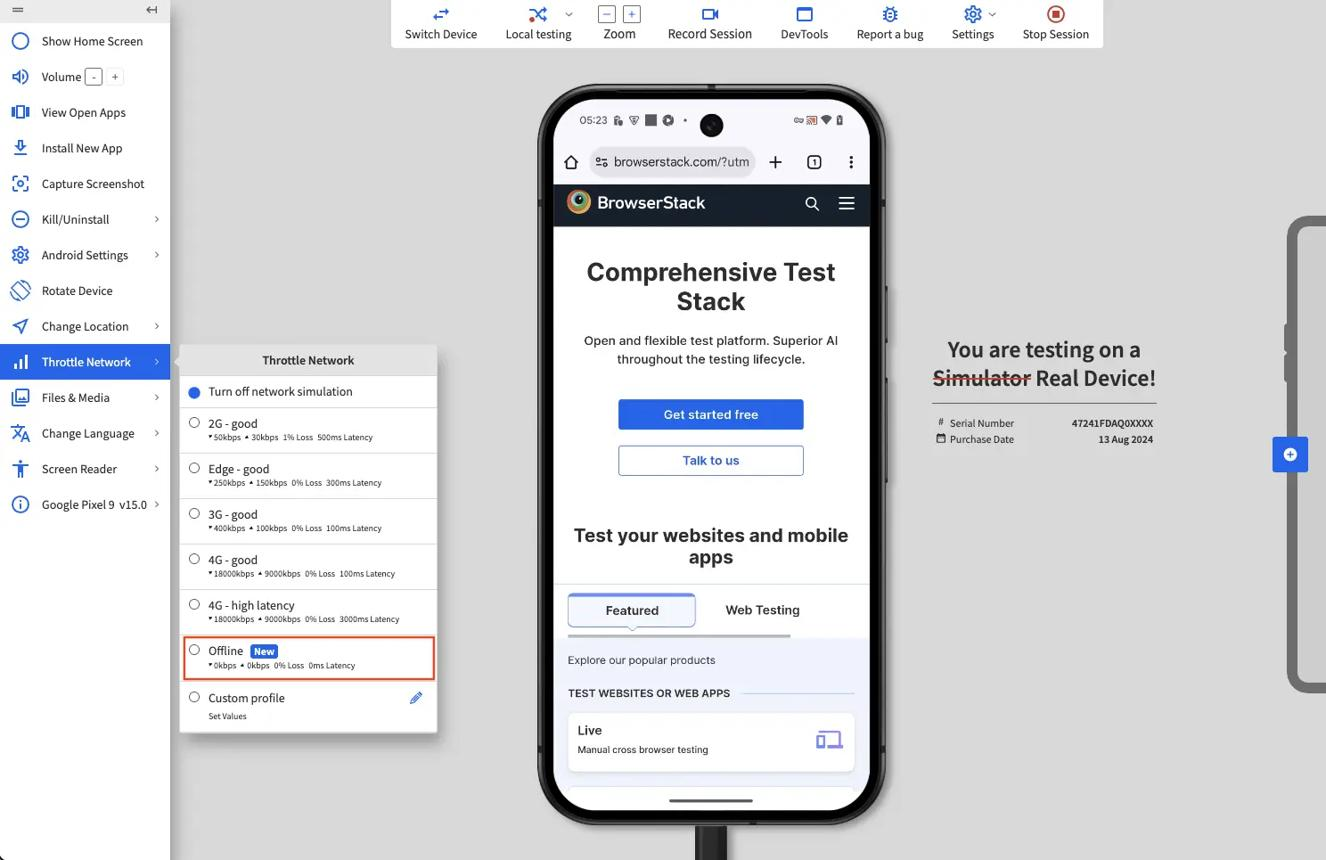
Your staging environment has a stable connection. Your users don't.
Here are the real network conditions they're actually on:
| Condition | Characteristics | Common Scenarios |
|---|---|---|
| 4G/LTE stable 15–50 | Mbps, low latency | Urban, commuting |
| 3G / weak 4G | 1–5 Mbps, variable latency | Tier 2/3 cities, elevators |
| 2G / EDGE | 100–200 Kbps, high latency | Rural areas, certain areas mid-day |
| Wi-Fi with packet loss | Variable, intermittent | Offices, cafes |
| Network switching | Latency spike during handoff | Commuting, moving between zones |
| Offline | No connectivity | Metros, basements, tunnels |
Most apps are built for "4G stable." The code just assumes requests will complete within a reasonable timeout, that retries are rare, and that the user's network won't just vanish mid-transaction.
None of those assumptions hold up for a huge slice of your real traffic.
So, what to do? You have to simulate awful network conditions in your test pipeline with tools like Android's Network Throttling or Charles Proxy, letting you explicitly test timeout behavior, retry logic, and how the app handles an offline state. An app that degrades gracefully on a bad network is always more reliable than one that works perfectly only on a good one.
We cover offline mode testing separately in this series, but the short version is this: most apps treat being offline as an error state when it should be a first-class design state.
3. Backend Dependencies
Your mobile app isn't an island. It calls APIs. And those APIs lean on a whole mess of other things: databases, third-party services, auth providers, payment gateways, and CDNs. Every single one is an external point of failure.
Here's the reliability problem most mobile teams just ignore: your app's perceived reliability has a ceiling, it's defined by the flakiness of your worst dependency, not the quality of your own code.
Think about it. Maybe your user auth service is at 99.5% uptime, your payment gateway is at 99.8%, the content API hits 99.9%, and your analytics are at 99.7%. When you chain them all together, what do you get?
0.995 × 0.998 × 0.999 × 0.997 = ~98.9% uptime
That's bad. It works out to about 52 hours of degraded experience for your users every year, all because of a bunch of dependencies that, on their own, seem totally fine.
And that's why debugging mobile apps is so much harder than it looks, the failure might not even be in your code.
So what can you do? Start by mapping your app's entire dependency graph and actually assigning reliability targets to every single service you rely on. You have to implement proper timeout handling, build fallback states, and use retries with exponential backoff. Make the failures visible. Surface them as real, observable signals instead of letting them die as silent errors.
4. Environment and State Unpredictability
Your test suite is pristine. It runs the app from a clean install, always in a known state. But your users' apps are running after a week of background sessions with 200 items cached, right in the middle of a low-memory alert and with a phone call interrupting the whole session.
Testing rarely covers the truly chaotic, real-world app states:
- Memory pressure - The OS suddenly killing a background process, or the app getting a low-memory warning right in the middle of a heavy operation.
- App lifecycle interruptions - What about incoming calls? Then there are the notifications pulled down mid-checkout, or even just switching to another app and trying to find your way back.
- Session state corruption - It's a mess. You end up with stale tokens, or even worse: partially committed local database writes and interruptions that happen right in the middle of a sync.
- Slow startup - Think about this scenario. The app launches cold, it hasn't been touched in a day, and now it's stuck trying to fetch the user's auth state while the network is barely chugging along.
These aren't edge cases. Not even close. With a user base in the millions, every single one of these scenarios is playing out thousands of times per day, it's just a matter of statistics.
SLAs for Mobile: Defining What "Reliable" Actually Means
Here's a big problem. Most mobile engineering teams can't actually tell you what their reliability target is, which is kind of wild since that number is the single most basic measure of whether their app is stable for users.
Don't believe me? Go ask an engineering team "what's your app's reliability target?" and you will get answers like:
- "We aim for as few bugs as possible"
- "We want 99% crash-free users"
- "We don't want P0s in production"
These aren't reliability targets. they're vibes.
An SLA is something else entirely. A Service Level Agreement for a mobile app is a specific, measurable commitment about how the app has to perform, answering the simple but critical questions: what does "working" actually mean, and how often must it be true?
The Google SRE book lays out the components clearly. It all begins with the SLI (Service Level Indicator), which is just the specific metric you're measuring, things like crash-free user rate, p95 API response time, or the successful checkout completion rate. Then you set the SLO. That's the Service Level Objective: the actual target for your metric, like ensuring the crash-free rate is ≥ 99.5% or keeping p95 checkout latency ≤ 800ms. And the SLA? That's the formal Service Level Agreement, a commitment that's usually external, since for internal teams, the SLO is the only SLA that really matters.
For mobile apps, useful SLIs to define SLOs around:
| SLI | What It Measures | Typical Target |
|---|---|---|
| Crash-free user rate | % of users with no crash in a session | ≥ 99.5% |
| API success rate | % of API calls returning non-error response | ≥ 99.9% |
| p95 screen load time | 95th percentile time to interactive for key screens | ≤ 2 seconds |
| Checkout completion rate | % of initiated checkouts that succeed | Depends on vertical |
You can't have a serious conversation about reliability without SLOs. Period. You're just guessing, unable to answer with any rigor if a release was reliable or whether you should even ship the next one.
Continuous testing in CI/CD only creates real release gates when the gates are tied to specific thresholds - which requires having defined what the thresholds should be.
Error Budgets: The Tool That Forces Honest Tradeoffs
Once you have SLOs, error budgets are the logical next step. This is the concept that makes reliability engineering concrete, something an actual engineering team can grip and use every single day.
An **error budget** is simply the amount of unreliability you're allowed. It's the wiggle room you have before you officially breach the promise made in your SLO.
Let's make it concrete. If your SLO is 99.5% crash-free users over a 30-day window, your error budget is that other 0.5%, the small sliver of user sessions that can involve a crash.
The discipline comes from what happens when you track this number actively:
Measuring Reliability: The Metrics That Actually Matter
You can't manage what you don't measure. It's an old saying, but it's especially true when you're trying to figure out exactly what belongs in a mobile reliability dashboard.
Android Vitals (for Android teams)
Android Vitals, accessible via Google Play Console, tracks:
- Crash rate - crashes per 1,000 daily active users
- ANR rate - App Not Responding events per 1,000 DAU
- Excessive wakeups - battery-impacting background behavior
- Slow rendering frames
This is a big deal. Google actually uses these metrics to determine your app's discoverability, which means that poor Android Vitals scores will actively torpedo your search ranking right there in the Play Store. This isn't just an engineering concern, it's a reliability issue with a direct impact on the business.Firebase Crashlytics
Firebase Crashlytics gives you:
- Crash-free users rate (the right metric, not just crash-free sessions)
- Issue clustering - similar crashes grouped automatically
- Breadcrumbs - the event trail leading to a crash
- Velocity alerts - when a crash rate crosses a threshold
Crashlytics is free. It's the baseline expectation for any production mobile app, if your team doesn't have it set up, reliability discussions are happening in a vacuum, completely without data.
Sentry for Mobile
Sentry isn't just for crashes. The system also monitors for all sorts of other problems, caught exceptions, network errors, and slow transactions, and then ties every issue back to a specific release so you know exactly which deployment introduced a regression.
Here's where most teams have a gap. They track app-side errors just fine, but they're completely blind to the specific backend failures that are actually wrecking the mobile experience.
Connecting New Relic or Datadog finally lets you answer the big question. When you connect traces to mobile API calls, and correlate everything by user session, you can figure out what really happened: "Was that checkout failure a client bug or an API timeout?"
Good luck answering that. You can't. Without this instrumentation, you're just guessing, hoping a random fix works while flying completely blind about the actual root cause of the problem.
What High-Reliability Mobile Teams Do Structurally Different
It's not about the tech. The real difference separating high-performing mobile teams from the average ones isn't a technical issue at all, it's a massive gap in process and ownership.
They Have Defined Reliability Owners
In most teams, reliability is everyone's responsibility. Which means it's no one's. High-reliability groups have explicit ownership: a platform engineer, a QA lead, or someone in a reliability-focused role whose entire job is to monitor the metrics, manage error budgets, and flag any release that starts to degrade them.
They Build Device Coverage Into Their Definition of Done
A feature isn't "done" just because it works on a new Pixel and an iPhone. It's done when the team has validated it across the full device matrix that actually covers your real user distribution. Make this a checklist item, it's not some optional post-release check.
The testing pyramid matters here. Most teams get it backwards. They pour money into E2E tests on the newest, shiniest devices while barely glancing at integration tests across OS versions, which is exactly where things actually break the most.They Treat Reliability Metrics as Release Gates
For high-reliability teams, standard practice is to deploy to a small slice of users first, say, 5%, and then watch the metrics for 24–48 hours to gate the full rollout. It's a staged rollout with automated SLO monitoring.
Continuous testing in CI/CD just gets things in place. That's it. What really matters are the reliability thresholds, because those are what create the actual gate that everything has to pass through.They Instrument for What They Cannot Test
No test suite is perfect.That's why high-reliability teams get aggressive with production monitoring, logging key user journey events, tracking API response distributions. And Watching error rates per feature flag segment, so when an unexpected failure occurs, they have hard data for the diagnosis, not just a series of guesses.
This is the observability-first mindset: debugging starts with observability, not reproduction attempts.
They Track Reliability Metrics at the Same Level as Feature Metrics
If weekly reviews only focus on DAU, conversion, and revenue, the team knows exactly what the priorities are.
But what about stability? The truly high-reliability teams put stability metrics right there on the same dashboard. And They discuss them in the same meetings as their product stats, because that one simple discipline is the glue that makes all the other work hold together.
The Reliability Conversation Your Team Is Not Having
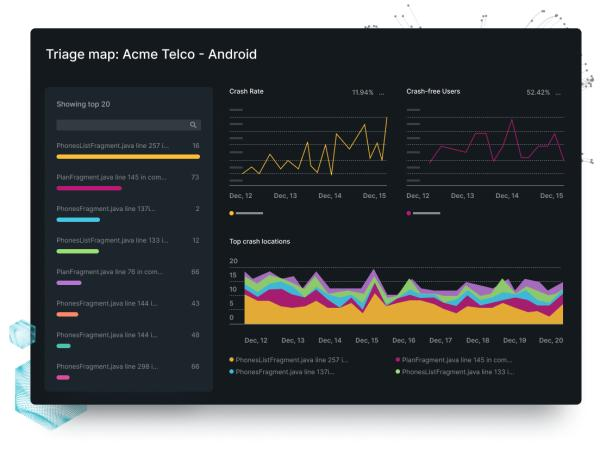
Here's an audit question for your next sprint planning meeting:
What's your current crash-free user rate, what's your target, and how much of this month's error budget is still in the bank?
If your team can't rattle off answers to those three questions in under 30 seconds, you don't actually have a reliability engineering practice, not a real one, anyway. You just have hope.
Look, this isn't a criticism; it's the reality for most mobile teams out there. It's the fundamental gap explaining why so many apps test perfectly fine in QA but then suddenly start falling over the moment they hit the chaos of production. It's not bad engineers. The problem is the simple absence of a system designed to catch these issues before they ever reach a customer.
Bugs don't get out because your engineers are careless. They get out because the process itself has holes, and reliability engineering is simply the discipline of building a system that doesn't.
Conclusion: Reliability Is Consistency Across Conditions You Did Not Control
Testing proves your app works. Reliability engineering proves it keeps working.
These two disciplines aren't the same. Conflating them is how teams end up shipping confident releases that just create unhappy users. A test suite running on three devices in a staging environment only gives you evidence from one tiny slice of reality, it says absolutely nothing about the Redmi 9 with 3GB RAM in Bhopal running Android 11 with aggressive background process killing, on a 3G connection during peak hours.
Reliability isn't just the absence of known failures. It's the consistent behavior of your system when it runs up against all the wild conditions you never explicitly designed for.
That takes work. It means having SLOs so you can define what "reliable" actually means, and error budgets that let you make honest tradeoffs between velocity and stability. It also requires device coverage matrices to create sure your testing reflects your real users, not just a sanitized lab, and deep observability so you can see what's happening in production before anyone even thinks to complain.
"It works on my device" is always true. And always irrelevant. The only statement that matters is a simple one: it holds up for your users, consistently, across the complete chaos they actually live in.
Key Takeaways
- "It works on my device" is a sampling error. It's not a reliability signal. Real mobile reliability means something totally different, it means consistency across a chaotic mix of device fragmentation, network variability, backend dependencies, and all kinds of unpredictable environmental states.
- Mobile reliability isn't a single problem. It's a constant battle on four fronts: device fragmentation, network variability, backend dependencies, and the sheer unpredictability of a phone's state and environment. Teams that only test one of these in isolation completely miss the failures that happen right at the intersection of the others.
- Without defined SLOs, reliability is completely unmeasurable. It's just a feeling. And when there's no error budget, opinions and politics, not data, end up deciding the critical tradeoff between shipping fast and staying stable.
- Here's the bottom line: Android Vitals directly impacts Play Store discoverability. When crash and ANR rates are poor, you create a measurable business problem, one that goes far beyond just a frustrating user experience.
- Forget the vanity metrics. These are the ones that matter. You need to know your crash-free user rate, a very different thing from crash-free sessions, along with your ANR rate and p95 API latency. That's the baseline. But the real story is the end-to-end flow completion rate, because that's what tells you if people can successfully finish the most critical journeys in your app.
- What separates high-performing teams from average ones? It's not the tech. The reliability gap is almost always about process and ownership, which boils down to four key differences: having defined owners for reliability, including device coverage in the definition of done, using solid metrics as release gates, and building for production observability from day one.
Further Reading
From Digia - Testing & Quality Series
- Mobile App Testing: Why Most Bugs Are Not Found - They Escape
- App Crashes: Why Stability Matters More Than Features
- Debugging Mobile Apps: Why Bugs Are Harder Than They Look
- Testing Under Real Conditions: Networks, Devices, and Chaos
- Continuous Testing in CI/CD: Shipping Without Fear
- The Testing Pyramid for Mobile Apps: What Most Teams Get Wrong
- Test Coverage: Why 100% Coverage Still Misses Bugs
External Sources
- Google SRE Book: Embracing Risk and Error Budgets - Google SRE Team
- Android Vitals - Core app quality metrics - Android Developers
- Firebase Crashlytics Documentation - Google Firebase
- Android OS Distribution Dashboard - Android Developers
- Android Compatibility Overview - Android Developers
- Site Reliability Engineering: How Google Runs Production Systems - O'Reilly / Google
- Sentry Mobile Error Monitoring - Sentry
- New Relic Mobile Observability - New Relic