TL;DR: Most mobile teams get offline wrong. They treat it as an error state to be handled, not a user experience to be designed, and you can see the results in data loss, silent sync failures, confusing frozen UIs, and duplicate records that wreck user information. It's the wrong mental model. This article gets into the four real problems of offline mode (numbers sync, caching, conflict resolution, and UX states), showing how to test each one properly and revealing the specific scenarios your test suite is almost certainly missing.
Every mobile team has an offline story. It's a classic. A user files a support ticket saying their data just disappeared.After some digging, the engineers piece it all together: the person was on a metro, went offline mid-session, the app hit a dead-end error state with no recovery path. And Then, once back online, their local changes were silently overwritten by whatever the server had.
No error message. No retry prompt. Not even a hint that anything went sideways. Just lost work.
So, the team logs a bug. They add a retry call on that one API, close the ticket, and ship it. Problem solved, right? Nope. Two weeks later, a different customer reports their data is duplicating because the new retry logic is firing twice on reconnect, nobody thought to test what happens when someone comes back online after a long session.
This isn't bad engineering. It's the predictable outcome of a broken mindset: treating 'offline' as an afterthought, a rare exception to handle, rather than a fundamental user state to design for from day one.
The flawed premise is always the same. The team built the app assuming connectivity is the default and being offline is the exception. That assumption isn't just a little bit wrong, it's completely wrong for a huge fraction of your users and a catastrophic failure for the very people who use your app the most.
Testing under real-world conditions reveals network variability isn't an edge case. But a flaky connection and true offline are completely different problems, one just degrades performance, while the other shatters the entire set of assumptions your app is built on. The thing is, most apps just aren't built for that.
This article is about fixing that. We're not just talking theory, either; this is about how you can actually, tangibly test your application to make sure it holds up when the connection finally gives out.
Offline Is Not an Edge Case. Stop Testing It Like One.
Let's get right to it. What percentage of your users are regularly dealing with a bad connection, or no connection at all?
If you are building for India, the answer is not small. According to TRAI's 2023 Telecom Subscription Data, roughly 38% of India's wireless subscribers are still on 2G or early 3G networks. Think about the Delhi Metro. It carries over 6 million passengers daily, shuttling them through tunnels and underground stations where reliable connectivity is a total longshot. And it's not just a big-city problem, Tier 2 and Tier 3 cities see frequent network blackouts whenever congestion peaks. Even urban users with supposedly stable 4G connections aren't safe, constantly going offline in the most common dead zones: basements, parking garages, elevators, or during simple network handoffs.
If you are building globally, GSMA Intelligence data states that roughly 400 million mobile users worldwide are still on 2G networks, a user base so large it's baffling that it gets ignored. These aren't fringe users. In many markets, they're the majority.
Forget about spotty connections for a second. Your own users deliberately go offline. Think about it: airplane mode, a phone hitting low power mode and killing data, VPN failures mid-session, or corporate firewalls that arbitrarily block specific API endpoints without any warning. And that's not even counting the people who just haven't noticed their information plan is exhausted. These aren't pathological scenarios. they're daily reality.
But we all know the story. Offline testing is almost universally the last item thrown onto the test plan, and the absolute first one cut the moment a sprint timeline compresses.
The result is a nasty category of failures that are incredibly expensive to fix after the fact. Think corrupted local data. Unresolved sync conflicts. You get user-facing error screens that provide no path forward, and sometimes even silent information loss that people only discover days later when they notice something important is just missing.
Offline is not a failure mode. It is a usage state. The app needs to handle it with the same design intent as any other state.
The Four Problems of Offline Mode (and Why Each One Needs Its Own Test Strategy)
Offline isn't one problem. It's four distinct issues that just happen to show up together. Any team that tests for "offline" by flipping to airplane mode and tapping around? They've tested for exactly one of them.
1. Data Sync: What Happens to Changes Made While Disconnected

The most common offline failure? It's the one nobody tells you about: your changes just vanish.
Here's why. Most apps treat the server as the absolute source of truth, syncing data by sending it up and waiting for a definitive response. But when you're offline, there's no response. So the app either blocks the action entirely, you've seen the "must be online" message, or, worse, it accepts the change locally and then quietly throws it out on the next sync without any attempt at conflict resolution.
Neither of these outcomes is remotely acceptable for a production app handling people's data.
What actually needs to happen:
- Don't discard local writes when the user goes offline. Queue them.
- The queue has to persist across app restarts. No excuses. If a user goes offline, writes a note, closes the app, and only comes back online 12 hours later, that note still needs to sync.
- Just a single retry on reconnect? That won't cut it. Your queue needs proper retry logic with exponential backoff, otherwise, you're just hammering a downstream service that's already struggling to recover.
- Don't silently drop failed syncs, show them to the user.
What to test specifically:
| Scenario | What to Verify |
|---|---|
| Write data while offline, restore connection | Local changes sync correctly to server |
| Write data while offline, force-quit app, restore connection | Queue persists, sync completes on next session |
| Write data while offline, keep offline for 24+ hours, reconnect | Queue survives extended offline duration |
| Write data while offline, server rejects on sync | Error surfaces to user with actionable path |
| Write data while offline, same data modified on server | Conflict resolution fires correctly (see section 3) |
| Make 50+ writes while offline | Queue handles bulk operations without data loss or ordering errors |
Most teams test the first scenario. Almost none test the fourth, fifth, or sixth.
The tools for this: Android's WorkManager is the standard for durable background sync on Android - it guarantees execution even after app restarts and device reboots. On iOS, BGTaskScheduler handles deferred background work. Testing these properly means verifying behaviour after app kill, not just after backgrounding.
2. Caching: What the User Sees When There Is No Network
Then there's the second problem: what users actually see when they open the app with no connection or get knocked offline in the middle of doing something. It's a mess. Most apps do one of three things, and honestly, two of them are just terrible.
Wrong: A blank screen with a generic error. Total dead end. This is what most apps do, they fire an API request, get nothing back, throw up an error message, and just give up completely. The user is left staring at a useless screen, with no idea what data they had and no ability to do anything, so they just close the app. It's basically a crash with extra steps.
Wrong: Silently showing stale data. This is the other failure mode, and it's almost worse. The app will happily serve up cached information from three days ago, letting the user make decisions on information that's just flat-out wrong, placing an order, sending a message, booking a slot. Is there a timestamp? A "last updated" indicator? Any kind of banner? Nope. The user has absolutely no idea they're working with old info.
Correct: Show the cached data, but be honest about it. It's that simple. Clearly mark the information as cached, reveal exactly when it was last synced, and offer a simple way to try refreshing. The user sees their old information. They understand it might be stale, and they know how to get an update when their connection is back.
This isn't some complex UX pattern. It's not rocket science. It's just a design decision that most teams never bother to make because "offline support" was never a line item on the project plan.
Here are some caching strategies worth understanding, and testing:
| Strategy | How It Works Good For | Good For | Fails At |
|---|---|---|---|
| Cache-first | Serve cache, refresh in background | Read-heavy, tolerant of slight staleness | High-frequency real-time data |
| Network-first with cache fallback | Try network, fall back to cache on failure | Data that must be current when online | Poor networks (slow, not offline) |
| Stale-while-revalidate | Serve cache immediately, revalidate async | Fast perceived performance, most content Time-critical accuracy | |
| Cache-only (offline-first) | Never hit network, sync separately | True offline-first apps | Data that must be real-time |
Google's Workbox library patterns are documented extensively for the web. But the mental models? They map directly to mobile caching decisions you'd make using Room on Android or Core Data on iOS.
What to test specifically:
- Open app in offline mode from scratch (cold start, no cached data). What does the user see?
- Open app online, load data, go offline, navigate to a new screen. What is shown?
- Open app online, load data, go offline, kill app, reopen offline. Does cache persist across app restart?
- Open app online, go offline, wait 48 hours, reopen. Is the cache still there? Is it correctly marked as stale?
- Open app in offline mode with cached data. Is there a visible timestamp or freshness indicator?
Almost no one runs the cold start offline test. It's also the most jarring user experience imaginable, a completely blank app with a network error on first open, and it happens to literally every person who installs your app and immediately loses their connection.
3. Conflict Resolution: What Happens When Both Sides Changed the Same Data
This is the single hardest problem in offline mode. It's the one most apps solve by just pretending it can't happen.
So what's a conflict? It happens when the same piece of data gets changed in two different places before a sync can happen. Imagine User A edits a record while they're offline, but at the same time, another user (or another session) updates that exact same record back on the server. When User A finally reconnects, the app is staring at two distinct versions of the truth. Which one wins?
Most apps take the easy way out: "last write wins." This approach is simple, as whichever version syncs last completely overwrites the other one. It's the easiest path for developers but also incredibly dangerous for user data, because it just silently throws away one person's changes without anyone ever knowing.
There are three real ways to handle conflict resolution:
Last write wins (LWW): The server just looks at the timestamp (or the sync time) and keeps whichever version is newest. Done. While it's fast to implement, this method loses data without a trace. It's only really acceptable for trivial things where the most recent change is always the right one, think UI preferences or theme choices.
Client wins: Bad idea. The local version always overwrites whatever is on the server during a sync. At any kind of scale, this creates a total mess of duplicate or divergent data and is never the right choice for multi-user or even multi-device situations.
Merge with conflict surfacing: Here, the app is smart enough to see that both versions branched off from a common ancestor, so it attempts to automatically merge any changes that don't clash. The app then surfaces any genuine conflicts (the hard ones) to the user for a manual decision. It's tough to build. But it's the only correct approach for user-created content, documents, or any field where both changes could be independently valid.
Applications like Notion and Linear have published engineering posts about their conflict resolution systems - Notion's collaborative editing model uses operational transforms to merge concurrent edits, and Linear's sync engine uses a variant of CRDTs (Conflict-free Replicated Data Types) to guarantee eventual consistency without data loss.These systems get seriously complex. They're built for collaboration on a massive scale, and while your app probably doesn't need that level of sophistication, it absolutely needs something better than a silent "last-write-wins" approach for any user-generated content.
What to test specifically:
| Scenari/o | What to Verify |
|---|---|
| Write data while offline, restore connection | Local changes sync correctly to server |
| Write data while offline, force-quit app, restore connection | Queue persists, sync completes on next session |
| Write data while offline, server rejects on sync | Error surfaces to user with actionable path |
| Write data while offline, same data modified on server | Conflict resolution fires correctly (see section 3) |
| Make 50+ writes while offline | Queue handles bulk operations without data loss or ordering errors |
You have undetected conflict scenarios in production. Right now. If your app handles any data that users create or modify, and you've never run these tests, then it's a certainty.
4. UX During Offline States: What the User Experiences in Real Time
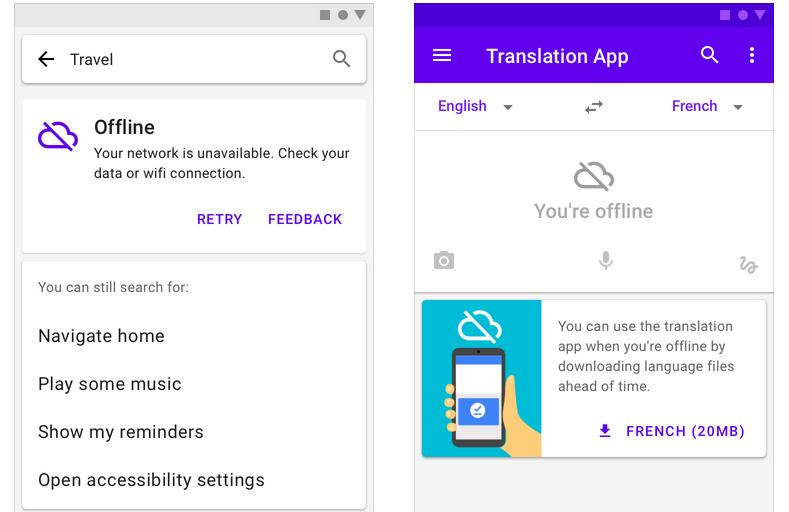
And the fourth problem? People tend to wave it off as a design issue, not something that testing should even worry about. It's both.
A bad offline UX isn't just frustrating; it directly causes user errors. It's a mess. When users get zero feedback about their offline state, they take actions they assume will succeed, submitting forms, placing orders, sending messages, and they get no sign that those actions are queued or will just fail. Later, once they're back online, one of two things happens: either nothing (because the app simply discarded the action) or everything happened twice after the user manually retried just before the queue fired.
This means there are specific offline UX states you have to design and test for:
Transition to offline (real-time detection): What happens when the connection drops mid-session? The app has to spot it. Fast. And it needs to communicate the problem clearly: maybe a persistent banner, a changed status indicator, or just something visible that doesn't interrupt what the user is doing.. Android's ConnectivityManager and iOS's Network framework provide real-time reachability monitoring. Almost every app tries to handle this. The problem is they usually just flash a generic "no internet" toast that disappears after three seconds, never to be seen again.
What about offline action feedback? When a user does something, submits a form, saves a note, posts a comment, while they're offline, the app has to communicate that the action was queued and will sync up later. "Saved offline. Will sync when connected." is the right pattern. A spinner that just spins forever isn't.
Reconnection is tricky. When connectivity returns, does the app just silently sync in the background? Does it show a progress indicator for large sync operations? Does it actually confirm to the user that their queued actions went through? That moment of reconnection is incredibly high-risk for confusing people, especially if a sync takes more than ten seconds or a conflict pops up.
Partial connectivity is the absolute worst state. The user has a network connection, but it's so degraded that requests just time out, leaving them in a frustrating limbo.
The app isn't truly offline, but it behaves as if it's. Most detection logic just checks for connectivity, not actual server reachability, meaning the app thinks it's online (it has a signal!) while requests are silently failing in the background.
This creates the worst possible UX: the user believes the app should be working, and it's not. Testing for this requires simulating high-packet-loss networks, not just toggling the wifi off.
The user should never have to wonder whether their action happened. The app's job is to be unambiguously clear about the state of every action taken.
How to Actually Test Offline Mode: The Tools and Approach
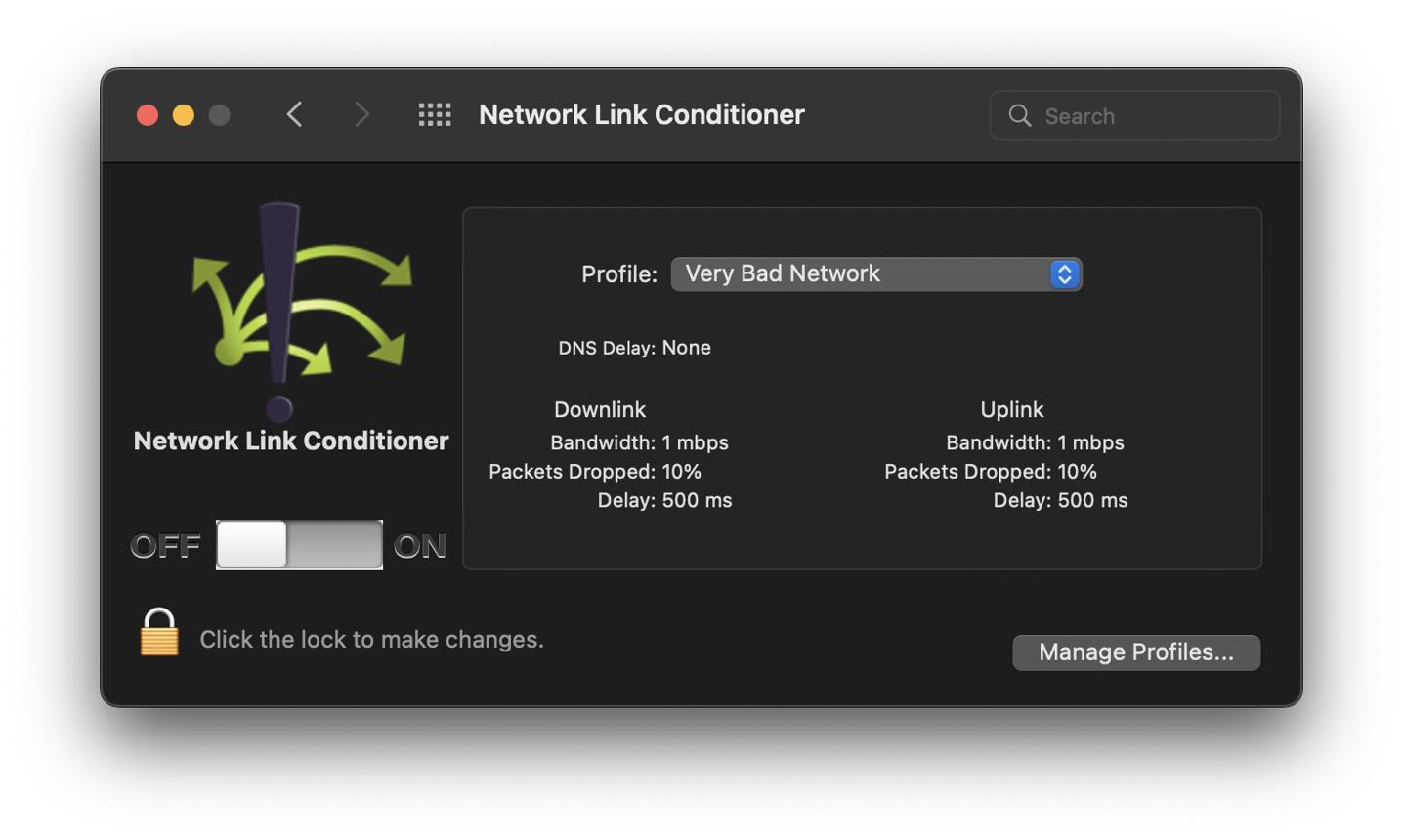
Most people just test for offline by flipping on airplane mode and tapping around. It's better than nothing. But that isn't a real test strategy, it's barely a starting point for understanding how your app behaves when the connection inevitably drops.
So, here's what a real offline test approach actually looks like.
Simulating Offline and Degraded Conditions
Android:
- Network throttling in Android Emulator: You can use the emulator's built-in network profiles (2G, 3G, 4G) or dial in custom latency and bandwidth settings yourself. This is the whole point. It's not just for testing a full offline state, but for simulating the kind of frustratingly slow and degraded networks people actually experience every day.
adb shell svc wifi disableandadb shell svc data disable: Programmatically disables Wi-Fi and mobile data without touching airplane mode. Useful for automation scripts.- Android Network Emulator (ANE): This kills your Wi-Fi and mobile data programmatically. No messing with airplane mode.
It's really just for automation scripts, perfect for when you need to control the connection state directly but can't deal with the other system changes that airplane mode triggers.
iOS:
- Network Link Conditioner: This is a fantastic developer tool. It gives you direct, system-level control over network conditions across the entire device: you can throttle bandwidth, inject latency, and simulate packet loss with a download from Xcode's Additional Tools.
- XCTest +
XCUIDevice:This is a fantastic developer tool. It gives you direct, system-level control over network conditions across the entire device: you can throttle bandwidth, inject latency, and simulate packet loss with a download from Xcode's Additional Tools.
Cross-platform / Proxy-based:
- Charles Proxy: It intercepts HTTP/HTTPS traffic. This is the most surgical tool for the job, you can make one API endpoint fail while the others succeed, which is perfect for simulating partial backend unavailability rather than a total offline event.
- mitmproxy:Here's an open-source alternative to Charles. It's got full scripting support. That makes it incredibly useful for automating those tricky degraded network scenarios right inside your CI pipelines.
Offline tests? They're slow to write. And they're easy to skip.
The only way to make them stick is to give them their own category in your test suite with dedicated execution slots, don't just mix them into the standard regression run where their flakiness bleeds into everyone's confidence.
So what's a practical structure?
- First up: unit tests. You need them for the sync queue logic, all the cache invalidation rules, and the algorithms that handle conflict resolution. These run offline. Because no network is required, they should run on every single commit.
- Integration tests for the data layer. It's a simple process: you write a record offline, verify it shows up in the queue, and then confirm that it syncs correctly when a mock server is brought online. And here's the key rule, these tests always run against a local server or mock, not production.
- E2E offline scenarios as a separate, scheduled test suite. Airplane mode, specific user flows, reconnection. These are slow and should run on a nightly or pre-release schedule, not on every pull request.
Continuous testing in CI/CD It works just like you'd expect. The pre-merge tests cover all the fast, high-confidence cases, while the full offline scenario coverage runs on a totally separate cadence that's tied to the release gate.
The Offline Testing Checklist
Hold on. Before any feature that handles user data gets marked as done, it absolutely has to pass every single one of the following test scenarios:
Data Sync
- [ ] User makes changes offline. Changes sync correctly on reconnect.
- [ ] User makes changes offline, kills app, reopens online. Changes still sync.
- [ ] Sync fails due to server error. User is notified. Data is not lost.
- [ ] Sync queue handles 50+ queued operations in correct order.
Caching
- [ ] App cold-started offline shows cached data (not blank screen) if prior session existed.
- [ ] App cold-started offline with no prior session shows meaningful empty state, not generic network error.
- [ ] Cached data is visibly marked as cached with a timestamp or "last synced" indicator.
- [ ] Cache survives app restart and 24+ hour offline duration.
Conflict Resolution
- [ ] Offline edit + server edit of same field - defined behaviour, user is not silently overwritten.
- [ ] Offline edit + server edit of different fields - non-conflicting changes merge correctly.
- [ ] Offline record creation that conflicts with a server record - no silent duplicate or silent discard.
UX States
- [ ] Going offline mid-session surfaces a visible, persistent indicator (not just a toast).
- [ ] Actions taken while offline show a queued state, not a false success or an error.
- [ ] Reconnection triggers visible sync progress for operations that take more than 2 seconds.
- [ ] Partial connectivity (high packet loss, no complete offline) is handled - requests time out cleanly, not silently.
What Most Teams Get Wrong About Offline Testing
The most damaging offline bug is the one the user never knows about. At least, not right away. Think about silent discards of queued data, a last-write-wins conflict that resolves itself without a peep, or a cache that expires with no indicator whatsoever, these invisible failures erode user trust over time without generating a single support ticket until someone notices their information is just gone. The rule is simple: any offline state change must be visible to the user. Not loud. Visible.
Another classic trap? Testing for online recovery instead of offline duration. Most test sequences look the same: go offline → do a thing → come back online → verify it worked. That covers the 30-second subway tunnel scenario just fine. But it completely fails to cover the user who opened your app on the train, wrote three paragraphs, forgot about it, and only came back online two days later. Your queue, cache, and conflict resolution logic behave in wildly different ways at a 48-hour duration versus a 30-second one. You have to test both.
And finally, people ignore the transition states. The messiest bugs don't live in the "fully online" or "fully offline" states; they happen in the transitions themselves. Think about going from online to offline mid-operation, coming back online with a massive queue to sync, or dropping from a degraded connection into true offline when the app still thinks it's connected. This is nothing new. Debugging mobile apps is always hardest when you're hunting down failures that only appear during these state changes, and offline mode is no exception. Test the messy moments, not just the stable states.
The Question That Exposes Your Offline Coverage
Here's a direct audit question for your current codebase:
If a user makes 10 changes to their data while offline, closes the app, the phone dies and is recharged. And They come back online 18 hours later, what *exactly* happens to those 10 changes?
Walk through the code and answer it. Not the intent. Not what it should do. What it actually does.
If you can't answer it with certainty, your offline handling has coverage gaps. It's that simple. And if the answer is something like "some of them probably sync," you have a major reliability problem. Worse, if the answer is "they're lost," you have a data loss bug that's already hitting real people in production who just haven't filed a ticket yet.
What really matters is consistency across conditions you didn't control. Offline mode is the ultimate example of this, all those uncontrolled variables made concrete, which means passing your standard test suite doesn't prove the scenario actually works. You have to test it directly.
Offline-First Architecture: The Right Mental Model
There's a difference here, and it's not subtle: offline-tolerant isn't the same as offline-first.
Offline-tolerant is really just online-first. These apps are designed primarily for when you have an internet connection, but they handle going offline as a kind of graceful degradation. It's all about minimizing data loss, showing clear errors, and letting the user know what's going on. Honestly? This is the minimum acceptable bar for any application that handles user information.
But offline-first flips the whole script. The app treats local storage as the one true data source, and syncing with the server is just a background operation that doesn't get in your way. The user experience is never blocked by network status, ever. Reads always pull from local information. And writes? They succeed instantly on your device and then sync up asynchronously. This is the architecture of apps like Notion, Obsidian, and Linear.
At a minimum, consumer apps should be offline-tolerant. That's the baseline. But for any app with collaborative features, user-generated content, or usage patterns that involve spotty connections, you have to seriously consider building an offline-first architecture from the ground up.
So what's the tech that makes this practical on mobile?
| Tool / Pattern | Platform | What It Provides |
|---|---|---|
| Room + WorkManager | Android | Local SQLite ORM + durable background sync |
| Core Data + CloudKit | iOS | Local persistence + automatic iCloud sync |
| Realm | Android + iOS | Mobile-first database with built-in sync |
| WatermelonDB | React Native | Lazy loading, observability, offline-first for RN |
| Firebase Firestore offline persistence | Android + iOS | Automatic local caching + sync with conflict resolution |
| CRDTs | Any | Conflict-free data structures that merge without coordination |
So what's the right approach? Your choice really depends on your data model, what collaboration looks like for your team, and the level of consistency you absolutely need. But you have to make that choice deliberately, don't just default into one because you never thought about offline at all.
Conclusion: Offline Is a Feature, Not a Failure Mode
Here's the big mental shift. It's what separates apps that handle being offline beautifully from the ones that completely fall apart when the connection drops.
Bad apps treat it as an error. They see being offline as a temporary problem that just needs a fallback, a quick fix before things get back to normal. But the great apps? They treat it as a first-class user state that requires its own thoughtful design.
This gap shows up in every layer. You can spot it in the data architecture (is there a sync queue, or does information just get thrown away?), the caching strategy (do you see stale numbers, or just a blank screen?), and even in the conflict resolution, a smart merge versus a silent last-write-wins. It's all the way down to the UI feedback: a persistent state indicator instead of a toast that just vanishes.
None of this is hard to build. The real reason most apps are so bad at this isn't some deep engineering complexity; it's because being offline was never actually part of the original design. It was just bolted on after a production fire. And boy, does it show.
Bugs do not escape because engineers are careless. They escape because no one ever had to look for them. We skip offline mode testing because offline mode was never a core requirement, just a nice-to-have that nobody really prioritized. The fix is simple: change that, and start by running every test in the checklist on your next release.
Think about the people in metro tunnels, in rural spots with 2G, or just riding an elevator with no signal, they aren't edge cases. they're real users. With real data. Your app either handles their world or it silently destroys their work.
Key Takeaways
- Offline isn't an edge case. For a huge number of mobile users, particularly in India and other markets wrestling with inconsistent infrastructure, it's just a daily reality, and treating it otherwise is a product decision with measurable consequences.
- Offline mode isn't one problem. It's four. You have to tackle four distinct challenges, and each needs its own separate testing strategy: data sync (what happens to offline changes?), caching (what do users see when disconnected?), conflict resolution (what if both sides changed the same information?), and the UX itself, how the app clearly communicates its status in real time.
- Most offline testing barely scratches the surface. It's usually just this: turn on airplane mode, do something, turn it off. But that approach only covers one simple scenario and misses the real problems, what happens during an extended offline period, if the app restarts with no connection, or when you're stuck with partial connectivity?
- Silent failure is worse than visible failure. An app that shows an error message is recoverable. An app that silently discards data is not.
- The most dangerous offline scenario isn't full disconnection. It's partial connectivity. That's the awful state where a signal is present but your requests time out, creating a mismatch where the app believes it's online and the user just thinks it should be working.
- Offline tests belong in a dedicated test category, not mixed into regression suites. Unit tests for sync logic on every commit. Integration tests for data layer behaviour per PR. Full E2E offline scenarios on a nightly or pre-release schedule.
- You have to make a deliberate choice: offline-tolerant or offline-first. This architectural decision isn't something to stumble into; it depends entirely on your specific data model and how people actually use your product. Defaulting to offline-tolerant by accident is a classic recipe for information loss bugs.
Further Reading
From Digia - Testing & Quality Series
- Mobile App Testing: Why Most Bugs Are Not Found - They Escape
- Testing Under Real Conditions: Networks, Devices, and Chaos
- Reliability Engineering for Mobile: Beyond "It Works on My Device"
- Debugging Mobile Apps: Why Bugs Are Harder Than They Look
- Continuous Testing in CI/CD: Shipping Without Fear
- App Crashes: Why Stability Matters More Than Features
- Test Coverage: Why 100% Coverage Still Misses Bugs
External Sources
- TRAI Telecom Subscription Data 2023 - Telecom Regulatory Authority of India
- GSMA Mobile Economy Report 2024 - GSMA Intelligence
- Android WorkManager: Durable Background Work - Android Developers
- Android Room Persistence Library - Android Developers
- Firebase Firestore Offline Persistence - Google Firebase
- Workbox: Caching Strategies for the Web - Google Chrome Developers (strategy documentation applicable to mobile caching models)
- Linear: How We Built Real-Time Sync - Linear Engineering Blog
- Solving the Scary Problem at the Heart of Notion - Notion Engineering Blog
- Network Link Conditioner - Additional Tools for Xcode - Apple Developer
- Charles Web Debugging Proxy - Charles Proxy
- mitmproxy - Open Source Interactive HTTPS Proxy - mitmproxy